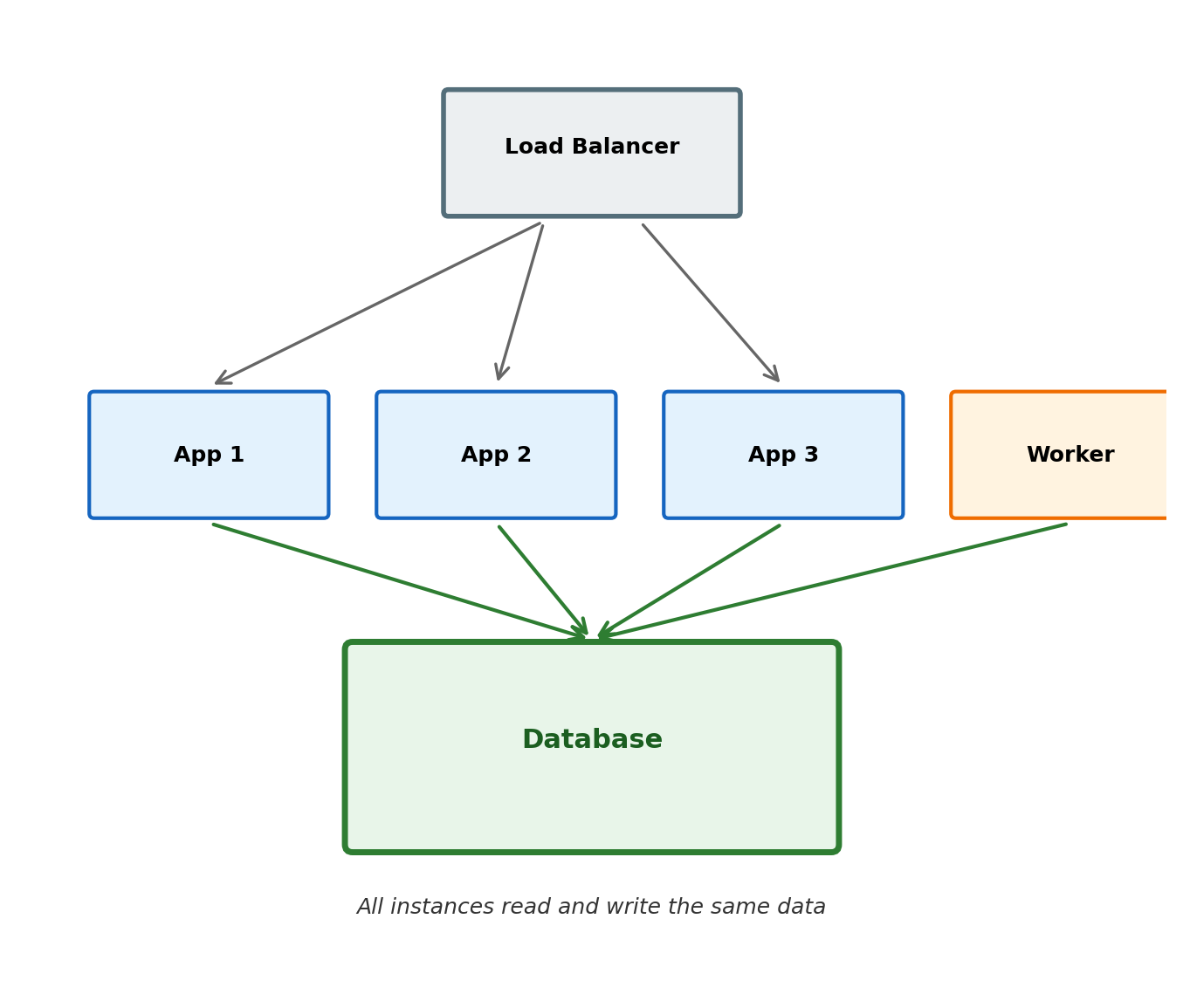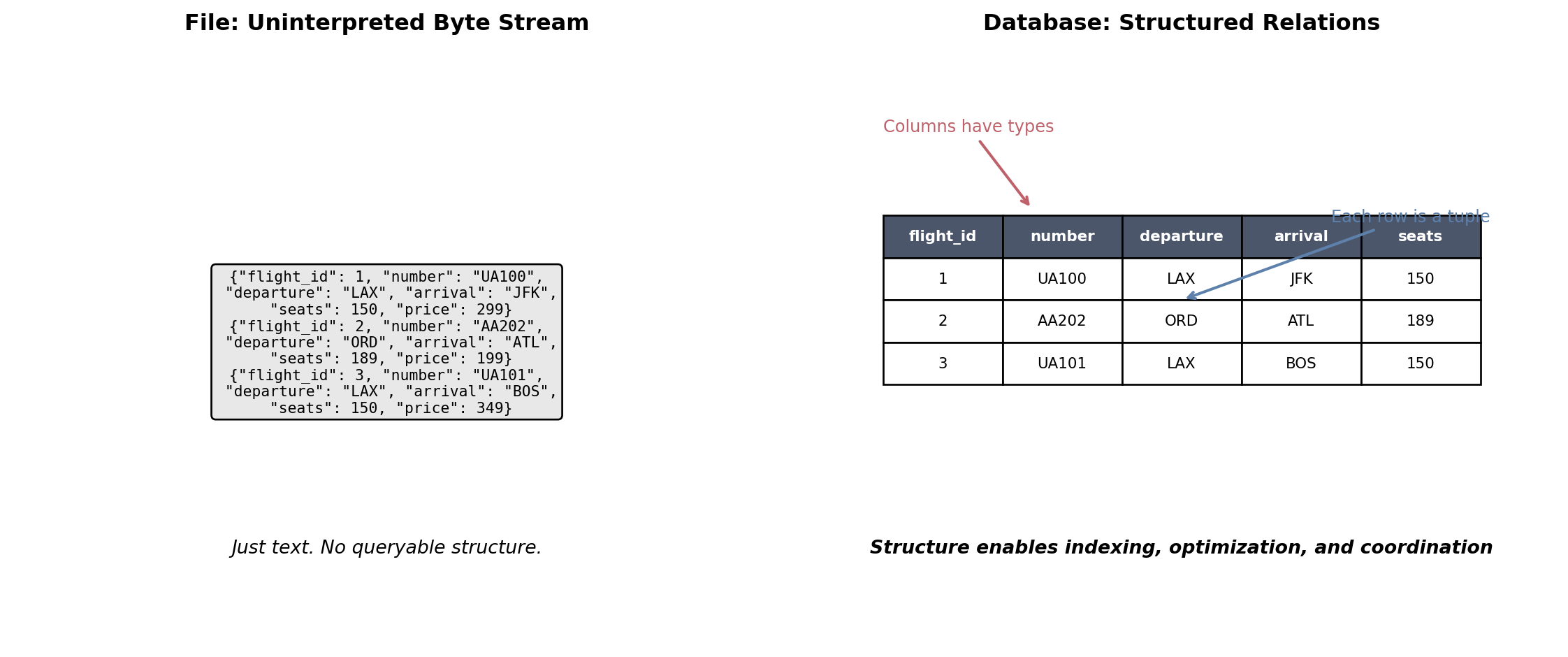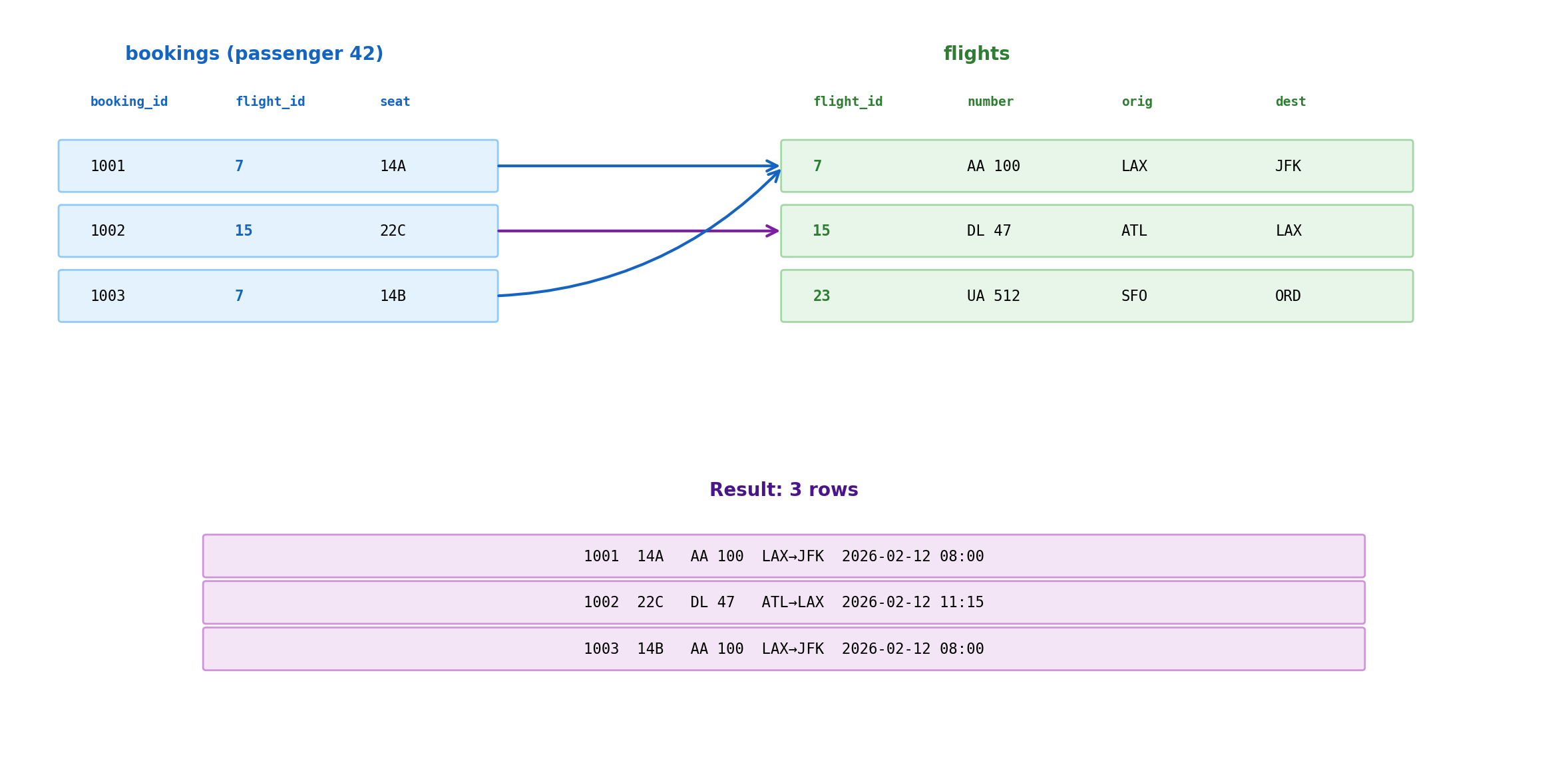
Business need: Which flights from LAX to JFK have seats available tomorrow?
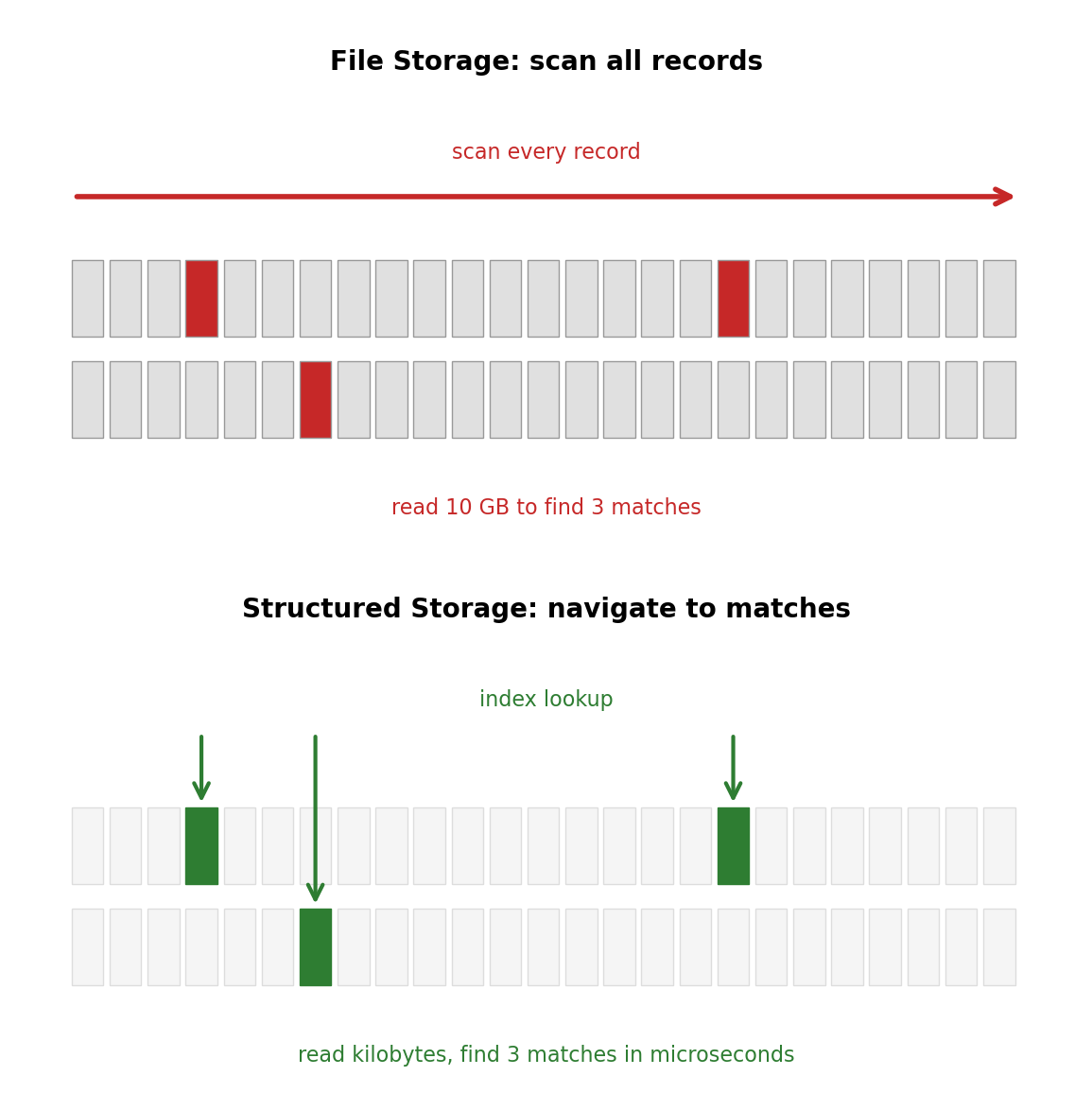
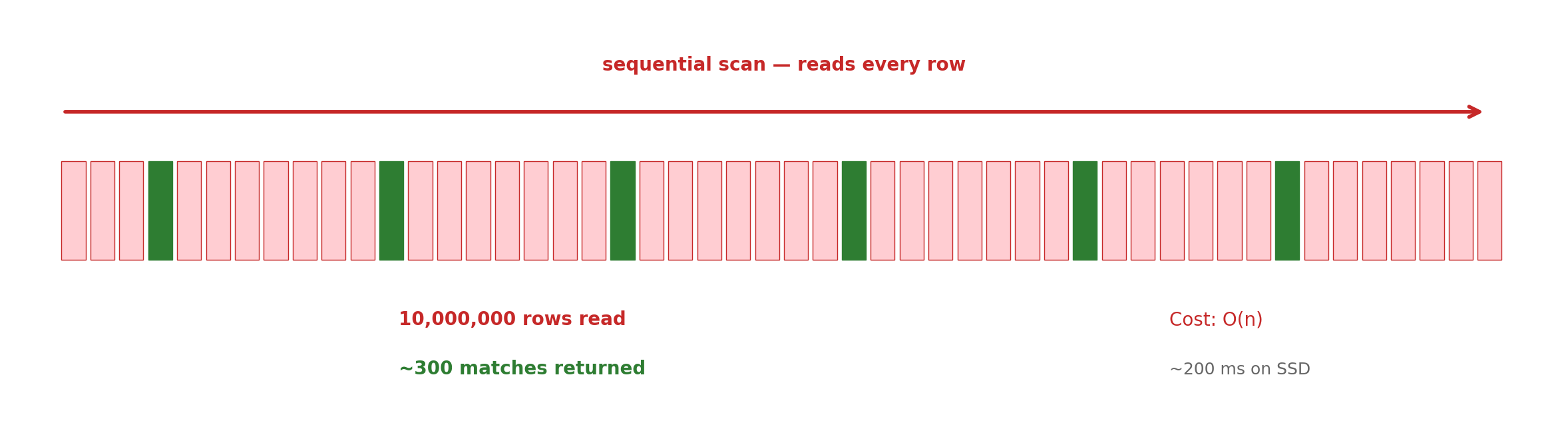
Without structure, finding 3 flights requires examining all 50,000:
import jsonfrom datetime import datetime, timedelta# Load entire flight dataset to memorywithopen('flights.json', 'r') as f: all_flights = json.load(f) # 50,000 flights# Check every single flighttomorrow_lax_jfk = []tomorrow = datetime.now().date() + timedelta(days=1)for flight in all_flights:if (flight['departure'] =='LAX'and flight['arrival'] =='JFK'and flight['date'] == tomorrow and flight['available_seats'] >0): tomorrow_lax_jfk.append(flight)# Examined 50,000 records to find 3
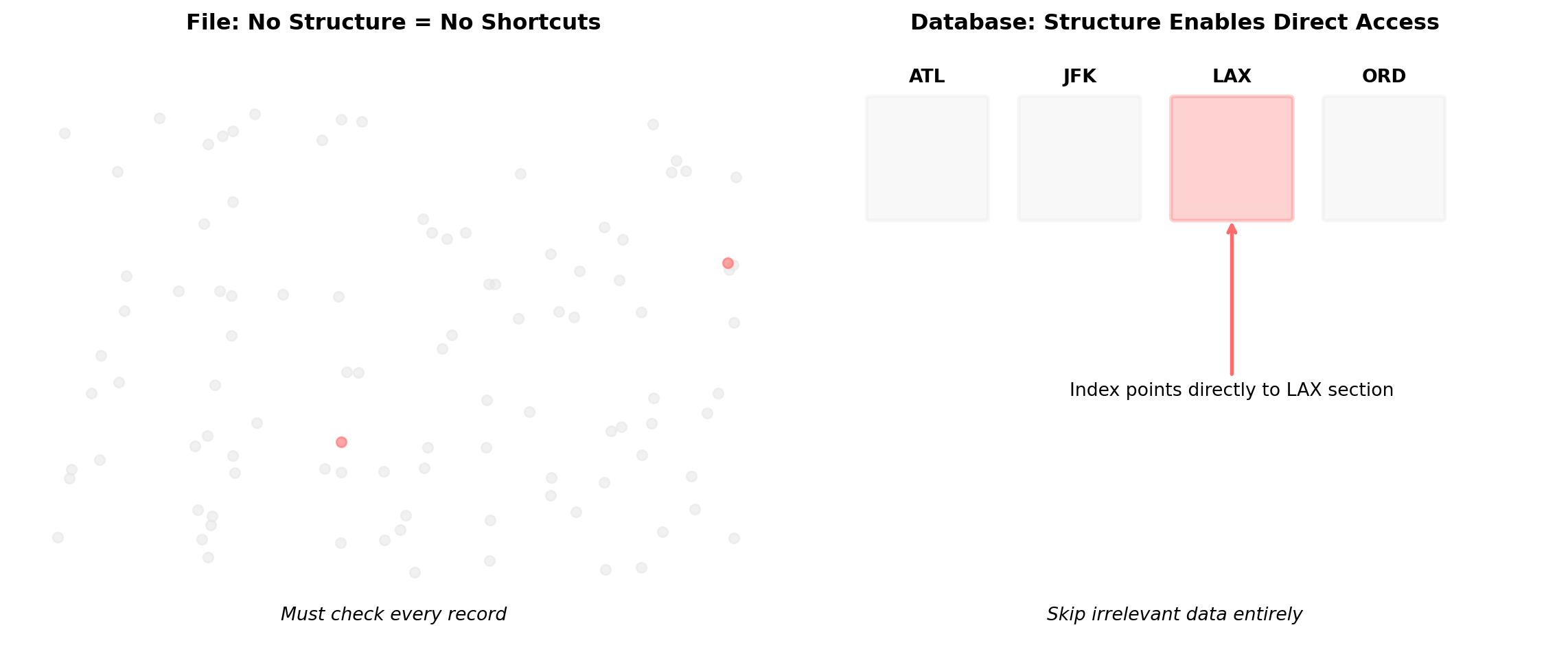
Files lack internal organization. Finding specific records means scanning everything, always.
No Optimization Means No Reuse
Each business question requires a complete scan:
# Morning status report needs four queries:# Query 1: Count today's departureswithopen('flights.json', 'r') as f: all_flights = json.load(f) # Load all 50,000 today_count =sum(1for f in all_flights if f['date'] == today)# Query 2: Find delayed flights withopen('flights.json', 'r') as f: all_flights = json.load(f) # Load all 50,000 again delayed = [f for f in all_flights if f['status'] =='delayed']# Query 3: Calculate revenuewithopen('bookings.json', 'r') as f: all_bookings = json.load(f) # Different file, same problem revenue =sum(b['price'] for b in all_bookings if b['date'] == today)# Query 4: Find cancellationswithopen('flights.json', 'r') as f: all_flights = json.load(f) # Loaded 3 times now cancelled = [f for f in all_flights if f['status'] =='cancelled']
Loaded 200,000 records to answer 4 simple questions. The code can’t be optimized because files have no internal organization.
Optimization Requires Structure
Without structure, these optimizations are impossible:
File: Every query is a full scan - no way to skip irrelevant data Database: Structure lets us jump directly to what we need
Simple Questions Require Complex Implementations
Query requirement: Find flights with less than 70% occupancy
# File approach: Manual everythingimport pandas as pd# Step 1: Load three separate filesflights_df = pd.read_csv('flights.csv')bookings_df = pd.read_csv('bookings.csv') aircraft_df = pd.read_csv('aircraft.csv')# Step 2: Count bookings per flight manuallybooking_counts = bookings_df.groupby('flight_id').size().to_dict()# Step 3: Merge flight data with booking countsfor i, row in flights_df.iterrows(): flight_id = row['flight_id'] flights_df.at[i, 'booking_count'] = booking_counts.get(flight_id, 0)# Step 4: Join with aircraft capacityflights_with_capacity = flights_df.merge(aircraft_df[['aircraft_id', 'capacity']], on='aircraft_id', how='left')# Step 5: Calculate occupancy rateflights_with_capacity['occupancy'] = ( flights_with_capacity['booking_count'] / flights_with_capacity['capacity'])# Step 6: Filter and format resultsunderbooked = flights_with_capacity[ flights_with_capacity['occupancy'] <0.7][['flight_number', 'departure_airport', 'arrival_airport', 'occupancy']]# 25+ lines of code for one question
Every query becomes a custom algorithm with manual joins, aggregations, and error handling.
Code Complexity Compounds With Each Requirement
Add one more filter: “departing tomorrow”
from datetime import datetime, timedelta# Previous 25 lines, plus:tomorrow = datetime.now().date() + timedelta(days=1)# Now need to parse dates and filterfiltered_flights = []for _, flight in flights_with_capacity.iterrows():try: flight_date = datetime.strptime(flight['departure_date'], '%Y-%m-%d').date()if flight_date == tomorrow and flight['occupancy'] <0.7: filtered_flights.append(flight)exceptValueError:# Handle malformed datescontinue# Add time zone handling# Add date format variations # Add null value checking# Add logging for debugging# Now 40+ lines for a two-condition query
Each additional requirement multiplies the implementation complexity.
Concurrent Access: The Lost Update Problem
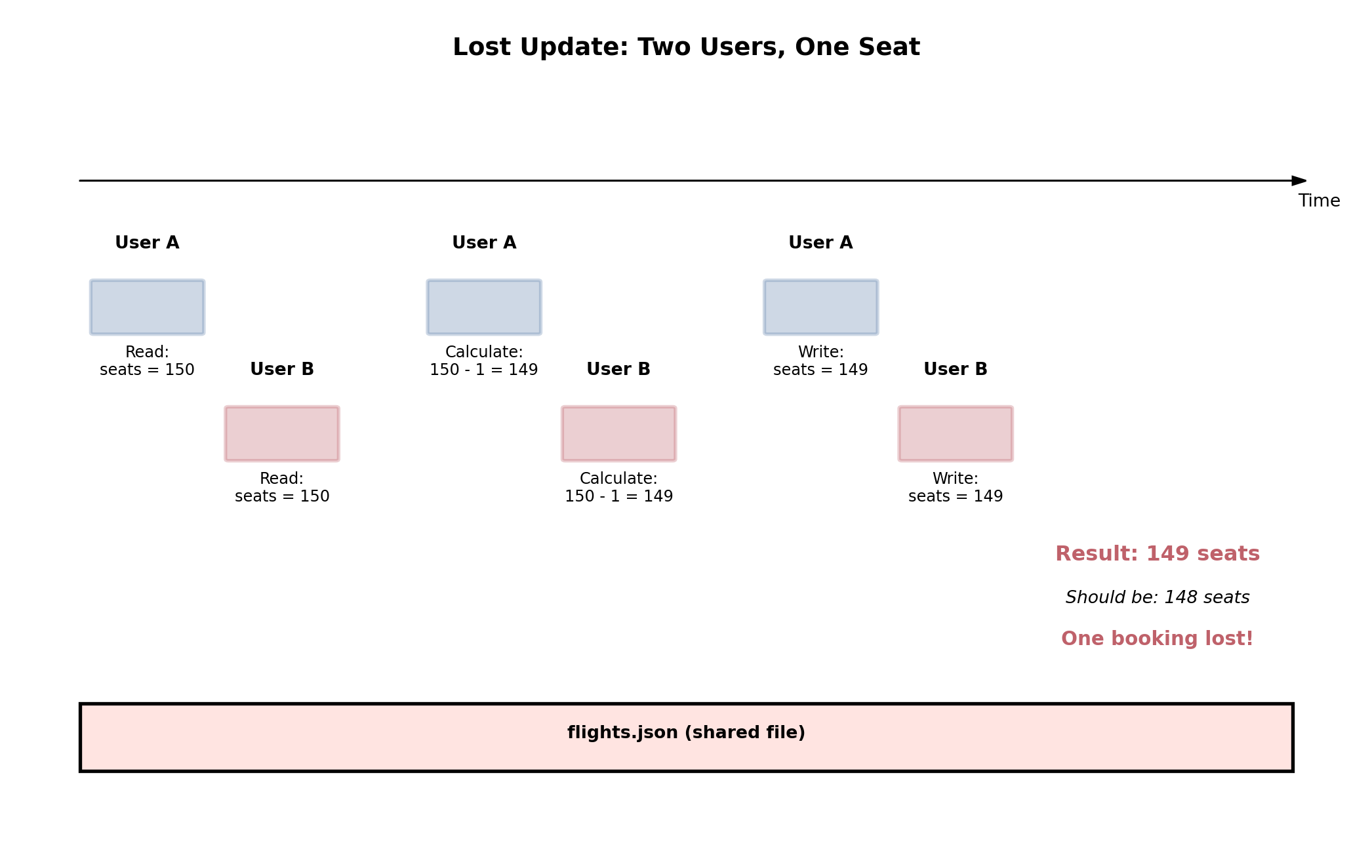
Two users book the same flight simultaneously:
Without coordination, concurrent updates lose data. This isn’t rare - it happens whenever two users access the same record.
Operating System File Locks: Correctness vs Performance
File locking mechanism prevents corruption through mutual exclusion:
OS kernel enforces exclusive access to file descriptors
fcntl.flock() system call blocks concurrent processes
Only one process can hold lock at a time
Creates serialized execution bottleneck
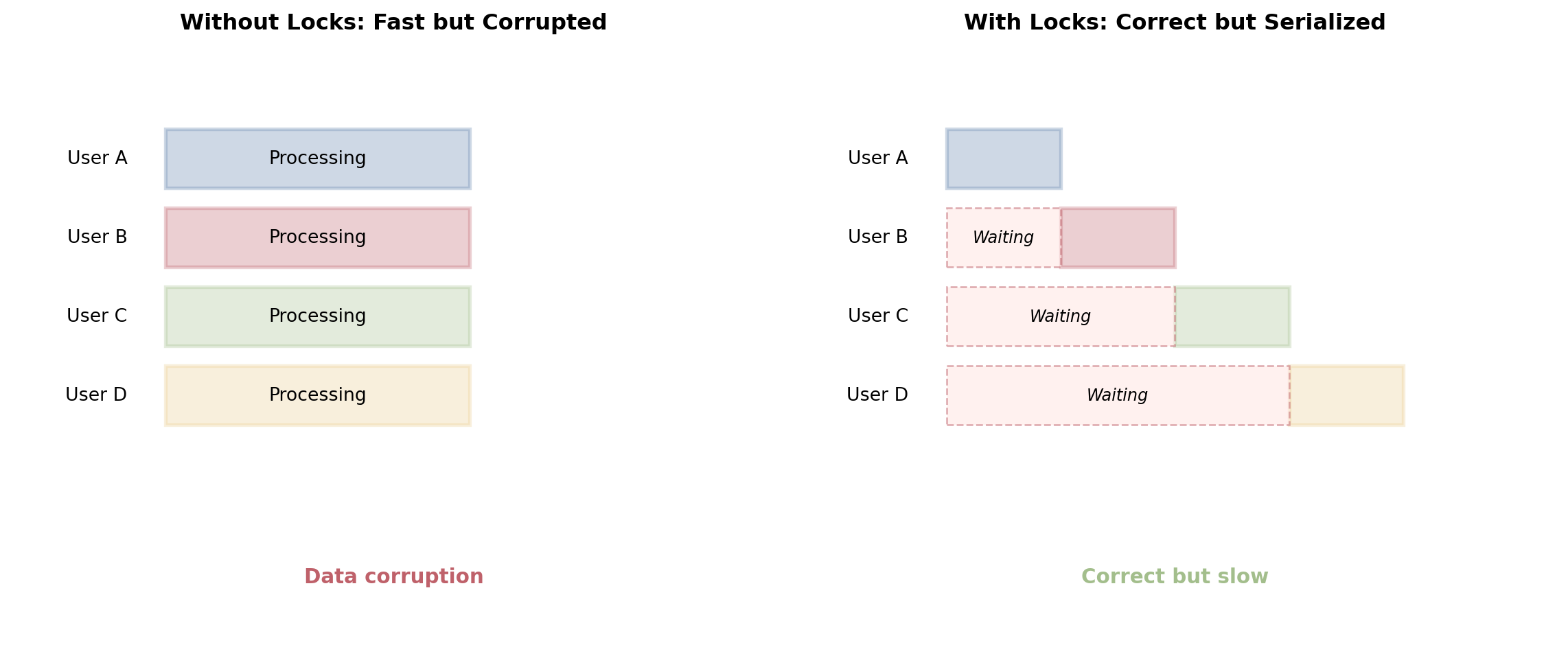
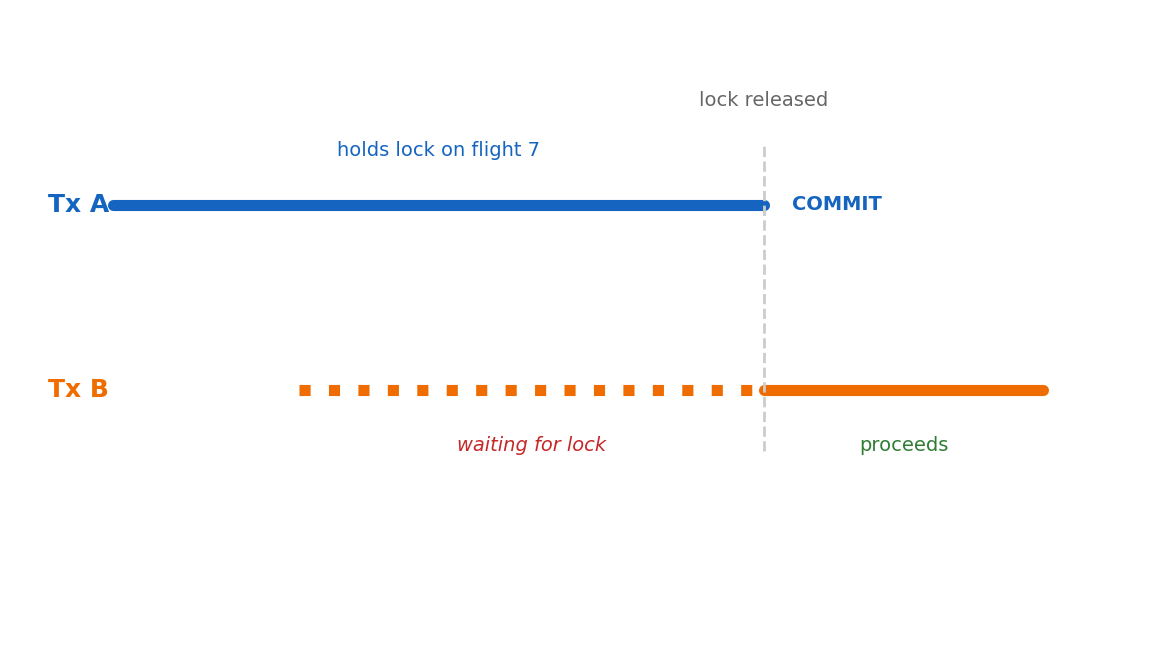
Adding locks prevents corruption but eliminates concurrency:
import threadingimport timeflight_lock = threading.Lock()def book_seat(user):# Everyone waits here flight_lock.acquire()try:# Now only one user at a timewithopen('flight.json', 'r') as f: flight = json.load(f) flight['seats'] -=1withopen('flight.json', 'w') as f: json.dump(flight, f)finally: flight_lock.release()# Next user can proceed
Files create an impossible trade-off: concurrent access for performance, but coordination for correctness.
Reads During Writes: Inconsistent Data
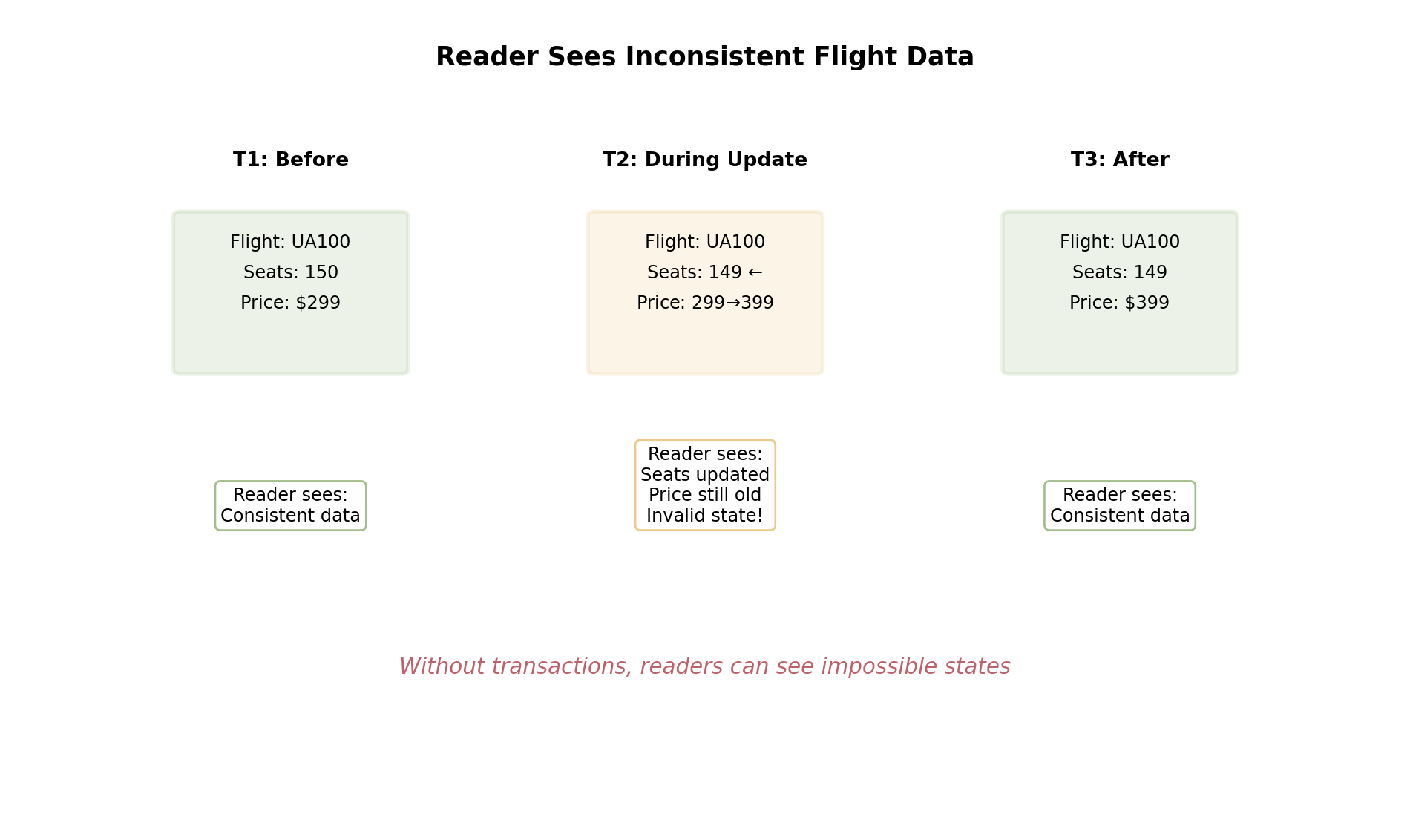
Without coordination, readers see partial updates:
Files offer no isolation between readers and writers. Partial updates create states that should never exist.
Structure Changes Everything
Relational model: Data organized as sets with defined relationships
Relations aren’t just “tables” - they’re mathematical sets that enable query optimization and coordination.
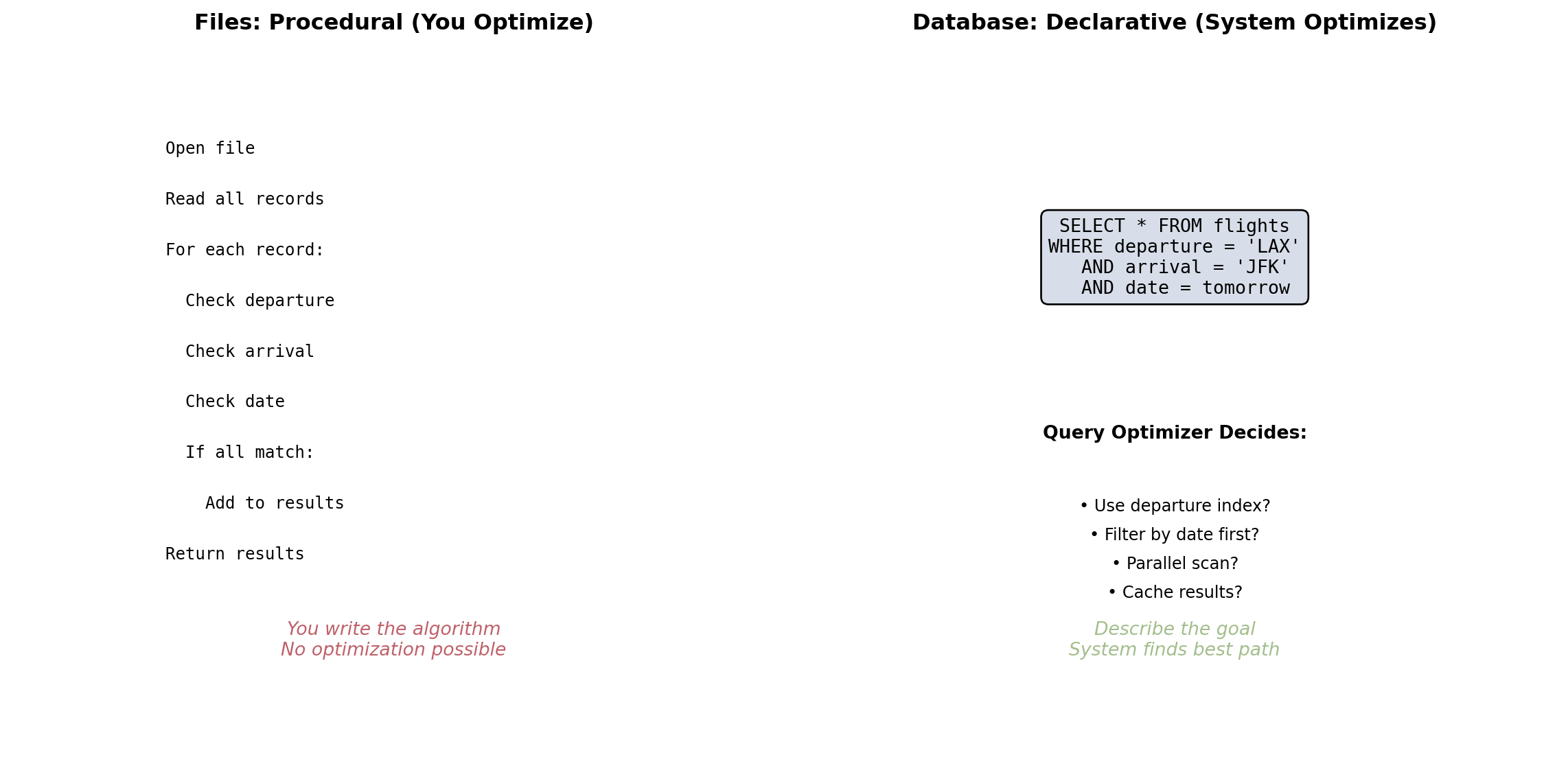
Declarative Queries: Say What, Not How
The breakthrough: Describe the result, let the system figure out how
Declarative queries let the database choose optimal execution based on data distribution, available indexes, and system resources.
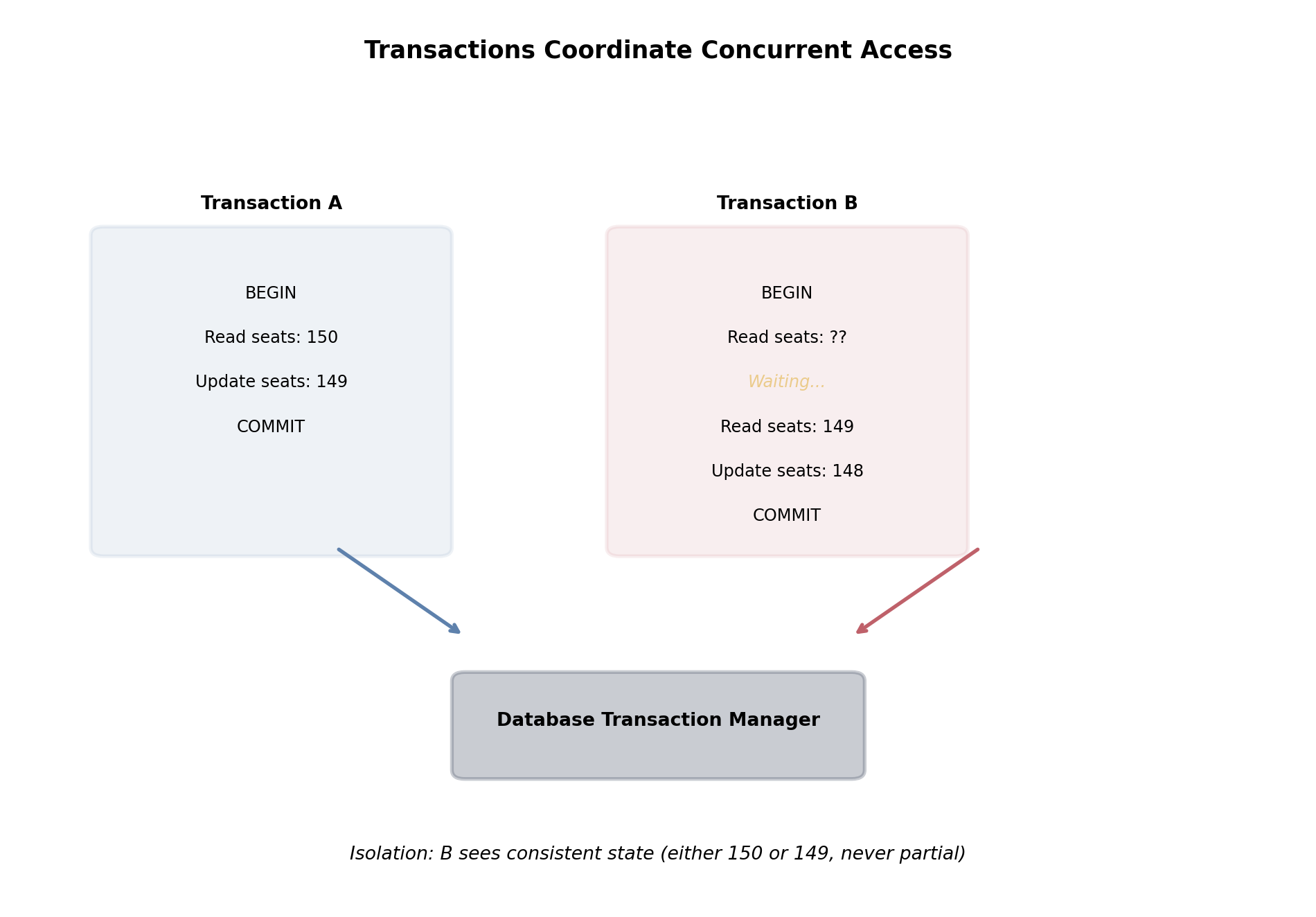
Transactions: The Coordination Solution
Databases provide ACID guarantees to solve concurrency:
Transactions ensure each operation sees a consistent view of data, even with concurrent access.
Database Design Addresses Systematic Problems
Files cannot handle two fundamental requirements:
Query Optimization
No structure means no shortcuts
Every query scans everything
Memory limits make this impossible at scale
Concurrent Access
Lost updates without coordination
Inconsistent reads during writes
Manual locks destroy performance
Databases solve both through systematic design:
Structure - Relations enable indexing and optimization
Declarative queries - System chooses optimal execution
The Relational Model: Mathematical Structure for Data
What is a relational database?
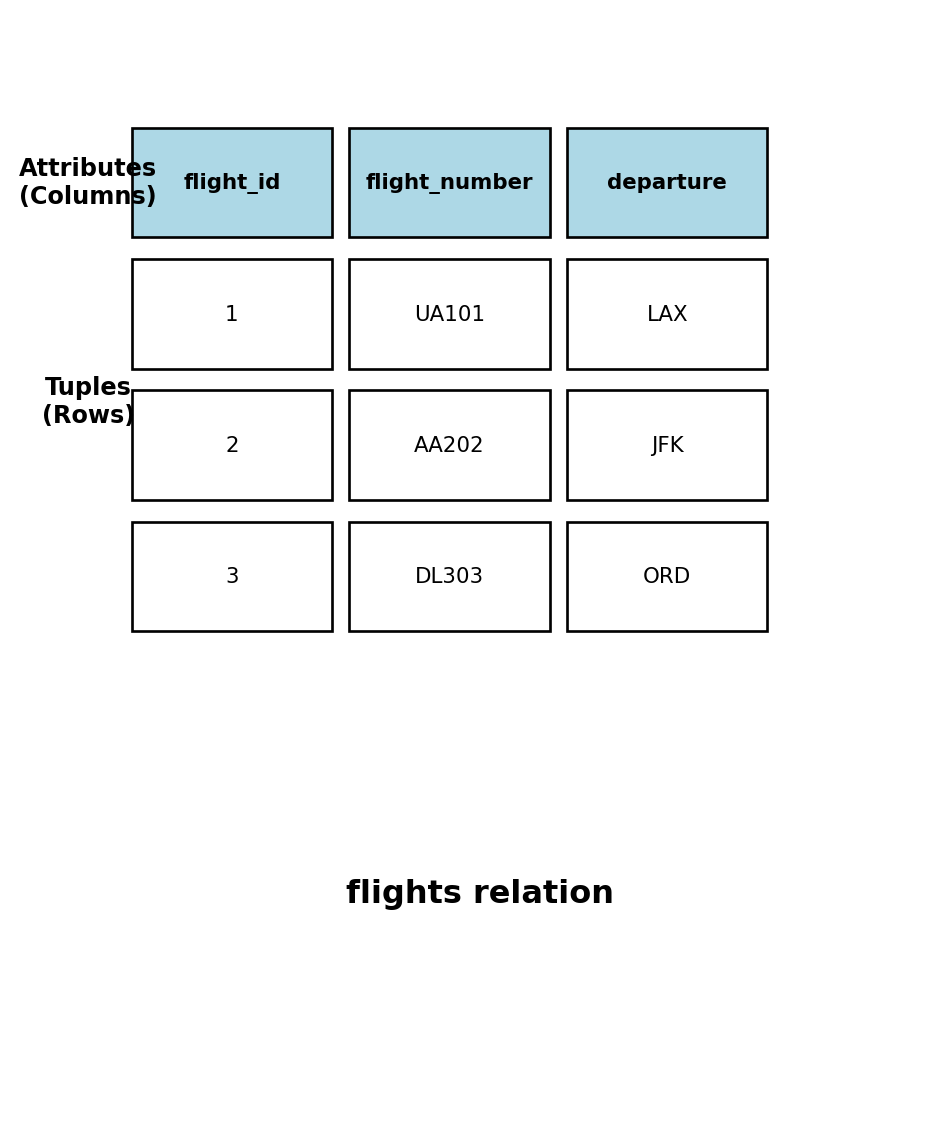
A relational database organizes data using mathematical relations - structured sets of data that follow specific rules:
Relation (Table) - A named collection of related data
Like a spreadsheet, but with strict rules
Each relation has a fixed structure (schema)
Contains zero or more rows of data
Tuple (Row) - A single record in a relation
Represents one instance of the entity
Contains values for each attribute
No duplicate rows allowed in a relation
Attribute (Column) - A named property of the relation
Has a specific data type (INTEGER, VARCHAR, etc.)
Domain defines valid values for the attribute
Order of attributes doesn’t matter mathematically
Unlike files or spreadsheets, relations have mathematical properties that enable optimization and ensure data consistency.
Data Types and Domains
Why data types matter in databases
Each attribute must have a data type that defines:
What values are valid (the domain)
How much storage space is needed
What operations are possible
How the database can optimize access
Common data types:
INTEGER - Whole numbers (-2,147,483,648 to 2,147,483,647)
Fixed 4-byte storage
Fast arithmetic and comparison operations
Efficient indexing and sorting
VARCHAR(n) - Variable-length text (up to n characters)
Uses only space needed (efficient)
Supports string operations and pattern matching
Can be indexed for fast text searches
TIMESTAMP - Date and time with timezone
Stores as 8-byte integer (microseconds since epoch)
Built-in date arithmetic
Automatic timezone conversion
query ="""SELECT column_name, data_type, is_nullable, character_maximum_lengthFROM information_schema.columnsWHERE table_name = 'flights' AND column_name IN ( 'flight_id', 'flight_number', 'departure_airport', 'scheduled_departure', 'passenger_count' )ORDER BY ordinal_position"""print("### flights table schema")print(run_sql(query))
### flights table schema
| column_name | data_type | is_nullable | character_maximum_length |
|:--------------------|:----------------------------|:--------------|---------------------------:|
| flight_id | integer | NO | nan |
| flight_number | character varying | NO | 10 |
| departure_airport | character | NO | 3 |
| scheduled_departure | timestamp without time zone | NO | nan |
4 rows | 96.4 ms
Domain constraints prevent invalid data: You cannot store “ABC” in an INTEGER column or a negative passenger count.
Keys: Unique Identification in Relations
Primary Keys - The Foundation of Data Integrity
Every relation must have a primary key - one or more attributes that uniquely identify each tuple:
Properties of primary keys:
Uniqueness - No two rows can have the same primary key value
Non-null - Primary key values cannot be NULL or missing
Immutable - Primary key values should never change
Minimal - Use the smallest number of attributes needed
Types of primary keys:
Natural keys - Meaningful identifiers from the real world
Examples: SSN, ISBN, license plate number
Risk: External changes can force key changes
Surrogate keys - Artificial identifiers created by the database
Examples: auto-incrementing integers, UUIDs
Advantage: Complete control, never need to change
Most databases generate these automatically
# Show primary key in flights tablequery ="""SELECT column_name, data_type, is_nullableFROM information_schema.columnsWHERE table_name = 'flights' AND column_name = 'flight_id'"""print("### Primary key example")print(run_sql(query))
### Primary key example
| column_name | data_type | is_nullable |
|:--------------|:------------|:--------------|
| flight_id | integer | NO |
1 rows | 5.5 ms
# Show uniqueness constraint in actionquery ="""SELECT flight_id, flight_number, departure_airportFROM flightsWHERE flight_number = 'UA101'ORDER BY flight_idLIMIT 3"""print("### Each flight_id is unique")print(run_sql(query))
### Each flight_id is unique
| flight_id | flight_number | departure_airport |
|------------:|:----------------|:--------------------|
| 1 | UA101 | JFK |
1 rows | 2.1 ms
Primary keys provide unambiguous reference to each data record, similar to unique memory addresses in computer systems.
Foreign Keys: Connecting Relations
Foreign Keys - References Between Relations
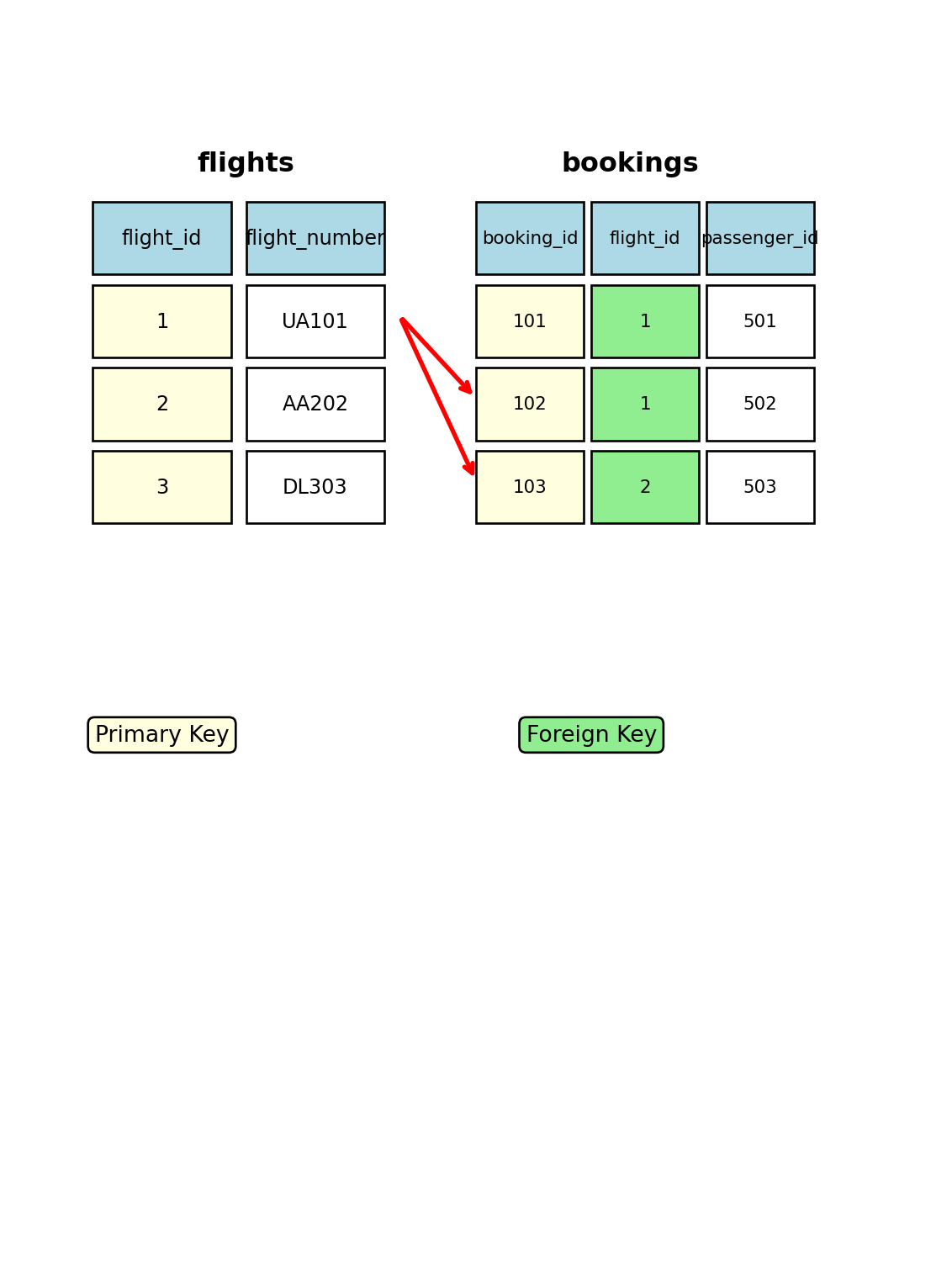
A foreign key is an attribute (or combination) that refers to the primary key of another relation:
Purpose:
Establish relationships between tables
Maintain referential integrity
Enable join operations
Referential integrity rules:
Foreign key value must match an existing primary key value
OR foreign key value can be NULL (if allowed)
Cannot delete a referenced primary key row
Cannot insert invalid foreign key values
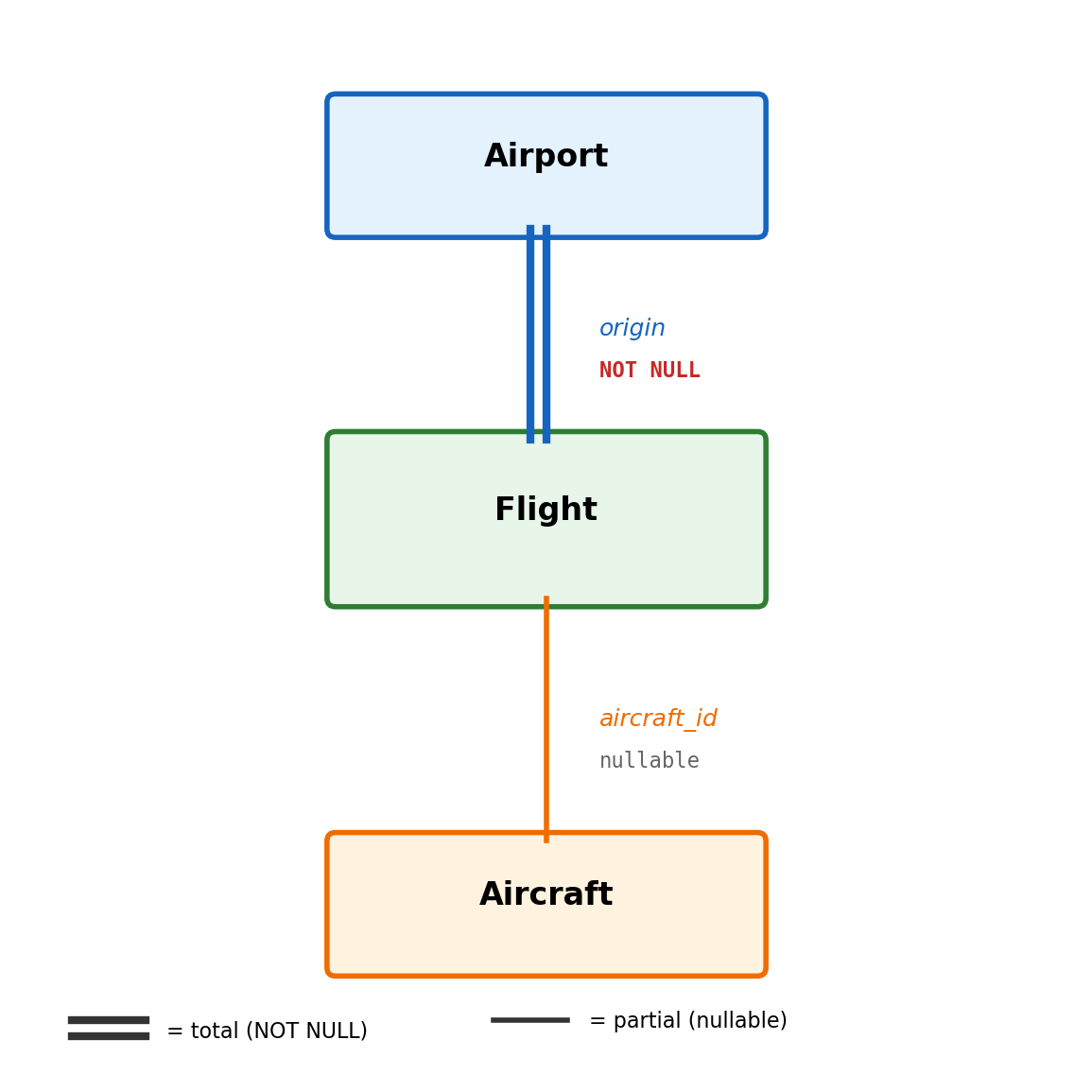
Example:bookings.flight_id → flights.flight_id
Every booking must reference a valid flight
Cannot delete a flight that has bookings
Cannot create booking for non-existent flight
Database enforces these rules automatically - attempts to violate referential integrity are rejected with an error.
Composite Keys and Candidate Keys
When single attributes aren’t enough
Composite Primary Key - Multiple attributes combined to form unique identification:
Example: bookings(flight_id, seat)
Neither flight_id nor seat alone is unique
But the combination (flight_id, seat) uniquely identifies each seat assignment
Both attributes together form the primary key
Candidate Keys - Alternative attributes that could serve as primary keys:
Every relation has at least one candidate key
The chosen primary key is one of the candidate keys
Other candidate keys become “alternate keys” with unique constraints
Choose the simplest, most stable candidate key as your primary key.
NULL Values and Three-Valued Logic
Handling missing or unknown data
NULL represents missing, unknown, or inapplicable data:
Not the same as zero, empty string, or false
NULL means “we don’t know what the value is”
Can appear in any column except primary key columns
Three-valued logic: Comparisons with NULL have three possible outcomes:
TRUE - condition is definitely true
FALSE - condition is definitely false
UNKNOWN - condition cannot be determined (involves NULL)
NULL comparison rules:
NULL = NULL returns UNKNOWN (not TRUE!)
NULL = anything returns UNKNOWN
Only IS NULL and IS NOT NULL work with NULLs
WHERE clauses filter out UNKNOWN results
NULL handling affects query results and requires special consideration in application logic.
# Show NULL handlingquery ="""SELECT flight_number, actual_departure, CASE WHEN actual_departure IS NULL THEN 'Not departed' ELSE 'Departed' END as statusFROM flightsWHERE flight_number IN ('UA101', 'AA202', 'DL303')ORDER BY flight_number"""print("### NULL value handling")print(run_sql(query))
### NULL value handling
| flight_number | actual_departure | status |
|:----------------|:---------------------------|:---------|
| UA101 | 2025-09-16 09:02:53.790476 | Departed |
1 rows | 2.5 ms
Comparison behavior:
-- These return no rows!WHERE actual_departure =NULLWHERE actual_departure !=NULL-- Correct NULL testing:WHERE actual_departure ISNULLWHERE actual_departure ISNOTNULL
NULL behaves like an undefined value in mathematics - any operation involving undefined returns undefined.
Constraints: Enforcing Data Quality
Database constraints automatically enforce data integrity rules
NOT NULL Constraint
Prevents NULL values in specific columns
Required for primary keys and mandatory fields
Example: passenger_count NOT NULL
UNIQUE Constraint
Ensures no duplicate values (except NULL)
Can apply to single columns or combinations
Example: flight_number, scheduled_departure must be unique
CHECK Constraint
Enforces domain-specific business rules
Example: passenger_count >= 0, price > 0
Can reference multiple columns in same row
DEFAULT Constraint
Provides automatic values for columns when not specified
Example: status DEFAULT 'scheduled'
These constraints are enforced by the database engine - invalid data is rejected automatically, preventing corruption.
# Show constraint informationquery ="""SELECT column_name, is_nullable, column_default, data_typeFROM information_schema.columnsWHERE table_name = 'flights' AND column_name IN ( 'flight_id', 'passenger_count', 'status' )ORDER BY ordinal_position"""print("### Constraint examples")print(run_sql(query))
### Constraint examples
| column_name | is_nullable | column_default | data_type |
|:--------------|:--------------|:-------------------------------------------|:------------------|
| flight_id | NO | nextval('flights_flight_id_seq'::regclass) | integer |
| status | YES | 'scheduled'::character varying | character varying |
2 rows | 10.6 ms
Constraint violations are rejected:
-- This would fail:INSERTINTO flights ( flight_id, passenger_count) VALUES (999, -50-- CHECK constraint violation);
Constraints catch data errors at the database level, preventing invalid states from ever being stored.
query ="""SELECT flight_id, flight_number, departure_airport, arrival_airport, passenger_countFROM flightsWHERE flight_id IN (1, 2)ORDER BY flight_id"""print("### Structured relational data")print(run_sql(query))
### Structured relational data
Error: Execution failed on sql '
SELECT
flight_id,
flight_number,
departure_airport,
arrival_airport,
passenger_count
FROM flights
WHERE flight_id IN (1, 2)
ORDER BY flight_id
': column "passenger_count" does not exist
LINE 7: passenger_count
^
Relational advantages:
Type safety enforced automatically
Consistent data representation
Referential integrity guaranteed
Constraint validation built-in
Query optimization possible
The relational model provides mathematical structure that enables both data integrity and performance optimization.
SQL uses this structured foundation for data manipulation.
SQL: A Different Way of Thinking
Moving from procedural to declarative
Programming languages you know:
C/C++: Write step-by-step instructions
Python: Specify the algorithm
MATLAB: Define the computation process
SQL is fundamentally different:
Describe what you want
Database figures out how to get it
System chooses the optimal path
This shift eliminates the complexity explosion we saw with files.
# Traditional approachresults = []for flight in all_flights:if flight.departure =='LAX':if flight.status =='on-time': results.append(flight)
-- SQL approachSELECT*FROM flights WHERE departure_airport ='LAX'AND status ='on-time'
Mathematical Foundation: Set Operations
SQL is based on mathematical set theory
Unlike programming with arrays or lists, SQL treats data as mathematical sets:
No inherent order (until you specify ORDER BY)
No duplicate rows (unless you specify ALL)
Operations follow set algebra rules
This mathematical foundation allows the database to:
Rearrange operations for efficiency
Apply optimization rules automatically
Guarantee consistent results regardless of data size
Query Processing: Parse, Plan, Execute
Understanding how databases process your SQL
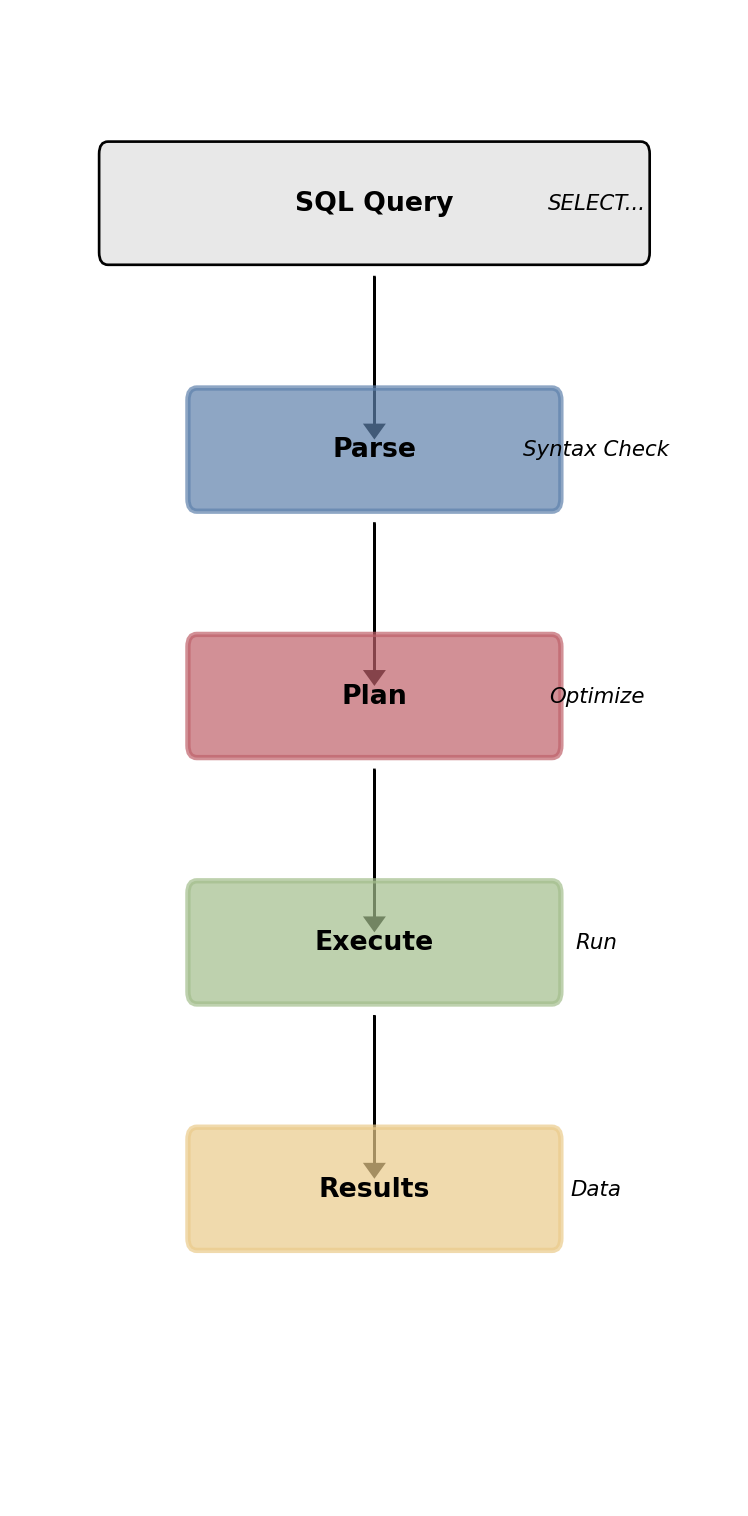
When you write a query, the database follows three phases:
1. Parse & Validate
Check syntax and table/column names
Verify you have permissions
Build internal query tree
2. Plan Optimization
Files cannot do this optimization
Analyze multiple execution strategies
Choose lowest-cost approach based on data statistics
Consider available indexes and join algorithms
3. Execute
Run the optimized plan
Return results
The same SQL can execute differently as your data grows, always choosing the most efficient path.
Our Working Database: Flight Operations
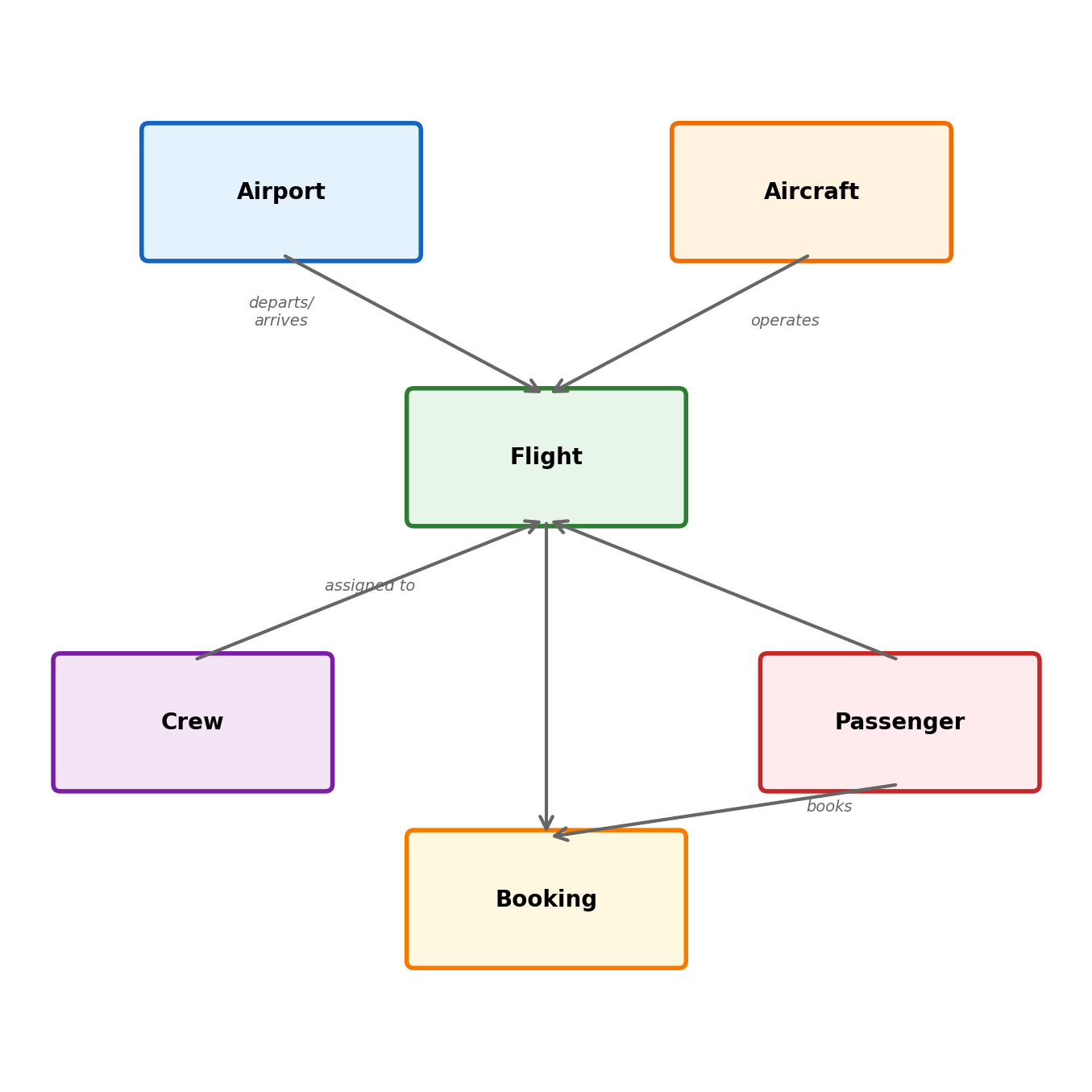
Our sample database models airline operations with four main tables:
flights - Individual flight schedules
Routes (LAX → JFK)
Timing information
Aircraft assignments
Current status
bookings - Passenger reservations
Links passengers to specific flights
Seat assignments and pricing
Booking timestamps
passengers - Customer information
Contact details and preferences
aircraft - Fleet management
Capacity and aircraft specifications
query ="""SELECT table_name, COUNT(*) as row_countFROM ( SELECT 'flights' as table_name FROM flights UNION ALL SELECT 'bookings' as table_name FROM bookings UNION ALL SELECT 'passengers' as table_name FROM passengers UNION ALL SELECT 'aircraft' as table_name FROM aircraft) tGROUP BY table_nameORDER BY row_count DESC"""print(run_sql(query))
Projection chooses which columns (attributes) to include in results. This reduces data transfer and processing.
Basic projection:
SELECT column1, column2 - specific columns
SELECT * - all columns (avoid!)
Computed expressions:
Arithmetic: passenger_count * 1.1
String operations: first_name || ' ' || last_name
Date/time functions: EXTRACT(hour FROM departure_time)
Column aliases:
SELECT expression AS alias_name
Makes output more readable
Required for computed columns in some contexts
Network efficiency: Selecting only needed columns reduces bandwidth and memory usage. Critical for large datasets.
query ="""SELECT flight_number, departure_airport || ' → ' || arrival_airport AS route, EXTRACT(hour FROM scheduled_departure) AS departure_hour, passenger_countFROM flightsWHERE departure_airport = 'LAX'ORDER BY departure_hourLIMIT 5"""print(run_sql(query))
Error: Execution failed on sql '
SELECT
flight_number,
departure_airport || ' → ' || arrival_airport AS route,
EXTRACT(hour FROM scheduled_departure) AS departure_hour,
passenger_count
FROM flights
WHERE departure_airport = 'LAX'
ORDER BY departure_hour
LIMIT 5
': column "passenger_count" does not exist
LINE 6: passenger_count
^
Computed columns:
query ="""SELECT flight_number, passenger_count, capacity, ROUND(passenger_count::decimal / capacity * 100, 1) AS occupancy_pctFROM flights fJOIN aircraft a USING (aircraft_id)LIMIT 4"""print(run_sql(query))
Error: Execution failed on sql '
SELECT
flight_number,
passenger_count,
capacity,
ROUND(passenger_count::decimal / capacity * 100, 1) AS occupancy_pct
FROM flights f
JOIN aircraft a USING (aircraft_id)
LIMIT 4
': column "passenger_count" does not exist
LINE 4: passenger_count,
^
Sorting Results: ORDER BY
Controlling result presentation order
Sets have no inherent order. ORDER BY imposes ordering on results.
Syntax patterns:
ORDER BY column_name - ascending (default)
ORDER BY column_name DESC - descending
ORDER BY col1, col2 - multi-column sorting
Multi-column sorting logic:
Sort by first column
Within equal values, sort by second column
Continue for additional columns
Performance considerations:
Sorting large result sets is expensive
Database may use indexes for efficient sorting
LIMIT with ORDER BY stops processing early
When ORDER BY matters: Reports, user interfaces, finding top/bottom values.
query ="""SELECT flight_number, departure_airport, passenger_countFROM flightsWHERE departure_airport IN ('LAX', 'JFK')ORDER BY passenger_count DESC, flight_numberLIMIT 6"""print(run_sql(query))
Error: Execution failed on sql '
SELECT
flight_number,
departure_airport,
passenger_count
FROM flights
WHERE departure_airport IN ('LAX', 'JFK')
ORDER BY passenger_count DESC, flight_number
LIMIT 6
': column "passenger_count" does not exist
LINE 5: passenger_count
^
Finding extremes:
query ="""SELECT departure_airport, MAX(passenger_count) as max_passengers, MIN(passenger_count) as min_passengersFROM flightsGROUP BY departure_airportORDER BY max_passengers DESCLIMIT 5"""print(run_sql(query))
Error: Execution failed on sql '
SELECT
departure_airport,
MAX(passenger_count) as max_passengers,
MIN(passenger_count) as min_passengers
FROM flights
GROUP BY departure_airport
ORDER BY max_passengers DESC
LIMIT 5
': column "passenger_count" does not exist
LINE 4: MAX(passenger_count) as max_passengers,
^
Aggregation: Summarizing Data
Computing summary statistics across rows
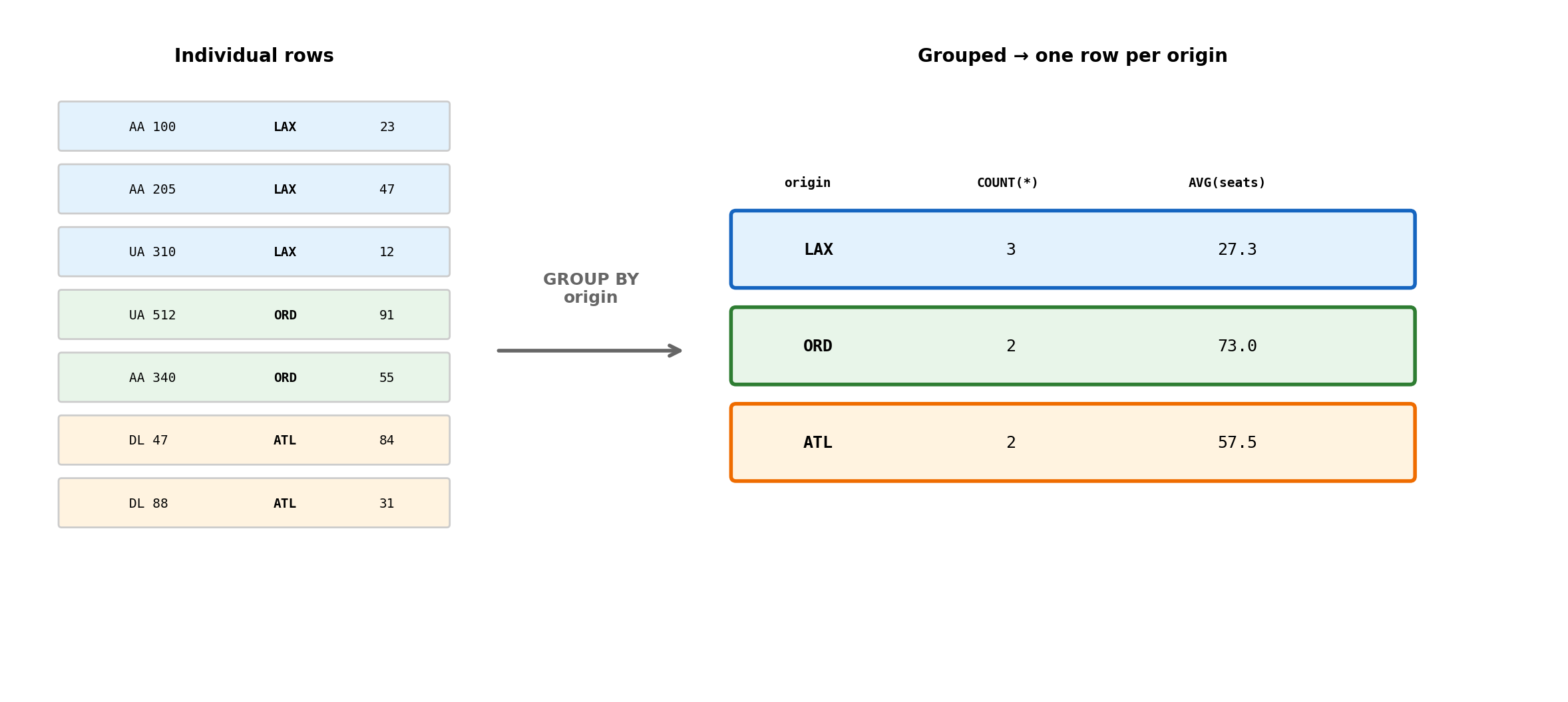
Aggregation transforms multiple rows into summary values:
Common aggregate functions:
COUNT(*) - number of rows
COUNT(column) - non-null values in column
SUM(column) - total of numeric values
AVG(column) - arithmetic mean
MAX(column), MIN(column) - extreme values
GROUP BY mechanics:
Partitions rows into groups based on column values
Applies aggregate functions to each group
Results in one row per group
Non-aggregated columns in SELECT must appear in GROUP BY (with exceptions for certain database systems).
This operation is computationally expensive with files but efficient in databases due to optimized algorithms.
query ="""SELECT departure_airport, COUNT(*) as flight_count, AVG(passenger_count)::int as avg_passengers, MAX(passenger_count) as max_passengersFROM flightsGROUP BY departure_airportORDER BY flight_count DESCLIMIT 6"""print(run_sql(query))
Error: Execution failed on sql '
SELECT
departure_airport,
COUNT(*) as flight_count,
AVG(passenger_count)::int as avg_passengers,
MAX(passenger_count) as max_passengers
FROM flights
GROUP BY departure_airport
ORDER BY flight_count DESC
LIMIT 6
': column "passenger_count" does not exist
LINE 5: AVG(passenger_count)::int as avg_passengers,
^
Multiple grouping columns:
query ="""SELECT departure_airport, status, COUNT(*) as countFROM flightsWHERE departure_airport IN ('LAX', 'JFK')GROUP BY departure_airport, statusORDER BY departure_airport, count DESC"""print(run_sql(query))
WHERE filters individual rows before grouping. HAVING filters groups after aggregation.
Query execution order:
FROM - identify tables
WHERE - filter individual rows
GROUP BY - partition into groups
Aggregate functions - compute summaries
HAVING - filter groups based on aggregates
ORDER BY - sort results
HAVING vs WHERE:
WHERE: passenger_count > 100 (filters rows)
HAVING: COUNT(*) > 5 (filters groups)
HAVING can reference aggregate functions; WHERE cannot
Use cases: Finding groups that meet aggregate criteria - airports with many flights, customers with high spending, etc.
HAVING is applied after expensive aggregation, so combine with WHERE when possible to reduce data processed.
query ="""SELECT departure_airport, COUNT(*) as flight_count, AVG(passenger_count)::int as avg_passengersFROM flightsWHERE status = 'on-time'GROUP BY departure_airportHAVING COUNT(*) > 15ORDER BY avg_passengers DESC"""print(run_sql(query))
Error: Execution failed on sql '
SELECT
departure_airport,
COUNT(*) as flight_count,
AVG(passenger_count)::int as avg_passengers
FROM flights
WHERE status = 'on-time'
GROUP BY departure_airport
HAVING COUNT(*) > 15
ORDER BY avg_passengers DESC
': column "passenger_count" does not exist
LINE 5: AVG(passenger_count)::int as avg_passengers
^
Complex HAVING conditions:
query ="""SELECT departure_airport, COUNT(*) as total_flights, COUNT(*) FILTER (WHERE status = 'delayed') as delayed_flightsFROM flightsGROUP BY departure_airportHAVING COUNT(*) > 10 AND COUNT(*) FILTER (WHERE status = 'delayed') > 2ORDER BY delayed_flights DESC"""print(run_sql(query))
query ="""SELECT flight_number, scheduled_departure, actual_departure, CASE WHEN actual_departure IS NULL THEN 'Scheduled' ELSE 'Departed' END as status_checkFROM flightsWHERE scheduled_departure >= CURRENT_DATELIMIT 5"""print("### Testing for NULL")print(run_sql(query))
### Testing for NULL
No results returned | 1.7 ms
JOIN Operations: Combining Data Sources
Moving beyond single-table queries
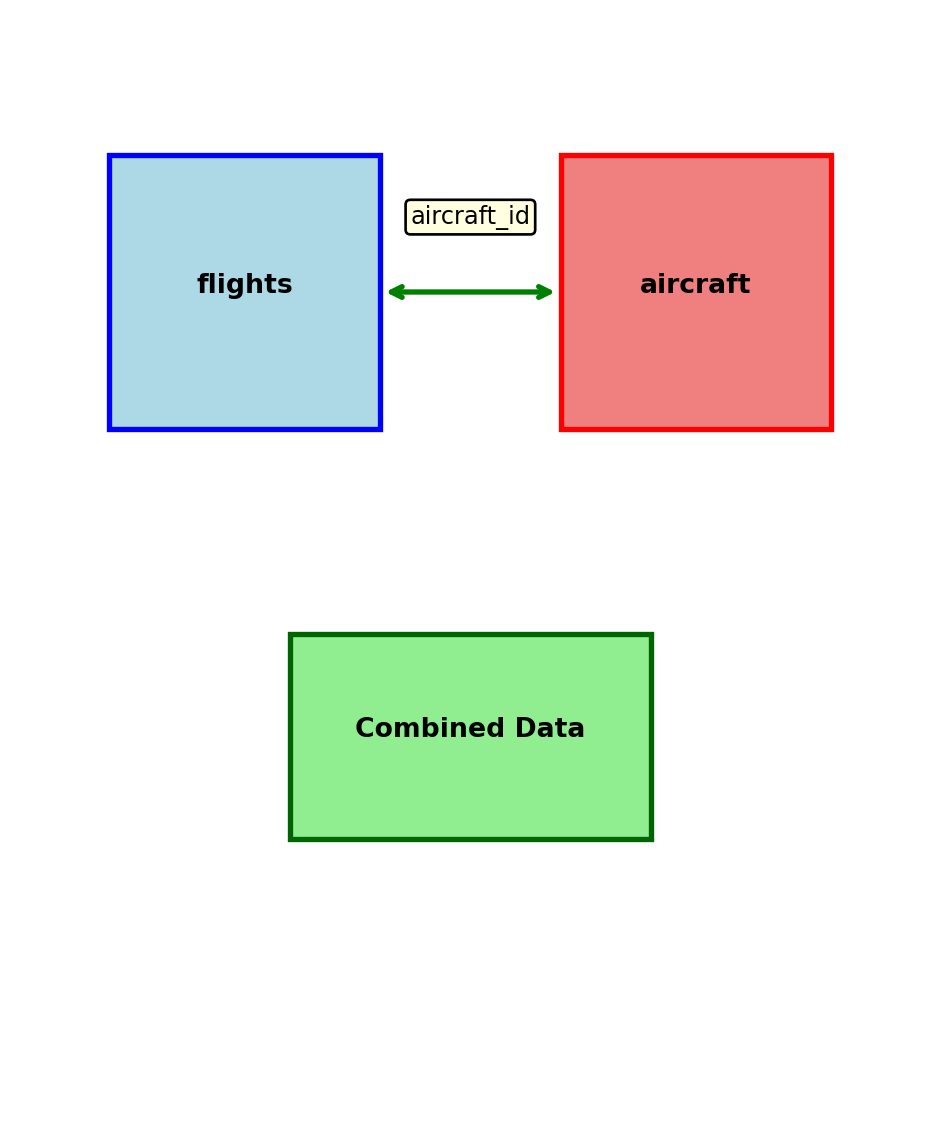
Real-world data is normalized across multiple tables to avoid redundancy and maintain consistency. JOINs recombine this data for analysis.
File processing limitations:
Employee data in employees.json
Department data in departments.json
To get “employee name with department”, you need custom code to link them
Database solution:
Tables are linked by foreign key relationships
JOIN operations combine tables based on these relationships
Database optimizes the combination process
Mathematical foundation: JOINs implement relational algebra operations on sets, allowing precise control over how tables combine.
Our flight database has natural relationships that JOINs exploit.
Cartesian Product: The Foundation
Understanding the mathematical basis of JOINs
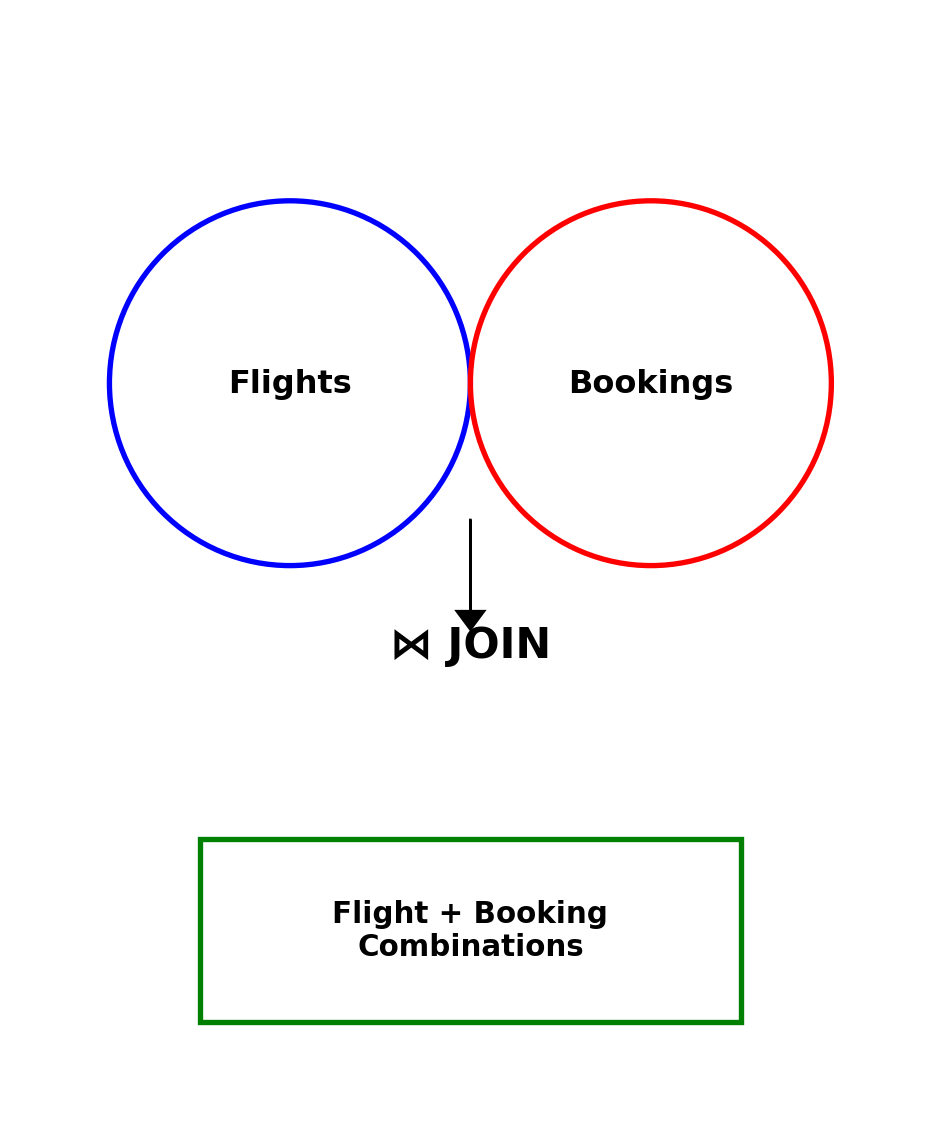
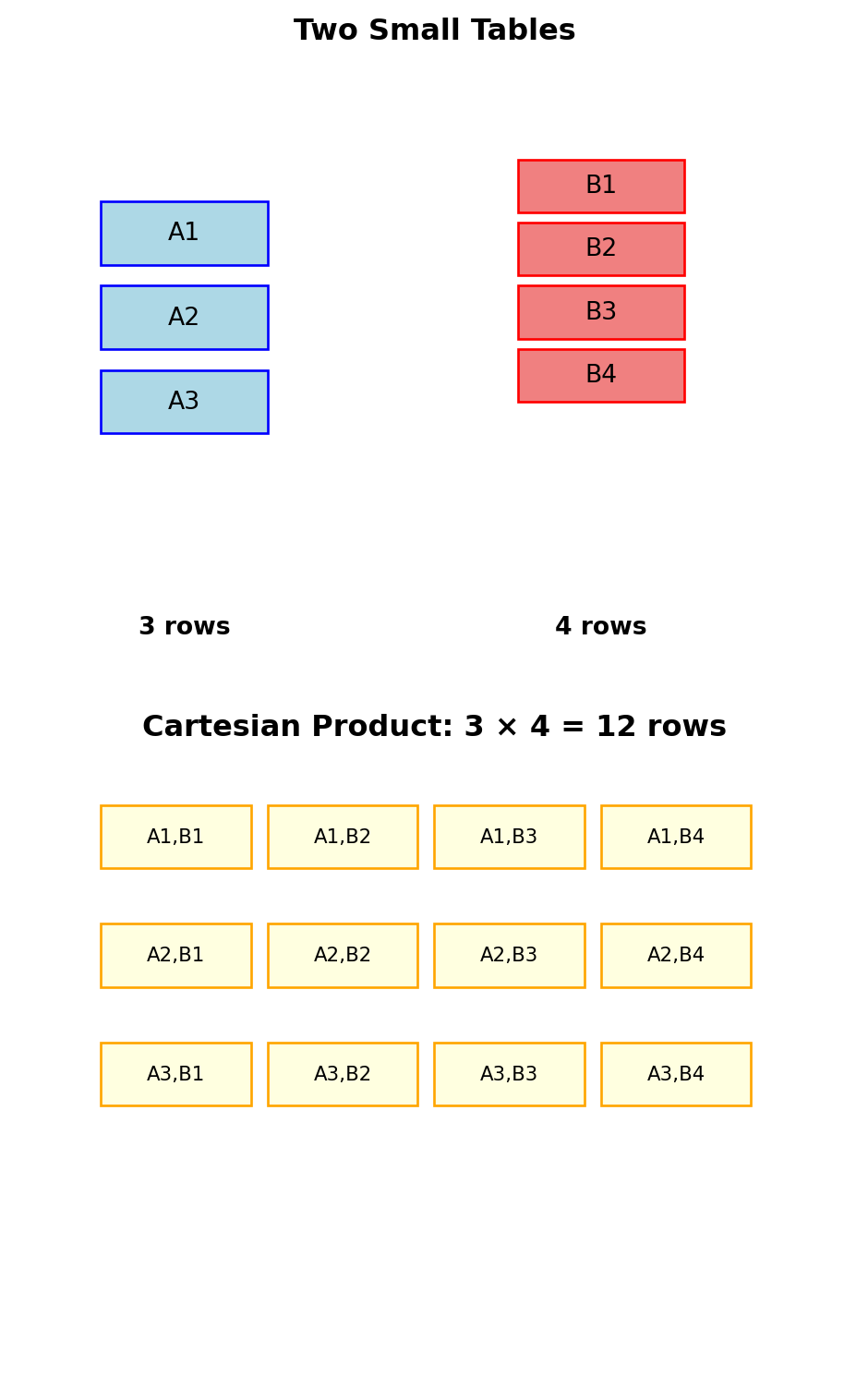
Every JOIN operation starts with the Cartesian product - every row from table A combined with every row from table B.
Example:
Table A has 3 rows
Table B has 4 rows
Cartesian product has 3 × 4 = 12 rows
Cartesian product implications:
This is computationally expensive
Most combinations are meaningless
JOINs add conditions to filter down to useful combinations
A JOIN is a Cartesian product followed by filtering. The database optimizer finds efficient ways to compute this without actually creating the full Cartesian product.
INNER JOIN: Meaningful Combinations Only
Filtering the Cartesian product to useful rows
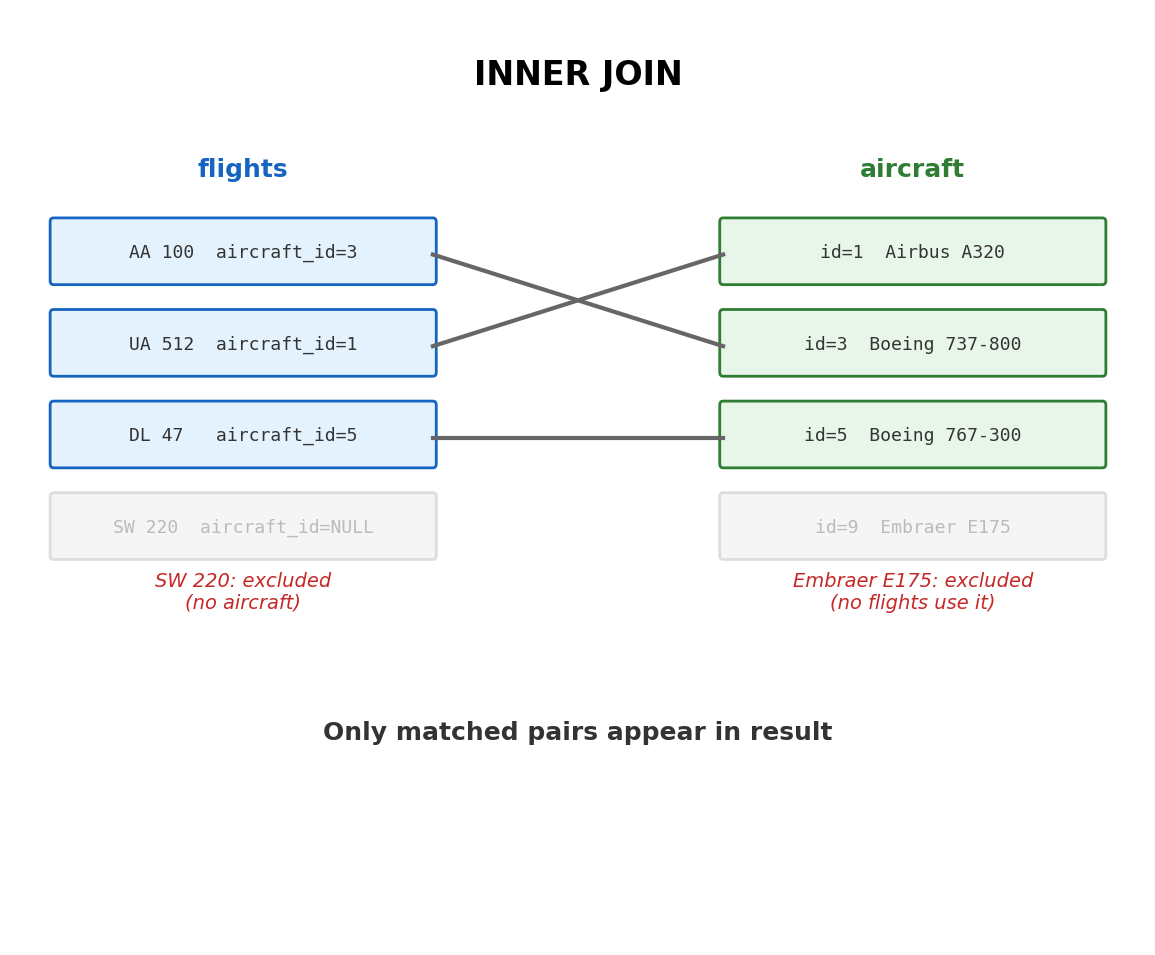
INNER JOIN keeps only combinations where the join condition is TRUE.
Syntax:
FROM table1 INNERJOIN table2 ON condition
Most common pattern - Foreign Key JOINs:
FROM flights fINNERJOIN aircraft a ON f.aircraft_id = a.aircraft_id
What happens:
Database considers all flight-aircraft combinations
Keeps only pairs where IDs match
Returns combined information
Result: Only flights that have matching aircraft records. Orphaned records (flights without aircraft, aircraft without flights) are excluded.
Performance: Database uses indexes on join columns to avoid full Cartesian product computation.
query ="""SELECT f.flight_number, f.departure_airport, a.model, a.capacityFROM flights fINNER JOIN aircraft a ON f.aircraft_id = a.aircraft_idLIMIT 5"""print(run_sql(query))
| flight_number | departure_airport | model | capacity |
|:----------------|:--------------------|:-----------------|-----------:|
| UA101 | JFK | Airbus A320 | 180 |
| UA102 | JFK | Boeing 777-300ER | 396 |
| UA103 | JFK | Airbus A350-900 | 325 |
| UA104 | JFK | Boeing 787-9 | 296 |
| UA105 | JFK | Airbus A321 | 220 |
5 rows | 3.5 ms
LEFT OUTER JOIN: Preserving Left Table
Keeping all rows from the left table
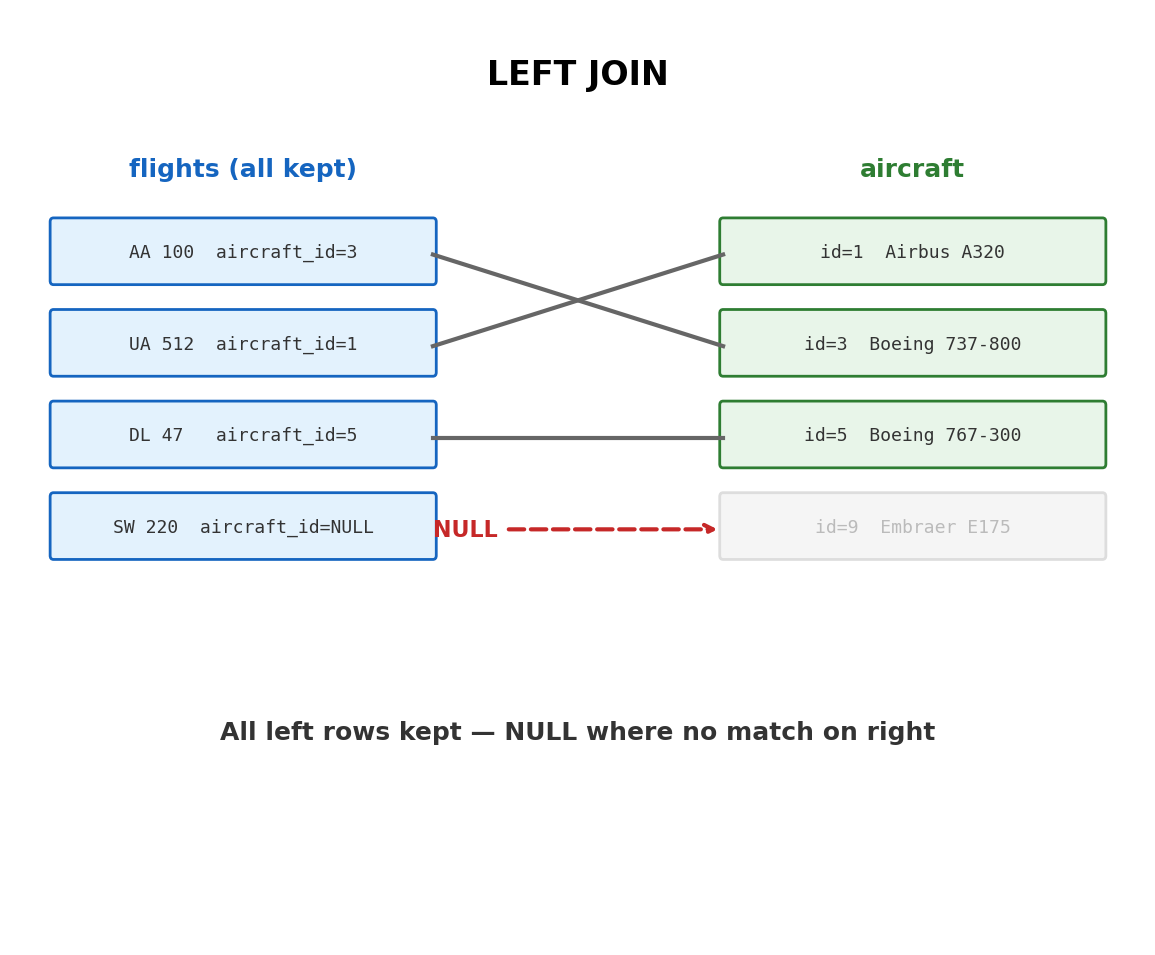
LEFT JOIN returns all rows from the left table, plus matching rows from the right table. When no match exists, NULL values fill the right table columns.
Use case: “Show all flights, and aircraft info when available”
Maybe some flights don’t have aircraft assigned yet
You still want to see those flights in results
Aircraft columns will be NULL for unmatched flights
Syntax pattern:
FROM flights fLEFTJOIN aircraft a ON f.aircraft_id = a.aircraft_id
Mental model:
Start with complete left table
Add right table data where possible
Fill gaps with NULL
When to use: Analysis requiring complete left table data, even when relationships are incomplete.
query ="""SELECT f.flight_number, f.departure_airport, a.model, CASE WHEN a.aircraft_id IS NULL THEN 'No aircraft assigned' ELSE a.model END as aircraft_statusFROM flights fLEFT JOIN aircraft a ON f.aircraft_id = a.aircraft_idWHERE a.aircraft_id IS NULLLIMIT 3"""print("### Flights without aircraft")print(run_sql(query))
### Flights without aircraft
No results returned | 4.2 ms
RIGHT and FULL OUTER JOINs
Complete outer join patterns
RIGHT JOIN: Mirror of LEFT JOIN
Preserves all rows from right table
Adds left table data where matches exist
Less commonly used (can rewrite as LEFT JOIN)
FULL OUTER JOIN: Union of LEFT and RIGHT
Preserves all rows from both tables
NULL fills gaps in either direction
Useful for complete relationship analysis
Practical example:
All aircraft and all flights
See which aircraft have no flights scheduled
See which flights have no aircraft assigned
Complete operational picture
FULL OUTER JOINs are expensive - they process both tables completely.
query ="""SELECT COALESCE(f.flight_number, 'No flights') as flight_info, COALESCE(a.model, 'No aircraft') as aircraft_info, CASE WHEN f.flight_id IS NULL THEN 'Unused aircraft' WHEN a.aircraft_id IS NULL THEN 'Unassigned flight' ELSE 'Matched' END as relationship_statusFROM flights fFULL OUTER JOIN aircraft a ON f.aircraft_id = a.aircraft_idWHERE f.flight_id IS NULL OR a.aircraft_id IS NULLLIMIT 5"""print("### Unmatched records")print(run_sql(query))
### Unmatched records
No results returned | 4.6 ms
Multiple Table JOINs
Building complex queries with multiple relationships
Real analysis often requires data from 3+ tables. JOINs can be chained to follow relationship paths.
Pattern:
FROM table1 t1JOIN table2 t2 ON t1.key= t2.keyJOIN table3 t3 ON t2.key= t3.key
Execution process:
Database joins first two tables
Result becomes input to next join
Process continues left-to-right
Join order optimization: Database may reorder joins for efficiency based on:
Table sizes
Available indexes
Selectivity of conditions
Example scenario: “Show passenger names, flight details, and aircraft type for bookings”
Requires: bookings → flights → aircraft
Also needs: bookings → passengers
query ="""SELECT p.first_name || ' ' || p.last_name as passenger, f.flight_number, f.departure_airport || '→' || f.arrival_airport as route, a.model, b.seatFROM bookings bJOIN passengers p ON b.passenger_id = p.passenger_idJOIN flights f ON b.flight_id = f.flight_id JOIN aircraft a ON f.aircraft_id = a.aircraft_idLIMIT 5"""print(run_sql(query))
Results in flights × aircraft combinations - extremely expensive.
2. Wrong JOIN type
Using INNER JOIN when you need LEFT JOIN loses data
Using LEFT JOIN when you need INNER JOIN includes NULLs
3. Joining on wrong columns
Join conditions must make logical sense
Usually primary key to foreign key relationships
4. Multiple conditions in ON vs WHERE
Conditions in ON clause: applied during join
Conditions in WHERE clause: applied after join
Different results with OUTER JOINs
Performance impact: These mistakes can turn millisecond queries into minute-long disasters.
Row count verification:
query ="""SELECT COUNT(*) as total_rows, COUNT(DISTINCT f.flight_id) as unique_flights, COUNT(DISTINCT a.aircraft_id) as unique_aircraftFROM flights fJOIN aircraft a ON f.aircraft_id = a.aircraft_id"""print("### Sanity check JOIN results")print(run_sql(query))
# Find flights with above-average passenger countsquery ="""SELECT flight_number, departure_airport, passenger_count, (SELECT AVG(passenger_count) FROM flights)::int as avg_passengersFROM flightsWHERE passenger_count > (SELECT AVG(passenger_count) FROM flights)ORDER BY passenger_count DESCLIMIT 6"""print("### Above-average passenger counts")print(run_sql(query))
### Above-average passenger counts
Error: Execution failed on sql '
SELECT
flight_number,
departure_airport,
passenger_count,
(SELECT AVG(passenger_count) FROM flights)::int as avg_passengers
FROM flights
WHERE passenger_count > (SELECT AVG(passenger_count) FROM flights)
ORDER BY passenger_count DESC
LIMIT 6
': column "passenger_count" does not exist
LINE 5: passenger_count,
^
The subquery (SELECT AVG(passenger_count) FROM flights) is executed first, then its result is used in the WHERE condition.
Scalar Subqueries: Single Value Results
Subqueries that return exactly one value
Scalar subqueries can appear anywhere a single value is expected:
WHERE clauses for comparisons
SELECT clauses for computed columns
HAVING clauses for aggregate comparisons
Execution model:
Database executes subquery first
Uses returned value in outer query
If subquery returns multiple rows → error
If subquery returns no rows → NULL
Performance consideration: Scalar subqueries in SELECT are executed once per output row. Use JOINs when possible for better performance.
# Subquery in SELECT clausequery ="""SELECT departure_airport, COUNT(*) as flights, (SELECT COUNT(*) FROM flights) as total_flights, ROUND(COUNT(*)::decimal / (SELECT COUNT(*) FROM flights) * 100, 1) as percentageFROM flightsGROUP BY departure_airportORDER BY flights DESCLIMIT 4"""print("### Airport market share")print(run_sql(query))
Two approaches for “find records that relate to others”
IN subqueries:
# Find passengers who have bookingsquery ="""SELECT first_name, last_name, emailFROM passengersWHERE passenger_id IN ( SELECT DISTINCT passenger_id FROM bookings)LIMIT 5"""print("### Passengers with bookings (IN)")print(run_sql(query))
# Same result using EXISTSquery ="""SELECT first_name, last_name, emailFROM passengers pWHERE EXISTS ( SELECT 1 FROM bookings b WHERE b.passenger_id = p.passenger_id)LIMIT 5"""print("### Passengers with bookings (EXISTS)")print(run_sql(query))
Performance difference: EXISTS stops at first match; IN builds complete list. EXISTS is often faster for large subquery results.
Correlated Subqueries: Row-by-Row Evaluation
Subqueries that reference the outer query
Unlike previous examples, correlated subqueries are executed once for each row of the outer query, using values from that row.
# Find each airport's busiest flightquery ="""SELECT f1.departure_airport, f1.flight_number, f1.passenger_countFROM flights f1WHERE f1.passenger_count = ( SELECT MAX(f2.passenger_count) FROM flights f2 WHERE f2.departure_airport = f1.departure_airport)ORDER BY f1.departure_airportLIMIT 8"""print("### Busiest flight from each airport")print(run_sql(query))
### Busiest flight from each airport
Error: Execution failed on sql '
SELECT
f1.departure_airport,
f1.flight_number,
f1.passenger_count
FROM flights f1
WHERE f1.passenger_count = (
SELECT MAX(f2.passenger_count)
FROM flights f2
WHERE f2.departure_airport = f1.departure_airport
)
ORDER BY f1.departure_airport
LIMIT 8
': column f1.passenger_count does not exist
LINE 5: f1.passenger_count
^
Execution process:
For each flight in outer query
Execute subquery with that flight’s departure_airport
Compare that flight’s passenger_count to the maximum
Include row if they match
Performance warning: Correlated subqueries can be expensive - the inner query runs many times. Often replaceable with window functions or JOINs.
Common Table Expressions (CTEs): Readable Complexity
CTEs provide a way to name subqueries and reference them multiple times, making complex queries more readable.
Basic CTE syntax:
WITH cte_name AS (SELECT...)SELECT... FROM cte_name
Without CTE (hard to read):
SELECT departure_airport, high_capacity_flights, total_flights,ROUND(high_capacity_flights::decimal/ total_flights *100, 1) as pctFROM (SELECT departure_airport,COUNT(*) FILTER (WHERE passenger_count >150) as high_capacity_flights,COUNT(*) as total_flightsFROM flights GROUPBY departure_airport) statsWHERE total_flights >10ORDERBY pct DESC
With CTE (clear intent):
query ="""WITH flight_stats AS ( SELECT departure_airport, COUNT(*) FILTER (WHERE passenger_count > 150) as high_capacity, COUNT(*) as total_flights FROM flights GROUP BY departure_airport HAVING COUNT(*) > 10)SELECT departure_airport, high_capacity, total_flights, ROUND(high_capacity::decimal / total_flights * 100, 1) as pct_high_capacityFROM flight_statsORDER BY pct_high_capacity DESCLIMIT 6"""print(run_sql(query))
Error: Execution failed on sql '
WITH flight_stats AS (
SELECT
departure_airport,
COUNT(*) FILTER (WHERE passenger_count > 150) as high_capacity,
COUNT(*) as total_flights
FROM flights
GROUP BY departure_airport
HAVING COUNT(*) > 10
)
SELECT
departure_airport,
high_capacity,
total_flights,
ROUND(high_capacity::decimal / total_flights * 100, 1) as pct_high_capacity
FROM flight_stats
ORDER BY pct_high_capacity DESC
LIMIT 6
': column "passenger_count" does not exist
LINE 5: COUNT(*) FILTER (WHERE passenger_count > 150) as hig...
^
CTEs improve:
Query readability and maintainability
Ability to reference the same subquery multiple times
Debugging (can test the CTE independently)
Multiple CTEs and CTE Chains
Building complex analysis through composition
# Multi-step analysis with chained CTEsquery ="""WITH airport_stats AS ( SELECT departure_airport, COUNT(*) as flight_count, AVG(passenger_count) as avg_passengers FROM flights GROUP BY departure_airport),airport_categories AS ( SELECT departure_airport, flight_count, avg_passengers, CASE WHEN flight_count > 50 THEN 'Major Hub' WHEN flight_count > 20 THEN 'Regional Hub' ELSE 'Small Airport' END as category FROM airport_stats),category_summary AS ( SELECT category, COUNT(*) as airport_count, AVG(avg_passengers)::int as avg_passenger_load FROM airport_categories GROUP BY category)SELECT * FROM category_summaryORDER BY airport_count DESC"""print("### Airport categorization analysis")print(run_sql(query))
### Airport categorization analysis
Error: Execution failed on sql '
WITH airport_stats AS (
SELECT
departure_airport,
COUNT(*) as flight_count,
AVG(passenger_count) as avg_passengers
FROM flights
GROUP BY departure_airport
),
airport_categories AS (
SELECT
departure_airport,
flight_count,
avg_passengers,
CASE
WHEN flight_count > 50 THEN 'Major Hub'
WHEN flight_count > 20 THEN 'Regional Hub'
ELSE 'Small Airport'
END as category
FROM airport_stats
),
category_summary AS (
SELECT
category,
COUNT(*) as airport_count,
AVG(avg_passengers)::int as avg_passenger_load
FROM airport_categories
GROUP BY category
)
SELECT * FROM category_summary
ORDER BY airport_count DESC
': column "passenger_count" does not exist
LINE 6: AVG(passenger_count) as avg_passengers
^
Execution flow:
airport_stats - Calculate basic statistics per airport
airport_categories - Classify airports based on flight volume
category_summary - Aggregate by category
Final SELECT - Present results
Key advantage: Each step is testable independently. You can run just the first CTE to verify its logic before building the next layer.
Performance Considerations and Query Strategy
JOINs vs subqueries performance characteristics:
JOINs are typically faster because:
Database optimizers are highly tuned for JOIN operations
Use indexes on both tables simultaneously
Enable parallel processing across multiple tables
Avoid repeated subquery execution
Correlated subqueries can be expensive:
Execute once per outer row
Cannot take advantage of set-based processing
Often prevent optimal index usage
Example of performance difference:
-- Correlated subquery (slower)SELECT*FROM flights f1WHERE passenger_count > (SELECTAVG(passenger_count) FROM flights f2 WHERE f2.departure_airport = f1.departure_airport);-- JOIN equivalent (faster) SELECT f.*FROM flights fJOIN (SELECT departure_airport, AVG(passenger_count) as avg_passFROM flights GROUPBY departure_airport) avg_by_airport ON f.departure_airport = avg_by_airport.departure_airportWHERE f.passenger_count > avg_by_airport.avg_pass;
# Demonstrate EXISTS vs IN performance patternquery ="""-- EXISTS approachEXPLAIN (ANALYZE, BUFFERS OFF, TIMING OFF)SELECT COUNT(*) FROM passengers pWHERE EXISTS ( SELECT 1 FROM bookings b WHERE b.passenger_id = p.passenger_id)"""result, _ = execute_query(query)print("EXISTS execution plan:")for row in result['QUERY PLAN'].head(3):print(f" {row}")
Analytical functions that operate over sets of related rows
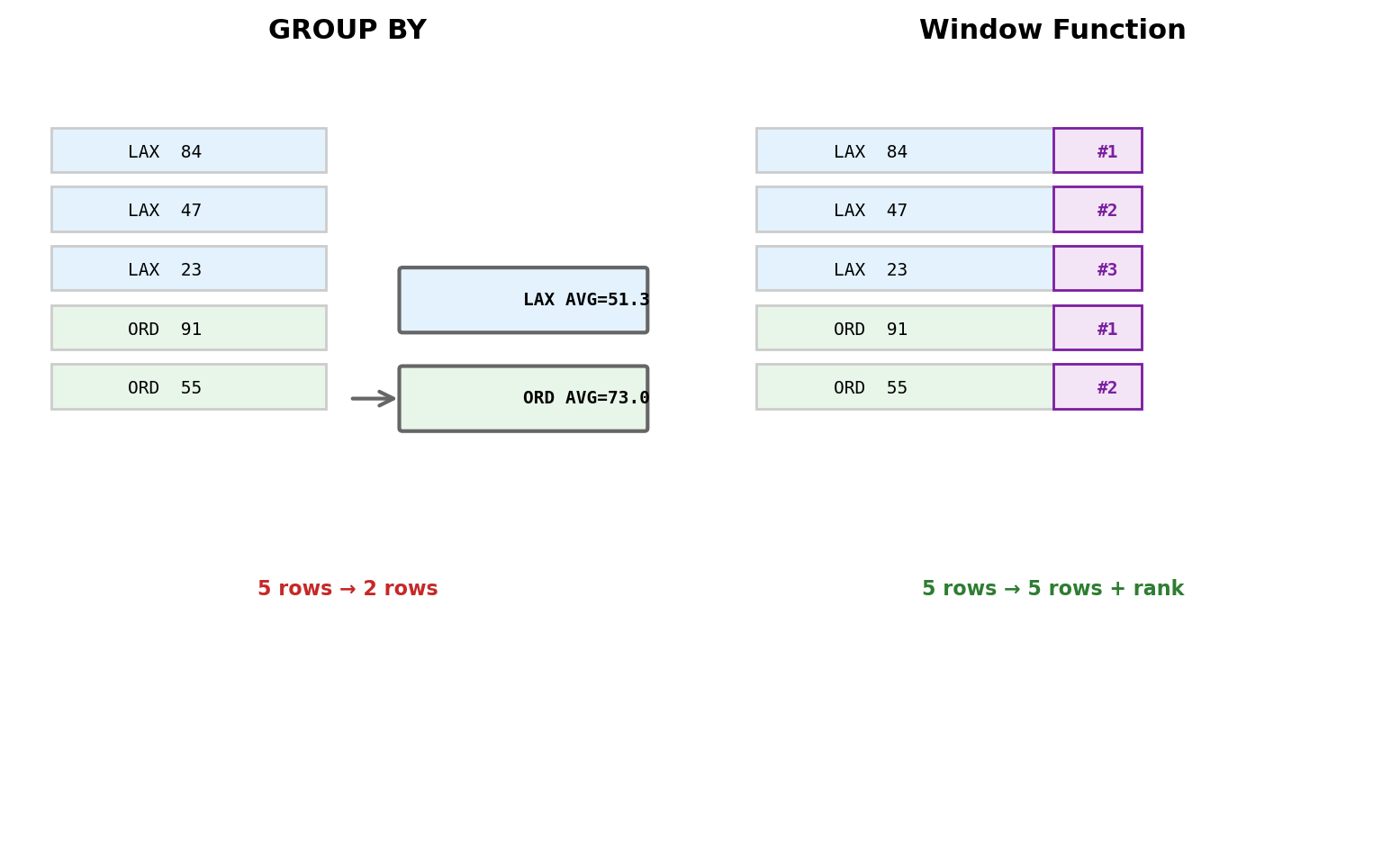
Traditional aggregation collapses multiple rows into single results. Window functions perform calculations across row sets while preserving individual rows.
Window functions add analytical context to each row without losing the original data structure.
Ranking and Ordering Functions
ROW_NUMBER, RANK, DENSE_RANK
These functions assign sequential numbers based on ordering criteria:
ROW_NUMBER() - Sequential numbering (1,2,3,4…)
RANK() - Gaps after ties (1,2,2,4…)
DENSE_RANK() - No gaps after ties (1,2,2,3…)
Syntax pattern:
function() OVER (PARTITIONBYcolumnORDERBYcolumn)
PARTITION BY creates separate “windows” - like GROUP BY but without collapsing rows.
query ="""SELECT departure_airport, flight_number, passenger_count, ROW_NUMBER() OVER ( PARTITION BY departure_airport ORDER BY passenger_count DESC ) as row_num, RANK() OVER ( PARTITION BY departure_airport ORDER BY passenger_count DESC ) as rank_with_gaps, DENSE_RANK() OVER ( PARTITION BY departure_airport ORDER BY passenger_count DESC ) as dense_rankFROM flightsWHERE departure_airport IN ('LAX', 'JFK')ORDER BY departure_airport, passenger_count DESCLIMIT 10"""print(run_sql(query))
Error: Execution failed on sql '
SELECT
departure_airport,
flight_number,
passenger_count,
ROW_NUMBER() OVER (
PARTITION BY departure_airport
ORDER BY passenger_count DESC
) as row_num,
RANK() OVER (
PARTITION BY departure_airport
ORDER BY passenger_count DESC
) as rank_with_gaps,
DENSE_RANK() OVER (
PARTITION BY departure_airport
ORDER BY passenger_count DESC
) as dense_rank
FROM flights
WHERE departure_airport IN ('LAX', 'JFK')
ORDER BY departure_airport, passenger_count DESC
LIMIT 10
': column "passenger_count" does not exist
LINE 5: passenger_count,
^
Practical applications: Top N per category, percentile rankings, identifying outliers within groups.
Analytical Functions: Running Calculations
Cumulative sums, moving averages, and lead/lag comparisons
# Running totals and comparisonsquery ="""SELECT departure_airport, scheduled_departure::date as flight_date, passenger_count, SUM(passenger_count) OVER ( PARTITION BY departure_airport ORDER BY scheduled_departure ROWS UNBOUNDED PRECEDING ) as running_total, AVG(passenger_count) OVER ( PARTITION BY departure_airport ORDER BY scheduled_departure ROWS 2 PRECEDING )::int as three_day_avg, LAG(passenger_count, 1) OVER ( PARTITION BY departure_airport ORDER BY scheduled_departure ) as prev_flight_passengersFROM flightsWHERE departure_airport = 'LAX' AND scheduled_departure >= '2024-01-15' AND scheduled_departure < '2024-01-18'ORDER BY scheduled_departureLIMIT 8"""print("### Time-series analysis with window functions")print(run_sql(query))
### Time-series analysis with window functions
Error: Execution failed on sql '
SELECT
departure_airport,
scheduled_departure::date as flight_date,
passenger_count,
SUM(passenger_count) OVER (
PARTITION BY departure_airport
ORDER BY scheduled_departure
ROWS UNBOUNDED PRECEDING
) as running_total,
AVG(passenger_count) OVER (
PARTITION BY departure_airport
ORDER BY scheduled_departure
ROWS 2 PRECEDING
)::int as three_day_avg,
LAG(passenger_count, 1) OVER (
PARTITION BY departure_airport
ORDER BY scheduled_departure
) as prev_flight_passengers
FROM flights
WHERE departure_airport = 'LAX'
AND scheduled_departure >= '2024-01-15'
AND scheduled_departure < '2024-01-18'
ORDER BY scheduled_departure
LIMIT 8
': column "passenger_count" does not exist
LINE 5: passenger_count,
^
Frame specifications control the calculation window:
ROWS UNBOUNDED PRECEDING - from start to current row
ROWS 2 PRECEDING - previous 2 rows plus current
ROWS BETWEEN 1 PRECEDING AND 1 FOLLOWING - centered 3-row window
LAG/LEAD functions access neighboring rows:
LAG(column, 1) - value from previous row
LEAD(column, 2) - value from 2 rows ahead
Perfect for period-over-period comparisons
Complex Business Analysis Made Simple
Bringing it all together: sophisticated analysis in readable SQL
Traditional file-based approach for “monthly revenue trends with year-over-year comparison” would require:
Loading all historical data
Complex date grouping logic
Manual calculation of running totals
Custom year-over-year matching
100+ lines of error-prone code
SQL with window functions:
query ="""WITH monthly_revenue AS ( SELECT DATE_TRUNC('month', scheduled_departure) as month, SUM(b.price) as revenue FROM flights f JOIN bookings b ON f.flight_id = b.flight_id WHERE scheduled_departure >= '2023-01-01' GROUP BY DATE_TRUNC('month', scheduled_departure)),revenue_analysis AS ( SELECT month, revenue, SUM(revenue) OVER ( ORDER BY month ROWS UNBOUNDED PRECEDING ) as cumulative_revenue, LAG(revenue, 12) OVER (ORDER BY month) as same_month_last_year, AVG(revenue) OVER ( ORDER BY month ROWS 2 PRECEDING ) as three_month_avg FROM monthly_revenue)SELECT TO_CHAR(month, 'YYYY-MM') as period, revenue::int, cumulative_revenue::int, CASE WHEN same_month_last_year IS NOT NULL THEN ROUND((revenue - same_month_last_year) / same_month_last_year * 100, 1) END as yoy_growth_pct, three_month_avg::int as trend_avgFROM revenue_analysisORDER BY month DESCLIMIT 8"""print("### Revenue analysis by flight and route")print(run_sql(query))
# Show the linking table structurequery ="""SELECT b.booking_id, b.passenger_id, p.last_name, b.flight_id, f.flight_number, b.seat, b.priceFROM bookings bJOIN passengers p ON b.passenger_id = p.passenger_idJOIN flights f ON b.flight_id = f.flight_idORDER BY b.passenger_id, b.flight_idLIMIT 8"""print("### Linking table: bookings")print(run_sql(query))
Weak entities are common in real systems and require careful primary key design to maintain uniqueness.
ER to Relational Translation Algorithm
Systematic conversion from ER model to relational schema
Step 1: Convert Entities to Tables
Each entity becomes a table
Entity attributes become table columns
Entity primary key becomes table primary key
Weak entities include owner’s primary key in their key
Step 2: Convert Relationships
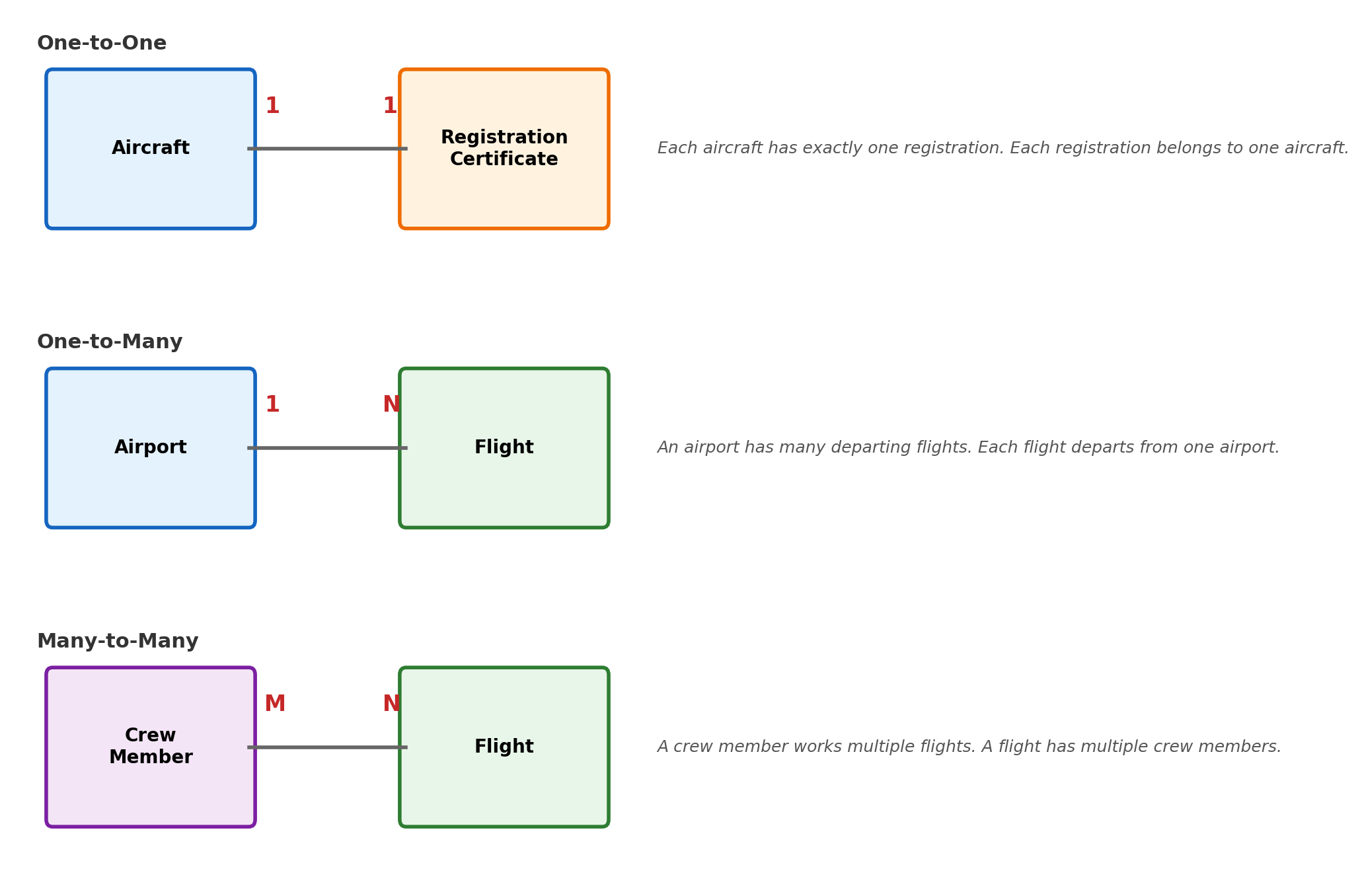
1:1 Relationships:
Add foreign key to either table (choose based on participation)
If one side has total participation, put foreign key there
Alternative: Merge entities into single table if closely related
1:N Relationships:
Add foreign key to the “many” side table
Foreign key references primary key of “one” side
Relationship attributes become columns in “many” side table
M:N Relationships:
Create new linking table
Include foreign keys to both related entities
Primary key is usually combination of both foreign keys
Relationship attributes become additional columns
Step 3: Handle Constraints
NOT NULL for total participation
UNIQUE constraints for alternate keys
CHECK constraints for domain restrictions
# Show translation result for our airline ER modelquery ="""SELECT table_name, COUNT(*) as column_countFROM information_schema.columnsWHERE table_schema = 'public' AND table_name IN ('flights', 'passengers', 'bookings', 'aircraft')GROUP BY table_nameORDER BY table_name"""print("### Translated tables")print(run_sql(query))
# Show foreign key relationshipsquery ="""SELECT tc.table_name, kcu.column_name, ccu.table_name AS foreign_table_name, ccu.column_name AS foreign_column_nameFROM information_schema.table_constraints AS tc JOIN information_schema.key_column_usage AS kcu ON tc.constraint_name = kcu.constraint_nameJOIN information_schema.constraint_column_usage AS ccu ON ccu.constraint_name = tc.constraint_nameWHERE tc.constraint_type = 'FOREIGN KEY' AND tc.table_name IN ('bookings', 'flights')ORDER BY tc.table_name, kcu.column_name"""print("### Foreign key relationships")print(run_sql(query))
Complex patterns require analyzing business rules and query requirements to choose implementation methods.
Primary Key Design: Performance and Integrity Trade-offs
Primary key selection affects database performance, storage efficiency, and system maintainability. The choice between natural and surrogate keys affects uniqueness constraints, query optimization, index structure, and referential integrity enforcement.
# Compare different primary key strategiesquery ="""SELECT 'flights' as table_name, 'flight_id (surrogate)' as key_type, pg_size_pretty(pg_relation_size('flights')) as table_size, 'INTEGER' as key_data_type, '4 bytes' as key_storageUNION ALLSELECT 'hypothetical_flights', 'flight_number + date (natural)', 'Would be ~15% larger', 'VARCHAR(6) + DATE', '12+ bytes'"""print("### Primary key storage comparison")print(run_sql(query))
Engineering consideration: Surrogate keys optimize for system performance; natural keys optimize for business semantics. Most production systems use surrogates for primary keys and maintain natural keys as unique alternate indexes.
Composite Keys: When Multiple Attributes Define Uniqueness
Composite keys occur when no single attribute uniquely identifies records. The key design impacts both logical constraints and physical performance.
Query optimization with composite keys:
# Show index usage patternsquery ="""EXPLAIN (COSTS OFF, TIMING OFF)SELECT passenger_id, priceFROM bookings WHERE flight_id = 1 AND seat = '12A'"""result, _ = execute_query(query)print("### Composite key lookup (optimal):")for row in result['QUERY PLAN'].head(2):print(f" {row}")
### Composite key lookup (optimal):
Index Scan using bookings_flight_id_seat_key on bookings
Index Cond: ((flight_id = 1) AND ((seat)::text = '12A'::text))
# Partial key usagequery ="""EXPLAIN (COSTS OFF, TIMING OFF)SELECT passenger_id, priceFROM bookings WHERE flight_id = 1"""result, _ = execute_query(query)print("### Leading key column only (still uses index):")for row in result['QUERY PLAN'].head(2):print(f" {row}")
### Leading key column only (still uses index):
Index Scan using idx_bookings_flight on bookings
Index Cond: (flight_id = 1)
Column order in composite keys matters. The most selective or frequently queried column should be first, as B-tree indexes can only efficiently support left-to-right key prefixes.
# Show referential integrity in actionquery ="""SELECT tc.constraint_name, tc.table_name, kcu.column_name, ccu.table_name AS references_table, ccu.column_name AS references_column, rc.update_rule, rc.delete_ruleFROM information_schema.table_constraints tcJOIN information_schema.key_column_usage kcu ON tc.constraint_name = kcu.constraint_nameJOIN information_schema.constraint_column_usage ccu ON ccu.constraint_name = tc.constraint_nameJOIN information_schema.referential_constraints rc ON tc.constraint_name = rc.constraint_nameWHERE tc.constraint_type = 'FOREIGN KEY' AND tc.table_name = 'bookings'ORDER BY tc.table_name, kcu.column_name"""print("### Foreign key constraints and actions")print(run_sql(query))
Foreign keys enforce referential integrity through automatic constraint checking. The enforcement mechanisms maintain data consistency in concurrent systems.
Referential actions define behavior when referenced keys change:
ON DELETE CASCADE - Automatically delete dependent records
-- If a flight is deleted, all its bookings are automatically removedDELETEFROM flights WHERE flight_id =1;-- Cascades to: DELETE FROM bookings WHERE flight_id = 1;
ON DELETE RESTRICT - Prevent deletion of referenced records
-- Cannot delete a flight that has bookingsDELETEFROM flights WHERE flight_id =1;-- ERROR: violates foreign key constraint
ON DELETE SET NULL - Set foreign key to NULL when reference is deleted
-- If passenger is deleted, booking remains but passenger_id becomes NULLDELETEFROM passengers WHERE passenger_id =501;-- Updates: bookings.passenger_id = NULL WHERE passenger_id = 501
Performance implications: Referential integrity checks require index lookups on both sides of the relationship. Foreign key columns should always be indexed for optimal constraint verification performance.
Candidate Keys and Unique Constraints
Multiple attributes or attribute combinations may uniquely identify records. Candidate keys enable complete data modeling and query optimization.
# Identify alternate unique combinations in flightsquery ="""SELECT flight_number, scheduled_departure, COUNT(*) as occurrencesFROM flightsGROUP BY flight_number, scheduled_departureHAVING COUNT(*) > 1ORDER BY COUNT(*) DESCLIMIT 5"""print("### Checking natural key uniqueness")print(run_sql(query))
### Checking natural key uniqueness
No results returned | 2.7 ms
# Show unique constraint implementationquery ="""SELECT conname as constraint_name, contype as constraint_type, CASE contype WHEN 'p' THEN 'PRIMARY KEY' WHEN 'u' THEN 'UNIQUE' WHEN 'f' THEN 'FOREIGN KEY' WHEN 'c' THEN 'CHECK' END as constraint_description, pg_get_constraintdef(oid) as definitionFROM pg_constraintWHERE conrelid = 'flights'::regclass AND contype IN ('p', 'u')ORDER BY contype"""print("### Primary and unique constraints on flights")print(run_sql(query))
### Primary and unique constraints on flights
| constraint_name | constraint_type | constraint_description | definition |
|:------------------|:------------------|:-------------------------|:------------------------|
| flights_pkey | p | PRIMARY KEY | PRIMARY KEY (flight_id) |
1 rows | 2.1 ms
Candidate key selection criteria:
Minimality - Use fewest attributes necessary for uniqueness
Stability - Values should rarely change once assigned
Simplicity - Prefer single columns over composite keys when possible
Implementation: Choose the most stable, minimal candidate key as primary key. Implement other candidate keys as UNIQUE constraints to maintain alternate access paths and prevent duplicate data entry.
Query optimizer benefit: Unique constraints provide additional optimization opportunities, allowing the optimizer to eliminate duplicate removal operations and optimize join algorithms.
Key Design Patterns and Performance Impact
The choice of key design affects not just data integrity, but system performance, storage efficiency, and maintainability. Different patterns serve different architectural needs.
Sequential integers provide optimal performance characteristics:
B-tree insertion always occurs at the right edge, minimizing page splits
Minimal storage footprint (4 bytes)
Efficient foreign key joins through integer comparison
Potential vulnerability: sequential values may leak information about record creation patterns
UUIDs offer global uniqueness at performance cost:
128-bit storage requirement (4× larger than integers)
Random insertion patterns increase B-tree fragmentation
Eliminates central coordination requirements in distributed systems
Preferred when records must be unique across multiple databases
Composite keys preserve semantic relationships:
Foreign key storage scales linearly with component count
Production systems typically use auto-incrementing integers for primary keys while maintaining natural key uniqueness through alternate indexes. This approach optimizes for system performance while preserving semantic access patterns.
Functional Dependencies: Mathematical Basis for Decomposition
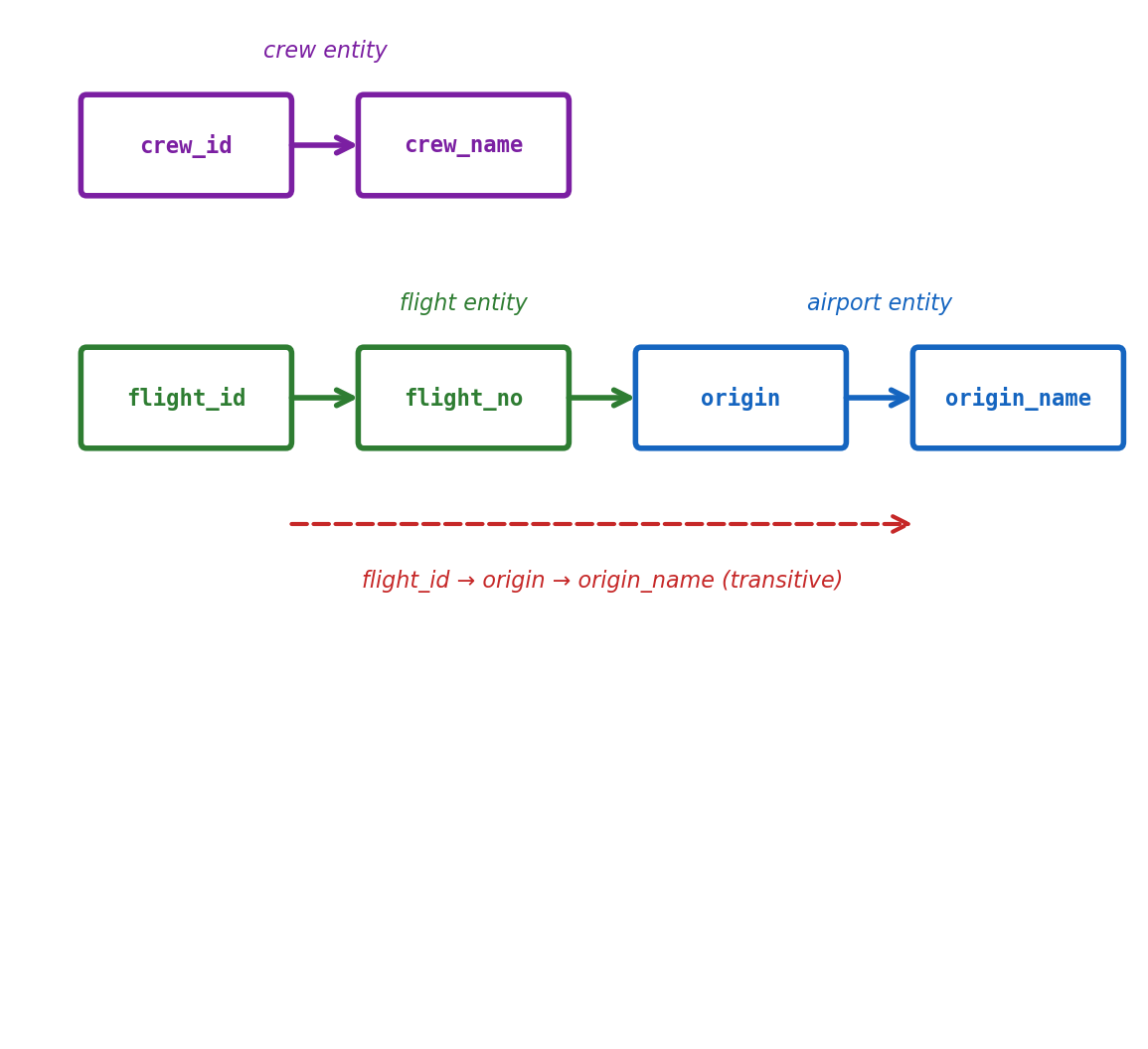
Functional dependencies define mathematical relationships between attributes that govern how tables can be decomposed without information loss.
Functional dependency notation: A → B means “A functionally determines B”
For every value of A, there exists exactly one value of B
If two tuples have the same A value, they must have the same B value
Violation indicates data inconsistency or incorrect schema design
Mathematical properties of functional dependencies:
Reflexivity: If Y ⊆ X, then X → Y (trivial dependency)
Augmentation: If X → Y, then XZ → YZ for any Z
Transitivity: If X → Y and Y → Z, then X → Z
First Normal Form: Eliminating Repeating Groups
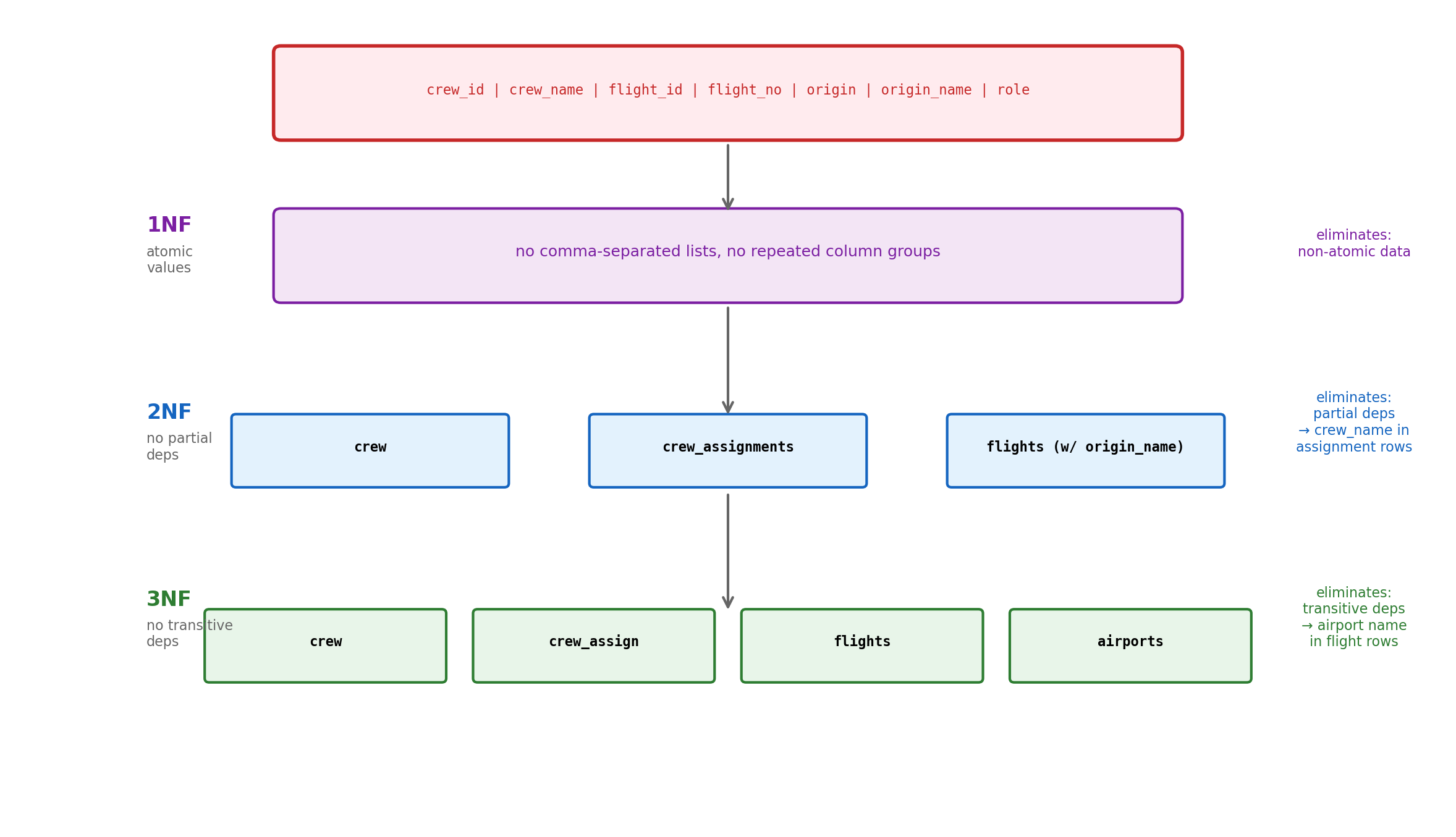
1NF requires that all attribute values be atomic - no repeating groups or nested structures within table cells.
1NF transformation process:
Identify repeating groups within table cells
Create separate rows for each value in the repeating group
Add appropriate identifiers to maintain relationships
Ensure each cell contains only atomic values
Result: Information is preserved but redundancy increases. Further normalization addresses redundancy issues.
Second Normal Form: Eliminating Partial Dependencies
2NF requires 1NF plus elimination of partial functional dependencies - no non-key attribute depends on only part of a composite primary key.
2NF decomposition algorithm:
Identify composite primary key and all functional dependencies
Find attributes that depend on only part of the primary key (partial dependencies)
Create separate table for each partial dependency
Remove partially dependent attributes from original table
Use foreign keys to maintain relationships
Eliminates update anomalies where changing one attribute requires updating multiple rows.
Third Normal Form: Removing Transitive Dependencies
3NF requires 2NF plus elimination of transitive functional dependencies - no non-key attribute depends on another non-key attribute.
3NF decomposition process:
Identify all functional dependencies in the table
Find transitive dependencies: A → B → C where A is the primary key
Create separate table for the transitive dependency (B → C)
Remove transitively dependent attributes from original table
Keep the intermediate attribute as foreign key
Trade-off consideration: 3NF eliminates redundancy but requires joins to reconstruct complete information.
Denormalization: Performance vs Redundancy Trade-offs
Denormalization deliberately introduces redundancy to improve query performance, reversing the normalization process for specific use cases.
Denormalization decision criteria:
Read-heavy workloads benefit most from denormalization:
Reporting systems with complex aggregations
Analytics platforms requiring fast dashboard queries
E-commerce product catalogs with frequent browsing
Write-heavy workloads suffer from denormalization:
Transaction processing systems
Real-time data ingestion
Systems requiring strict consistency
Selective denormalization strategies:
Calculated columns: Store computed values (order totals, tax amounts)
Flattened tables: Merge frequently joined tables into single table
Summary tables: Pre-aggregate data at different time granularities
Redundant foreign key data: Store commonly accessed related attributes
Maintenance considerations:
Update multiple locations when source data changes
Implement triggers or application logic to maintain consistency
Monitor for data drift between redundant copies
Plan for increased storage requirements
Denormalization should be applied selectively based on measured performance bottlenecks rather than preemptive optimization.
B-tree Indexes Reduce Query Complexity from O(n) to O(log n)
Without index: sequential scan reads every row
query ="""SELECT * FROM users WHERE email = 'alice@example.com';"""print("-- Scans all 1M users to find one record")print("-- Reads: 1,000,000 rows")print("-- Time: 250ms")
-- Scans all 1M users to find one record
-- Reads: 1,000,000 rows
-- Time: 250ms
With B-tree index: logarithmic search
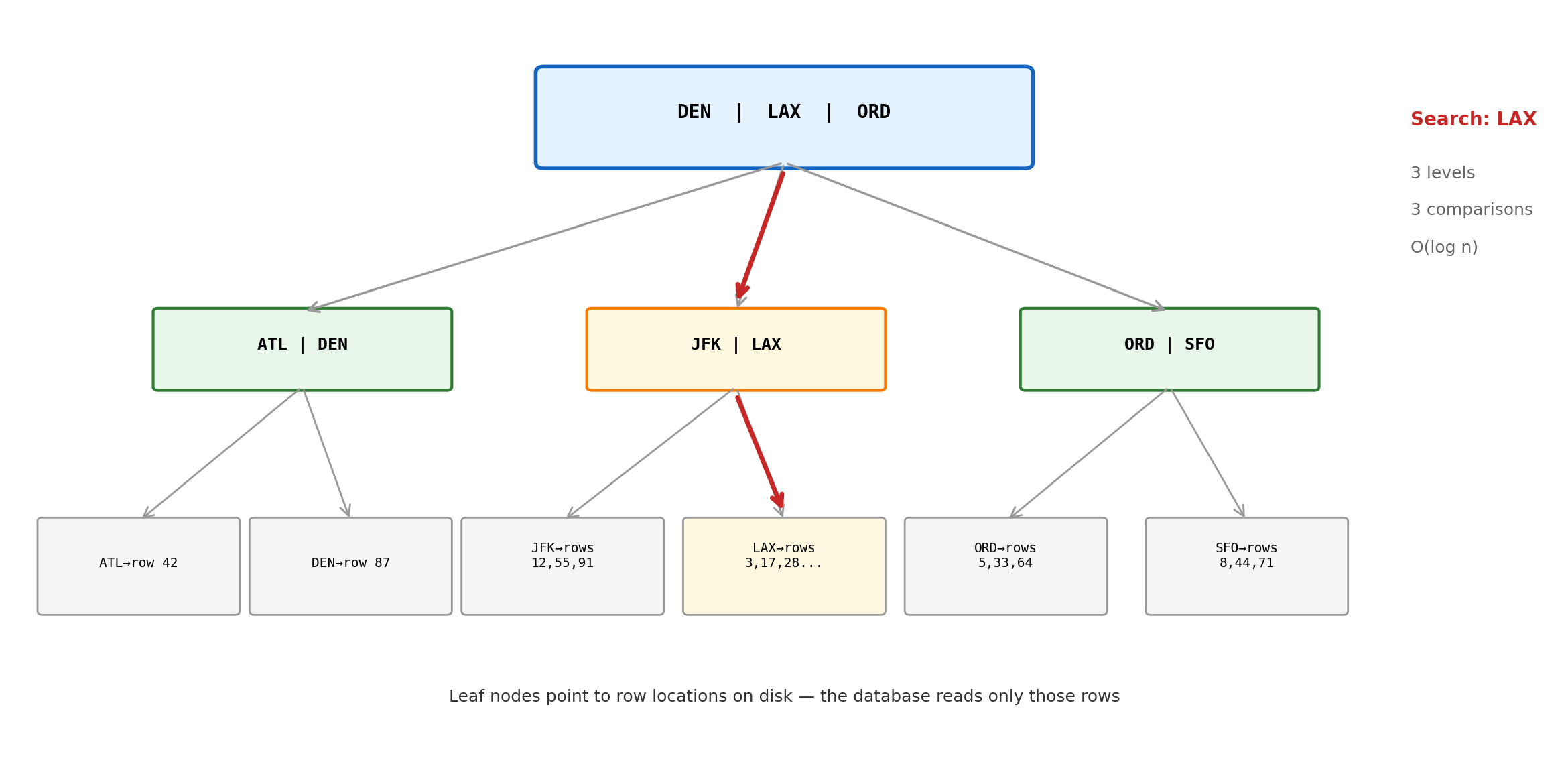
query ="""CREATE INDEX idx_users_email ON users(email);SELECT * FROM users WHERE email = 'alice@example.com';"""print("-- Traverses tree structure")print("-- Reads: 3-4 index pages + 1 data page")print("-- Time: 2ms")
-- Traverses tree structure
-- Reads: 3-4 index pages + 1 data page
-- Time: 2ms
Why B-trees work: Tree height grows slowly. Even 1 billion records need only 4-5 levels.
Single vs Composite Indexes
Index structure determines which queries can be optimized
-- Requires full scanWHERE user_id =123AND email ='alice@example.com'
Composite indexes work for:
-- Uses index efficientlyWHERE status ='active'AND created_date >'2024-01-01'WHERE status ='active'-- Cannot use indexWHERE created_date >'2024-01-01'
Column order matters: Most selective column first.
When Indexes Help vs Hurt
Indexes have costs - they’re not always beneficial
# Testing index effectivenessquery ="""-- Without index: reads all rowsEXPLAIN ANALYZE SELECT * FROM orders WHERE customer_id = 12345;"""print("Seq Scan: 245ms (read 1M rows)")print()query2 ="""-- With index: direct lookupCREATE INDEX idx_orders_customer_id ON orders(customer_id);EXPLAIN ANALYZE SELECT * FROM orders WHERE customer_id = 12345;"""print("Index Scan: 3ms (read 12 rows)")
INSERTINTO users (name, email) VALUES ('Alice', 'alice@co.com');-- Must update: table + all indexes on table-- Each index adds ~20% write cost
Temporal Data: Handling Time and Change
Time-dependent data requires different storage patterns than static records
# Simple approach: overwrite data (loses history)query ="""CREATE TABLE user_profiles ( user_id INTEGER PRIMARY KEY, email VARCHAR(255), subscription_tier VARCHAR(50), updated_at TIMESTAMP);UPDATE user_profiles SET subscription_tier = 'premium', updated_at = NOW()WHERE user_id = 123;"""print("Problem: Lost the fact that user was 'basic' tier yesterday")
Problem: Lost the fact that user was 'basic' tier yesterday
# Versioned approach: keep historyquery ="""CREATE TABLE user_profile_versions ( user_id INTEGER, email VARCHAR(255), subscription_tier VARCHAR(50), valid_from TIMESTAMP, valid_to TIMESTAMP, PRIMARY KEY (user_id, valid_from));-- Get current stateSELECT * FROM user_profile_versions WHERE user_id = 123 AND valid_to IS NULL;-- Get state at specific timeSELECT * FROM user_profile_versions WHERE user_id = 123 AND valid_from <= '2024-01-15' AND (valid_to IS NULL OR valid_to > '2024-01-15');"""print("Benefit: Can answer 'What was subscription tier on Jan 15?'")
Benefit: Can answer 'What was subscription tier on Jan 15?'
Time-series patterns:
Event logs: User clicks, sensor readings, model predictions
Snapshots: Daily feature values, model performance metrics
Change tracking: Which features changed and when
Storage trade-offs: History takes more space but enables temporal analysis ML models often need.
Hierarchical Data: Trees in Relational Tables
Organizational charts, category trees, and nested data structures
Adjacency List (most common):
CREATETABLE categories (idINTEGERPRIMARYKEY, name VARCHAR(100), parent_id INTEGERREFERENCES categories(id));-- Find all children of category 5WITH RECURSIVE subcategories AS (SELECTid, name FROM categories WHEREid=5UNIONALLSELECT c.id, c.name FROM categories cJOIN subcategories s ON c.parent_id = s.id)SELECT*FROM subcategories;
Good for: Frequent inserts, simple parent-child queries
Path Enumeration (for read-heavy):
CREATETABLE categories (idINTEGERPRIMARYKEY, name VARCHAR(100), path VARCHAR(255) -- '/1/3/7/');-- Find all descendants of category 3SELECT*FROM categories WHERE path LIKE'/1/3/%';-- Find depthSELECT*, LENGTH(path) -LENGTH(REPLACE(path, '/', '')) -1asdepthFROM categories;
Good for: Fast subtree queries, read-heavy workloads
Choice depends on query patterns: Adjacency lists for frequent updates, path enumeration for read-heavy analytics.
Partitioning: Splitting Large Tables
When single tables become too large for efficient queries or maintenance
Horizontal partitioning strategies:
# Range partitioning (common for time-series)query ="""CREATE TABLE events ( id SERIAL, user_id INTEGER, event_type VARCHAR(50), event_date DATE, data JSONB) PARTITION BY RANGE (event_date);CREATE TABLE events_2024_q1 PARTITION OF events FOR VALUES FROM ('2024-01-01') TO ('2024-04-01');"""print("Range partitioning: Groups related data together")
Range partitioning: Groups related data together
# Hash partitioning (for even distribution)query ="""CREATE TABLE user_events ( user_id INTEGER, event_data JSONB, created_at TIMESTAMP) PARTITION BY HASH (user_id);CREATE TABLE user_events_0 PARTITION OF user_events FOR VALUES WITH (MODULUS 4, REMAINDER 0);"""print("Hash partitioning: Spreads load evenly across partitions")
Hash partitioning: Spreads load evenly across partitions
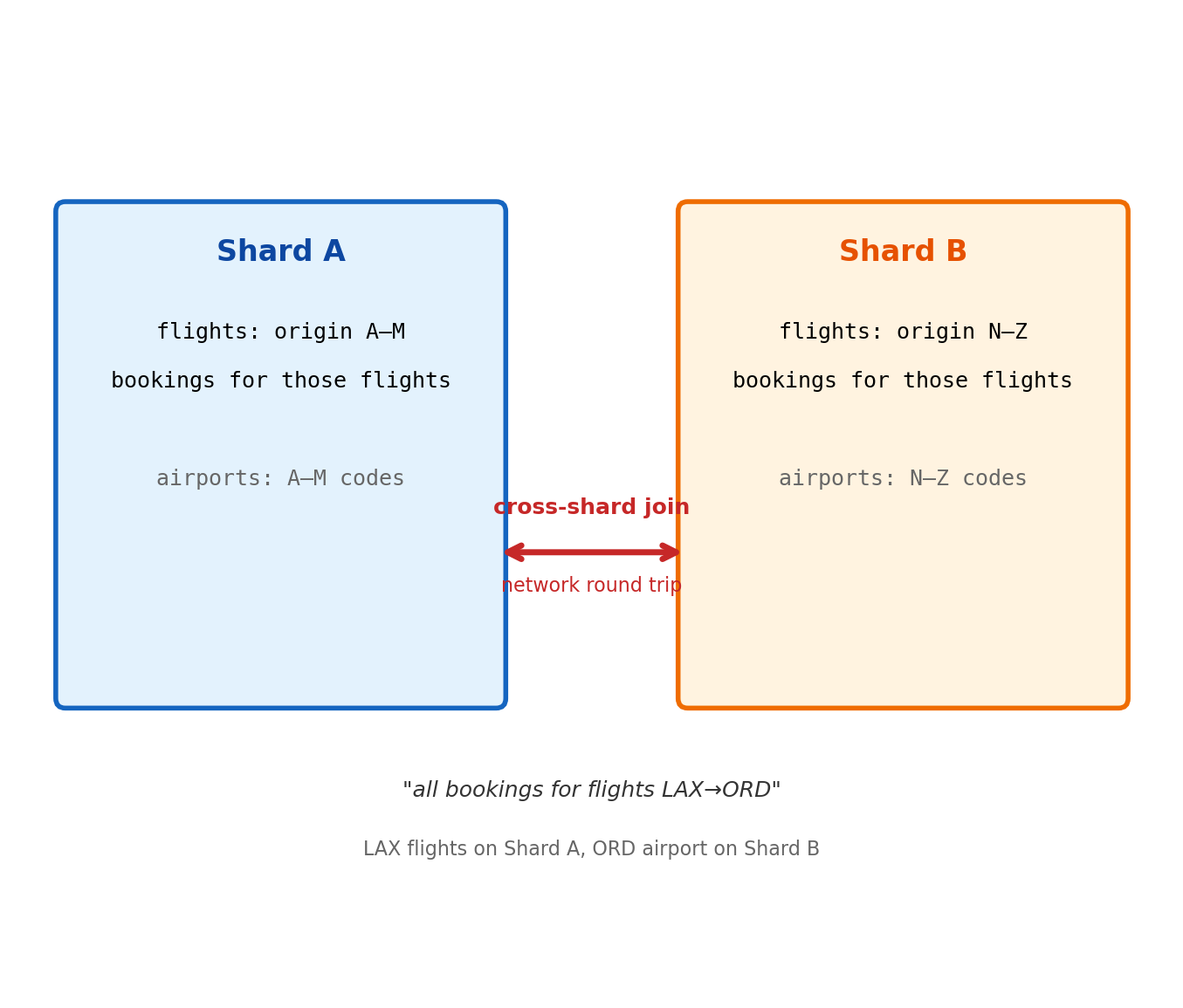
NoSQL connection: Many NoSQL databases automatically partition (shard) data using similar hash/range strategies.
Concurrency: When Multiple Operations Conflict
Real database systems must handle simultaneous read/write operations
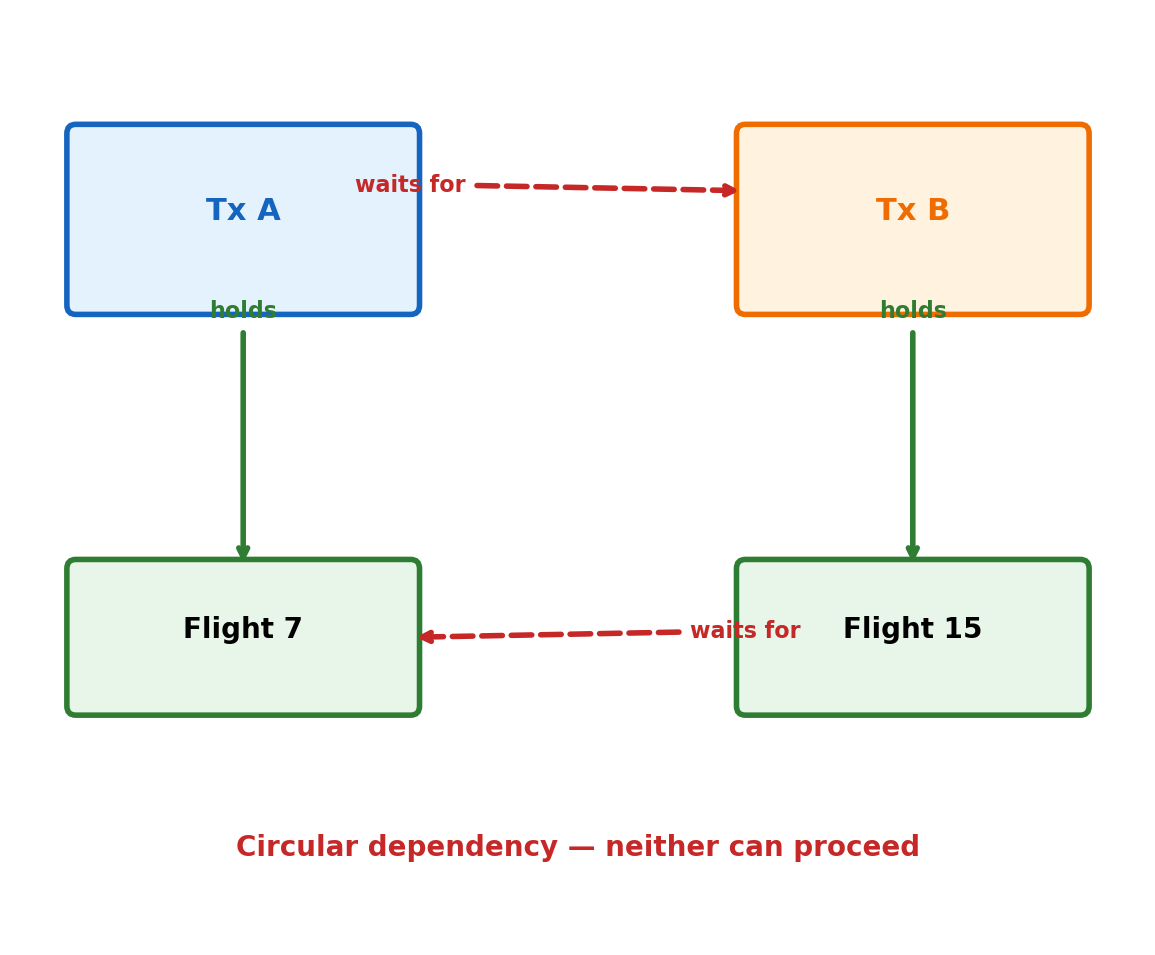
# Deadlock scenarioprint("Session A:")print("BEGIN;")print("UPDATE accounts SET balance = balance - 100 WHERE id = 1;")print("-- Waiting for lock on account 2...")print("UPDATE accounts SET balance = balance + 100 WHERE id = 2;")print("")print("Session B (simultaneously):")print("BEGIN;") print("UPDATE accounts SET balance = balance - 50 WHERE id = 2;")print("-- Waiting for lock on account 1...")print("UPDATE accounts SET balance = balance + 50 WHERE id = 1;")print("")print("Result: DEADLOCK DETECTED")print("One transaction automatically rolled back")
Session A:
BEGIN;
UPDATE accounts SET balance = balance - 100 WHERE id = 1;
-- Waiting for lock on account 2...
UPDATE accounts SET balance = balance + 100 WHERE id = 2;
Session B (simultaneously):
BEGIN;
UPDATE accounts SET balance = balance - 50 WHERE id = 2;
-- Waiting for lock on account 1...
UPDATE accounts SET balance = balance + 50 WHERE id = 1;
Result: DEADLOCK DETECTED
One transaction automatically rolled back
Schema-level blocking during maintenance:
# Long-running schema changequery ="""-- This blocks ALL table access during executionALTER TABLE events ADD COLUMN processed_at TIMESTAMP;-- On 100M row table: 30+ minutes of downtime-- Better approach: add column with defaultALTER TABLE events ADD COLUMN processed_at TIMESTAMP DEFAULT NULL;-- Seconds, not minutes"""print("Schema changes can block entire applications")print("Plan maintenance windows or use online schema change tools")
Schema changes can block entire applications
Plan maintenance windows or use online schema change tools
Common ML concurrency patterns:
Model training jobs reading while data pipelines write
Feature stores with high read/write concurrency
A/B testing requiring consistent snapshots during experiments
Production databases must evolve without breaking running applications
# Safe operations (usually fast)query ="""-- Add nullable columnALTER TABLE users ADD COLUMN last_login_at TIMESTAMP;-- Add index (builds in background)CREATE INDEX CONCURRENTLY idx_users_email ON users(email);-- Drop column (drops instantly)ALTER TABLE users DROP COLUMN old_unused_column;"""print("Safe: Can run during business hours")
Safe: Can run during business hours
# Dangerous operations (require downtime)query ="""-- Add NOT NULL column (must scan entire table)ALTER TABLE users ADD COLUMN required_field VARCHAR(100) NOT NULL;-- Change column type (rebuilds table)ALTER TABLE users ALTER COLUMN age TYPE BIGINT;-- Drop index on large table (blocks writes)DROP INDEX idx_users_complex_query;"""print("Dangerous: Require maintenance windows")
Dangerous: Require maintenance windows
Migration patterns:
Feature schema evolution:
-- Phase 1: Add new feature columnsALTERTABLE feature_store ADDCOLUMN user_embedding_v2 VECTOR(128);-- Phase 2: Backfill historical data UPDATE feature_store SET user_embedding_v2 = compute_v2_embedding(user_id);-- Phase 3: Switch models to use v2-- Phase 4: Drop old columnALTERTABLE feature_store DROPCOLUMN user_embedding_v1;
Version management: Can also maintain separate feature tables per model version to avoid schema conflicts.
Access Pattern Optimization
Database design should match how applications actually query the data
Common ML access patterns drive different schema choices:
Time-series analytics: Partition by date, index on timestamp + entity_id
-- Optimized for: "Show metrics for user X in last 30 days"CREATEINDEX idx_metrics_user_time ON user_metrics(user_id, recorded_at);
Feature lookup: Denormalize frequently-joined data
-- Instead of joining 3 tables for each prediction:-- Store pre-computed features in single wide tableCREATETABLE user_features_current ASSELECT u.user_id, u.tier, p.avg_purchase, s.session_count, ...
Model serving: Design for low-latency point queries
-- Optimize for: "Get all features for user 12345"-- Not: "Get feature X for all users"
Batch processing: Structure for efficient scans
-- Clustered/sorted storage for: "Process all users in tier=premium"-- Avoid: Random access patterns requiring many seeks
The best schema depends entirely on whether your primary use case is transactional updates, analytical queries, or low-latency serving.
Transactions and ACID Properties
Concurrent Access Creates Race Conditions
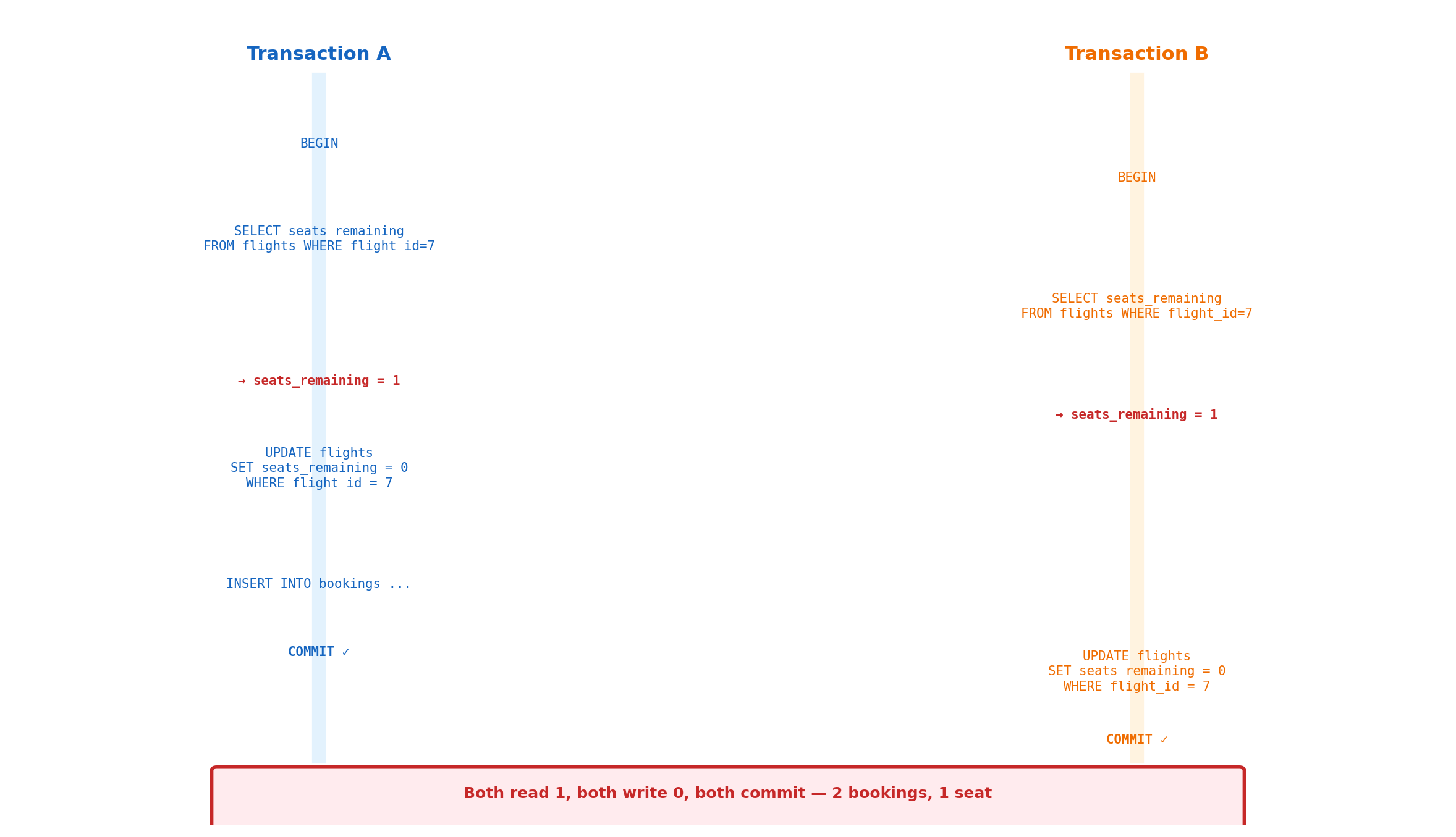
Two processes accessing shared data simultaneously produce incorrect results
Process A:
# Check seat availabilityquery ="""SELECT seats_available FROM flights WHERE flight_id = 'UA101';"""print("Returns: 1")print()# Update seat countquery ="""UPDATE flights SET seats_available = 0 WHERE flight_id = 'UA101';INSERT INTO reservations VALUES ('user_a', 'UA101', NOW());"""print("Executes successfully")
Returns: 1
Executes successfully
Process B (simultaneously):
# Same query at same timequery ="""SELECT seats_available FROM flights WHERE flight_id = 'UA101';"""print("Returns: 1")print()# Same updatequery ="""UPDATE flights SET seats_available = 0 WHERE flight_id = 'UA101';INSERT INTO reservations VALUES ('user_b', 'UA101', NOW());"""print("Also executes successfully")
Returns: 1
Also executes successfully
Database state progression:
Initial: seats_available = 1
Both processes read seats_available = 1
Both processes execute UPDATE ... SET seats_available = 0
Final: seats_available = 0, but 2 reservations exist
Transaction Boundaries Provide Coordination
BEGIN/COMMIT creates atomic execution units
# Without transaction coordinationquery ="""SELECT seats_available FROM flights WHERE flight_id = 'UA101';-- Other processes can modify data hereUPDATE flights SET seats_available = seats_available - 1 WHERE flight_id = 'UA101';INSERT INTO reservations VALUES ('user_a', 'UA101', NOW());"""print("Problem: Race condition between SELECT and UPDATE")
Problem: Race condition between SELECT and UPDATE
# With transaction coordinationquery ="""BEGIN; SELECT seats_available FROM flights WHERE flight_id = 'UA101' FOR UPDATE; -- FOR UPDATE locks row, prevents concurrent modification UPDATE flights SET seats_available = seats_available - 1 WHERE flight_id = 'UA101'; INSERT INTO reservations VALUES ('user_a', 'UA101', NOW());COMMIT;"""print("Solution: Atomic execution prevents interference")
Solution: Atomic execution prevents interference
Transaction execution properties:
Transaction guarantees:
Operations within BEGIN/COMMIT execute as single unit
Other transactions cannot observe intermediate states
Either all operations succeed (COMMIT) or all fail (ROLLBACK)
ACID Properties Address Specific Problems
Each property solves distinct classes of failures
ACID overview:
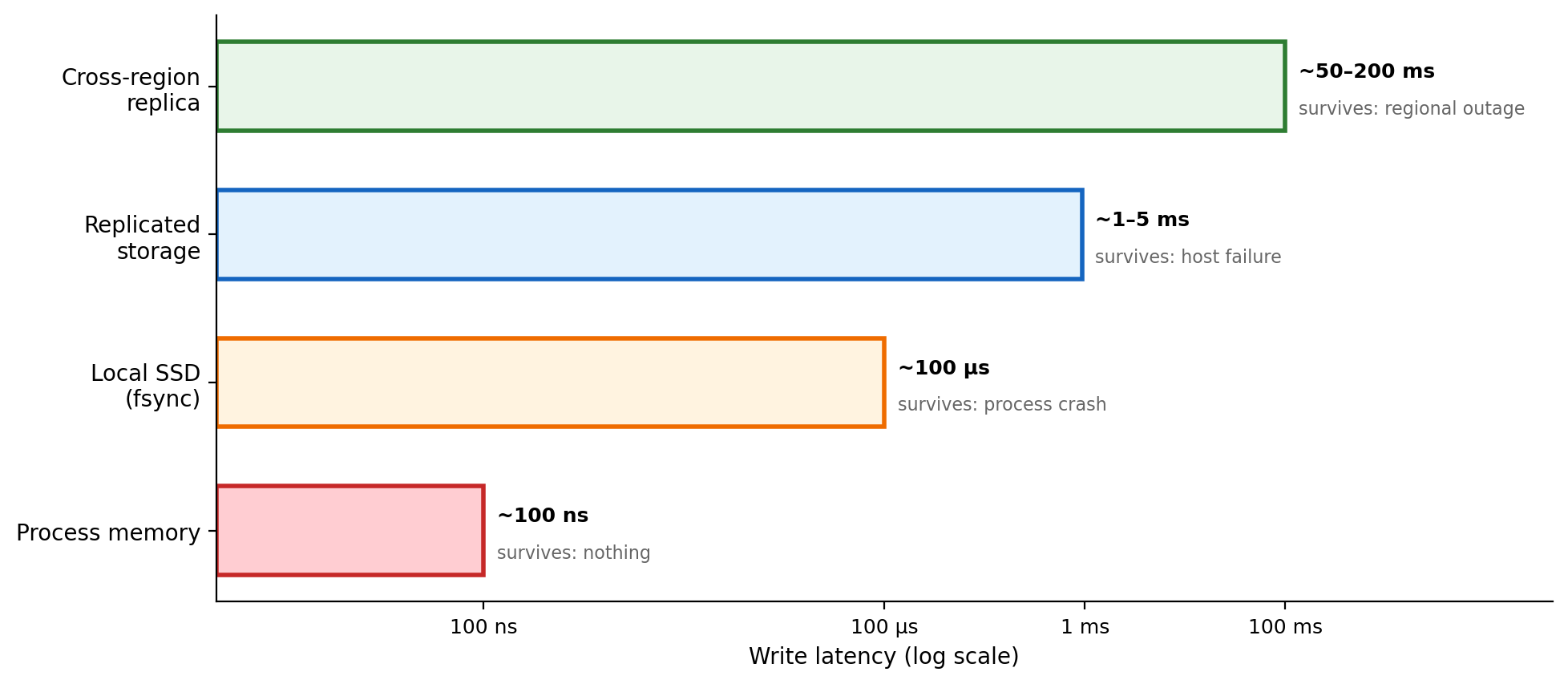
# Each property requires specific mechanismsmechanisms ="""Atomicity: Write-ahead logging for rollback capabilityConsistency: Constraint checking before commit Isolation: Locking or timestamp-based concurrency controlDurability: Forced writes to persistent storage"""print(mechanisms)
Atomicity: Write-ahead logging for rollback capability
Consistency: Constraint checking before commit
Isolation: Locking or timestamp-based concurrency control
Durability: Forced writes to persistent storage
Database systems use coordinated mechanisms for reliable multi-user operation.
All-or-Nothing Execution
Atomicity prevents partial failures that leave systems in inconsistent states
Atomicity implementation:
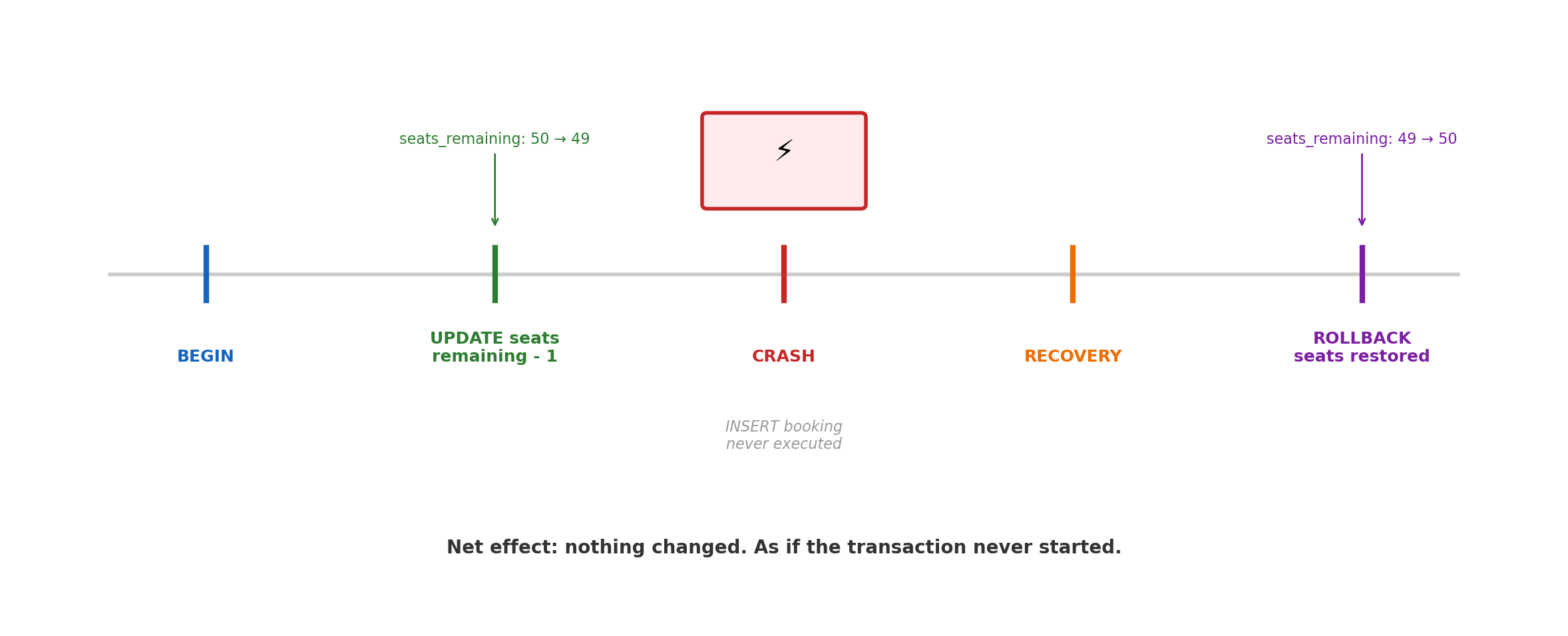
# Money transfer with proper atomicityquery ="""BEGIN; UPDATE accounts SET balance = balance - 100 WHERE account_id = 'A'; UPDATE accounts SET balance = balance + 100 WHERE account_id = 'B'; -- If any statement fails or system crashes: automatic ROLLBACKCOMMIT;"""print("Either both updates succeed, or both are undone")
Either both updates succeed, or both are undone
Write-ahead logging principle: Database logs all changes before applying them. Recovery process can undo incomplete transactions by reading the log.
Rollback Mechanisms
How databases implement all-or-nothing execution through logging
Write-ahead logging (WAL) sequence:
# What happens during transaction executionsequence ="""1. BEGIN: Create transaction ID, start logging2. UPDATE: Write change to log file (forced to disk)3. UPDATE: Write second change to log file4. COMMIT: Mark transaction complete in log5. Later: Apply changes to database pagesRecovery after crash:- Read log file- Find incomplete transactions- UNDO all changes from incomplete transactions"""print(sequence)
1. BEGIN: Create transaction ID, start logging
2. UPDATE: Write change to log file (forced to disk)
3. UPDATE: Write second change to log file
4. COMMIT: Mark transaction complete in log
5. Later: Apply changes to database pages
Recovery after crash:
- Read log file
- Find incomplete transactions
- UNDO all changes from incomplete transactions
Transaction states:
Active: Executing statements
Committed: All statements completed successfully
Aborted: Failed or explicitly rolled back
Explicit rollback for application errors:
# Application-controlled rollbackquery ="""BEGIN; UPDATE accounts SET balance = balance - 100 WHERE account_id = 'A'; -- Check business rule IF (SELECT balance FROM accounts WHERE account_id = 'A') < 0 THEN ROLLBACK; -- Undo the UPDATE ELSE UPDATE accounts SET balance = balance + 100 WHERE account_id = 'B'; COMMIT; END IF;"""print("Applications can explicitly undo transactions")
Applications can explicitly undo transactions
Recovery guarantees: Any transaction that completed COMMIT before crash will survive. Any transaction that did not complete COMMIT will be completely undone.
Database Constraints vs Application Rules
Consistency divides responsibility between database structure and application logic
# Rules too complex for database constraintsrules ="""Business rules requiring application logic:- "Premium customers get 2x rewards points"- "Free shipping for orders over $100"- "Refunds allowed within 30 days of purchase"- "Students get 50% discount on weekdays"- "Maximum 3 login attempts per hour"Database cannot evaluate time-dependent orcomplex conditional business rules."""print(rules)
Business rules requiring application logic:
- "Premium customers get 2x rewards points"
- "Free shipping for orders over $100"
- "Refunds allowed within 30 days of purchase"
- "Students get 50% discount on weekdays"
- "Maximum 3 login attempts per hour"
Database cannot evaluate time-dependent or
complex conditional business rules.
Constraint checking during transactions:
# What happens when constraints are violatedquery ="""BEGIN; UPDATE accounts SET balance = balance - 500 WHERE id = 'A'; -- If account A only has $300, CHECK (balance >= 0) fails UPDATE accounts SET balance = balance + 500 WHERE id = 'B';COMMIT;-- Result: ERROR - entire transaction rolled back-- Both accounts remain unchanged"""print("Any constraint violation forces complete rollback")
Any constraint violation forces complete rollback
Constraint enforcement timing:
Consistency guarantee: Database ensures no transaction can leave data in a state that violates declared constraints.
Concurrent Transaction Interference
Isolation prevents transactions from observing each other’s intermediate states
# Dirty read exampleprint("Transaction A:")print("BEGIN;")print("UPDATE accounts SET balance = 1000 WHERE id = 'savings';")print("-- Balance changed to 1000, but not yet committed")print()print("Transaction B (simultaneously):")print("SELECT balance FROM accounts WHERE id = 'savings';")print("-- Without isolation: sees 1000")print("-- With isolation: sees original value")print()print("Transaction A continues:")print("ROLLBACK; -- Balance returns to original value")print()print("Problem: Transaction B made decisions based on data that never existed")
Transaction A:
BEGIN;
UPDATE accounts SET balance = 1000 WHERE id = 'savings';
-- Balance changed to 1000, but not yet committed
Transaction B (simultaneously):
SELECT balance FROM accounts WHERE id = 'savings';
-- Without isolation: sees 1000
-- With isolation: sees original value
Transaction A continues:
ROLLBACK; -- Balance returns to original value
Problem: Transaction B made decisions based on data that never existed
Non-repeatable reads within same transaction:
Phantom reads - new rows appear:
# Phantom read scenariophantom_example ="""Transaction A:SELECT * FROM orders WHERE date = '2024-01-15';-- Returns 5 orders-- Transaction B inserts new order with date = '2024-01-15'Transaction A (repeats same query):SELECT * FROM orders WHERE date = '2024-01-15';-- Returns 6 orders - phantom row appeared"""print(phantom_example)
Transaction A:
SELECT * FROM orders WHERE date = '2024-01-15';
-- Returns 5 orders
-- Transaction B inserts new order with date = '2024-01-15'
Transaction A (repeats same query):
SELECT * FROM orders WHERE date = '2024-01-15';
-- Returns 6 orders - phantom row appeared
Applications assume database state remains consistent during transaction execution. Without isolation, business logic can make incorrect decisions.
Isolation Through Locking
Databases coordinate concurrent access through lock-based mechanisms
# Locking prevents interferencequery ="""-- Transaction ABEGIN;SELECT * FROM inventory WHERE product_id = 'laptop' FOR UPDATE;-- FOR UPDATE acquires exclusive lock on rows-- Transaction B tries to modify same rowsUPDATE inventory SET quantity = quantity - 1 WHERE product_id = 'laptop';-- BLOCKED - must wait for Transaction A to complete-- Transaction A continuesUPDATE inventory SET quantity = quantity - 5 WHERE product_id = 'laptop';COMMIT; -- Releases lock-- Now Transaction B can proceed"""print("Lock coordination ensures serializable execution")
Lock coordination ensures serializable execution
Lock types and behavior:
Deadlock detection:
# Deadlock scenariodeadlock ="""Transaction A:UPDATE accounts SET balance = balance - 100 WHERE id = 'A';-- Locks account ATransaction B:UPDATE accounts SET balance = balance - 50 WHERE id = 'B';-- Locks account BTransaction A (waiting for B):UPDATE accounts SET balance = balance + 100 WHERE id = 'B';Transaction B (waiting for A):UPDATE accounts SET balance = balance + 50 WHERE id = 'A';Result: DEADLOCK DETECTEDOne transaction automatically rolled back"""print(deadlock)
Transaction A:
UPDATE accounts SET balance = balance - 100 WHERE id = 'A';
-- Locks account A
Transaction B:
UPDATE accounts SET balance = balance - 50 WHERE id = 'B';
-- Locks account B
Transaction A (waiting for B):
UPDATE accounts SET balance = balance + 100 WHERE id = 'B';
Transaction B (waiting for A):
UPDATE accounts SET balance = balance + 50 WHERE id = 'A';
Result: DEADLOCK DETECTED
One transaction automatically rolled back
Performance cost: Locking adds coordination overhead. Transactions may wait for locks, reducing concurrent throughput.
Isolation Levels: Performance vs Consistency Trade-offs
Isolation levels trade consistency guarantees for performance
Choosing isolation levels:
# Application-specific isolation choiceschoices ="""Banking transfers: SERIALIZABLE- Absolute consistency required- Performance secondary to correctnessWeb analytics: READ COMMITTED - Occasional inconsistent reads acceptable- High throughput more importantReporting queries: REPEATABLE READ- Consistent snapshots needed- Can tolerate some phantom readsReal-time dashboards: READ UNCOMMITTED- Speed most important- Dirty reads acceptable for approximate data"""print(choices)
Banking transfers: SERIALIZABLE
- Absolute consistency required
- Performance secondary to correctness
Web analytics: READ COMMITTED
- Occasional inconsistent reads acceptable
- High throughput more important
Reporting queries: REPEATABLE READ
- Consistent snapshots needed
- Can tolerate some phantom reads
Real-time dashboards: READ UNCOMMITTED
- Speed most important
- Dirty reads acceptable for approximate data
NoSQL connection: Many NoSQL databases default to weaker isolation levels (eventual consistency) to achieve higher performance and availability.
Committed Data Survives System Failures
Durability ensures completed transactions persist through crashes and hardware failures
# Durability guarantee testscenario ="""User completes online order:1. BEGIN;2. INSERT INTO orders VALUES (12345, 'user123', 'laptop', 999.99);3. UPDATE inventory SET quantity = quantity - 1 WHERE product = 'laptop';4. COMMIT;5. Application responds: "Order confirmed"System crashes 10 seconds later.Power restored, database restarts.Question: Is order 12345 still in the database?Answer: YES - durability guarantees committed data survives"""print(scenario)
User completes online order:
1. BEGIN;
2. INSERT INTO orders VALUES (12345, 'user123', 'laptop', 999.99);
3. UPDATE inventory SET quantity = quantity - 1 WHERE product = 'laptop';
4. COMMIT;
5. Application responds: "Order confirmed"
System crashes 10 seconds later.
Power restored, database restarts.
Question: Is order 12345 still in the database?
Answer: YES - durability guarantees committed data survives
Write-ahead logging ensures durability:
Durability performance cost:
# Performance impact of durabilitycomparison ="""Without forced writes (fsync disabled):- 50,000 small transactions/second- Risk: committed data lost on crashWith durability (fsync enabled):- 5,000 small transactions/second - Guarantee: committed data always survives10x performance reduction for crash safety"""print(comparison)
Without forced writes (fsync disabled):
- 50,000 small transactions/second
- Risk: committed data lost on crash
With durability (fsync enabled):
- 5,000 small transactions/second
- Guarantee: committed data always survives
10x performance reduction for crash safety
Distributed durability through replication:
# Multiple machine durabilityreplication ="""Single machine durability:- Write-ahead log on local disk- Survives software crashes, some hardware failures- Vulnerable to disk failure, fire, natural disastersMulti-machine durability:- Replicate commits to multiple servers- Survives individual machine failures- Higher availability but lower performance- Required for mission-critical systems"""print(replication)
Single machine durability:
- Write-ahead log on local disk
- Survives software crashes, some hardware failures
- Vulnerable to disk failure, fire, natural disasters
Multi-machine durability:
- Replicate commits to multiple servers
- Survives individual machine failures
- Higher availability but lower performance
- Required for mission-critical systems
ACID properties guarantee reliable multi-user database operation, with each property addressing specific failure modes that would otherwise require complex application-level coordination.
Performance and Scaling Limits
Query Execution Plans Expose Performance Problems
EXPLAIN shows where databases spend time during query execution
# Slow query: Find popular products and their reviewsslow_query ="""SELECT p.name, p.price, AVG(r.rating), COUNT(r.*)FROM products pJOIN reviews r ON p.product_id = r.product_id WHERE p.category = 'electronics'GROUP BY p.product_id, p.name, p.priceORDER BY COUNT(r.*) DESCLIMIT 10;-- Execution time: 2.3 seconds on 1M products, 5M reviews"""print("Query takes 2.3 seconds - where is the time spent?")
Query takes 2.3 seconds - where is the time spent?
Seq Scan: Reading entire table - expensive for large tables
Index Scan: Using index to find specific rows - fast for selective queries
Hash Join: Build hash table from smaller relation, probe with larger
Nested Loop: For each row in outer relation, find matches in inner
Cost numbers: Database’s estimate of relative expense
Actual time: Real measured execution time
Index creation eliminates sequential scans:
# Adding indexes transforms performanceindex_creation ="""CREATE INDEX idx_products_category ON products(category);CREATE INDEX idx_reviews_product_id ON reviews(product_id);-- Same query now runs in 68ms instead of 2.3 seconds-- Sequential scans replaced with index lookups"""print("Proper indexing strategy derived from execution plan analysis")
Proper indexing strategy derived from execution plan analysis
# What influences optimizer decisionscost_factors ="""Table statistics (updated by ANALYZE):- Row counts: 100,000 customers, 500,000 orders- Data distribution: 1000 customers in NYC (1%)- Index selectivity: customer_id index 99% uniqueCost parameters:- Sequential page read: cost 1.0- Random page read: cost 4.0 - CPU tuple processing: cost 0.01- Memory available: 256MB work_memEstimation logic:- Nested loop good for small outer relation (1000 NYC customers)- Hash join good when one side fits in memory- Merge join good for pre-sorted data"""print(cost_factors)
Table statistics (updated by ANALYZE):
- Row counts: 100,000 customers, 500,000 orders
- Data distribution: 1000 customers in NYC (1%)
- Index selectivity: customer_id index 99% unique
Cost parameters:
- Sequential page read: cost 1.0
- Random page read: cost 4.0
- CPU tuple processing: cost 0.01
- Memory available: 256MB work_mem
Estimation logic:
- Nested loop good for small outer relation (1000 NYC customers)
- Hash join good when one side fits in memory
- Merge join good for pre-sorted data
When optimizer makes poor choices:
# Common optimizer failuresfailures ="""Outdated statistics:- Table grew from 1K to 1M rows- Index selectivity changed dramatically- Solution: Run ANALYZE more frequentlyParameter correlation:- WHERE city = 'NYC' AND state = 'NY' - Optimizer assumes independent conditions- Reality: 100% correlation- Solution: Multi-column statisticsComplex expressions:- WHERE EXTRACT(year FROM order_date) = 2024- Optimizer cannot use date indexes- Solution: Add computed column or rewrite query"""print(failures)
Outdated statistics:
- Table grew from 1K to 1M rows
- Index selectivity changed dramatically
- Solution: Run ANALYZE more frequently
Parameter correlation:
- WHERE city = 'NYC' AND state = 'NY'
- Optimizer assumes independent conditions
- Reality: 100% correlation
- Solution: Multi-column statistics
Complex expressions:
- WHERE EXTRACT(year FROM order_date) = 2024
- Optimizer cannot use date indexes
- Solution: Add computed column or rewrite query
Statistics drive plan quality:
Optimizer effectiveness depends entirely on accurate table statistics. Regular ANALYZE operations maintain good query performance.
Connection Establishment Dominates Small Query Performance
# What limits single-machine databasesbottlenecks ="""Storage I/O saturation:- Random writes limited by disk seek time- Solution: SSDs, but expensive for large datasetsCPU saturation:- Complex query processing- JSON/XML parsing overhead - Solution: More cores, but diminishing returnsMemory pressure:- Working set larger than available RAM- Swapping kills performance- Solution: More memory, but limited by motherboardLock contention:- Hot rows accessed by many transactions- Single-threaded bottlenecks- Solution: Application redesign, not hardwareNetwork bandwidth:- Large result sets- Replication traffic- Solution: Better queries, compression"""print(bottlenecks)
Storage I/O saturation:
- Random writes limited by disk seek time
- Solution: SSDs, but expensive for large datasets
CPU saturation:
- Complex query processing
- JSON/XML parsing overhead
- Solution: More cores, but diminishing returns
Memory pressure:
- Working set larger than available RAM
- Swapping kills performance
- Solution: More memory, but limited by motherboard
Lock contention:
- Hot rows accessed by many transactions
- Single-threaded bottlenecks
- Solution: Application redesign, not hardware
Network bandwidth:
- Large result sets
- Replication traffic
- Solution: Better queries, compression
Moving to multiple machines solves capacity limits but introduces consistency and coordination challenges
# Query that works on single machine but fails distributedproblematic_query ="""-- Works fine on single PostgreSQL instance:SELECT u.name, COUNT(o.order_id), SUM(o.total)FROM users uJOIN orders o ON u.user_id = o.user_id WHERE u.registration_date > '2024-01-01'GROUP BY u.user_id, u.nameORDER BY SUM(o.total) DESCLIMIT 100;-- Fails when data is sharded across multiple databases:-- users table on shard A (user_id 1-1000000)-- orders table on shard B (user_id 1000001-2000000)-- Cannot JOIN across different database servers"""print("Cross-shard JOINs require application-level coordination")
# CAP theorem implicationscap_example ="""Banking system with accounts distributed across 3 servers:Normal operation:- All servers communicate- Transfers between any accounts work- Strong consistency maintainedNetwork partition scenario:- Server A isolated from servers B and C- Servers B and C can still communicateChoice forced by partition:1. Availability: Allow operations on both sides - Risk: Account balances become inconsistent - User withdraws $100 from A, $100 from B simultaneously2. Consistency: Reject operations on minority side - Server A refuses all operations (unavailable) - Only servers B+C accept transactions - Consistency maintained but reduced availabilityCannot have both perfect consistency and availability during partitions"""print(cap_example)
Banking system with accounts distributed across 3 servers:
Normal operation:
- All servers communicate
- Transfers between any accounts work
- Strong consistency maintained
Network partition scenario:
- Server A isolated from servers B and C
- Servers B and C can still communicate
Choice forced by partition:
1. Availability: Allow operations on both sides
- Risk: Account balances become inconsistent
- User withdraws $100 from A, $100 from B simultaneously
2. Consistency: Reject operations on minority side
- Server A refuses all operations (unavailable)
- Only servers B+C accept transactions
- Consistency maintained but reduced availability
Cannot have both perfect consistency and availability during partitions
Distributed coordination overhead:
Why NoSQL databases emerged:
Many applications discovered they could trade ACID guarantees for horizontal scalability:
Eventual consistency instead of strong consistency
Application-level joins instead of database joins
Partition tolerance instead of perfect availability
Simple queries instead of complex SQL
This creates the foundation for understanding NoSQL design choices in distributed systems.