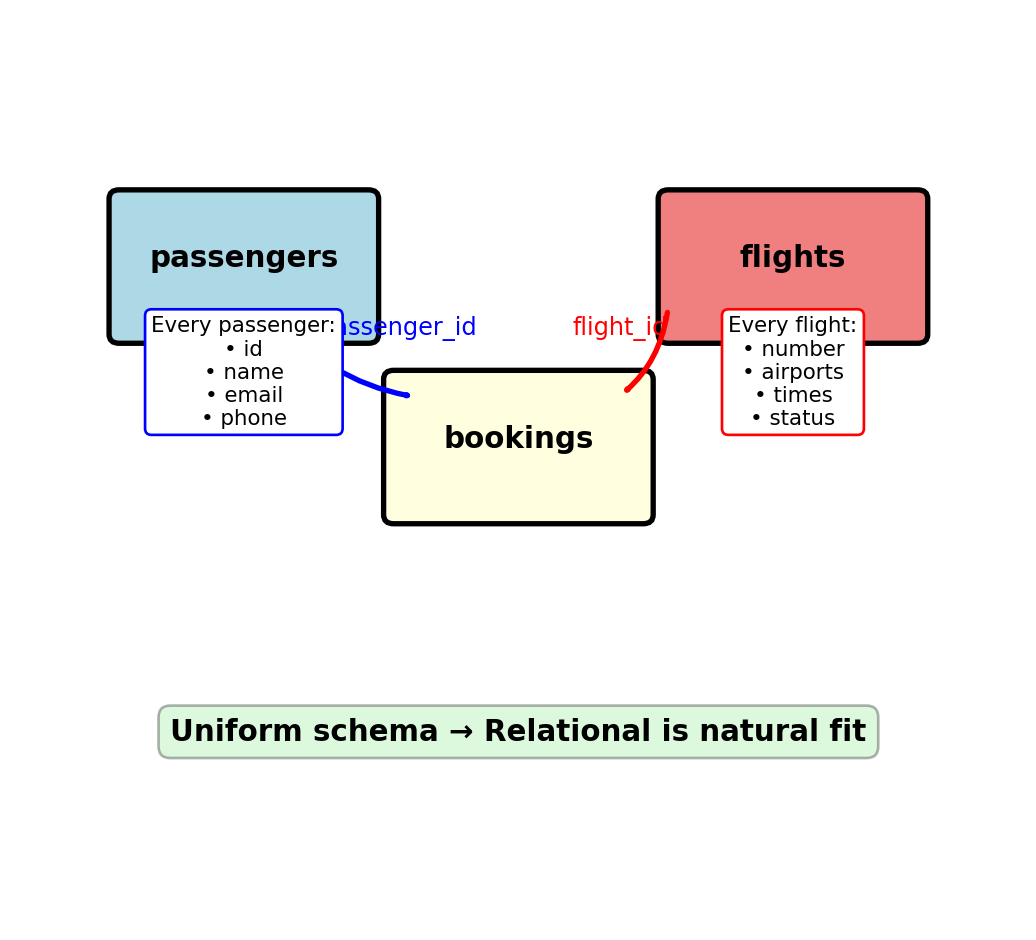
NoSQL and Distributed Databases
EE 547 - Unit 5
Nested Data Requires JOIN Operations for Reassembly
Application code thinks in objects:
# Natural object access
booking.passenger.frequent_flyer_number
booking.flight.departure_airport
booking.flight.aircraft.model
SQL requires JOIN to reassemble:
SELECT b.*, p.*, f.*, a.*
FROM bookings b
  JOIN passengers p ON b.passenger_id = p.passenger_id
  JOIN flights f ON b.flight_id = f.flight_id
  JOIN aircraft a ON f.aircraft_id = a.aircraft_id
WHERE b.booking_id = 12345;
Computational cost:
- Each JOIN: O(n log n) at best with indexes
- Three JOINs for three-level nesting
- Deeply nested structures → multiple JOINs
Worse: Comments on posts on forums
-- Get comment with post and forum context
SELECT c.*, p.*, f.*
FROM comments c
  JOIN posts p ON c.post_id = p.post_id
  JOIN forums f ON p.forum_id = f.forum_id;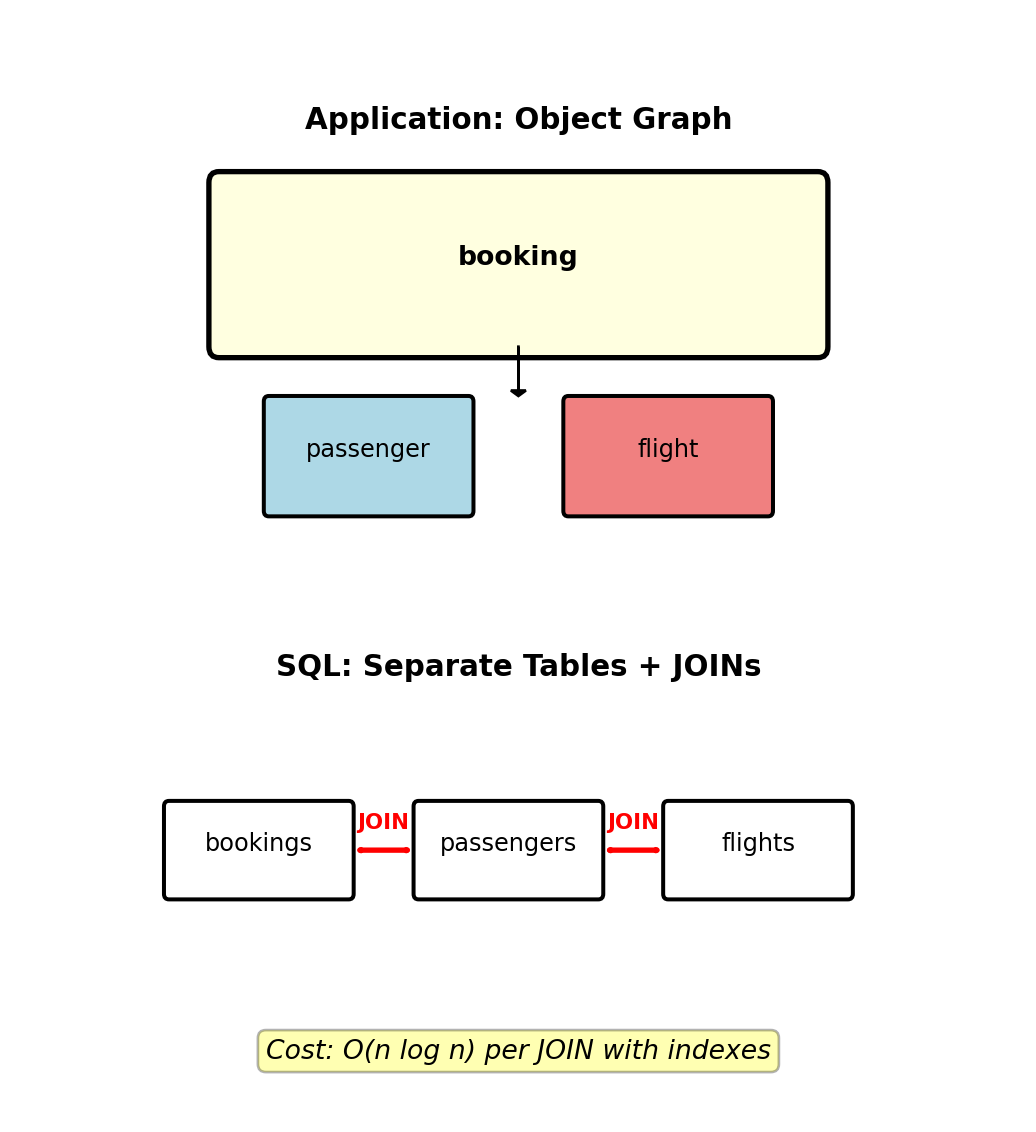
Impedance mismatch: Object hierarchy vs tabular relations
Every nested access = JOIN operation
Impedance Mismatch - Serialization Round-Trips
Impedance mismatch: Application code operates on object graphs, databases store flat tables. Moving data between these representations requires expensive translation.
Loading a passenger with 3 bookings and flight details:
# ORM loading pattern (N+1 query problem)
passenger = session.query(Passenger).get(123)  # 1 query
for booking in passenger.bookings:              # 1 query
    flight = booking.flight                     # 3 queries
    aircraft = flight.aircraft                  # 3 queries
# Total: 8 queries
Eager loading with JOINs:
SELECT p.*, b.*, f.*, a.*
FROM passengers p
  LEFT JOIN bookings b ON p.passenger_id = b.passenger_id
  LEFT JOIN flights f ON b.flight_id = f.flight_id
  LEFT JOIN aircraft a ON f.aircraft_id = a.aircraft_id
WHERE p.passenger_id = 123;
Result: Duplicated passenger data × 3 rows (one per booking)
Alternative: Serialize entire object as JSON
-- Store object as JSON blob
ALTER TABLE passengers ADD COLUMN data JSONB;
Problem: Lose query capability, indexing, constraints
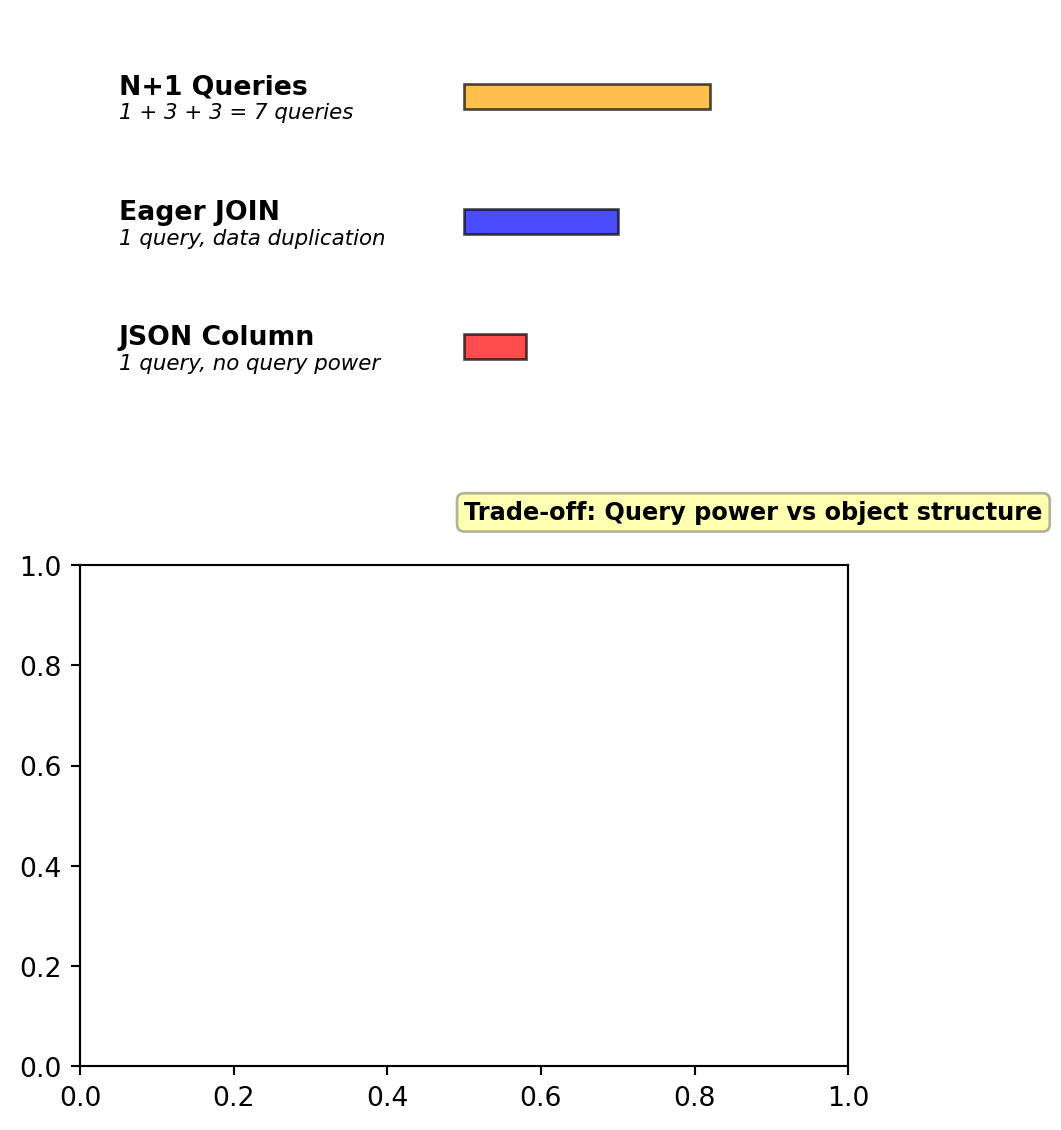
Load time for 1 passenger + 3 bookings:
- N+1 Queries: 45ms (7 roundtrips)
- Eager JOIN: 12ms (data duplication across rows)
- JSON Column: 3ms (no additional queries, but limited query power)
Each approach has serious drawbacks
Query Patterns That Fight Relational Structure
Relational optimized for:
- Get entity by ID: O(log n) with B-tree primary key
- Filter on indexed columns: O(log n)
- JOIN related tables: O(n log n)
Problematic patterns:
1. Path queries:
-- Flights connecting through exactly 2 hubs
SELECT f1.flight_number, f2.flight_number, f3.flight_number
FROM flights f1
  JOIN flights f2 ON f1.arrival_airport = f2.departure_airport
  JOIN flights f3 ON f2.arrival_airport = f3.departure_airport
WHERE f1.departure_airport = 'LAX'
  AND f3.arrival_airport = 'LHR'
  AND f1.arrival_airport NOT IN ('LAX', 'LHR')
  AND f2.arrival_airport NOT IN ('LAX', 'LHR');
Self-JOINs explode with path length
2. Sparse attribute filters:
-- Passengers with (gluten-free OR wheelchair) AND pet
SELECT DISTINCT ps1.passenger_id
FROM passenger_services ps1
WHERE ps1.passenger_id IN (
    SELECT passenger_id FROM passenger_services
    WHERE (service_key = 'meal' AND service_value = 'gluten-free')
       OR (service_key = 'wheelchair' AND service_value = 'true')
  )
  AND ps1.passenger_id IN (
    SELECT passenger_id FROM passenger_services
    WHERE service_key = 'pet_carrier' AND service_value = 'true'
  );
3. Full-text search:
-- Passengers whose names contain substring
SELECT * FROM passengers
WHERE first_name LIKE '%john%'
   OR last_name LIKE '%john%';
Cannot use B-tree index, requires full table scan
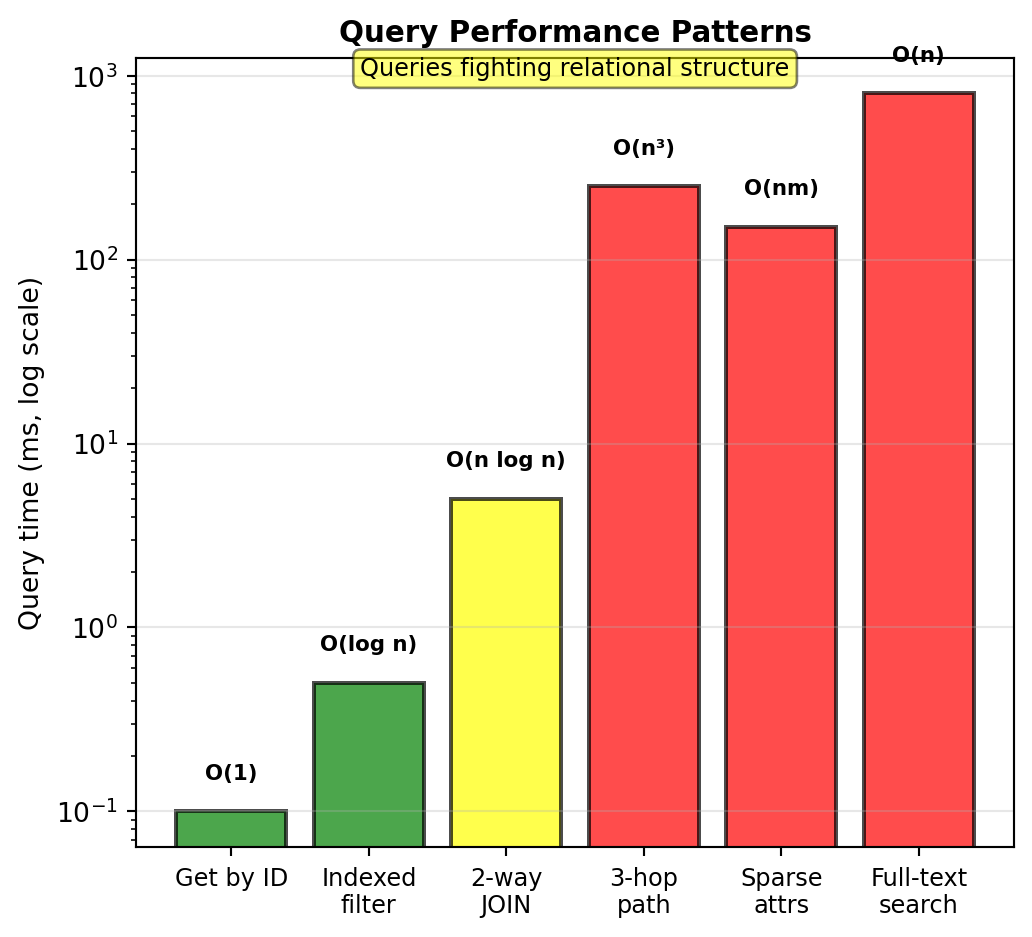
These work but feel forced, require complex queries, or full table scans
JSON Columns Provide Flexibility But Limits Query Power
PostgreSQL JSONB, MySQL JSON type:
ALTER TABLE passengers ADD COLUMN services JSONB;

-- Store variable data as JSON
INSERT INTO passengers (id, name, email, services)
VALUES (1, 'Alice', 'alice@example.com',
  '{"wheelchair": true, "meal": "vegetarian"}');

INSERT INTO passengers (2, 'Bob', 'bob@example.com',
  '{"meal": "gluten-free", "pet_carrier": true, "extra_legroom": true}');
Querying JSON data:
-- PostgreSQL JSONB operators
SELECT * FROM passengers
WHERE services->>'wheelchair' = 'true';

SELECT * FROM passengers
WHERE services ? 'meal'
  AND services->>'meal' = 'vegetarian';
Problems:
- Query optimization: Cannot use B-tree indexes on nested paths efficiently
- Partial indexes help but don’t solve fundamental issue
CREATE INDEX idx_wheelchair
ON passengers ((services->>'wheelchair'))
WHERE services->>'wheelchair' IS NOT NULL;- Type constraints lost: Everything is text in JSON
- No foreign key relationships inside JSON
Performance comparison:
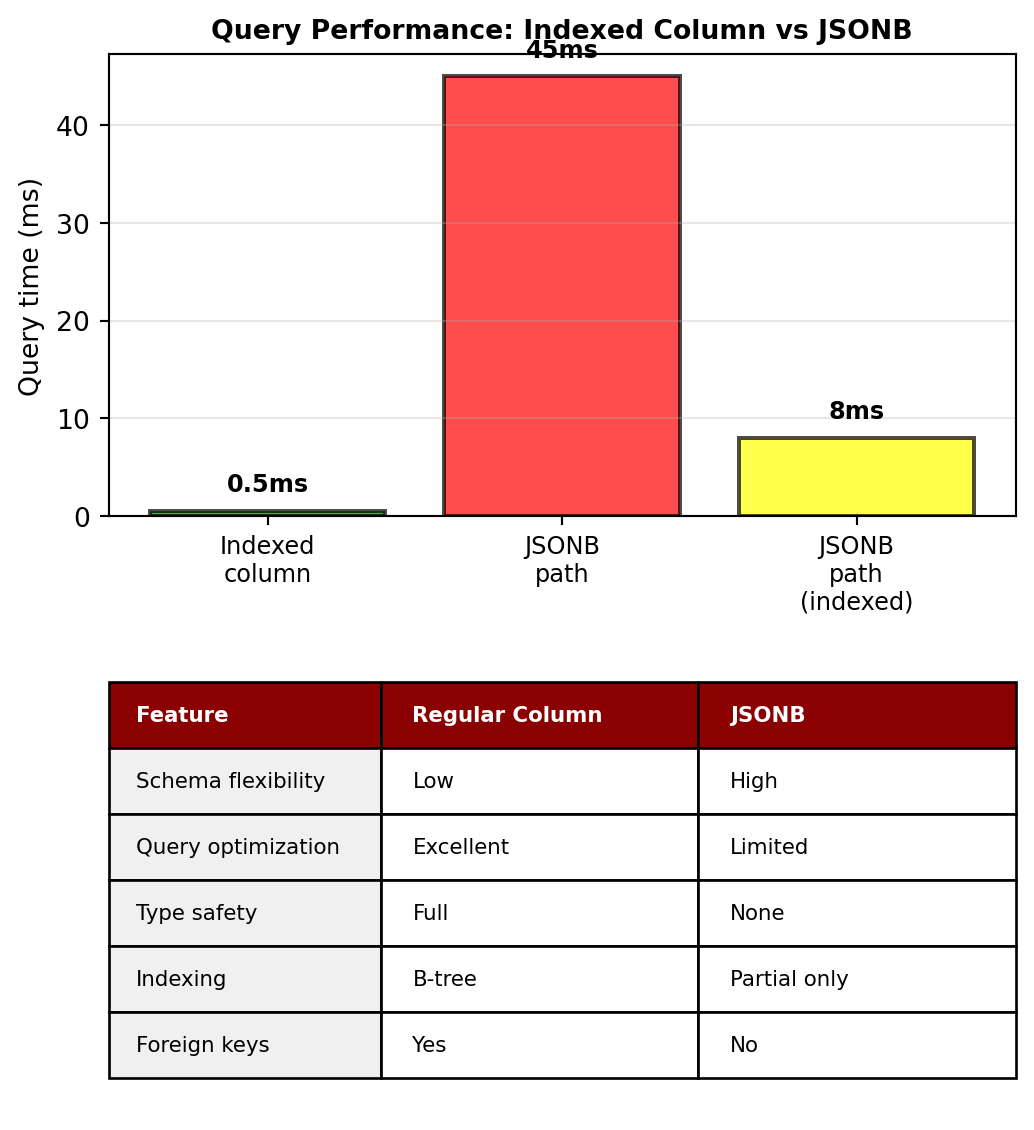
Result: Relational overhead without relational benefits for nested data
Better solutions exist when data is fundamentally non-tabular
Schema Evolution Under Load
Need to add column to flights table with 10M rows:
ALTER TABLE flights ADD COLUMN delay_minutes INTEGER;PostgreSQL behavior:
- Acquires ACCESS EXCLUSIVE lock
- Blocks ALL reads and writes during operation
- On large tables: Minutes of downtime
- Application connections timeout and fail
Timing for different table sizes:
| Rows | ALTER TABLE time |
|---|---|
| 10K | ~1 second |
| 100K | ~10 seconds |
| 1M | ~30 seconds |
| 10M | ~5 minutes |
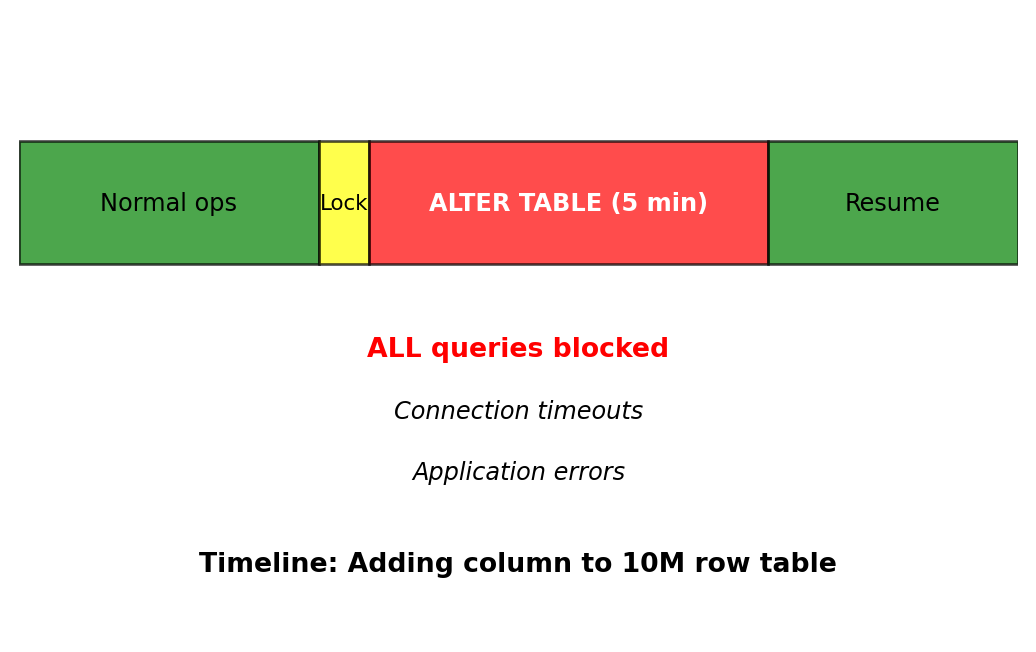
Zero-downtime migration requires shadow table (complexity: high, time: hours)
Application-level workaround (complex):
- Create shadow table with new schema
- Implement dual-write to both tables
- Backfill old data to new table
- Switch application to new table
- Drop old table
Error-prone:
- Maintaining data consistency during migration
- Coordinating application deployments
- Rollback strategy if issues arise
Relational Normalizes, NoSQL Denormalizes
Relational modeling:
- Normalize to 3NF, eliminate redundancy
- Single source of truth for each fact
- JOIN to assemble complete views
NoSQL modeling:
- Start with queries, store data for read patterns
- Redundancy acceptable for query performance
- Trade storage and update complexity for read simplicity
Example: Flight booking confirmation email
Relational approach: JOIN 5 tables
SELECT b.booking_reference, p.name, p.email,
       f.flight_number, f.scheduled_departure,
       d.name AS departure_city,
       a.name AS arrival_city,
       ac.model AS aircraft_type
FROM bookings b
  JOIN passengers p ON b.passenger_id = p.passenger_id
  JOIN flights f ON b.flight_id = f.flight_id
  JOIN airports d ON f.departure_airport = d.airport_code
  JOIN airports a ON f.arrival_airport = a.airport_code
  JOIN aircraft ac ON f.aircraft_id = ac.aircraft_id
WHERE b.booking_id = 12345;
NoSQL approach: Store complete confirmation in booking document
{
  "booking_id": 12345,
  "booking_reference": "ABC123",
  "passenger": {
    "name": "Alice Chen",
    "email": "alice@example.com"
  },
  "flight": {
    "number": "UA123",
    "departure": "2025-02-15T08:30:00Z",
    "departure_city": "Los Angeles",
    "arrival_city": "New York",
    "aircraft": "Boeing 737"
  }
}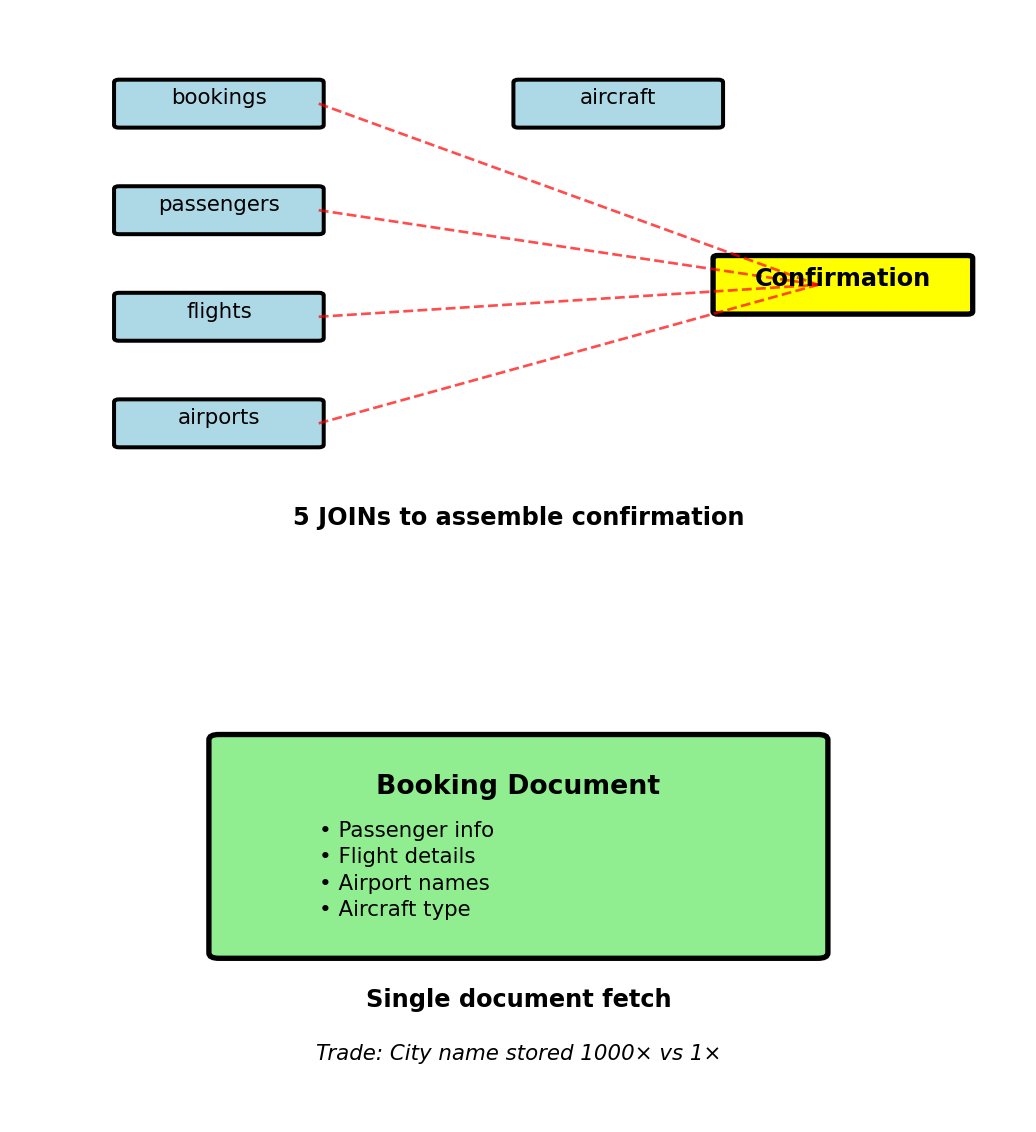
Update cost: User name changes → update in 1000 places vs 1 place
When acceptable: Reads >> Writes (confirmation viewed 100× more than user changes name)
Embedding - Passenger Special Services
Earlier Problem: Variable passenger services
- Wheelchair assistance
- Meal preferences
- Pet carrier
- Varying per passenger
Document approach: Embed services as nested object
{
  "passenger_id": 123,
  "name": "Alice Chen",
  "email": "alice@example.com",
  "phone": "+1-555-0123",
  "services": {
    "wheelchair": true,
    "meal": "vegetarian",
    "pet_carrier": true,
    "seat_preference": "aisle",
    "medical_oxygen": false
  },
  "frequent_flyer": {
    "number": "FF123456",
    "tier": "Gold",
    "miles": 85000
  }
}
Why embed:
- Accessed together in primary query pattern
- Small size (<1KB total)
- No independent existence
- Services have no meaning without passenger context
Single document fetch gets everything
No NULL columns for passengers without services
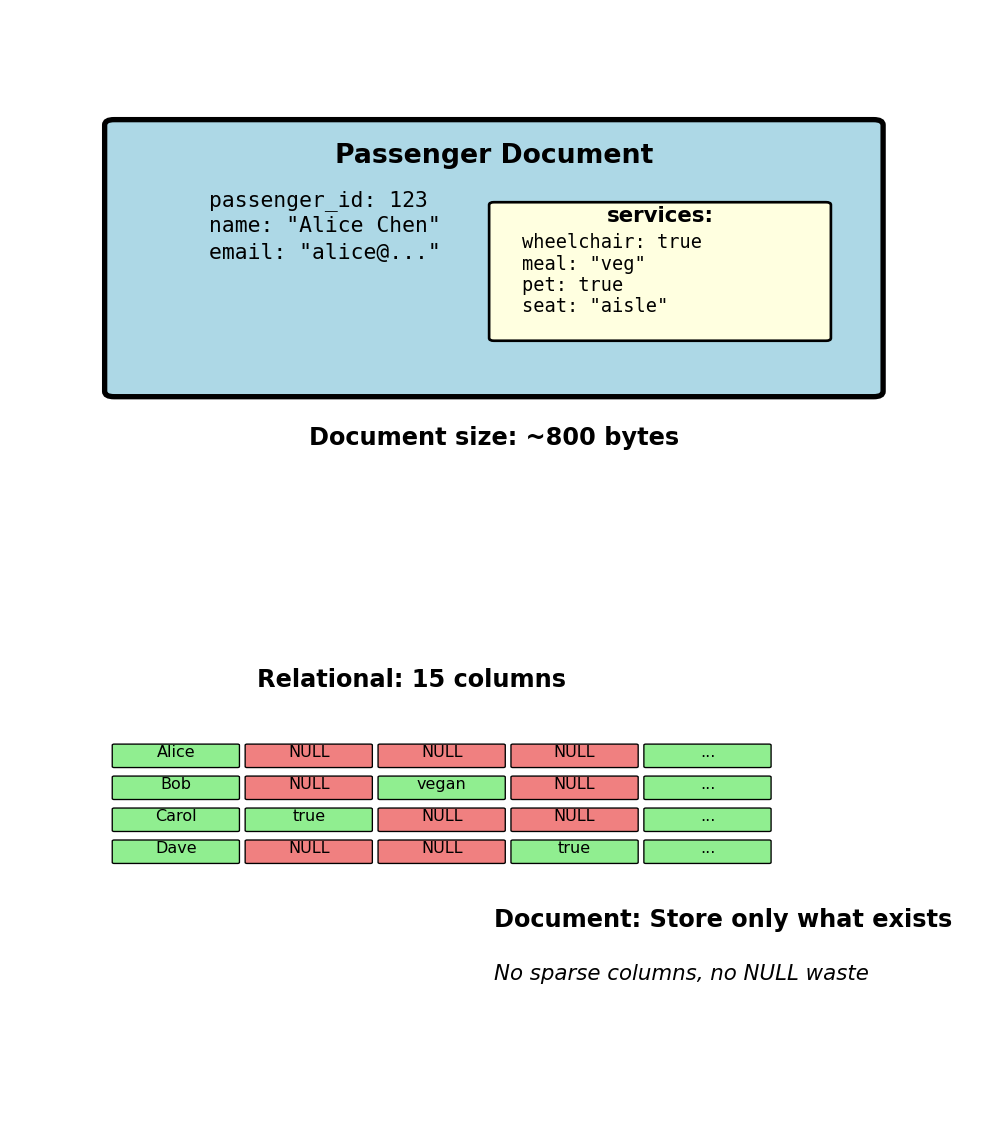
Store only what exists, no wasted NULL storage
Sensor Data - Partition by Sensor ID
Partition strategy: All data for sensor_id on same server
Physical layout across 5 servers:
- Server 1: sensor_id 0-19,999 (20K sensors)
- Server 2: sensor_id 20,000-39,999
- Server 3: sensor_id 40,000-59,999
- Server 4: sensor_id 60,000-79,999
- Server 5: sensor_id 80,000-99,999
Each server stores:
sensor_id | timestamp           | temperature
----------|--------------------|-----------
40000     | 2025-01-15 00:00  | 21.0
40000     | 2025-01-15 00:01  | 21.1
40000     | 2025-01-15 00:02  | 21.2
...
40001     | 2025-01-15 00:00  | 19.5
Query 1: “Sensor 42000, last 24 hours”
- Hash(42000) → Server 3
- Route query to single server
- Single server processes query
- Fast: O(1) routing, O(log n) within server
Query 2: “Average temperature all sensors”
- Must contact all 5 servers
- Each computes local average
- Coordinator aggregates results
- Slow: 5× network calls
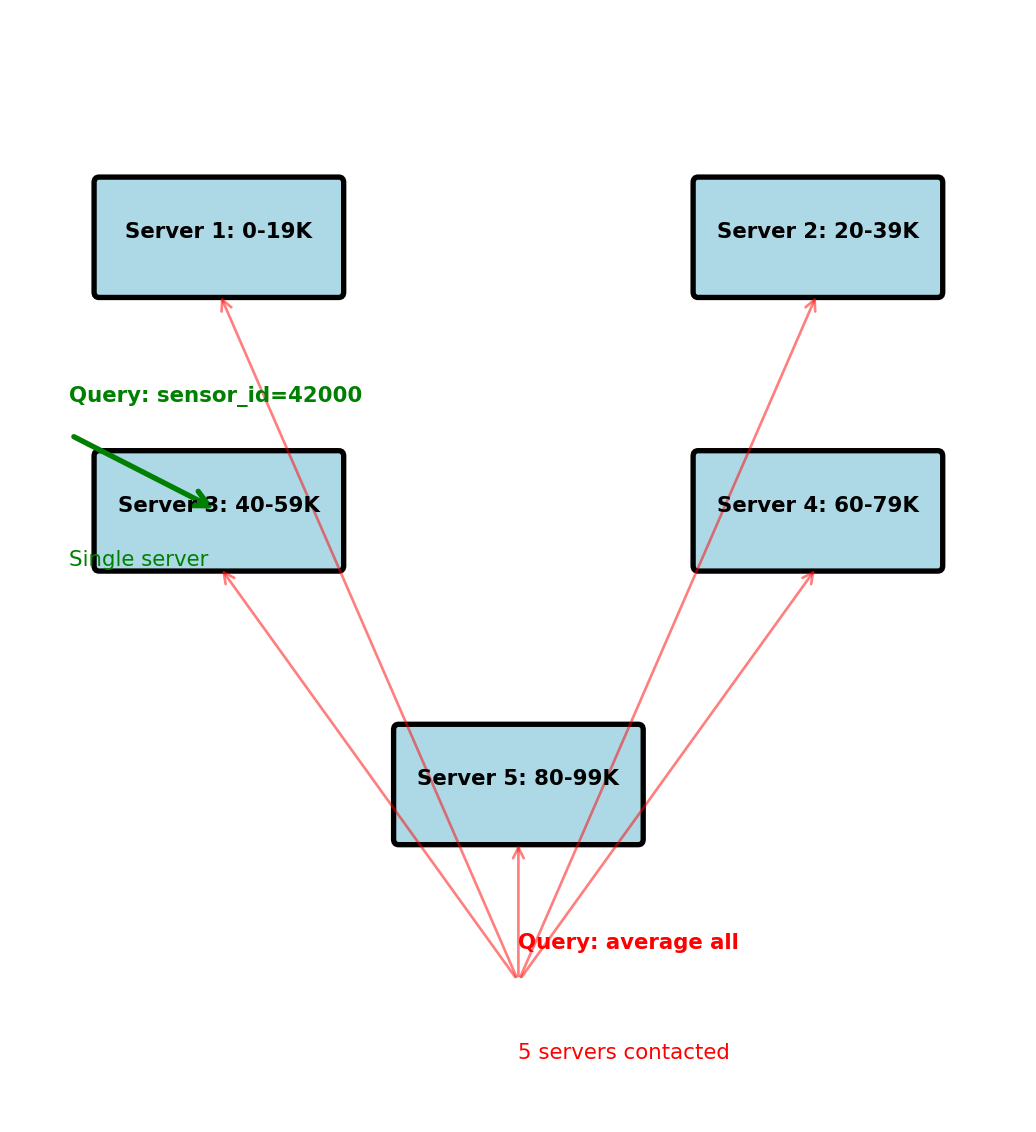
Performance:
- Single sensor query: ~5ms
- All sensors query: ~50ms (parallel) + aggregation
Partition key determines query efficiency
Sensor Data - Row Structure Optimized for Queries
Query requirement: Readings with metadata
- Location where sensor installed
- Sensor type and calibration info
- Building/floor information
Relational approach (bad for distributed):
-- Metadata on central server
CREATE TABLE sensors (
  sensor_id INT PRIMARY KEY,
  location VARCHAR(100),
  building VARCHAR(50),
  sensor_type VARCHAR(20)
);

-- Readings partitioned across 5 servers
CREATE TABLE readings (
  sensor_id INT,
  timestamp TIMESTAMP,
  temperature FLOAT,
  FOREIGN KEY (sensor_id) REFERENCES sensors
);
Query needs metadata:
- Fetch metadata from central server
- Fetch readings from data server
- Join in application = 2 network round-trips
Denormalized approach:
{
  "sensor_id": 42000,
  "timestamp": "2025-01-15T10:30:00Z",
  "temperature": 22.5,
  "location": "Building A, Floor 3, Room 301",  // Duplicated
  "sensor_type": "indoor_temp",                  // Duplicated
  "building": "Building A"                       // Duplicated
}
Storage trade-off:
- +40 bytes per reading (metadata)
- 263B readings × 40 bytes = 10.5TB extra
- Total: 23.5TB vs 13TB
Query performance:
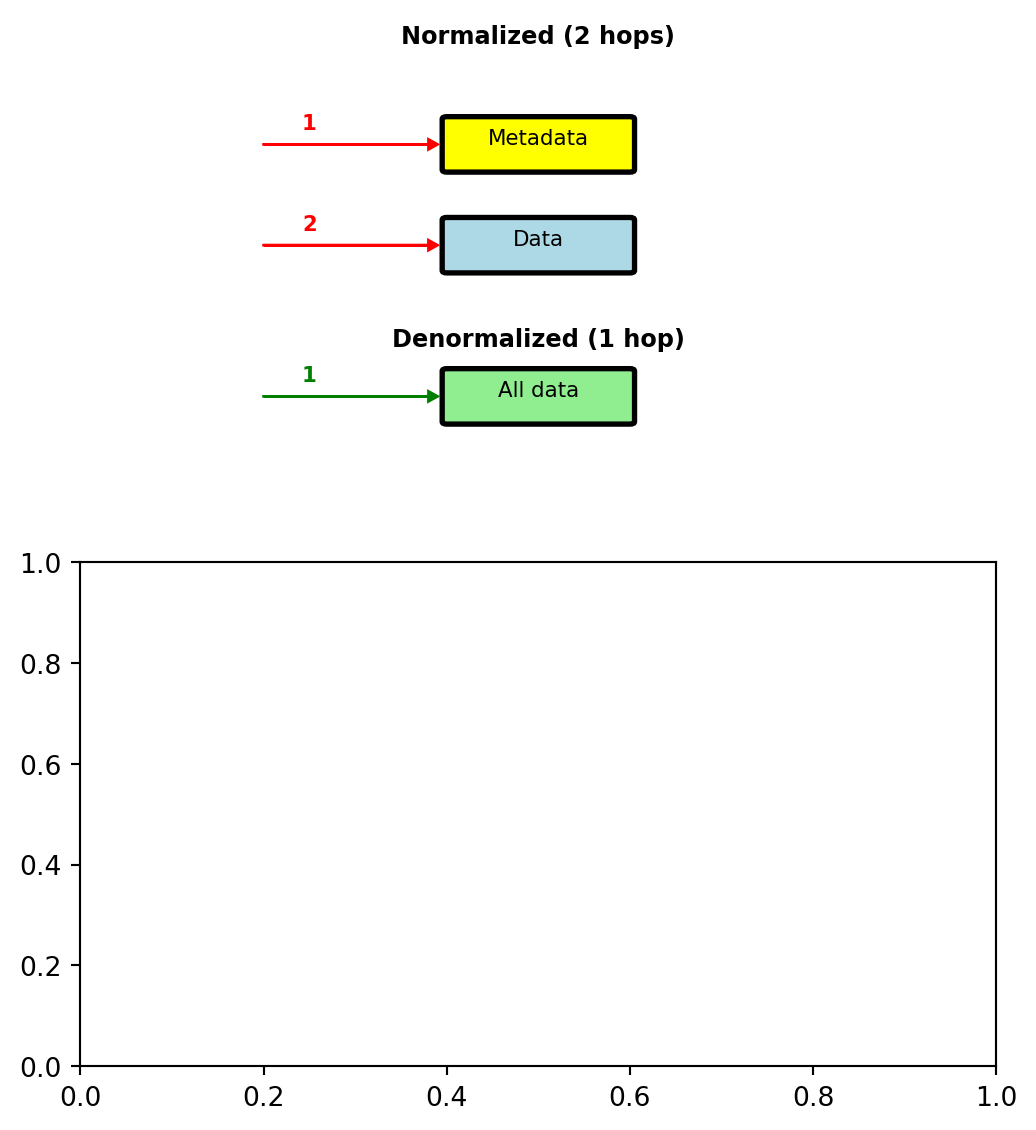
Query performance:
- Normalized: 25ms (2 server roundtrips)
- Denormalized: 5ms (single server)
Update frequency:
- Sensor location changes: ~1 per month
- Temperature readings: 100K per minute
Denormalization justified by read:write ratio
Sensor Data - Compound Sort Key for Time Queries
Data on Server 3 (sensor_id 40,000-59,999):
- Primary: Partition by sensor_id
- Secondary: Sort by timestamp within partition
Physical layout on disk:
Partition: sensor_id=40000
--------------------------
timestamp            | temp
2025-01-15 00:00:00 | 21.0
2025-01-15 00:01:00 | 21.1
2025-01-15 00:02:00 | 21.2
...
2025-01-15 23:59:00 | 20.8

Partition: sensor_id=40001
--------------------------
timestamp            | temp
2025-01-15 00:00:00 | 19.5
2025-01-15 00:01:00 | 19.6
...
Query: “sensor_id=40000 between 10:00 and 12:00”
- Hash(40000) → locate partition
- Binary search to find 10:00:00
- Sequential scan until 12:00:00
- Return ~120 readings
Efficient: O(log n) + O(k) where k = result size
Cannot efficiently query: “All sensors at 10:00”
- Would scan all 20,000 partitions on this server
- Then contact other 4 servers
- Query pattern not supported by layout
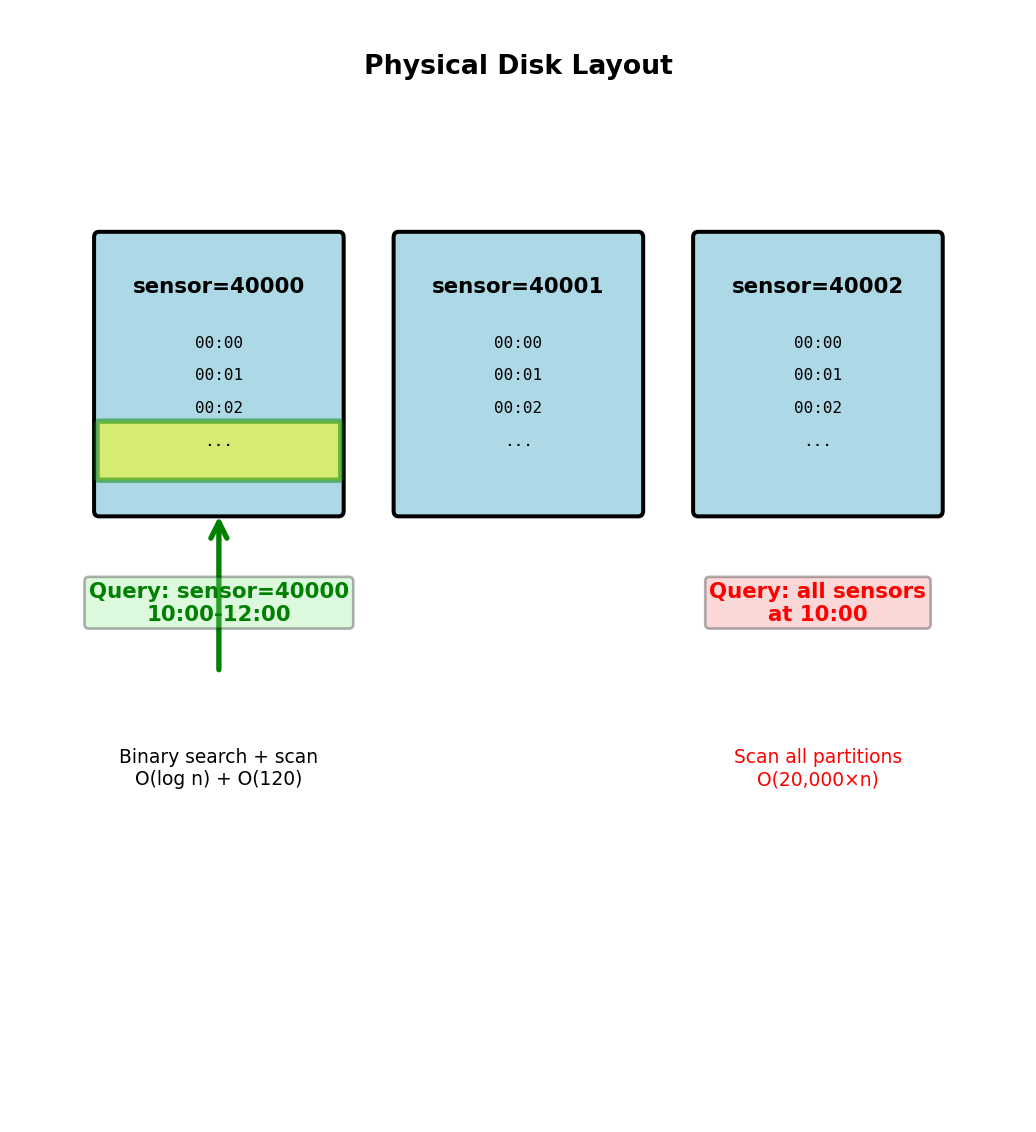
Sort order within partition provides O(log n) range queries
Multiple Access Patterns Require Multiple Tables
Two different access patterns:
Pattern 1: Recent readings by sensor
- “Get sensor 42000 for last 24 hours”
- Need: Partition by sensor_id, sort by timestamp
Pattern 2: All sensors at specific time
- “Get all sensors at 10:00-11:00”
- Need: Partition by timestamp, sort by sensor_id
Same data, stored twice:
-- Table 1: Optimized for sensor queries
CREATE TABLE readings_by_sensor (
  sensor_id INT,        -- Partition key
  timestamp TIMESTAMP,  -- Sort key
  temperature FLOAT,
  location TEXT,
  PRIMARY KEY (sensor_id, timestamp)
);

-- Table 2: Optimized for time queries
CREATE TABLE readings_by_time (
  time_bucket INT,      -- Partition key (hour)
  sensor_id INT,        -- Sort key
  temperature FLOAT,
  location TEXT,
  PRIMARY KEY (time_bucket, sensor_id)
);
Write path: Application writes to both tables
Read path: Query router chooses table based on pattern
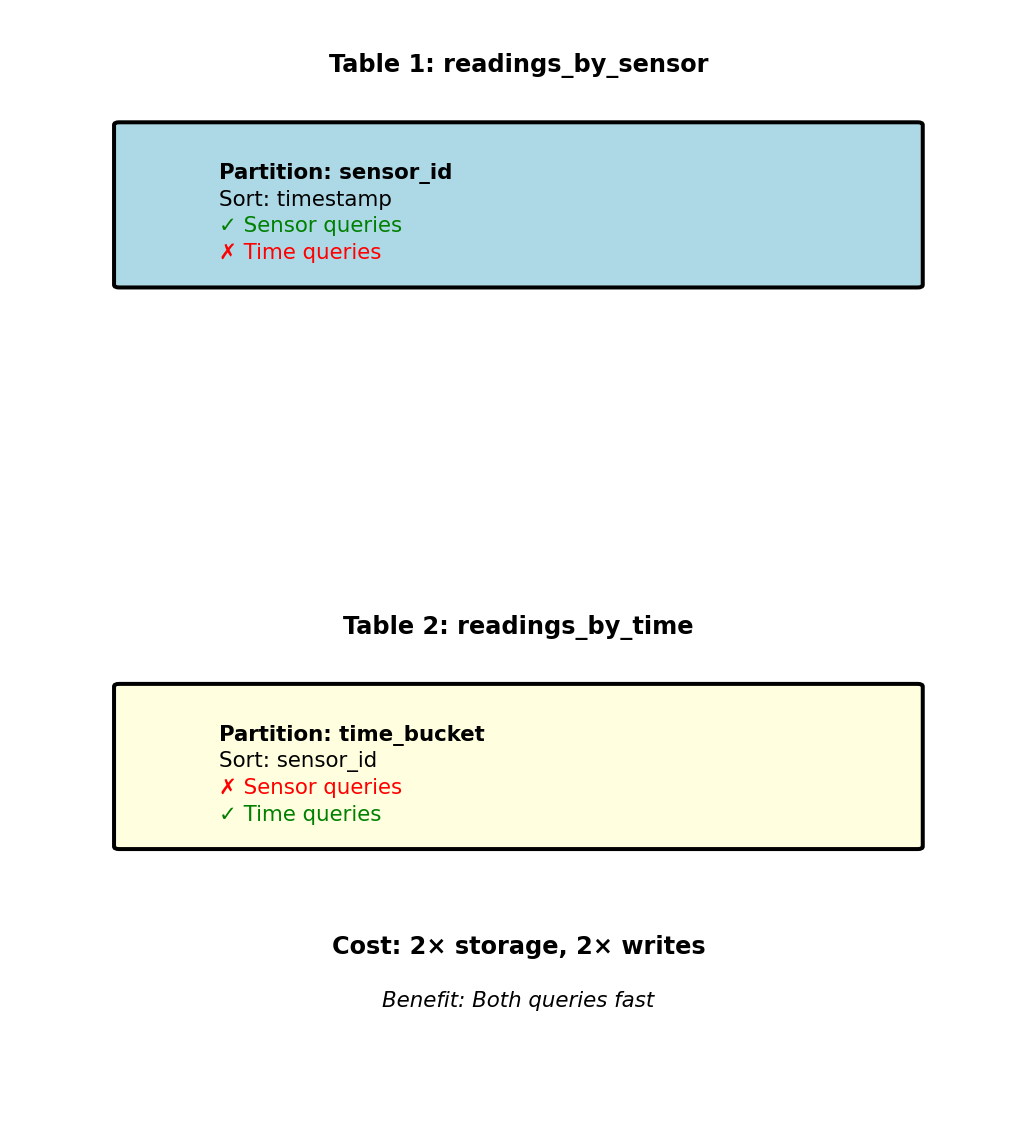
Cannot optimize single table for both patterns
Trade storage and write complexity for query performance
NoSQL Data Modeling Anti-Pattern - Relational Thinking
Anti-pattern: Normalize sensor data
// Sensors collection (metadata)
{
  "sensor_id": 42000,
  "location": "Building A, Floor 3",
  "sensor_type": "indoor_temp",
  "calibration_date": "2024-01-15"
}

// Readings collection (data)
{
  "reading_id": 999999,
  "sensor_id": 42000,  // Reference
  "timestamp": "2025-01-15T10:30:00Z",
  "temperature": 22.5
}
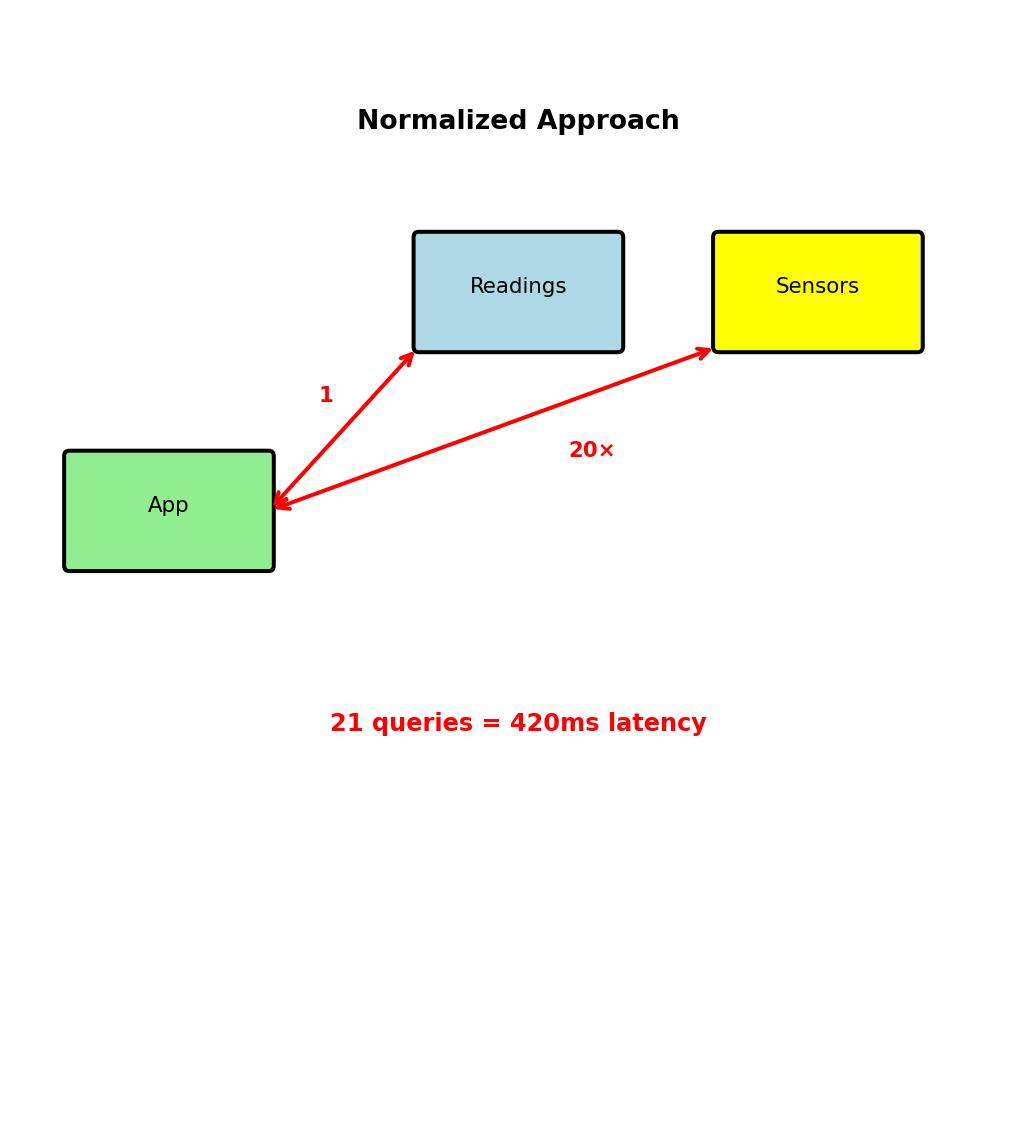
Query to display dashboard (100 recent readings):
- Fetch 100 readings from readings collection
- Extract unique sensor_ids
- Fetch sensor metadata for each unique sensor
- Join in application
Problem:
- 100 readings from 20 sensors = 21 queries
- Network latency: 20ms × 21 = 420ms
- Dashboard refresh every second? Impossible
Correct approach: Denormalize
- Store location with every reading
- Single query returns everything
- Latency: 20ms total (21× faster)
Relational normalization creates N+1 query problem
When Denormalization Breaks - Update Anomalies
Scenario: Sensor relocated (Building A → Building B)
With denormalization, location stored in:
- 1,440 readings per day (every minute)
- 43,200 readings per month
- 518,400 readings per year
Update options:
Option 1: Update all historical records
db.readings.updateMany(
  {sensor_id: 42000},
  {$set: {location: "Building B, Floor 2"}}
)- 518,400 documents updated
- Takes minutes on distributed system
- Blocks other operations
- Historical data now incorrect
Option 2: Update going forward only
- Historical: “Building A”
- Current: “Building B”
- Query results inconsistent
- Acceptable for time-series
Option 3: Versioned metadata
{
  "sensor_id": 42000,
  "timestamp": "2025-01-15T10:30:00Z",
  "temperature": 22.5,
  "metadata_version": 3  // Reference version
}
More complex queries, additional lookup
When denormalization acceptable:
- Reads significantly outnumber writes
- Updates rare (monthly)
- Eventual consistency OK
- Historical accuracy not critical
When to avoid:
- Frequent updates (prices change hourly)
- Strong consistency required (inventory)
- Write-heavy workloads
- Regulatory accuracy requirements
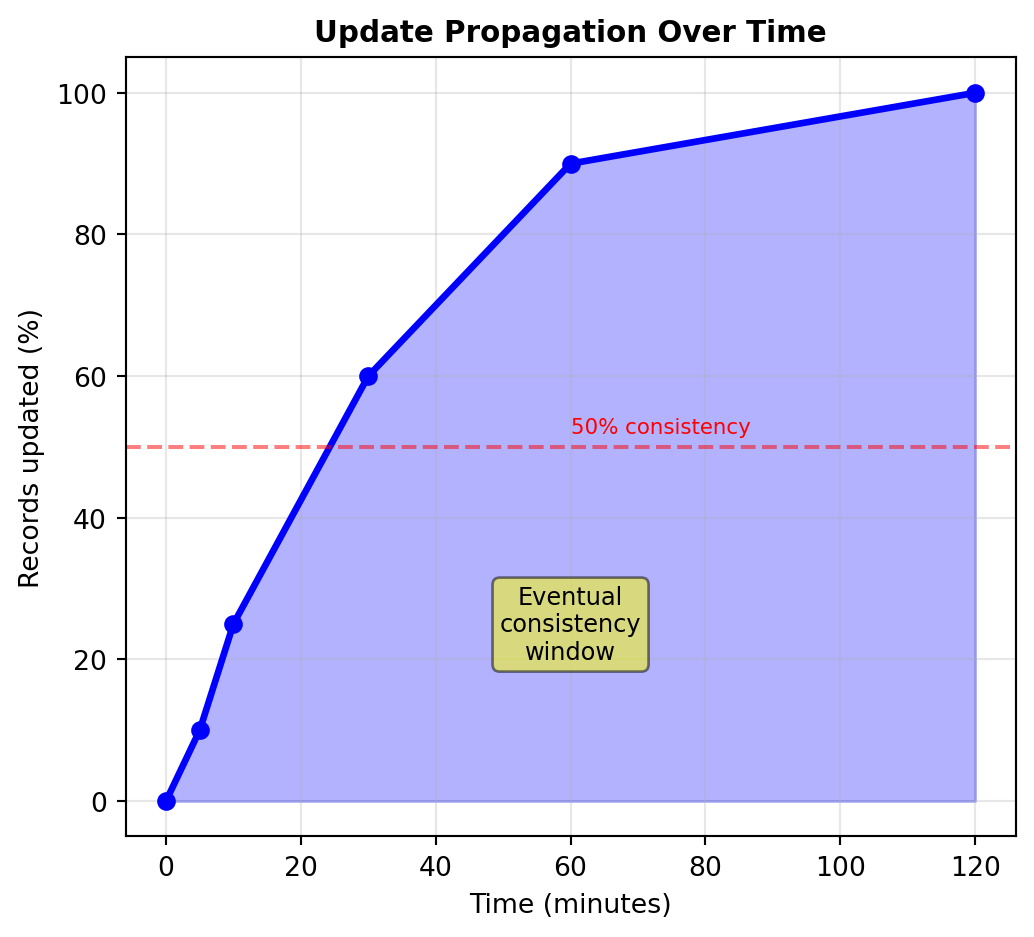
Trade-off: Read performance vs update complexity
Partitioning Splits Data Across Nodes
Partition = subset of data assigned to one node
Example: 10M users, 10 nodes
- Each node stores 1M users
- Query routes to node containing requested data
Two partitioning strategies:
Hash-based partitioning:
node = hash(user_id) % num_nodes

hash("alice") = 0x7a3f → Node 7
hash("bob") = 0x2c91 → Node 2
hash("carol") = 0x9e5d → Node 9
Characteristics:
- Even distribution (no hotspots)
- Random assignment
- Range queries scan all nodes
Range-based partitioning:
A-B → Node 1
C-E → Node 2
F-J → Node 3
...
Z → Node 10

"alice" → Node 1
"bob" → Node 1
"carol" → Node 2
Characteristics:
- Range scans stay on few nodes
- Risk: Hotspots if data skewed
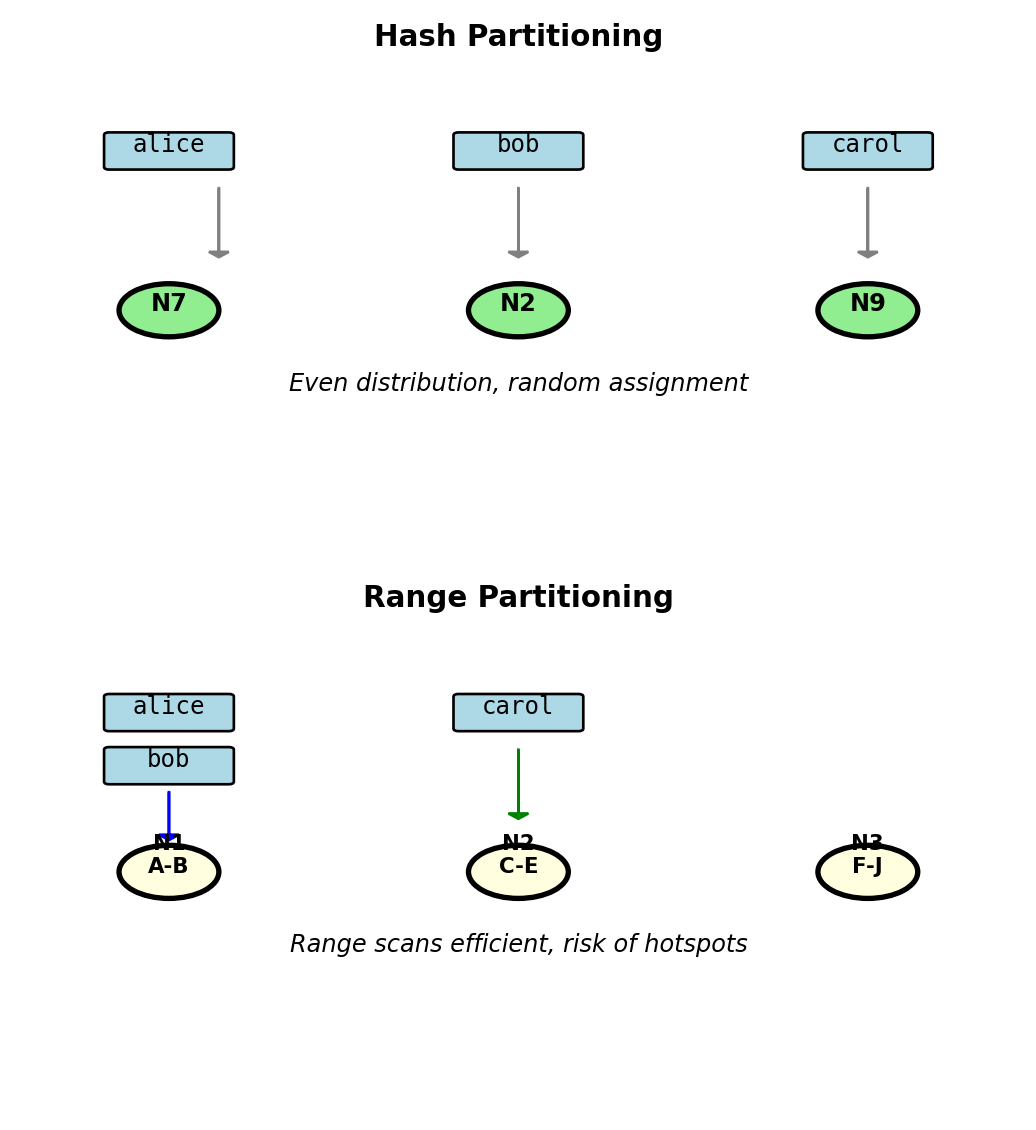
Trade-off: Even load vs efficient range queries
Partition Key Determines Data Location and Query Routing
Partition key = attribute used to determine node assignment
Example: E-commerce orders table
Option 1: Partition by user_id
-- Efficient: Single node
SELECT * FROM orders WHERE user_id = 123;
→ hash(123) = Node 4 → Query Node 4 only

-- Expensive: All nodes
SELECT * FROM orders WHERE order_date = '2024-10-07';
→ Must query all 10 nodes, merge results
Option 2: Partition by order_date
-- Efficient: Single node
SELECT * FROM orders WHERE order_date = '2024-10-07';
→ '2024-10-07' in range for Node 3 → Query Node 3 only

-- Expensive: All nodes
SELECT * FROM orders WHERE user_id = 123;
→ Date unknown, must query all 10 nodes
Partition key choice optimizes one access pattern at expense of others
Cost of wrong choice:
- Single-node query: 10ms latency
- Cross-partition query: 10 nodes × 10ms = 100ms latency
- Plus: Network coordination overhead
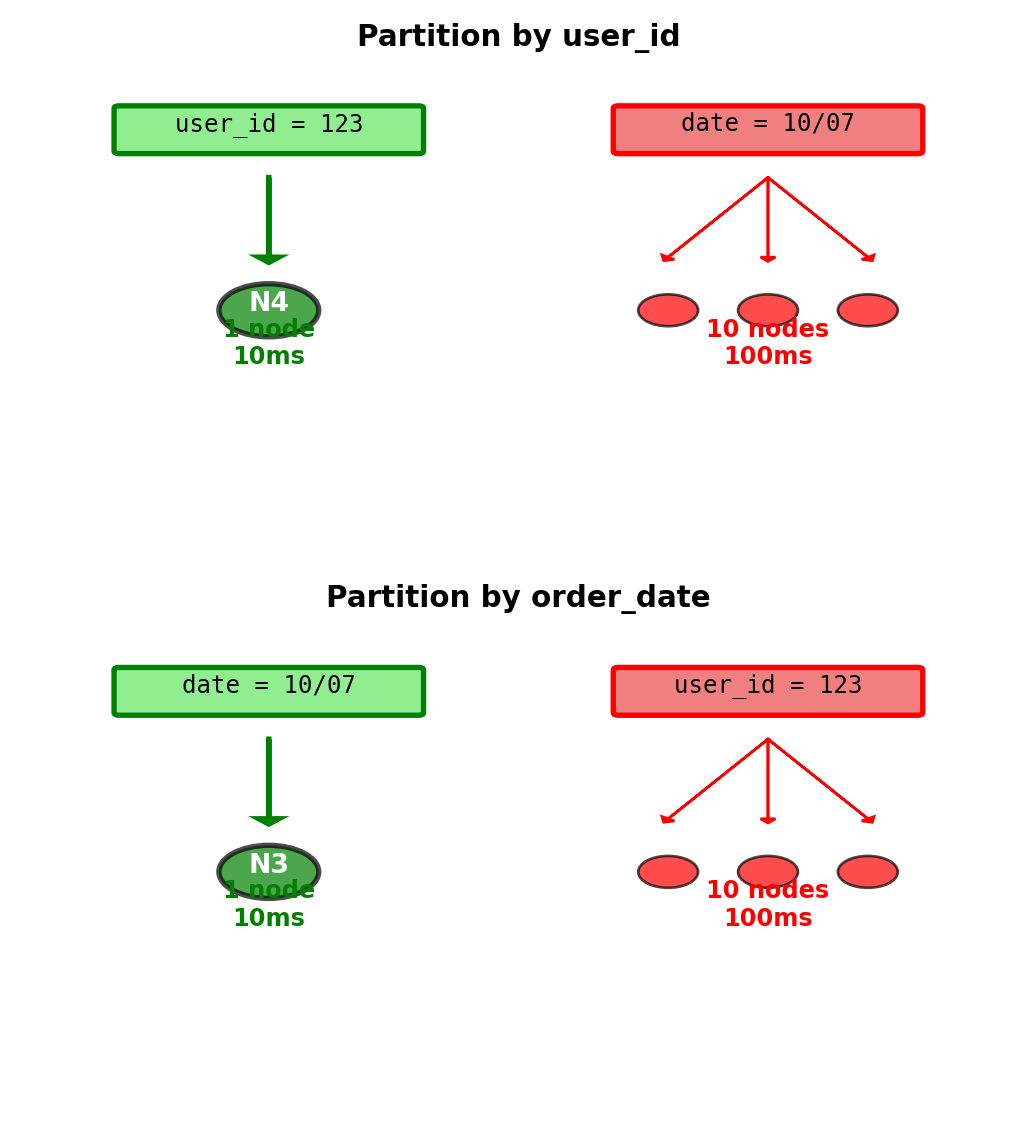
Partition key choice determines which queries are efficient
Replication Provides Redundancy
Replication = store multiple copies of data on different nodes
Why replicate:
1. Fault tolerance:
- Disk failure: 0.5% annual failure rate
- With 100 nodes: Expect 1 failure every 2 months
- Without replication: Data loss
- With 3 replicas: 2 copies survive
2. Read scaling:
- Primary handles writes
- Replicas handle reads
- 3 replicas = 3× read capacity
3. Geographic distribution:
- US datacenter + EU datacenter + Asia datacenter
- Place replica near users: 10ms vs 200ms latency
Standard configuration: N=3 replicas
Example: Partition A (users 0-999,999)
- Primary: Node 1 (handles writes)
- Replica 1: Node 2 (handles reads)
- Replica 2: Node 3 (handles reads)
Storage cost: 3× disk space
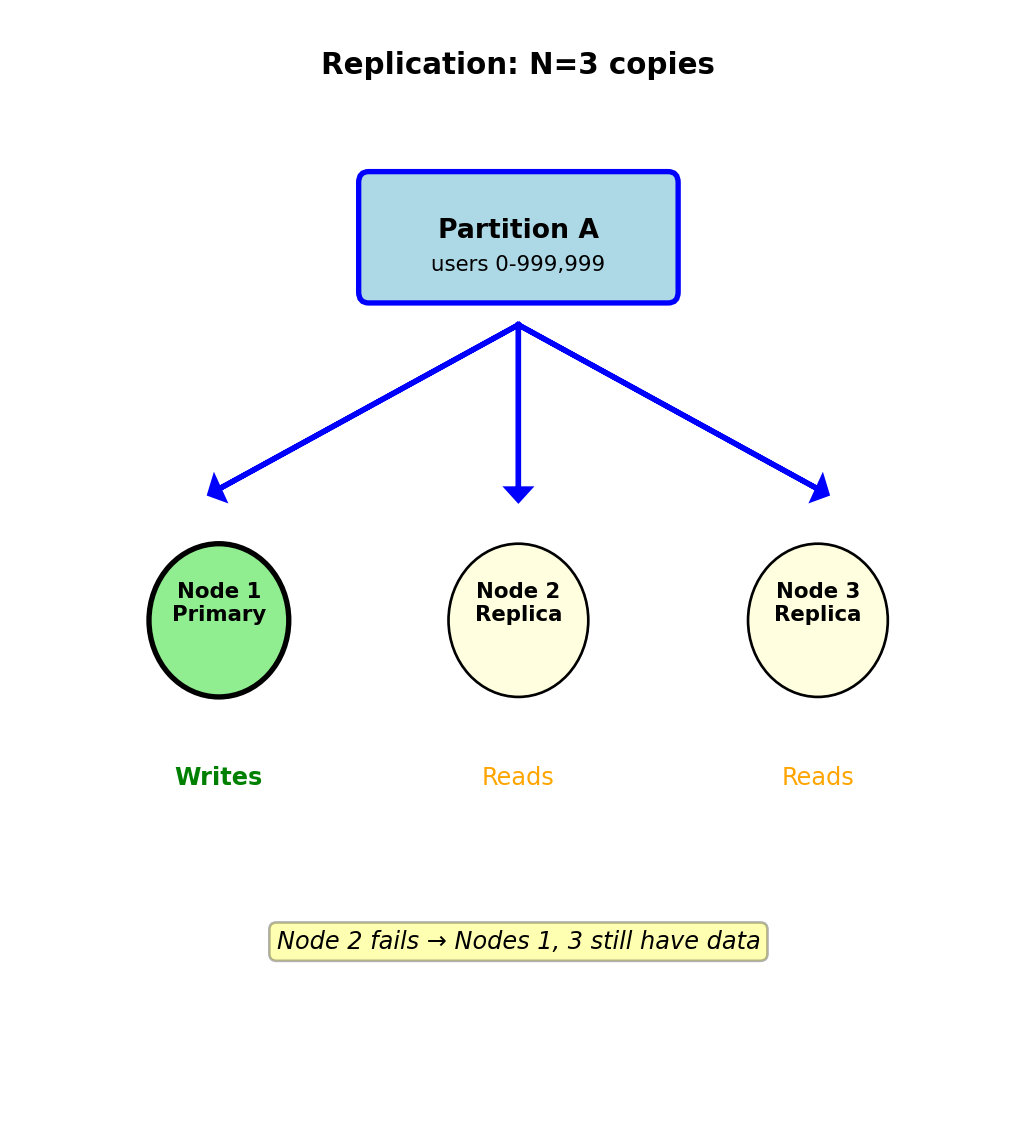
3 replicas = survive 2 simultaneous failures
Replication Creates Consistency Problem
Write must propagate from primary to replicas
Write flow:
- Client sends write to Primary (Node 1)
- Primary updates local copy
- Primary sends update to Replicas (Nodes 2, 3)
- Replicas acknowledge receipt
Network latencies:
- Same datacenter: 1-5ms between nodes
- Cross-datacenter: 50-200ms
- Replica may be temporarily offline
Critical question: When does write “succeed”?
Option A: Wait for all replicas (synchronous)
Client → Primary (5ms) → Wait for replicas (50ms)
Total latency: 55ms
If replica offline: Write fails
Result: All nodes have same data (consistent)
Option B: Return immediately (asynchronous)
Client → Primary (5ms) → Return success
Replicas updated in background (async)
Total latency: 5ms
If replica offline: Write still succeeds
Result: Replicas temporarily stale (inconsistent)
Trade-off: 5ms vs 55ms response time
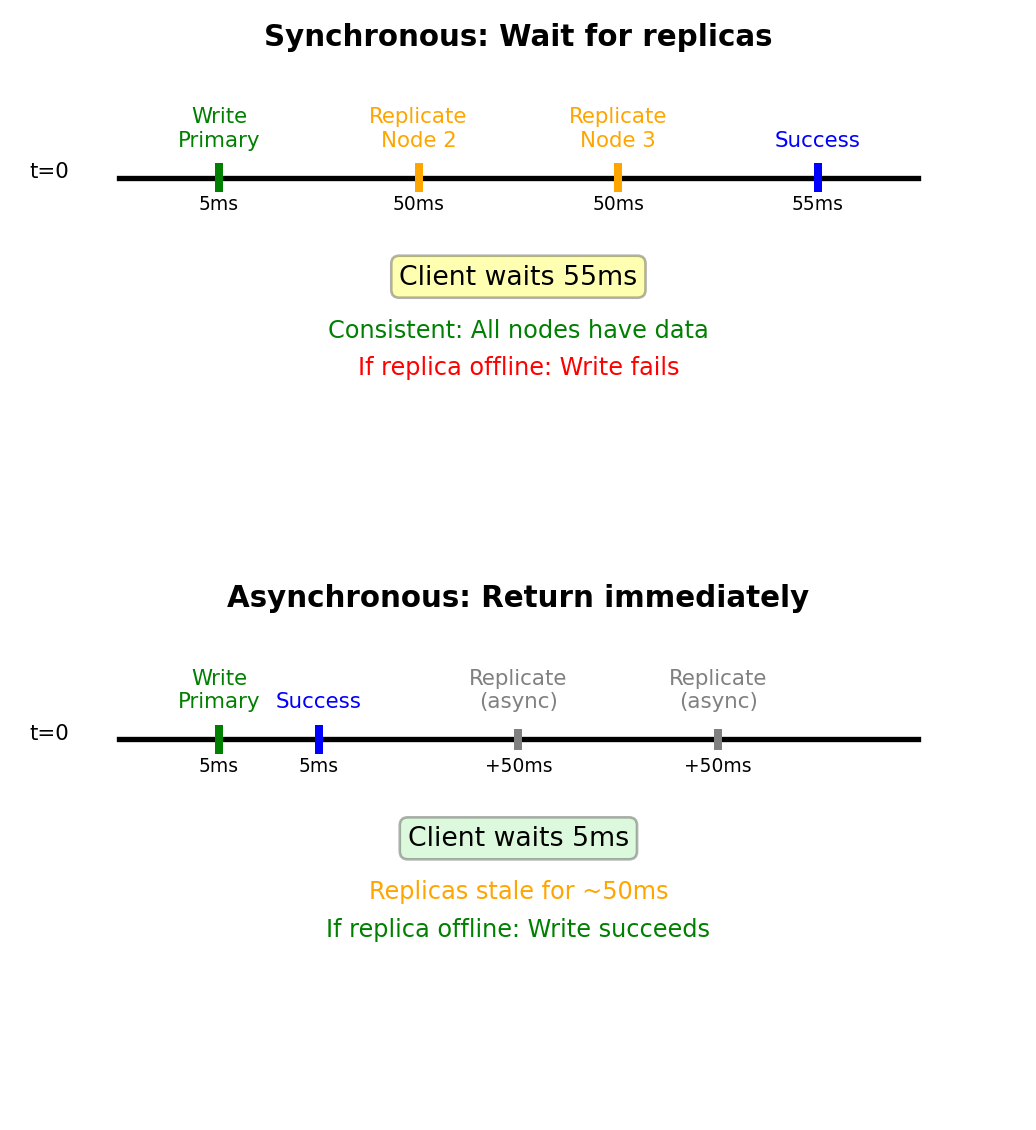
Consistency vs latency vs availability trade-off
Network Partitions Split Clusters
Network partition = nodes cannot communicate due to network failure
Common causes:
- Switch failure in datacenter
- Fiber cable cut (construction accident)
- Network misconfiguration
- AWS documented frequency: ~0.1% of requests see partition effects
Example: 3-node cluster [A, B, C]
Normal operation:
- All nodes communicate
- Writes propagate A → B → C
Network partition occurs:
- Network splits: [Node A] isolated from [Nodes B, C]
- Both sides still operational
- Both sides think they’re correct
Critical problem: Neither side knows if other side crashed or network failed
Duration:
- Seconds: Brief network glitch
- Minutes: Switch reboot
- Hours: Waiting for human intervention (fiber repair)
During partition:
- Both sides may accept writes
- Creates conflicting data versions
- Must resolve after partition heals
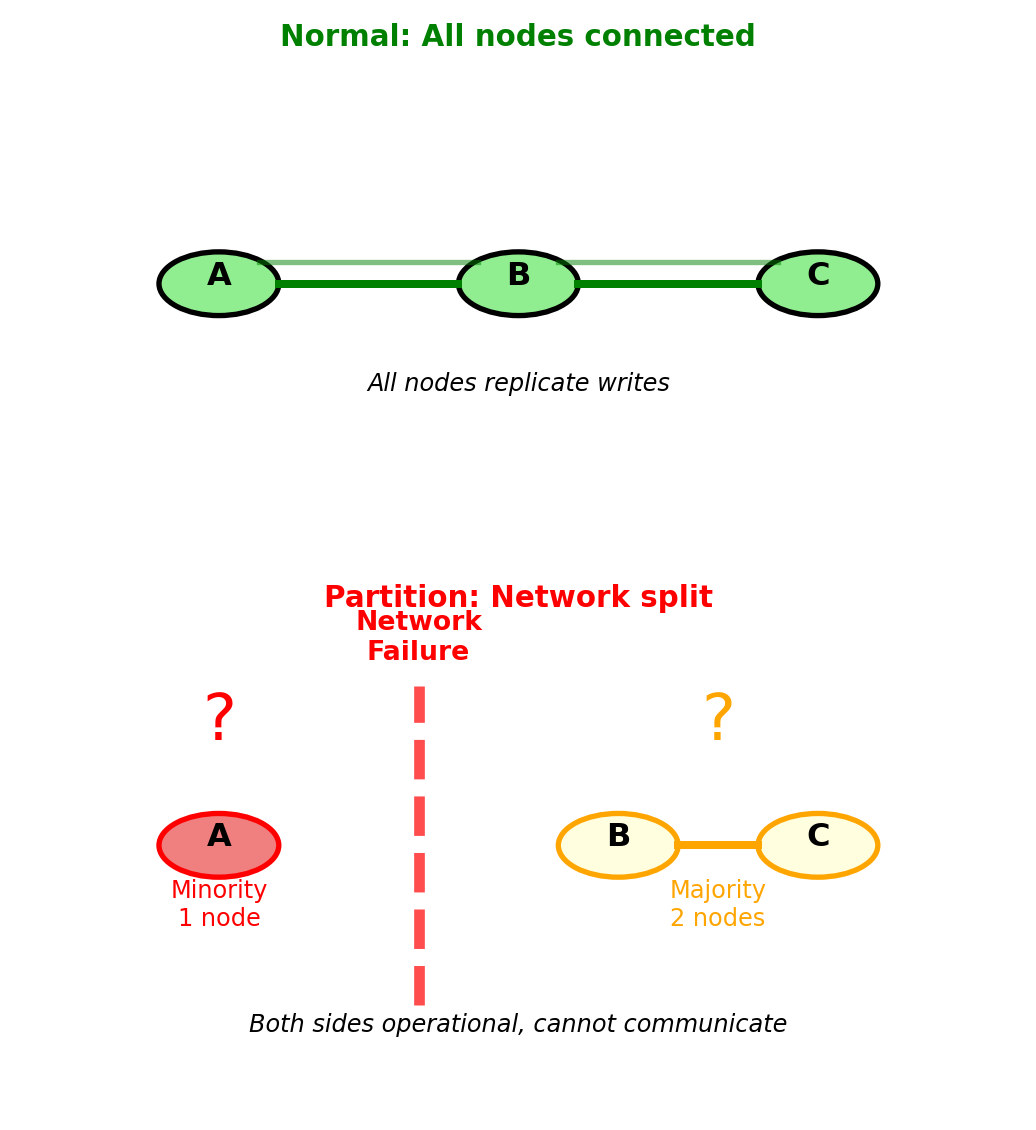
Partition forces choice: reject writes or accept conflicts
CAP Theorem Forces a Choice During Partitions
Three properties distributed systems want:
Consistency (C):
- All nodes return same value for same query
- Read always returns most recent write
- No stale data
Availability (A):
- Every request gets non-error response
- No timeouts or failures
- System always operational
Partition tolerance (P):
- System works despite network splits
- Required for any distributed system
- Network failures inevitable
CAP Theorem: Cannot have all three during network partition
During partition, must choose:
CP (Consistency + Partition tolerance):
- Reject requests to minority partition
- Guarantees consistency
- Sacrifices availability
AP (Availability + Partition tolerance):
- Accept requests on all partitions
- Guarantees availability
- Sacrifices immediate consistency
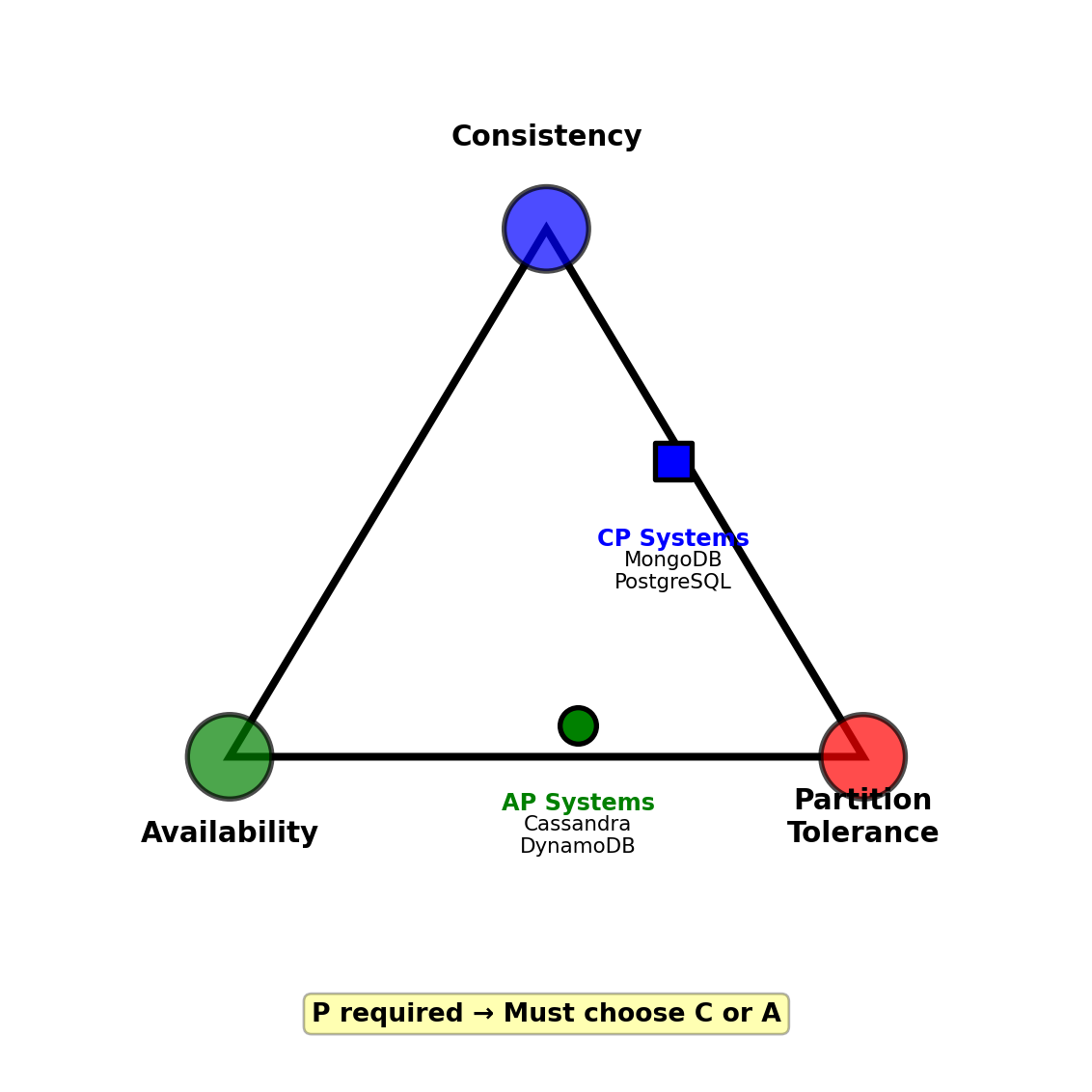
Real systems:
- Banking: CP (consistency critical)
- Social media: AP (availability critical)
- Inventory: CP (avoid overselling)
- Analytics: AP (stale data acceptable)
CP Systems Sacrifice Availability for Consistency
CP behavior during partition: [Node A] | [Nodes B, C]
Minority partition (Node A):
- Rejects all write requests: “Error: Cannot reach majority”
- May reject reads (depending on configuration)
- Becomes unavailable to clients
Majority partition (Nodes B, C):
- Continues accepting writes
- Requires majority (2 of 3 nodes) for writes
- Guarantees no conflicting data
After partition heals:
- Node A syncs from B or C
- No conflicts to resolve
- Data guaranteed consistent
Write quorum: W > N/2
- 3 nodes: Must write to 2 nodes
- Latency: Wait for slowest of 2 nodes
- Cost: Higher latency, possible unavailability
PostgreSQL example:
- Primary fails → replica promoted
- Failover time: 30-120 seconds
- During failover: All writes fail
- After: Guaranteed consistency
Use CP when:
- Financial transactions (no double-spending)
- Inventory (no overselling)
- User authentication (no conflicting state)
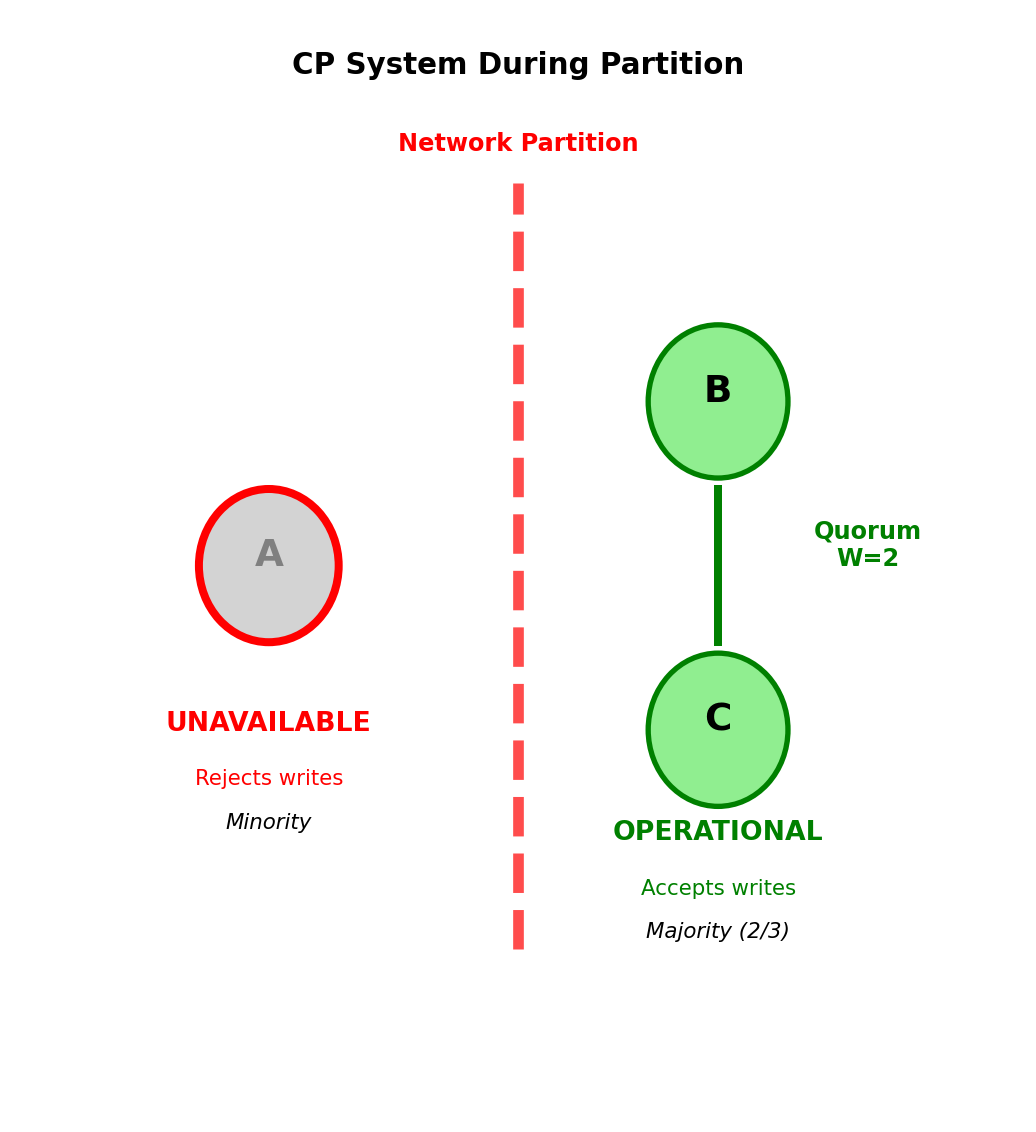
Trade-off: Latency and availability for guaranteed consistency
AP Systems Sacrifice Consistency for Availability
AP behavior during partition: [Node A] | [Nodes B, C]
Both partitions accept writes:
- Node A: Accepts writes from its clients
- Nodes B, C: Accept writes from their clients
- Result: Divergent data versions
Example conflict:
Node A: user.balance = 100 (withdraw $50)
Node B: user.balance = 120 (deposit $20)
Initial: user.balance = 150

After partition heals: Which is correct?
Conflict resolution strategies:
1. Last-write-wins (timestamp):
- Keep write with latest timestamp
- Simple, fast
- Risk: Clock skew causes wrong choice, data loss
2. Application merge:
- Application logic combines conflicts
- Example: Both transactions valid → balance = 70
- Correct but complex
3. Vector clocks:
- Track causality between writes
- Detect concurrent writes
- DynamoDB approach
Cassandra example:
- Write with W=1 (any node): 5ms latency
- Always available during partitions
- Read may return stale data
- Eventual consistency: Replicas converge in milliseconds to seconds
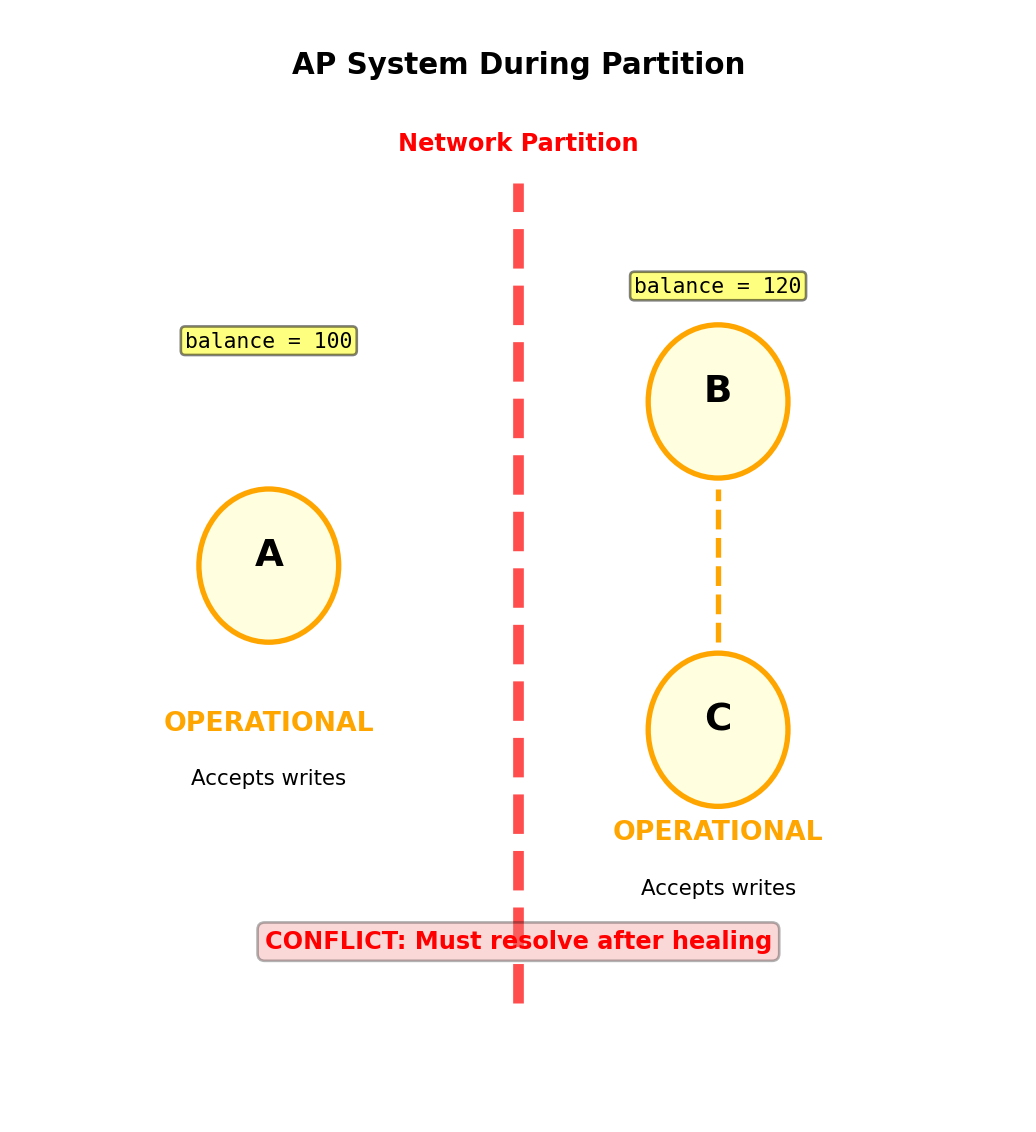
Trade-off: Consistency for availability and low latency
BASE Properties Define AP System Guarantees
ACID (relational databases):
- Atomic: All or nothing
- Consistent: Constraints enforced
- Isolated: Concurrent transactions don’t interfere
- Durable: Committed data survives failures
BASE (distributed systems):
- Basically Available: System responds even during failures
- Soft state: State may change without input (due to eventual consistency)
- Eventual consistency: Replicas converge given enough time
Basically Available:
- System operational during network partitions
- May return stale data or degraded service
- Prioritizes availability over correctness
Soft State:
- No guaranteed consistency at any given moment
- State changes as updates propagate
- Application must handle inconsistencies
Eventual Consistency:
- All replicas converge to same value
- Time window: milliseconds to seconds
- No guarantee when convergence occurs
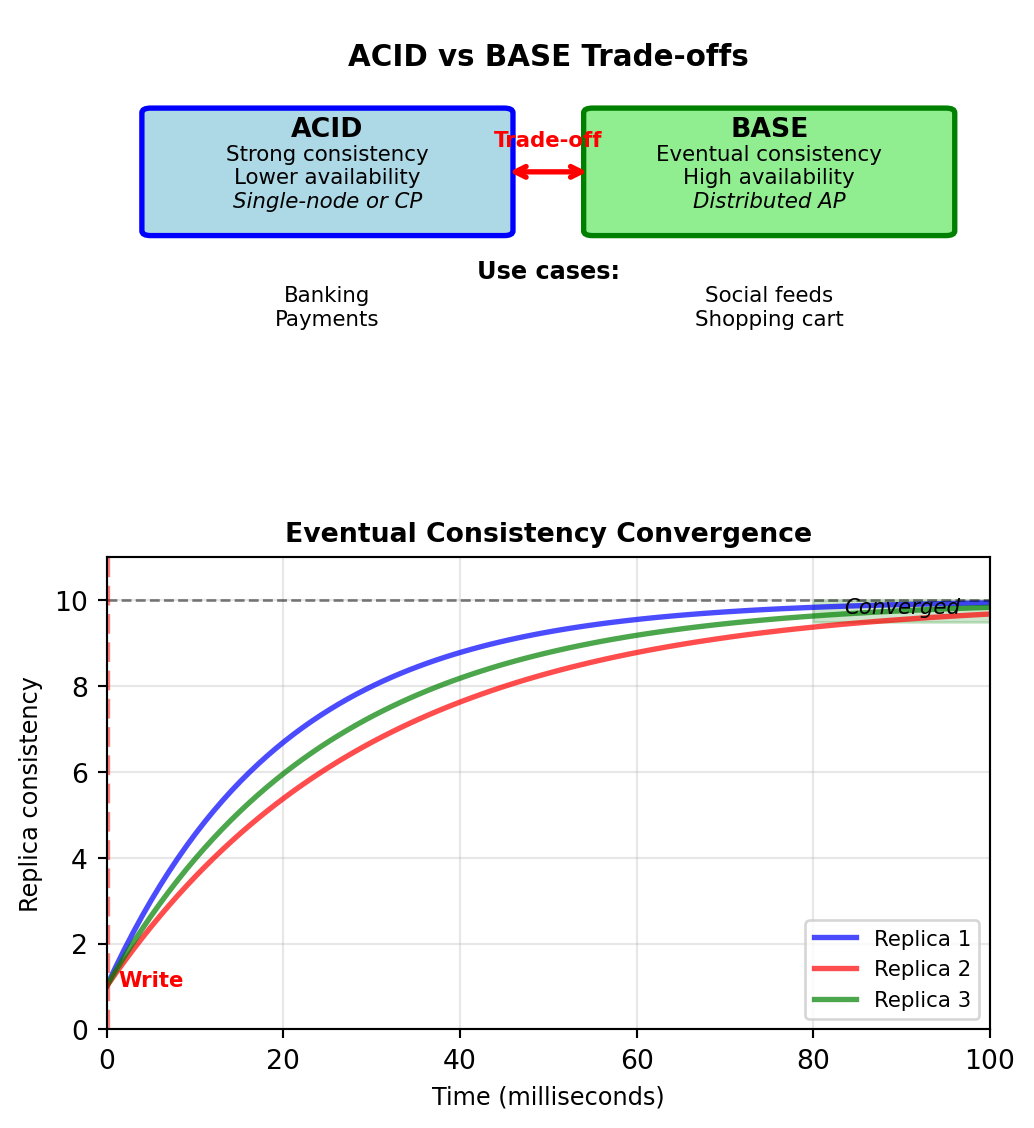
Practical implications:
- Read from replica: May get old value
- Write to one node: Other nodes lag behind
- Network partition: Nodes diverge temporarily
- Partition heals: Conflict resolution required
BASE trades immediate consistency for availability and partition tolerance (AP in CAP)
Key-Value Model - Dictionary at Database Scale
Fundamental abstraction:
PUT(key, value)  # Store
value = GET(key) # Retrieve
DELETE(key)      # Remove
Value is opaque blob:
- Database does not interpret contents
- No schema enforcement
- No query language for value structure
- Application handles serialization
Examples: Redis, Memcached, Riak, DynamoDB (key-value mode)
Why minimal structure:
- O(1) lookup with hash function
- Trivial horizontal partitioning
- Minimal feature set reduces overhead
- No query parser or optimizer
Contrast with relational:
- Relational: Schema, types, constraints, indexes, query optimizer
- Key-value: Hash table, bytes in/bytes out
- Trade query capability for raw performance
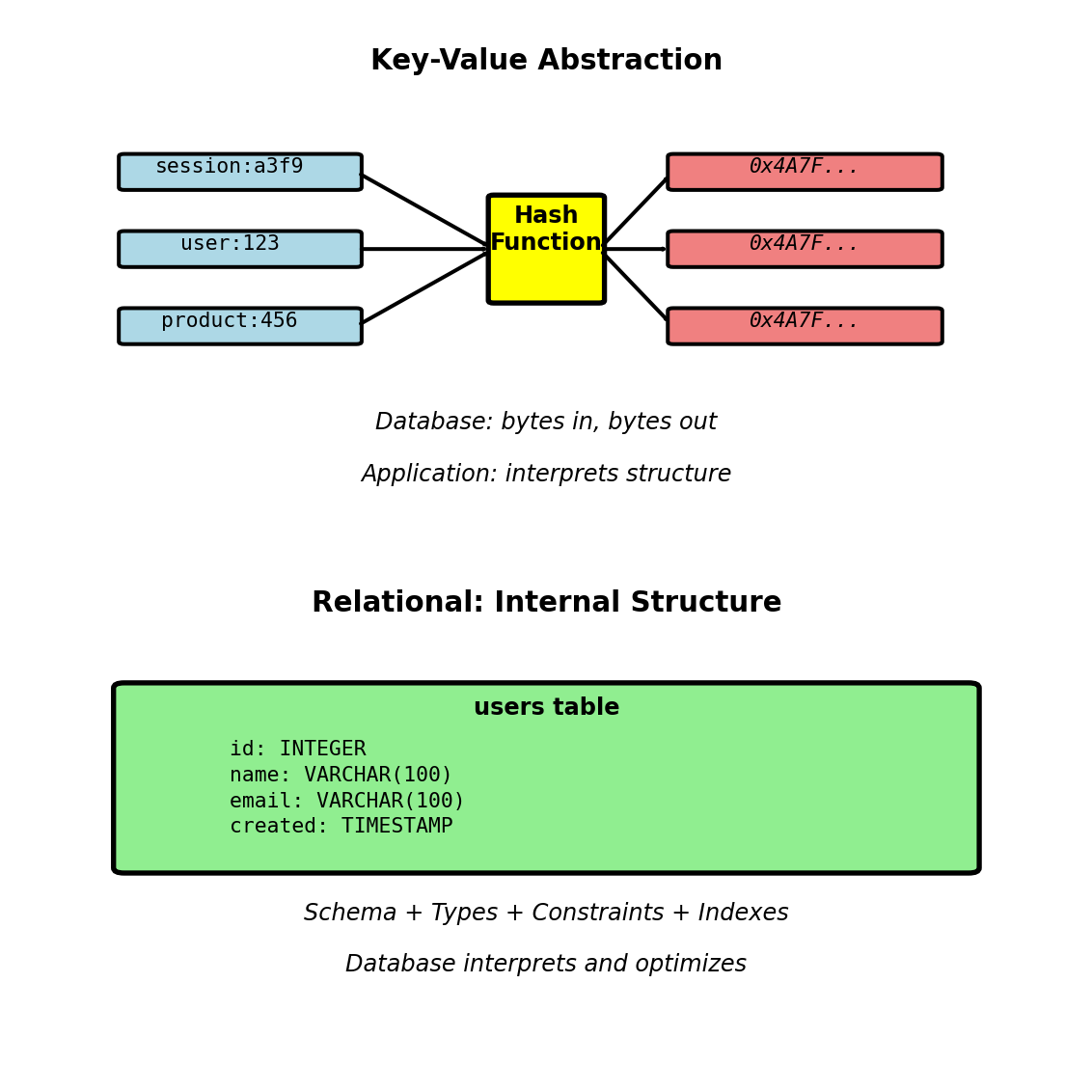
Simple interface provides O(1) access with minimal overhead
Session Management with Automatic Expiration
Web application session requirements:
- Store per-user state (user_id, preferences, cart)
- Expire after inactivity (30 minutes typical)
- High volume (every HTTP request checks session)
- Fast access (< 5ms latency requirement)
Relational approach problems:
CREATE TABLE sessions (
  session_id VARCHAR(64) PRIMARY KEY,
  user_id INT,
  data JSONB,
  created_at TIMESTAMP,
  last_activity TIMESTAMP
);

-- Every request
SELECT * FROM sessions
WHERE session_id = ?
  AND last_activity > NOW() - INTERVAL '30 minutes';

-- Cleanup job (runs every minute)
DELETE FROM sessions
WHERE last_activity < NOW() - INTERVAL '30 minutes';
Issues:
- Cleanup job scans millions of rows
- Index on last_activity, but still expensive
- Delete locks table
- Write amplification: Record activity on every request
Key-value with TTL:
# Store with automatic expiration
redis.setex(f"session:{token}", 1800, session_data)

# Retrieve (no expiration check needed)
data = redis.get(f"session:{token}")

# Extend session on activity
if data:
    redis.expire(f"session:{token}", 1800)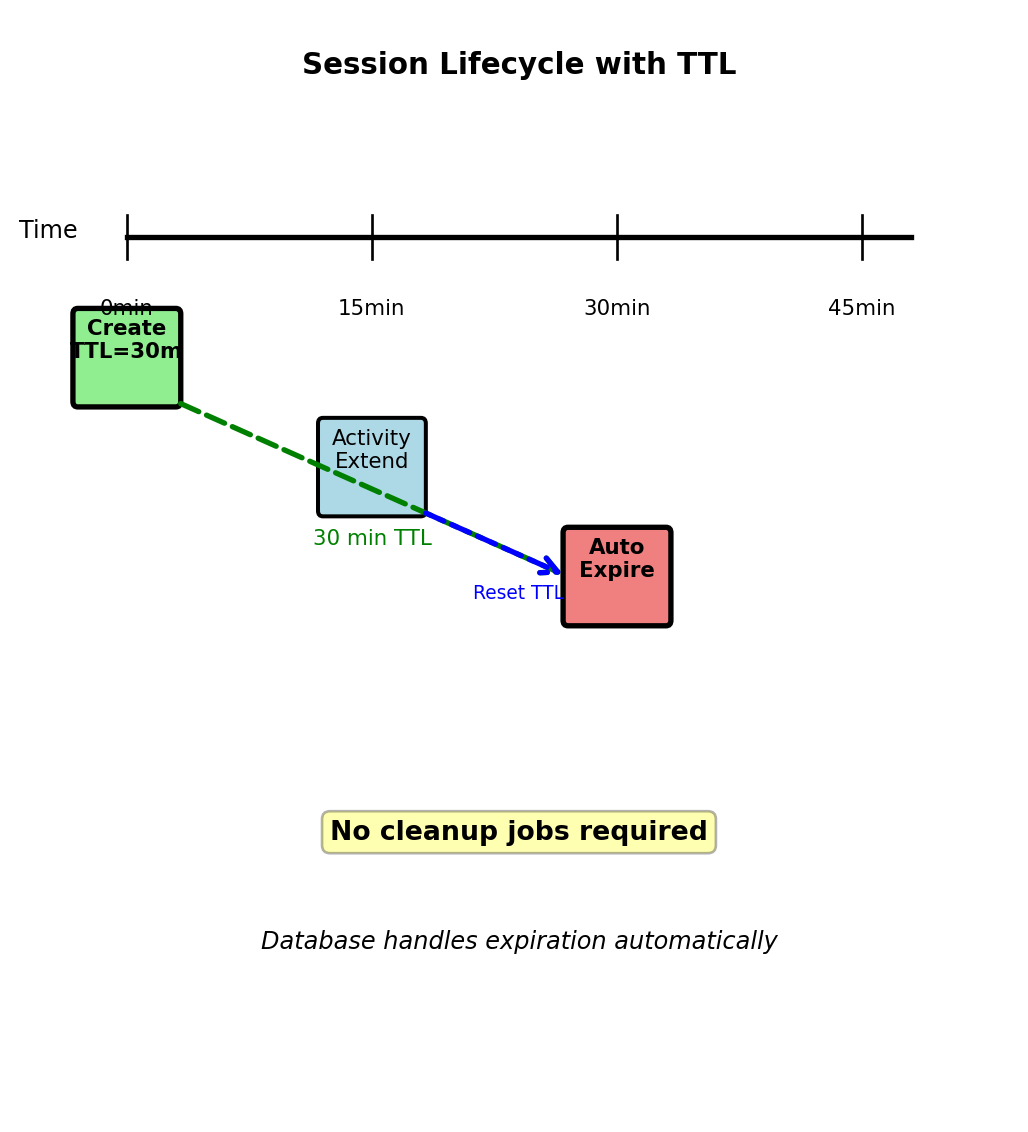
Performance:
- Session check: < 1ms (in-memory)
- Relational: 10-50ms (disk, index lookup, expiration check)
- Automatic cleanup vs periodic scan
Caching Database Queries - Read-Through Pattern
Product catalog query:
SELECT p.*, c.name AS category_name
FROM products p
  JOIN categories c ON p.category_id = c.category_id
WHERE p.product_id = 456;
Execution time: 45ms (JOIN, disk I/O)
Cache layer intercepts:
def get_product(product_id):
    cache_key = f"product:{product_id}"

    # Check cache
    cached = redis.get(cache_key)
    if cached:
        return json.loads(cached)  # 1ms

    # Cache miss - query database
    product = db.execute("""
        SELECT p.*, c.name AS category_name
        FROM products p
        JOIN categories c ON p.category_id = c.category_id
        WHERE p.product_id = ?
    """, product_id)  # 45ms

    # Cache result for 5 minutes
    redis.setex(cache_key, 300, json.dumps(product))

    return product
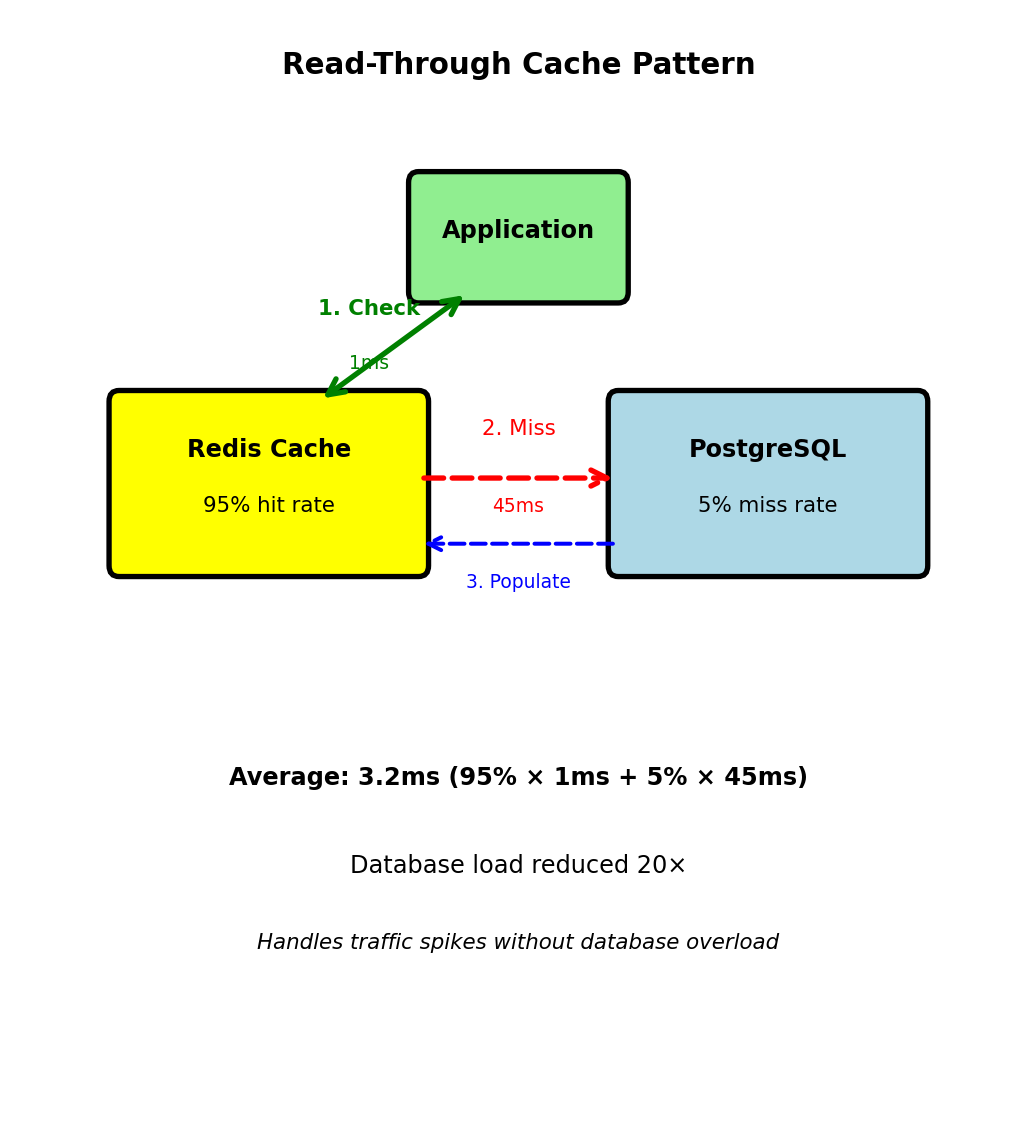
Performance calculation:
- Cache hit rate: 95%
- Average latency: 0.95 × 1ms + 0.05 × 45ms = 3.2ms
- vs without cache: 45ms
- 14× faster average response
Database load reduction:
- 1000 requests/second
- Without cache: 1000 database queries/second
- With 95% hit rate: 50 database queries/second
- 20× reduction in database load

Cache absorbs read load
Database handles writes and cache misses
Distributed Caching with Consistent Hashing
Single cache server limit:
- 64GB RAM = ~50M cached items
- Network bandwidth: 10Gbps
- Need horizontal scaling
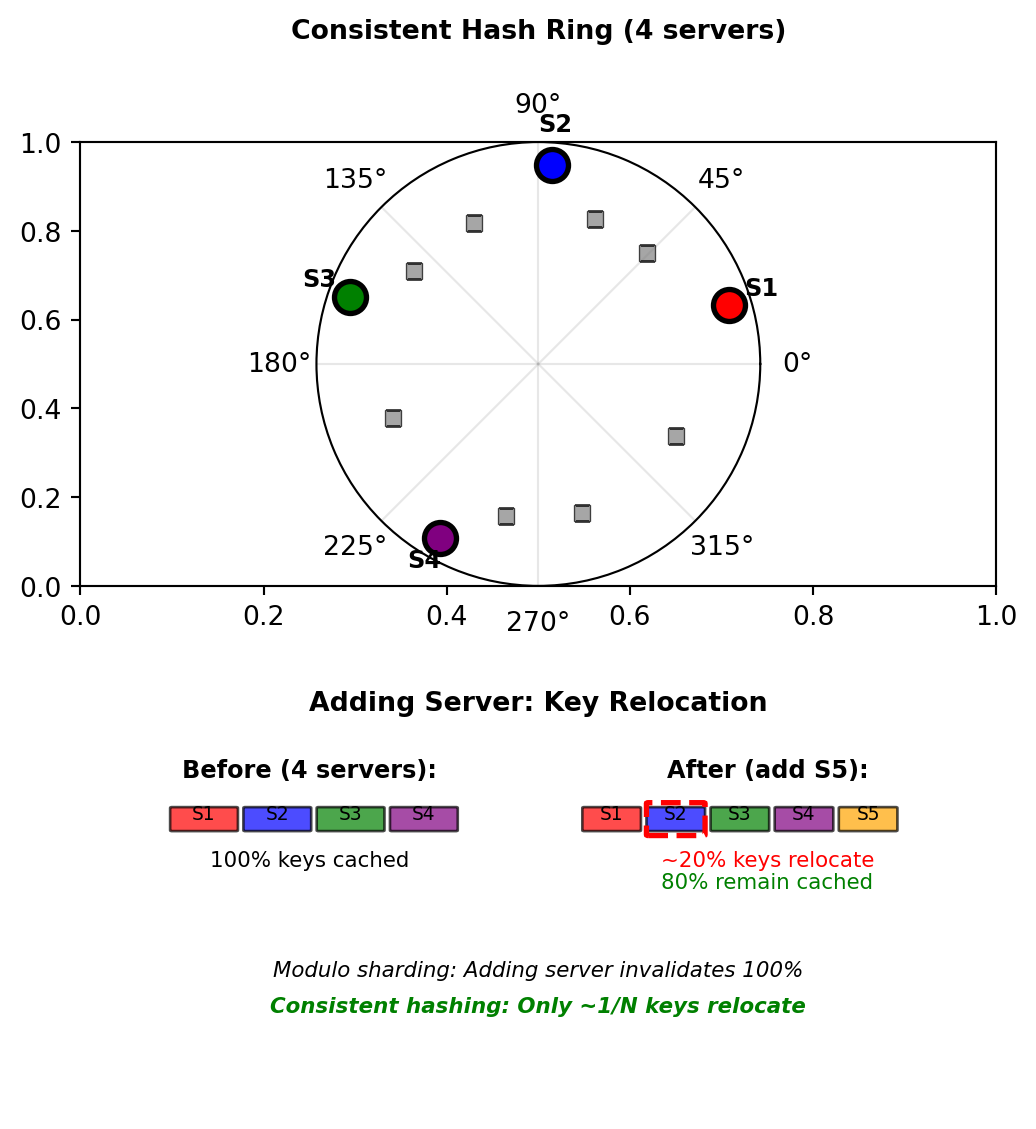
Naive sharding breaks:
server_id = hash(key) % N # N = number of serversAdding server changes N → all keys remap
Consistent hashing solution:
- Hash ring: 0 to 2³²-1
- Servers and keys both hash to ring positions
- Key stored on next clockwise server
- Adding server: Only adjacent keys relocate (~1/N)
Example with 4 servers:
# Server positions on ring (hash of server ID)
servers = {
    "server1": hash("server1") % (2**32),  # 428312345
    "server2": hash("server2") % (2**32),  # 1827364829
    "server3": hash("server3") % (2**32),  # 2913746582
    "server4": hash("server4") % (2**32),  # 3728191028
}

# Key placement
key_hash = hash("product:456") % (2**32)  # 945628371
# Finds next server clockwise: server2
Adding server5:
- New position: 2100000000
- Only keys between server2 and server5 relocate
- ~25% of keys move (1/4 servers)
- Other 75% remain cached
Hash slots distribute cache load without global invalidation
Rate Limiting with Atomic Counters
API rate limit: 100 requests per minute per user
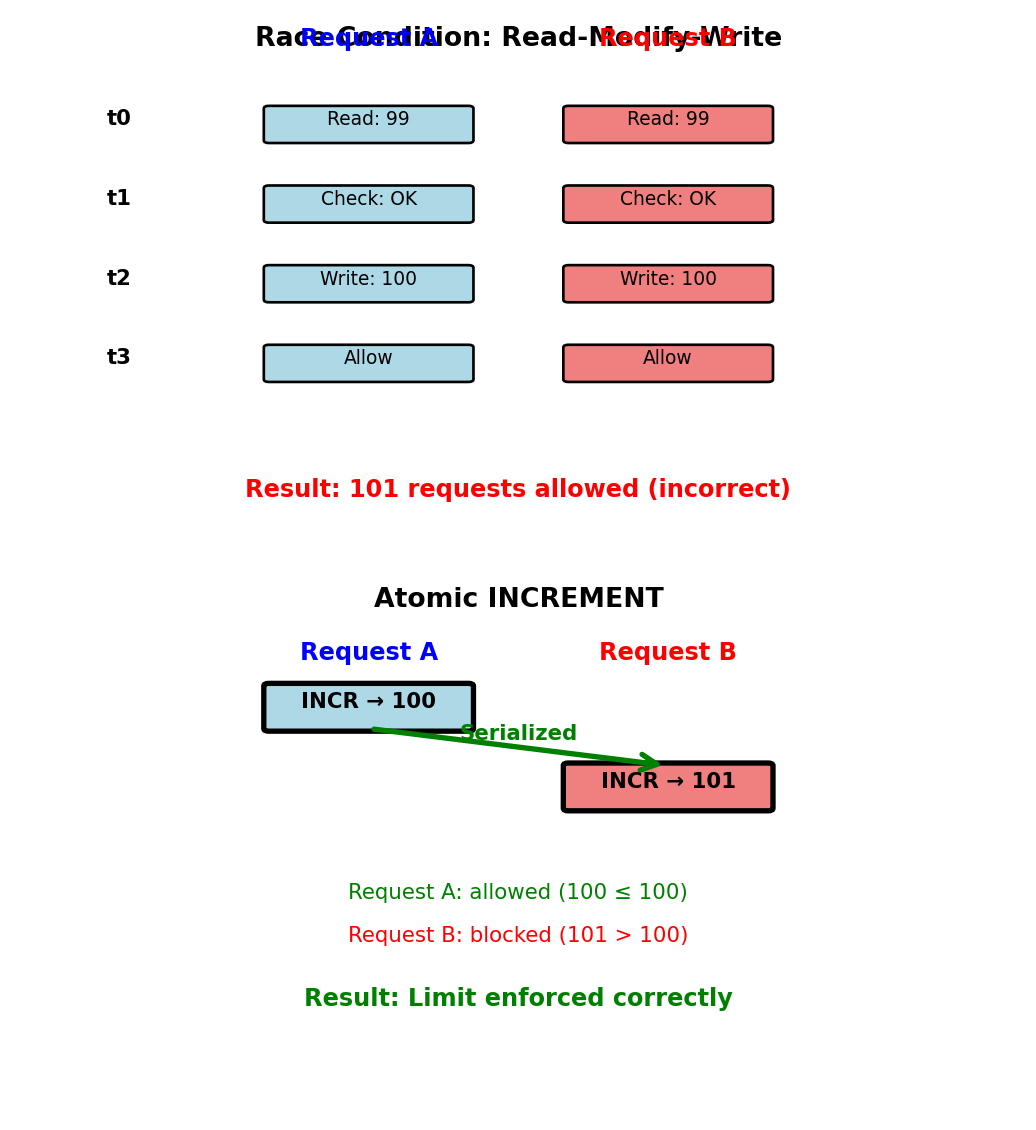
Wrong approach - Race condition:
# Read current count
count = int(redis.get(f"rate:{user_id}") or 0)

# Check limit
if count >= 100:
    return "Rate limit exceeded"

# Increment count
redis.set(f"rate:{user_id}", count + 1)
redis.expire(f"rate:{user_id}", 60)
Problem with concurrent requests:
Time    Request A           Request B
t0      Read count=99       Read count=99
t1      Check: 99 < 100     Check: 99 < 100
t2      Set count=100       Set count=100
t3      Allow request       Allow request
Both requests see count=99, both allowed → 101 requests
Correct approach - Atomic operation:
key = f"rate:{user_id}:{current_minute}"

# Atomic increment returns new value
count = redis.incr(key)

# Set TTL on first request
if count == 1:
    redis.expire(key, 60)

# Check after increment
if count > 100:
    return "Rate limit exceeded"

return "Request allowed"
Atomic increment guarantees correct count under concurrency
Single round-trip, no race conditions
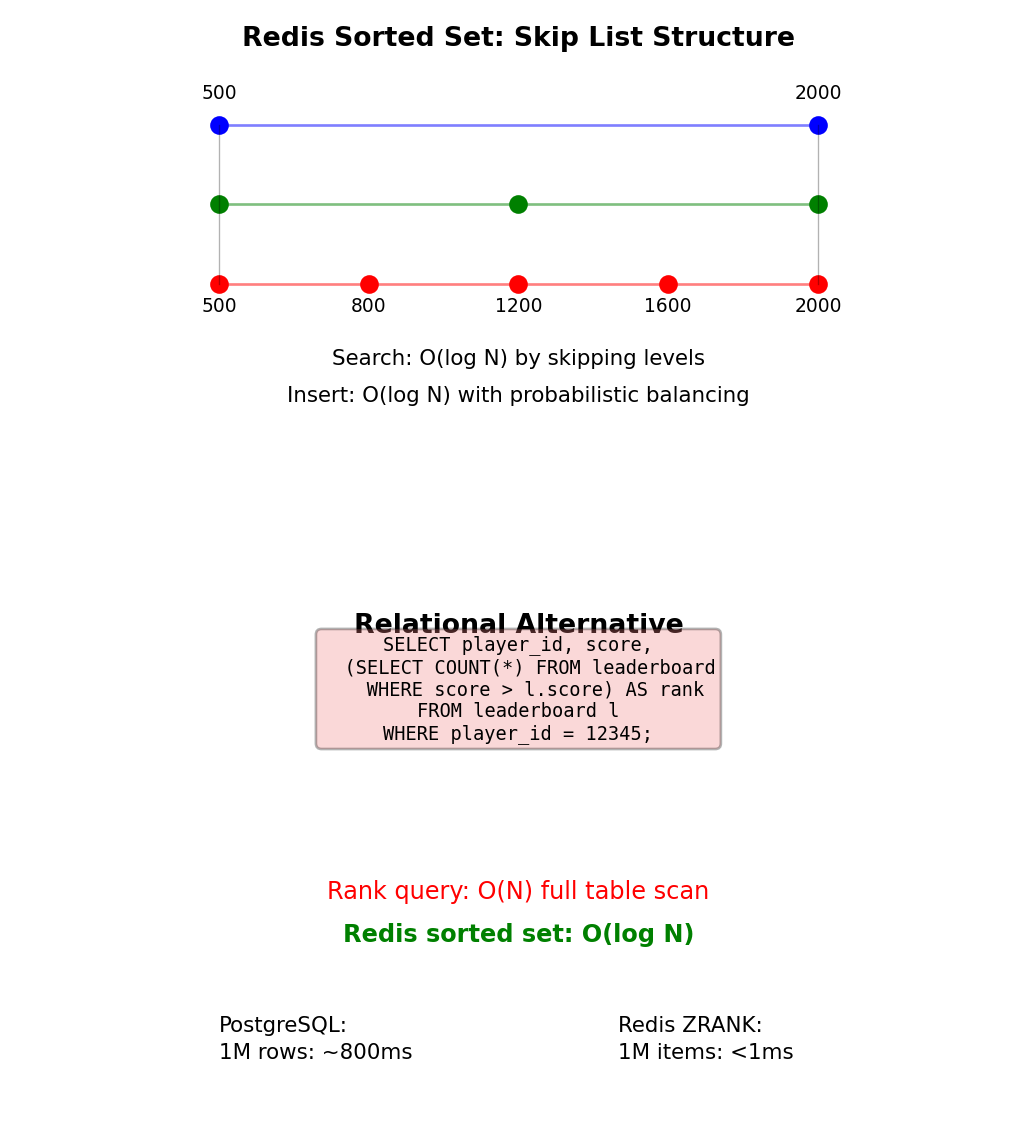
Leaderboards with Sorted Sets
Gaming leaderboard requirements:
Rank 1 million players by score
Update scores frequently (every game completion)
Query operations:
- Player rank: “What rank is player_id=12345?”
- Top N: “Who are top 10 players?”
- Score range: “Players with 1000-2000 points”
Redis sorted set:
import redis
r = redis.Redis()

# Update player score (O(log N))
r.zadd("leaderboard", {"player_12345": 1850})
r.zadd("leaderboard", {"player_67890": 2100})

# Get player rank - 0-indexed, from lowest (O(log N))
rank = r.zrevrank("leaderboard", "player_12345")
# Returns: 43127 (meaning 43,128th place)

# Get top 10 players with scores (O(log N + 10))
top_10 = r.zrevrange("leaderboard", 0, 9, withscores=True)
# Returns: [("player_67890", 2100.0), ...]

# Get players in score range (O(log N + M))
players = r.zrangebyscore("leaderboard", 1000, 2000)

# Get player score (O(1))
score = r.zscore("leaderboard", "player_12345")
All operations logarithmic or better with 1M players
Internal structure: Skip list
Specialized data structure for ranking operations
Document Model - Structured Objects as Storage Unit
Document database stores structured objects as atomic units
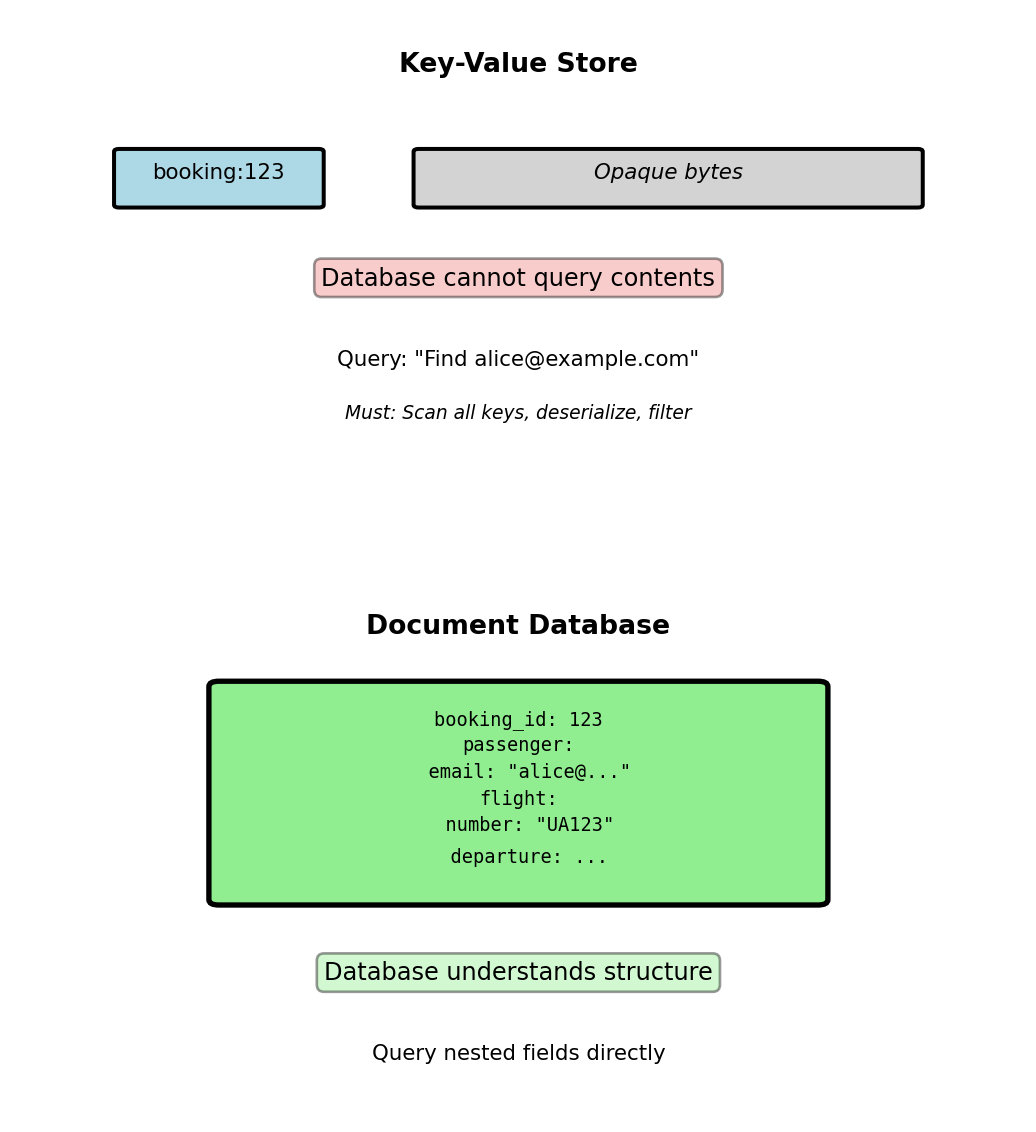
Recall embed vs reference patterns from earlier. Document databases implement these patterns while understanding document structure.
Key-value limitation:
# Key-value: Opaque blob
redis.set("booking:123", json.dumps(booking_data))
value = redis.get("booking:123")
booking = json.loads(value)  # Application interprets

# Cannot query: "Find bookings for alice@example.com"
# Must scan all keys and deserialize
Document database capability:
// Database understands structure
db.bookings.find({
  "passenger.email": "alice@example.com"
})
// Direct query on nested field
Database parses JSON structure to support:
- Queries on nested fields without deserialization
- Indexes on any field, including nested
- Aggregations across document contents
- Structure validation
Primary implementations: MongoDB (BSON), CouchDB (JSON), DocumentDB
Key-value stores opaque bytes; document databases index and query the structure inside
MongoDB Collections and Documents
Collection: Group of related documents (analogous to relational table)
Document: Single JSON object with _id primary key
No enforced schema: Documents in same collection can have different fields
Booking collection example:
{
  "_id": ObjectId("507f1f77bcf86cd799439011"),
  "booking_reference": "ABC123",
  "passenger_id": 123,
  "flight_id": 456,
  "seat": "12A",
  "booking_time": ISODate("2025-01-15T10:30:00Z"),
  "price": 450.00
}
MongoDB-specific types:
ObjectId: 12-byte unique identifier (timestamp + random)ISODate: Native datetime type (UTC)NumberLong,NumberDecimal: Typed numeric values- Embedded documents and arrays
Storage format: BSON (Binary JSON)
- Binary encoding: More efficient than text JSON
- Additional types: Date, Binary, Decimal128, ObjectId
- Preserves field order (unlike JSON spec)
- ~1.5× space overhead vs raw JSON for typical documents
Collection contains documents with varying fields
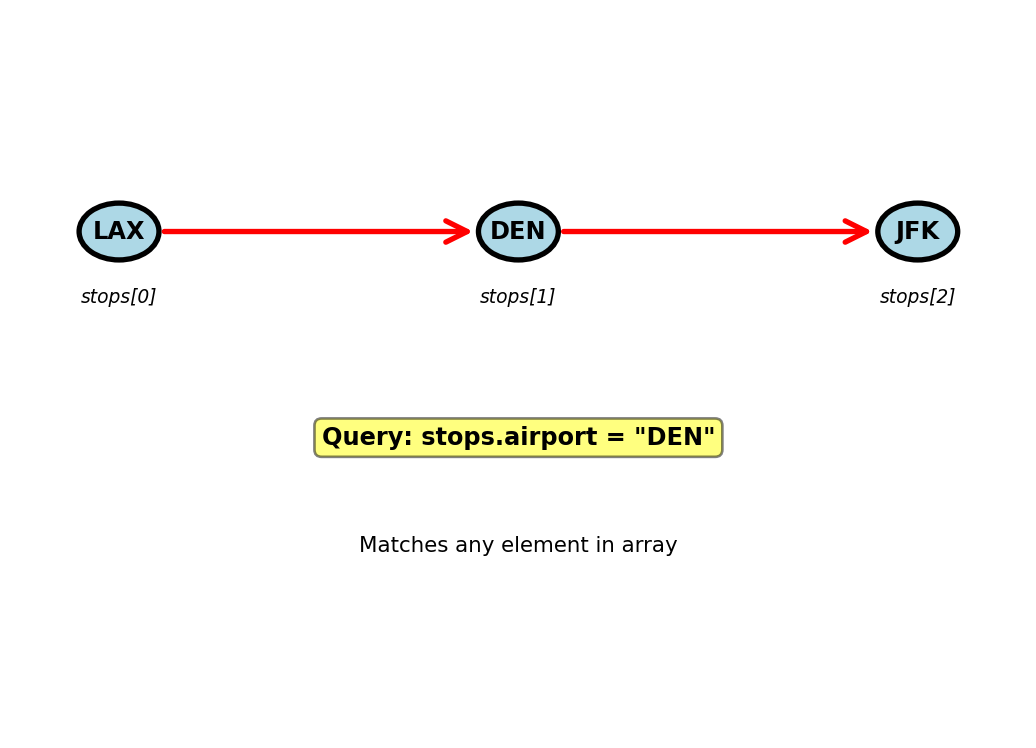
Querying Arrays - Flight Stops Example
Scenario: Multi-stop flights (LAX → DEN → JFK)
{
  "flight_id": 789,
  "flight_number": "UA456",
  "stops": [
    {
      "airport": "LAX",
      "arrival": null,
      "departure": ISODate("2025-02-15T08:00:00Z"),
      "gate": "B12"
    },
    {
      "airport": "DEN",
      "arrival": ISODate("2025-02-15T10:30:00Z"),
      "departure": ISODate("2025-02-15T11:00:00Z"),
      "gate": "A5"
    },
    {
      "airport": "JFK",
      "arrival": ISODate("2025-02-15T17:00:00Z"),
      "departure": null,
      "gate": "C8"
    }
  ]
}
Query any array element:
// Find all flights stopping at DEN
db.flights.find({
  "stops.airport": "DEN"
})
// Matches if ANY element has airport: "DEN"
Query specific array position:
// First stop must be LAX
db.flights.find({
  "stops.0.airport": "LAX"
})
Match array element with multiple conditions:
// Find flights with DEN stop, departure after 11:00
db.flights.find({
  "stops": {
    $elemMatch: {
      "airport": "DEN",
      "departure": {$gte: ISODate("2025-02-15T11:00:00Z")}
    }
  }
})
Array operators:
$elemMatch: Element meets multiple conditions$all: Array contains all specified elements$size: Array has specific length$: Positional operator for updates

Array queries operate across all elements
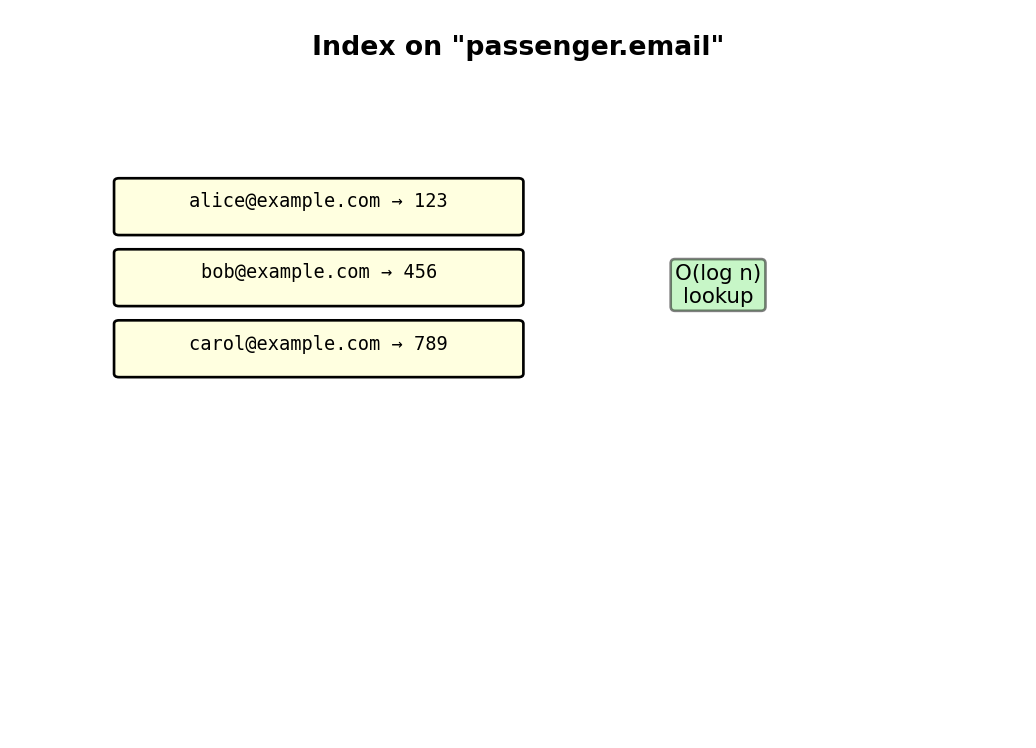
Indexes on Nested Fields and Arrays
Creating indexes on document structure:
// Index on nested field (2 levels deep)
db.bookings.createIndex({"passenger.email": 1})

// Compound index across nesting levels
db.bookings.createIndex({
  "flight.departure_airport": 1,
  "flight.scheduled_departure": 1
})
Multikey indexes on arrays:
// Index on array field
db.flights.createIndex({"stops.airport": 1})

// Flight with 3 stops creates 3 index entries:
// "LAX" → flight_id: 789
// "DEN" → flight_id: 789
// "JFK" → flight_id: 789
Query execution:
// With index (fast)
db.bookings.find({"passenger.email": "alice@example.com"})
// Index seek: O(log n), ~2ms for 1M documents

// Without index (slow)
db.bookings.find({"passenger.phone": "+1-555-0123"})
// Collection scan: O(n), ~500ms for 1M documents
Index size impact:
- Nested field indexes: Same cost as top-level
- Multikey (array) indexes: Size = sum of array lengths across collection
- 10K flights × 3 stops average = 30K index entries
MongoDB limit: 64 indexes per collection
Indexes work on any document field
Performance (1M documents): Indexed query: 2ms, Collection scan: 500ms
Aggregation Pipeline - Multi-Stage Processing
Query: “Average booking price by departure airport for last 30 days”
Relational approach requires JOIN:
SELECT f.departure_airport, AVG(b.price)
FROM bookings b
JOIN flights f ON b.flight_id = f.flight_id
WHERE b.booking_time >= CURRENT_DATE - INTERVAL '30 days'
GROUP BY f.departure_airport
ORDER BY AVG(b.price) DESC
LIMIT 10;
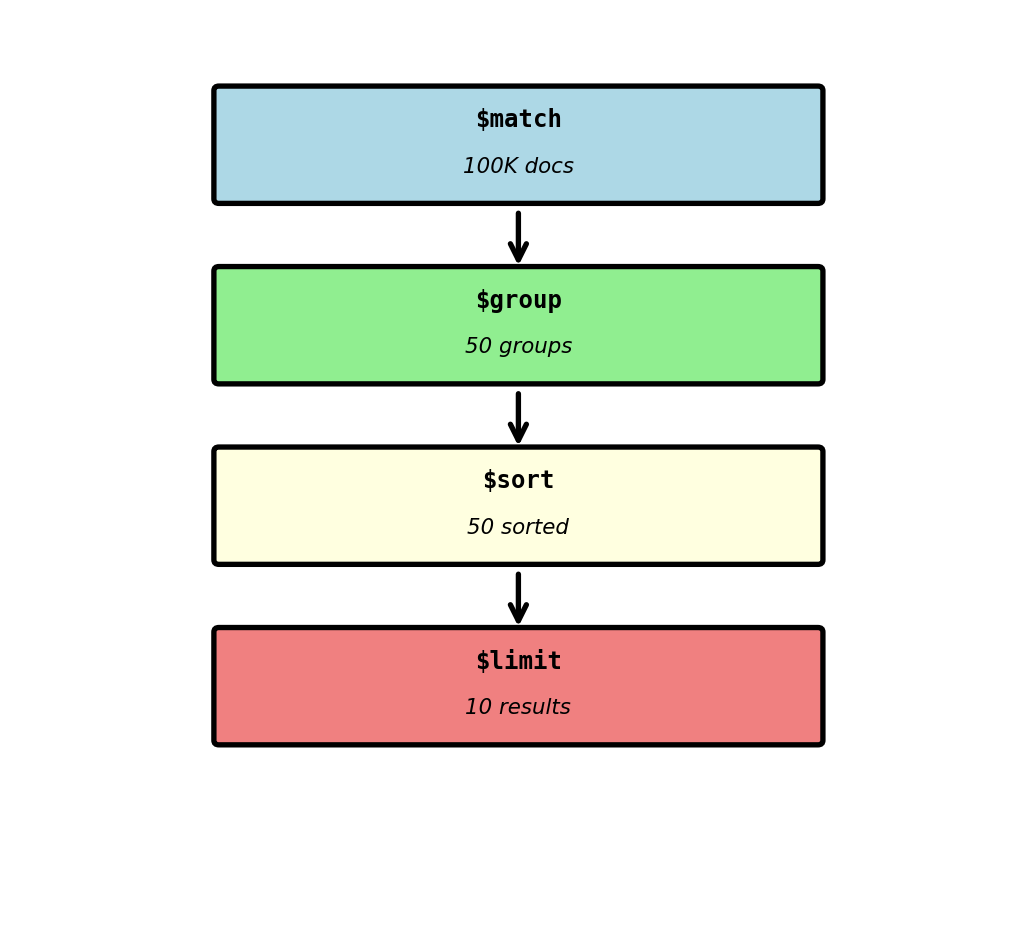
MongoDB aggregation pipeline:
db.bookings.aggregate([
  // Stage 1: Filter to last 30 days
  {
    $match: {
      booking_time: {
        $gte: ISODate("2025-01-15"),
        $lt: ISODate("2025-02-15")
      }
    }
  },

  // Stage 2: Group by departure airport
  {
    $group: {
      _id: "$flight.departure_airport",
      avg_price: {$avg: "$price"},
      total_bookings: {$sum: 1},
      min_price: {$min: "$price"},
      max_price: {$max: "$price"}
    }
  },

  // Stage 3: Sort by average price descending
  {
    $sort: {avg_price: -1}
  },

  // Stage 4: Limit to top 10
  {
    $limit: 10
  }
])
Result:
[
  {
    "_id": "LAX",
    "avg_price": 487.50,
    "total_bookings": 2500,
    "min_price": 250.00,
    "max_price": 950.00
  },
  {
    "_id": "JFK",
    "avg_price": 465.25,
    "total_bookings": 2100,
    "min_price": 275.00,
    "max_price": 875.00
  }
]
Pipeline processes documents through stages on database server
MongoDB in Production - Replica Sets
Single server limitations:
- Hardware failure → data loss
- Maintenance → downtime
- No geographic distribution
- Read throughput limited to single machine
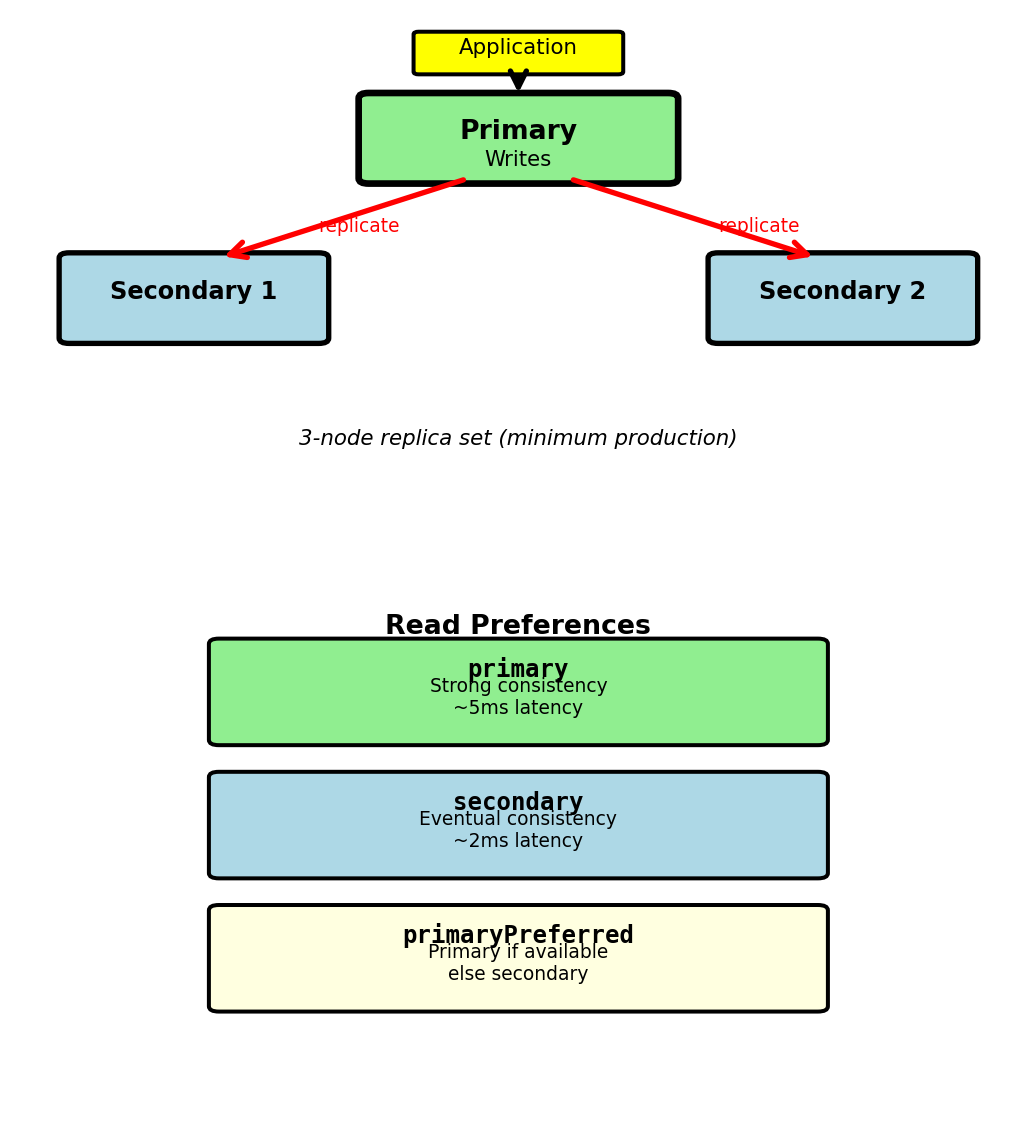
Replica set architecture:
- Primary node: Handles all writes
- Secondary nodes (2+): Replicate from primary
- Automatic failover: Secondary elected if primary fails
- Production minimum: 3 nodes (1 primary + 2 secondaries)
Write path:
// Application writes to primary
db.bookings.insertOne({...})

// Primary writes to oplog (operation log)
// Secondaries tail oplog and apply operations
// Replication asynchronous by default
Write concern controls durability:
// Wait for majority acknowledgment (2 of 3 nodes)
db.bookings.insertOne(
  {...},
  {writeConcern: {w: "majority", wtimeout: 5000}}
)
// Returns when 2 nodes confirm write
// If timeout: write may succeed but client gets error
Replication lag:
- Typical: < 100ms (local network)
- Under heavy write load: Can reach seconds
- Network partition: Unbounded until resolved
Wide-Column Model - Tables Without Fixed Schema
Sparse data problem:
- Flight events: delay, diversion, emergency
- Relational: Fixed columns, mostly NULL
- 1M flights × 20 event columns = 19M NULL values (95%)
Wide-column approach:
- Rows can have different columns
- Store only non-NULL values
- Columns grouped into column families
- Physical storage: Column-oriented, not row-oriented
Examples: Apache Cassandra, HBase, Google Bigtable
Flight 12345 (delay event):
row_key: "flight_12345"
  standard: flight_number="UA123", departure="LAX", arrival="JFK"
  events: delay_reason="weather", delay_minutes=45
Flight 12346 (emergency event):
row_key: "flight_12346"
  standard: flight_number="AA456", departure="JFK", arrival="SFO"
  events: emergency_type="medical", diverted_airport="DEN"
Different columns per row, no NULL storage
Data Model - Row Key, Column Families, Columns
Three-level hierarchy:
1. Row key:
- Unique identifier
- Determines partition (which nodes store data)
- Sorted lexicographically
- Example:
sensor:42000:2025-01-15
2. Column family:
- Logical grouping of related columns
- Defined at table creation
- Physical storage unit: columns in family stored together
- Examples:
metadata,readings,events
3. Column:
- Key-value pair within family
- Column name is part of the data (not schema)
- Each row can have different columns
- Example:
readings:temperature=22.5
Physical storage example:
row_key="sensor:42000:2025-01-15T10:00"
  metadata:location = "Building A, Floor 3"
  metadata:sensor_type = "indoor_temp"
  readings:temperature = 22.5
  readings:humidity = 45.0
  readings:timestamp = "2025-01-15T10:00:00Z"
Different sensor might have:
row_key="sensor:42001:2025-01-15T10:00"
  metadata:location = "Building B, Floor 1"
  metadata:sensor_type = "motion"
  readings:x_accel = 0.05
  readings:y_accel = 0.12
  readings:z_accel = 9.81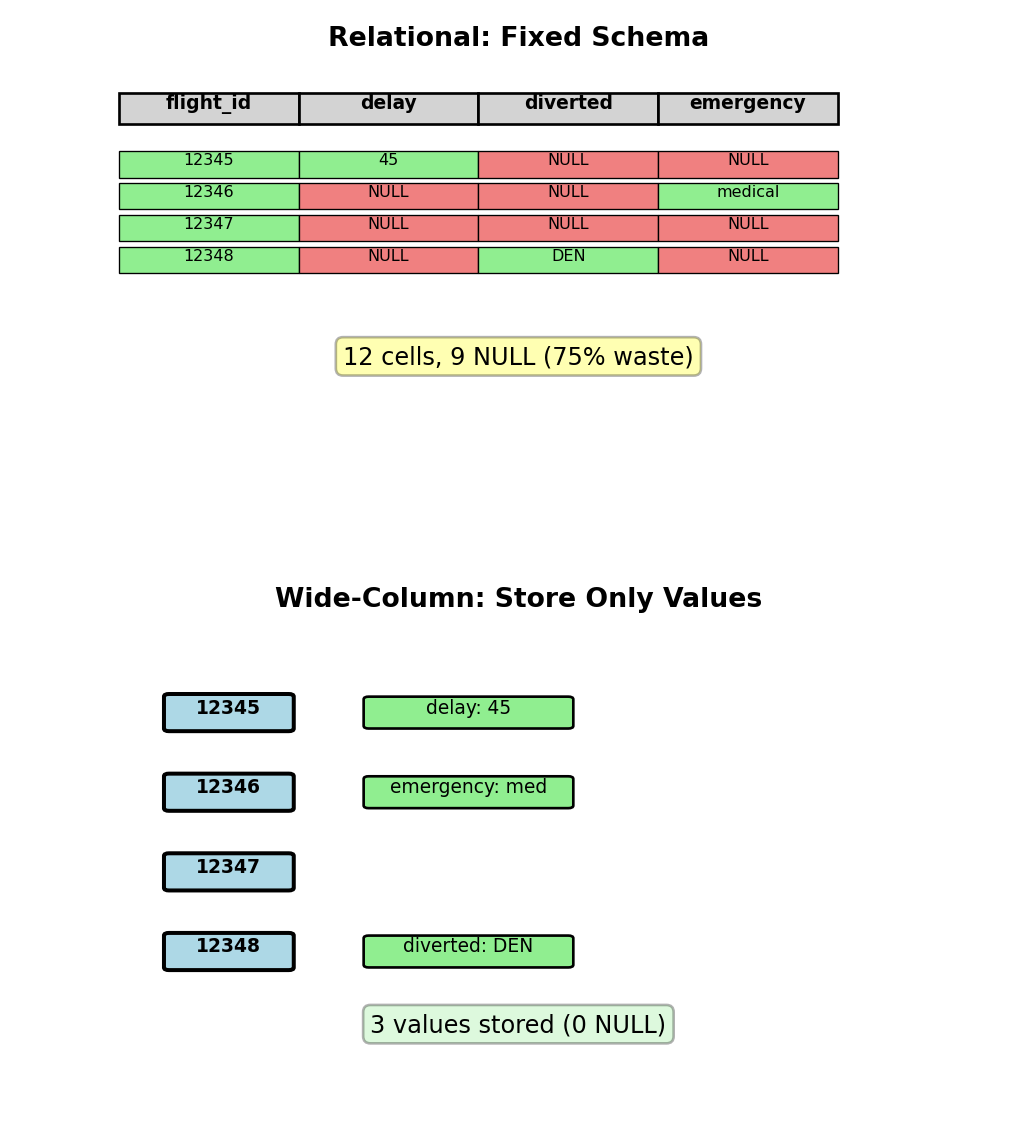
Column families provide structure, columns provide flexibility
Time-Series Data - Natural Fit for Wide-Column
Scenario: Server monitoring metrics
- 10,000 servers
- Metrics every 10 seconds: CPU, memory, disk I/O, network
- Sparse: I/O metrics only when disk active (~30% of time)
- Retention: 90 days
Data volume:
- 10,000 servers × 6 samples/minute = 60,000 writes/minute
- 86.4M samples/day
- 90 days = 7.78B samples
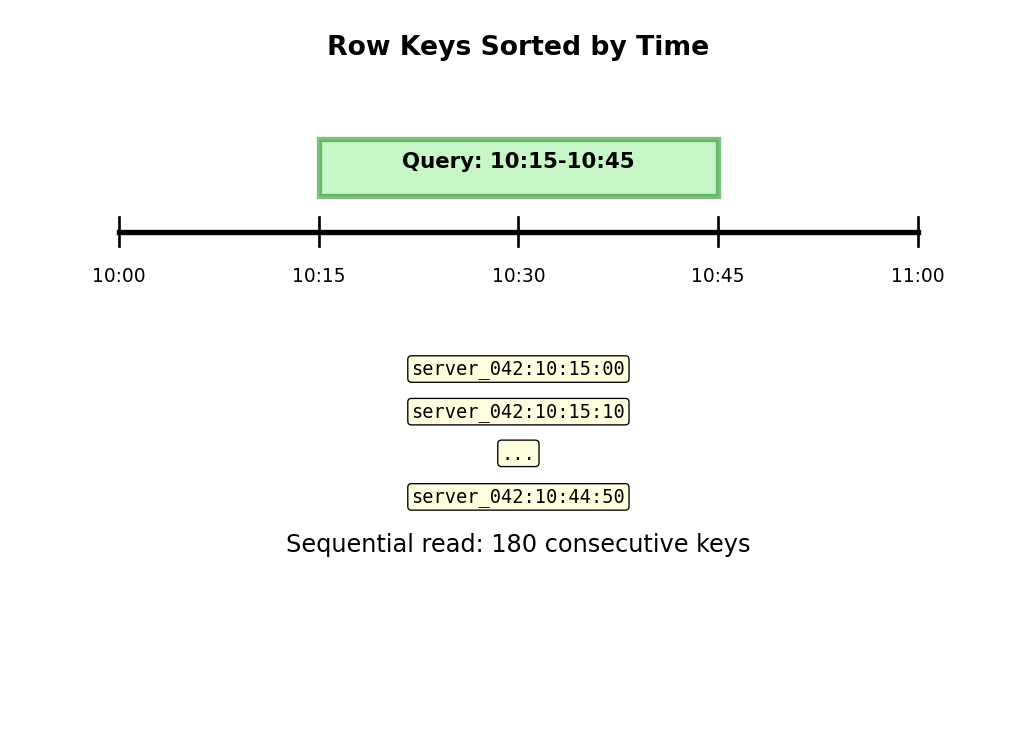
Row key design: server_id:timestamp
server_042:2025-01-15T10:30:00
server_042:2025-01-15T10:30:10
server_042:2025-01-15T10:30:20
Lexicographic sort → time-adjacent data stored adjacently
Query: “Server 42, last hour”
Start: server_042:2025-01-15T09:30:00
End:   server_042:2025-01-15T10:30:00
Sequential read of 360 consecutive row keys
Column families:
system: cpu_percent=45.2, memory_mb=8192, uptime_sec=345600
disk:   read_iops=120, write_iops=80, queue_depth=3
        (only when disk active)
network: rx_bytes=1048576, tx_bytes=524288, connections=42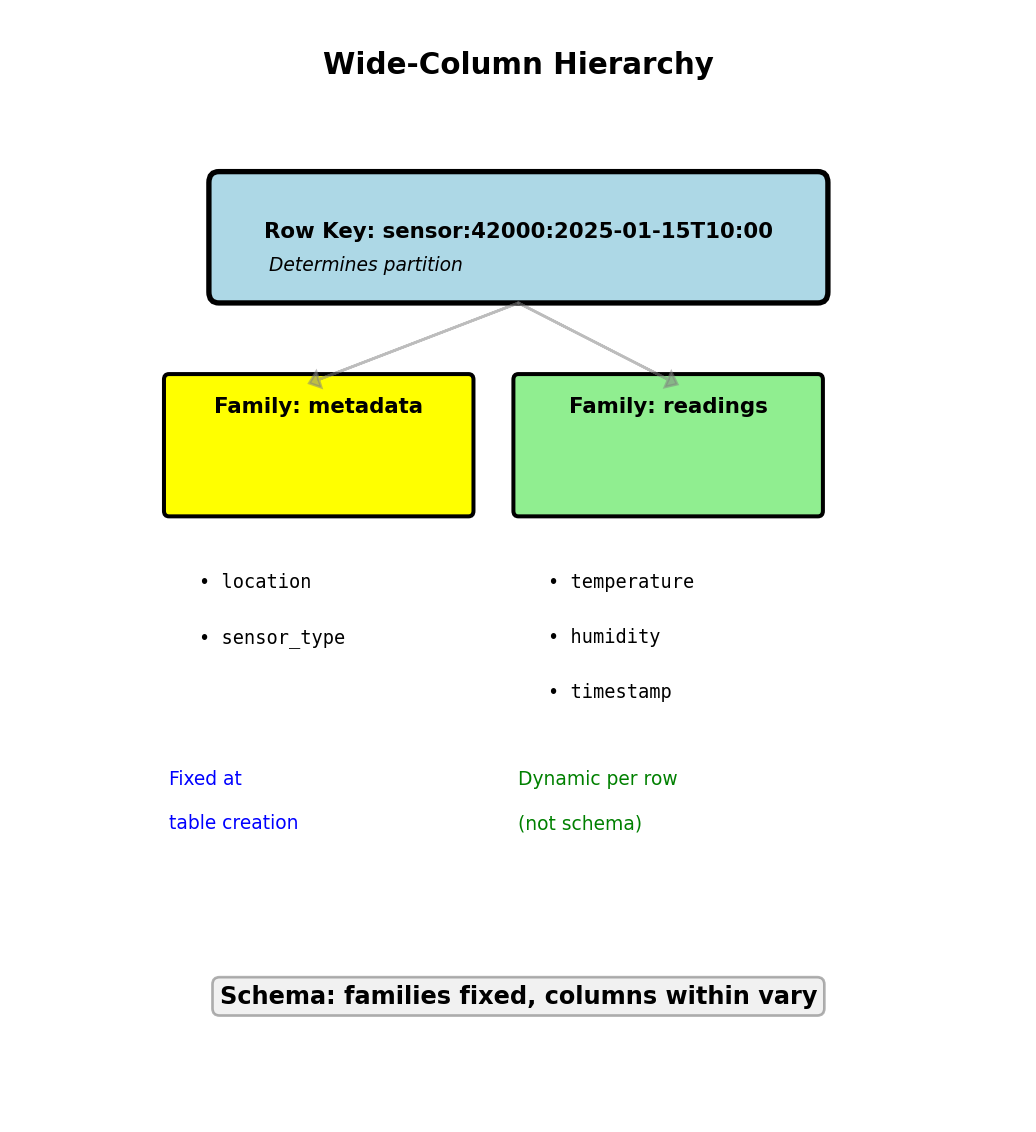
Time-ordered row keys enable efficient range queries
Storage efficiency (1M samples): Relational with NULLs: 1000 MB, Wide-Column sparse: 400 MB (60% reduction)
Cassandra Architecture - Distributed by Design
Peer-to-peer: All nodes equal
- No primary-replica distinction
- Any node can handle any request
- Consistent hashing distributes row keys
Partitioning:
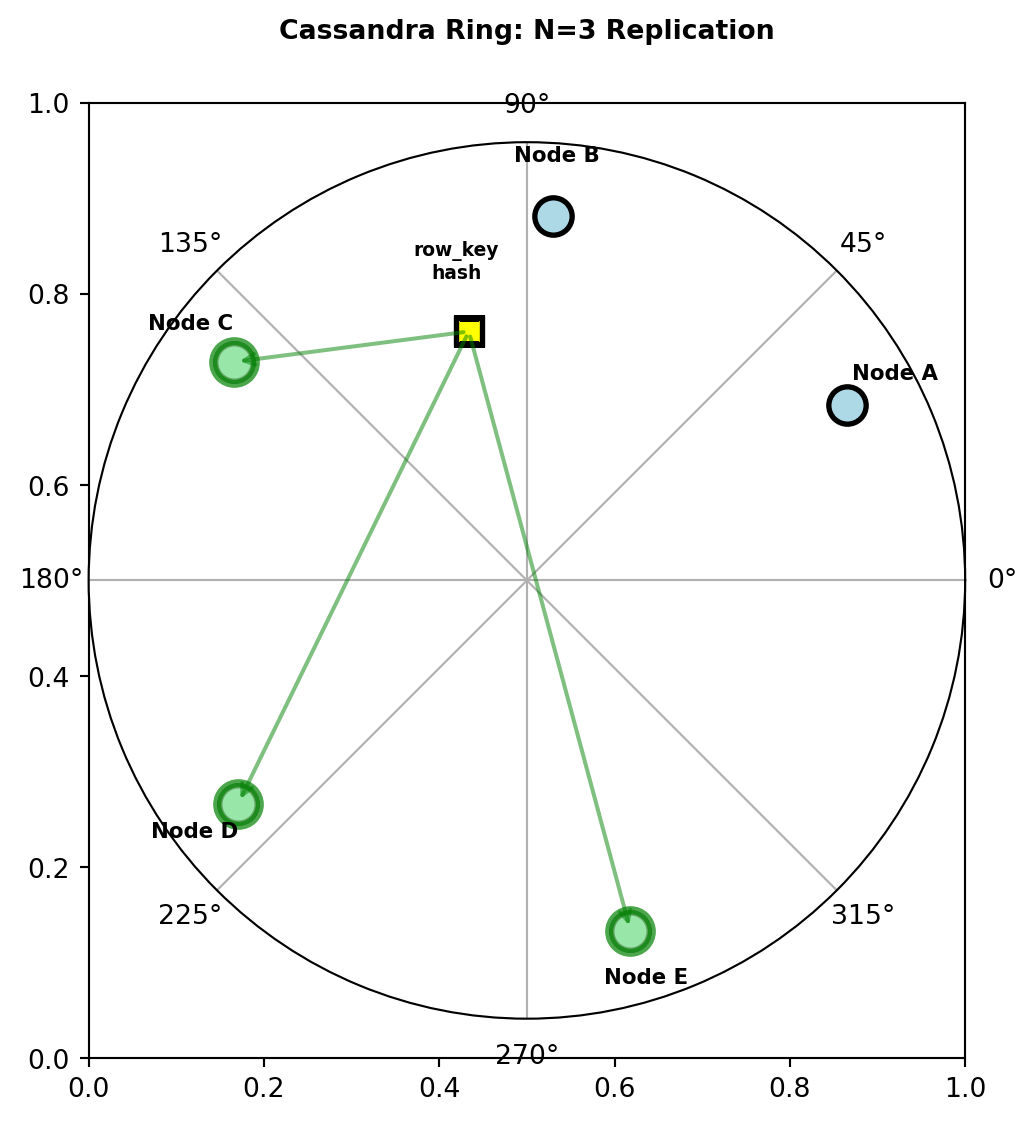
- Row key hashed to token (0 to 2^63-1)
- Token ring: Nodes own token ranges
- Replication factor N=3: Each row stored on 3 nodes
Write path:
Client sends write to any node (coordinator)
Coordinator determines replicas from hash(row_key)
Write sent to N=3 replica nodes
Coordinator waits based on consistency level:
- ONE: Wait for 1 acknowledgment (5ms)
- QUORUM: Wait for 2 of 3 (10ms, parallel writes)
- ALL: Wait for all 3 (30ms)
Write durability on each node:
Write arrives
  ↓
Commit log (sequential append, durable)
  ↓
Memtable (in-memory, fast)
  ↓
[Background: Flush memtable → SSTable on disk]
Commit log ensures no data loss if node crashes
Read path:
- Query replicas (number based on consistency)
- If replicas disagree: Return latest (by timestamp)
- Background read repair reconciles replicas
Hash determines primary node, N consecutive nodes store replicas
Compound Primary Key - Partition and Clustering
Primary key = (partition key, clustering columns)
Partition key: Determines node placement (hash distribution)
Clustering columns: Sort order within partition (range queries)
Table definition:
CREATE TABLE sensor_readings (
    sensor_id INT,
    timestamp TIMESTAMP,
    temperature FLOAT,
    humidity FLOAT,
    PRIMARY KEY (sensor_id, timestamp)
);sensor_id= partition key (which node)timestamp= clustering column (sort order)
Physical layout on Node 3:
Partition: sensor_id=42000
  timestamp=2025-01-15T10:00:00, temp=22.5, humidity=45
  timestamp=2025-01-15T10:01:00, temp=22.6, humidity=46
  timestamp=2025-01-15T10:02:00, temp=22.4, humidity=45
  ... (sorted by timestamp)

Partition: sensor_id=42001
  timestamp=2025-01-15T10:00:00, temp=19.5, humidity=50
  ...
Efficient query (uses partition key + clustering):
SELECT * FROM sensor_readings
WHERE sensor_id = 42000
  AND timestamp >= '2025-01-15T10:00:00'
  AND timestamp < '2025-01-15T11:00:00';
Single node, sequential read of 60 rows
Inefficient query (missing partition key):
SELECT * FROM sensor_readings
WHERE timestamp > '2025-01-15T10:00:00';
Must query ALL nodes, scatter-gather
Query cost: O(1) partition + O(log M + K) vs O(N nodes)
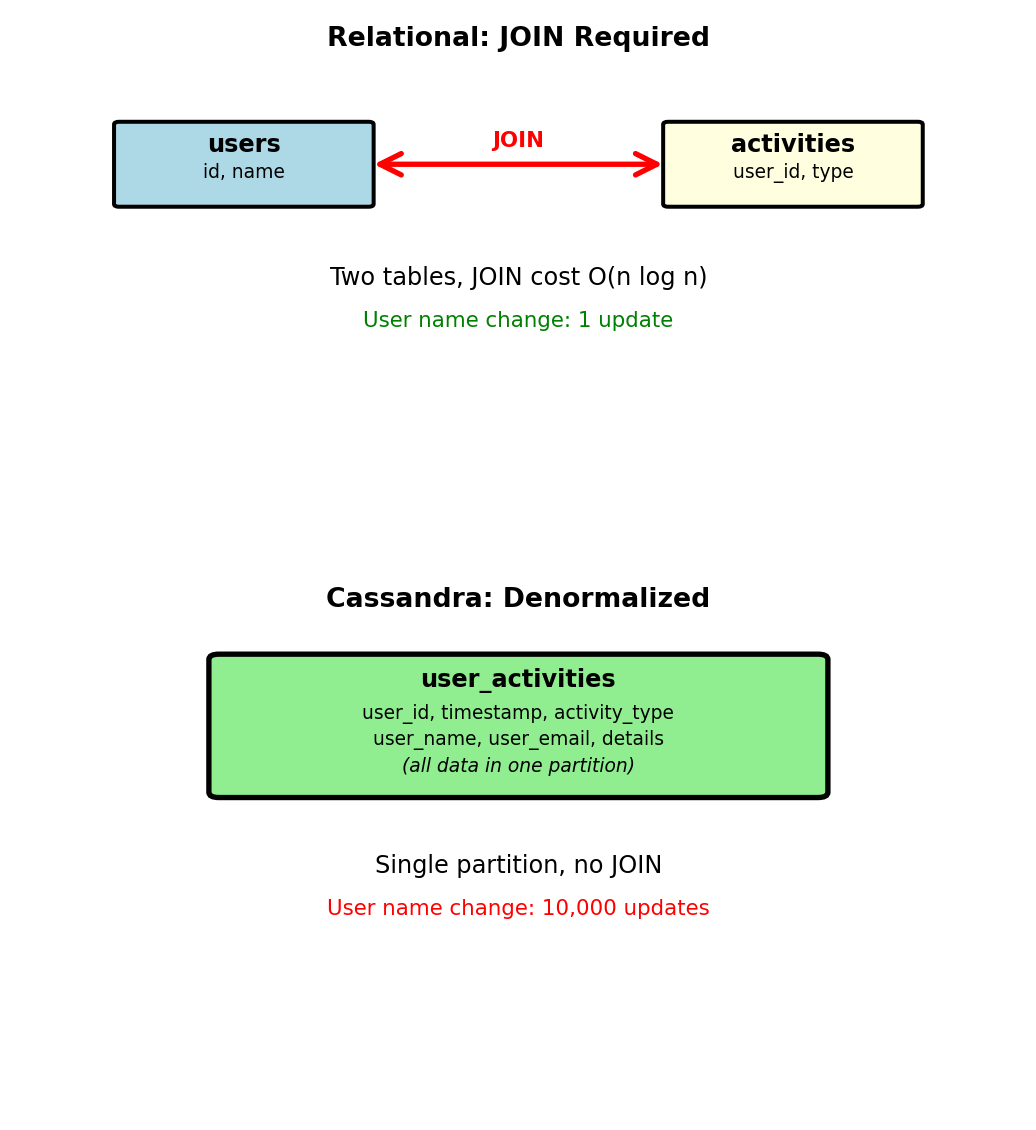
Denormalization Required - No JOINs
Cassandra has no JOIN operation
Data for query must exist in single partition
Relational approach (JOINs):
-- users table
CREATE TABLE users (
  user_id INT PRIMARY KEY,
  name VARCHAR(100),
  email VARCHAR(100)
);

-- activities table
CREATE TABLE activities (
  activity_id INT PRIMARY KEY,
  user_id INT,
  activity_type VARCHAR(50),
  timestamp TIMESTAMP,
  details TEXT
);

-- Query with JOIN
SELECT a.*, u.name
FROM activities a
JOIN users u ON a.user_id = u.user_id
WHERE a.timestamp > NOW() - INTERVAL '24 hours';
Cassandra approach (denormalized):
CREATE TABLE user_activities (
    user_id INT,
    timestamp TIMESTAMP,
    activity_type TEXT,
    user_name TEXT,     -- Denormalized
    user_email TEXT,    -- Denormalized
    details TEXT,
    PRIMARY KEY (user_id, timestamp)
) WITH CLUSTERING ORDER BY (timestamp DESC);
Query:
SELECT * FROM user_activities
WHERE user_id = 12345
  AND timestamp > '2025-01-15T00:00:00';
Single partition, no JOIN
Update cost:
- User name changes → update all activity records
- User with 10,000 activities: 10,000 updates
- Trade-off: Query simplicity for update complexity

Acceptable when reads >> writes (activity log read 1000×, name changes rarely)
Multiple Query Patterns - Multiple Tables
Cannot optimize single table for multiple partition keys
Solution: Duplicate data in tables with different primary keys
Query pattern 1: Posts by user (timeline)
CREATE TABLE posts_by_user (
    user_id INT,
    post_timestamp TIMESTAMP,
    post_id UUID,
    content TEXT,
    likes INT,
    PRIMARY KEY (user_id, post_timestamp)
) WITH CLUSTERING ORDER BY (post_timestamp DESC);

-- Efficient: Single partition
SELECT * FROM posts_by_user
WHERE user_id = 12345
LIMIT 20;
Query pattern 2: Posts by tag (search)
CREATE TABLE posts_by_tag (
    tag TEXT,
    post_timestamp TIMESTAMP,
    post_id UUID,
    user_id INT,      -- Duplicated
    content TEXT,     -- Duplicated
    likes INT,        -- Duplicated
    PRIMARY KEY (tag, post_timestamp)
) WITH CLUSTERING ORDER BY (post_timestamp DESC);

-- Efficient: Single partition
SELECT * FROM posts_by_tag
WHERE tag = 'nosql'
LIMIT 20;
Write path:
- Application writes to both tables
- Post with 5 tags: 1 write to posts_by_user + 5 writes to posts_by_tag
- Total: 6 writes for 1 post
Storage: 6× duplication for 5-tag post
Trade: Storage and write complexity for query performance
TTL - Automatic Data Expiration
Time-series data has natural lifecycle
Old data less valuable, must be removed
Manual deletion: Expensive
DELETE FROM sensor_readings
WHERE timestamp < '2025-01-15' - INTERVAL '90 days';
Scans entire table, expensive on billions of rows
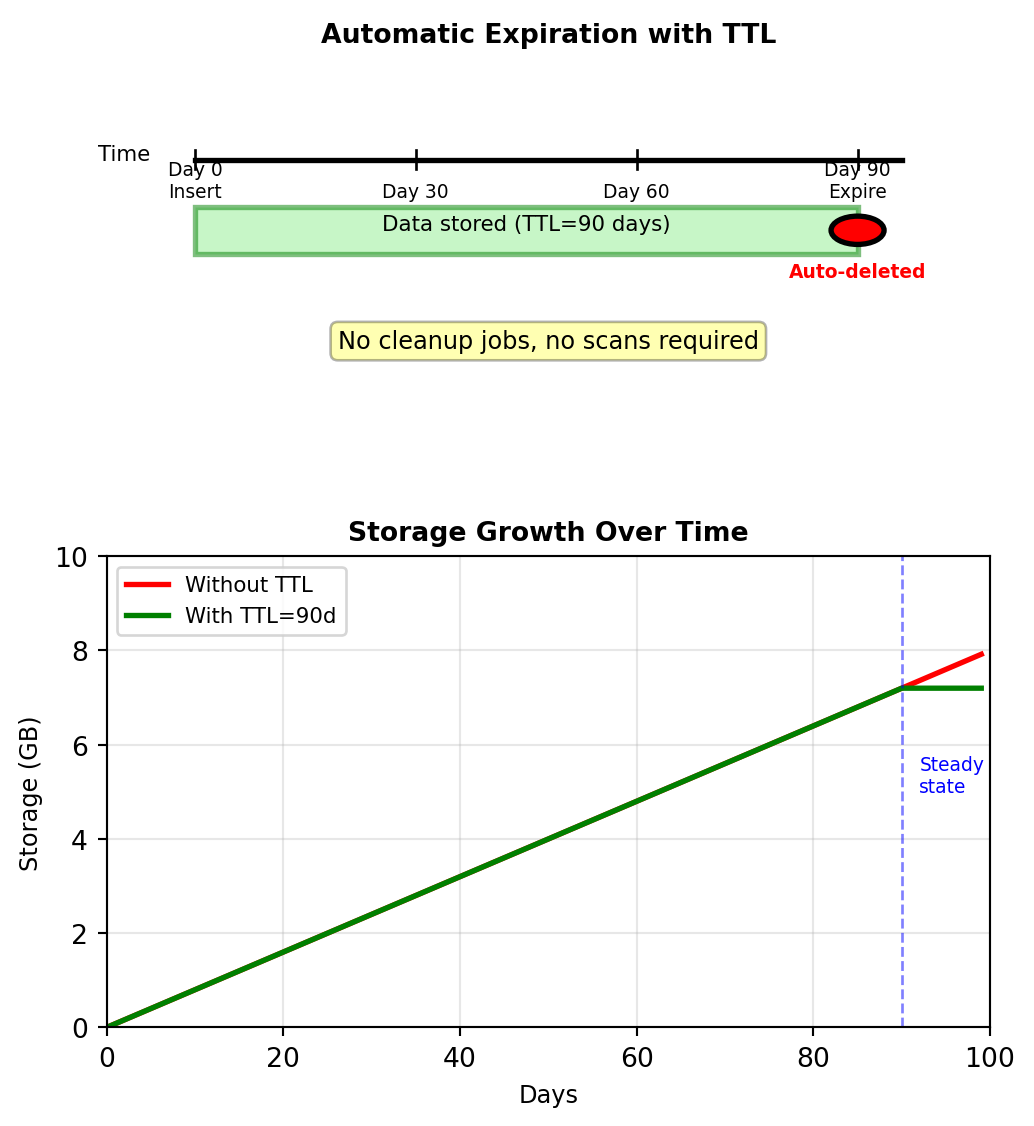
TTL (time to live): Automatic expiration
INSERT INTO sensor_readings
  (sensor_id, timestamp, temperature, humidity)
VALUES (42000, '2025-01-15T10:00:00', 22.5, 45)
USING TTL 7776000;  -- 90 days in seconds

-- After 90 days: Row automatically deleted
Implementation:
- TTL stored as metadata with each column
- Compaction removes expired data during background merge
- Tombstone created at expiration (soft delete)
- No read-time overhead: Expired data not returned
Use cases:
- Monitoring data: 90-day retention
- Session data: 30-minute expiration
- Cache data: 5-minute expiration
- Rate limiting counters: Hourly expiration

Storage calculation:
- 10,000 sensors × 8,640 readings/day = 86.4M rows/day
- Without TTL: Unbounded growth
- With 90-day TTL: Steady state at 7.78B rows
Graph Model - Nodes, Edges, Properties
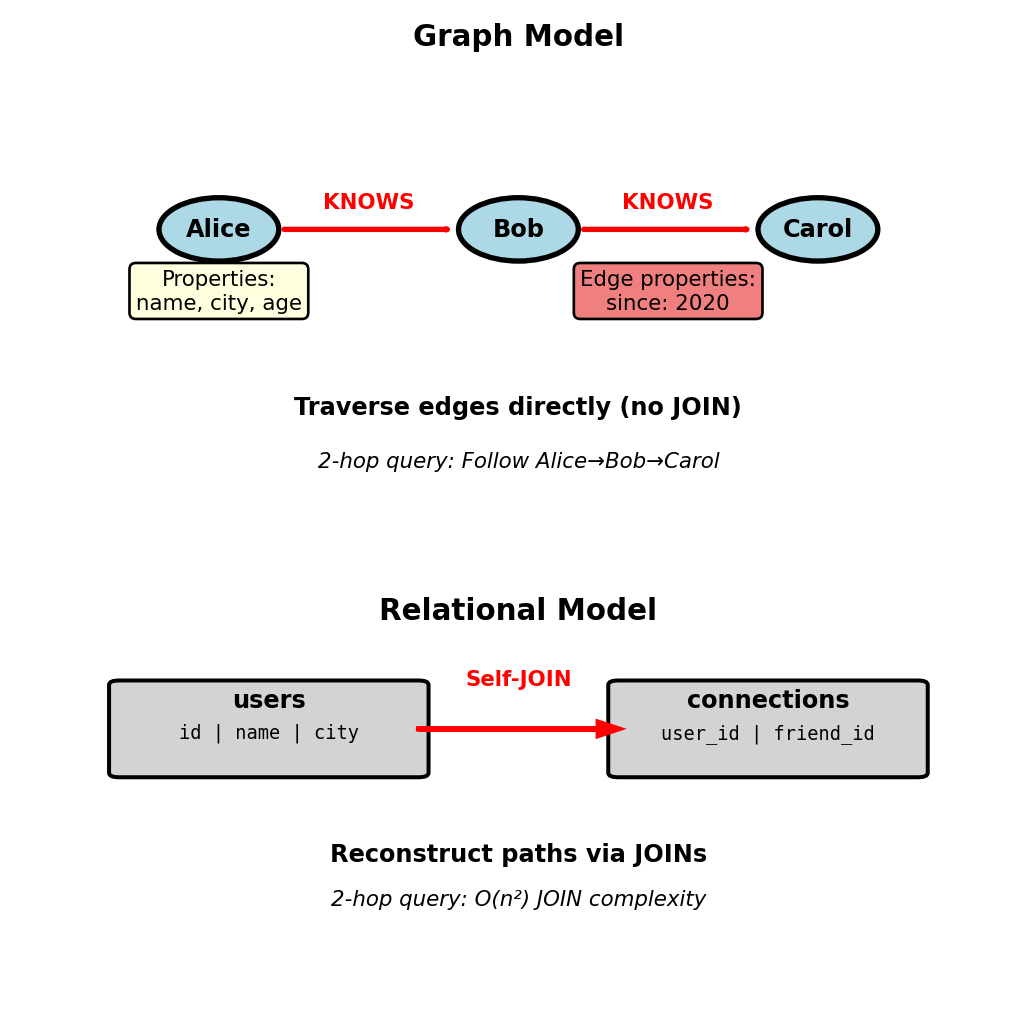
Social network queries require expensive self-JOINs:
-- Friends-of-friends
SELECT DISTINCT u.name
FROM connections c1
  JOIN connections c2 ON c1.friend_id = c2.user_id
  JOIN users u ON c2.friend_id = u.id
WHERE c1.user_id = 123;
Graph model stores relationships directly:
- Nodes: Entities with properties
- Edges: Relationships between nodes, can have properties
- Query: Traverse edges, no JOIN operations
Example:
- Node: Person {id: 123, name: “Alice”, city: “Boston”}
- Edge: (Alice)-[:KNOWS {since: 2020}]->(Bob)
- Query “friends of friends” = follow 2 edges
Native graph databases store adjacency (pointers between nodes), not foreign keys
Path Traversal - Friends of Friends in Neo4j
Query: Find friends-of-friends who live in Boston
Cypher (Neo4j query language):
MATCH (me:Person {id: 123})-[:KNOWS]->(friend)
      -[:KNOWS]->(fof:Person)
WHERE fof.city = 'Boston'
  AND fof.id <> 123
RETURN fof.name, fof.city
Pattern matching: (node)-[edge]->(node) describes path structure
Relational equivalent:
SELECT DISTINCT u.name, u.city
FROM connections c1
  JOIN connections c2 ON c1.friend_id = c2.user_id
  JOIN users u ON c2.friend_id = u.id
WHERE c1.user_id = 123
  AND u.city = 'Boston'
  AND c2.friend_id <> 123;
Performance difference:
- Relational: O(n²) - must JOIN entire connections table twice
- Graph: O(degree²) - follows edges from specific node
For node with 100 friends, each friend has 100 friends:
- Graph: Explores ~10,000 nodes
- SQL: Must process millions of rows (even with indexes)
Graph complexity depends on local structure (node degree), not global table size
Variable-Length Paths - Connection Distance
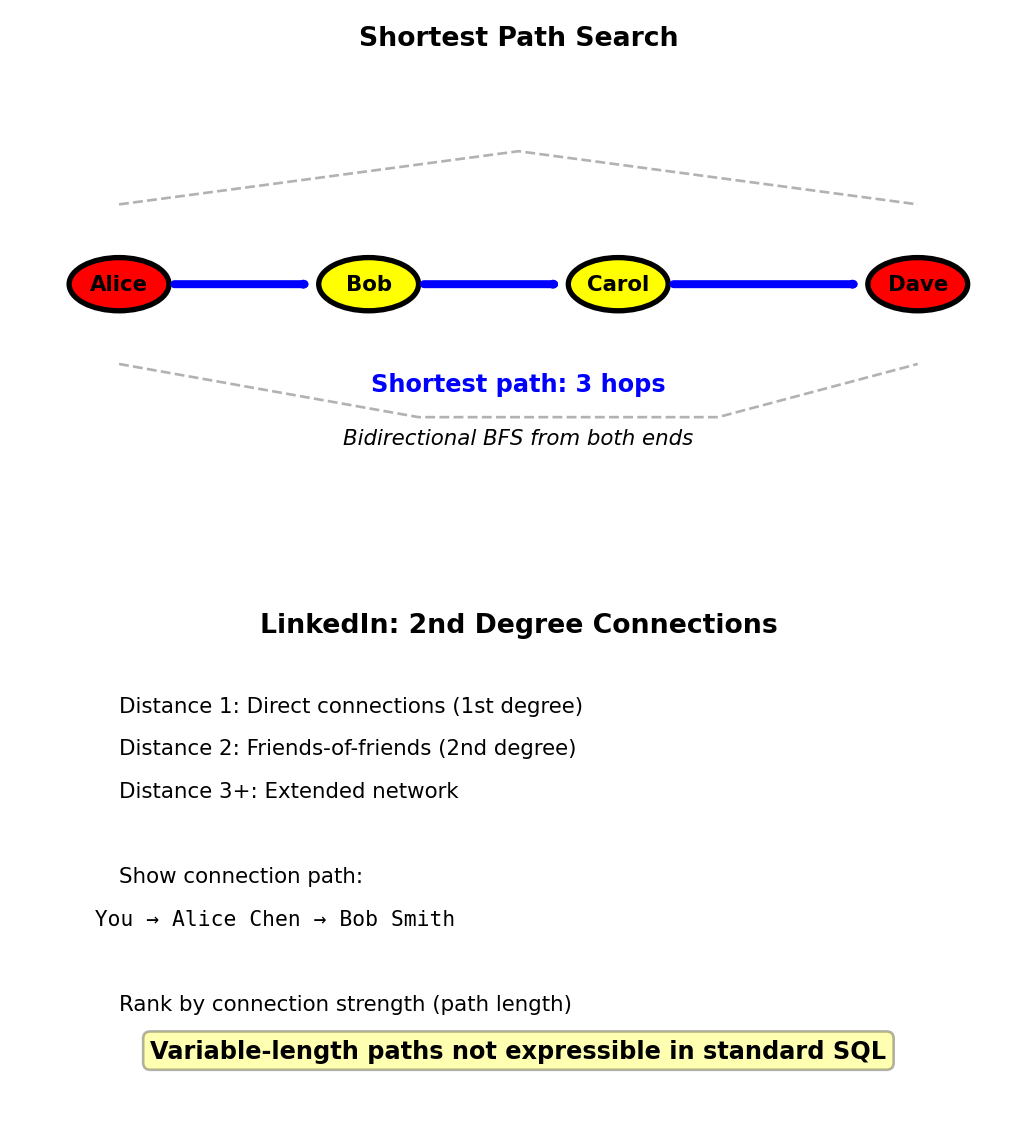
Query: How many hops separate two people? Find shortest path.
Cypher:
MATCH path = shortestPath(
  (a:Person {id: 123})-[:KNOWS*]-(b:Person {id: 789})
)
RETURN length(path)[:KNOWS*]matches 1 or more KNOWS edges- Finds shortest connection: 2 hops, 3 hops, etc.
- Bidirectional breadth-first search from both ends
Return path details:
RETURN [node IN nodes(path) | node.name] AS connection_path
-- Result: ["Alice", "Bob", "Carol", "Dave"]
SQL equivalent:
- Requires recursive CTE (PostgreSQL, Oracle)
- Limited depth, complex syntax
- Poor performance on large graphs
WITH RECURSIVE paths AS (
  SELECT user_id, friend_id, 1 AS depth,
         ARRAY[user_id, friend_id] AS path
  FROM connections
  WHERE user_id = 123
  UNION ALL
  SELECT p.user_id, c.friend_id, p.depth + 1,
         p.path || c.friend_id
  FROM paths p
  JOIN connections c ON p.friend_id = c.user_id
  WHERE p.depth < 6
    AND NOT c.friend_id = ANY(p.path)
)
SELECT MIN(depth) FROM paths WHERE friend_id = 789;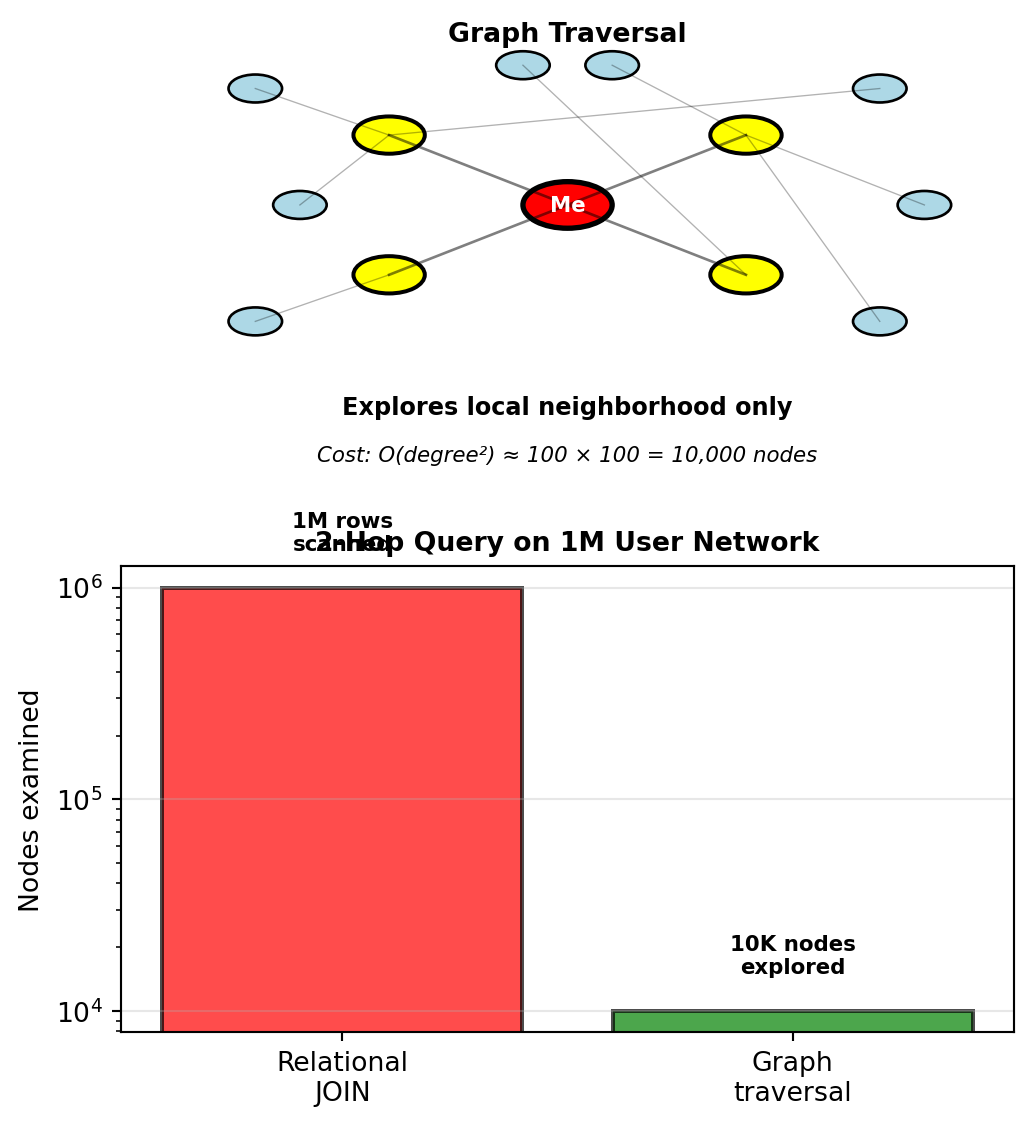
Use case: LinkedIn shows connection path and degree of separation
Recommendation - Collaborative Filtering
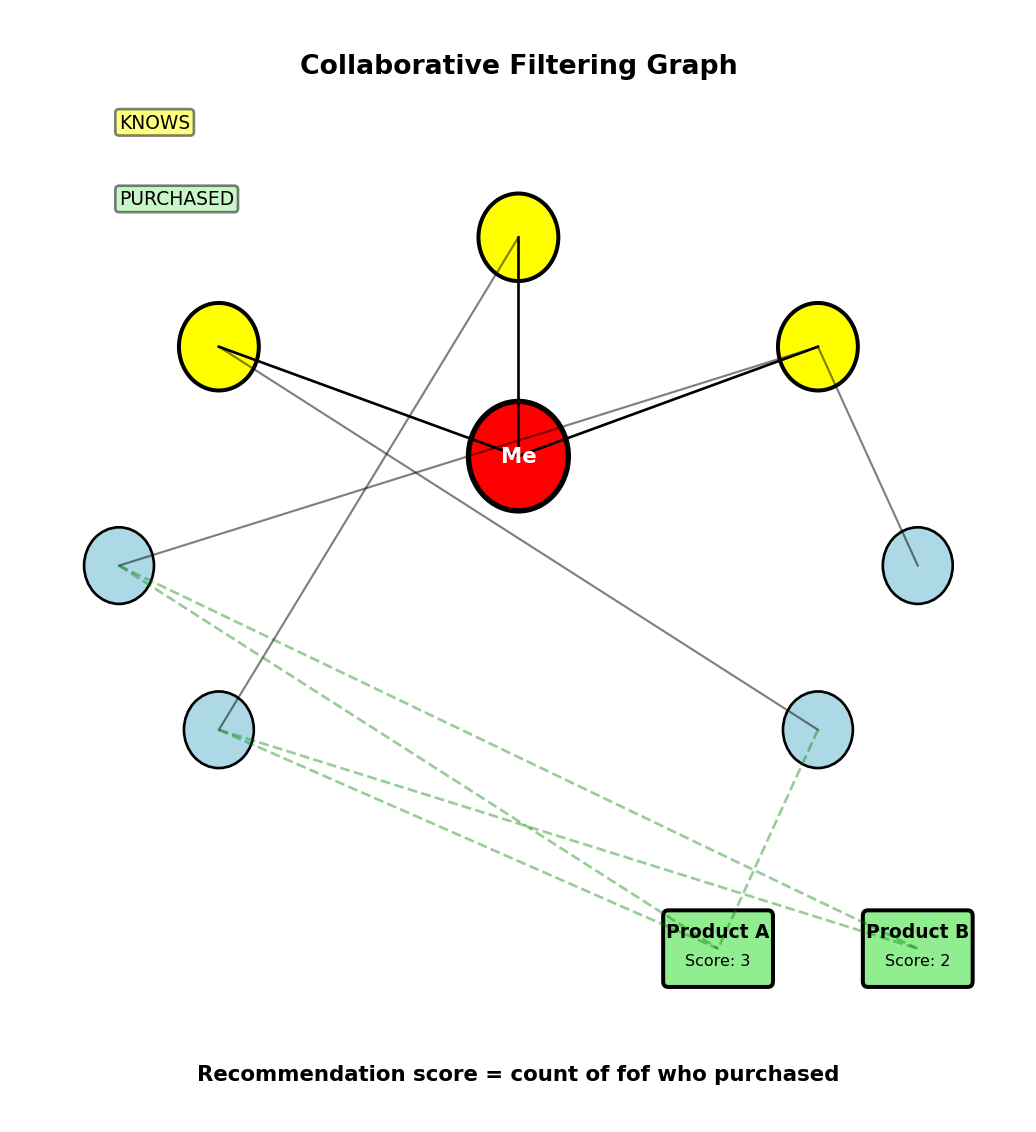
Problem: Recommend products based on friend purchases
Query: Products bought by friends-of-friends but not by me or my direct friends
MATCH (me:Person {id: 123})-[:KNOWS*1..2]->(friend)
MATCH (friend)-[:PURCHASED]->(product:Product)
WHERE NOT (me)-[:PURCHASED]->(product)
  AND NOT (me)-[:KNOWS]->()-[:PURCHASED]->(product)
RETURN product.name, COUNT(friend) as recommendation_score
ORDER BY recommendation_score DESC
LIMIT 10
Query breakdown:
[:KNOWS*1..2]= 1 or 2 hops (friends + friends-of-friends)- Find products purchased by anyone in that set
- Filter out: products I’ve bought
- Filter out: products my direct friends bought
- Count recommendations from multiple sources
Performance:
- Traverses ~10,000 relationships (100 friends × 100 fof)
- Filters and aggregates during traversal
- Returns top 10 products
- Completes in ~50ms
Relational equivalent:
- 3 self-JOINs on connections table
- JOIN with purchases table
- Multiple subqueries for filtering
- Scans millions of rows
- Completes in ~5 seconds
Results:
- Product A: 3 friends-of-friends purchased → score 3
- Product B: 2 friends-of-friends purchased → score 2
Relational requires 3 self-JOINs + product JOIN + filtering subqueries
Knowledge Graphs - Multi-Type Relationships
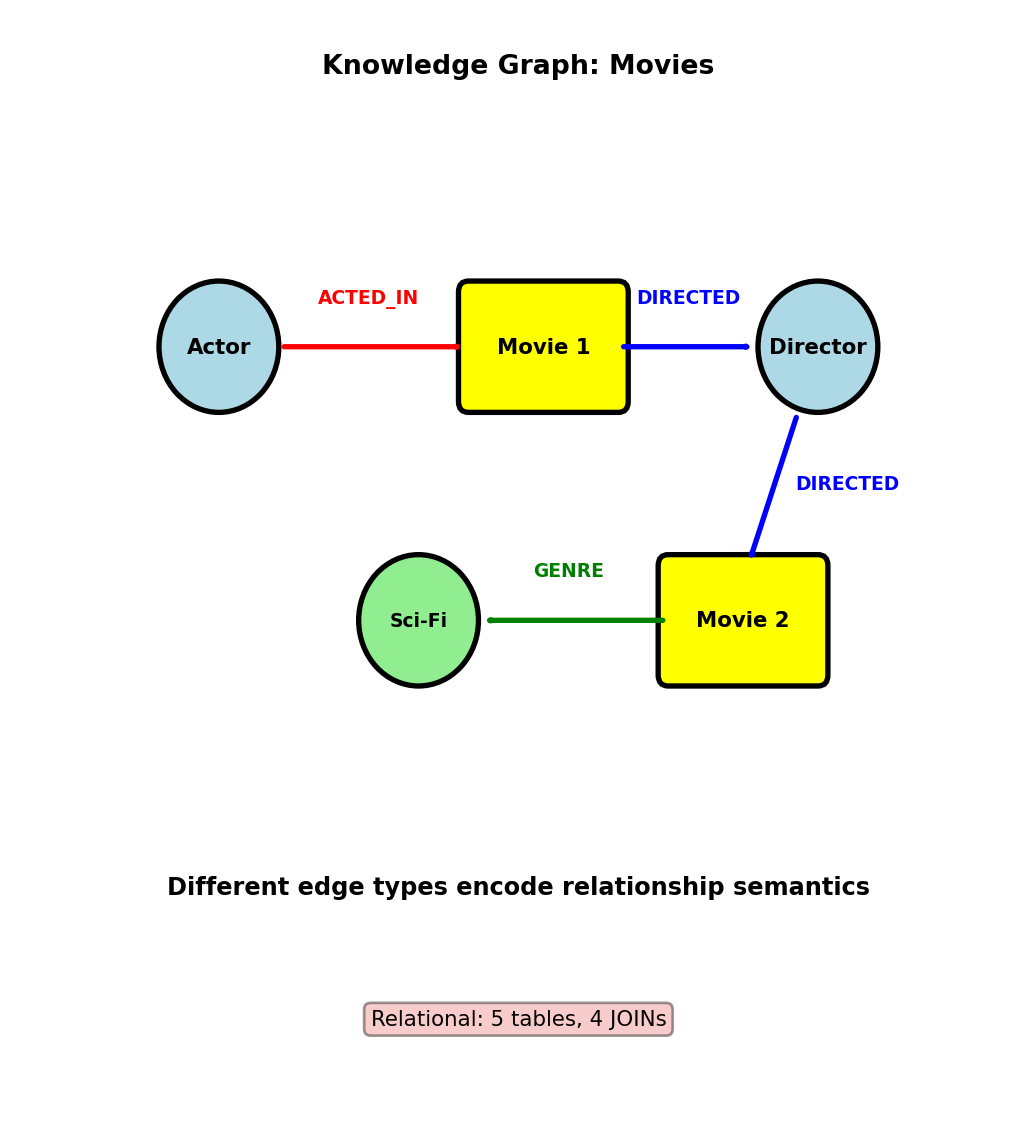
Movie database with heterogeneous relationships:
Schema (property graph model):
Nodes:
  Person (name, birth_year)
  Movie (title, year, rating)
  Genre (name)

Edges:
  (Person)-[:ACTED_IN {role: "Batman"}]->(Movie)
  (Person)-[:DIRECTED]->(Movie)
  (Movie)-[:BELONGS_TO_GENRE]->(Genre)
Query: Actors who worked with directors who directed Sci-Fi movies
MATCH (actor:Person)-[:ACTED_IN]->(m1:Movie)
  <-[:DIRECTED]-(director:Person)
MATCH (director)-[:DIRECTED]->(m2:Movie)
  -[:BELONGS_TO_GENRE]->(g:Genre {name: 'Sci-Fi'})
WHERE m1 <> m2
RETURN DISTINCT actor.name, director.name, m2.title
Query breakdown:
- Find actor-director collaborations
- Find other movies directed by same director
- Filter for Sci-Fi genre
- Different relationship types (ACTED_IN, DIRECTED, BELONGS_TO_GENRE)
Relational equivalent:
- 5 tables: people, movies, genres, movie_actors, movie_directors, movie_genres
- 4 JOINs with filtering on relationship types
- Complex foreign key navigation
Heterogeneous graphs: Multiple node types, multiple edge types with different semantics
Property Graph Storage - Index-Free Adjacency
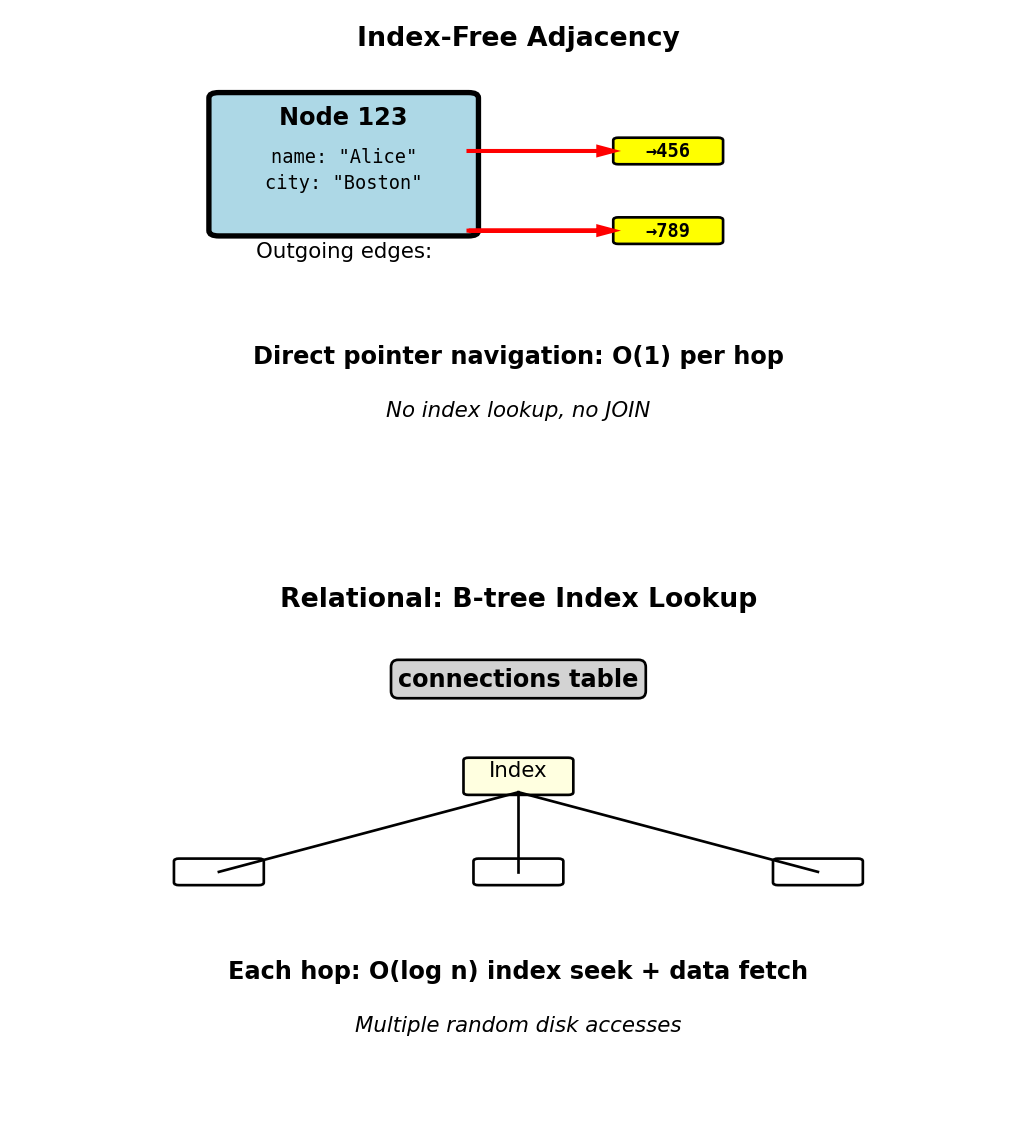
Native graph databases store direct pointers between nodes:
Conceptual storage structure:
Node 123 (Alice):
  properties: {name: "Alice", city: "Boston"}
  outgoing_edges: [ptr→456, ptr→789]
  incoming_edges: [ptr→234]

Node 456 (Bob):
  properties: {name: "Bob", city: "NYC"}
  outgoing_edges: [ptr→123, ptr→999]
  incoming_edges: [ptr→123, ptr→555]
Traversal cost:
- Follow edge: O(1) pointer dereference
- No index lookup required
- No JOIN operation
- Cache-efficient: Related nodes stored nearby on disk
Relational comparison:
- JOIN requires: Index lookup O(log n) or table scan O(n)
- Even with B-tree indexes: Multiple random disk seeks
- Each hop: Seek to index, seek to data
- Graph: Sequential read following pointers
Physical layout:
- Nodes clustered by locality
- Edges stored with source node
- Adjacency list per node
- Disk reads proportional to result size, not table size
Graph databases optimize for traversal, relational optimizes for joins
Fraud Detection - Connected Account Rings
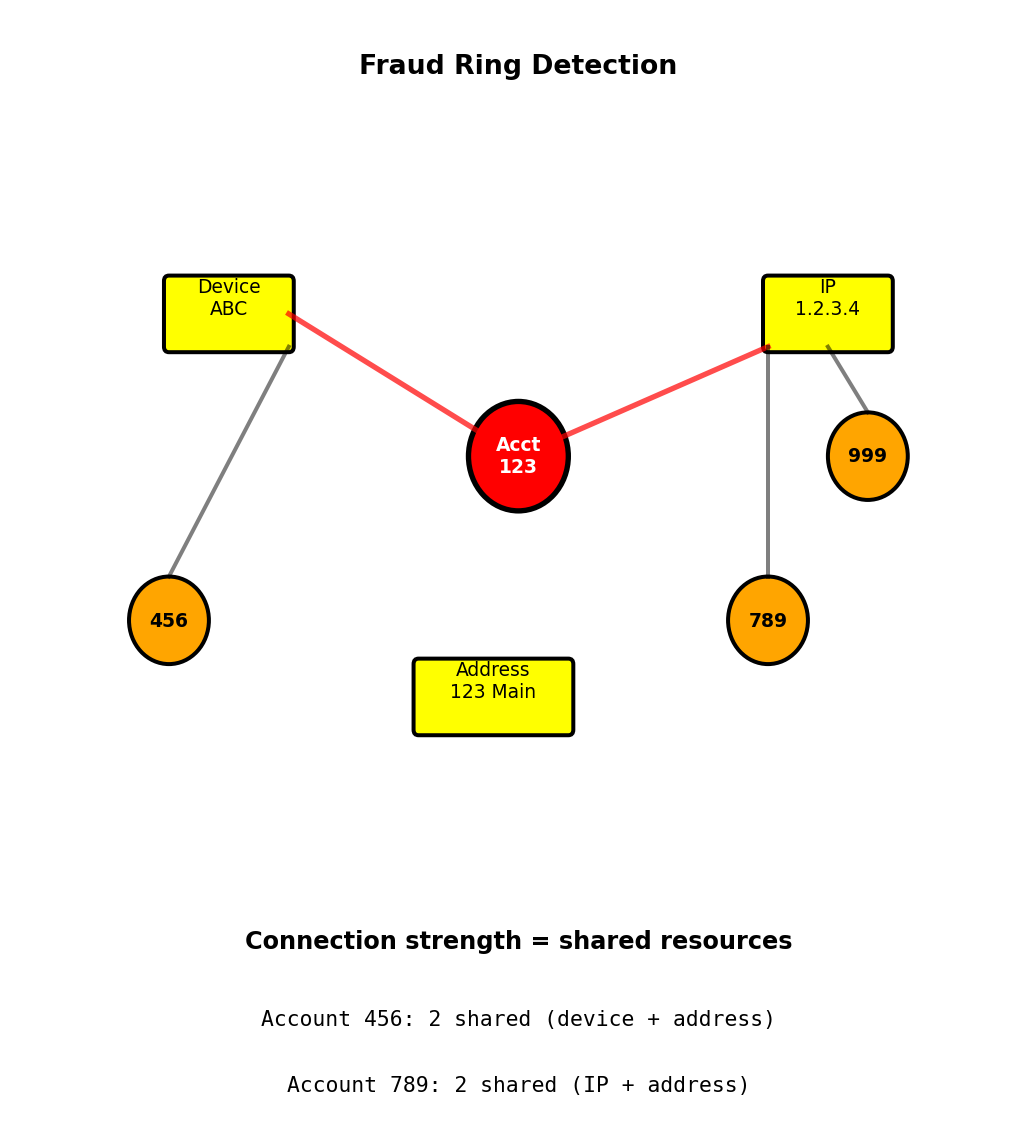
Scenario: Credit card fraud detection - identify accounts sharing resources
Data model:
Nodes:
  Account (account_id, status)
  Device (device_fingerprint)
  IPAddress (ip)
  PhysicalAddress (street, city)

Edges:
  (Account)-[:USED_DEVICE]->(Device)
  (Account)-[:ORIGINATED_FROM]->(IPAddress)
  (Account)-[:REGISTERED_AT]->(PhysicalAddress)
Fraud detection query:
Find accounts connected to flagged account through shared resources (2 hops):
MATCH (suspicious:Account {flagged: true})
MATCH (suspicious)-[:USED_DEVICE|ORIGINATED_FROM
                    |REGISTERED_AT*1..2]-(related:Account)
WHERE related.account_id <> suspicious.account_id
RETURN related.account_id,
       COUNT(*) as connection_strength
ORDER BY connection_strength DESC
Pattern detected:
- Suspicious account shares device with 3 accounts
- Those 3 accounts all share same IP address
- Flag entire ring for review
Timing:
- Graph: 50ms to explore 2-hop neighborhood
- Relational: 5s for equivalent multi-JOIN query
Relational approach:
- 7 tables: accounts, devices, account_devices, ips, account_ips, addresses, account_addresses
- Complex multi-JOIN to find shared resources
- Adding new connection type requires schema change
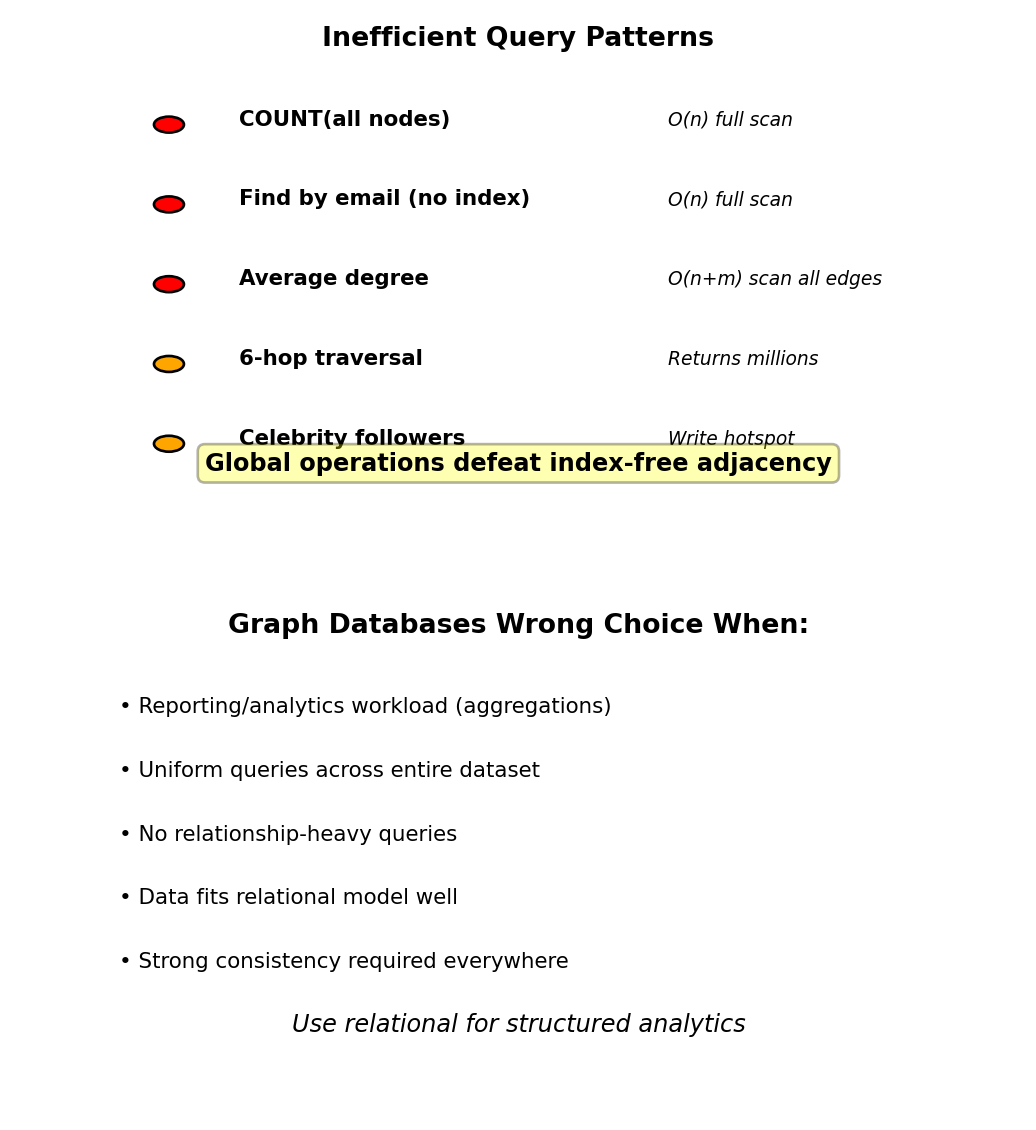
Graph Database Limitations
Inefficient without indexes:
Global aggregations require full graph scan:
// Count all users - O(n)
MATCH (u:User) RETURN COUNT(u)

// Average friend count - O(n + m)
MATCH (u:User)-[:KNOWS]->(f)
RETURN AVG(COUNT(f))

// Find by property without index - O(n)
MATCH (u:User {email: 'alice@example.com'})
RETURN u
Without property index: scans all User nodes
Large traversal results:
Small world problem - 6 degrees reaches most of graph:
// All people within 6 hops - returns millions
MATCH (me:User {id: 123})-[:KNOWS*1..6]-(connected)
RETURN COUNT(DISTINCT connected)
Kevin Bacon number: 6 hops connects to entire Hollywood
Limited transactions:
- Neo4j: Full ACID transactions supported
- Distributed graphs (JanusGraph, Neptune): Eventually consistent
- Cross-partition transactions limited
Write hotspots:
Celebrity node with 10M followers:
- Every follower edge stored on celebrity node
- Hot spot for writes and reads
- Sharding difficult - high-degree nodes don’t partition well
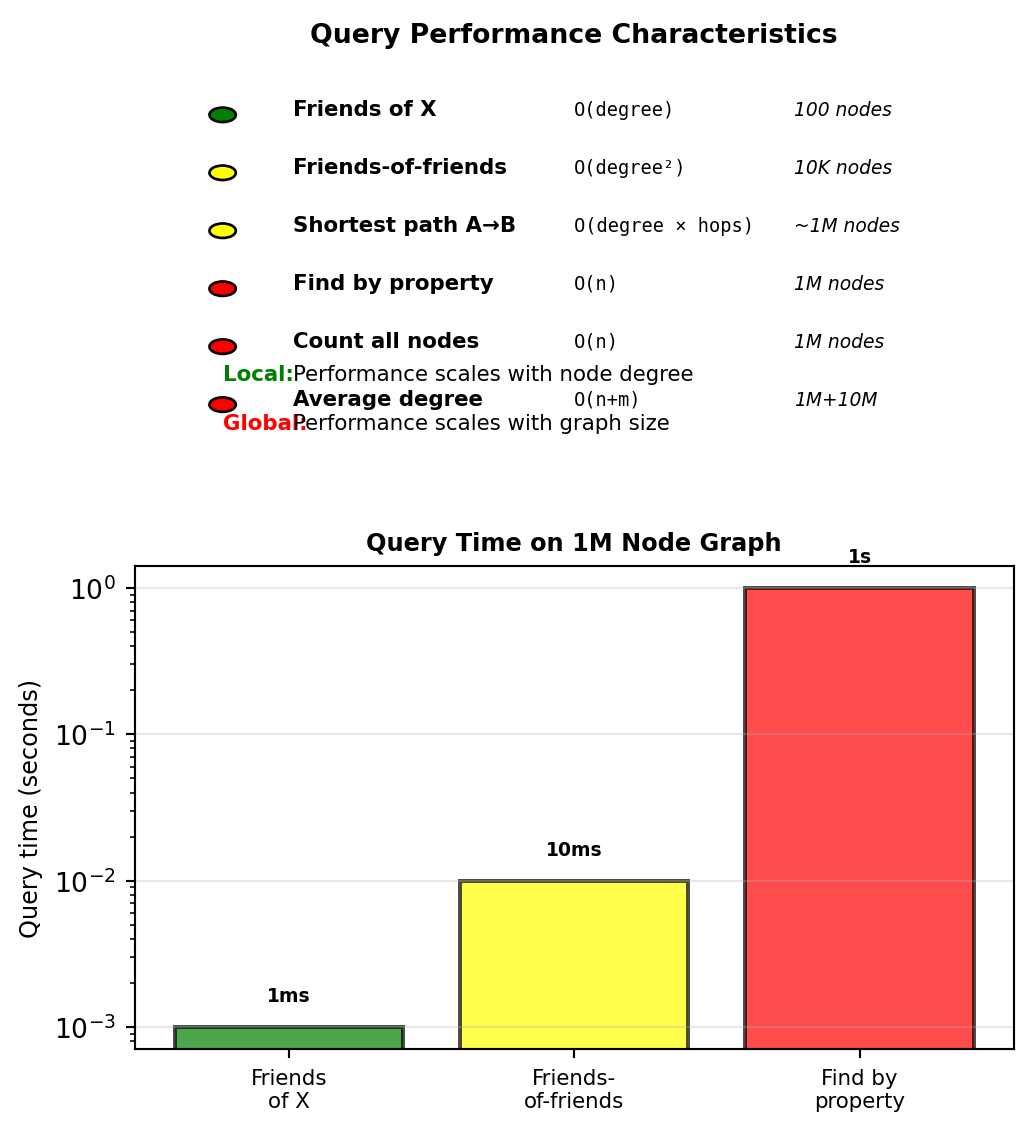
Graph databases optimize for relationship traversal, not aggregation
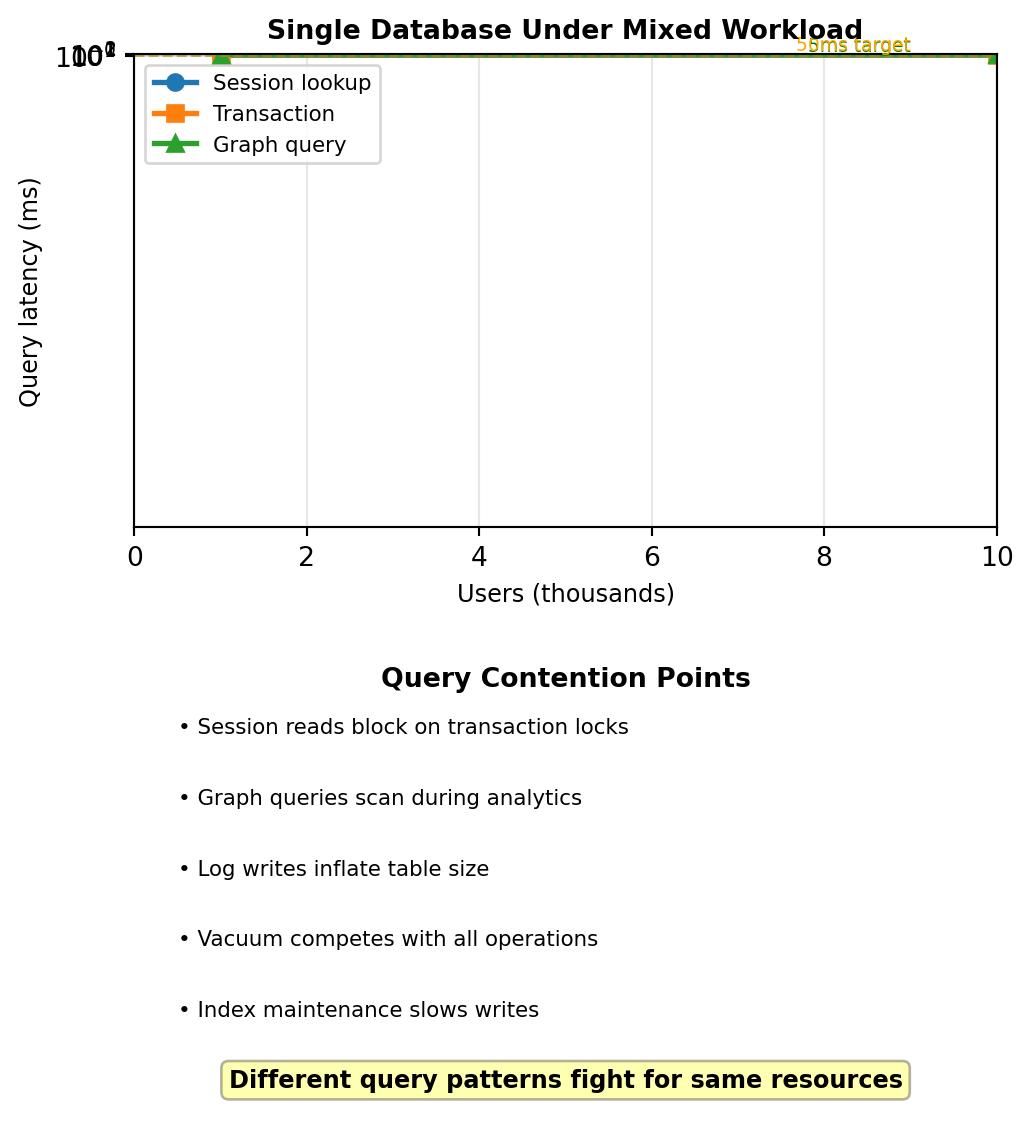
Single Database Assumption Breaks Under Heterogeneous Workload
Traditional architecture: Single PostgreSQL database
Handles everything:
- User accounts, transactions, sessions
- Social connections, recommendations
- Logs, analytics queries
Works at small scale (thousands of users)
Observed failure at 100K users:
- Session lookups (10K req/sec) compete with order writes (100 req/sec)
- Friends-of-friends graph queries lock tables during analytics scans
- Log inserts (1M/day) bloat primary database
- Index maintenance slows all operations
Not a scale problem - a workload mismatch problem:
- Shopping cart read: Needs <5ms latency, key-value lookup
- Order write: Needs ACID transaction, relational integrity
- Product recommendation: Needs graph traversal, relationship queries
- Analytics query: Scans entire order history, full table aggregation
PostgreSQL optimized for transactions, not for all four patterns simultaneously
Query patterns interfere when forced through single storage model
E-commerce Platform - Data Flow Across Stores
Production system: 500K users, 50K orders/day
User completes checkout:
PostgreSQL (ACID transaction):
BEGIN;
  INSERT INTO orders (order_id, user_id, total, timestamp)
  VALUES (12345, 789, 99.99, NOW());

  INSERT INTO order_items (order_id, product_id, quantity, price)
  VALUES (12345, 101, 2, 49.99);

  UPDATE products SET inventory = inventory - 2
  WHERE product_id = 101 AND inventory >= 2;

  -- If inventory check fails, entire transaction rolls back
COMMIT;
Latency: 50ms | Consistency: Immediate (ACID)
Redis (ephemeral data):
# Clear shopping cart (no longer needed)
redis.delete(f"cart:{user_id}")
Latency: 1ms | Consistency: Immediate (single key)
Neo4j (graph relationship - async):
// Seconds later, from background worker
MATCH (u:User {id: 789}), (p:Product {id: 101})
CREATE (u)-[:PURCHASED {timestamp: 1234567890}]->(p)
Latency: 20ms | Consistency: Eventual (5 second delay acceptable)
Application routes operations to appropriate database
Caching Layer Reduces Primary Database Load
Problem: Product pages receive 5K views/minute
Each view queries PostgreSQL:
SELECT p.name, p.price, p.inventory,
       c.name as category,
       array_agg(i.url) as images
FROM products p
  JOIN categories c ON p.category_id = c.id
  JOIN product_images i ON p.id = i.product_id
WHERE p.id = 12345
GROUP BY p.id, c.name;
Load: 5K queries/minute = 83 queries/second to PostgreSQL
Product data changes rarely (once per day)
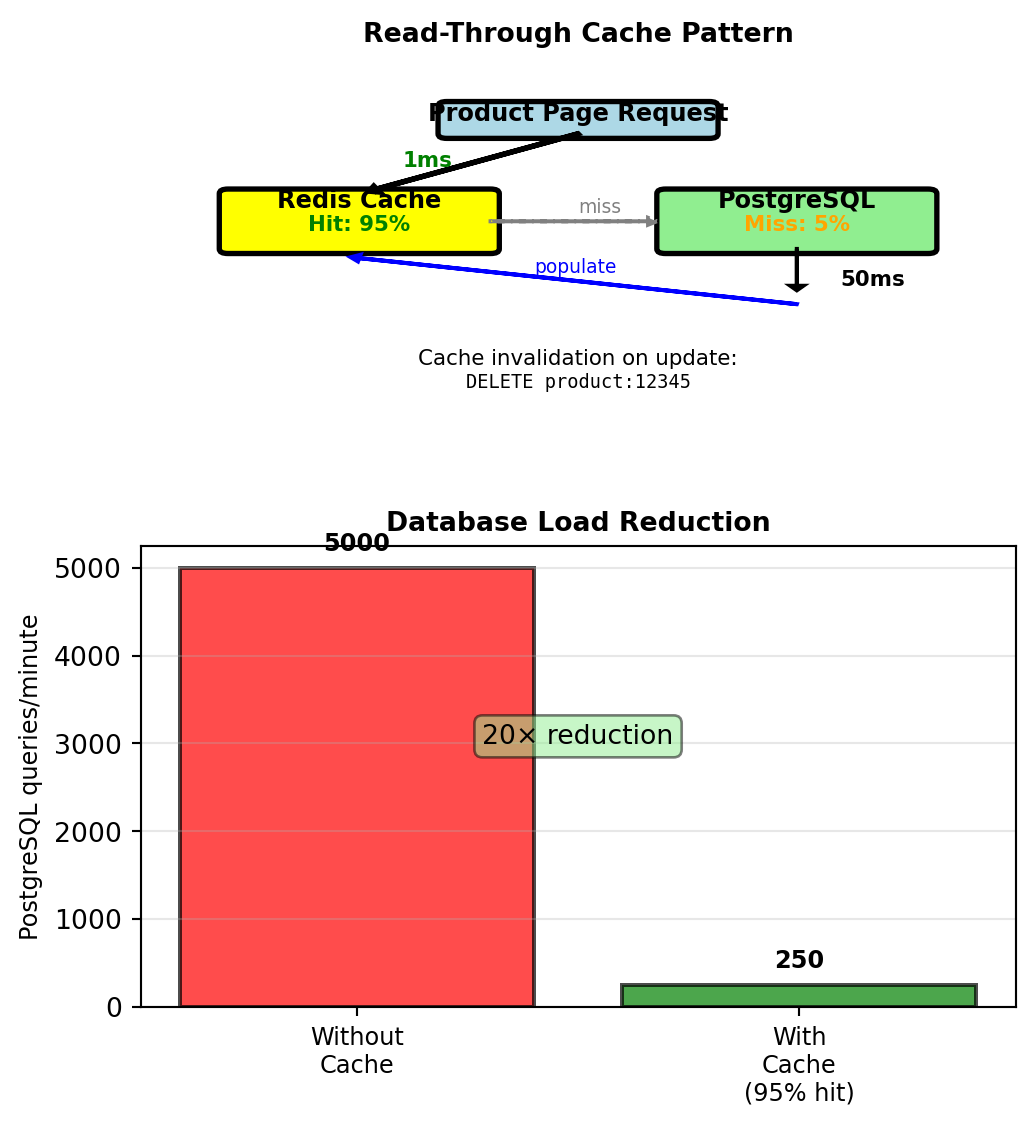
Read-through cache pattern:
def get_product_details(product_id):
    cache_key = f"product:{product_id}"

    cached = redis.get(cache_key)
    if cached:
        return json.loads(cached)  # 1ms cache hit

    # Cache miss - query database
    product = postgres.query(query_string, product_id)  # 50ms

    # Cache for 1 hour
    redis.setex(cache_key, 3600, json.dumps(product))
    return product
Measured performance:
- Cache hit rate: 95%
- Average latency: 0.95 × 1ms + 0.05 × 50ms = 3.45ms
- PostgreSQL load: 5K × 0.05 = 250 queries/minute
- Database load reduced 20×
Analytics queries run on read replica:
- Revenue reports scan millions of rows
- Run on replica: Primary unaffected
- Replica lags 5-10 seconds (acceptable for reports)
Data Synchronization Without Distributed Transactions
Problem: User changes email address
Must update:
- PostgreSQL users table (primary copy)
- Neo4j User node (has email property for queries)
No distributed transaction across databases
Approach 1: Dual write
def update_email(user_id, new_email):
    # PostgreSQL first (source of truth)
    postgres.execute(
        "UPDATE users SET email=? WHERE id=?",
        new_email, user_id
    )

    # Neo4j second
    try:
        neo4j.run(
            "MATCH (u:User {id: $uid}) SET u.email = $email",
            uid=user_id, email=new_email
        )
    except Exception as e:
        log.error(f"Neo4j update failed: {e}")
        retry_queue.push({
            "user_id": user_id,
            "email": new_email
        })
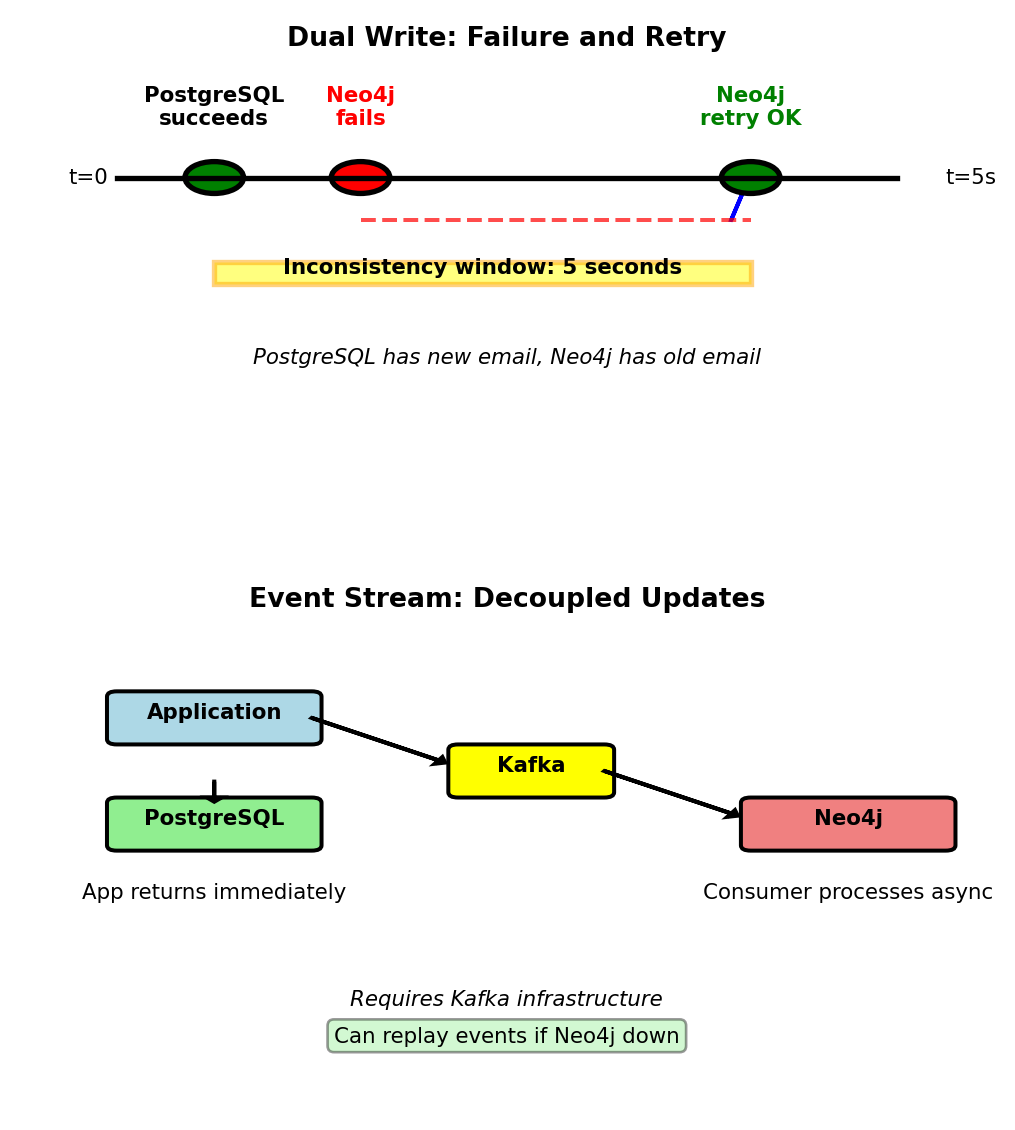
Failure scenario:
- PostgreSQL succeeds at t=0
- Neo4j fails (network partition)
- Retry succeeds at t=5
- Neo4j shows stale email for 5 seconds
- Acceptable for social graph queries
Approach 2: Event stream
# Application writes to PostgreSQL only
def update_email(user_id, new_email):
    postgres.execute("UPDATE users SET email=? WHERE id=?")
    kafka.publish("user.updated", {
        "user_id": user_id, "email": new_email
    })

# Separate consumer updates Neo4j
for event in kafka.consume("user.updated"):
    neo4j.run("MATCH (u:User {id: $uid}) SET u.email = $email")
Operational complexity:
- Monitor: PostgreSQL metrics ≠ Redis metrics ≠ Neo4j metrics
- Backups: Each database independent
- Upgrades: PostgreSQL 14→15, Redis 6→7 separately
Polyglot Persistence in Production Architecture
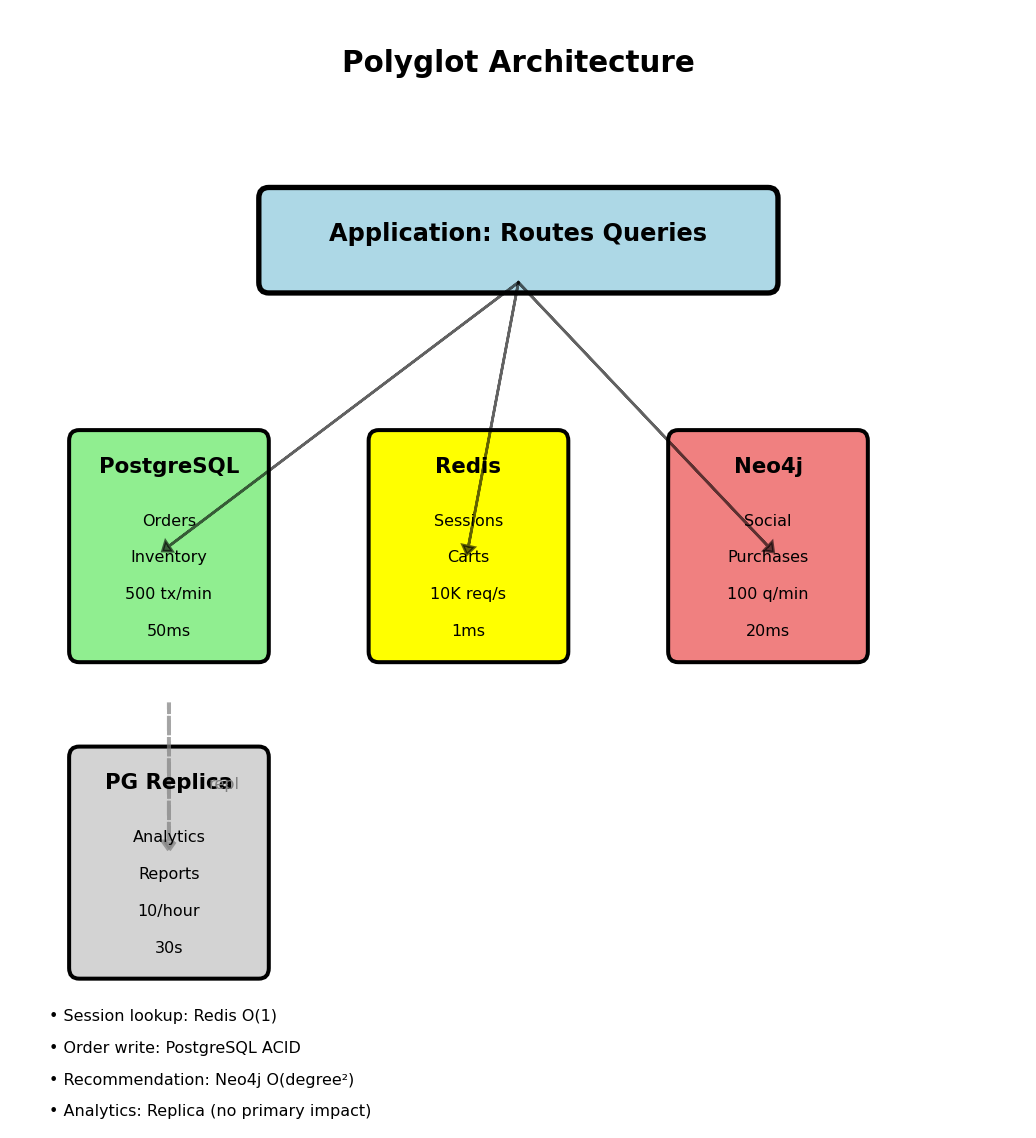
Social e-commerce platform: 500K users, 50K orders/day
PostgreSQL (ACID transactions):
- Tables: users, orders, order_items, products, inventory
- Write: INSERT orders, UPDATE inventory atomically
- Read: Point lookups by ID (indexed)
- Query latency: 50ms (JOIN queries)
- Load: 500 transactions/minute
- Consistency: Immediate (ACID guarantees)
Redis (ephemeral cache):
- Data: sessions, shopping carts, product cache
- Write: SET with TTL, DELETE on invalidation
- Read: GET by exact key
- Query latency: 1ms
- Load: 10K requests/second
- Consistency: Single-key immediate
Neo4j (graph traversal):
- Data: (User)-[:KNOWS]->(User), (User)-[:PURCHASED]->(Product)
- Write: CREATE edge (async from PostgreSQL)
- Read: MATCH paths, 2-3 hop traversal
- Query latency: 20ms (friends-of-friends)
- Load: 100 traversals/minute
- Consistency: Eventual (5 second lag acceptable)
PostgreSQL read replica (analytics):
- Same data as primary
- Replication lag: 5-10 seconds
- Query: Full table scans, aggregations
- Query latency: 30 seconds (acceptable for reports)
- Load: 10 reports/hour
Trade-off measured:
- Performance: 3.45ms average page load
- vs 200ms with single PostgreSQL
- Complexity: 4 systems to operate
- Team: Managed services or in-house expertise
Migration pattern observed:
- Start: Single PostgreSQL
- Pain: Session queries block transactions
- Add: Redis for sessions (quick win)
- Later: Neo4j for recommendations (higher value justifies complexity)
Not about database choice - about workload isolation
DynamoDB - AWS Implementation of Wide-Column Model
DynamoDB: AWS managed database service that follows wide-column data model
Amazon’s fully managed database service:
- No cluster management (contrast with Cassandra 5-node setup)
- Automatic scaling based on traffic
- Built-in multi-region replication
- Pay-per-request pricing: $1.25 per million reads, $6.25 per million writes
Production usage:
- Amazon.com: Shopping cart (50M requests/sec peak)
- Lyft: Trip and location data
- Snapchat: User stories storage
Trade-off vs Cassandra:
- Managed service abstracts distribution complexity
- Limited query flexibility (no custom partition strategies)
- Operational simplicity for query constraints
Cassandra: Operator manages cluster. DynamoDB: AWS manages distribution.
Table Structure - Partition Key and Sort Key
Primary key structure determines data distribution and query patterns
Partition key (required):
- Hash determines which partition stores item
- Same concept as Cassandra partition key
- Distribution: hash(partition_key) mod num_partitions
Sort key (optional):
- Orders items within partition
- Supports range queries on sort key
- Physical storage: Items sorted by sort key on disk
Composite primary key = (partition key, sort key)
Sensor monitoring table:
{
    "TableName": "sensor_readings",
    "KeySchema": [
        {"AttributeName": "sensor_id", "KeyType": "HASH"},
        {"AttributeName": "timestamp", "KeyType": "RANGE"}
    ],
    "AttributeDefinitions": [
        {"AttributeName": "sensor_id", "AttributeType": "N"},
        {"AttributeName": "timestamp", "AttributeType": "N"}
    ]
}
Items for sensor_id=42000:
{"sensor_id": 42000, "timestamp": 1704034800, "temperature": 22.5}
{"sensor_id": 42000, "timestamp": 1704034810, "temperature": 22.6}
{"sensor_id": 42000, "timestamp": 1704034820, "temperature": 22.4}
All stored in same partition, sorted by timestamp
Partition key determines storage location, sort key supports range queries
Item Structure - Sparse Storage
Items in same table can have different attributes
Wide-column stores only non-NULL values. DynamoDB implements this - no wasted storage on missing attributes.
Flight events with varying attributes:
Delay event:
{
    "flight_id": 12345,
    "event_time": 1704034800,
    "event_type": "delay",
    "delay_minutes": 45,
    "delay_reason": "weather"
}
Emergency event:
{
    "flight_id": 12346,
    "event_time": 1704038400,
    "event_type": "emergency",
    "diverted_airport": "DEN",
    "emergency_type": "medical"
}
Normal departure (no special attributes):
{
    "flight_id": 12347,
    "event_time": 1704042000,
    "event_type": "departure"
}
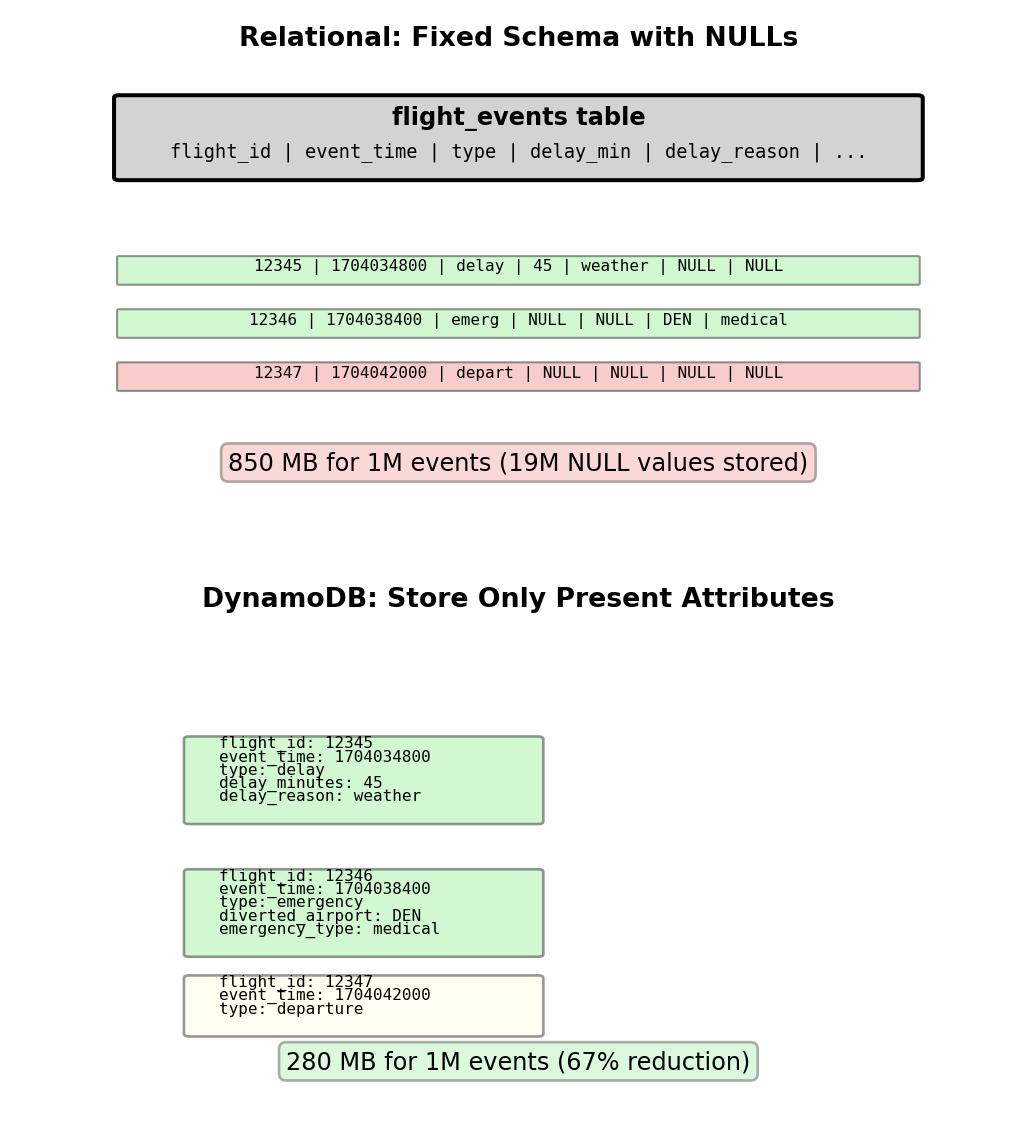
Storage efficiency measurement (1M flight events):
Relational approach: 20 event columns × 1M rows = 20M cells
- 95% events have no special attributes → 19M NULL values
- Storage: 850 MB (including NULL overhead)
DynamoDB: Only stores present attributes
- 50K delays (5 attributes each) + 5K emergencies (5 attributes each) + 945K normal (3 attributes each)
- Storage: 280 MB (67% reduction)

Sparse storage eliminates NULL overhead
Query Patterns - Partition Key Requirement
Query performance depends on partition key specification
Like Cassandra, DynamoDB requires partition key for efficient queries. Without partition key, expensive full-table scan required.
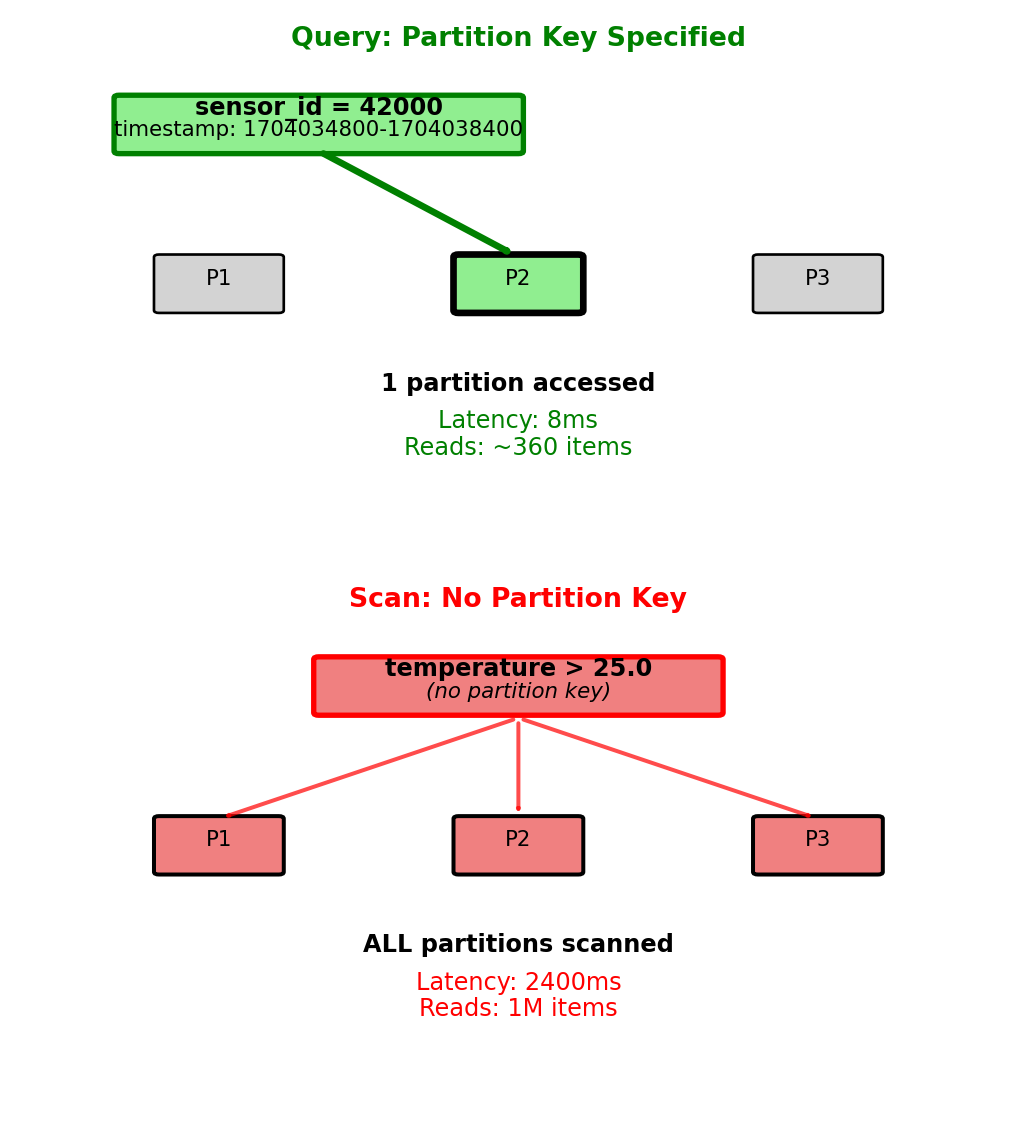
Efficient query (partition key specified):
from boto3.dynamodb.conditions import Key

response = table.query(
    KeyConditionExpression=
        Key('sensor_id').eq(42000) &
        Key('timestamp').between(1704034800, 1704038400)
)
Execution:
- Accesses single partition (sensor_id=42000)
- Range scan on timestamp within partition
- Returns 360 items (1 hour at 10-second intervals)
- Latency: 8ms
- Billed for ~360 items read
Inefficient scan (no partition key):
from boto3.dynamodb.conditions import Attr

response = table.scan(
    FilterExpression=Attr('temperature').gt(25.0)
)
Execution:
- Reads every item in every partition
- Applies temperature filter after reading from storage
- 1M total items, 100K match filter
- Latency: 2400ms (300× slower)
- Billed for 1M items read (not 100K returned)

Partition key specification: 300× latency difference, 2800× items read
Global Secondary Index - Alternative Access Patterns
Problem: Table partitioned by sensor_id cannot efficiently query by other attributes
sensor_readings table:
- Partition key: sensor_id
- Sort key: timestamp
- Efficient: “Readings for sensor 42000”
- Inefficient: “All sensors with low battery” → requires scan
Solution: Global Secondary Index (GSI)
GSI creates alternate partition key on different attribute:
table.update(
    GlobalSecondaryIndexUpdates=[{
        'Create': {
            'IndexName': 'battery-status-index',
            'KeySchema': [
                {'AttributeName': 'battery_status', 'KeyType': 'HASH'},
                {'AttributeName': 'sensor_id', 'KeyType': 'RANGE'}
            ],
            'Projection': {'ProjectionType': 'ALL'}
        }
    }]
)
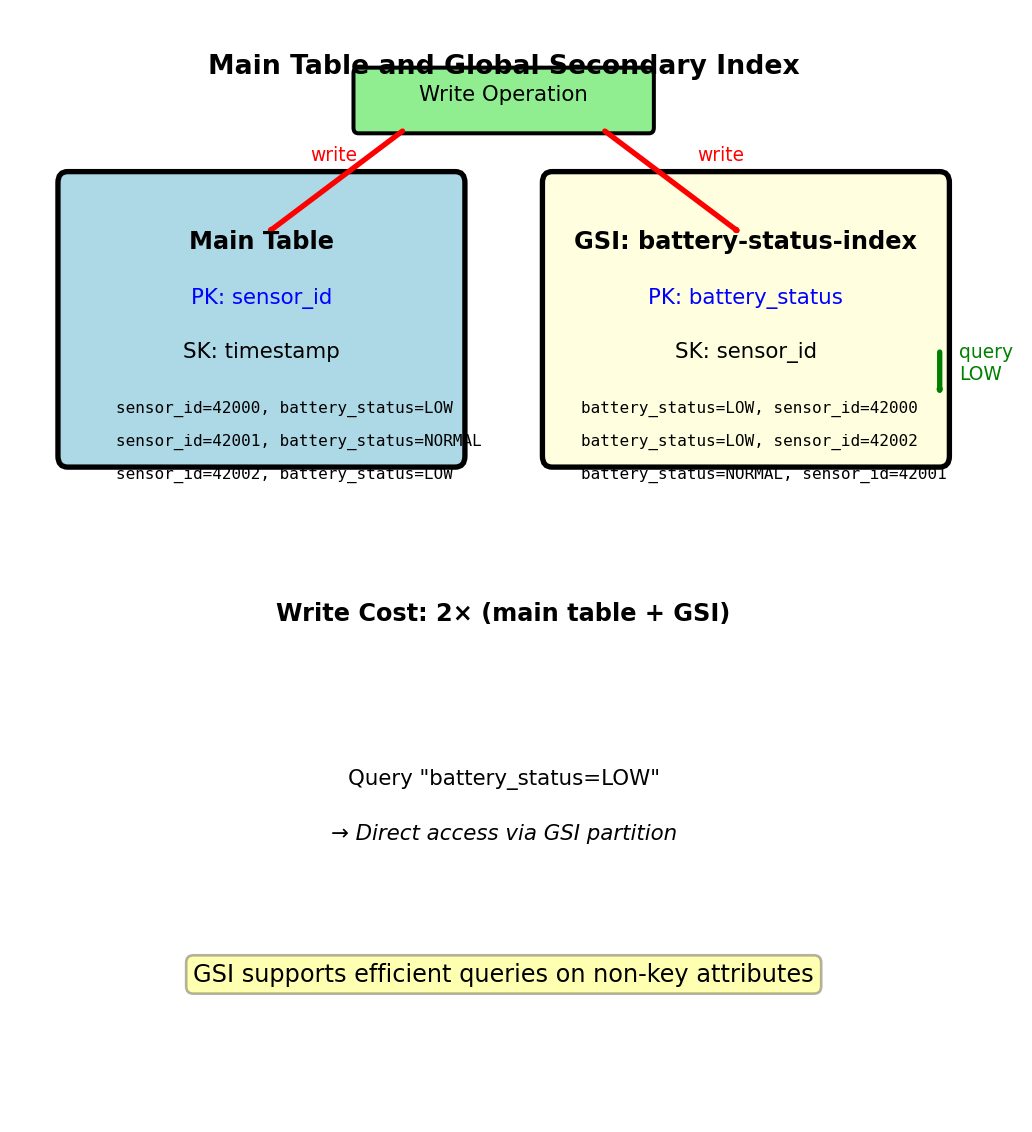
GSI structure:
- New partition key: battery_status (values: LOW, NORMAL, FULL)
- New sort key: sensor_id
- DynamoDB maintains GSI automatically on every write
Query using GSI:
response = table.query(
    IndexName='battery-status-index',
    KeyConditionExpression=Key('battery_status').eq('LOW')
)
Returns all low-battery sensors in single partition access
GSI maintained automatically, doubles write cost
Capacity Modes - On-Demand vs Provisioned
On-demand mode: Pay per request
Pricing (us-west-2):
- $1.25 per million read requests
- $6.25 per million write requests
- Storage: $0.25 per GB-month
Capacity unit definition:
- 1 read request = up to 4 KB
- 1 write request = up to 1 KB
- Larger items consume multiple requests
Example cost calculation:
- 10,000 reads/day (each 2 KB) = 300K reads/month
- 2,000 writes/day (each 0.5 KB) = 60K writes/month
- Storage: 5 GB
- Monthly cost: (0.3 × $1.25) + (0.06 × $6.25) + (5 × $0.25) = $0.38 + $0.38 + $1.25 = $2.01
When to use on-demand:
- Development and testing (unpredictable traffic)
- Spiky workloads (traffic varies 10× between peak and baseline)
- New applications (unknown traffic patterns)
Provisioned mode: Reserve capacity
Specify capacity units:
Read Capacity Units (RCU): Strongly consistent reads/sec
- 1 RCU = 1 read/sec of up to 4 KB
- Eventually consistent reads: 2× capacity (1 RCU = 2 reads/sec)
Write Capacity Units (WCU): Writes/sec of up to 1 KB
Pricing:
- $0.00065/hour per RCU = $0.47/month per RCU
- $0.00325/hour per WCU = $2.35/month per WCU
Provisioned capacity example:
Reserve 10 RCU + 5 WCU:
- Monthly cost: (10 × $0.47) + (5 × $2.35) = $4.70 + $11.75 = $16.45
- Capacity: 10 reads/sec + 5 writes/sec
- Handles: 25.9M reads/month + 13M writes/month
If traffic exceeds provisioned capacity: ProvisionedThroughputExceededException (throttling). Application must retry with exponential backoff.
Auto-scaling:
table.update(
    BillingMode='PROVISIONED',
    ProvisionedThroughput={
        'ReadCapacityUnits': 10,
        'WriteCapacityUnits': 5
    }
)

# Enable auto-scaling (via AWS Application Auto Scaling)
# Target: 70% utilization
# Min: 5 RCU/WCU
# Max: 100 RCU/WCU
Auto-scaling adjusts capacity based on utilization, responds within 2-5 minutes.
Break-even analysis:
Provisioned cheaper for sustained traffic, on-demand cheaper for spiky/low-volume
Single-Table Design - Multiple Entities in One Table
Advanced pattern: Store multiple entity types in single table
Wide-column model supports heterogeneous rows. DynamoDB extends this - different entity types in same table using composite key structure.
Multi-table approach (relational thinking):
users_table:        PK: user_id
orders_table:       PK: order_id
products_table:     PK: product_id
order_items_table:  PK: order_id, SK: product_id
Query “user profile + recent 10 orders + line items for each order”:
- Query 1: users_table → 1 item
- Query 2: orders_table (GSI on user_id) → 10 items
- Query 3: order_items_table (10 separate queries) → 50 items
- Total: 12 requests, 45ms latency, 15 RCU
Single-table approach:
application_table:
  PK: USER#alice,      SK: PROFILE           → user data
  PK: USER#alice,      SK: ORDER#2025-01-15  → order summary
  PK: ORDER#12345,     SK: METADATA          → order details
  PK: ORDER#12345,     SK: ITEM#widget       → line item
Query “user profile + recent orders”:
table.query(
    KeyConditionExpression=Key('PK').eq('USER#alice')
)
Returns user profile + all orders in single request (11 items), 8ms latency, 3 RCU
Trade-off:
- Benefit: Fewer queries (12→1), lower latency (45ms→8ms), lower cost (15→3 RCU)
- Cost: Must know access patterns at design time, cannot query “all orders” efficiently (no partition key)
Single query retrieves related entities, no GSI overhead
DynamoDB in System Architecture
DynamoDB complements relational databases
PostgreSQL RDS (relational):
- User accounts: id, email, password_hash, created_at
- Subscription plans: plan_id, name, price_cents, features
- Payment transactions: txn_id, user_id, amount, status, timestamp
- Referential integrity: Foreign keys, CASCADE deletes
- ACID transactions for payment processing
DynamoDB (wide-column):
- User activity logs: user_id + timestamp → action, resource, metadata
- API rate limiting: api_key + window_start → request_count, TTL
- Session storage: session_token → user_id, login_time, expires_at
- Real-time sensor data: device_id + timestamp → measurements
- High write throughput, key-based access, TTL for automatic expiration
S3 (object storage):
- Raw log files (archived from DynamoDB)
- User-uploaded files
- ML model artifacts
- Static website assets
Data flow example (IoT sensor platform):
- Sensor HTTP POST → API Gateway → Lambda function
- Lambda writes to DynamoDB (sensor_id, timestamp, readings)
- Write latency: 5ms
- Cost: 1 WCU per reading
- DynamoDB Stream triggers Lambda for anomaly detection
- Stream provides ordered change log
- Lambda processes each reading within 100ms
- Anomaly detected → Lambda writes alert to PostgreSQL
- alerts table: alert_id, sensor_id, severity, timestamp, description
- Triggers notification to operations team
- Nightly batch job: DynamoDB → S3 Export
- Parquet format for analytics
- Athena queries for daily/weekly aggregates
- Monthly aggregates → PostgreSQL for dashboard queries
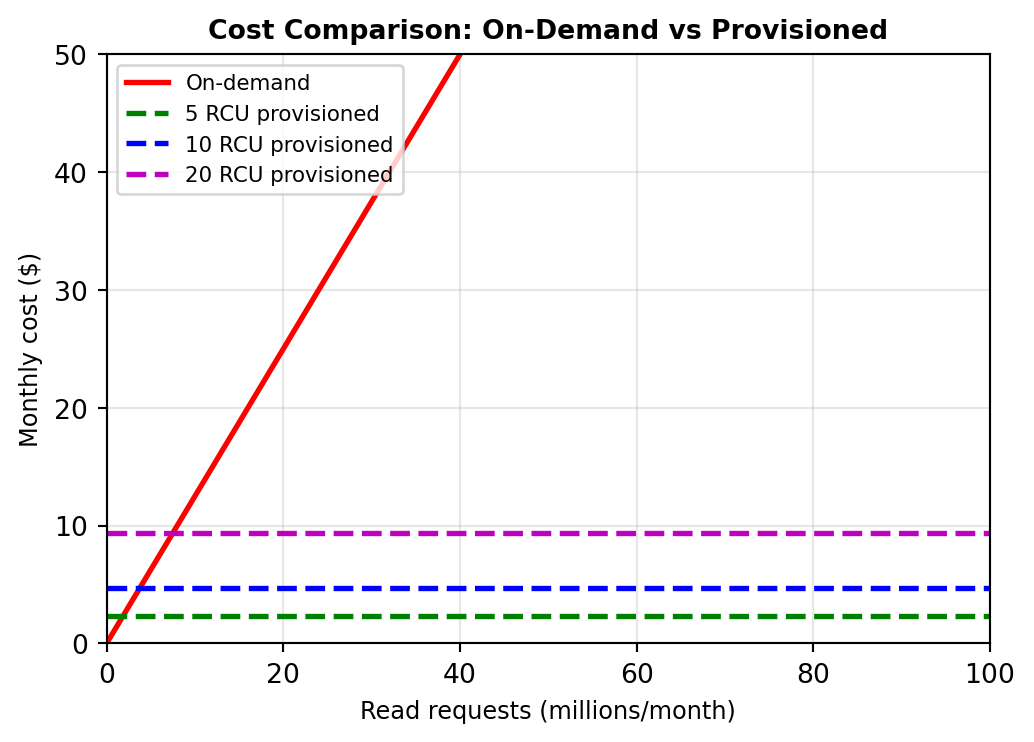
Each storage system handles workload it optimizes for
Social Connection Queries in Relational Models
Schema:
Query: “Friends of friends who live in Boston”
Cost: 2 self-JOINs, O(n²) join complexity
3-hop traversal (friends-of-friends-of-friends)?
Arbitrary depth?
Recursive CTEs:
Complex, performance unpredictable