EE 547 - Unit 6
Spring 2026
Software engineering fundamental: Separating concerns through interfaces
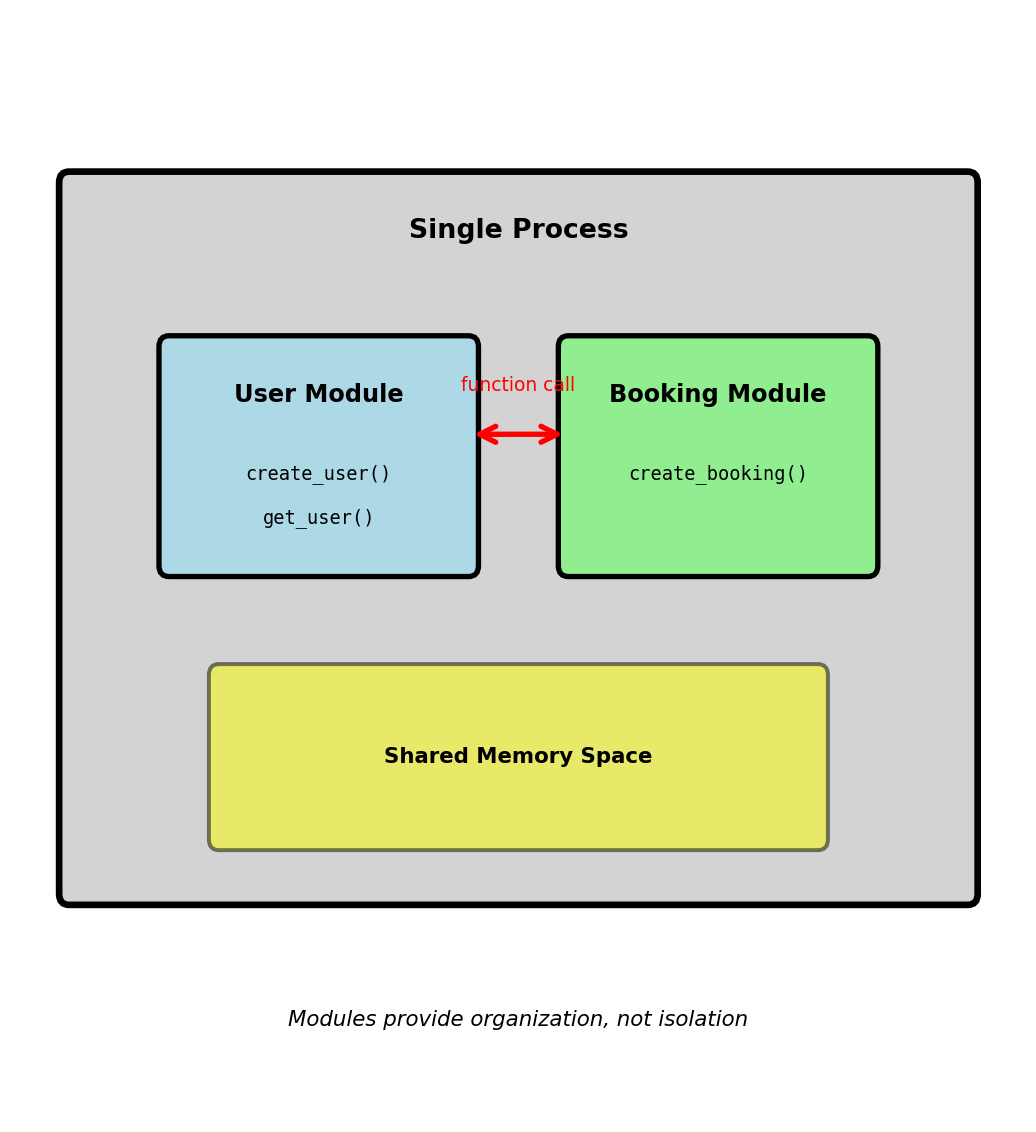
Within a single application:
# User management module
def create_user(email, password):
user_id = generate_id()
hash_pwd = hash_password(password)
store_user(user_id, email, hash_pwd)
return user_id
# Booking module
def create_booking(user_id, flight_id):
user = get_user(user_id) # Function call
if user.is_active:
return store_booking(user_id, flight_id)Module boundaries provide:
get_user(user_id) → User defines expectationsSingle process limitation:

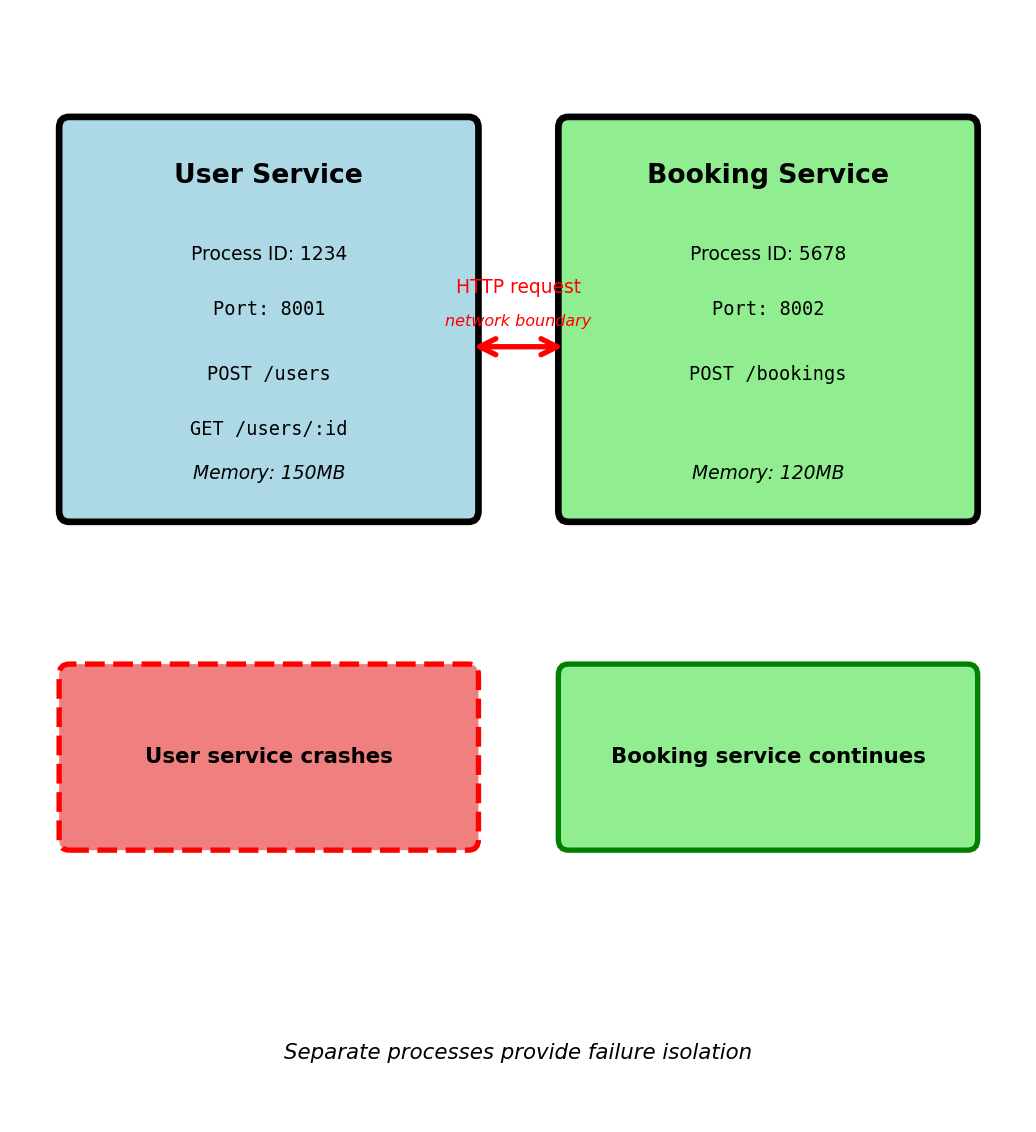
Moving from modules to separate processes
Same code, different execution model:
# User service (separate process)
# Listens on port 8001
@app.route('/users', methods=['POST'])
def create_user():
email = request.json['email']
password = request.json['password']
user_id = generate_id()
hash_pwd = hash_password(password)
store_user(user_id, email, hash_pwd)
return {'user_id': user_id}
# Booking service (separate process)
# Listens on port 8002
@app.route('/bookings', methods=['POST'])
def create_booking():
user_id = request.json['user_id']
flight_id = request.json['flight_id']
# HTTP request instead of function call
response = requests.get(f'http://localhost:8001/users/{user_id}')
user = response.json()
if user['is_active']:
return store_booking(user_id, flight_id)Why separate processes:

API: Application Programming Interface - contract for communication
Function call contract:
HTTP API contract for same operation:
Request: GET /users/123 on host user-service:8001
Success response: HTTP 200 OK
Not found response: HTTP 404 Not Found
API contract specifies:
GET /users/123 identifies resource and operationuser_id, email, is_active fields (status 200)error message (status 404)Why explicit contracts matter:
Services can evolve independently:
is_active fieldAPI documentation as contract:
GET /users/:user_id — Retrieve user by ID
Parameters:
user_id (integer, path, required): User identifierResponses:
user_id (integer), email (string), is_active (boolean)error (string), user_id (integer)Contract enforcement:
APIs make implicit function contracts explicit and enforceable
Scenario: User service needs to add email verification
Version 1 response: GET /users/123
Version 2 - Adding fields (backward compatible)
Backward compatible change:
is_active as beforeVersion 2 - Breaking change (not compatible)
Problem: Booking service still reads is_active field
false or crashesVersion management strategies:
URL-based versioning:
GET /v1/users/123 → Old response (includes is_active)
GET /v2/users/123 → New response (includes account_status)
Booking service continues using /v1/users
New services can use /v2/users
User service maintains both versions temporarily
Version distribution (airline system, 45 days after v2 launch):
Cannot remove v1 until 100% migrated
Why versioning needed:
APIs enable independent deployment through versioning
API serves multiple independent consumers
Four clients calling GET /users/123:
is_active before creating bookinguser['email']https://api.airline.com)All four clients depend on same contract
Client code example:
Internal change in user service:
# Original: Users stored in PostgreSQL
def get_user(user_id):
row = db.query("SELECT * FROM users WHERE id = ?", user_id)
return {
'user_id': row['id'],
'email': row['email'],
'is_active': row['active']
}
# New: Users moved to Redis cache (performance improvement)
def get_user(user_id):
cached = redis.get(f'user:{user_id}')
if cached:
return json.loads(cached)
# Fallback to database...Impact on clients: None
Contract violation example:
User service developer changes field name:
Cascading failures:
KeyError: 'email' when sending confirmation4 clients break simultaneously from single field rename
Why contracts matter with multiple clients:
APIs require stability when serving multiple independent clients
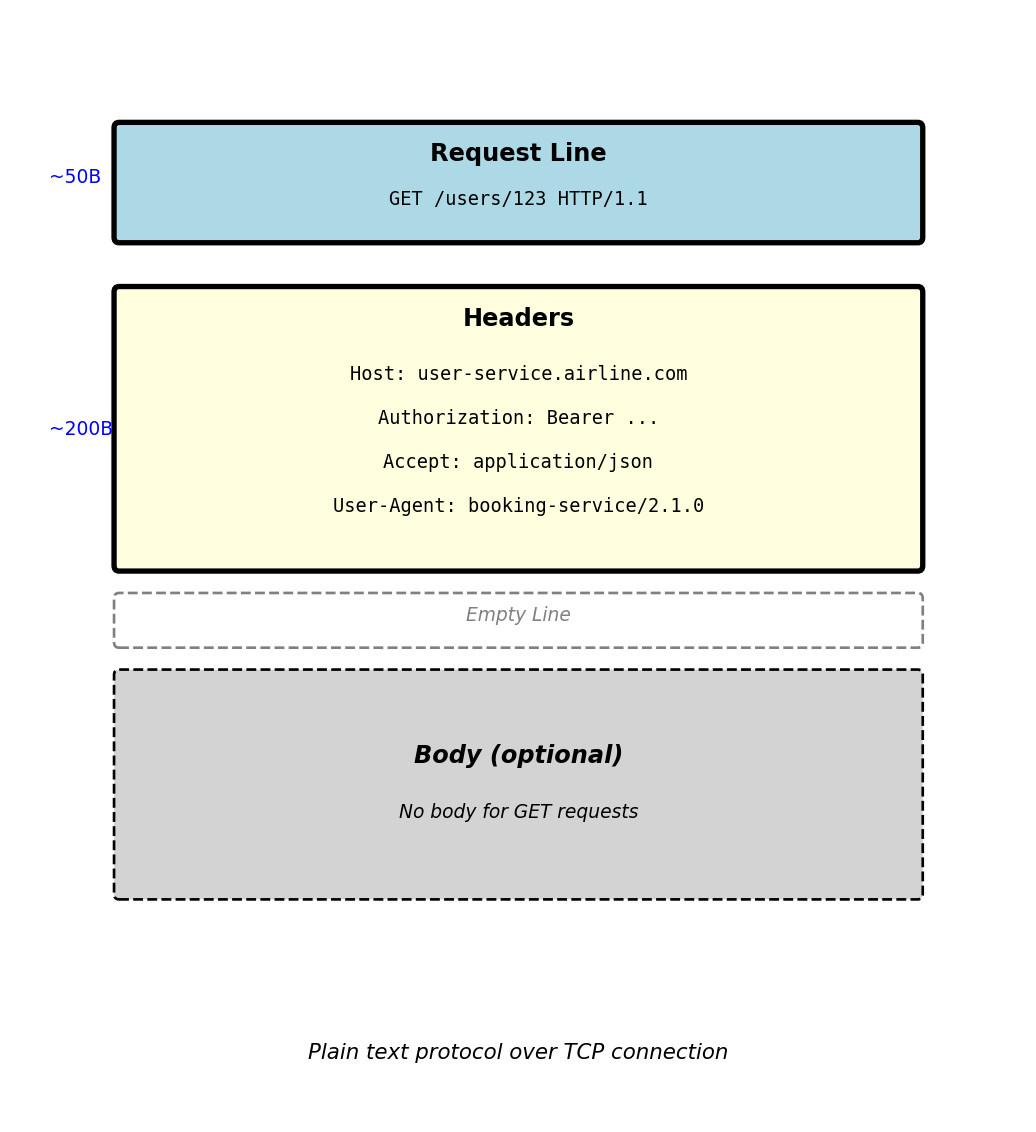
HTTP request anatomy:
GET /users/123 HTTP/1.1
Host: user-service.airline.com
Authorization: Bearer eyJhbGc...
Accept: application/json
User-Agent: booking-service/2.1.0
Request line components:
GET - what operation to perform/users/123 - which resource to accessHTTP/1.1 - version of HTTPRequest headers (metadata):
Host: Which server to route to (required in HTTP/1.1)Authorization: Credentials for authenticationAccept: What response format client understandsUser-Agent: Identifies client making requestHeaders are key-value pairs: Header-Name: value
Empty line separates headers from body
Requests without body (GET, DELETE) end after headers
Typical request size:

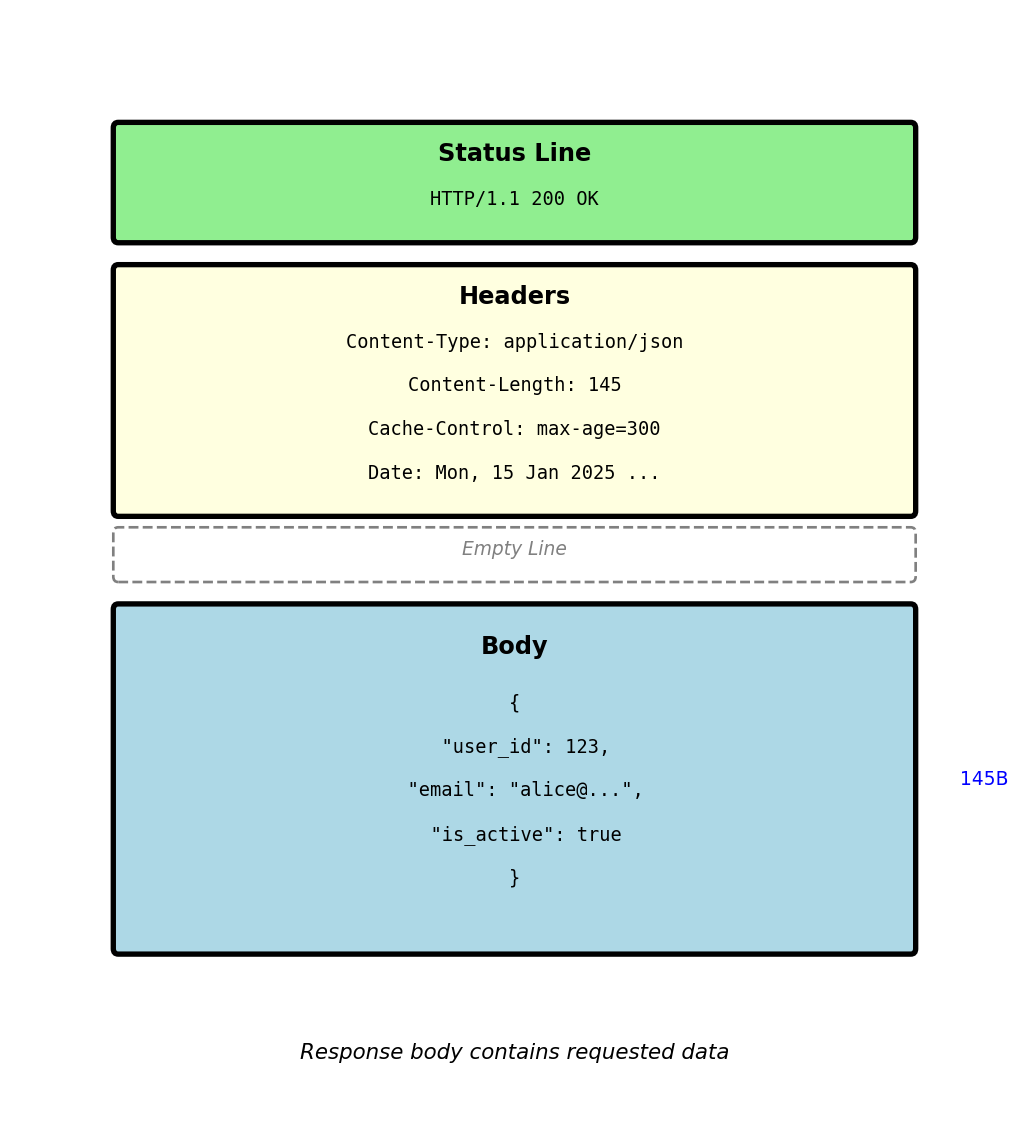
HTTP response anatomy:
HTTP/1.1 200 OK
Content-Type: application/json
Content-Length: 145
Cache-Control: max-age=300
Date: Mon, 15 Jan 2025 14:30:00 GMT
Status line components:
HTTP/1.1200 - numeric result indicatorOK - human-readable descriptionResponse headers:
Content-Type: Format of response body (JSON, HTML, etc)Content-Length: Body size in bytesCache-Control: How long response can be cachedDate: When response was generatedResponse body:
Content-Type headerEmpty line separates headers from body (same as request)

Status code tells client what happened and what to do next
response = requests.get('http://user-service/users/123')
if response.status_code == 200:
user = response.json() # Success - process data
elif response.status_code == 404:
return None # User doesn't exist - normal case
elif response.status_code == 401:
refresh_token() # Get new auth token
retry_request() # Try again
elif response.status_code == 503:
time.sleep(5) # Service down
retry_request() # Retry with backoff
elif response.status_code >= 500:
alert_ops_team() # Server problem
return fallback_response()Different codes require different handling:
2xx: Process response
4xx: Fix request or handle business logic
5xx: Retry or use fallback
Common status codes in production:
200 OK — Request succeeded
Return data in response body
201 Created — Resource created
Location header has new resource URL
204 No Content — Success, no data
DELETE succeeded, nothing to return
400 Bad Request — Malformed request
Invalid JSON, missing required field
401 Unauthorized — No valid auth
Token expired or missing
403 Forbidden — Not allowed
Valid auth but wrong permissions
404 Not Found — Resource missing
Normal for checking existence
429 Too Many Requests — Rate limited
Check Retry-After header
500 Internal Server Error — Bug
Unhandled exception in server
503 Service Unavailable — Overloaded
Retry with exponential backoff
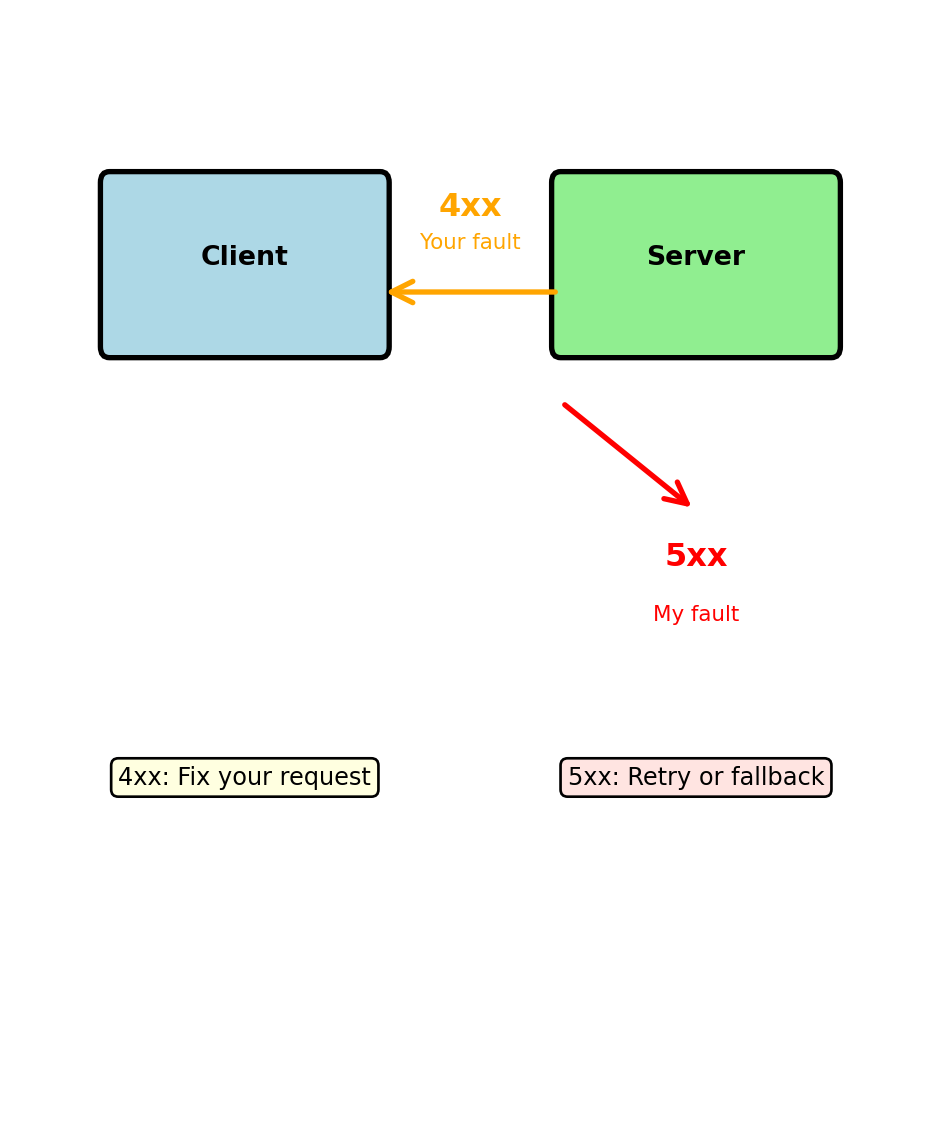
4xx = Your request has a problem
POST /users
Content-Type: application/json
{"email": "not-an-email", "age": "twenty"}
Response: 400 Bad Request
Client must fix the request:
5xx = Server has a problem
Response: 500 Internal Server Error
Client should retry (server might recover):

Retry strategies differ:
4xx errors: Don’t retry same request
5xx errors: Retry might work
429 Too Many Requests — You’re sending too fast
HTTP/1.1 429 Too Many Requests
X-RateLimit-Limit: 100
X-RateLimit-Remaining: 0
X-RateLimit-Reset: 1697299200
Retry-After: 60
Client must slow down:
503 Service Unavailable — Server overloaded
HTTP/1.1 503 Service Unavailable
Retry-After: 30
Server is temporarily unable to handle requests:
Different causes, different handling:
429 = Rate limiting (intentional)
503 = Overload (unintentional)
Exponential backoff pattern:
Circuit breaker pattern:
HTTP methods specify the operation type
GET — Read data
GET /users/123
Returns user 123’s data. No changes to server state.
POST — Create new
POST /users
{"email": "alice@example.com", "password": "..."}
Creates new user. Server assigns ID.
PUT — Replace entirely
PUT /users/123
{"email": "new@example.com", "is_active": false}
Replaces ALL fields of user 123.
PATCH — Update partially
PATCH /users/123
{"email": "new@example.com"}
Updates ONLY email, leaves other fields unchanged.
DELETE — Remove
DELETE /users/123
Removes user 123 from system.
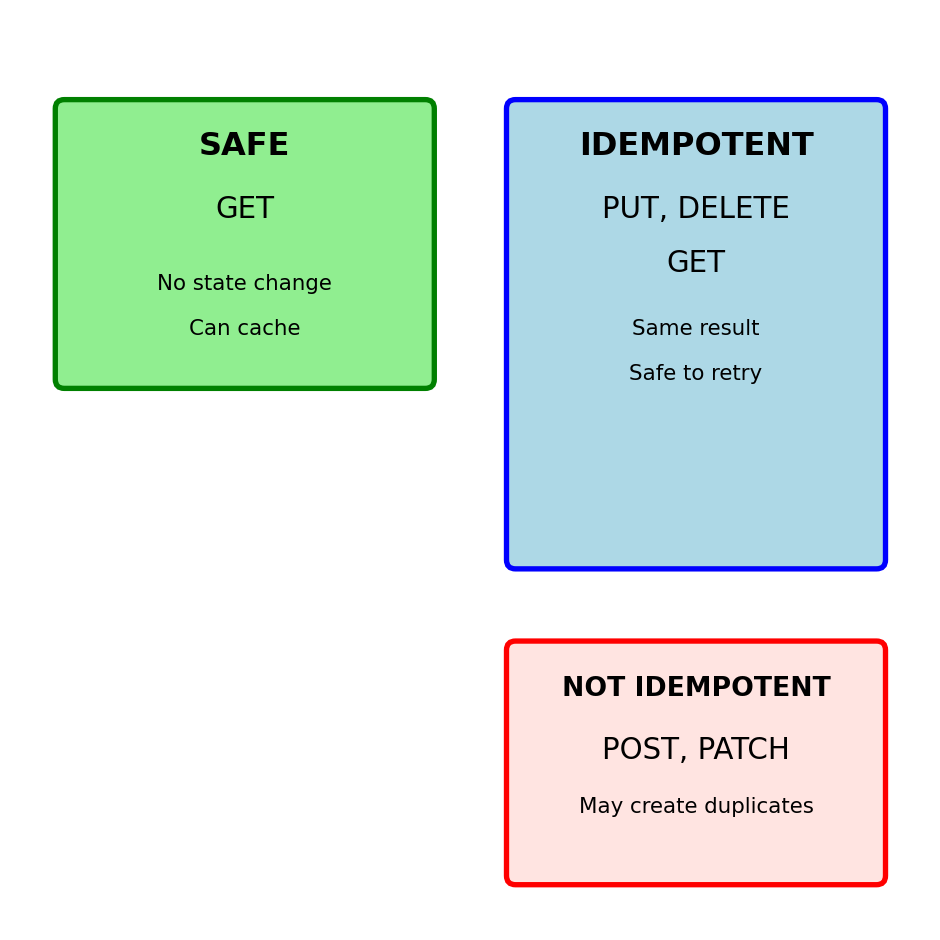
Critical property: Idempotency
Idempotent = Same result from multiple identical calls
| Method | Idempotent | Safe | Use Case |
|---|---|---|---|
| GET | Yes | Yes | Read data |
| POST | No | No | Create new |
| PUT | Yes | No | Replace all |
| PATCH | No | No | Update some |
| DELETE | Yes | No | Remove |
Why idempotency matters:
Network fails after server processes but before client gets response.
Idempotent (PUT, DELETE):
Not idempotent (POST):
Safe = No server state changes
Only GET is safe (can cache, prefetch)
POST - Server assigns identifier
PUT - Client specifies identifier
POST is not idempotent:
When to use each:
Use POST when:
Use PUT when:
Real examples:
GitHub:
POST /repos/owner/repo/issues
# Creates issue, GitHub assigns number
PUT /repos/owner/repo/contents/README.md
# Creates/replaces file at exact path
AWS S3:
PUT /bucket/object-key
# Always PUT - client controls key
# Creates new or replaces existing
Idempotency in practice:
PUT replaces entire resource
# Current user state
{
"id": 123,
"email": "alice@example.com",
"name": "Alice",
"role": "user",
"is_active": true
}
# PUT request (missing fields)
PUT /users/123
{
"email": "alice@example.com",
"name": "Alice Updated"
}
# Result - other fields lost/defaulted
{
"id": 123,
"email": "alice@example.com",
"name": "Alice Updated",
"role": null, # Lost!
"is_active": false # Lost!
}PATCH updates only specified fields
Common PATCH formats:
JSON Merge Patch (simple):
JSON Patch (RFC 6902):
When to use each:
PUT:
PATCH:
Common mistake: Using PUT for single field update loses data
Safe methods can be called without side effects
Unsafe methods change server state
# DELETE is idempotent but unsafe
DELETE /users/123 # Returns 204 No Content
DELETE /users/123 # Returns 404 Not Found
# Final state same, but state did change
# POST is neither safe nor idempotent
POST /orders # Creates order 1
POST /orders # Creates order 2 (duplicate!)
POST /orders # Creates order 3 (duplicate!)Network failure handling:

Retry safety:
Always safe: GET
Safe if idempotent: PUT, DELETE
Dangerous: POST, PATCH
Need idempotency keys for POST/PATCH
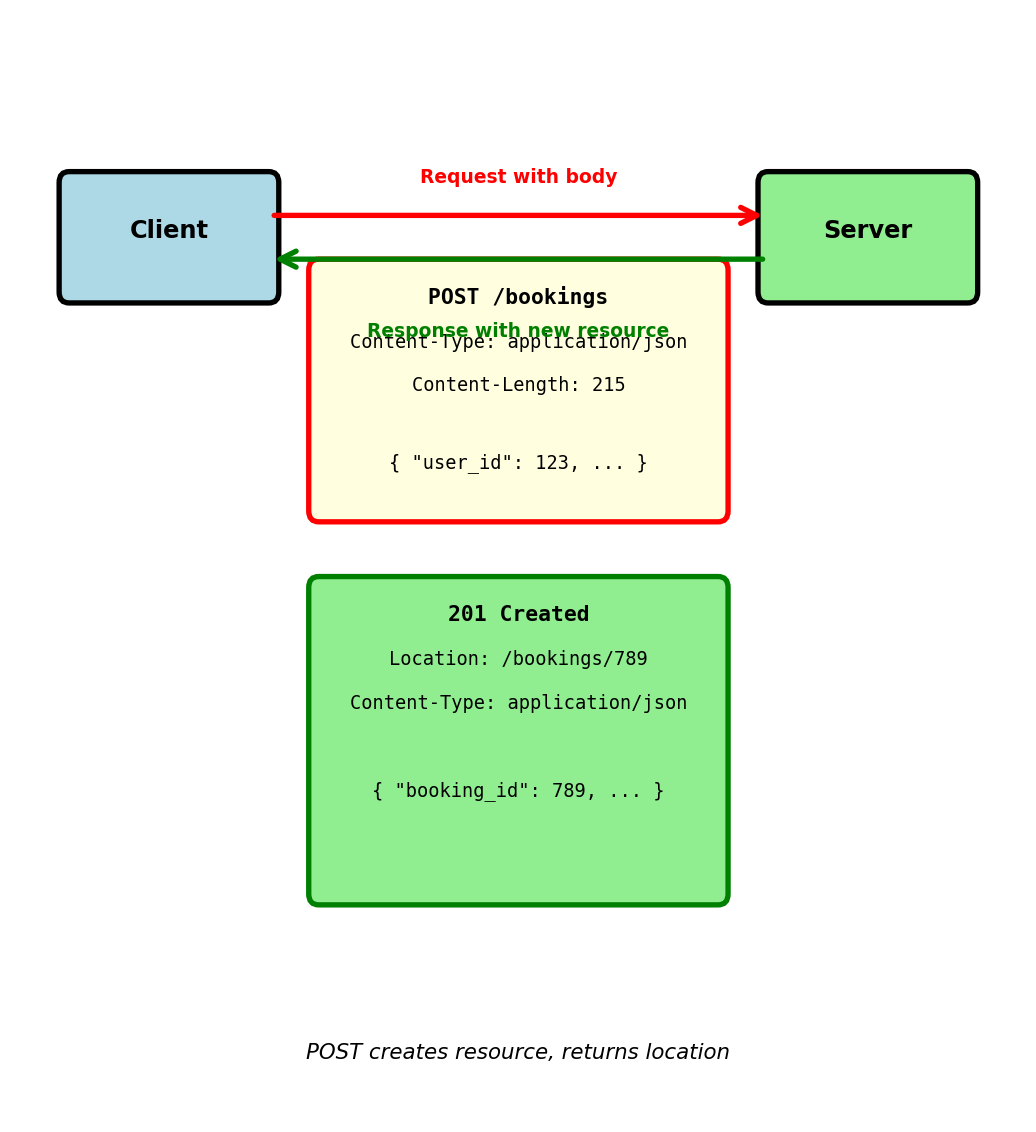
Creating new booking via POST:
POST /bookings HTTP/1.1
Host: booking-service.airline.com
Content-Type: application/json
Content-Length: 215
Authorization: Bearer eyJhbGc...
Additional headers for body:
Content-Type: Specifies body format (JSON, XML, form data)Content-Length: Exact size in bytes (required by HTTP/1.1)Server response:
HTTP/1.1 201 Created
Location: /bookings/789
Content-Type: application/json
Content-Length: 87
201 Created status indicates:
Location header provides URL to access new resource
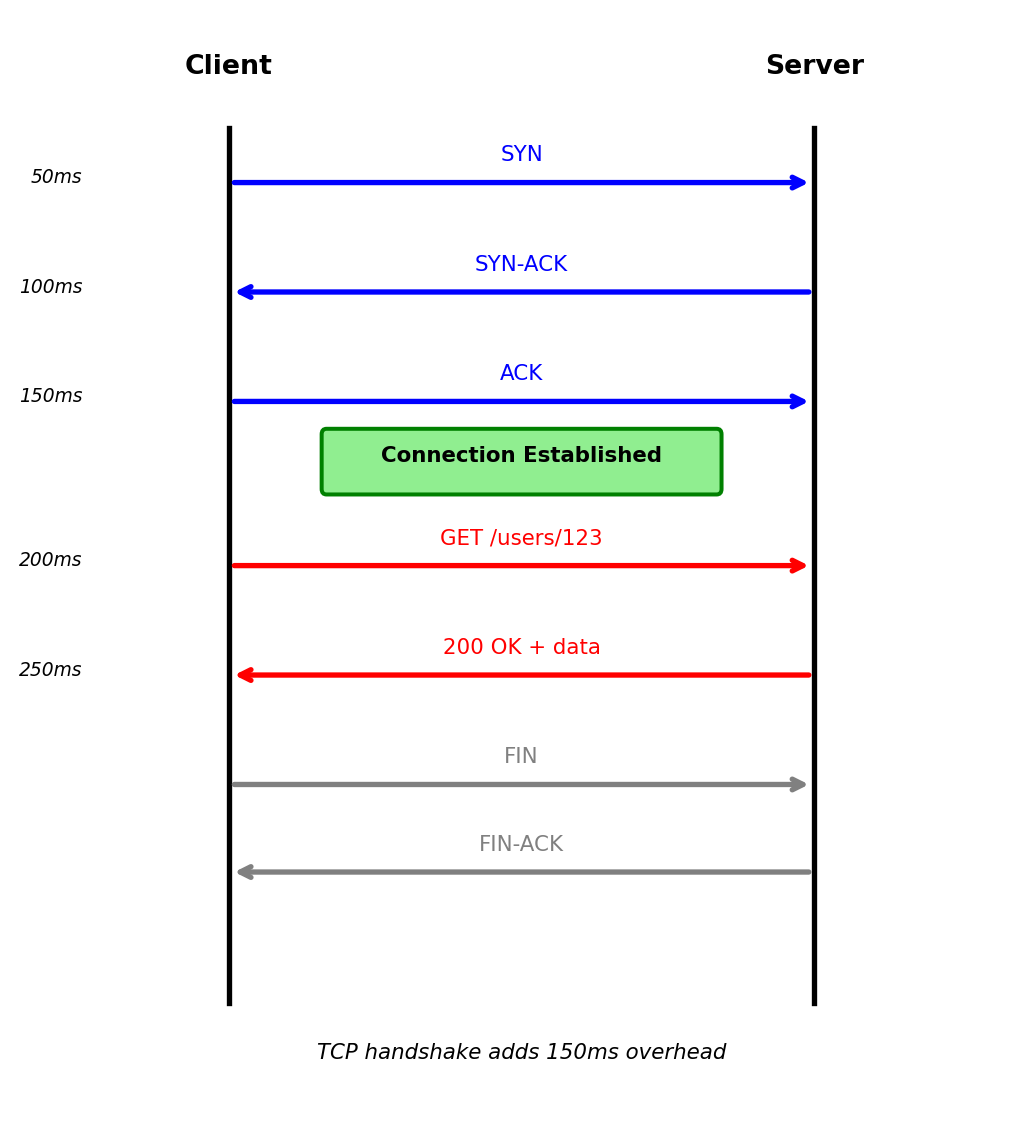
HTTP runs over TCP connection:
1. TCP handshake (connection establishment):
Client Server
| |
|--- SYN -------->| (50ms)
|<-- SYN-ACK -----| (50ms)
|--- ACK -------->| (50ms)
| |
[TCP established]
2. HTTP request/response over established connection:
| |
|- GET /users/123->| (50ms)
|<- 200 OK + data -| (50ms)
| |
3. Connection close:
| |
|---- FIN --------->|
|<--- FIN-ACK ------|
| |
[Connection closed]
Total measured latency for single request:
Round-trip latency varies by distance:

3-way handshake before HTTP request
TCP connections are expensive to establish — each requires a 3-way handshake before any data transfers
Without keep-alive (HTTP/1.0 default):
Request 1:
TCP handshake: 150ms
HTTP request/response: 100ms
Close connection
Total: 250ms
Request 2:
TCP handshake: 150ms (again!)
HTTP request/response: 100ms
Close connection
Total: 250ms
Request 3:
TCP handshake: 150ms (again!)
HTTP request/response: 100ms
Close connection
Total: 250ms
Total for 3 requests: 750ms
With keep-alive (HTTP/1.1 default):
Request 1:
TCP handshake: 150ms
HTTP request/response: 100ms
Keep connection open
Total: 250ms
Request 2:
HTTP request/response: 100ms
(reuse connection)
Total: 100ms
Request 3:
HTTP request/response: 100ms
(reuse connection)
Total: 100ms
Total for 3 requests: 450ms
40% latency reduction by reusing connection
Keep-alive headers:
Request includes: Connection: keep-alive Response includes: Connection: keep-alive and Keep-Alive: timeout=5, max=1000
Keep-alive parameters:
timeout=5: Server keeps connection open for 5 seconds idlemax=1000: Maximum 1000 requests on this connectionConnection pooling in practice:
Estimated impact (100 sequential requests, cross-coast):
Connection reuse critical for performance
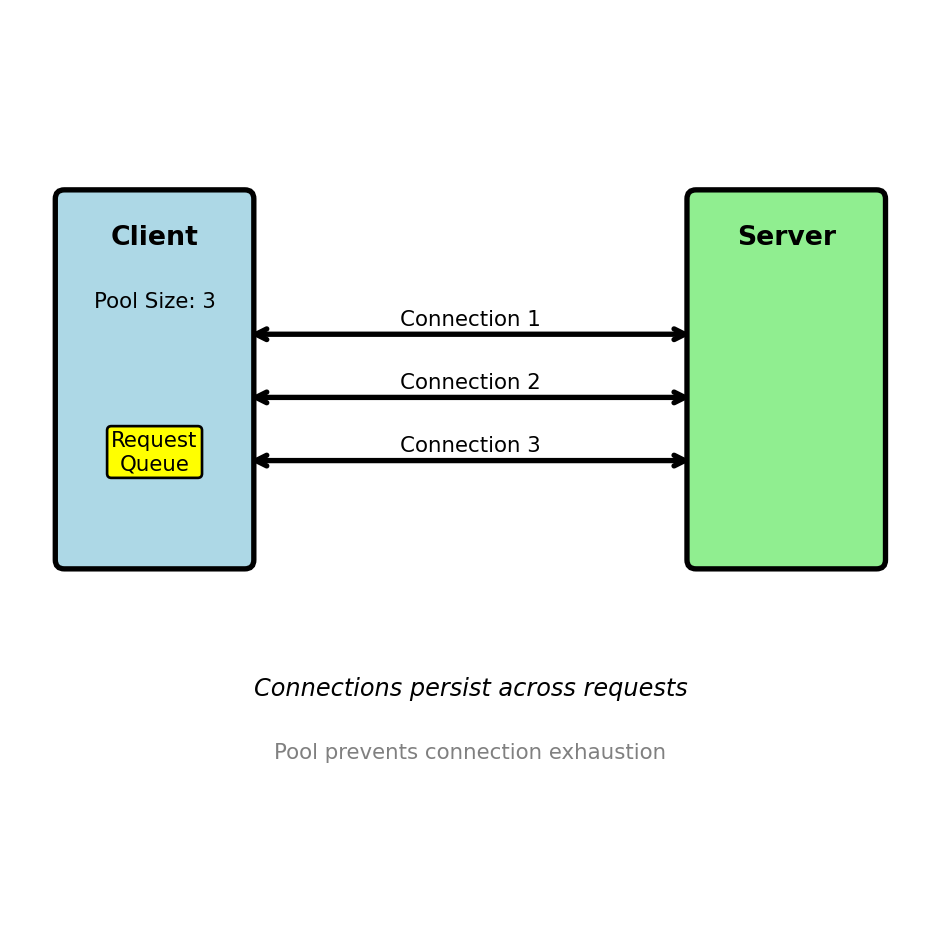
A single connection serializes requests — concurrent clients need concurrent connections
Single connection serves requests sequentially:
Connection 1: [Req1]->[Resp1]->[Req2]->[Resp2]->[Req3]->[Resp3]
Connection pool serves requests in parallel:
Connection 1: [Req1]->[Resp1] [Req4]->[Resp4]
Connection 2: [Req2]->[Resp2] [Req5]->[Resp5]
Connection 3: [Req3]->[Resp3]
Connection pool implementation:
from urllib3 import PoolManager
# Create pool with size limits
pool = PoolManager(
num_pools=10, # Max 10 different hosts
maxsize=20, # Max 20 connections per host
block=True # Wait if pool exhausted
)
# Connections managed automatically
response = pool.request('GET', 'http://api/users/123')
# Connection returned to pool after response readPool sizing considerations:

Pool exhaustion behavior:
Real scenarios requiring pools:
HTTP headers determine how services process requests
Four critical functions in distributed systems:
1. Authentication/Authorization Authorization: Bearer eyJhbGciOiJIUzI1NiIsInR5cCI6IkpXVCJ9...
Service validates identity and permissions before processing
2. Content Negotiation Content-Type: application/json; charset=utf-8 Accept: application/json
Ensures correct parsing and response format
3. Request Correlation X-Request-ID: 7f3c6b2a-5d9e-4f8b-a1c3-9e8d7c6b5a4f
Traces requests across multiple services for debugging
4. Service Metadata User-Agent: booking-service/2.1.0 X-API-Version: 2
Enables version-specific handling and deprecation
What happens without proper headers:
Missing Authorization → 401 Unauthorized
Wrong Content-Type → Data corruption
No X-Request-ID → Can’t trace failures
Invalid Accept → Client can’t parse response
Headers every request needs:
Authorization — Identity and permissionsContent-Type — How to parse bodyAccept — What format you want backHeaders for debugging:
X-Request-ID — Correlation across servicesUser-Agent — Which client sent thisHeaders in responses:
X-RateLimit-Remaining — Quota statusCache-Control — Can this be cached?Headers are contracts between services
Content-Type tells server how to parse request body
POST /models/123/predict
Content-Type: application/json; charset=utf-8
Accept: application/json
{"features": [1.2, 3.4, 5.6], "threshold": 0.8}
Server uses Content-Type to route parsing:
@app.route('/models/<id>/predict', methods=['POST'])
def predict(id):
content_type = request.headers.get('Content-Type', '')
if 'application/json' in content_type:
data = request.get_json() # JSON parser
elif 'application/x-www-form-urlencoded' in content_type:
data = request.form # Form parser
elif 'multipart/form-data' in content_type:
data = request.files # File parser
else:
return {'error': 'Unsupported Content-Type'}, 415
# Check Accept header for response format
accept = request.headers.get('Accept', 'application/json')
if 'application/json' not in accept:
return {'error': 'Cannot produce requested format'}, 406
result = model.predict(data)
return jsonify(result), 200How wrong Content-Type corrupts data:
Content-Type controls parsing:
application/json → JSON parser
application/x-www-form-urlencoded → Form parser
multipart/form-data → File upload parser
application/octet-stream → Raw bytes
Why explicit headers matter:
Every request should include:
REST: Representational State Transfer
Architectural style, not a protocol or standard
Coined by Roy Fielding (2000 dissertation) based on HTTP design principles
Core idea: Resources identified by URLs, manipulated via standard HTTP methods
What REST is NOT:
What REST provides:
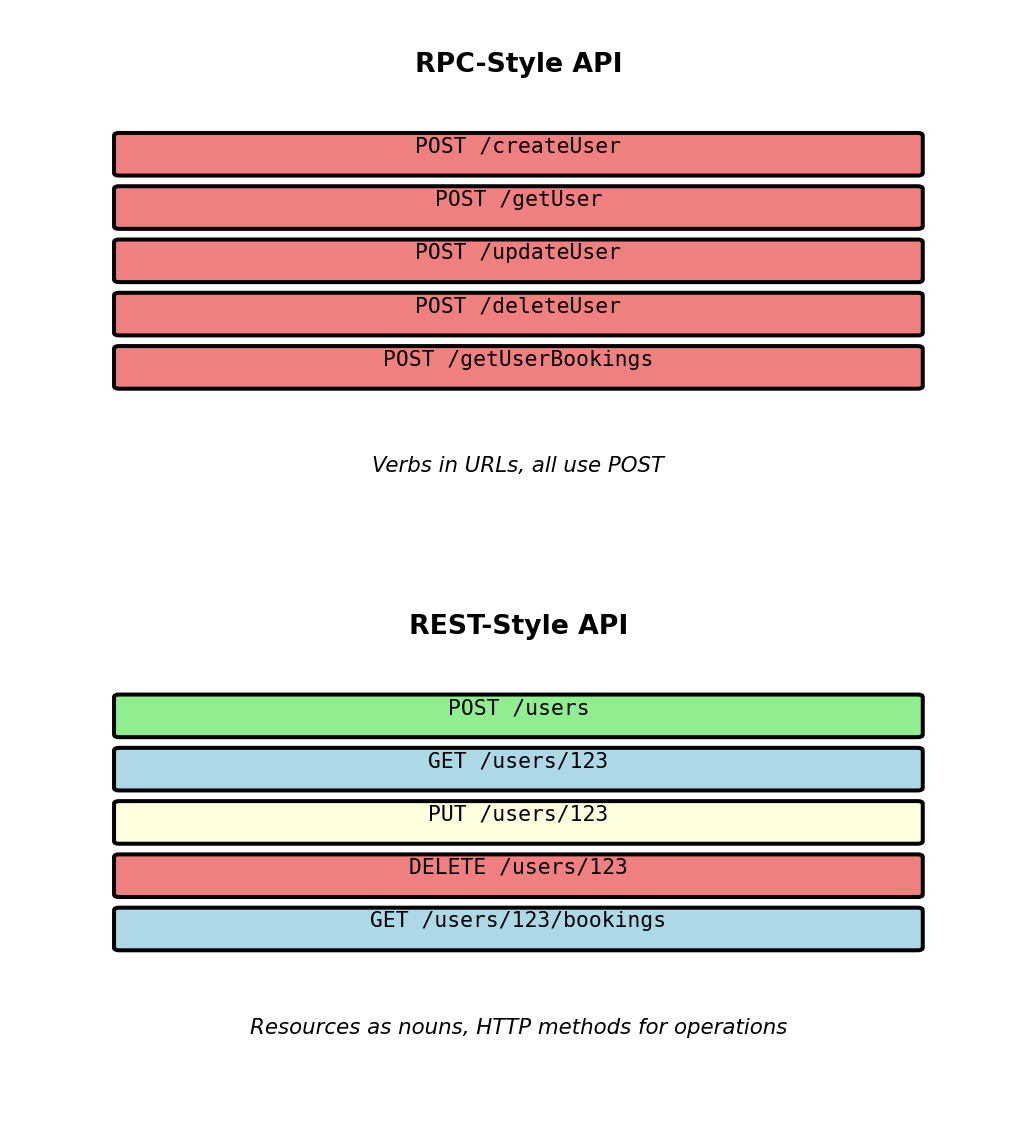
REST vs other approaches:
/createUser, /getUser, /deleteUser (verbs in URLs)POST /users, GET /users/123, DELETE /users/123 (resources + methods)REST treats everything as a resource accessible via URL

REST principle: URLs identify resources (things), methods specify operations
Resource hierarchy in airline API:
User resources:
/users — Collection of all users/users/123 — Specific user/users/123/bookings — User’s bookings (sub-collection)/users/123/bookings/789 — Specific bookingFlight resources:
/flights — Collection of all flights/flights/456 — Specific flight/flights/456/seats — Available seatsAirport resources:
/airports — Collection of airports/airports/LAX — Specific airport/airports/LAX/flights — Flights from LAXURL structure conventions:
/users not /user/frequent-flyers not /frequentFlyers/users/123/bookingsOperations via HTTP methods:
GET /users — Get all usersGET /users/123 — Get specific userPOST /users — Create new user (body: email, password)PUT /users/123 — Update user (body: complete resource)DELETE /users/123 — Delete userNested resources show relationships:
GET /users/123/bookings returns array of user’s bookings:
GET /users/123/bookings/789 returns specific booking via user path:
GET /bookings/789 returns same booking via direct path:
Design choice: Provide both paths when resource makes sense independently
/users/123/bookings — User-centric view (all bookings for user)/bookings/789 — Booking-centric view (single booking)Different access patterns for different use cases
GET retrieves resource without modification
Request targets specific resource by ID:
GET /users/456 HTTP/1.1
Server returns resource representation:
HTTP/1.1 200 OK
Content-Type: application/json
GET characteristics:
GET on collections returns multiple resources:
GET /users HTTP/1.1
HTTP/1.1 200 OK
DELETE removes resource
Request targets specific resource:
DELETE /users/456 HTTP/1.1
Server removes resource, returns minimal response:
HTTP/1.1 204 No Content
DELETE characteristics:
Subsequent DELETE returns 404:
First delete:
DELETE /users/456 → 204 No Content (deleted)
Second delete:
DELETE /users/456 → 404 Not Found (already gone)
Final state identical: User 456 doesn’t exist
Both methods are idempotent:
Idempotency enables safe retries on network failures
POST creates new resource
Request sent to collection URL:
POST /users HTTP/1.1
Content-Type: application/json
Server assigns ID and creates resource:
HTTP/1.1 201 Created
Location: /users/456
Content-Type: application/json
POST characteristics:
/users not /users/456)Location header contains new resource URLWhy not idempotent:
POST /users {"email": "test@example.com"} → 201 Created, user_id=456
POST /users {"email": "test@example.com"} → 201 Created, user_id=789 (different resource!)
PUT replaces entire resource
Request sent to specific resource URL:
PUT /users/456 HTTP/1.1
Content-Type: application/json
Server replaces resource completely:
HTTP/1.1 200 OK
PUT characteristics:
/users/456)PUT replaces entirely:
Missing fields in request are removed:
PUT /users/456 {"email": "new@example.com"}
Result: name field removed (entire resource replaced, not email alone)
Use PATCH for partial updates instead
Query parameters modify which resources are returned
Example: GET /flights?departure_airport=LAX
Path /flights identifies collection, departure_airport=LAX filters results
Query parameter syntax:
? in URLkey=value&%20, special characters escapedFiltering examples:
Single filter: GET /flights?departure_airport=LAX → Returns only flights departing from LAX
Multiple filters: GET /flights?departure_airport=LAX&arrival_airport=JFK&date=2025-02-15 → Returns LAX→JFK flights on specific date
Three-way filter: GET /flights?departure_airport=LAX&status=scheduled&aircraft_type=737 → Returns scheduled 737 flights from LAX
All filters are AND conditions - flight must match all criteria
Parameter validation returns 400 Bad Request:
Invalid value:
GET /flights?date=Feb-15-2025
HTTP/1.1 400 Bad Request
Server validates parameters before database query
Sorting with parameters:
GET /flights?sort=departure_time — Ascending order (default)GET /flights?sort=-departure_time — Descending order (minus prefix)GET /flights?sort=departure_airport,departure_time — Multiple fields (comma-separated)Last example sorts LAX flights before JFK, then by time within each airport
Combining filters and sorting:
GET /flights?departure_airport=LAX&status=scheduled&sort=-departure_time
Returns scheduled LAX flights, most recent first
Query parameters keep URL structure clean while enabling flexible filtering
Collections grow beyond what a single response can efficiently carry
Without pagination: GET /flights → Returns 2,500 flights, 4MB response, 8 second load time
With pagination: GET /flights?limit=50&offset=0 → Returns 50 flights, 80KB response, 150ms load time
Offset-based pagination:
limit controls page size, offset controls starting position
GET /flights?limit=50&offset=0GET /flights?limit=50&offset=50GET /flights?limit=50&offset=100Formula: offset = page_number × limit
Pagination metadata in response:
Pagination with filters:
GET /flights?departure_airport=LAX&limit=50&offset=0 → First 50 LAX flights GET /flights?departure_airport=LAX&limit=50&offset=50 → Next 50 LAX flights
Filters applied before pagination
Measured performance (2,500 flight collection):
Alternative strategies:
?page=2&per_page=50 — server calculates offset internallyOffset is simple but degrades at large offsets and produces inconsistent results when data changes between page fetches. Cursor-based pagination addresses both — covered in detail in API Specification.
Idempotent operation: Multiple identical requests have same effect as single request
GET - Idempotent and safe:
# Call once
response1 = requests.get('http://api/users/123')
user1 = response1.json() # {"user_id": 123, "email": "alice@..."}
# Call again
response2 = requests.get('http://api/users/123')
user2 = response2.json() # {"user_id": 123, "email": "alice@..."}
# Same result, no side effects
assert user1 == user2PUT - Idempotent but not safe:
# Call once
requests.put('http://api/users/123',
json={"email": "alice.new@example.com", "is_active": true})
# Result: email changed to alice.new@example.com
# Call again with same data
requests.put('http://api/users/123',
json={"email": "alice.new@example.com", "is_active": true})
# Result: email still alice.new@example.com (no additional change)
# Multiple calls → same final stateDELETE - Idempotent:
POST - Not idempotent:
# Call once
response1 = requests.post('http://api/users',
json={"email": "bob@example.com"})
# Response: 201 Created, user_id=456
# Call again with same data
response2 = requests.post('http://api/users',
json={"email": "bob@example.com"})
# Response: 201 Created, user_id=789 (different user!)
# Two users created - NOT idempotentIdempotency matters for retries:
Network timeout scenario:
Idempotency key pattern:
Server implementation:
REST constraint: Each request contains all information needed to process it
Stateful approach (violates REST):
# Login creates server-side session
POST /login
Body: {"email": "alice@example.com", "password": "..."}
Response:
HTTP/1.1 200 OK
Set-Cookie: session_id=abc123
# Server stores:
sessions['abc123'] = {
'user_id': 123,
'email': 'alice@example.com',
'logged_in_at': '2025-01-15T10:00:00Z'
}
# Subsequent requests reference session
GET /bookings
Cookie: session_id=abc123
# Server looks up session['abc123'] to get user_idProblems with server-side sessions:
Stateless approach (REST-compliant):
Stateless request:
JWT (JSON Web Token) structure:
Header:
{
"alg": "HS256",
"typ": "JWT"
}
Payload:
{
"user_id": 123,
"email": "alice@example.com",
"exp": 1705324800, # Expiration timestamp
"iat": 1705321200 # Issued at timestamp
}
Signature:
HMACSHA256(
base64(header) + "." + base64(payload),
server_secret_key
)
Final token:
base64(header).base64(payload).signature
Benefits of stateless design:
Token expiration:
Statelessness: any server can handle any request — horizontal scaling without shared state
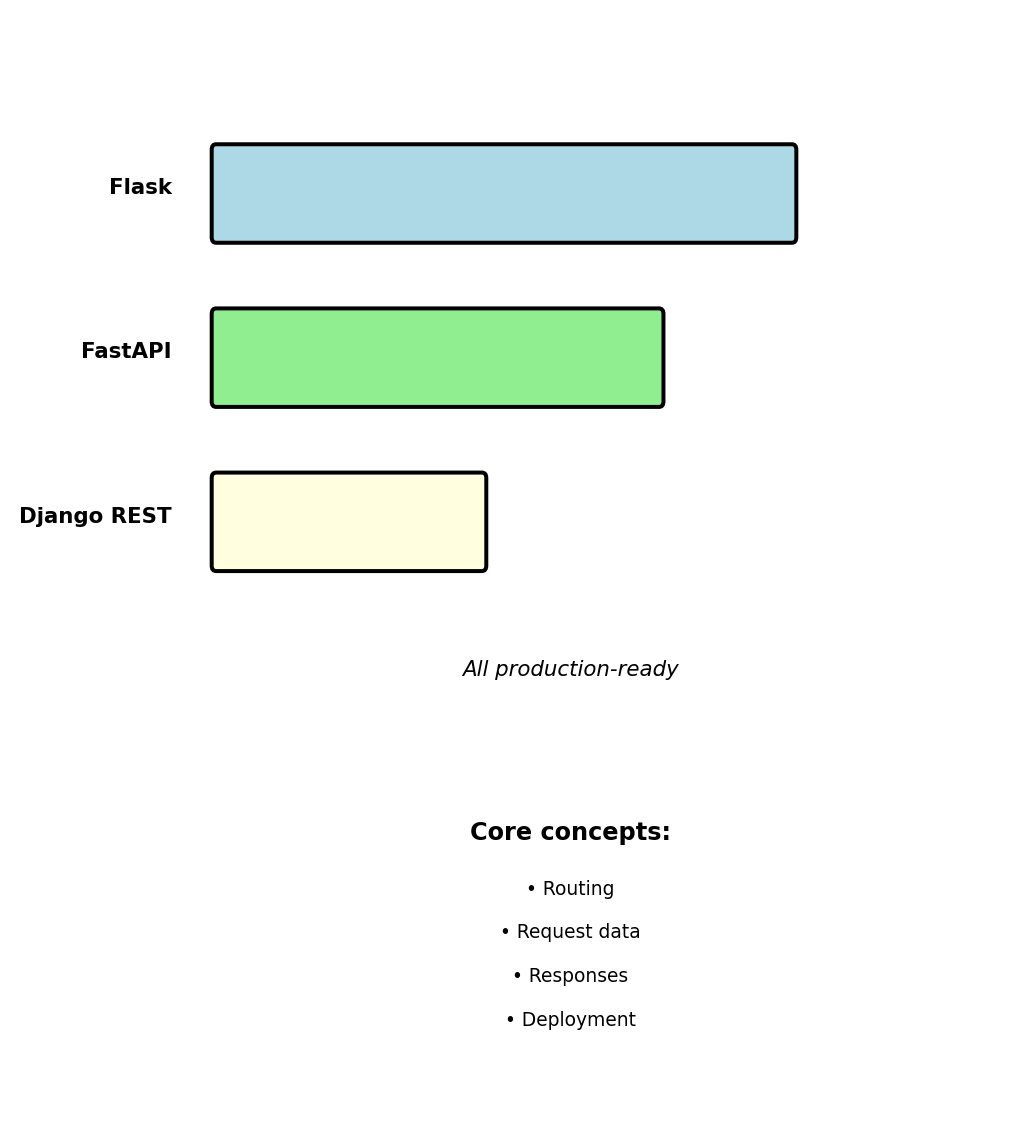
Python web frameworks for APIs:
EE 547 uses Flask
Minimal abstractions make core concepts visible. Patterns transfer to FastAPI and Django REST.
Framework-agnostic concepts covered:

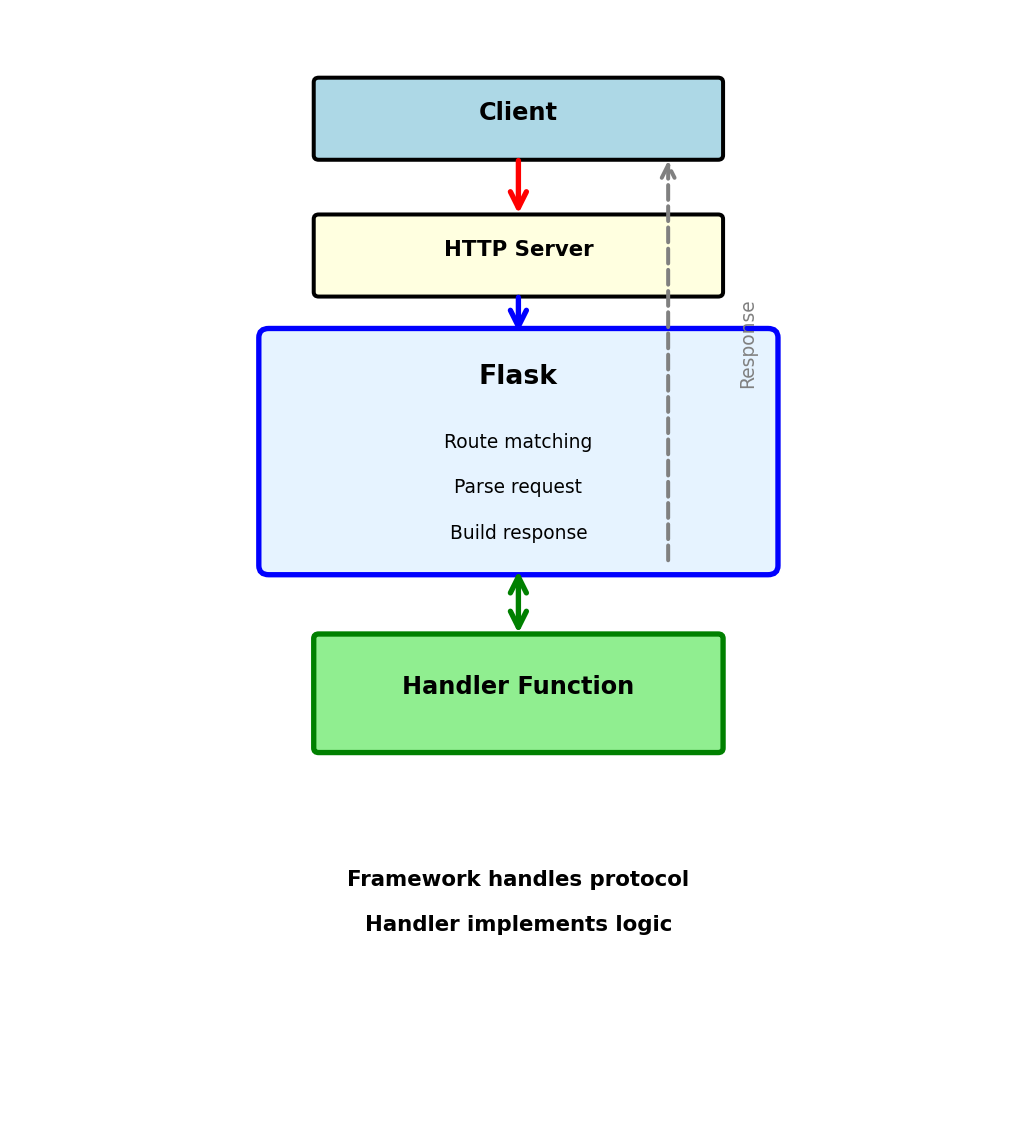
Framework sits between HTTP server and handler code
Client
↓ HTTP Request
HTTP Server (gunicorn)
↓ WSGI
Flask Framework
↓ Calls
Handler Function
↓ Returns
Flask Framework
↓ WSGI
HTTP Server
↓ HTTP Response
Client
What Flask does:
Handler implementation:

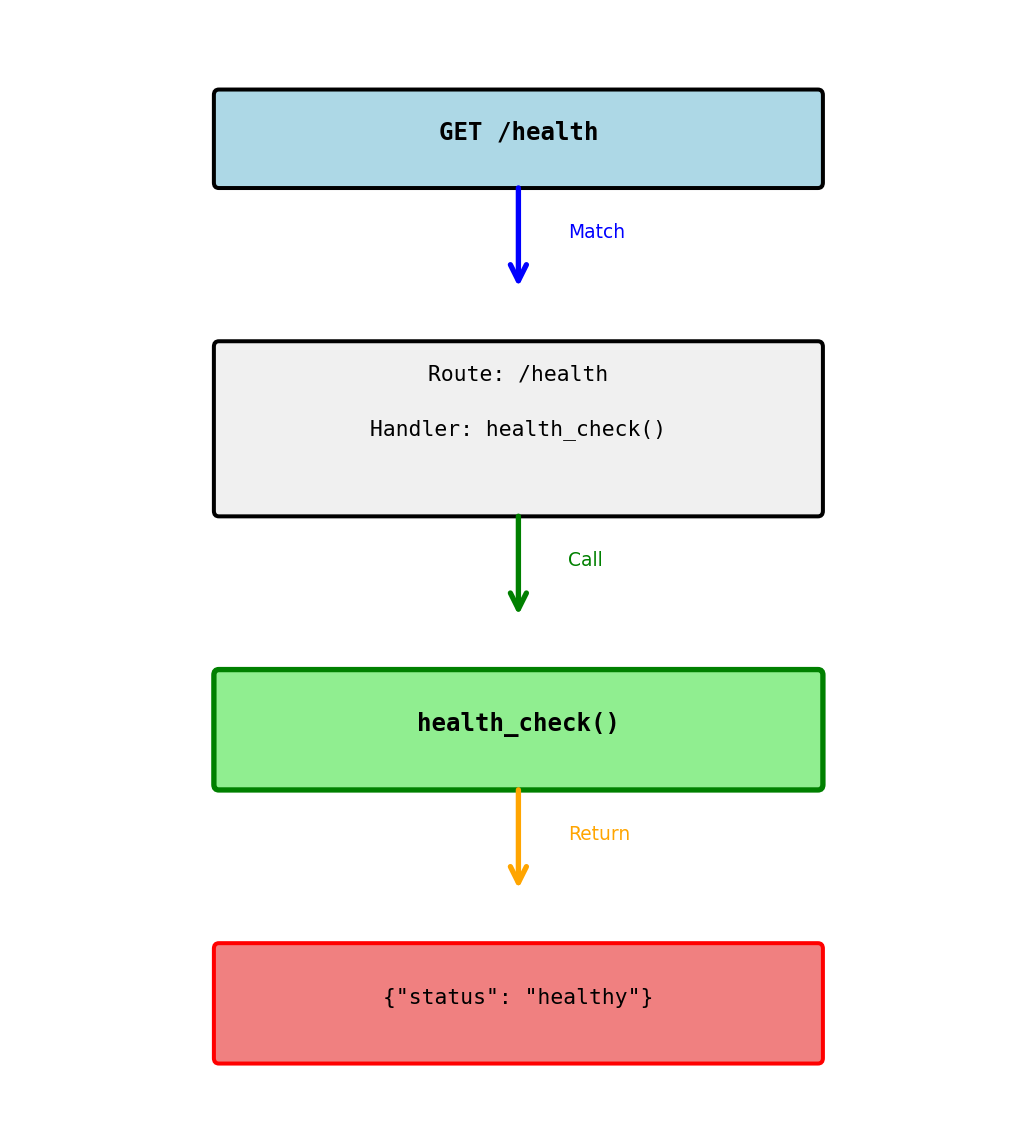
Connecting a URL to a function
What happens:
@app.route('/health') registers the routeGET /health/health matches registered routehealth_check() functionResponse:
HTTP/1.1 200 OK
Content-Type: application/json
{"status": "healthy"}
Flask automatically:

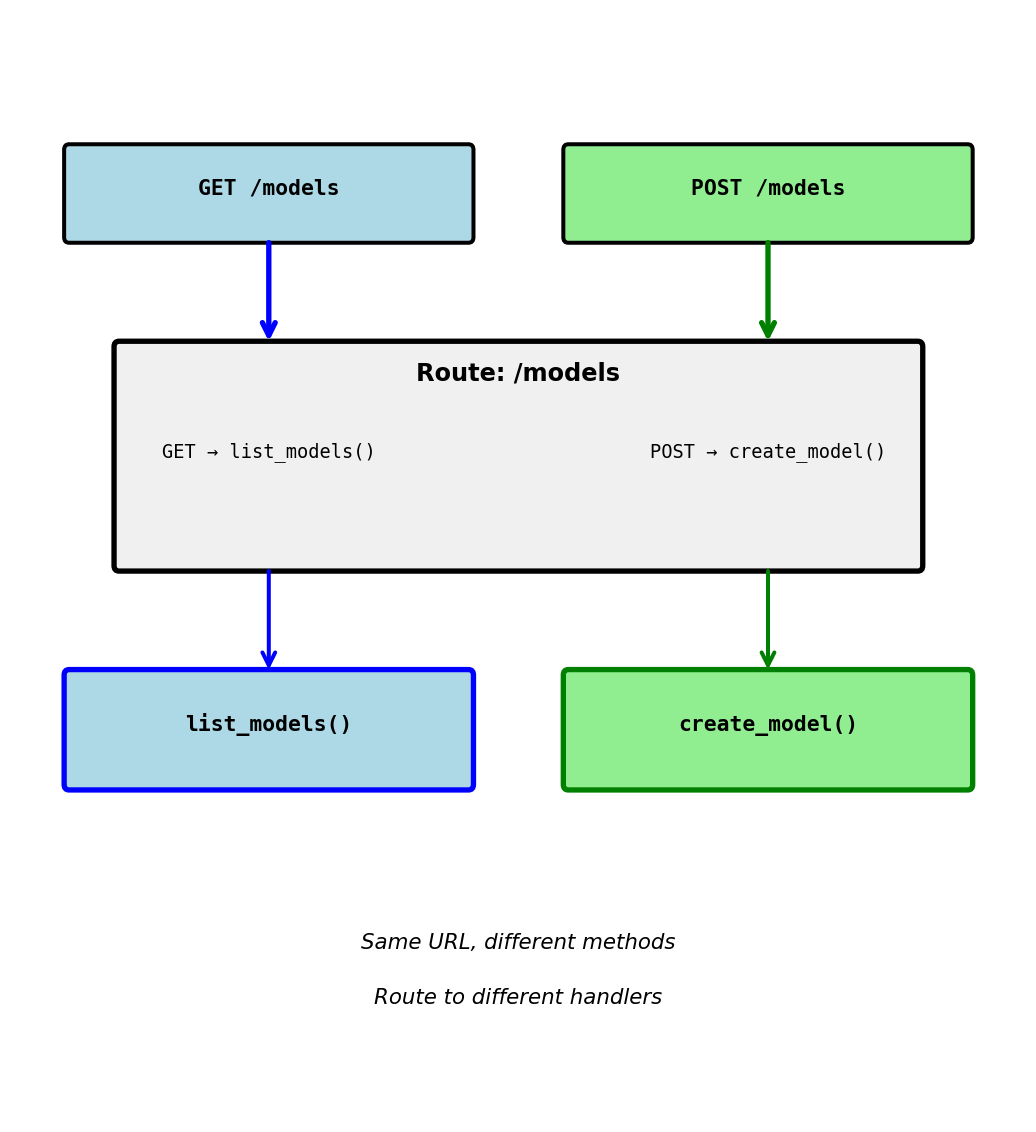
Restricting which HTTP methods a route accepts
Same URL, different methods:
GET /models → calls list_models()POST /models → calls create_model()PUT /models → 405 Method Not AllowedWhy separate by method:
Default is GET only:

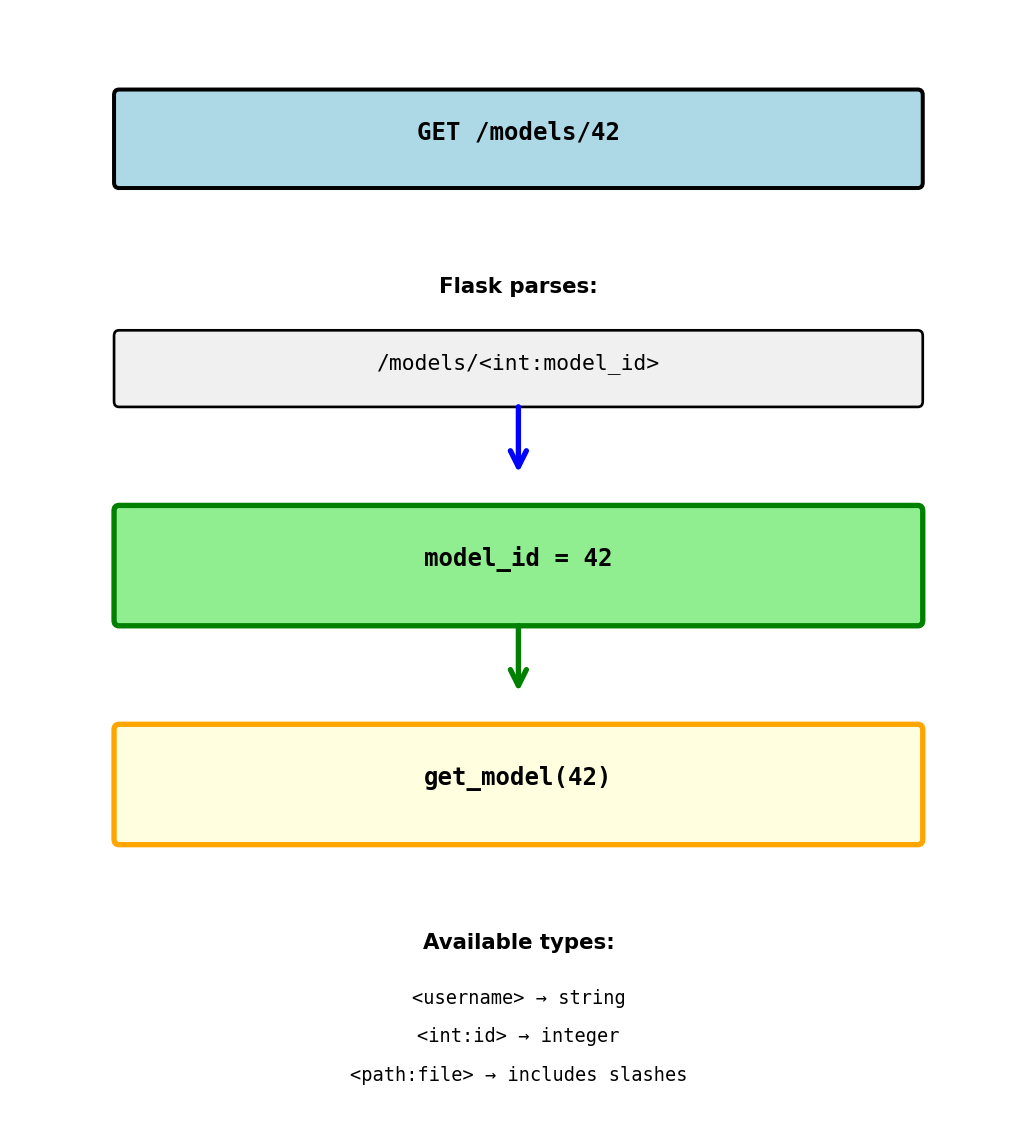
Capturing values from the URL
URL: GET /models/42 Result: model_id = "42" (string)
Type conversion:
URL: GET /models/42 Result: model_id = 42 (integer)
URL: GET /models/abc Result: 404 Not Found (can’t convert to int)
Multiple parameters:
URL: GET /models/42/predictions/xyz Result: model_id = 42, pred_id = "xyz"

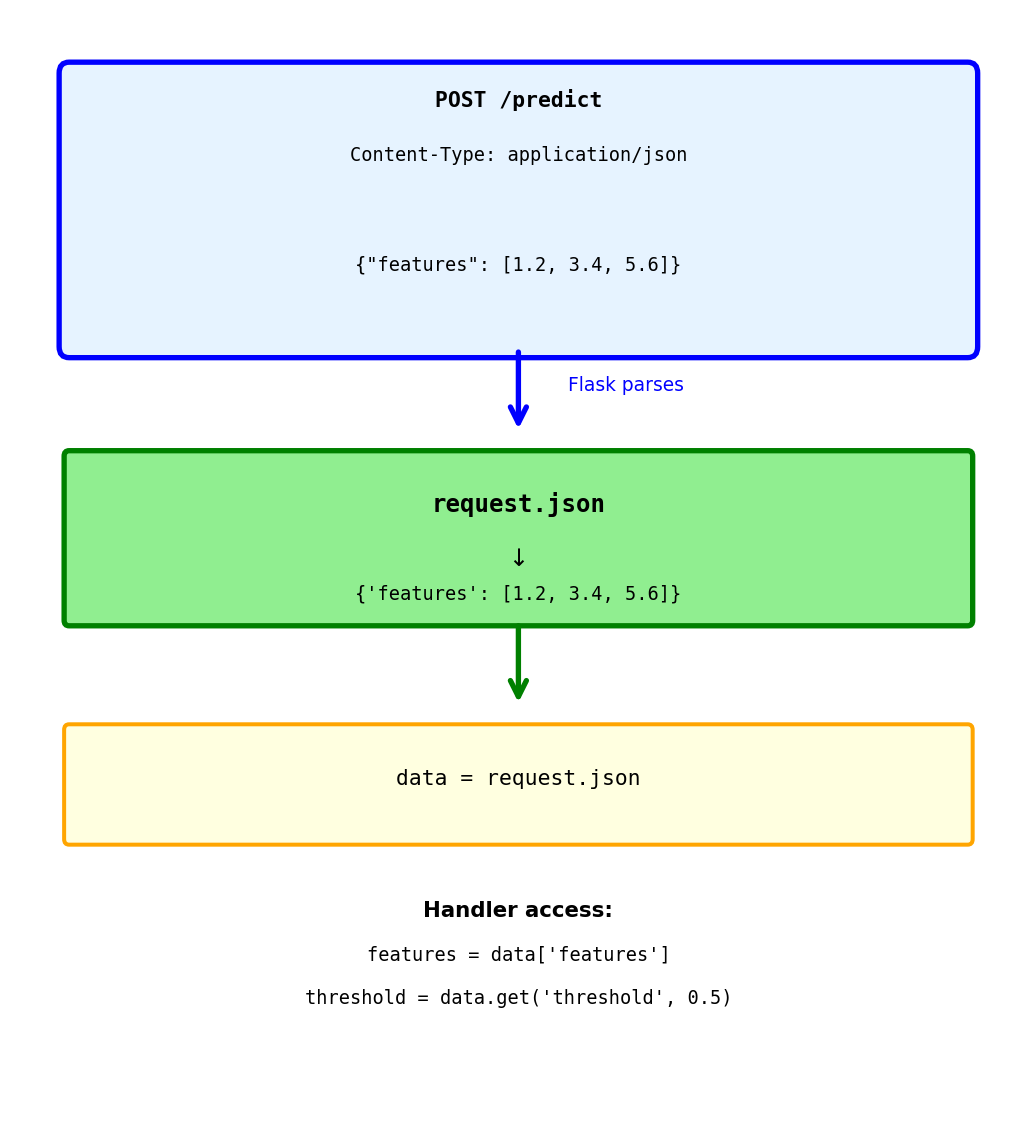
Reading JSON from request body
Client sends:
POST /predict
Content-Type: application/json
{"features": [1.2, 3.4, 5.6]}
Flask automatically:
request.jsonSafe access with get():

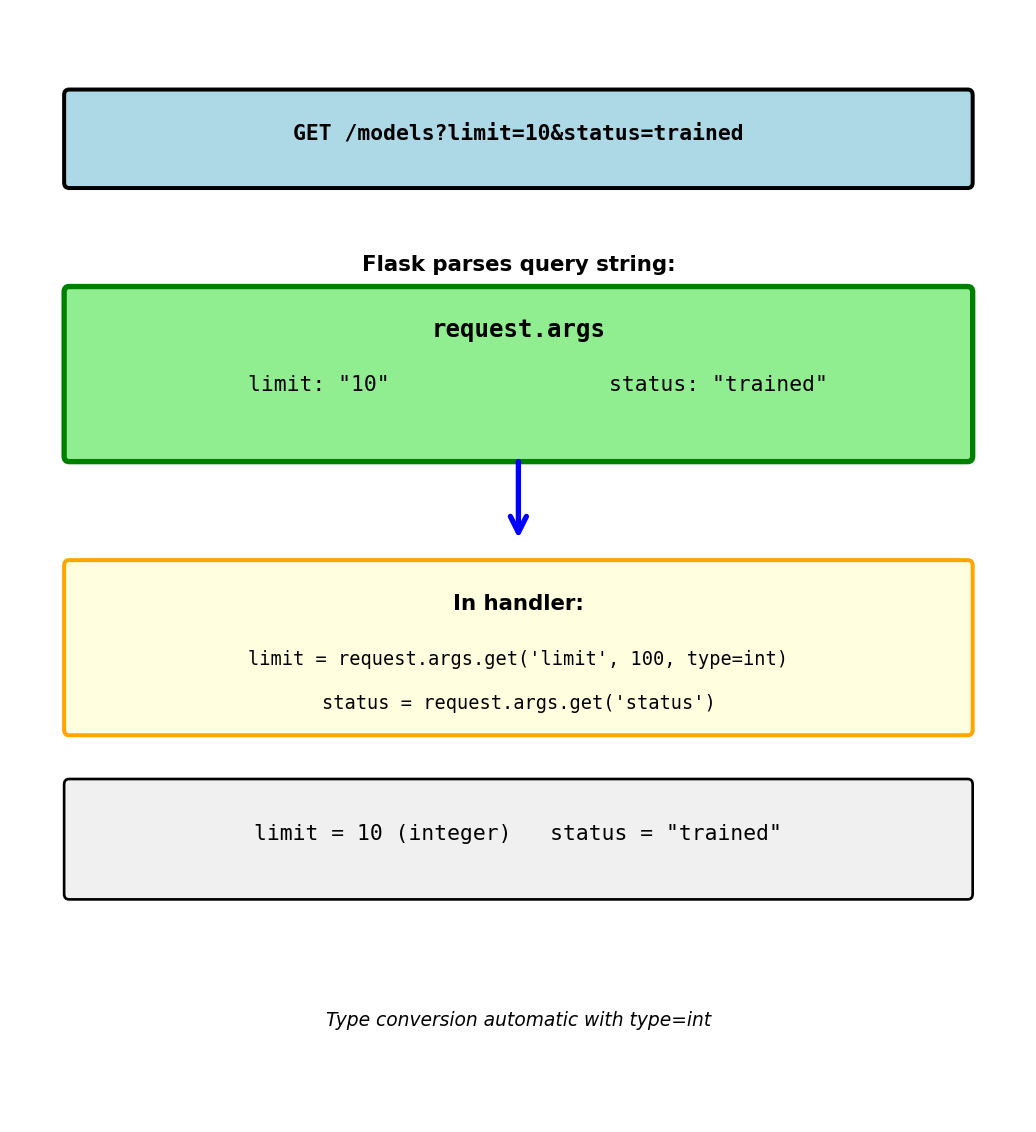
Reading parameters from URL query string
Query string after ? in URL:
key=value& separator/models?limit=10&status=trainedrequest.args.get() parameters:
type=int: convert to integerWithout default:
With default:

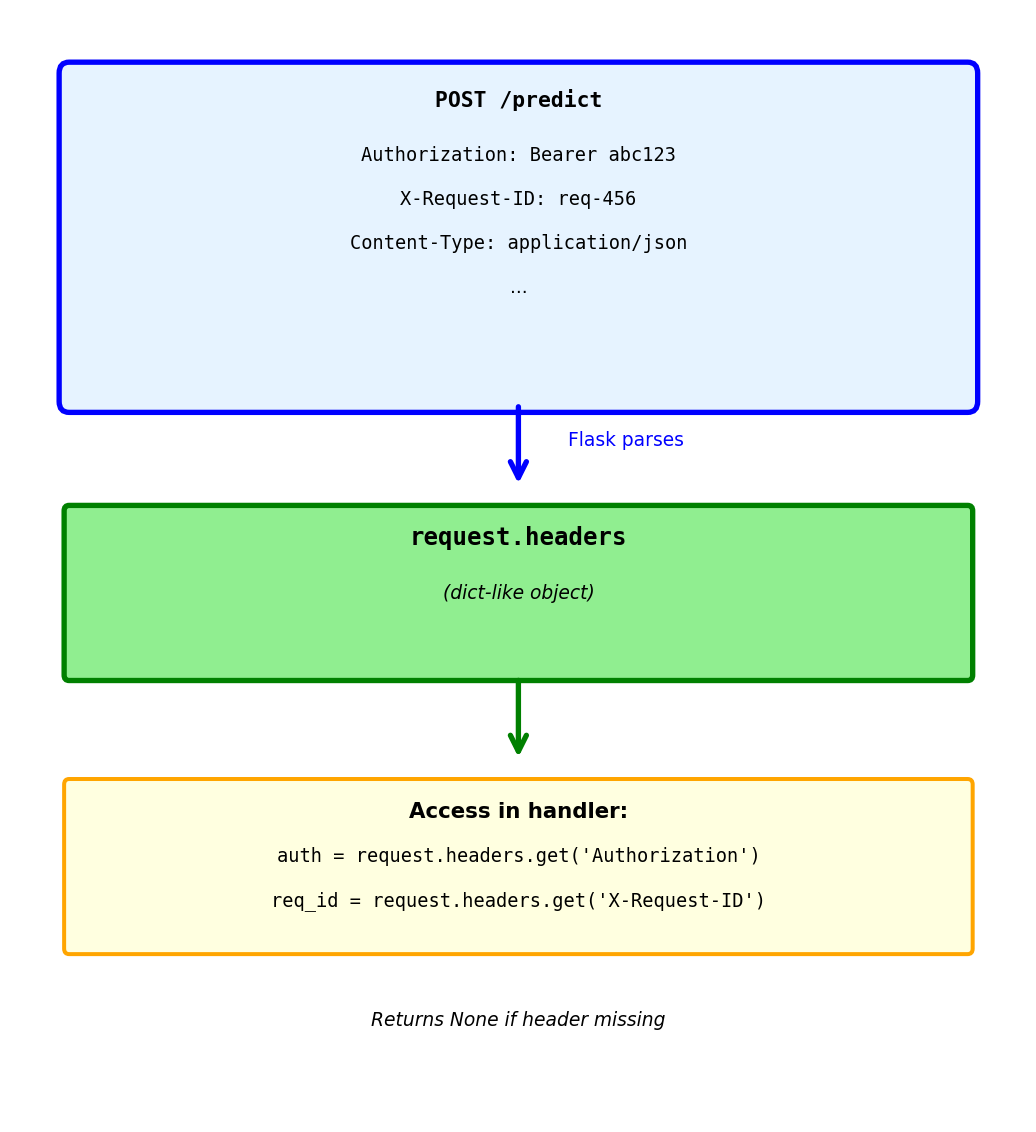
Reading HTTP headers
@app.route('/predict', methods=['POST'])
def predict():
# Authorization header
auth = request.headers.get('Authorization')
# "Bearer eyJhbGci..."
# Custom headers
request_id = request.headers.get('X-Request-ID')
# Content type
content_type = request.headers.get('Content-Type')
# Validate token
if not auth:
return {'error': 'Missing authorization'}, 401
if not validate_token(auth):
return {'error': 'Invalid token'}, 401
# Process request
return {'prediction': 0.87}Common headers:
Authorization: Auth tokensContent-Type: Body formatX-Request-ID: Request trackingUser-Agent: Client informationHeaders case-insensitive:

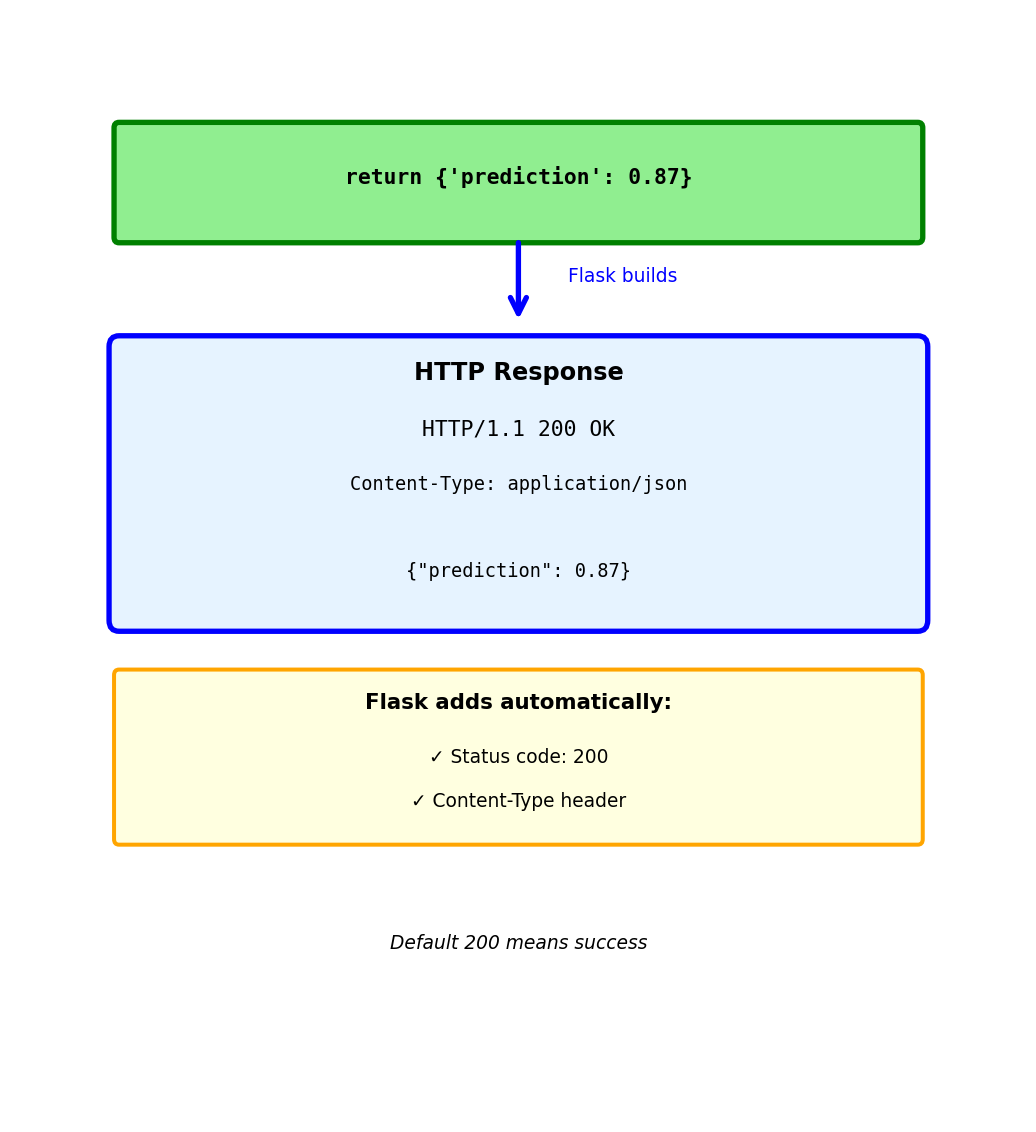
Return dict → Flask converts to JSON
Response Flask generates:
HTTP/1.1 200 OK
Content-Type: application/json
{"prediction": 0.87}
Flask automatically:
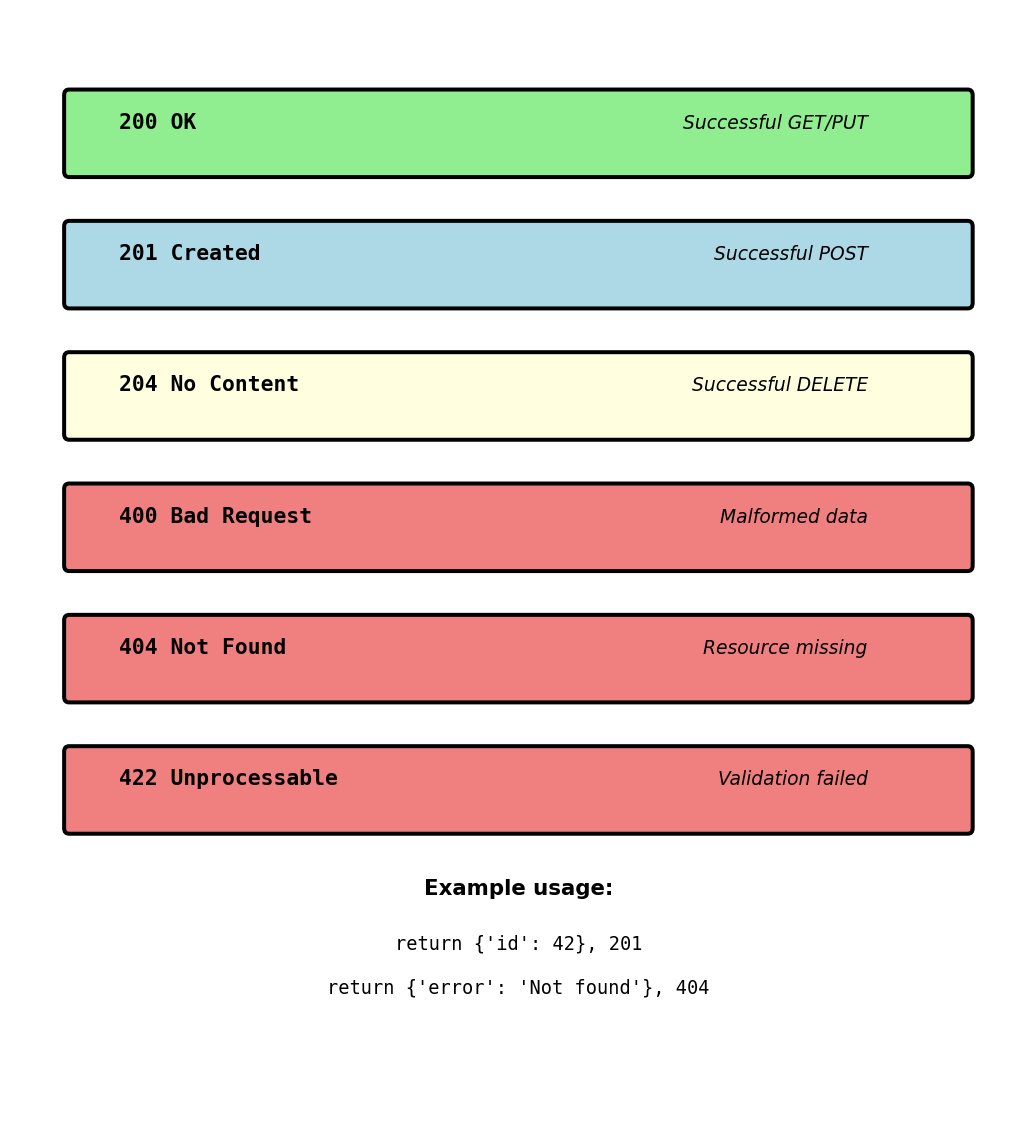
This is the most common pattern:

Return tuple: (data, status_code)
Response:
HTTP/1.1 201 Created
Content-Type: application/json
{"id": 42}
When to use different status codes:
201 Created - Resource successfully created (POST)
204 No Content - Success but no data to return (DELETE)
404 Not Found - Resource doesn’t exist
422 Unprocessable Entity - Validation failed

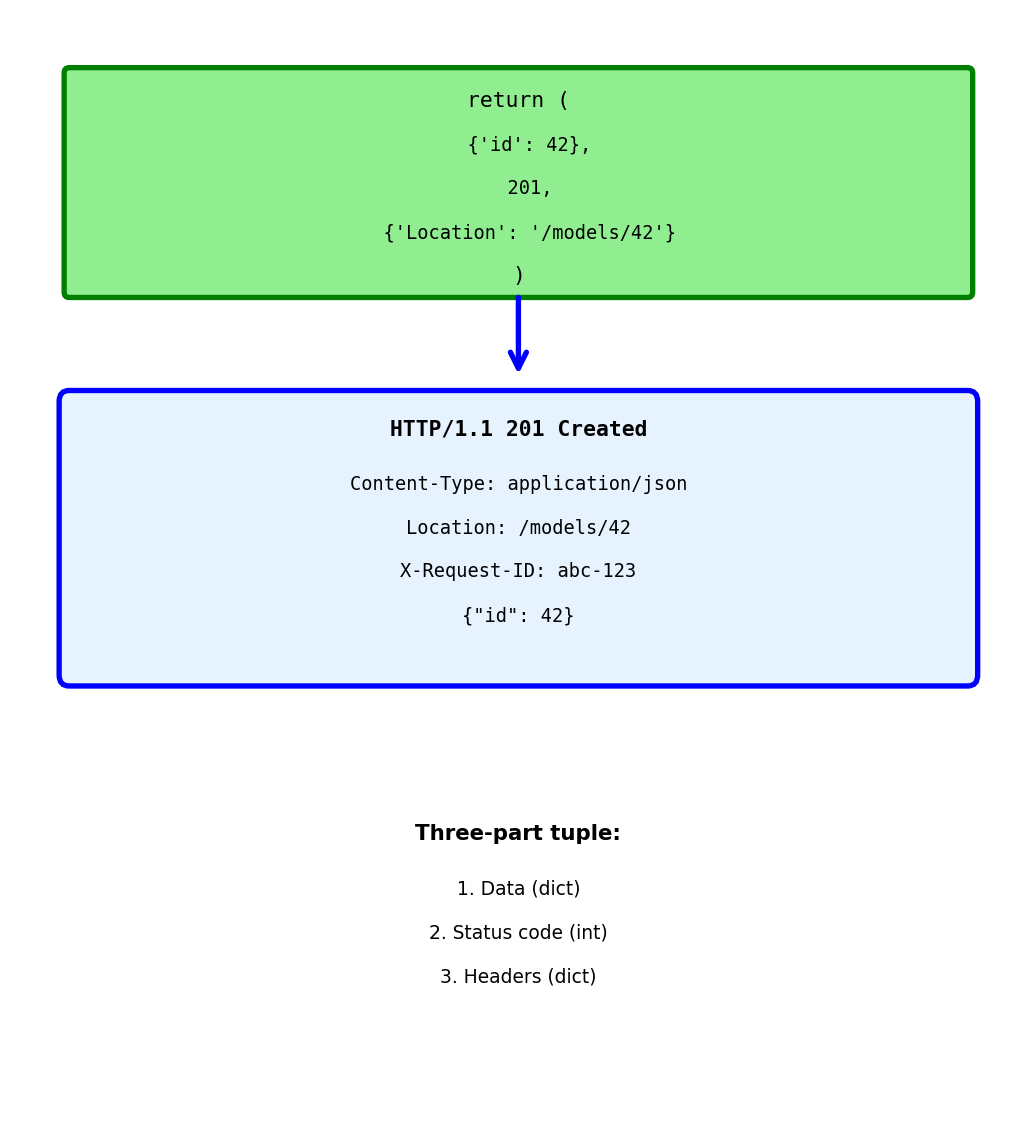
Return tuple: (data, status, headers)
Response:
HTTP/1.1 201 Created
Content-Type: application/json
Location: /models/42
X-Request-ID: abc-123
{"id": 42}
Common response headers:
Location - URL of newly created resource
X-Request-ID - Echo back for tracking
Cache-Control - Control caching

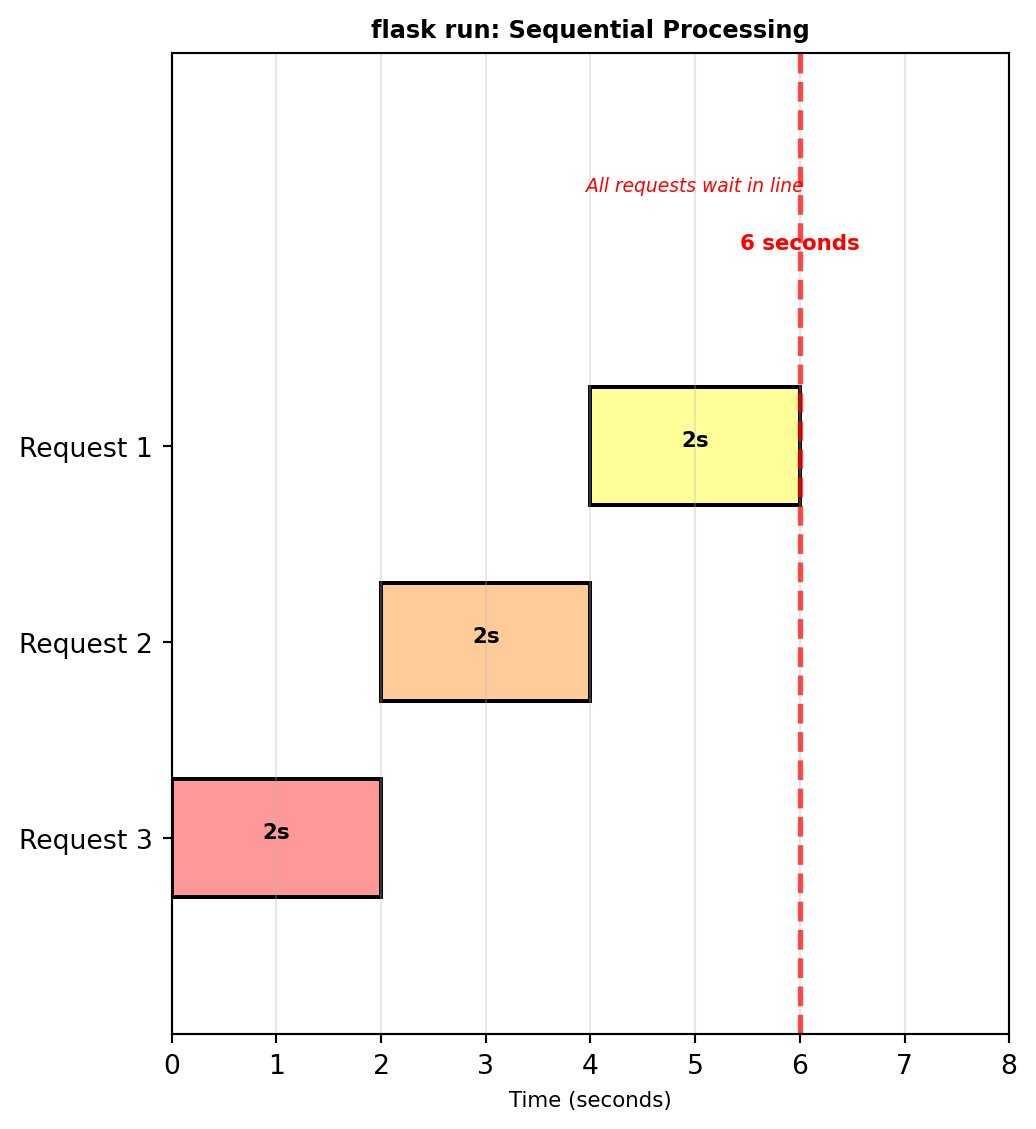
Development server not for production
Problems:
Example:
With flask run:
Production needs:

Single process means:
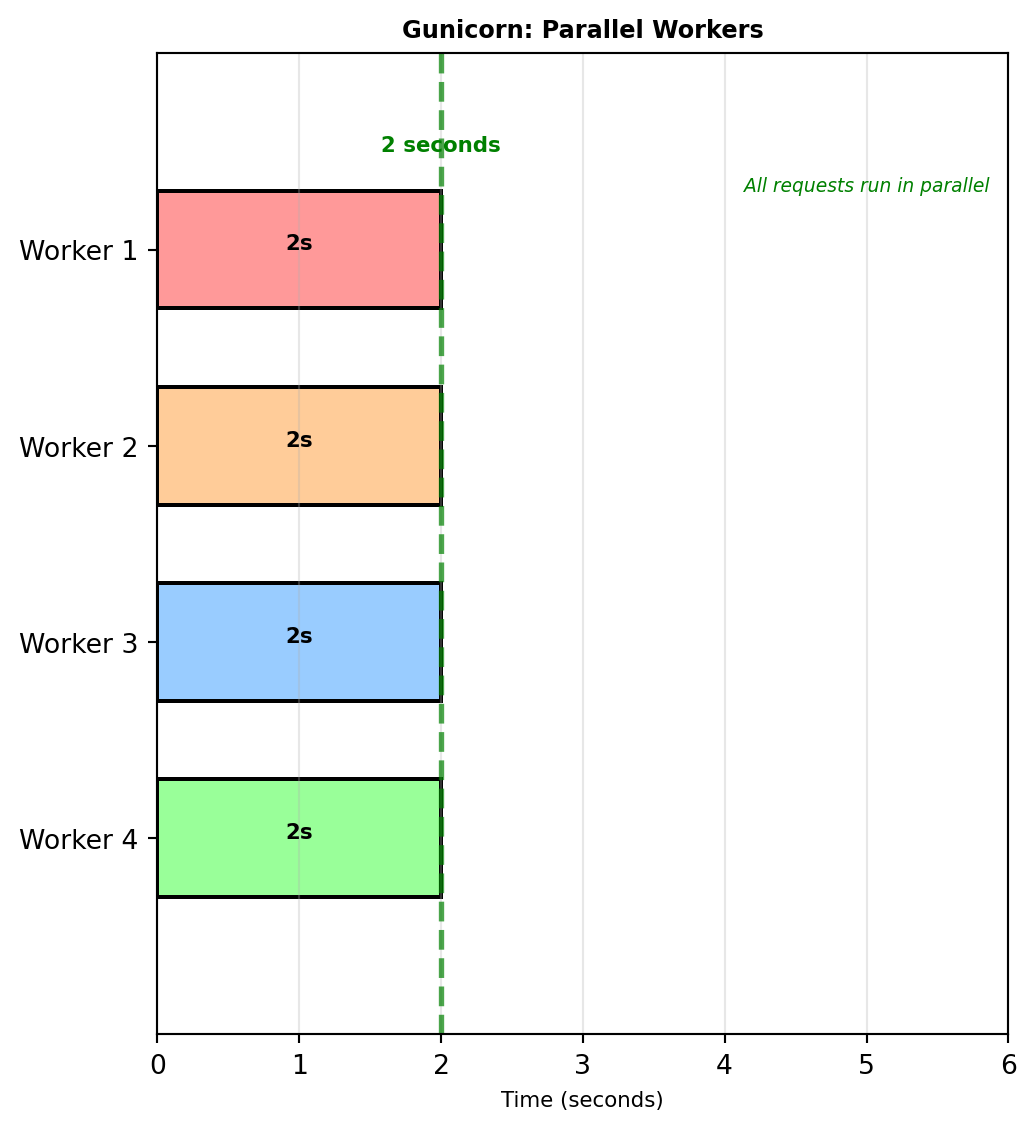
Gunicorn - Production WSGI server
What this does:
Worker calculation:
workers = (CPU cores × 2) + 1
2-core machine → 5 workers 4-core machine → 9 workers
Same 2-second prediction with 4 workers:
4× improvement for concurrent requests
Configuration file:

Multiple workers = concurrent processing
Each worker is independent process
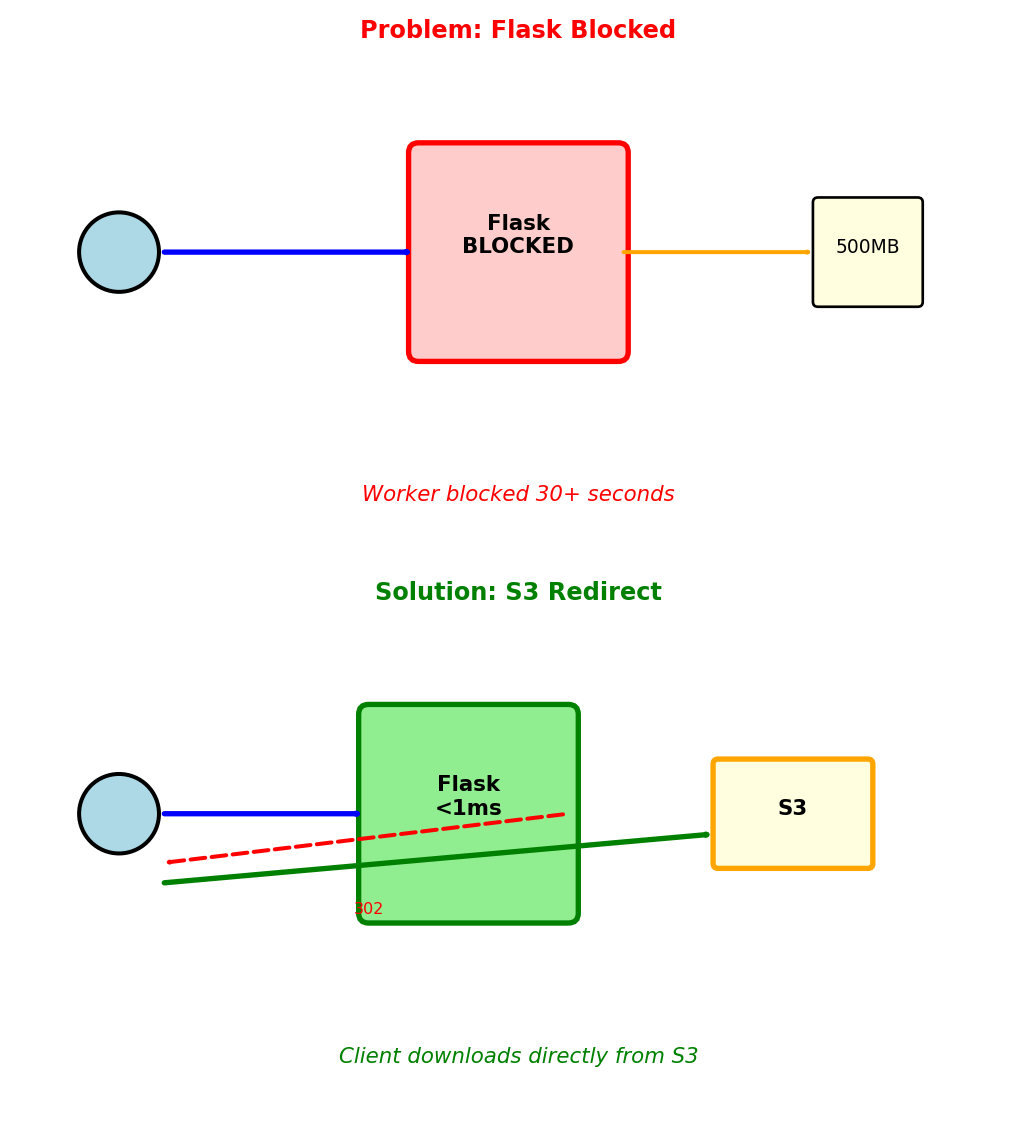
Flask serves static files synchronously, blocking the worker for the entire transfer
What happens:
Solution 1: Nginx serves static files
Nginx handles /static/* directly
Flask never sees these requests
Workers free for API calls
Solution 2: S3 redirect pattern
Flow:
Use S3 redirect for: Large files (>10MB), model weights, datasets, user uploads

OpenAPI defines API structure in machine-readable format
Specification written in YAML or JSON, describes:
Example specification for user endpoint:
openapi: 3.0.0
info:
title: User Service API
version: 2.1.0
paths:
/users/{userId}:
get:
parameters:
- name: userId
in: path
required: true
schema:
type: integer
minimum: 1
responses:
'200':
description: User found
content:
application/json:
schema:
$ref: '#/components/schemas/User'
'404':
description: User not found
components:
schemas:
User:
type: object
required: [user_id, email, is_active]
properties:
user_id: {type: integer}
email: {type: string, format: email}
is_active: {type: boolean}
engagement_score: {type: number, minimum: 0, maximum: 100}Specification serves multiple purposes:
1. Documentation source - Swagger UI generates interactive docs - Always synchronized with implementation - Developers explore API without writing code
2. Validation layer - Request validation against schema - Response validation before sending - Type checking and constraint enforcement
3. Code generation - Server stubs with routing - Client SDKs in multiple languages - Type-safe API calls
4. Contract testing - Verify implementation matches spec - Detect breaking changes - Test compliance automatically
Specification-first development:
Write spec → Generate code → Implement handlers
Ensures API design considered before implementation details
Alternative: Code-first
Write code → Generate spec from annotations
Easier to start, harder to maintain consistency
OpenAPI schemas define data structures with constraints
ML prediction endpoint schema:
paths:
/models/{modelId}/predict:
post:
parameters:
- name: modelId
in: path
schema: {type: string, pattern: '^[a-z0-9-]+$'}
requestBody:
required: true
content:
application/json:
schema:
type: object
required: [features, model_version]
properties:
features:
type: array
items: {type: number}
minItems: 10
maxItems: 10
model_version:
type: string
enum: [v1.0, v1.1, v2.0]
threshold:
type: number
minimum: 0.0
maximum: 1.0
default: 0.5
responses:
'200':
content:
application/json:
schema:
type: object
required: [prediction, confidence]
properties:
prediction: {type: number}
confidence: {type: number, minimum: 0, maximum: 1}Schema constraints validated automatically:
Invalid requests rejected before processing:
Missing required field:
Wrong array length:
Invalid enum value:
Validation prevents:
Schema validation rejects bad requests in microseconds — before the server spends time on database queries or model inference
Single OpenAPI specification generates multiple artifacts
1. Interactive documentation (Swagger UI)
Browsable interface with:
Developers test endpoints without writing client code
2. Server stubs
Generated code includes:
# Generated from OpenAPI spec
@app.route('/models/<model_id>/predict', methods=['POST'])
def predict_model(model_id: str):
# Request already validated against schema
body = request.json # Type: PredictionRequest
# Implement business logic here
result = run_prediction(model_id, body['features'])
# Response validated before sending
return {'prediction': result, 'confidence': 0.87}3. Client SDKs
Type-safe client libraries:
# Generated Python client
from api_client import UserServiceClient
client = UserServiceClient(base_url='https://api.example.com')
# Method signatures from spec
user = client.get_user(user_id=123) # Type: User
print(user.email) # IDE autocomplete knows fields
# Type checker catches errors
client.get_user(user_id="abc") # Error: expected int4. Request validation middleware
Automatically generated validators:
# Validates before handler executes
def validate_request(spec):
def decorator(f):
def wrapper(*args, **kwargs):
# Check request matches spec
errors = validate_against_schema(
request,
spec['paths'][request.path]
)
if errors:
return {'error': errors}, 400
return f(*args, **kwargs)
return wrapper
return decorator5. Mock servers
Generate mock API from specification:
Code generation tools:
Specification as single source of truth:
Change spec → Regenerate all artifacts
Documentation, validation, and client code stay synchronized
Manual maintenance alternative:
Machine-readable specification prevents divergence
APIs evolve but clients update slowly
Version placement options:
URL path versioning (most common):
GET /v1/users/123
GET /v2/users/123
Advantages: - Version immediately visible in URL - Easy to route in load balancer - Clear in logs and monitoring
Disadvantages: - URL changes with version - Resource “same” user has different URLs
Header versioning:
GET /users/123
Accept: application/vnd.api.v1+json
GET /users/123
Accept: application/vnd.api.v2+json
Advantages: - URLs remain stable - Content negotiation pattern
Disadvantages: - Version not visible in URL - Harder to test in browser - Requires header inspection
Custom header:
GET /users/123
API-Version: 1
GET /users/123
API-Version: 2
Similar trade-offs to Accept header
Query parameter (not recommended):
GET /users/123?version=1
GET /users/123?version=2
Disadvantages: - Mixes version with filtering parameters - Caching issues (query params affect cache key)
Version granularity:
Major versions (breaking changes): - v1 → v2: Field removed or renamed - v2 → v3: Response structure changed - Requires separate implementation
Minor versions (additions): - v2.0 → v2.1: New optional field added - v2.1 → v2.2: New endpoint added - Backward compatible within major version
Semantic versioning pattern:
MAJOR.MINOR.PATCH
When to increment major version:
Backward compatible additions:
Parallel version support:
Both versions active simultaneously:
Breaking change: Modification that causes existing clients to fail
Common breaking changes:
Field removal:
Client code accessing response['phone'] raises KeyError
Field rename:
Client parsing created field receives KeyError
Type change:
Client expecting string, performs string operations on number → TypeError
New required field:
// v1 request
POST /bookings
{"flight_id": 456, "user_id": 123}
// v2 request (requires seat_class)
POST /bookings
{"flight_id": 456, "user_id": 123, "seat_class": "economy"}
Old clients missing seat_class → 400 Bad Request
Status code change:
// v1: Returns 200 OK when user not found (empty result)
// v2: Returns 404 Not Found when user not found
Client checking status == 200 for success misses 404 case
Non-breaking changes (backward compatible):
Adding optional field to response:
Old clients ignore unknown created_at field
Adding optional request parameter:
// v1: GET /flights?departure=LAX
// v2: GET /flights?departure=LAX&max_price=500
Old clients don’t send max_price, server uses default behavior
Adding new endpoint:
// v1: GET /users, POST /users
// v2: GET /users, POST /users, GET /users/search
Old clients unaware of /users/search, continue using existing endpoints
Adding new HTTP method to existing endpoint:
// v1: GET /users/123
// v2: GET /users/123, PATCH /users/123
Old clients only use GET, PATCH addition doesn’t affect them
Deprecation headers indicate future removal:
HTTP/1.1 200 OK
Deprecation: true
Sunset: Wed, 31 Dec 2025 23:59:59 GMT
Link: </v2/users/123>; rel="successor-version"
Clients warned field or endpoint will be removed
Contract testing prevents breaking changes:
Test fails if response structure changes, preventing accidental breaking changes
Removing old API versions requires full client migration
Parallel operation is mandatory:
Monitor adoption via request logs:
Cannot remove v1 until 0% traffic remains
Signal deprecation through HTTP headers:
HTTP/1.1 200 OK
Deprecation: true
Sunset: Mon, 15 Sep 2025 23:59:59 GMT
Link: </docs/v2-migration>; rel="deprecation-policy"
Clients can programmatically detect pending removal
Gradual enforcement before shutdown:
Clients that block migration:
SELECT client_id, COUNT(*) as requests
FROM api_logs
WHERE version = 'v1'
AND timestamp > NOW() - INTERVAL '7 days'
GROUP BY client_id
ORDER BY requests DESC;
-- batch-job-1: 8,234 (automated, no owner)
-- mobile-app: 2,109 (old app version)
-- partner-api: 1,876 (quarterly release cycle)
-- unknown: 234 (API key ownership lost)Forgotten batch jobs, outdated mobile apps, and third-party integrations with slow release cycles are the typical blockers
Final shutdown returns 410 Gone:
HTTP/1.1 410 Gone
{
"error": "API v1 has been retired",
"migration_guide": "/docs/v1-to-v2",
"support": "api-support@example.com"
}
Cost of maintaining parallel versions:
Internal API migrations can take months; external deprecations can stretch considerably longer
Structured errors provide actionable information
Basic error response:
Detailed validation errors:
Rate limit error with retry information:
Resource not found with suggestions:
Error response components:
1. Machine-readable code
Enables programmatic handling:
if response.status_code == 400:
error = response.json()['error']
if error['code'] == 'VALIDATION_ERROR':
# Fix validation issues
for detail in error['details']:
log.warning(f"Field {detail['field']}: {detail['message']}")
elif error['code'] == 'RATE_LIMIT_EXCEEDED':
# Wait and retry
time.sleep(error['retry_after'])2. Human-readable message
For developer debugging and logs
3. Context-specific details
Field-level errors for validation failures
4. Actionable information
Rate limits include reset time and retry delay
5. Request correlation
Include in support tickets for log correlation
6. Documentation links
Error code categories:
VALIDATION_ERROR: Client sent invalid dataAUTHENTICATION_ERROR: Token missing or invalidAUTHORIZATION_ERROR: Valid token, insufficient permissionsRATE_LIMIT_EXCEEDED: Too many requestsRESOURCE_NOT_FOUND: Requested resource doesn’t existCONFLICT: Operation conflicts with current stateSERVER_ERROR: Internal server failureConsistent error structure across all endpoints
Large collections require pagination
Collection with 2,500 users:
Without pagination: GET /users - Returns all 2,500 users - Response size: 3.8 MB - Load time: 6-8 seconds - Client memory: Entire collection
With pagination: GET /users?limit=50&offset=0 - Returns 50 users - Response size: 76 KB (50× smaller) - Load time: 120ms (50× faster) - Client memory: Current page only
Offset-based pagination parameters:
limit: Number of items per page (page size) offset: Number of items to skip (starting position)
Fetching pages:
Page 1 (users 1-50):
GET /users?limit=50&offset=0
Page 2 (users 51-100):
GET /users?limit=50&offset=50
Page 3 (users 101-150):
GET /users?limit=50&offset=100
Formula: offset = (page_number - 1) × limit
Pagination metadata in response:
Offset pagination with filters:
GET /users?status=active&limit=50&offset=0
Filter applied before pagination: 1. Query users where status=‘active’ (1,200 matching) 2. Skip first 0 users 3. Return next 50 users
Offset pagination advantages:
Offset pagination limitations:
1. Performance degrades with large offsets
Database query: SELECT * FROM users LIMIT 50 OFFSET 10000
Must scan 10,000 rows before returning 50
2. Inconsistent results during modifications
Client requests page 1 (users 1-50) User 25 gets deleted Client requests page 2 (offset=50)
Receives users 51-100 (previously users 52-101) User 51 never seen by client
3. Duplicate results with insertions
Client requests page 1 (users 1-50) New user inserted at position 10 Client requests page 2 (offset=50)
Receives users 51-100 (previously users 50-99) User 50 appears on both pages
Cursor-based pagination solves these issues
Cursor encodes position in result set
Instead of numeric offset, use opaque cursor token
Initial request:
GET /users?limit=50
Response with cursor:
Next page request:
GET /users?limit=50&cursor=eyJ1c2VyX2lkIjo1MH0=
Cursor is base64-encoded JSON: {"user_id": 50}
Database query using cursor:
No OFFSET clause - uses indexed WHERE condition
Cursor for different sort orders:
Sort by created_at descending:
Decoded: {"created_at": "2025-01-15T10:30:00Z", "user_id": 50}
Include user_id for tie-breaking when timestamps equal
Cursor pagination advantages:
1. Consistent performance
Direct index lookup, no scanning:
2. Stable results during modifications
Client requests page 1 with cursor User 25 gets deleted Client requests page 2 using cursor
Cursor points to user_id > 50, deletion of user 25 doesn’t affect next page
3. No duplicate results from insertions
Cursor maintains position relative to sorted order, new insertions don’t cause duplicates
Cursor pagination limitations:
Cannot jump to arbitrary page
No “go to page 50” - must traverse sequentially
Cannot display total page count
Computing total requires full count query (expensive)
Cursor must be opaque to client
// Bad: Exposing internal structure
GET /users?after_id=50
// Good: Opaque cursor
GET /users?cursor=eyJ1c2VyX2lkIjo1MH0=
Allows server to change cursor format without breaking clients
When to use each approach:
Offset pagination: - Need page numbers (UI with page selector) - Need total count - Data rarely changes - Small to medium collections
Cursor pagination: - Large collections (millions of rows) - Data frequently updated - Mobile apps (efficient, consistent) - Infinite scroll UX
Many APIs support both: limit/offset for random access, limit/cursor for efficient traversal
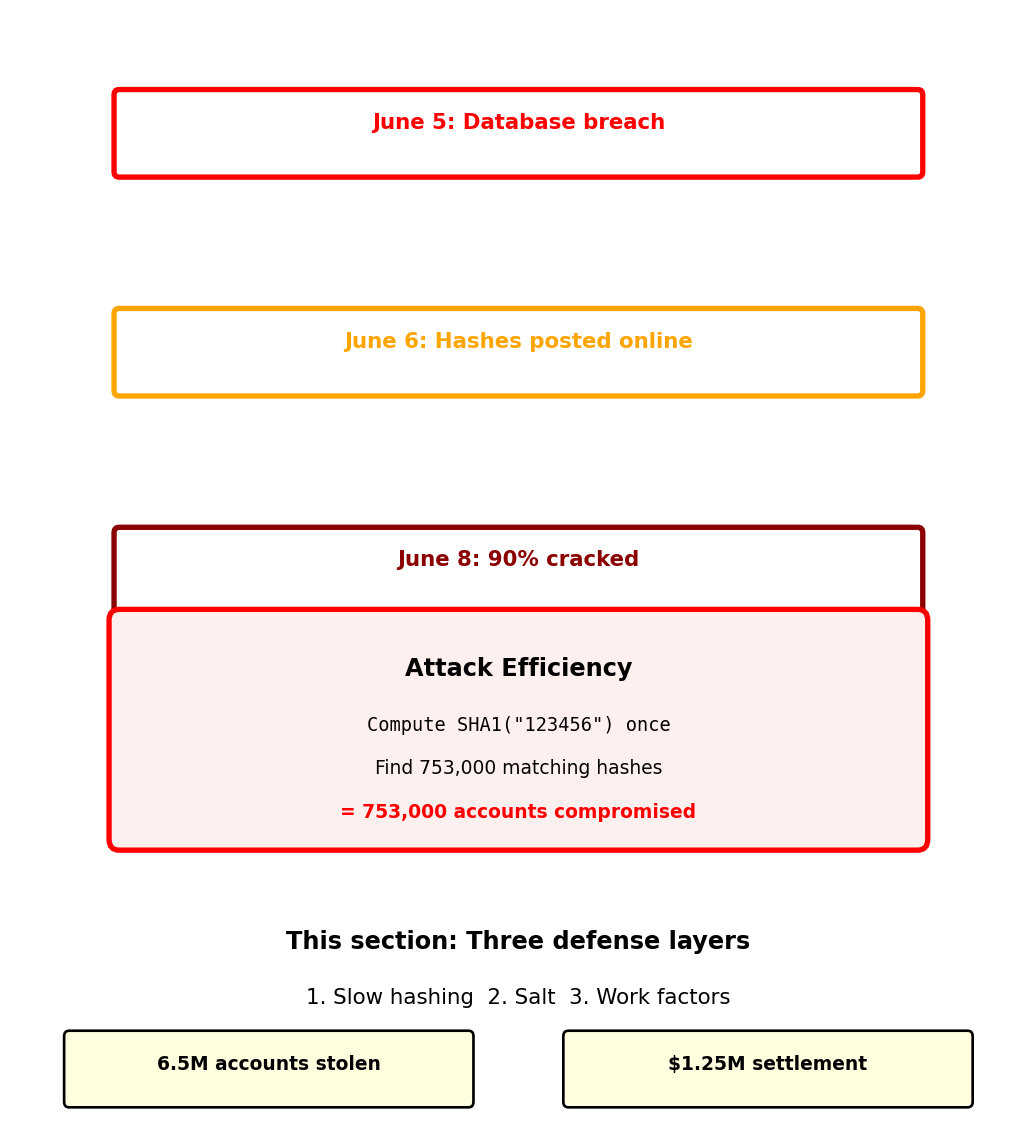
June 2012: 6.5 million LinkedIn password hashes stolen1
What LinkedIn did:
What attackers did:
Reported result: ~90% of passwords cracked within 72 hours
Why it failed:
Same password “123456” compromised 753,000 accounts simultaneously

LinkedIn’s breach shows authentication failures cascade across systems
ML API requires authentication to prevent unauthorized access:
Every API request needs to answer two questions:
In a single process, identity is implicit:
In distributed systems, identity must be explicit:
HTTP is stateless - no memory between requests:
Three approaches to maintaining identity across requests:
Each approach makes different trade-offs between security, scalability, and complexity.

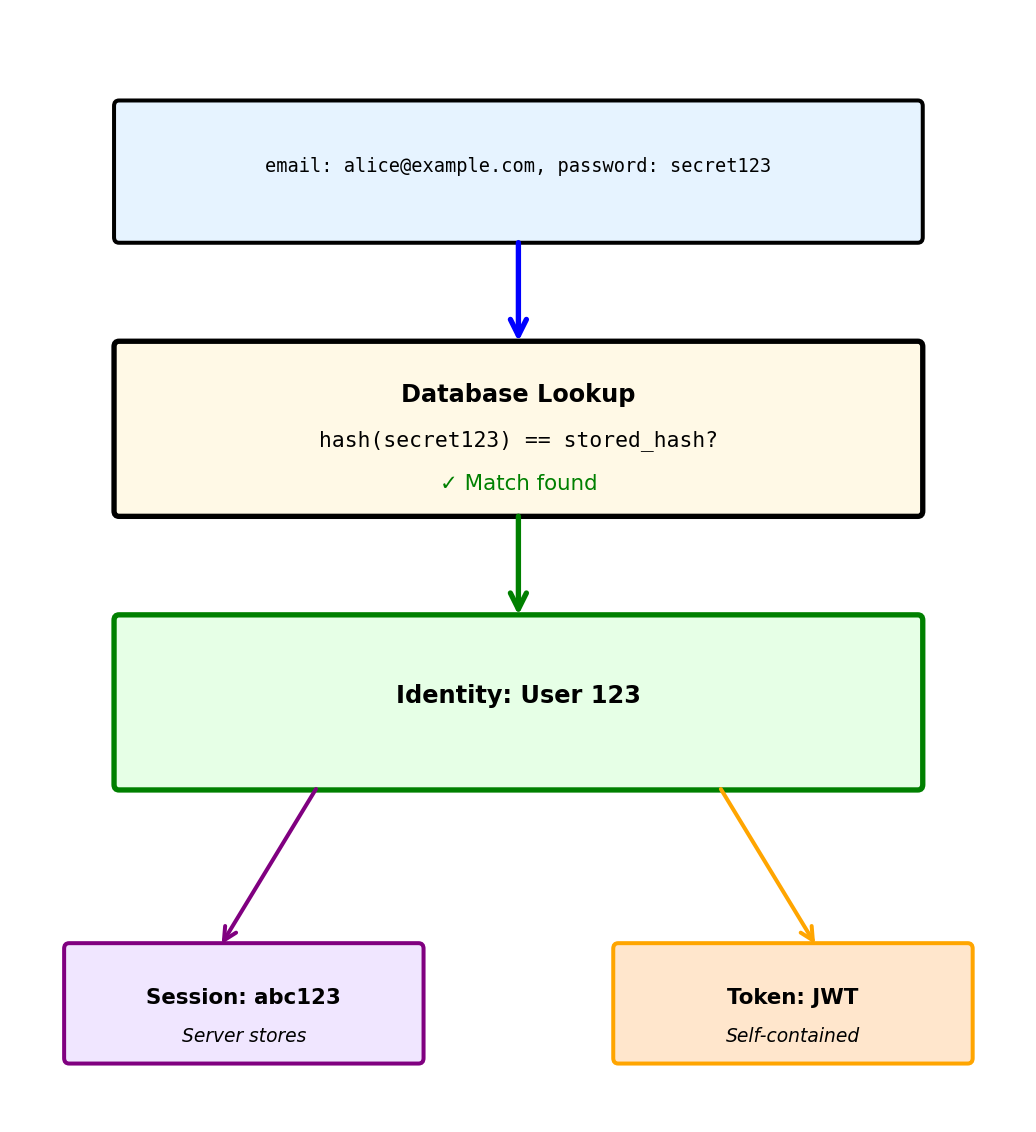
Authentication transforms a secret into verified identity
Step 1: User provides credentials
Step 2: Server verifies against stored credentials
Step 3: Server issues proof of authentication
Password storage determines breach impact:
Never store plaintext passwords:
Store cryptographic hashes instead:

LinkedIn used SHA-1 hashing - why wasn’t that enough?
First, understand why plaintext is catastrophic:
Database breach with plaintext passwords:
All accounts immediately compromised.
Hash functions provide one-way transformation:
Cannot reverse: hash → original password (computationally infeasible)
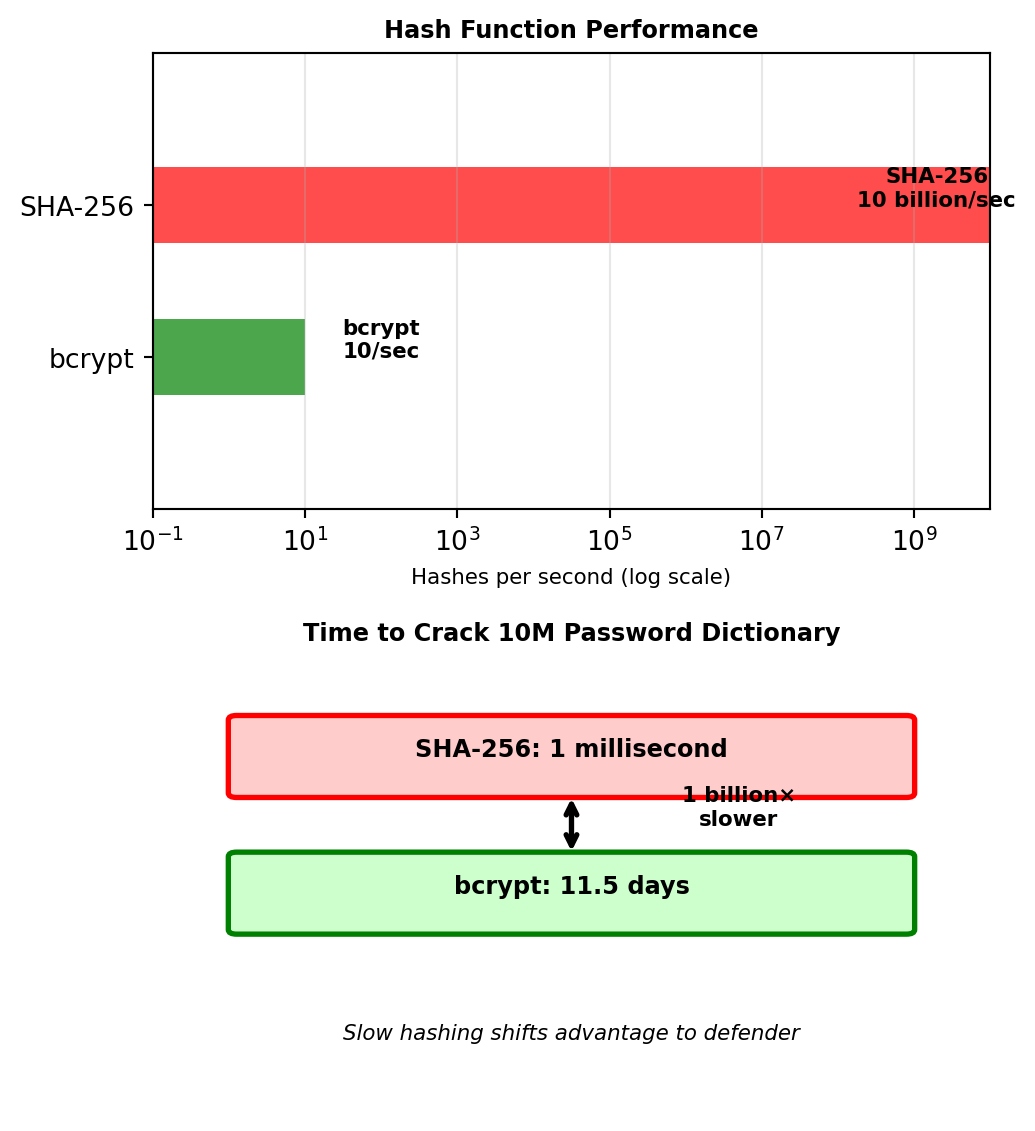
Asymmetry favors attackers:
Legitimate use: Verify one password for one user
Attack: Try millions of passwords against all users
Solution: Make hashing deliberately slow
This is why LinkedIn’s passwords fell in 72 hours - SHA-1 allowed rapid dictionary attacks.
This asymmetry favors defenders over attackers.

LinkedIn’s second mistake: No salt
Even with slow hashing, common passwords create identical hashes:
Without salt, all users with “password123” have same hash:
Salt: Random value unique to each user
Now identical passwords produce different hashes:
Impact on attack strategy:
Without salt: One computation compromises all instances
With salt: Must attack each user individually
Salt is not secret - stored with hash, prevents mass attacks not targeted ones
With salt, LinkedIn’s 753,000 “123456” users would each need individual attacks

Combining defenses: Slow hashing + Salt + Adaptive work factor
bcrypt’s configurable work factor scales with hardware improvements:
Each increment doubles computation time:
| Factor | Iterations | Time/Hash | Passwords/Day |
|---|---|---|---|
| 10 | 1,024 | 50ms | 1.7M |
| 11 | 2,048 | 100ms | 864K |
| 12 | 4,096 | 200ms | 432K |
| 13 | 8,192 | 400ms | 216K |
| 14 | 16,384 | 800ms | 108K |
Balancing security and usability:
def choose_work_factor():
# Target: 250ms computation time
test_password = b"benchmark"
for factor in range(10, 15):
start = time.time()
bcrypt.hashpw(test_password, bcrypt.gensalt(factor))
duration = time.time() - start
if duration > 0.250: # 250ms target
return factor
return 14 # Maximum reasonable factorMoore’s Law compensation:
Security parameter improves over time without code changes

Server sessions: Centralized state
# Login creates session in shared store
session_id = generate_uuid()
redis.set(f"session:{session_id}", {
"user_id": 123,
"created": timestamp,
"permissions": ["read", "write"]
})
response.set_cookie("session_id", session_id)
# Every request requires lookup
def handle_request(request):
session_id = request.cookies.get("session_id")
session = redis.get(f"session:{session_id}") # Network call
if not session:
return 401Tokens: Distributed state
# Login creates self-contained token
payload = {
"user_id": 123,
"exp": timestamp + 3600,
"permissions": ["read", "write"]
}
token = jwt.encode(payload, SECRET_KEY)
return {"token": token}
# Every request validates locally
def handle_request(request):
token = request.headers["Authorization"].split(" ")[1]
payload = jwt.decode(token, SECRET_KEY) # CPU only
# No network call requiredTrade-offs in practice:
| Aspect | Sessions | Tokens |
|---|---|---|
| Revocation | Immediate | At expiration |
| Scaling | Requires shared store | Linear |
| Network calls | Every request | None |
| State size | Server: O(users) | Server: O(1) |
| Client complexity | Simple cookie | Header management |

Authentication establishes identity; authorization determines capabilities
def process_request(request):
# Step 1: Who are you? (Authentication)
user_id = validate_token(request.headers['Authorization'])
if not user_id:
return 401 # Unauthorized - don't know who you are
# Step 2: What can you do? (Authorization)
resource = request.path # e.g., /models/123
action = request.method # e.g., DELETE
if not has_permission(user_id, resource, action):
return 403 # Forbidden - know who you are, can't do this
# Step 3: Execute
return perform_action(resource, action)Three authorization models:
1. Role-Based (RBAC): Users have roles, roles have permissions
2. Attribute-Based (ABAC): Decisions based on attributes
3. Resource-Based: Users own resources

Tokens can’t be recalled after issuing:
Once issued, JWT remains valid until expiration:
Employee terminated at 2:00 PM:
Three approaches to bounded revocation:
1. Short-lived access tokens (15 minutes)
2. Blacklist critical tokens
3. Version-based invalidation

Session-based scaling requires coordination
Adding servers with sessions:
Measured impact with 1000 requests/second:
Token-based scaling is trivial
Adding servers with tokens:
Measured impact with 1000 requests/second:
Deployment advantages:
| Operation | Sessions | Tokens |
|---|---|---|
| Add server | Update session store | Add server |
| Remove server | Migrate sessions | Remove server |
| Deploy update | Coordinate session drain | Rolling update |
| Region failover | Replicate sessions | No change |
Cost at scale (10K concurrent users):
Stateless tokens eliminate the shared session store — scaling adds servers, not infrastructure.

JSON Web Tokens encode identity without server state
JWT structure: Three Base64-encoded parts separated by dots
eyJhbGciOiJIUzI1NiIsInR5cCI6IkpXVCJ9.
eyJ1c2VyX2lkIjoxMjMsImVtYWlsIjoiYWxpY2VAZXhhbXBsZS5jb20iLCJleHAiOjE3MDUzMjQ4MDB9.
SflKxwRJSMeKKF2QT4fwpMeJf36POk6yJV_adQssw5c
Part 1: Header (Algorithm and type)
Part 2: Payload (Claims about user)
Part 3: Signature (Prevents tampering)
HMACSHA256(
base64(header) + "." + base64(payload),
server_secret_key
)
Critical properties:

Signature prevents token forgery
Server creates token with secret:
Client cannot modify token:
# Attacker tries to change user_id
decoded = base64.decode(token.split('.')[1])
decoded['user_id'] = 999 # Change to admin
fake_payload = base64.encode(decoded)
# But cannot generate valid signature without secret
fake_token = header + "." + fake_payload + "." + random_signature
# Server will reject: Invalid signatureServer validates with same secret:
Symmetric (HS256) vs Asymmetric (RS256):

Standard claims provide common functionality
Registered claims (predefined meanings):
Time-based validation:
Custom claims for application data:
Token size considerations:

Short access tokens + long refresh tokens minimize risk
Dual token pattern:
def login(email, password):
if authenticate(email, password):
# Short-lived for API calls
access_token = create_jwt(
user_id=123,
expires_in=15*60 # 15 minutes
)
# Long-lived for obtaining new access tokens
refresh_token = create_jwt(
user_id=123,
token_type="refresh",
expires_in=30*24*60*60 # 30 days
)
# Store refresh token for revocation
db.store_refresh_token(refresh_token)
return {
"access_token": access_token,
"refresh_token": refresh_token,
"expires_in": 900
}Token refresh flow:
def refresh_access_token(refresh_token):
# Validate refresh token
payload = jwt.decode(refresh_token, secret_key)
# Check if revoked (requires DB check)
if is_revoked(refresh_token):
return 401 # Revoked
# Issue new access token
new_access = create_jwt(
user_id=payload['user_id'],
expires_in=15*60
)
return {"access_token": new_access}Security boundaries:

OAuth allows third-party access without sharing passwords
OAuth solves password sharing with third parties:
OAuth authorization flow:
Step 1: User authorizes at provider
Browser → https://accounts.google.com/oauth/authorize?
client_id=github-analyzer&
redirect_uri=https://analyzer.com/callback&
scope=drive.readonly&
response_type=code
Step 2: Provider redirects with authorization code
Browser ← https://analyzer.com/callback?code=abc123
Step 3: Exchange code for token (backend)
# Server-to-server, not visible to browser
response = requests.post('https://oauth2.googleapis.com/token', {
'code': 'abc123',
'client_id': 'github-analyzer',
'client_secret': 'secret-key-xyz', # Proves identity
'grant_type': 'authorization_code'
})
tokens = response.json()
# {
# "access_token": "ya29.a0ARrdaM...",
# "token_type": "Bearer",
# "expires_in": 3600,
# "scope": "drive.readonly"
# }Key principles:

Scopes limit what applications can access
Requesting specific permissions:
User sees requested permissions:
ML Trainer App wants to access your GitHub account:
✓ Read access to repositories
- View code, issues, pull requests
- View repository metadata
✓ Read user email addresses
- View primary email
- View verified status
✗ Will NOT be able to:
- Write to repositories
- Delete anything
- Access billing information
[Authorize] [Deny]
Token contains granted scopes:
Common scope patterns:
| Provider | Scope | Permission |
|---|---|---|
| GitHub | repo |
Full repository access |
| GitHub | repo:status |
Only commit status |
drive.readonly |
Read files only | |
drive.file |
Only files created by app | |
| Slack | chat:write |
Post messages |
| Slack | users:read |
View user information |
Principle of least privilege: Request minimum necessary scope

OAuth defines multiple flows for different scenarios
1. Authorization Code (web apps with backend)
2. Client Credentials (service-to-service)
3. Implicit Flow (deprecated, was for SPAs)
4. Password Grant (deprecated, legacy systems)
Modern standard: Authorization Code + PKCE
Grant type selection:

Where and how to store tokens determines security
Browser storage options:
// localStorage - Persistent but vulnerable to XSS
localStorage.setItem('token', jwt_token);
// ⚠️ Any JavaScript can read: <script>alert(localStorage.token)</script>
// sessionStorage - Per-tab, still XSS vulnerable
sessionStorage.setItem('token', jwt_token);
// httpOnly cookie - Not accessible to JavaScript
// ✓ XSS protected, ✗ CSRF vulnerable
Set-Cookie: token=jwt_token; HttpOnly; Secure; SameSite=Strict
// Memory only - Most secure but lost on refresh
const token = jwt_token; // JavaScript variableMobile app storage:
Token transmission:
Security checklist:

Evolution of authorization complexity
Level 1: Binary access (all or nothing)
Level 2: Resource ownership
Level 3: Role-based (RBAC)
Level 4: Attribute-based (ABAC)
Real systems use hybrid approaches:

Users control resources they create
Database schema enforces ownership:
CREATE TABLE models (
id INTEGER PRIMARY KEY,
owner_id INTEGER NOT NULL,
name VARCHAR(255),
created_at TIMESTAMP,
is_public BOOLEAN DEFAULT FALSE,
FOREIGN KEY (owner_id) REFERENCES users(id)
);
CREATE TABLE model_shares (
model_id INTEGER,
user_id INTEGER,
permission VARCHAR(20), -- 'read', 'write'
PRIMARY KEY (model_id, user_id)
);Authorization logic:
def get_permission(user_id, model_id):
model = db.query("SELECT * FROM models WHERE id = ?", model_id)
# Owner has full control
if model.owner_id == user_id:
return ["read", "write", "delete", "share"]
# Check explicit shares
share = db.query("""
SELECT permission FROM model_shares
WHERE model_id = ? AND user_id = ?
""", model_id, user_id)
if share:
return share.permission.split(",")
# Public resources allow read
if model.is_public:
return ["read"]
return [] # No accessCommon patterns:

Users have roles, roles have permissions
Three-level hierarchy:
# 1. Users are assigned roles
user_roles = {
123: ["developer", "reviewer"],
456: ["viewer"],
789: ["admin", "developer"]
}
# 2. Roles define permissions
role_permissions = {
"viewer": {
"models": ["read"],
"data": ["read"]
},
"developer": {
"models": ["read", "write", "execute"],
"data": ["read", "write"],
"compute": ["submit"]
},
"reviewer": {
"models": ["read", "approve"],
"audit": ["read"]
},
"admin": {
"models": ["read", "write", "delete"],
"data": ["read", "write", "delete"],
"compute": ["submit", "cancel"],
"users": ["read", "write"]
}
}
# 3. Check if any role grants permission
def has_permission(user_id, resource_type, action):
user_role_list = user_roles.get(user_id, [])
for role in user_role_list:
permissions = role_permissions.get(role, {})
allowed_actions = permissions.get(resource_type, [])
if action in allowed_actions:
return True
return FalseRBAC advantages:
RBAC limitations:

Access decisions based on attributes, not roles
ABAC evaluates attributes from multiple sources per request:
Example: “Allow write if user’s department matches resource’s department, clearance meets classification, and request is during business hours”
vs RBAC: No role explosion — context-aware decisions without a role for every combination
Trade-off: Harder to audit (“what can user X do?” depends on context at request time)
Real systems combine approaches: ownership for user resources, roles for broad permissions, attributes for special cases

Different clients need different data from same resources
REST endpoint returns fixed structure:
Each client uses different subset:
Mobile app needs:
name, profile_image (thumbnail)Admin dashboard needs:
email, subscription, activity_historyAnalytics service needs:
user_id, preferences.languageREST over-fetches:
REST solutions are inadequate:
/users/123?fields=name,email (non-standard)/users/123/mobile, /users/123/admin (proliferation)
GraphQL lets clients specify exactly what data they need
Instead of multiple REST calls:
Single GraphQL query:
Response matches query structure exactly:
Key differences from REST:
POST /graphql for everything
Everything in GraphQL has a type
Schema definition:
type User {
id: ID! # ! means non-null
name: String!
email: String!
posts: [Post!]! # Array of Posts (never null)
friendCount: Int
accountType: AccountType! # Enum type
}
type Post {
id: ID!
title: String!
content: String
author: User! # Relationship to User
comments: [Comment!]!
likes: Int!
}
enum AccountType {
FREE
PREMIUM
ENTERPRISE
}
type Query {
user(id: ID!): User # Can return null if not found
users(limit: Int = 10): [User!]!
}
type Mutation {
createUser(input: CreateUserInput!): User!
deleteUser(id: ID!): Boolean!
}Type system provides:
Query validation example:

GraphQL separates reads from writes explicitly
Query: Read operations (no side effects)
Mutation: Write operations (changes state)
Serial execution prevents race conditions:
Convention: Mutations return the modified object so client can update its cache without refetching.

GraphQL’s flexibility creates performance challenges
Query requests users and their posts:
Naive resolver implementation:
Problem scales with nesting:
Solution: DataLoader pattern (batching)
# Collects all user IDs, makes single query
post_loader = DataLoader(batch_load_posts)
def batch_load_posts(user_ids):
# Single query for all users
posts = db.query(
"SELECT * FROM posts WHERE user_id IN (?)",
user_ids
)
# Group by user_id and return in order
return group_by_user(posts)
# Now: 1 + 1 = 2 queries totalMeasured impact:

GraphQL changes fundamental assumptions about APIs
Unified query interface:
Contrast with REST equivalent:
Performance characteristics:
GraphQL advantages:
GraphQL costs:
Error handling differences:
REST: HTTP status codes indicate error types
GET /users/999 → 404 Not Found
GET /users/123 → 200 OK with user data
GraphQL: Always returns 200 with error details

Network calls introduce unpredictable delays
Single process function call:
Distributed service call:
Sources of unpredictability:
Timeouts cascade through service chains:
Service A calls Service B calls Service C:
What happens:
Timeout strategies must coordinate across service boundaries
Hierarchical timeouts:
Each layer reserves time for its own processing.

Different phases of network communication have different failure modes
Connection timeout: Establishing TCP connection
Connection establishment steps:
Typical connection timeout: 3-10 seconds
Read timeout: Waiting for response
Why separate timeouts matter:
Connection timeout failures indicate:
Read timeout failures indicate:
Retry strategy depends on timeout type:
def call_service(url, data, max_retries=3):
for attempt in range(max_retries):
try:
response = requests.post(url, json=data,
timeout=(3, 30))
return response.json()
except requests.ConnectTimeout:
# Connection failed - service likely down
# Retry immediately (fail fast)
continue
except requests.ReadTimeout:
# Request sent but no response
# Longer backoff (service may be overloaded)
time.sleep(2 ** attempt)
continue
raise ServiceUnavailableError()
Not all failures should trigger retries
Immediate retry (no backoff):
Exponential backoff with jitter:
import random
import time
def exponential_backoff_retry(func, max_attempts=5):
for attempt in range(max_attempts):
try:
return func()
except (ReadTimeout, ServerError) as e:
if attempt == max_attempts - 1:
raise
# Base delay: 2^attempt seconds
delay = 2 ** attempt
# Add jitter to prevent thundering herd
jitter = random.uniform(0, 0.1 * delay)
total_delay = delay + jitter
time.sleep(total_delay)
continue
# Retry sequence: 1s, 2s, 4s, 8s, 16s (with jitter)Fixed interval retry:
When NOT to retry:
def should_retry(exception, response=None):
# Never retry these conditions
if isinstance(exception, AuthenticationError):
return False # 401 - bad credentials
if isinstance(exception, AuthorizationError):
return False # 403 - insufficient permissions
if response and response.status_code == 400:
return False # Bad request - won't improve
if response and response.status_code == 404:
return False # Not found - resource doesn't exist
# Retry these conditions
if isinstance(exception, (ConnectionError, ReadTimeout)):
return True # Transient network issues
if response and response.status_code in [500, 502, 503, 504]:
return True # Server errors - may recover
return False
Retries are only safe when operations are idempotent
POST retries risk duplicate side effects:
# Dangerous to retry - could double-charge customer
def charge_credit_card(customer_id, amount):
response = requests.post('https://payments.api/charge', {
'customer_id': customer_id,
'amount': amount,
'currency': 'USD'
})
# Network timeout after sending request
# Did the charge succeed? Unknown - timeout occurred before response
return response.json()
# Retry could result in:
charge_credit_card(123, 50.00) # $50 charged
# Timeout, retry...
charge_credit_card(123, 50.00) # Another $50 charged!Solution: Idempotency keys
import uuid
def charge_credit_card_safe(customer_id, amount, idempotency_key=None):
if not idempotency_key:
idempotency_key = str(uuid.uuid4())
response = requests.post('https://payments.api/charge', {
'customer_id': customer_id,
'amount': amount,
'currency': 'USD',
'idempotency_key': idempotency_key # Unique per logical operation
})
return response.json()
# Server implementation tracks processed keys:
def process_payment(request):
key = request.get('idempotency_key')
# Check if already processed
existing = db.query("SELECT * FROM payments WHERE idempotency_key = ?", key)
if existing:
return existing.response # Return same result as before
# Process payment
result = charge_card(request)
# Store result with key
db.execute("INSERT INTO payments (idempotency_key, response) VALUES (?, ?)",
key, result)
return resultGET, PUT, and DELETE are naturally idempotent — repeated calls produce the same server state (covered in REST Principles). POST is the problem: retrying a POST can create duplicates or, as above, double-charge a customer.
Idempotency keys make POST retries safe by giving the server a way to recognize duplicate submissions and return the original response.

Retries assume the downstream service will recover — if it doesn’t, the caller exhausts its own resources waiting
5 retries × 30s timeout = 2.5 minutes per request. Thread pools fill, memory grows, and the caller becomes unavailable too. One failing service takes down its dependents.
Circuit breaker: stop calling, fail fast, test periodically
Three states:
Caller behavior with circuit breaker:
Open state returns immediately — no 30s timeout, no wasted threads.
Tuning parameters:

Some operations take too long for synchronous HTTP
Typical HTTP request/response works for fast operations:
Long-running operations break this model:
# Video transcoding: 5 minutes
response = requests.post('https://api.service.com/transcode',
json={'video_url': 'input.mp4'},
timeout=300) # Wait 5 minutes?
# Problems:
# - Client connection held open entire time
# - Network interruption loses everything
# - No progress visibility
# - Client can't do anything elseCore problem: Need to decouple submission from completion
Three solutions exist, each with different trade-offs:
All three share the same pattern: Submit job → get job_id → retrieve result later. They differ in how the result is retrieved.
Pattern comparison at a glance:
Polling - Simple but wasteful:
Webhooks - Efficient but complex setup:
WebSockets - Real-time but resource-intensive:

All three patterns decouple submission from completion.
Polling: Client-driven status checks
Submit once, check repeatedly:
Server tracks job state:
Webhooks: Server-driven notifications
Submit with callback URL:
# Client submits with callback URL
job_id = submit_job({
'operation': 'transcode',
'input': 'video.mp4',
'callback_url': 'https://my-app.com/webhooks/transcode'
})
# Client provides endpoint - server calls this when done
@app.post('/webhooks/transcode')
def handle_complete(request):
data = request.json() # {job_id, status, result}
update_database(data['job_id'], data['result'])Server notifies client:
Trade-offs comparison:
| Aspect | Polling | Webhooks |
|---|---|---|
| Efficiency | Wasteful (most checks return “not ready”) | Efficient (one notification) |
| Latency | poll_interval/2 average | Immediate |
| Client requirements | Simple HTTP client | Public endpoint required |
| Firewall-friendly | Yes (outbound only) | No (needs inbound) |
| Reliability | Client controls retry | Server must retry failed deliveries |
When to use:

Polling is simple but wasteful; webhooks are efficient but require public endpoints.
Polling and webhooks handle discrete operations
Submit job → wait → get result. One submission, one result.
WebSockets handle continuous streams

The connection itself is the communication channel, not individual HTTP requests.
Video transcoding (5 minutes)
Discrete: submit → wait → result
Live dashboard (updates every second)
Continuous: constant stream of values
Mobile app vs Backend service
Mobile can’t receive webhooks (no public endpoint):
Backend can expose endpoints:
Combining approaches for reliability:
Webhook efficiency when network is reliable, polling safety when it isn’t.
Browsers enforce origin restrictions that other HTTP clients do not
Same-origin policy - Browser security restriction:
Examples:
http://localhost:3000 → http://localhost:5000 Blocked - Different ports
https://app.example.com → https://api.example.com Blocked - Different subdomains
https://app.example.com → https://app.example.com Allowed - Same origin
Not an API problem - browser enforces this
Postman bypasses CORS (not a browser) curl bypasses CORS (not a browser) Browser JavaScript cannot bypass CORS

Browser sends preflight OPTIONS request before actual request
OPTIONS /predict HTTP/1.1
Host: localhost:5000
Origin: http://localhost:3000
Access-Control-Request-Method: POST
Access-Control-Request-Headers: Content-Type
Server must respond with permission headers:
HTTP/1.1 200 OK
Access-Control-Allow-Origin: http://localhost:3000
Access-Control-Allow-Methods: POST, GET, OPTIONS
Access-Control-Allow-Headers: Content-Type, Authorization
Access-Control-Max-Age: 3600
Then browser sends actual request:
POST /predict HTTP/1.1
Host: localhost:5000
Origin: http://localhost:3000
Content-Type: application/json
{"features": [1, 2, 3]}
Flask implementation:
from flask_cors import CORS
app = Flask(__name__)
CORS(app, origins=['http://localhost:3000'])
# Or manual headers
@app.after_request
def add_cors_headers(response):
response.headers['Access-Control-Allow-Origin'] = 'http://localhost:3000'
response.headers['Access-Control-Allow-Headers'] = 'Content-Type'
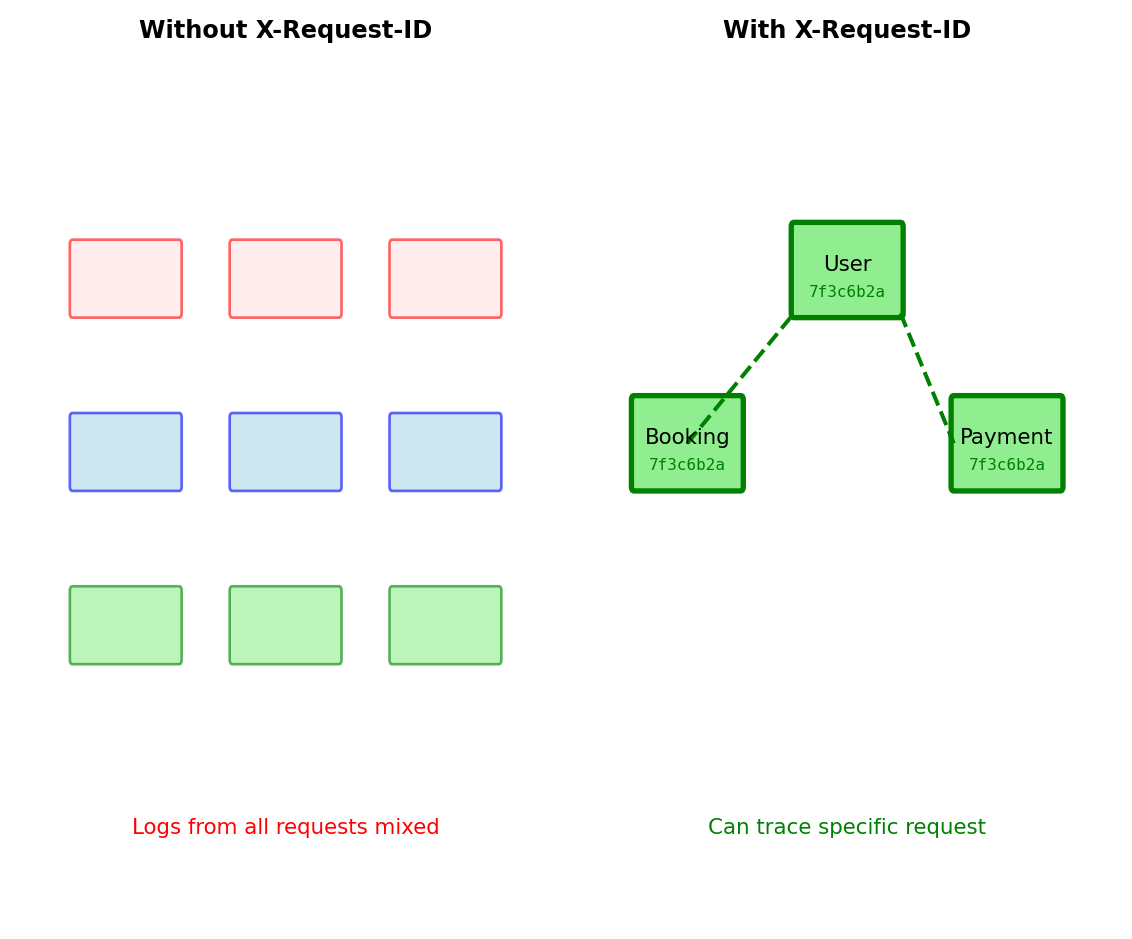
return responseTracing requests across multiple services requires unique identifiers
Three services generating thousands of log entries:
# Gateway logs (10,000 entries)
[14:23:01.123] Processing request
[14:23:01.134] Processing request
[14:23:01.145] Processing request
# User Service logs (5,000 entries)
[14:23:01.234] Database query
[14:23:01.245] Database query
[14:23:01.256] Database query failed
# Payment Service logs (8,000 entries)
[14:23:01.345] Processing payment
[14:23:01.356] Processing paymentWithout correlation: Cannot identify which entries belong to same request
With correlation ID: Thread unique identifier through all services
# Generate at API entry point
@app.before_request
def assign_request_id():
request_id = request.headers.get('X-Request-ID', str(uuid.uuid4()))
g.request_id = request_id
# Forward to downstream services
headers = {
'X-Request-ID': g.request_id,
'Authorization': get_token()
}
response = requests.post(user_service_url, headers=headers)
# Include in every log message
logger.info(f"[{g.request_id}] User {user_id} query failed")Structured logging: JSON format, not text strings
# Bad: Text logs hard to parse
logger.info(f"User {user_id} made prediction, took {duration}ms")
# Good: Structured JSON logs
logger.info(json.dumps({
"timestamp": "2024-01-15T10:30:45Z",
"level": "INFO",
"request_id": "550e8400-e29b-41d4-a716-446655440000",
"user_id": 123,
"endpoint": "POST /predict",
"duration_ms": 247,
"status_code": 200
}))Why JSON:
jqWhat to log:
request_id - Correlation across servicesuser_id - Which user affectedendpoint - What operationduration_ms - How long it tookstatus_code - Success or failureerror_message - What went wrong (if failed)What NOT to log:
API Gateway sits between clients and backend services
Why gateway: Implement cross-cutting concerns once, not in every service
Six core functions:
1. Authentication/Authorization
2. Rate Limiting
3. Request Routing
4. Response Caching
5. Monitoring/Analytics
6. CORS Headers

Without gateway:
With gateway:
AWS API Gateway - Managed service, no servers to run
Endpoint structure:
https://{api-id}.execute-api.{region}.amazonaws.com/{stage}/{resource}
https://abc123.execute-api.us-east-1.amazonaws.com/prod/predict
↑ ↑ ↑ ↑
API ID Region Stage Resource
Configuration components:
Resources - URL paths
/users/predict/models/{id}Methods - HTTP operations per resource
Integration - Backend target
Stages - Environment separation
prod - Production trafficstaging - Pre-production testingdev - Development environmentEach stage has independent configuration

Usage plans - Rate limits per API key:
Pricing:
Complete request flow through AWS API Gateway
1. Client makes request
2. API Gateway validates API key
3. API Gateway checks usage plan quota
4. API Gateway routes to backend
5. Backend processes request
6. API Gateway logs to CloudWatch