Cloud Patterns: Storage, Serverless, and Coordination
EE 547 - Unit 7
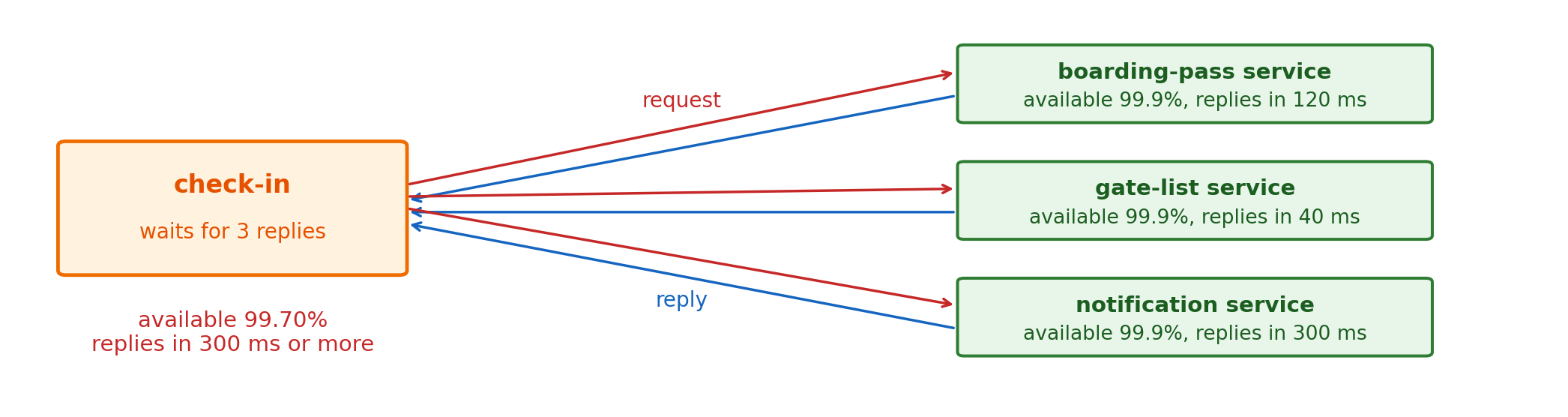
Intermediaries Let Senders Continue Without Waiting for Receivers

Asynchronous: the sender hands the message to an intermediary and does not wait for the receiver
- Check-in waits only for the intermediary to accept the message
- The boarding-pass service takes the message when it runs
- Decoupled in time: sender and receiver need not run at the same moment
- Check-in now depends on the intermediary, so the intermediary must be more available than the services it separates
Managed Services Move Infrastructure Operation to the Provider
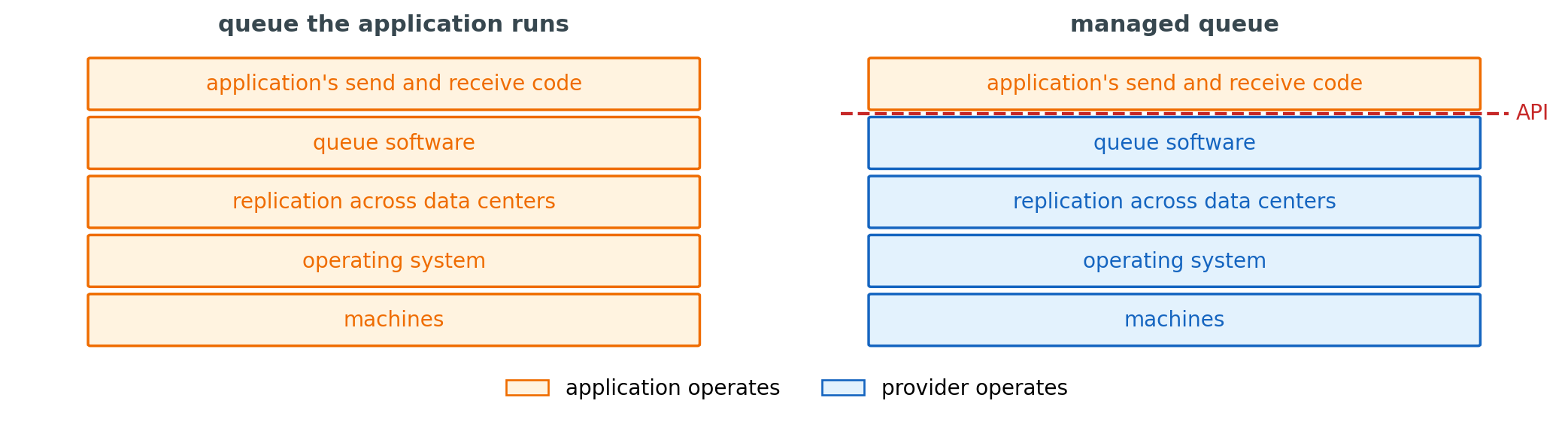
Managed service: infrastructure the provider operates and the application uses through API calls
- The provider runs the machines, replicates across data centers, replaces failures, and adds capacity
- The application creates a resource with a configuration, calls it with credentials, and pays per use
- Storage, queues, topics, functions, and gateways are each offered this way
Queues Reach One Receiver, Topics Reach Every Subscriber
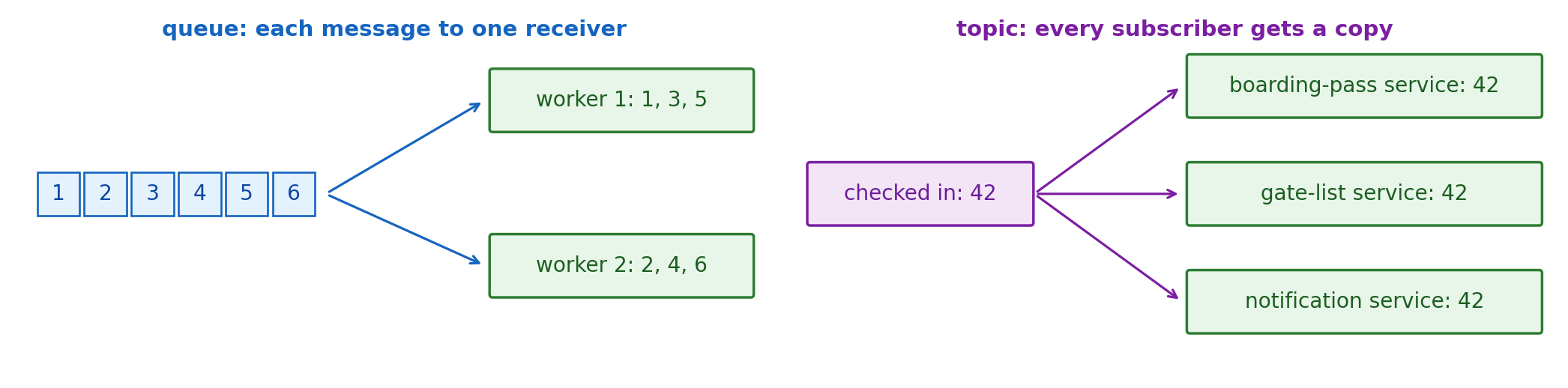
Point-to-point: a queue
- Each message goes to one receiver
- Several workers of one service divide the messages
- Fits work done once: generate one boarding pass
Publish-subscribe: a topic
- Each subscriber gets its own copy of every event
- A new subscriber needs no change to the publisher
- Fits a fact several services act on: a passenger checked in
Managed Services Produce, Carry, and Process Events
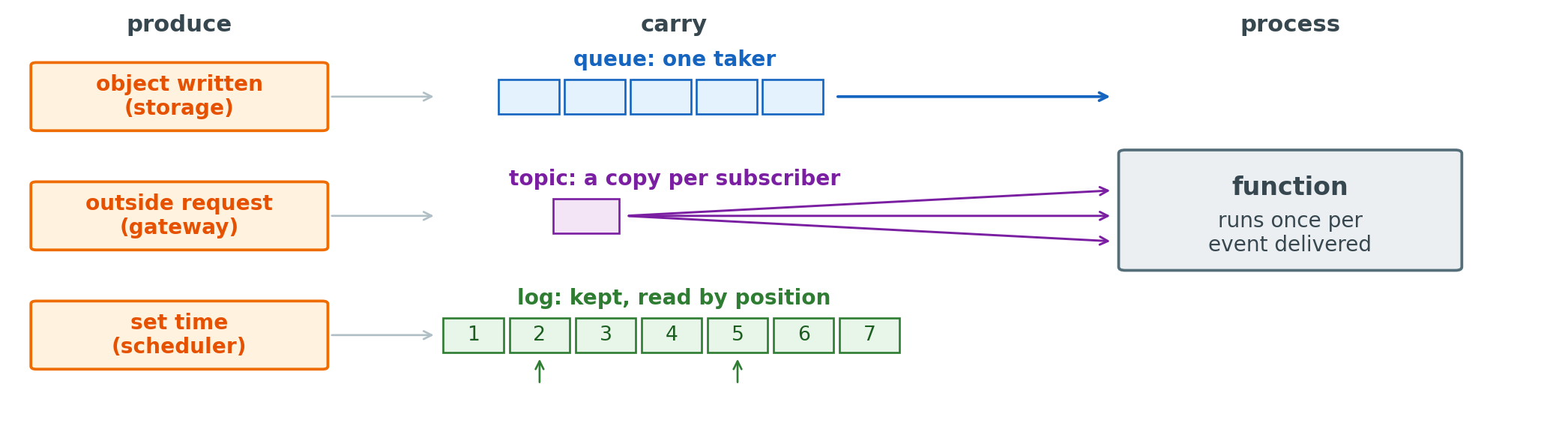
Produce: S3 when an object is written, API Gateway when a request arrives, EventBridge Scheduler at a set time
Carry: SQS queues, SNS topics, Kinesis Data Streams logs
Process: Lambda runs a function for each delivered event or batch, with nothing running or billed between events
Run by the provider: machines, failures, and capacity, so each service is configured and called, not operated
Services Show Old State Until They Process the Event
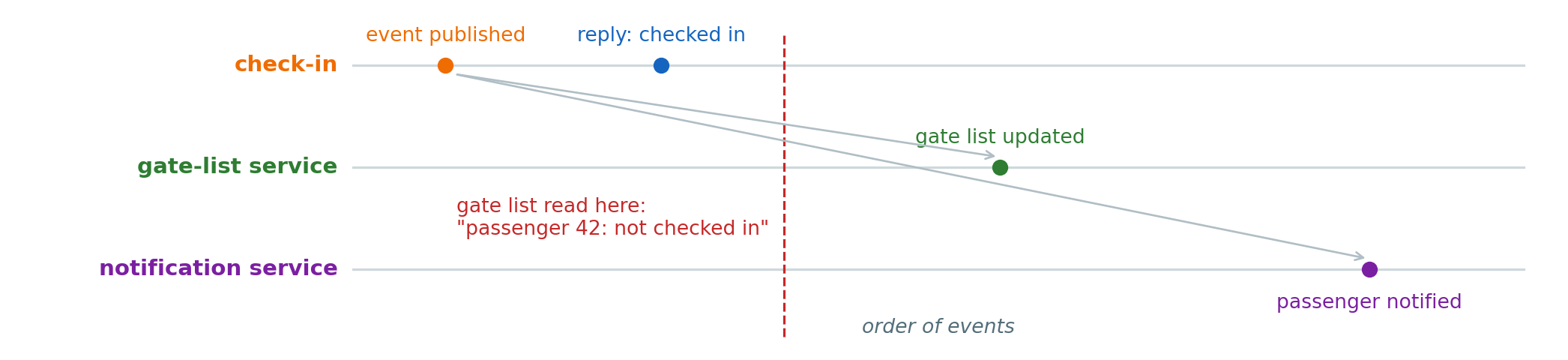
After the reply: each service shows the check-in only once it has processed the event
- A page that reads the gate list right after check-in shows “not checked in”
- The passenger already holds a confirmation
- Eventually consistent: the services agree once every event is processed, and disagree until then
- It matters only where something reads a service’s state: a queued confirmation email has no reader to see it late
One Request Spreads Across Several Managed Services
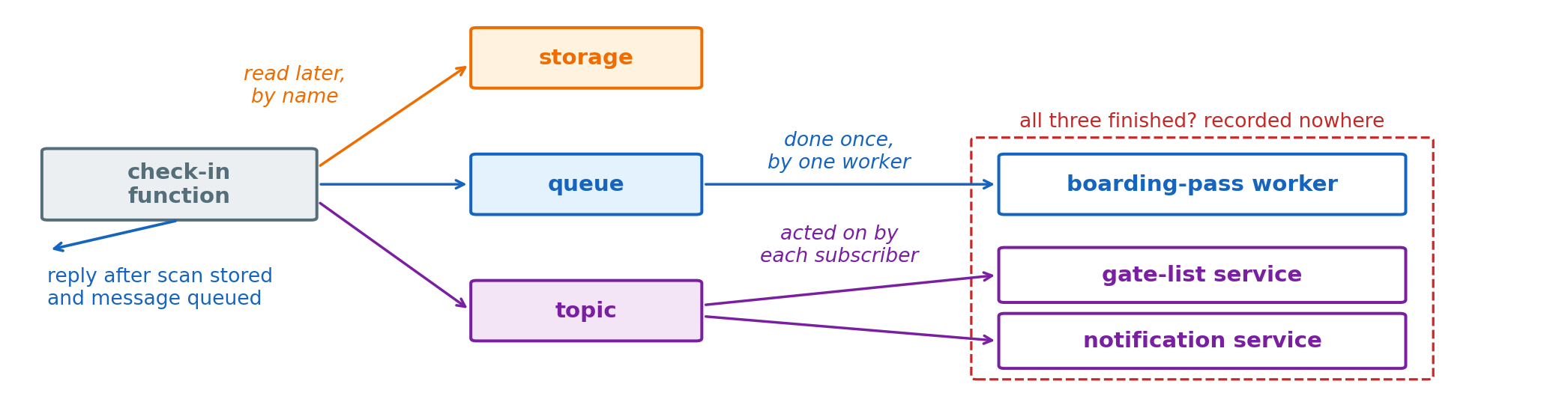
Check-in, one request
- The passport scan in storage, because other services read it later by name
- The boarding pass as a queued message, because one worker makes it once
- “Checked in” on a topic, because several services act on it
After the reply
- The scan is stored and the message is queued, and the pass may not exist yet
- No service records whether all three finished
File Systems Turn File Names Into Disk Blocks
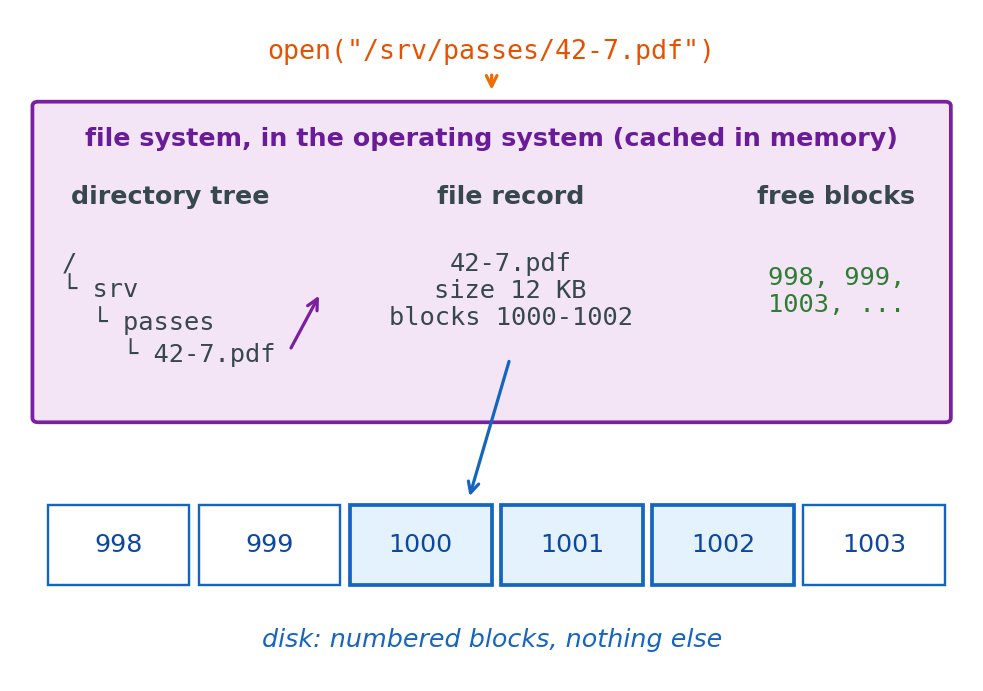
Disk: numbered blocks of a fixed size, read and written by number
File system: the software in the operating system that gives blocks names
- Directory tree: which names exist, and where
- File record: a file’s size and its block numbers
- Free-block list: which blocks are unused
Opening a file: a lookup in the tree, then the record, then the blocks
Cache: the tree, records, and free list are kept in memory, so most lookups never reach the disk
Block Volumes Give an Instance a Disk, Not a File System
Block volume: a disk reached over the network (EBS)
- Stores and returns numbered blocks
- Outlives the instance and attaches to a replacement
- Instance store, by contrast, is a disk in the host machine: fast, and lost when the instance stops or terminates
File system on the instance
- The instance’s operating system formats and mounts the volume
- The tree, records, and free list live in that instance’s memory
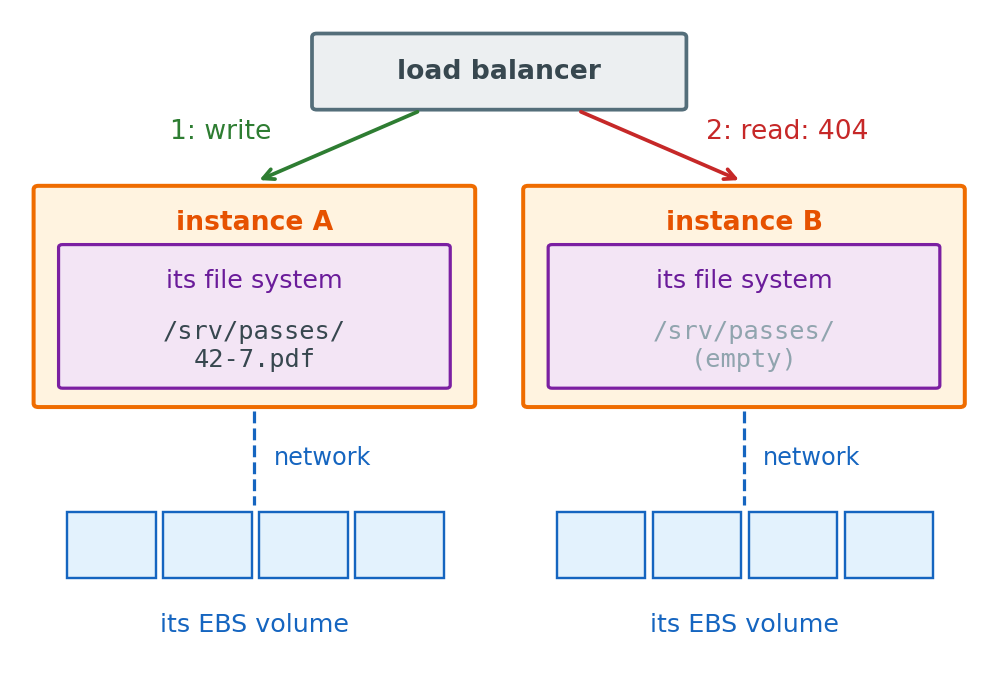
Files belong to the instance that mounts the volume
- Check-in on instance A writes
/srv/passes/42-7.pdf - Behind a load balancer, the next request can land on B, where the file does not exist
Shared Block Volumes Corrupt Ordinary File Systems
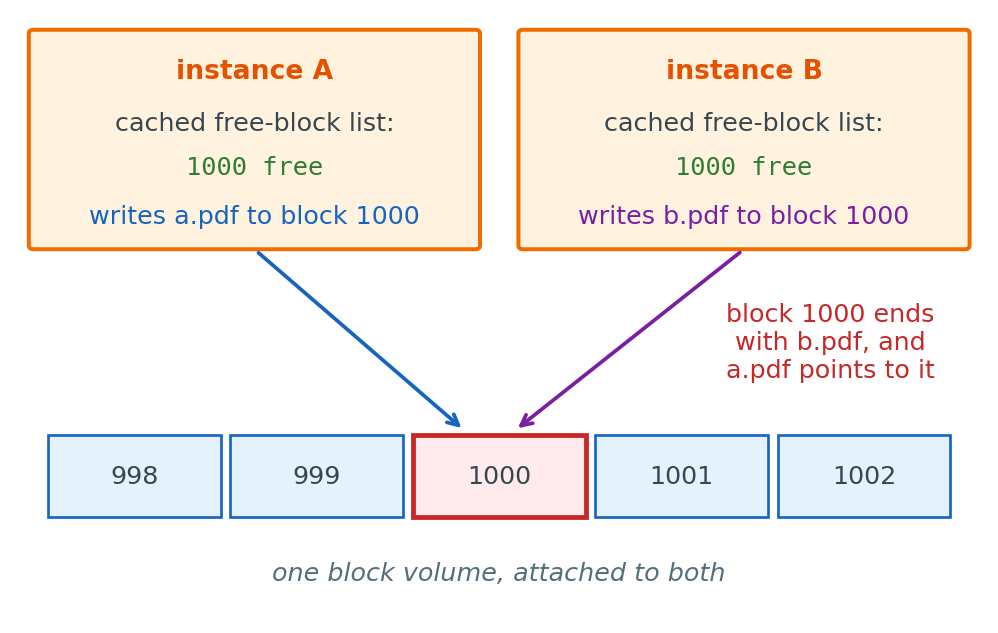
Two instances, one volume
- Each instance runs its own file system on the same blocks
- Each caches its own free-block list in its own memory
- Both find block 1000 free, and one file’s bytes overwrite the other’s
Ordinary file systems (ext4, XFS) assume one machine manages the volume
Network File Systems Serve Files From a Remote Server
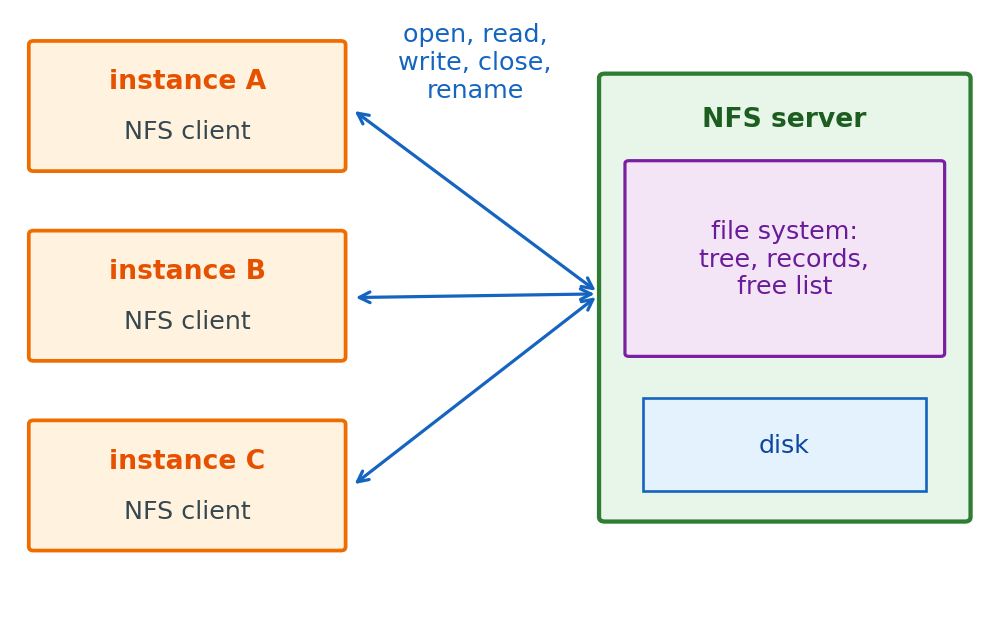
Network file system: the file system runs on a server, and the instances send it their file operations
- NFS is the standard protocol, built into Linux
- One directory tree, one set of records, one free list, on the server
- Every instance sees the same files at the same paths
Mounted like a disk
sudo mount -t nfs4 server:/ /srv/sharedopen("/srv/shared/passes/42-7.pdf")is unchanged- The operating system turns it into an NFS request
Amazon EFS Serves One File System Through a Mount Target in Each Zone
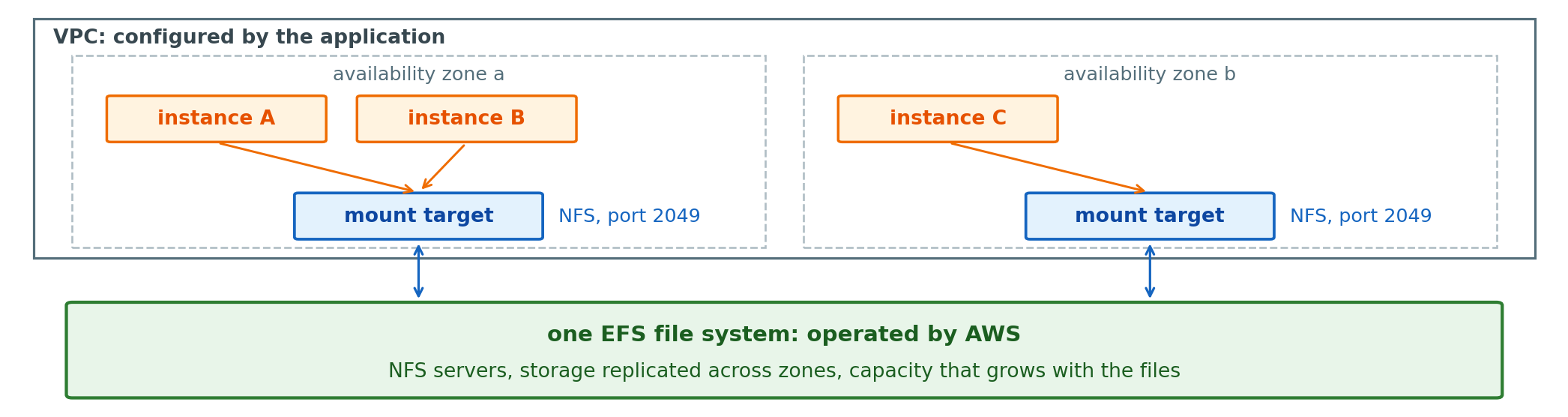
AWS runs
- The NFS servers and their failures
- Storage replicated across availability zones
- Capacity and throughput as files and requests grow
The application sets
- A file system, one per shared directory tree
- A mount target in each zone’s subnet, with a security group that admits port 2049
- The mount on each instance, to the target in its own zone
Small-File Workloads Run Slowly on NFS
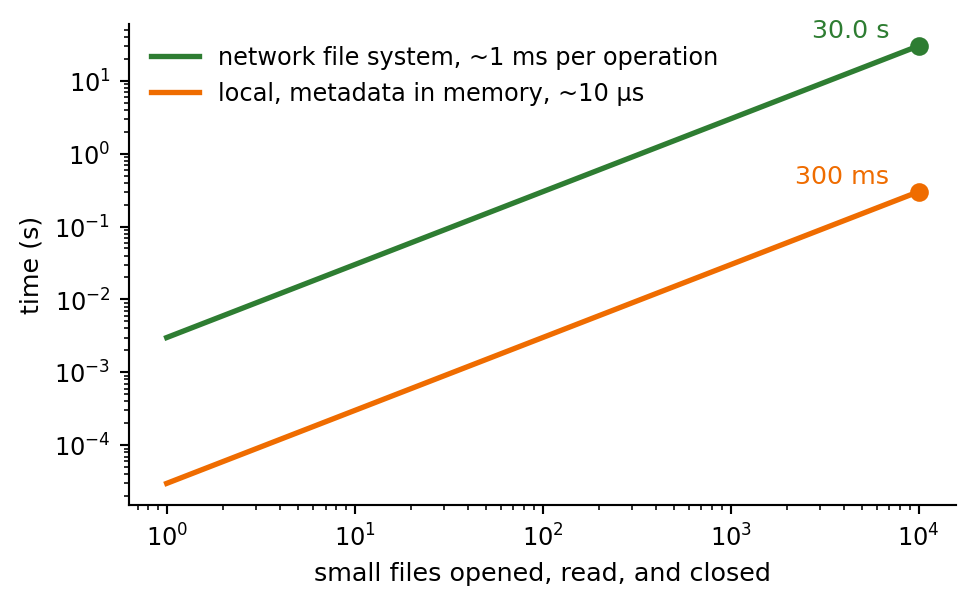
Round trip per operation: open, close, list, and every read or write not served from the client’s cache
- About 1 ms or more each on EFS, against microseconds for a local file system with its metadata in memory
- 10,000 small files: three operations each, about 30 s
Large files
- One open, then reads of large blocks streamed in sequence
- Throughput, not round trips, sets the time
Workloads it serves poorly
- Many small files: build trees, package installs, one file per record
- Many small writes that must each reach the server: a database’s data files
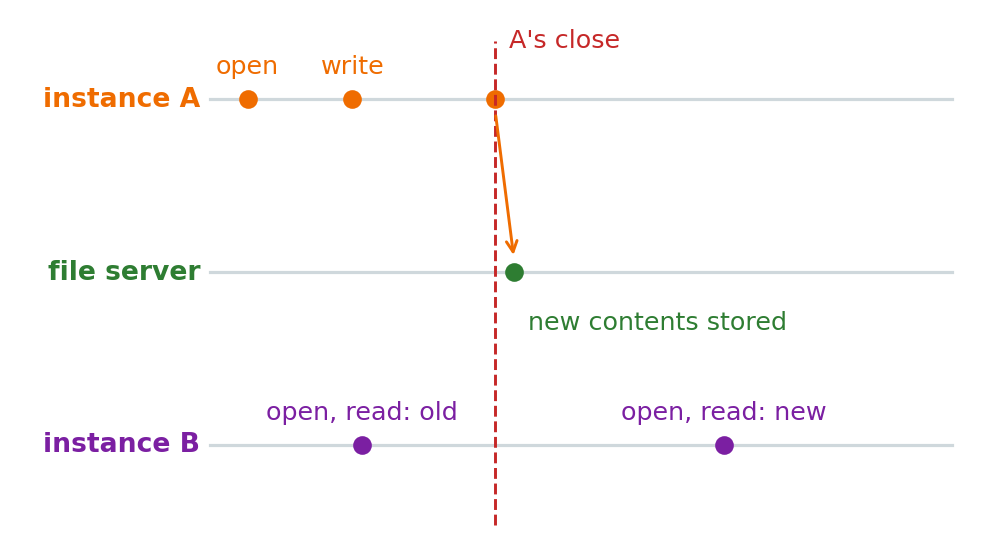
NFS Changes Become Visible When the Writer Closes the File
Close-to-open consistency: the NFS guarantee
- Instance A’s writes reach the server by the time A closes the file
- Instance B sees them in any open that starts after that close
- B, with the file already open, can keep reading its cached older bytes
Locks
- Advisory: they work between programs that ask for them
- Two writers that both lock the file take turns, and a writer that does not lock is not stopped
In practice: write, close, then open on another instance, and locks where two instances write the same file
Block Volumes and Network File Systems Mount Side by Side
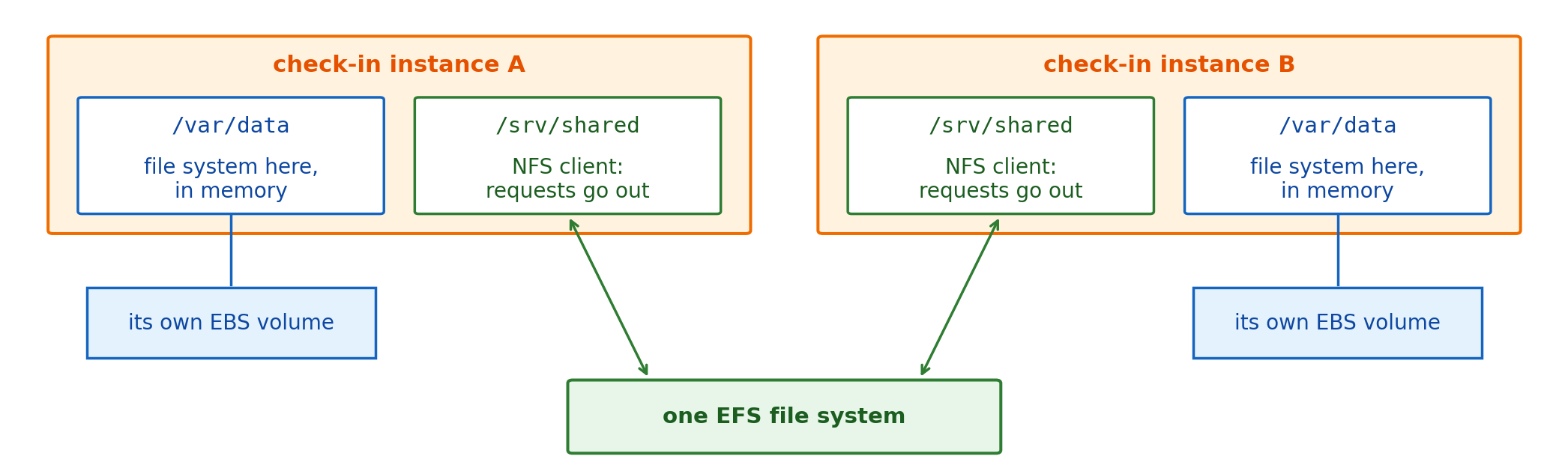
/var/data on EBS
- Seen by one instance, at local speed
- Billed for the volume’s size
- A database’s data directory, an instance’s own scratch files
/srv/shared on EFS
- Seen by every instance that mounts it, one round trip per operation
- Billed for the files stored
- Boarding-pass templates and generated passes, read on any instance
Both: paths, rename, append, in-place writes, and locks, reached by a mount from inside one network
Object Storage Replaces File Operations With Whole-Object Requests
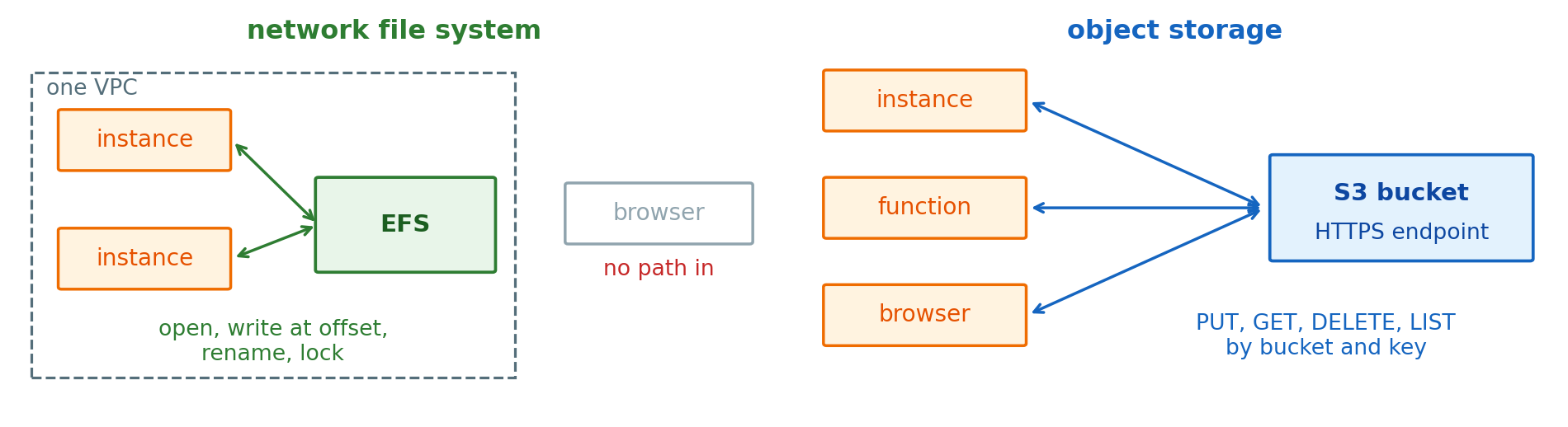
Object: bytes and metadata stored under a key in a bucket
- Written whole by one PUT, replaced whole by the next
- Read whole or by byte range with GET
- No open, append, rename in place, or lock
What the trade gives
- No file system state shared between clients: no tree, no free-block list
- Any client with credentials reaches it over HTTPS, inside AWS or not
- Stored in several availability zones, with no size set in advance
Conditional Writes Stop Two Writers From Replacing Each Other’s Object
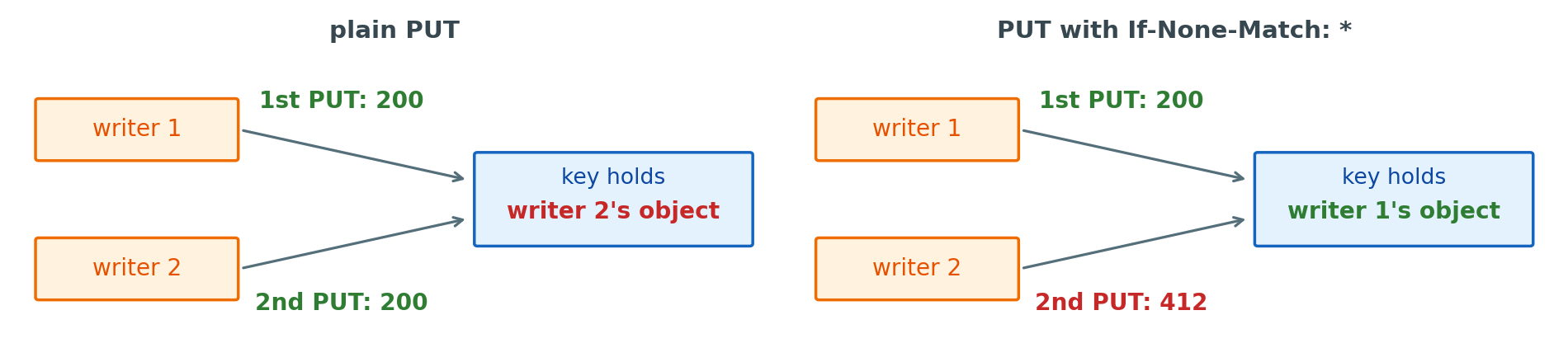
Two writers, one key
- A GET or LIST after a PUT returns the new object
- Two plain PUTs both succeed, and the last one received replaces the first, with neither writer told
Conditional write: the PUT states what must be true at the key
s3.put_object(Bucket="airline-passes",
    Key="flights/7/2026-10-27/42.pdf",
Body=pdf, IfNoneMatch="*")IfMatch=<ETag>replaces the object only if it is still the version read
Designing Object Keys Around the Most Frequent Listing
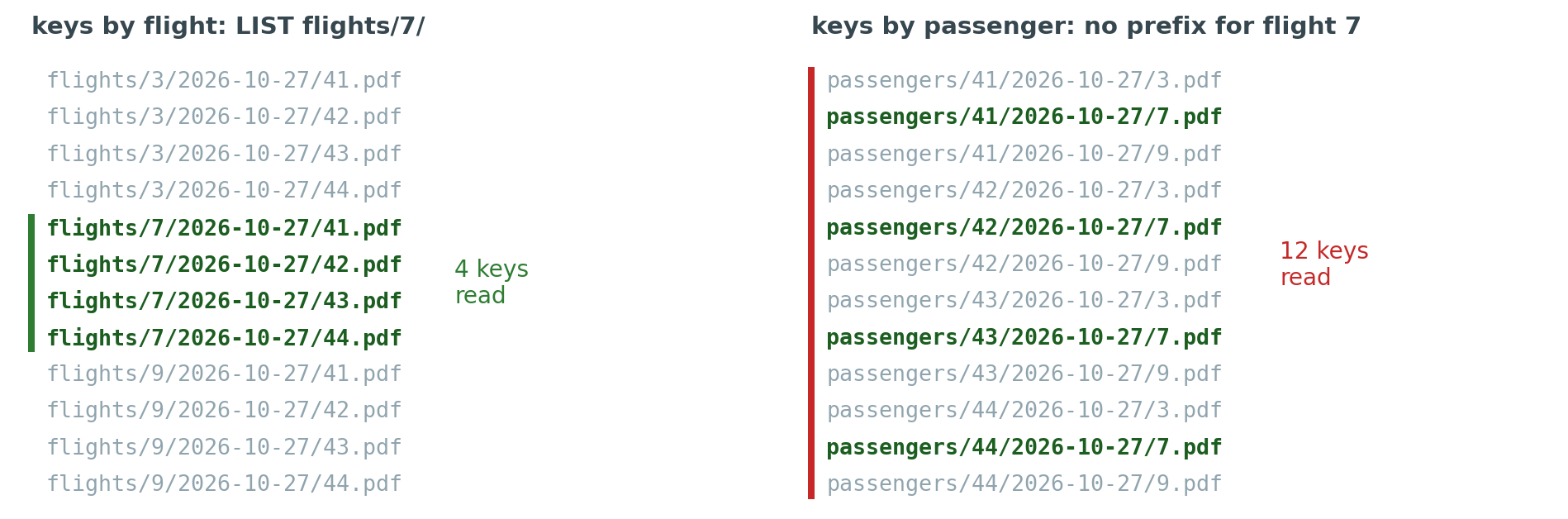
Sorted keys, listed by prefix
- S3 keeps keys in sorted order and returns a prefix’s keys together, 1,000 per request
- Keys that share their leading part are listed in one run
- Any other grouping is spread across the bucket
The key is the only index
- The same rule as a partition key: designed for the most frequent query
- At 1,080,000 passes, listing one flight reads 180 keys by flight and every key by passenger
Multipart Uploads Split Large Objects Into Independent Parts
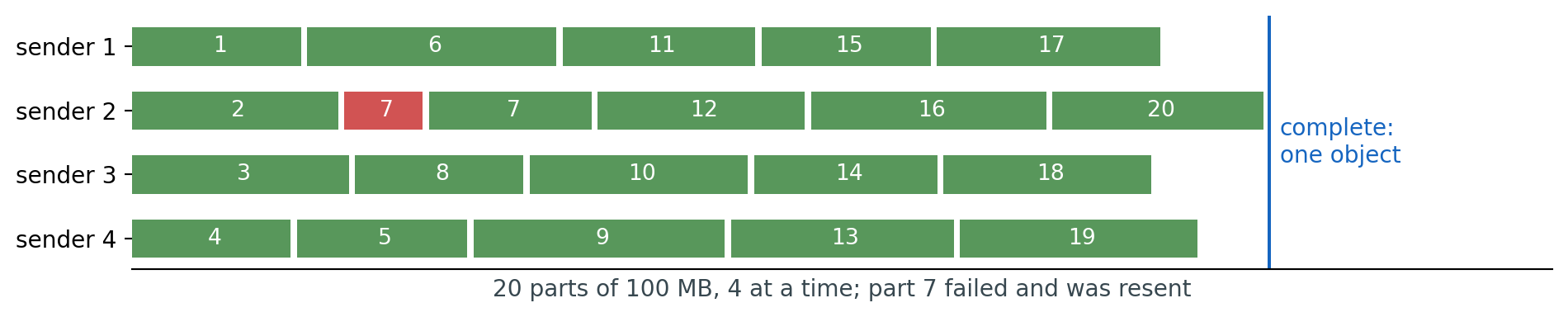
Multipart upload: start, send numbered parts, complete
- Parts of 5 MB to 5 GB, up to 10,000
- The key shows nothing until the upload is completed
- Parts go in parallel, and a failed part is resent alone
Also from independence
- Parts sent as they are produced, before the total size is known
- A restarted uploader lists the stored parts and sends only the missing ones
- Required above 5 GB, the single-PUT limit
Cost: parts of an unfinished upload are billed until it is aborted
Presigned URLs Grant Time-Limited Access to One Object

Presigned URL: a request signed in advance, locally, with the application’s credentials
url = s3.generate_presigned_url(
    "put_object",
    Params={"Bucket": "airline-scans",
            "Key": "scans/42/passport.jpg"},
    ExpiresIn=300)
The signature binds
- The method, the bucket, and the key
- The expiry, and the credentials that signed it
Upload and download
- PUT: the passport scan goes from the browser to S3, not through the API
- GET: the boarding-pass PDF is linked with a URL that expires in minutes, from a private bucket
S3 Notifies Other Services When Objects Change

Event notification: S3 publishes an event when an object is created, overwritten, copied, deleted, or restored
- Filtered by key prefix and suffix:
scans/,.jpg - Sent to a queue, a topic, a function, or EventBridge
- Carries the bucket, key, size, and ETag, not the bytes
Delivery
- Asynchronous, usually within seconds, sometimes a minute or more
- At least once: the same event can arrive twice
- The passport check records the key and ETag it processed, so a repeat changes nothing
- What runs the passport check, an instance or a function, is a separate choice
Slow Work Holds Up the Reply
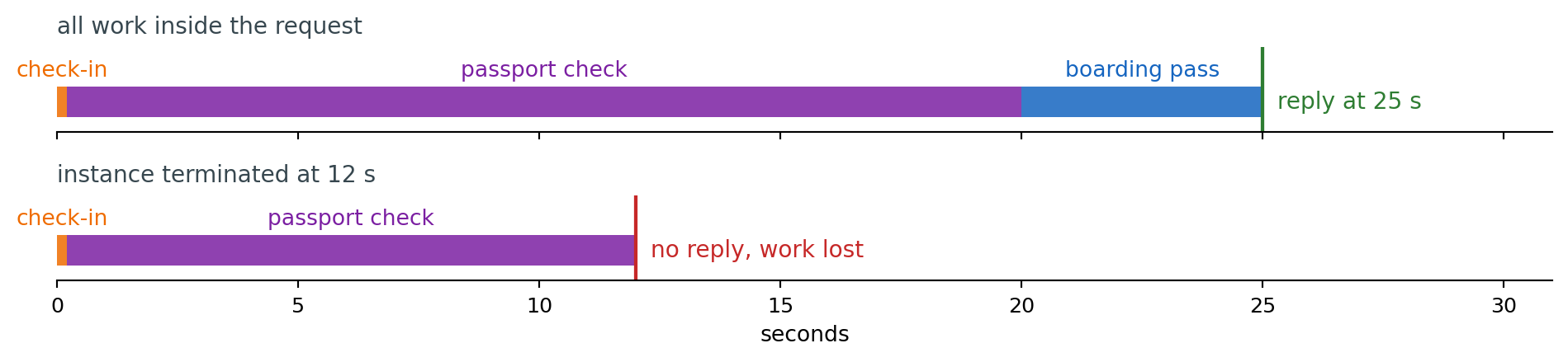
Work the passenger does not need before the reply
- Passport check: seconds to minutes, waiting on an outside document service
- Boarding-pass generation: after the check passes
- Confirmation email, gate-list update
Run inside the request
- The reply waits for the slowest step
- Instance terminated or restarted mid-request: no reply, and the work is lost with no record of where it stopped
Message Queues Pass Work From Producers to Consumers in Arrival Order
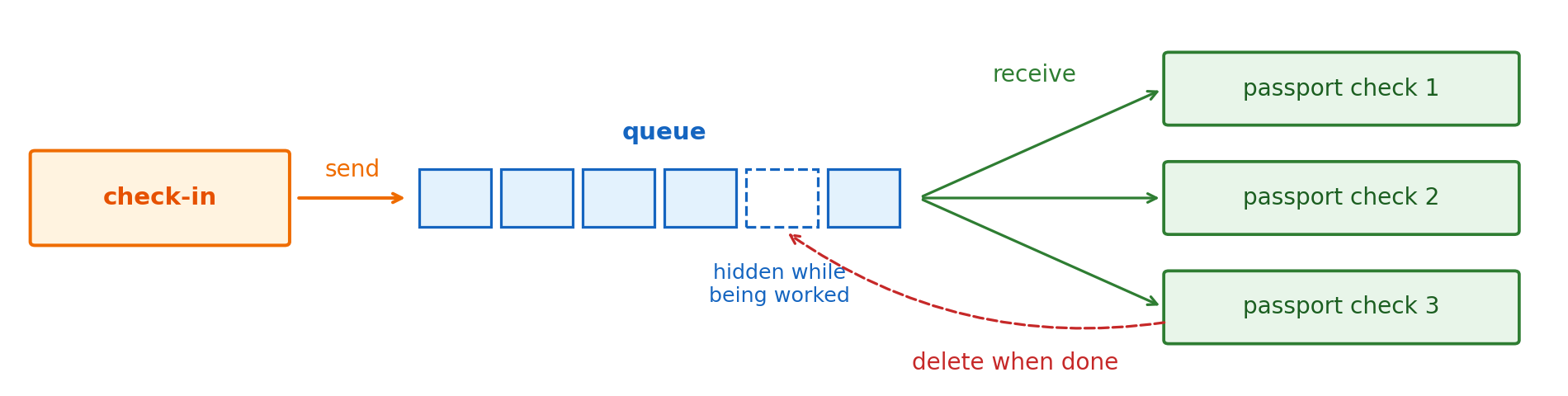
Message queue: a service that stores messages from producers until consumers finish them
- Send: the producer adds a message at the back and continues
- Receive: a consumer takes the oldest message, hidden from other consumers while it works
- Delete: the consumer removes it once the work is done
The job table’s properties, without the table
- Producer and consumer never address each other
- A message whose consumer dies becomes visible again
- Consumers are added or removed without changing the producer
SQS Keeps Each Message Until a Consumer Deletes It
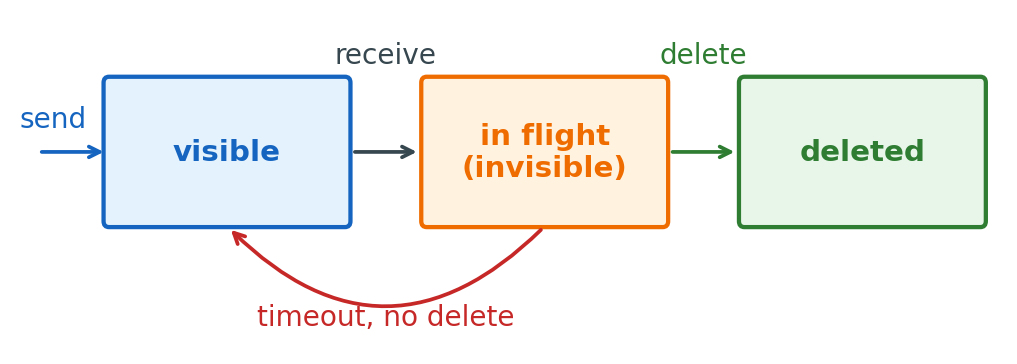
Message: up to 1 MiB of text, kept for 4 days by default and up to 14
- A larger payload is stored in S3, and the message carries its key
- The S3 event for a passport scan is already such a message: bucket and key, not the image
Three calls
sqs.send_message(QueueUrl=q,
    MessageBody=json.dumps(event))

r = sqs.receive_message(QueueUrl=q,
    MaxNumberOfMessages=10)
for m in r.get("Messages", []):
    check_passport(m["Body"])
    sqs.delete_message(QueueUrl=q,
ReceiptHandle=m["ReceiptHandle"])- Receive hands out a message and hides it
- Delete is the consumer’s statement that the work is done
- A consumer that stops between the two leaves the message in the queue
Unfinished Messages Return to the Queue After a Timeout
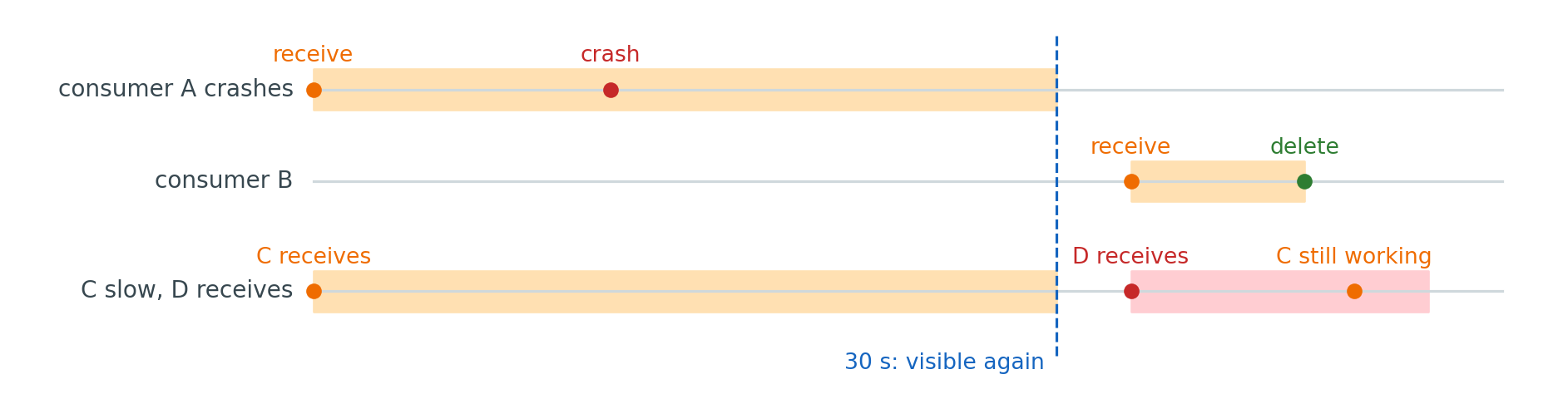
Visibility timeout: how long a received message stays hidden, 30 s by default
- Consumer crashes: the message returns after the timeout, and another consumer finishes it
- The timeout is the longest a failure delays the work
Shorter than the work
- The message reappears while the first consumer is still running
- Two consumers process it at once
- A consumer with long work extends the timeout as it goes, up to 12 hours from the first receive
De-duplicating Messages Keeps Redelivery From Repeating Work
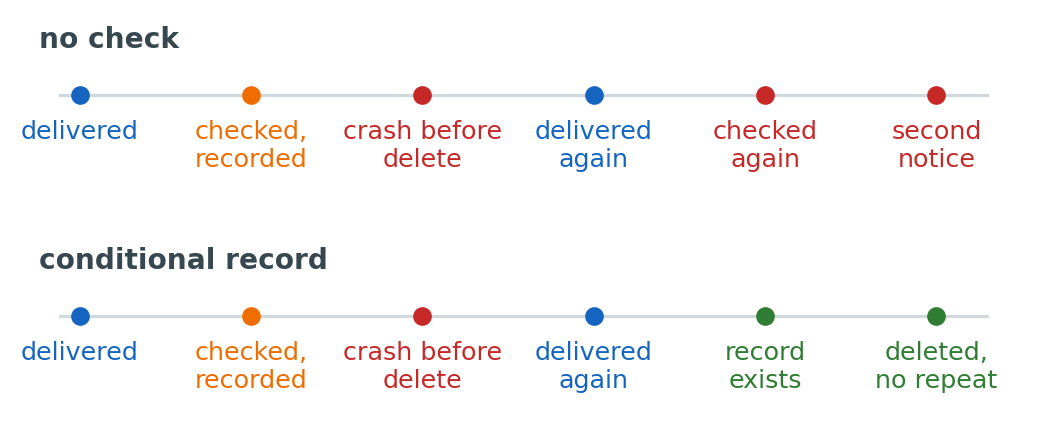
At-least-once delivery: every message is delivered, some more than once
- A crash between the work and the delete is enough
- So is a timeout shorter than the work
Idempotent consumer: the second delivery has no further effect
result = check_passport(scan)   # no side effects
table.put_item(
    Item={"pk": f"{key}#{etag}",
          "result": result},
    ConditionExpression=
"attribute_not_exists(pk)")- The result and the message’s identity, the scan’s key and ETag, are written together, once
- A failed condition means done already: delete the message and stop
- A crash before the write leaves nothing recorded, so the redelivery does the check again
Failed Messages Move to a Dead-Letter Queue

Poison message: one that fails on every attempt, such as a scan that is not an image
- Without a limit it is received, fails, and returns for as long as it is kept
- Each attempt costs a receive and the work done before the failure
- A delay queue holds a resent message for up to 15 minutes before it is visible, so a retry is spaced out
Redrive policy: a receive count after which SQS moves the message to a second queue
- Kept there with its body and attributes, for inspection
- Sent back to the main queue once the consumer is fixed
- A dead-letter queue that is filling up is the signal that consumers are failing
Slow Consumers Build a Backlog
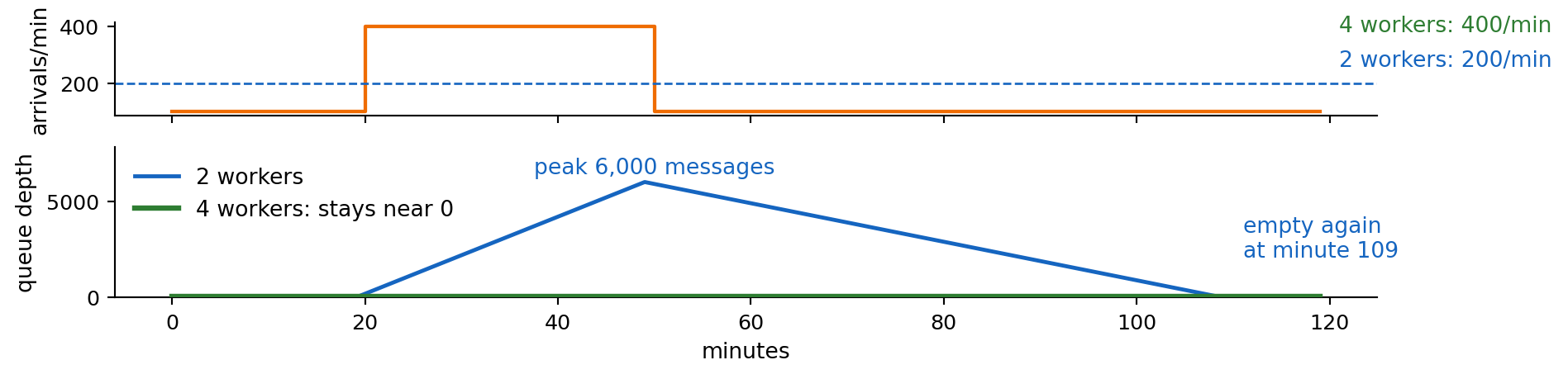
Backlog: grows at arrivals minus the processing rate, drains at the processing rate minus arrivals
- Wave of 400/min for 30 min against 200/min: a backlog of 6,000 messages
- Drained at 100/min afterward: another hour before the queue is empty
Competing consumers: workers on one queue take different messages
- Four workers finish 400/min, and no backlog builds
- Check-in sends at the same rate either way
- The oldest message’s age is the passenger’s delay
Consumers Poll the Queue for Messages

Short poll: a receive returns at once, empty if nothing is visible, and every request is billed
Long poll: a receive waits up to 20 s for a message
r = sqs.receive_message(QueueUrl=q,
    MaxNumberOfMessages=10,
WaitTimeSeconds=20)- Returns as soon as a message arrives
- Up to 10 messages per receive
The worker loop: receive, process, delete, repeat
- Runs on an instance or a container, whether or not messages arrive
- Polling, scaling the number of workers, and restarting a crashed worker are the application’s
Functions: code that runs only when a message arrives, with the platform doing the polling
Queues Do Not Solve Event Notification
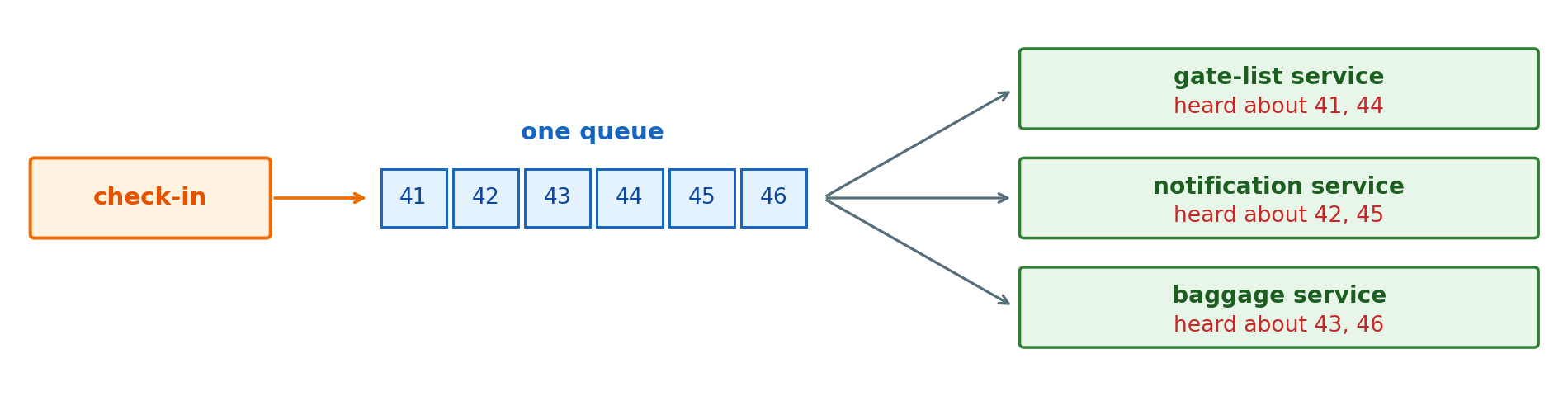
One fact, several services: “passenger 42 checked in” matters to the gate list, the notification service, and baggage
- One queue gives each message to one consumer
- Three services on one queue each see a third of the check-ins
A queue per service
- Check-in sends three messages, one to each queue
- A fourth service means a change to check-in
- Check-in, the producer, holds the list of everyone who cares
A Topic Sends Each Event to Every Subscriber
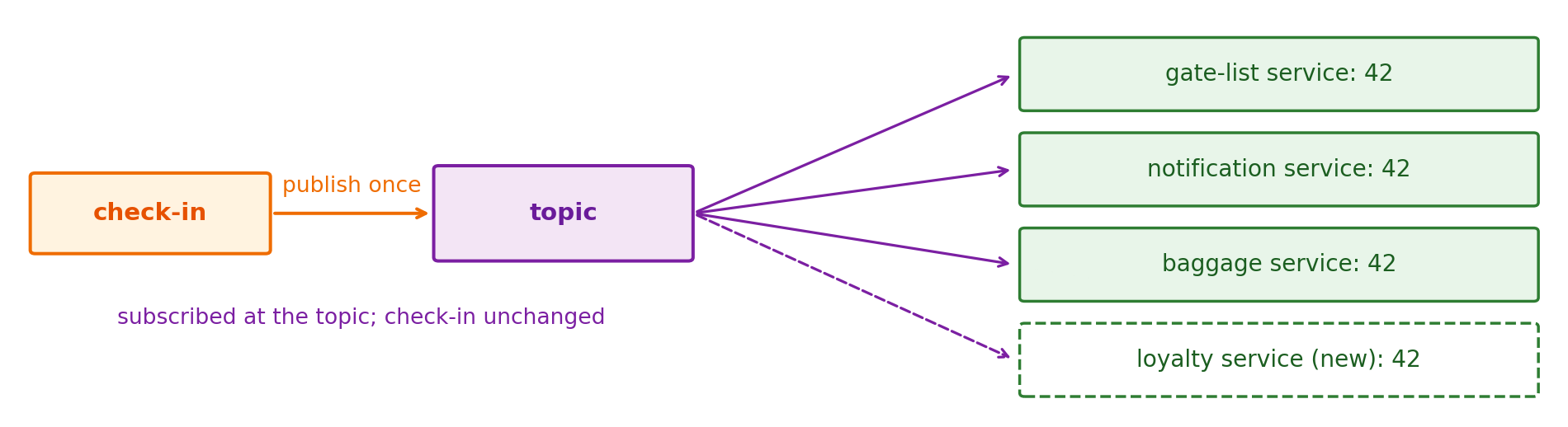
Publish-subscribe
- Publisher: sends an event to a topic, and knows nothing about who receives it
- Subscription: a link from the topic to one receiver
- Every subscription receives every event published after it is created
Compared with a queue
- Queue: each message to one of its consumers, for work done once
- Topic: each event to all of its subscribers, for a fact several services act on
- A new subscriber changes the topic’s subscriptions, not the publisher
A Queue per Subscriber Keeps Its Events Until That Service Is Ready
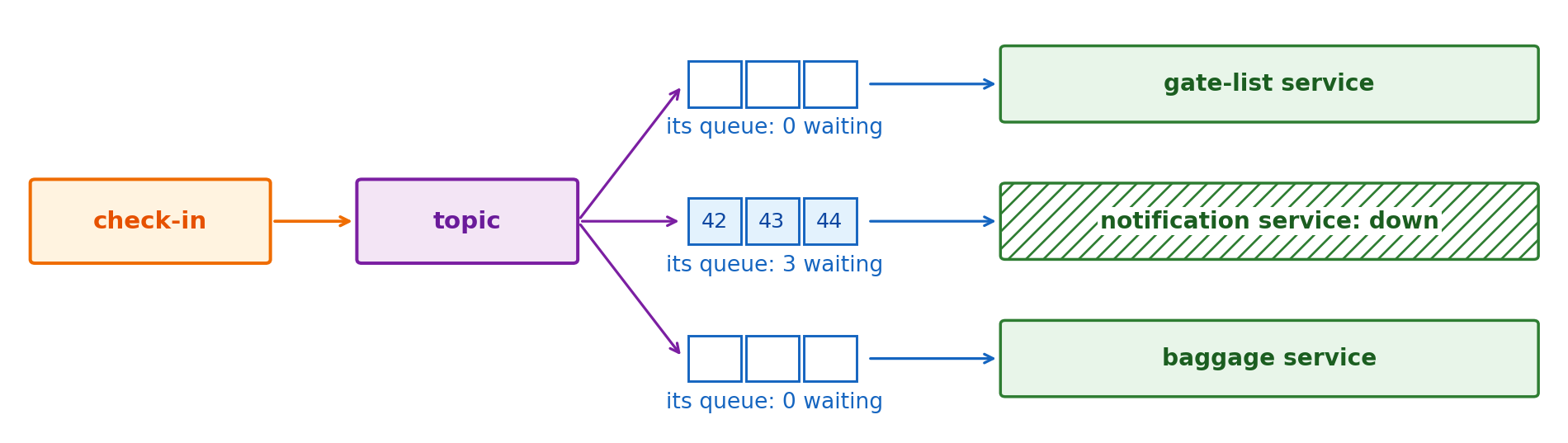
Topic to queues: each subscriber’s subscription is its own SQS queue
- The topic copies each event into every queue
- Each service receives from its queue at its own rate
- A service that is down finds its events waiting when it returns
What each queue adds
- The queue mechanics per subscriber: visibility timeout, redelivery, dead-letter queue
- A slow service builds a backlog in its own queue, not anyone else’s
- Delivery is at least once and unordered, as with a standard queue, so each service de-duplicates
Subscribers Only Receive Events Published After They Join

A topic keeps nothing once delivered
- A fraud check added today starts with the next event
- A subscriber that processed events wrongly cannot read them again after the fix
When a delivery to a subscriber fails
- Retried for a limited time: up to 23 days for queues and functions, a few attempts for HTTPS by default
- Then dropped, or sent to a dead-letter queue
Uses that need past events
- A new service built from past events
- Reprocessing after a bug
- A report over the last week, read in order
- FIFO topics can archive events for replay, standard topics cannot
Logs Retain Ordered Events for Replay
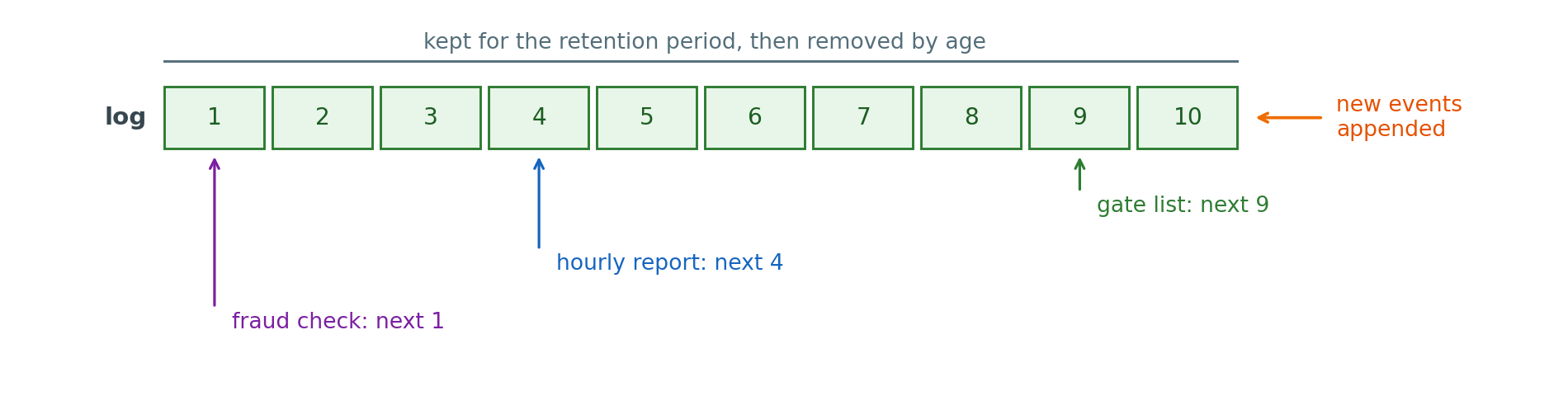
Log: events appended in order and kept for a set period
- Reading an event does not remove it
- Each reader keeps its own position and moves at its own rate
- A reader added later starts at any position still kept
Compared with a queue and a topic
- A queue removes a message once one consumer deletes it
- A topic hands copies to current subscribers and keeps none
- A log keeps every event for the retention period, for any reader
Kinesis Replays Events From Any Starting Time
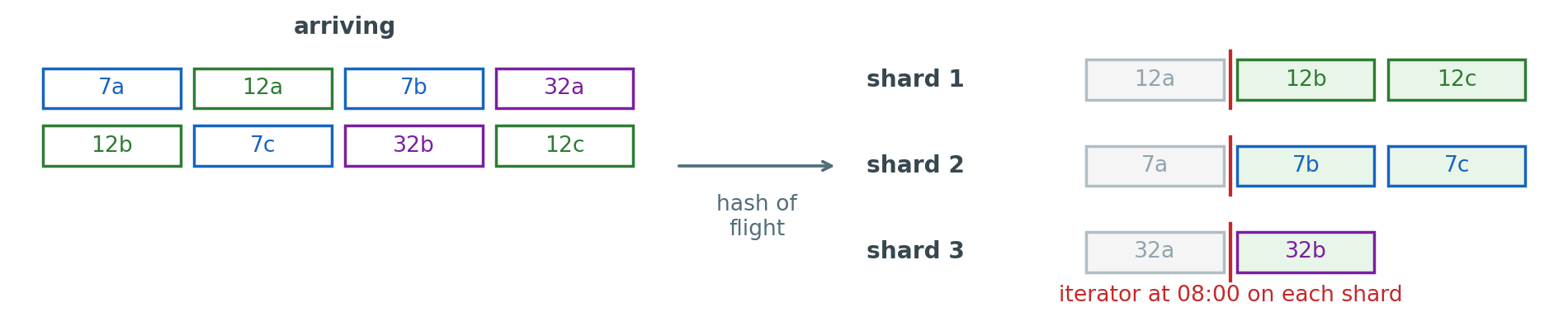
Amazon Kinesis Data Streams: a managed log, split into shards
- Partition key: hashed to pick the shard, Kinesis’s name for a partition
- Each flight’s events land in one shard, in the order written, with no order between shards
- Kept 24 hours by default, up to 365 days
Where a reader starts, per shard
kinesis.get_shard_iterator(
    StreamName="passenger-events",
    ShardId=shard,
    ShardIteratorType="AT_TIMESTAMP",
Timestamp=datetime(2026, 10, 27, 8, 0))- Or at the oldest kept event, a recorded position, or new events only
Instances Run Whether or Not Work Arrives
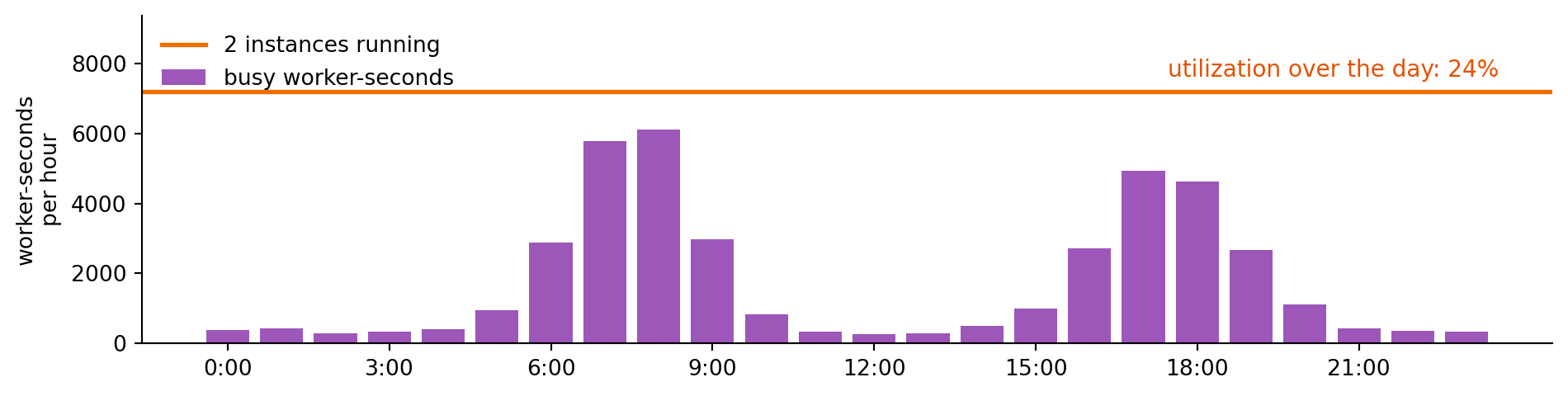
A server sized for the peak
- An API server, a queue worker, a scheduled job: each runs all day on an instance or a container
- Billed for every hour it runs, busy or idle
Also the application’s
- Adding capacity before a wave and removing it after
- Replacing a server that crashes
- Patching the operating system it runs on
A Function Runs Code Only When an Event Arrives
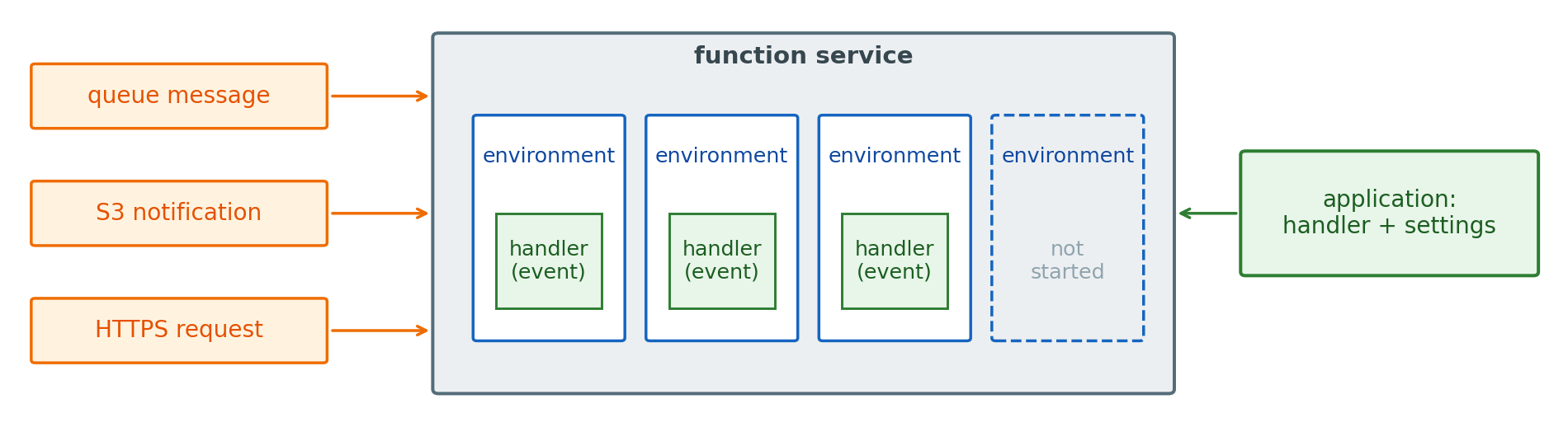
Function service: runs a handler once per event, on environments it starts and stops
- No process waits for work between events
- More events at once: more environments, each running one event
- No events: nothing running, nothing billed
One way to run the same patterns
- Queues, topics, and storage events work the same with any consumer
- Instances or containers that scale with a queue’s depth do the same work, with the scaling and idle hours the application’s
- AWS Lambda is AWS’s function service, and other providers offer their own
A Function Is Code, Settings, and Attached Permissions
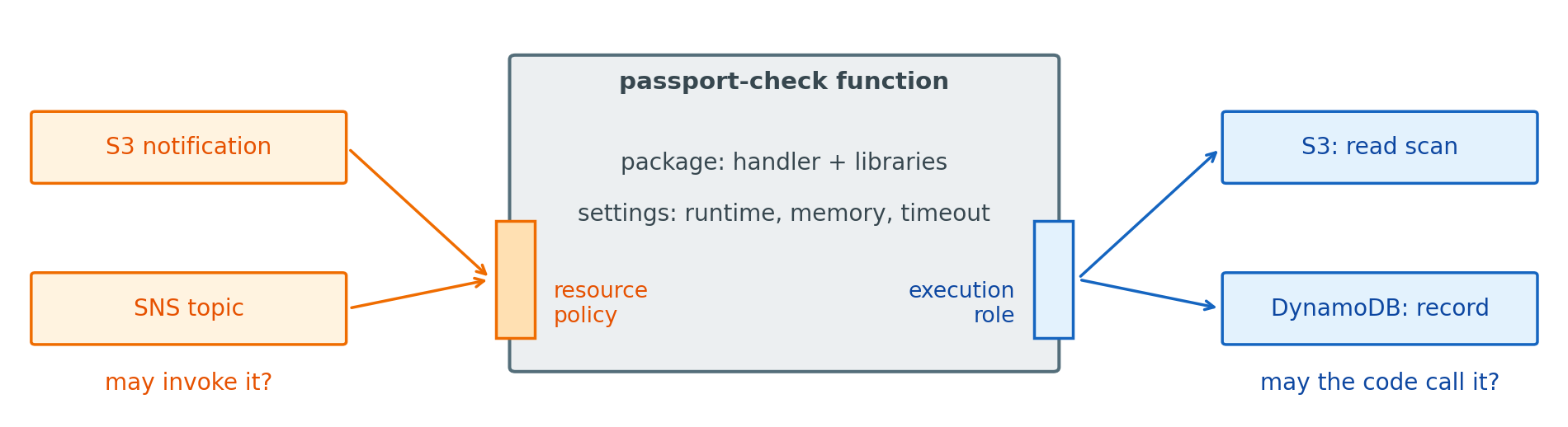
Package: the handler and its libraries
- A zip of up to 250 MB unpacked, shared libraries in layers
- Or a container image of up to 10 GB
- A larger package lengthens every cold start
Attached permissions
- Resource policy: which services and accounts may invoke the function
- Execution role: what the function’s code may call, through temporary credentials Lambda supplies
- An S3 trigger that never runs the function is usually a missing resource policy, a function that fails on
GetObjecta missing role permission
Large Libraries and Models Need a Container Image or Separate Storage
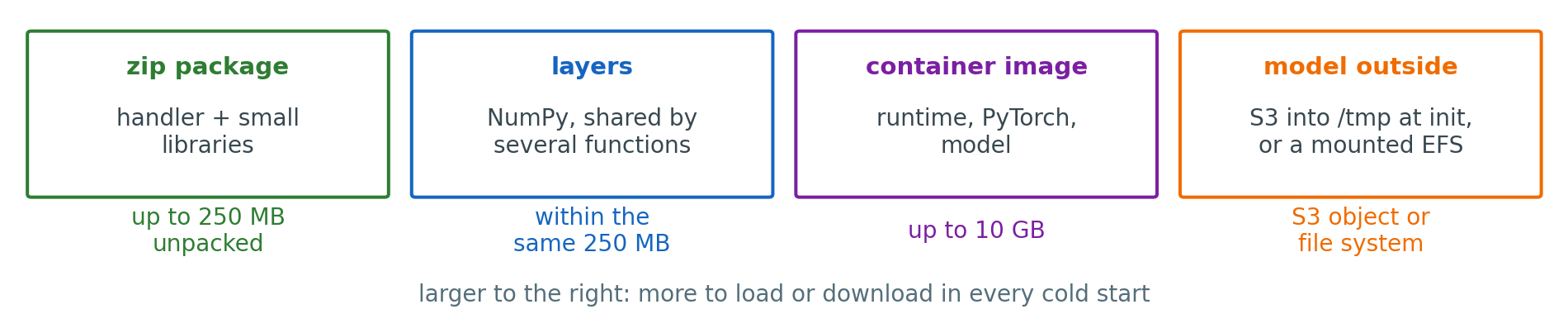
The 250 MB limit: zip and layers together, unpacked
- NumPy, pandas, and scikit-learn fill most of it
- PyTorch alone exceeds it
- Layers share libraries between functions without raising the limit
Beyond it
- A container image, up to 10 GB
- A model in S3, loaded into
/tmpoutside the handler - A model on EFS, mounted into a VPC-attached function
- Each adds bytes to load in every cold start
New Execution Environments Add a Cold-Start Delay

Cold start: the first event in a new environment waits for it to be set up
- Create the environment and load the code
- Start the runtime
- Run the code outside the handler
When it happens
- The first events after a deploy or a quiet period
- Every environment added when concurrency rises
- From about 100 ms for a small function to seconds with large libraries
Cold Starts Can Be Shortened or Avoided, at a Cost
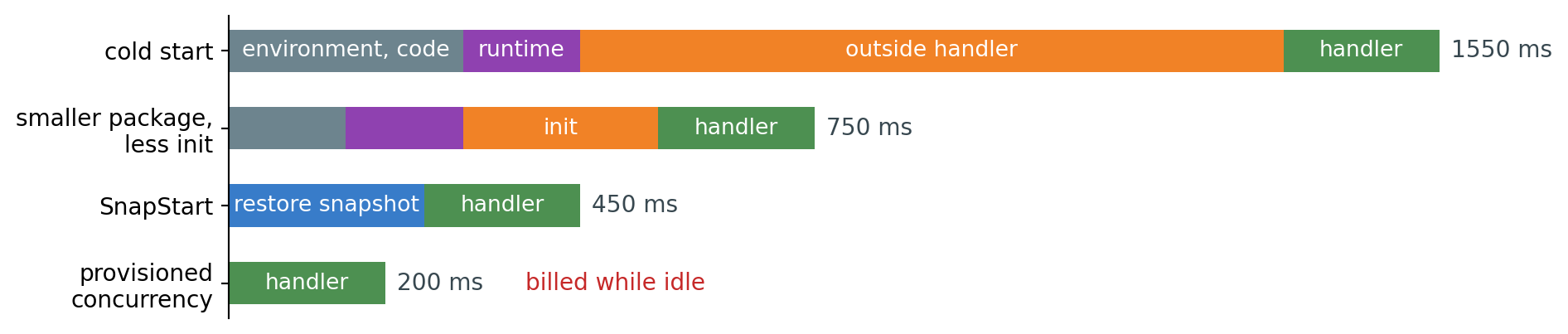
Shorter
- A smaller package and fewer imports
- Less work outside the handler: a client created, not a model downloaded, when the model can live elsewhere
Avoided, for a price
- SnapStart: an initialized environment snapshotted at deploy, then restored (Java, Python, .NET)
- Provisioned concurrency: environments kept initialized, billed whether or not events arrive
- Both apply to a published version
Lambda Allocates CPU in Proportion to Memory
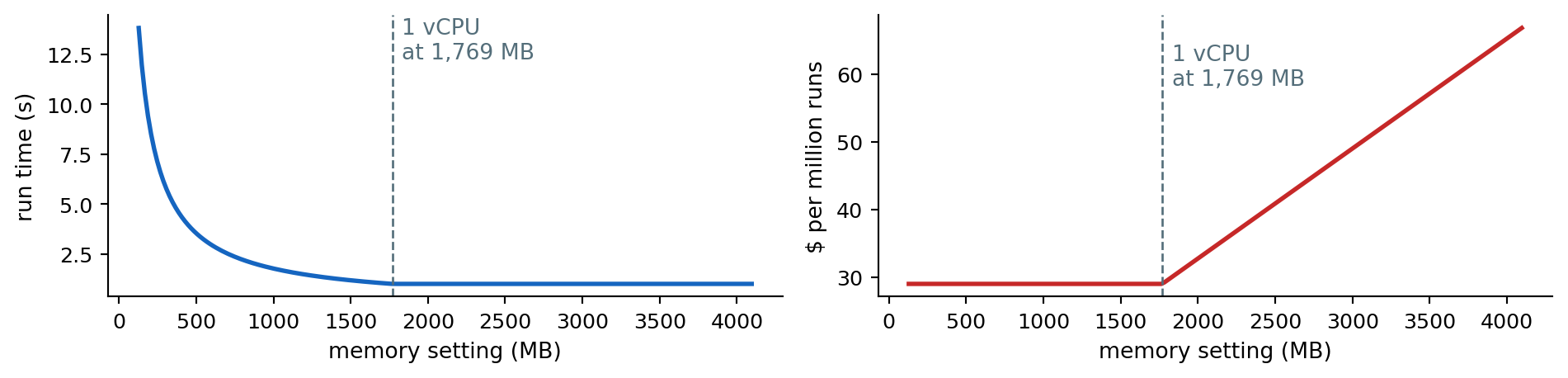
One setting: memory, from 128 MB to 10,240 MB
- CPU share follows it: one vCPU at 1,769 MB, six at the top
- A CPU-bound handler at 512 MB runs about 3.5 times longer than at 1,769 MB
Cost per run: memory times run time
- Up to one vCPU, a faster run at a higher setting costs about the same
- Past it, a single-threaded handler runs no faster and costs more
Lambda Stops a Handler Mid-Work When Its Timeout Expires
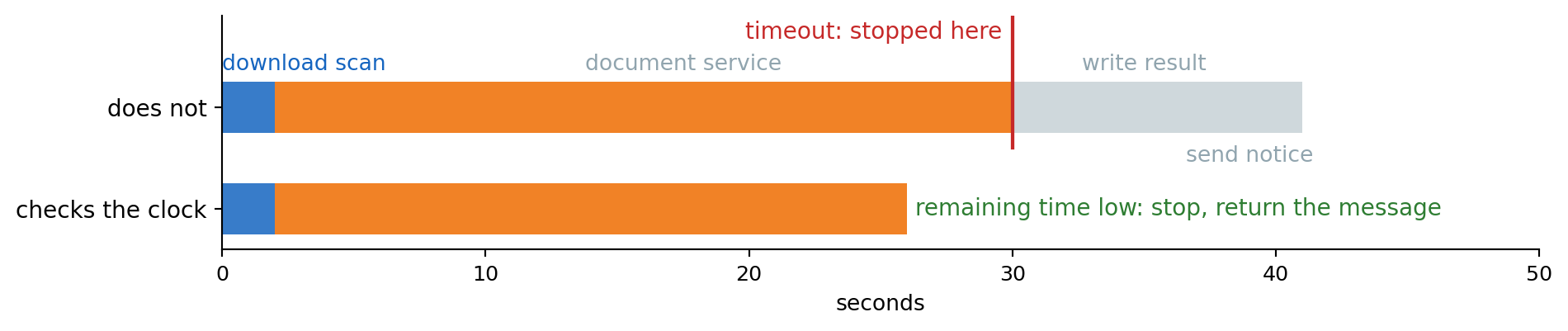
At the timeout
- The handler is stopped where it is: no
finally, no cleanup - Writes made before that point stay, and the rest never happen
- The run counts as a failure, retried or not as its invocation type decides
Stopping cleanly instead
for step in steps:
    left = context.get_remaining_time_in_millis()
    if left < 5000:
        raise Retryable("out of time")
step()- Each step idempotent, so a retry repeats nothing harmful
Synchronous Invocations Return the Handler’s Result to the Caller
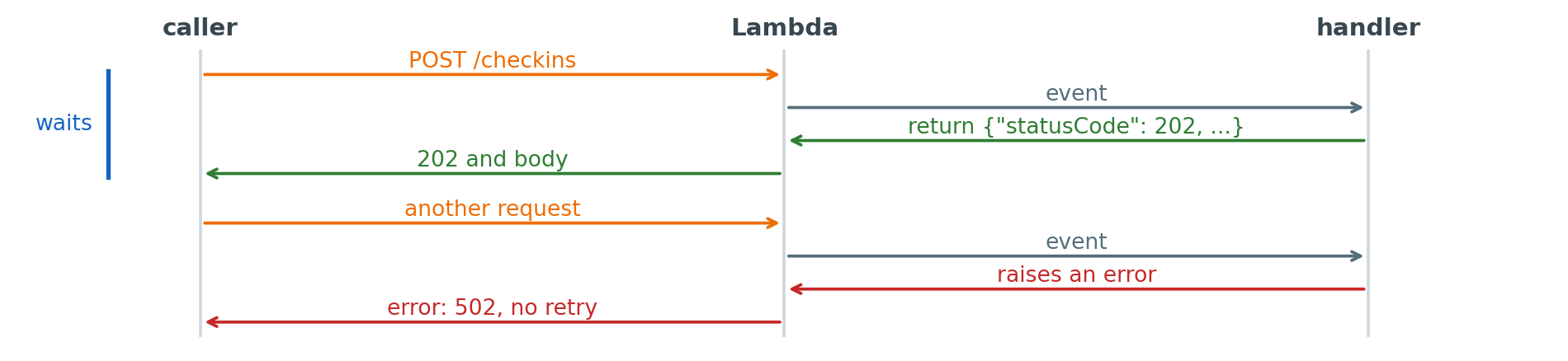
Synchronous: the caller waits for the run to finish
- API Gateway, a function URL, or a direct
Invokecall - The return value is the reply: status, headers, body
- A cold start and the whole run are in the caller’s wait
Failure is the caller’s
- An error or a timeout returns to the caller, and Lambda does not retry
- A gateway in front has its own limit: 30 s for an API Gateway HTTP API
- Retrying is the client’s decision, safe for idempotent requests
Asynchronous Invocations Wait in a Queue Inside Lambda

Asynchronous: the source hands over the event and continues
- S3 notifications, SNS, EventBridge, EventBridge Scheduler at a set time, or
InvokewithInvocationType="Event" - Lambda queues the event and returns at once
- The handler’s return value goes nowhere
Lambda’s retries
- Two retries after a failure, about one and then two minutes apart
- An event older than the maximum age, 6 hours by default, is dropped
- Then the failure destination: an SQS queue, SNS topic, or another function
- An event can also run twice with no failure, so the handler de-duplicates
A Failing Record Holds Up Its Kinesis Shard
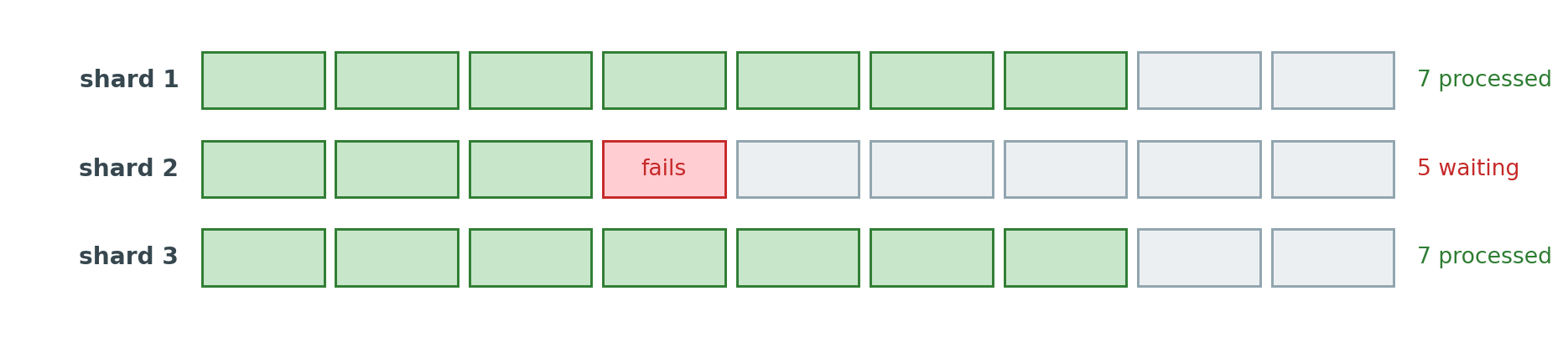
Polled from a stream: one batch per shard at a time, in order
- A batch that fails is retried as it is, so the shard does not move
- Every record behind it in that shard waits: the cost of keeping order
- Other shards continue
Limits on the wait
- The record expires with the stream’s retention
- A maximum retry count, then the record goes to a failure destination
- Splitting a failing batch in half until the bad record is alone
Concurrency Equals Event Rate × Run Time
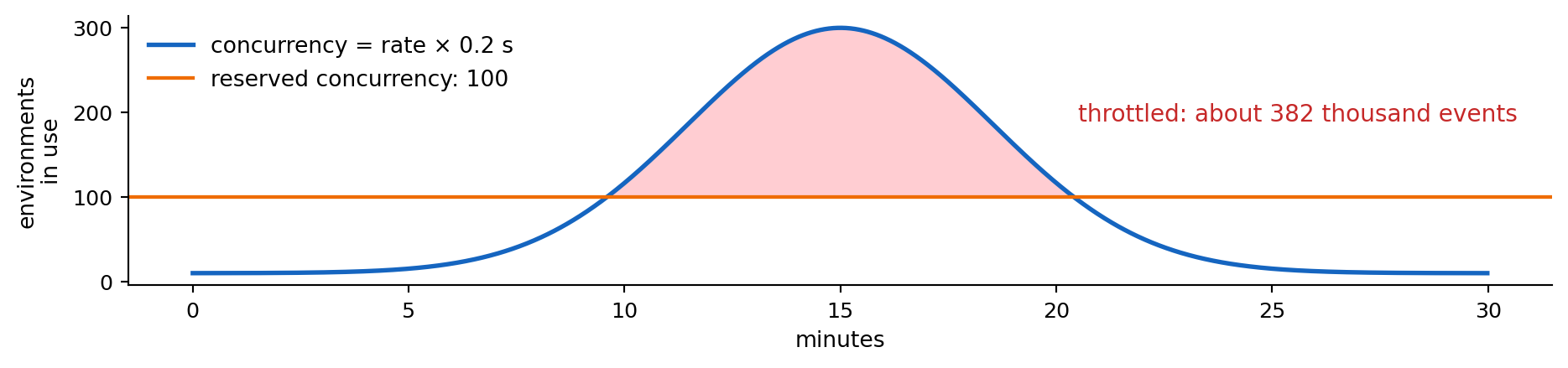
Concurrency: environments running at once
- 300 events per second at 0.2 s each: 60 environments
- Each function adds up to 1,000 environments every 10 seconds
- 1,000 per account per Region by default, shared by every function
Over a limit: throttling
- Synchronous callers receive an error at once
- Asynchronous events wait in Lambda’s queue and are retried
- Polled sources slow down: messages stay in the queue
- Reserved concurrency caps one function and guarantees it that share
Functions Run in an Isolated VPC Unless Attached to Another
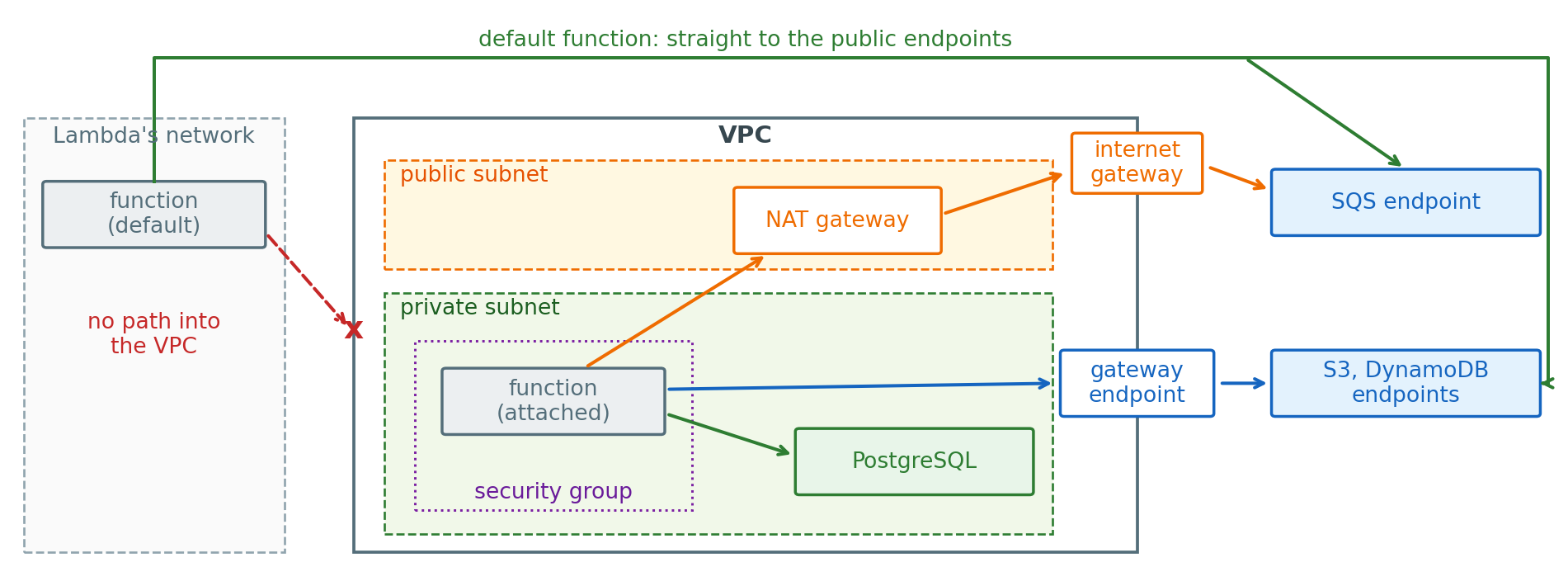
Default: an isolated VPC that Lambda owns, not connected to the account’s VPCs
- Public endpoints only: S3, SQS, SNS, DynamoDB
Attached: an interface in a private subnet
- Database: direct, as an instance there reaches it
- Other services: a VPC endpoint or the NAT gateway, else calls wait until the timeout
Execution Environments Maintain Their Own Database Connections
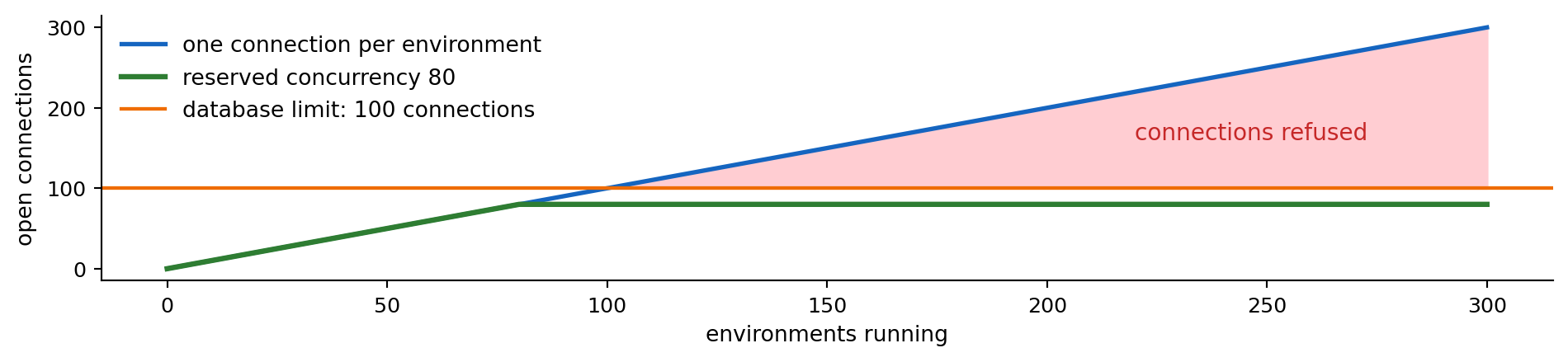
Connections follow environments
- A connection opened outside the handler is reused by one environment, not shared
- 300 environments in a check-in wave: 300 connections, against a limit near 100 on a small database instance
- Over the limit, new connections are refused and handlers fail
Bounds
- Reserved concurrency below the database’s limit
- A connection pooler between the functions and the database: RDS Proxy holds a few connections and lends them per transaction
- A database reached over HTTP with no connection to hold: DynamoDB
Functions Cost Less Than Instances Below a Break-Even Request Rate
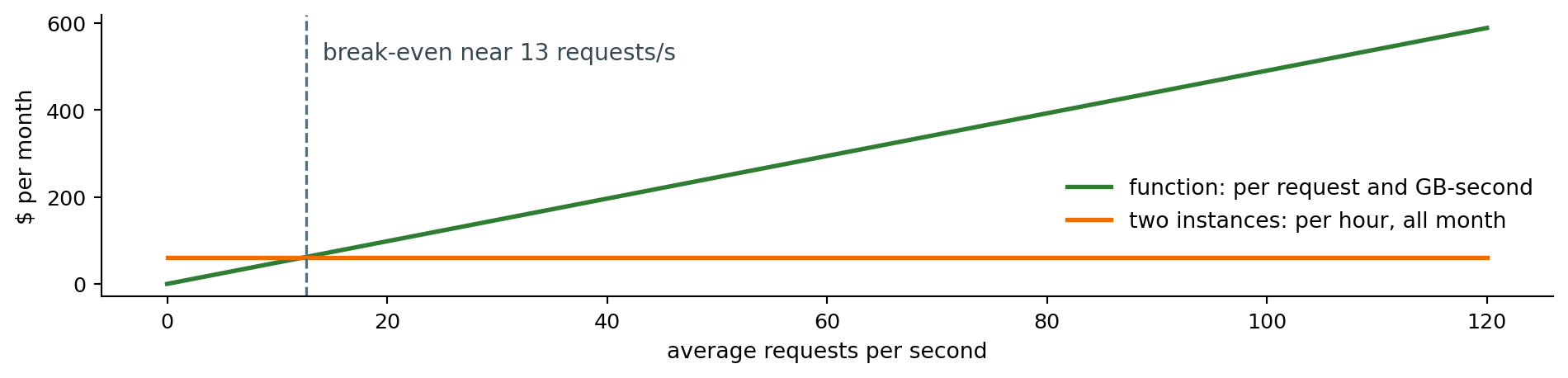
Cost
- Functions: paid per request and per GB-second, nothing when idle
- Instances: paid per hour, used or not
- Below break-even the function costs less, above it the instances do
Limits that decide it before cost
- Runs over 15 minutes, GPUs, long-lived connections: instances or containers
- Latency that cannot include a cold start
- Requests from outside reach a function through a gateway or a function URL
Browsers Cannot Invoke Functions Directly
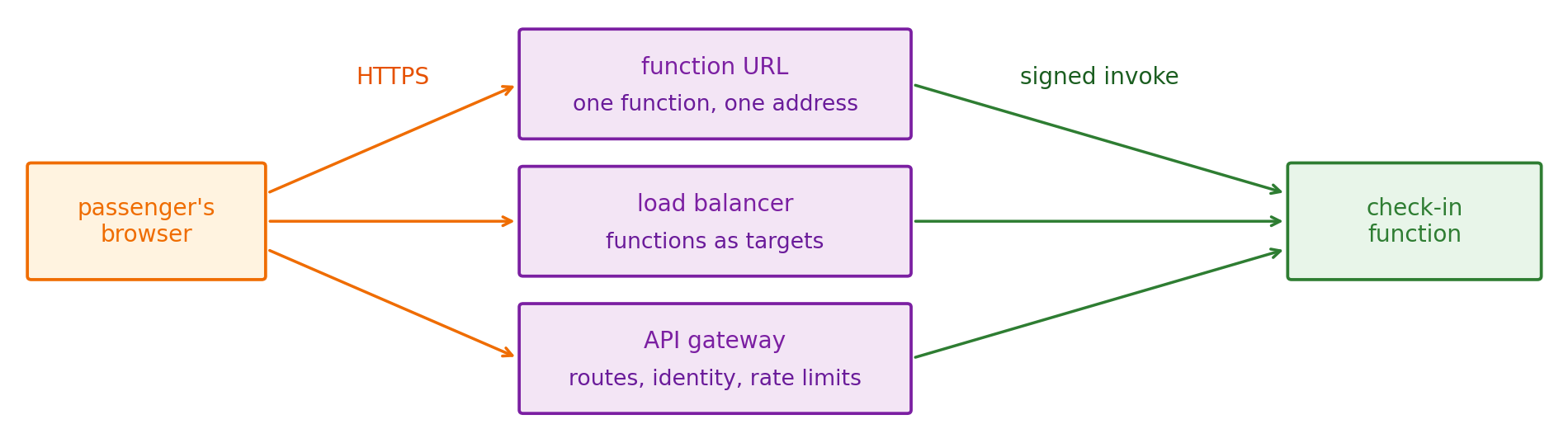
Invoking a function: an AWS API call, signed with credentials the function’s resource policy allows
- A browser speaks HTTPS and holds no AWS credentials, and must not
- Something AWS runs receives the HTTPS request and invokes the function for it
Three such endpoints
- Function URL: an HTTPS address for one function, nothing else
- Load balancer: spreads requests over targets, which can be functions or instances
- API gateway: routes many paths to many backends, and checks callers before any code runs
Gateways Turn HTTP Requests Into Calls to Backend Services
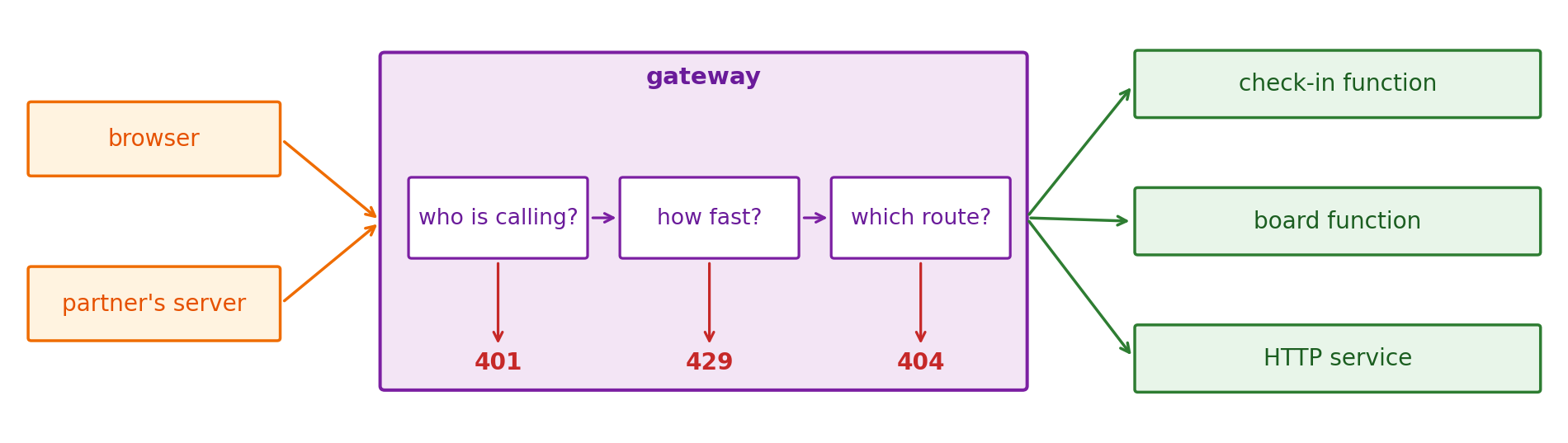
Gateway: a server in front of the backends that receives every request first
- Holds the public address and the TLS certificate
- Checks identity and rate, then matches a route
Backends
- Receive only requests that passed the checks
- Are functions, containers, or other HTTP services, and can change behind one address
- Refused requests cost no backend run
Authorizers Reject Requests Before Dispatching to a Function
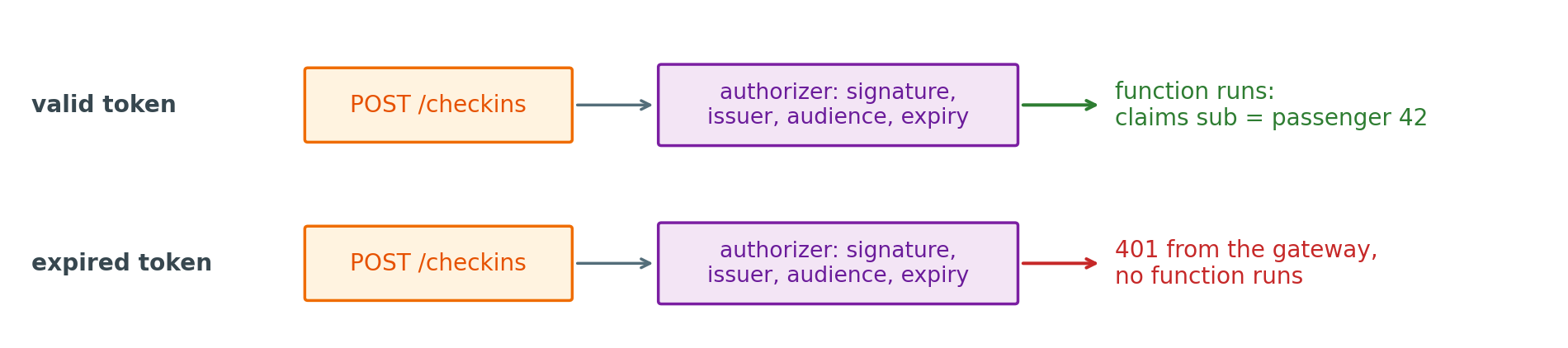
JWT authorizer: the gateway verifies a signed token on every request
- Signature, issuer, audience, and expiry, against the identity provider’s published keys
- Failure:
401, before any function runs
What the function receives
- The token’s claims in the event:
requestContext.authorizer.jwt.claims - Who is calling, already checked
- Whether that caller may check in this booking stays the function’s decision
Gateways Can Throttle Requests Before They Reach Functions
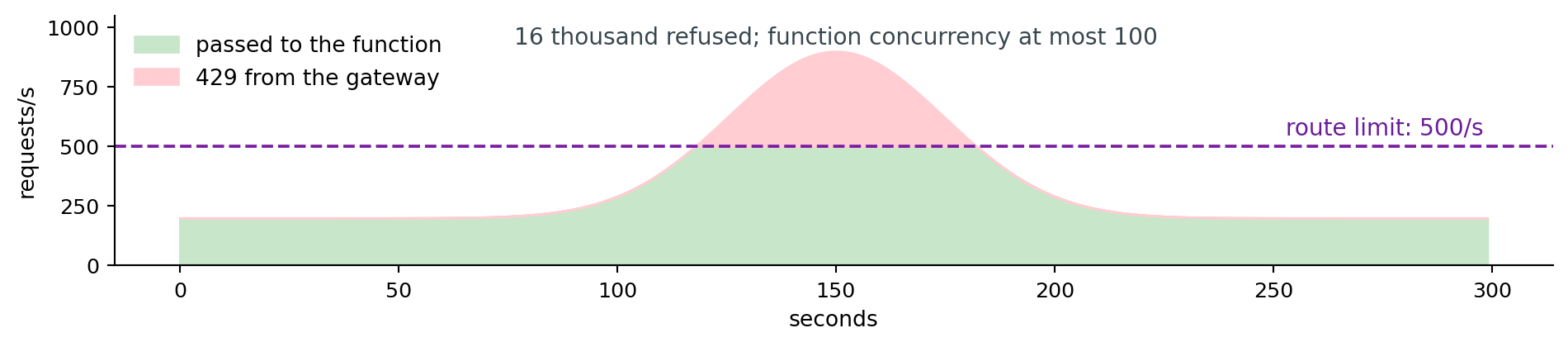
Throttling: a rate limit per route, per client, and per account
- Over the limit:
429 Too Many Requestsfrom the gateway - 10,000 requests per second per account and Region by default, before any route limit
What it protects
- Function concurrency: 500 requests per second at 0.2 s is at most 100 environments
- The database behind the function, which holds a fixed number of connections
- The bill: a refused request runs no function
Long Requests Can Return 202 Quickly and Finish Asynchronously
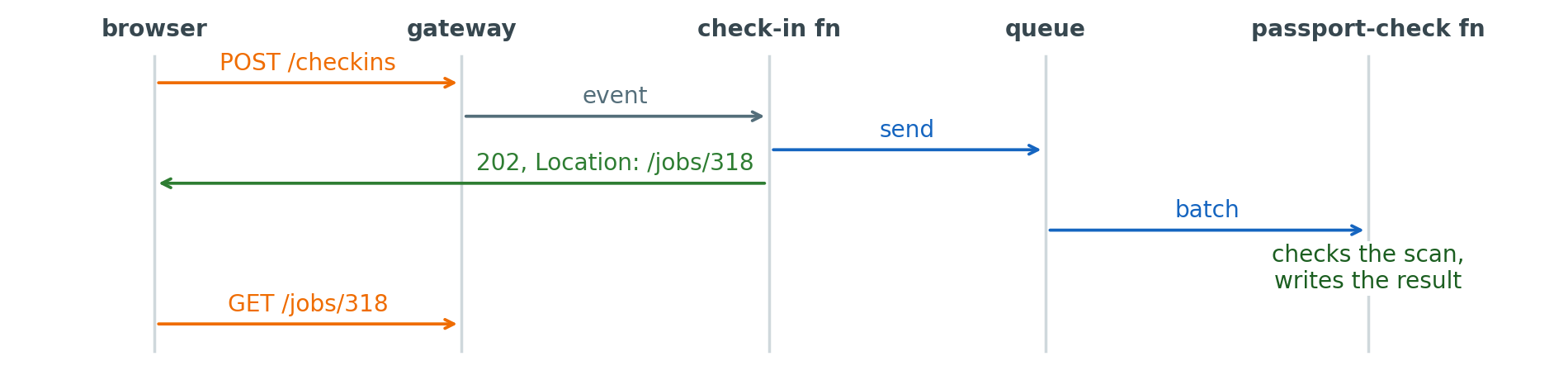
The gateway’s limit: 30 s at most for the whole request
- A passport check that waits on an outside document service can take longer
- A cold start, then the check, all inside the passenger’s wait
Accepted, then continued
- The check-in function queues the check and replies
202with a job address - The passport check runs from the queue, with its retries and dead-letter queue
- The page reads
/jobs/318, a short request, until the result is there
Minimum Latency Grows With Distance to the Region
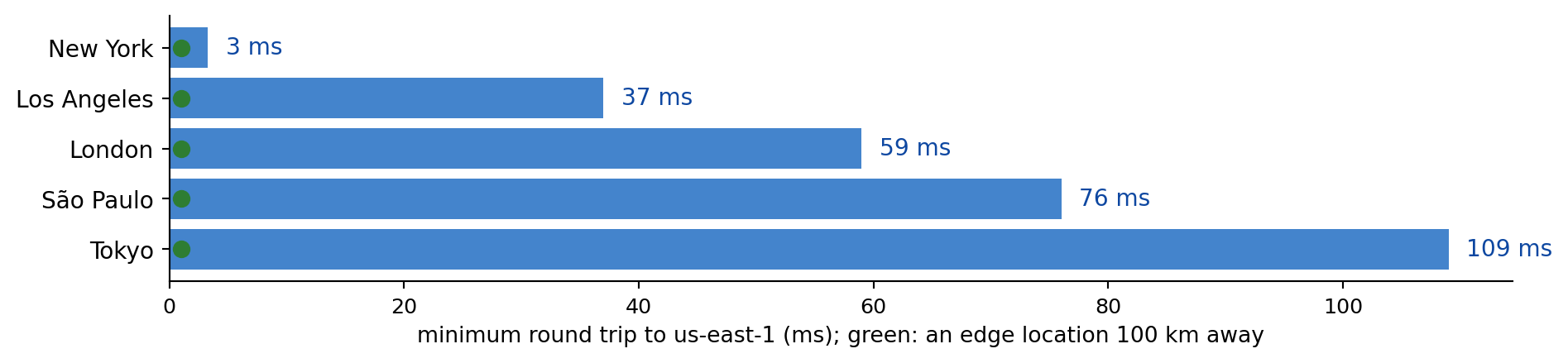
Round-trip floor: distance over the speed of light in fiber, there and back
- Tokyo to Virginia: about 110 ms, before any server work
- Measured round trips are longer: routes are not straight
A page is many requests
- The check-in page: HTML, scripts, styles, images, the departures data
- Each new connection adds round trips for TCP and TLS before the first byte
- Only a response from nearby lowers the floor
Edge Caches Deliver Copies Close to Clients
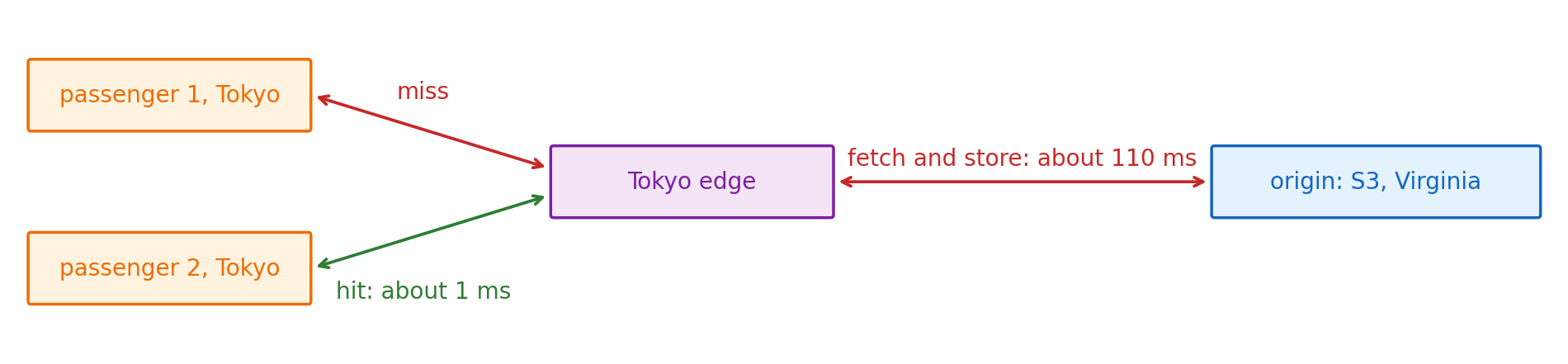
Content delivery network: caches in many cities, in front of one origin
- A request goes to the nearest edge location
- Hit: the stored copy is returned from nearby
- Miss: the edge fetches from the origin, returns it, and stores it
Who benefits
- Every client after the first at each edge, for the copy’s lifetime
- The origin: one fetch per edge per lifetime instead of one per client
- Content many clients request alike: scripts, images, a departures board
S3 Buckets Can Serve Static Sites Through CloudFront
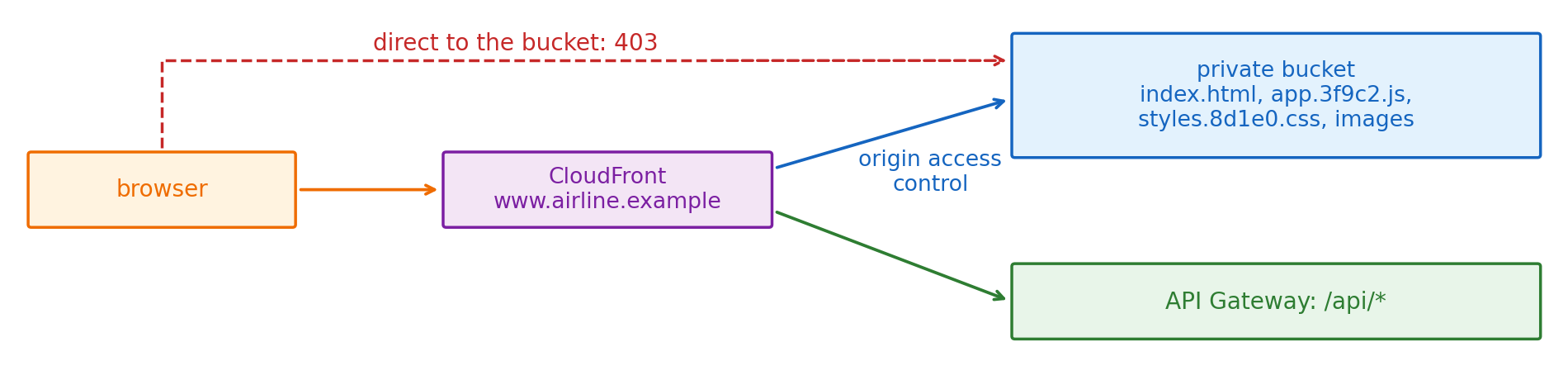
Static site: files the browser runs as they are, with no server code per request
- HTML, scripts, styles, images, stored as S3 objects
- Served through CloudFront, with HTTPS on the site’s own domain
Private bucket
- The bucket policy allows reads by this distribution only, through origin access control
- Clients cannot bypass the cache or read files that were never meant to be listed
/api/*on the same domain goes to API Gateway
Longer Cache Lifetimes Raise Hit Rates and Delay Updates
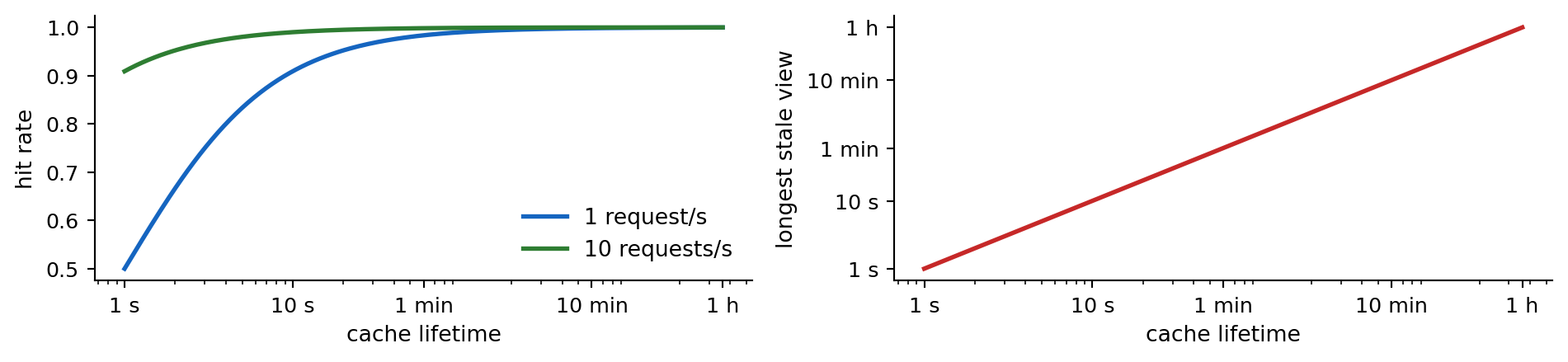
Lifetime: set by the origin’s Cache-Control: max-age, or by the distribution’s default
- One miss per lifetime per edge, every other request a hit
- Departures board at 30 s: a client sees a gate change up to 30 s late
The trade
- Longer: higher hit rate, less load on the origin, older copies
- Shorter: fresher copies, more trips to the origin
- Invalidating a path removes copies early, at every edge, and takes minutes
File Names With a Content Hash Prevent Stale Copies
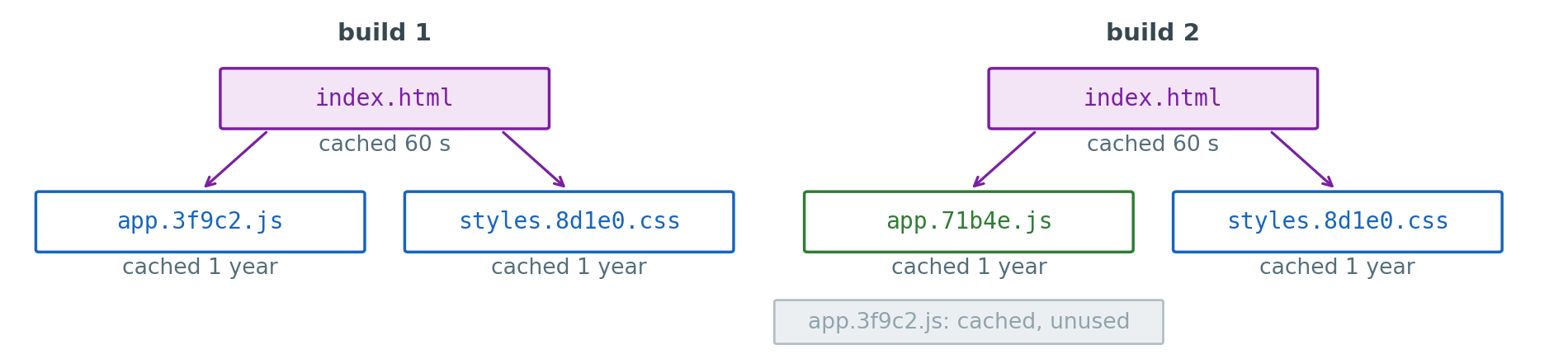
Content in the name: the build names each file by a hash of its bytes
- A changed script gets a new name, so a cached copy under an old name is never out of date
Cache-Control: max-age=31536000on hashed files,max-age=60onindex.html
After a deploy
index.htmlis refreshed within a minute and names the new script- Old copies stay cached, named by no page
- The one short lifetime is on the one file whose name cannot change
Edge Caches Can Serve API Replies That Many Clients Share
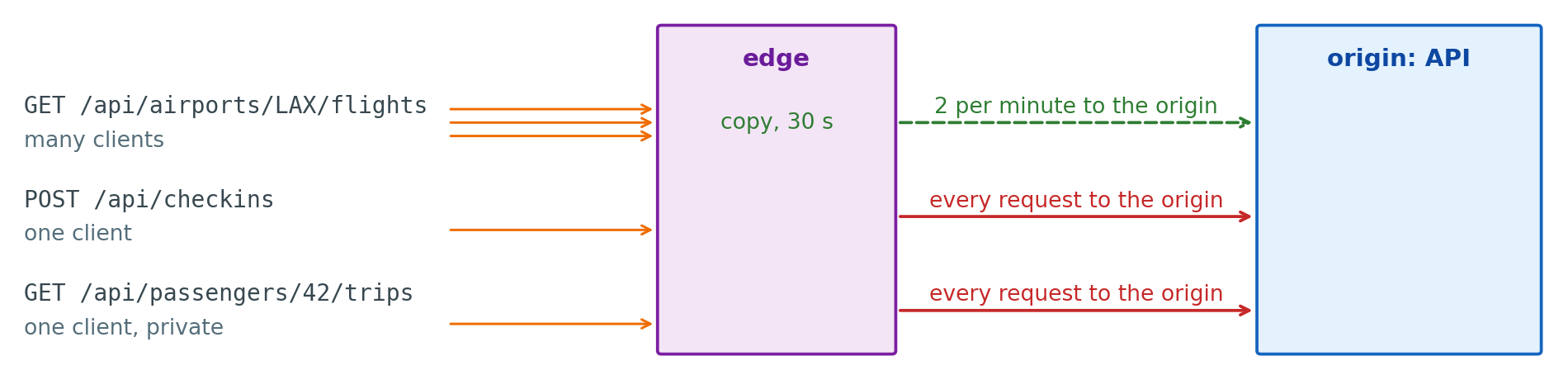
Cached at the edge
GET /api/airports/LAX/flights: the same reply for every client, 30 s lifetime- One trip to the board function per edge every 30 s, however many passengers look
- The cache key: path and the query parameters that change the reply
Passed through to the origin
POST /api/checkins: a change, never cachedGET /api/passengers/42/trips: one passenger’s data,Cache-Control: private- A reply that varies by a header or cookie not in the cache key would be served to the wrong client
Steps in Separate Services Share No Call Stack or Transaction
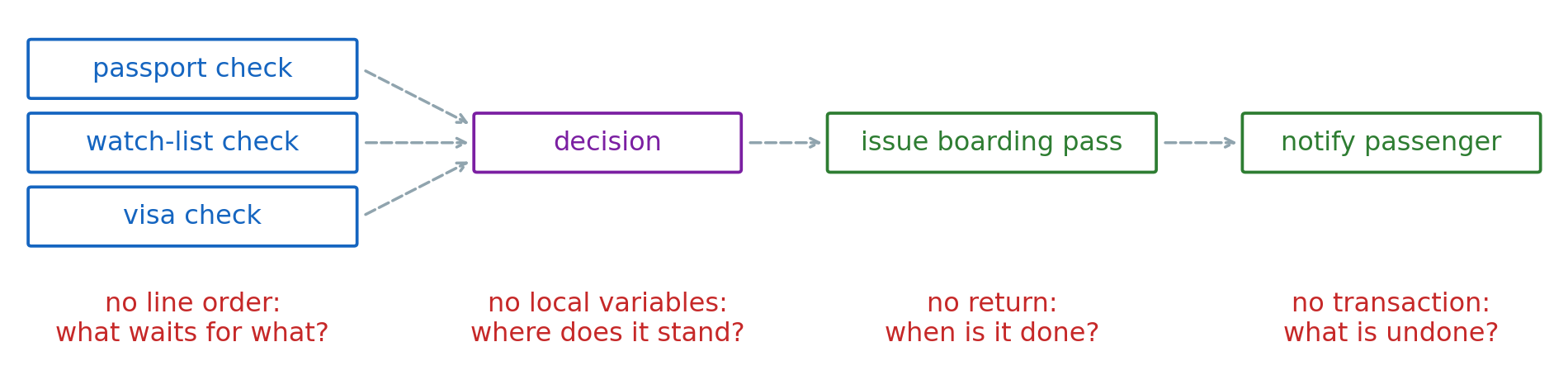
Each step in its own service
- Started by a message or an event, finished at its own time
- Fails, retries, and is redelivered on its own
What the application now places
- Order, state, completion, and the response to failure
- In a record every step can read, or in a workflow service that runs the steps
A Workflow’s Dependencies Decide Which Steps Run at Once
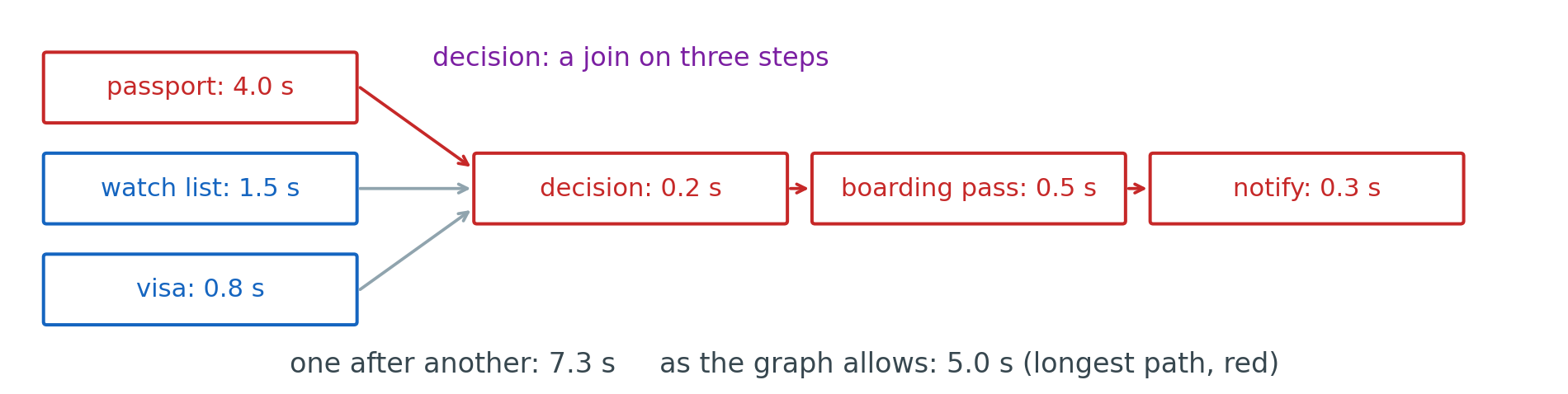
Order as dependencies: which step needs which other step’s result
- The three checks need nothing from each other and start together
- The total time is the longest path, here through the passport check
Join: a step that waits for several others
- Starting the three checks is one event to a topic, or three messages
- Nothing in a queue or a topic knows that all three have finished
- The join is where the application’s own record of the workflow is needed first
Steps Finishing Together Can Both Run the Join
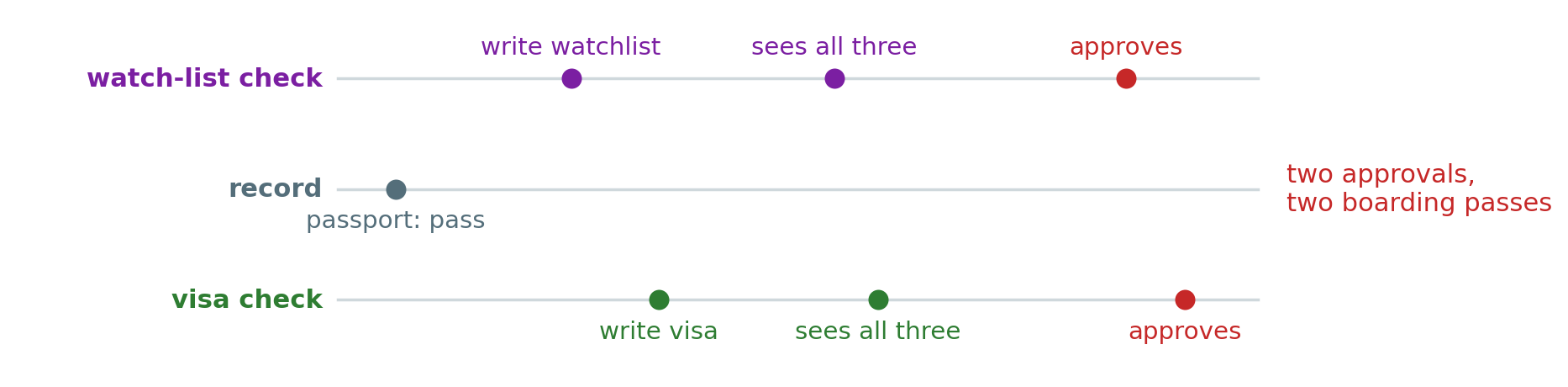
Write, then look: two separate requests for each check
- Both writes land before either check reads the record
- Both see three results, and both act
The same shape as a double booking
- Two writers each read a state that allows them to act
- The fix is the same: make the decision part of one atomic write
Recording Which Steps Finished Makes Redelivery Harmless
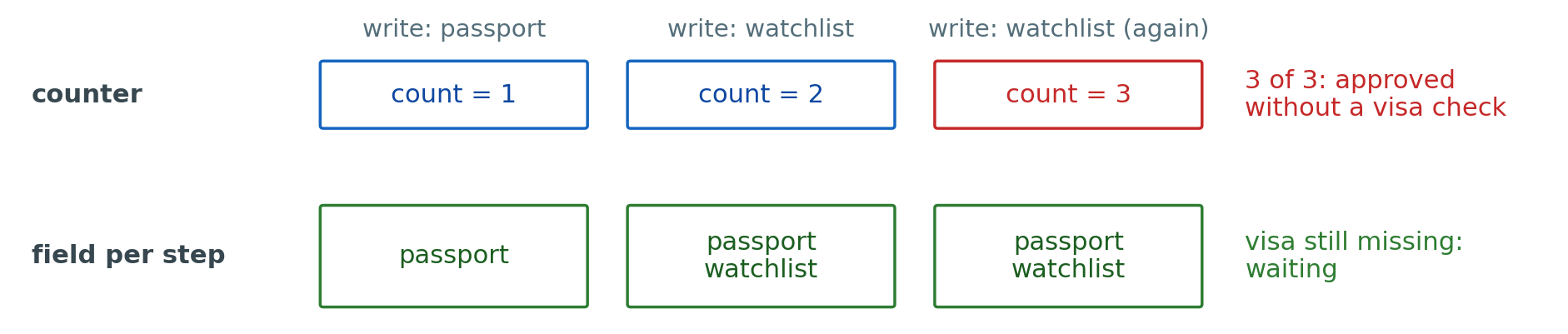
A counter: each step adds one
- A redelivered message adds one again
- The count reaches three with a check missing
A field per step: each step sets its own
- Setting the same field twice leaves the record as it was
- Complete means every named field present, whatever was delivered twice
A Deadline in the Record Ends Workflows Whose Steps Never Finish
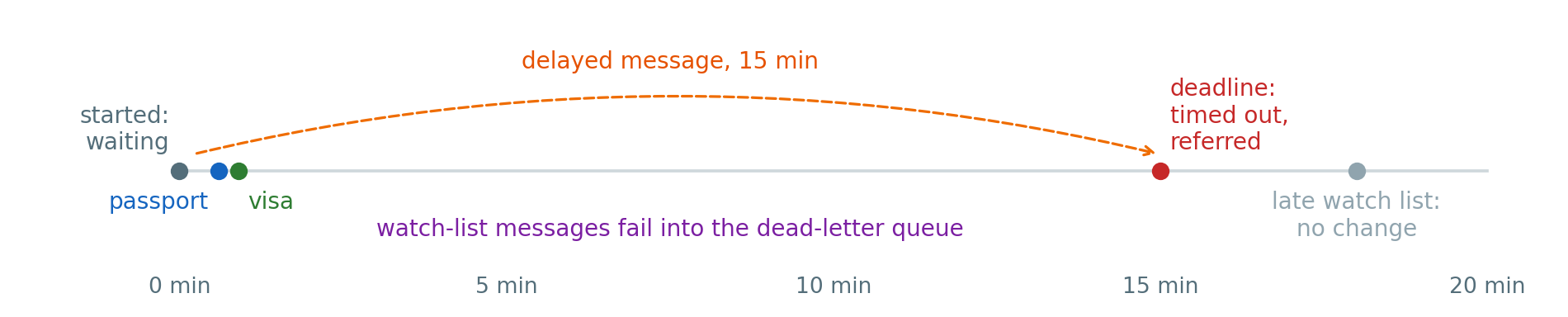
A step that never reports
- The outside document service is down for hours
- The step’s messages end in its dead-letter queue
- The record waits forever unless something checks it
A deadline, written when the check starts
- A delayed message, or a scheduled task, arrives at the deadline
- A conditional write:
waitingtotimed_out, then refer to an agent - A late result finds the status changed and does nothing
Choreography and Orchestration Differ in Where the Workflow Is Written
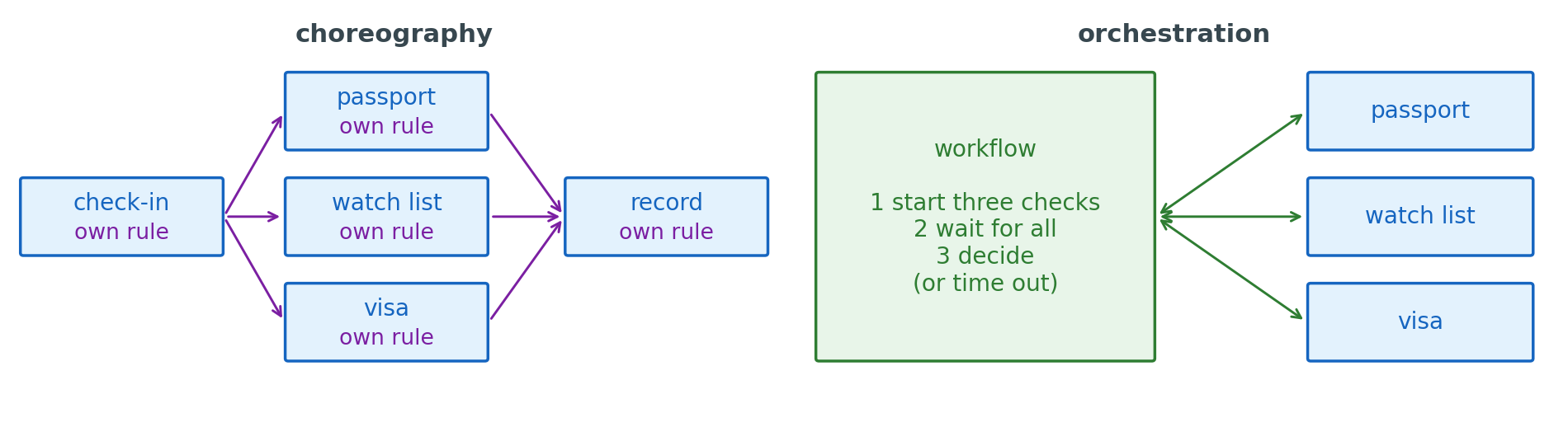
Choreography: services react to events, and the job record holds the state
- No component holds the whole order
- A new step is another subscriber
- A stuck check is found by reading the record and each service’s logs
Orchestration: one workflow calls each step
- The order, the waits, the retries, and the timeouts are written in one definition
- Each service does its step and returns
- The workflow is one more component that every run depends on