Cloud Patterns: Storage, Serverless, and Coordination

EE 547 - Unit 9

Dr. Brandon Franzke

Fall 2025

Outline

Storage and Compute

Cloud Storage Models

  • Instance storage ephemeral; EBS persists
  • S3: HTTP API, not filesystem
  • Key design determines query efficiency

Serverless Compute

  • Lambda: function invocation, not process lifecycle
  • Cold starts vs warm execution environments
  • Memory setting controls CPU allocation

Asynchronous Processing

  • SQS decouples producers from consumers
  • Visibility timeout and dead letter queues

Integration and Architecture

Service Integration

  • API Gateway bridges HTTP to Lambda
  • CloudFront caches at edge locations
  • Resilience: retry, backoff, circuit breaker

Putting Services Together

  • Decomposition into service boundaries
  • Fan-out to parallel processing paths
  • Coordination when multiple async tasks complete

Cloud Storage Models

Instance Storage Does Not Survive Instance Lifecycle

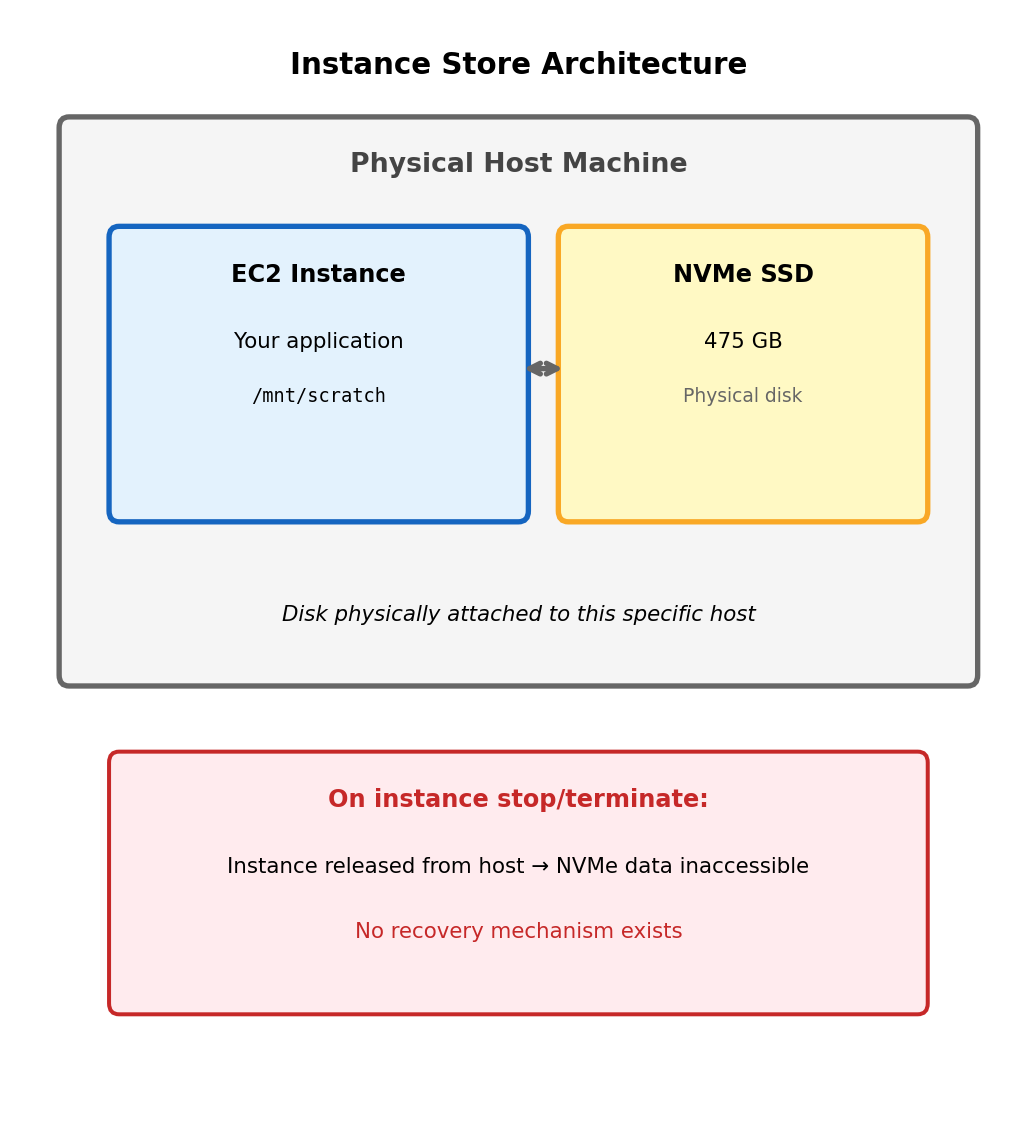
Instance store: Physical disk attached to host hardware

# Check available block devices on EC2 instance
$ lsblk
NAME          SIZE  TYPE  MOUNTPOINT
nvme0n1       8G    disk  /           # Root (EBS)
nvme1n1       475G  disk              # Instance store (NVMe)

Instance store provides highest performance - directly attached NVMe SSDs with ~100k IOPS and sub-millisecond latency.

Data loss occurs on:

  • Instance stop (not just terminate)
  • Instance termination
  • Underlying hardware failure
  • Spot instance reclamation
  • Host maintenance events

The storage is physically part of the host machine. When the instance moves to different hardware (or ceases to exist), the disk does not follow.

Cannot detach or snapshot. Unlike network-attached storage, there is no mechanism to preserve instance store contents independently of the instance.

Appropriate for: Scratch space, temporary processing files, caches that can be rebuilt. Not appropriate for any data that must survive instance lifecycle.

Horizontal Scaling Breaks Local Storage Assumptions

Single instance architecture

All requests handled by same instance, all file operations see same filesystem state.

Instance A
├── /data/models/classifier.pkl
├── /data/uploads/user_files/
└── /data/cache/

Multiple instance architecture

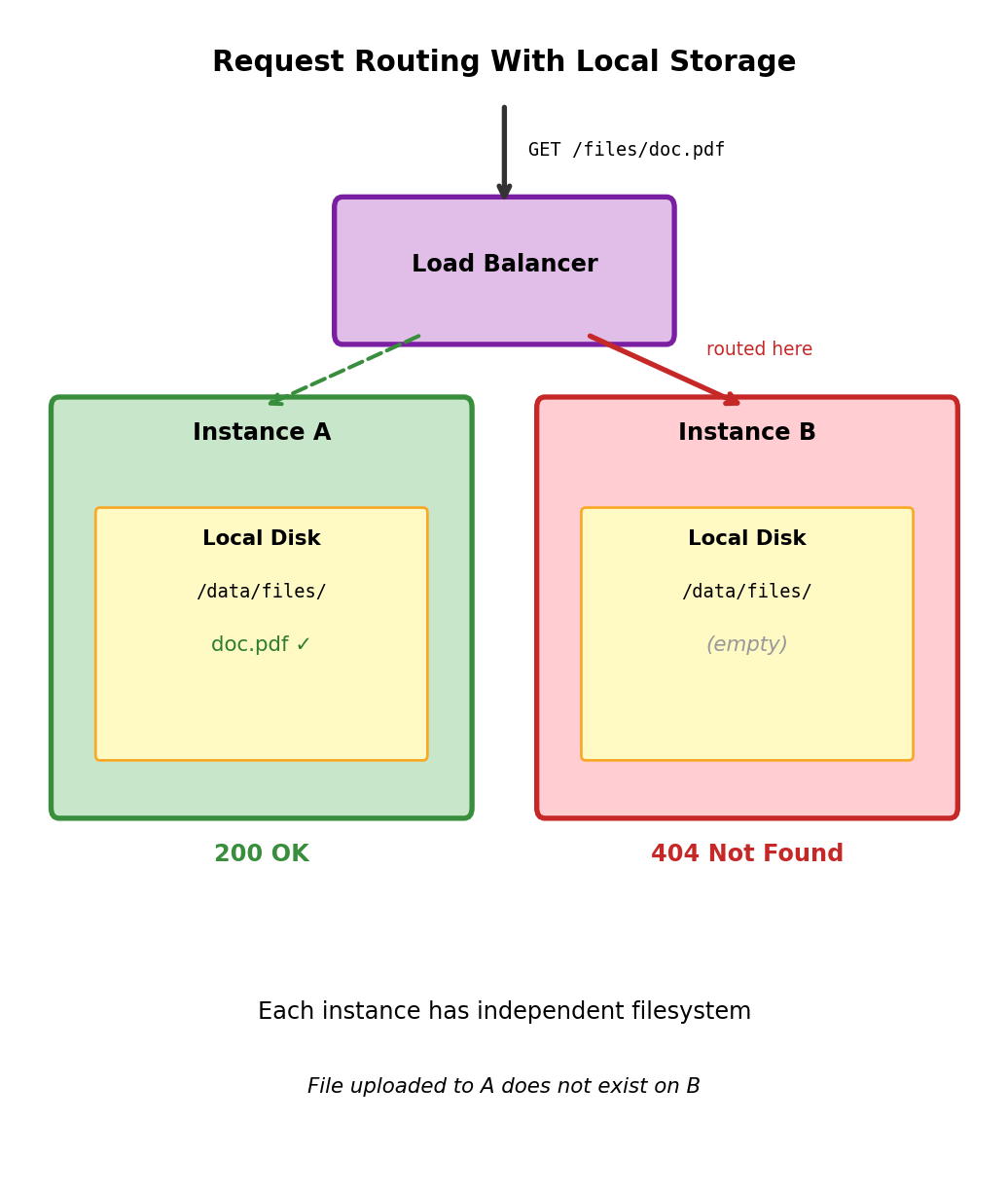
Load balancer distributes requests. Each instance has independent local filesystem.

Instance A                 Instance B
├── /data/models/          ├── /data/models/
│   └── classifier.pkl     │   └── (empty)
└── /data/uploads/         └── /data/uploads/
    └── file1.pdf              └── (empty)

Request uploads file to Instance A. Subsequent request routed to Instance B. File does not exist - FileNotFoundError.

Model deployed to Instance A. Instance B cannot serve predictions - model not present.

Fundamental issue: Local filesystem is instance-scoped, but application logic assumes shared state across all request handlers.

Storage Must Exist Independent of Compute Instances

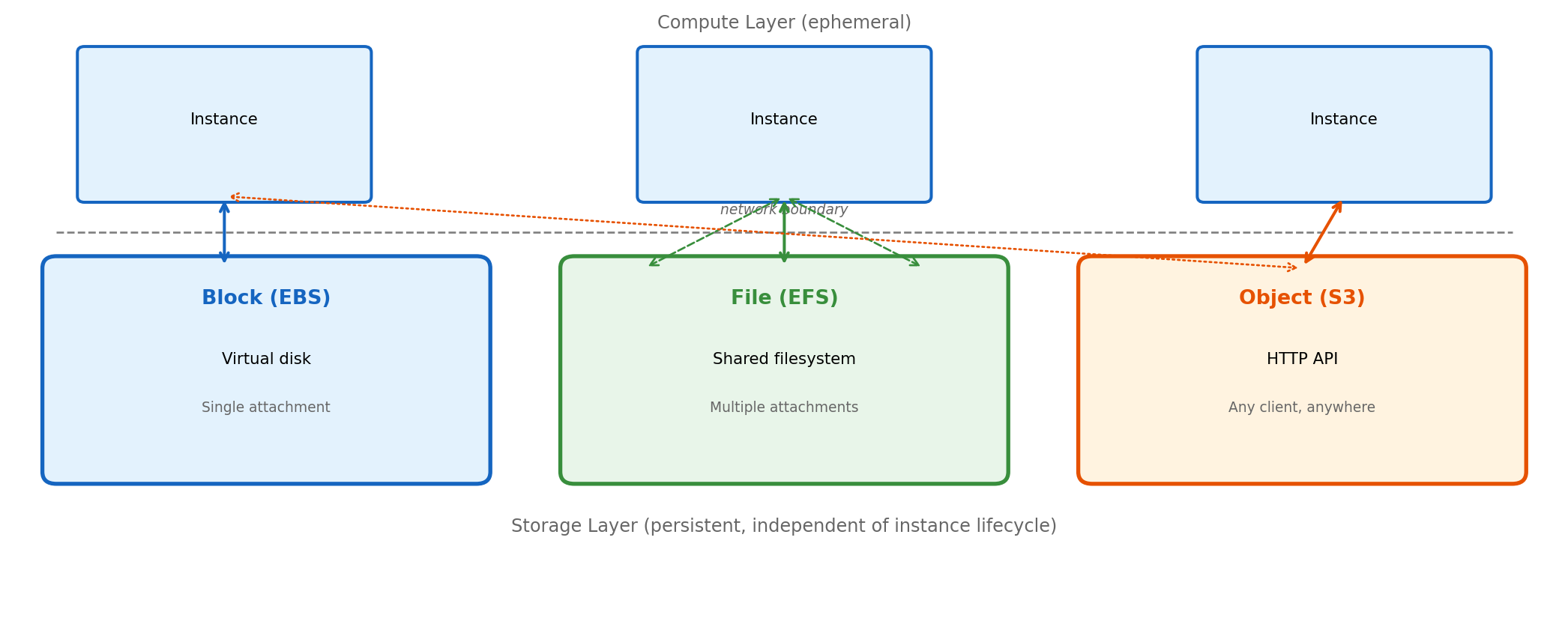
Three abstractions provide instance-independent storage with different access models:

Block storage presents a virtual disk device. Instance mounts it as filesystem, uses standard file operations. One instance attachment at a time (with limited exceptions).

File storage provides shared filesystem via network protocol (NFS). Multiple instances mount simultaneously, see same files, coordinate via filesystem semantics.

Object storage exposes HTTP API for storing and retrieving blobs by key. No filesystem abstraction - operations are PUT, GET, DELETE over HTTPS. Accessible from any network location.

Each model trades capabilities for constraints. Selection depends on how application accesses data.

Block Storage Provides Virtual Disk Device

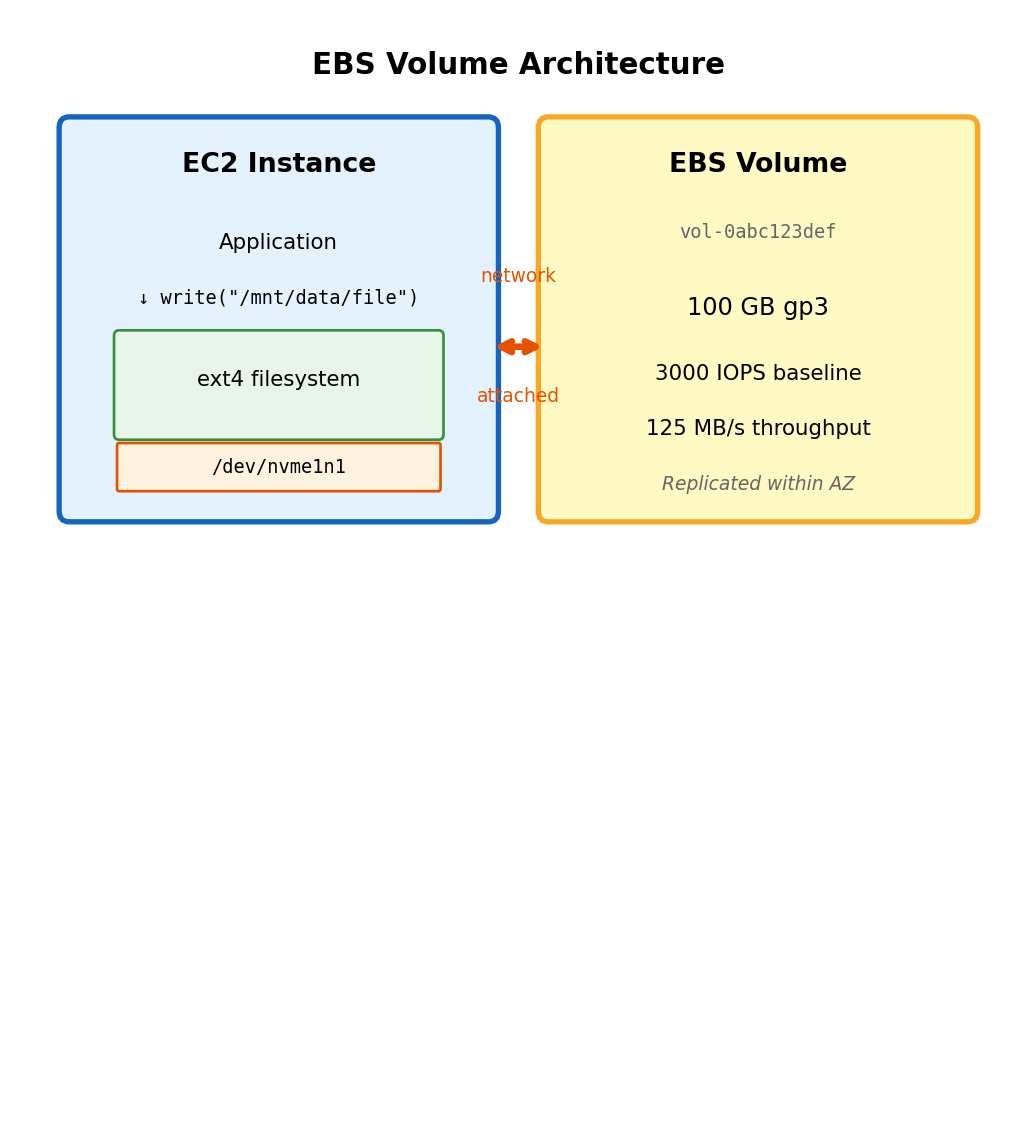
EBS volume appears as block device to instance

# List block devices - EBS volume appears as nvme device
$ lsblk
NAME          SIZE  TYPE
nvme0n1       8G    disk      # Root volume
└─nvme0n1p1   8G    part  /
nvme1n1       100G  disk      # Attached EBS volume

The volume is a raw block device - bytes addressable by sector. No filesystem until you create one.

Preparing new volume for use:

# Create partition table (GPT for volumes > 2TB)
$ sudo parted /dev/nvme1n1 mklabel gpt

# Create single partition spanning volume
$ sudo parted /dev/nvme1n1 mkpart primary 0% 100%

# Create ext4 filesystem on partition
$ sudo mkfs.ext4 /dev/nvme1n1p1

# Create mount point and mount
$ sudo mkdir /mnt/data
$ sudo mount /dev/nvme1n1p1 /mnt/data

# Verify
$ df -h /mnt/data
Filesystem      Size  Used Avail Use% Mounted on
/dev/nvme1n1p1   98G   61M   93G   1% /mnt/data

After mounting, /mnt/data behaves as normal directory. Application reads and writes files without awareness of underlying EBS volume.

EBS characteristics:

  • Persists independently of instance (survives stop/terminate)
  • Snapshots to S3 for backup and replication
  • Resizable while attached (extend filesystem after)
  • Latency: sub-millisecond (network-attached, same AZ)

Persistent Mount Configuration

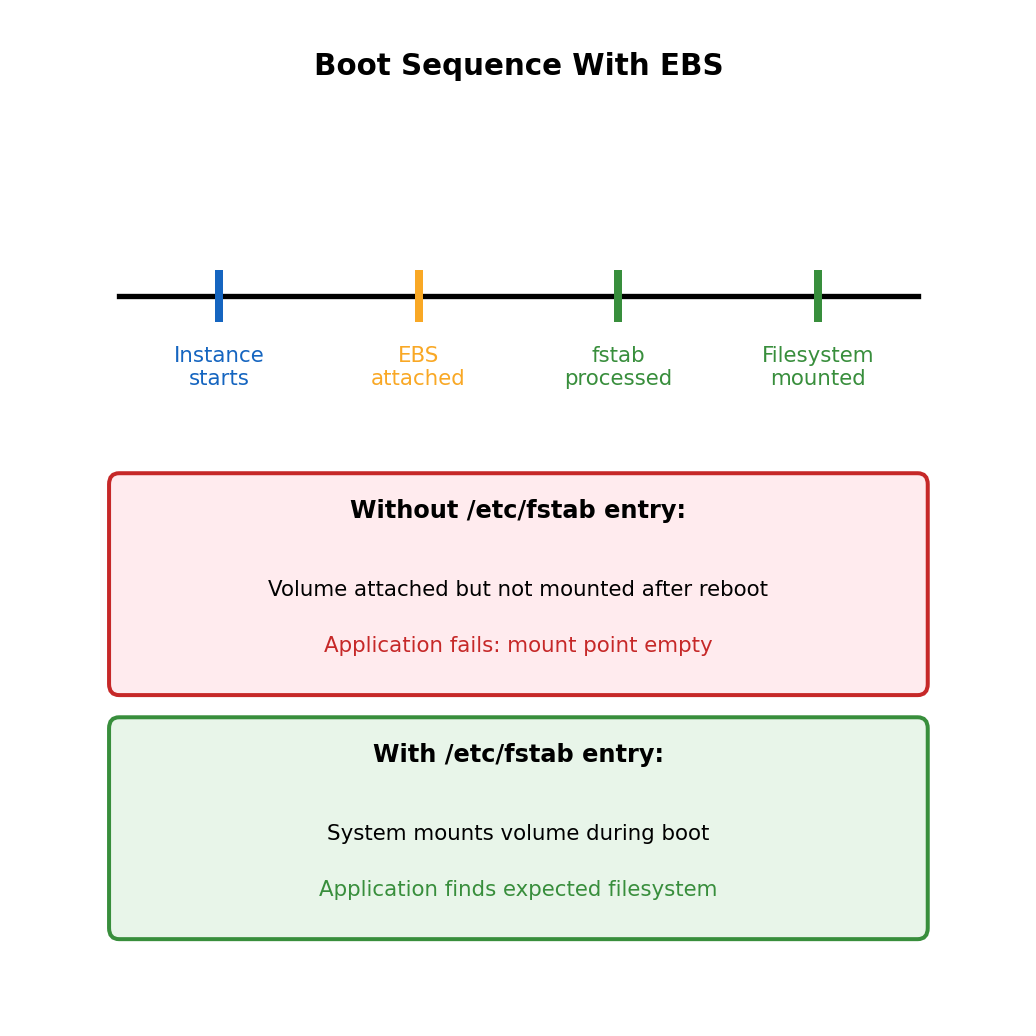
Mount persists only until reboot

The mount command attaches filesystem for current session. After instance reboot, volume is still attached but not mounted.

# After reboot
$ df -h /mnt/data
df: /mnt/data: No such file or directory

# Volume still attached, just not mounted
$ lsblk
NAME          SIZE  TYPE
nvme1n1       100G  disk    # Present but not mounted

Configure automatic mount via fstab:

# Get volume UUID (stable identifier)
$ sudo blkid /dev/nvme1n1p1
/dev/nvme1n1p1: UUID="a1b2c3d4-..." TYPE="ext4"

# Add entry to /etc/fstab
$ echo 'UUID=a1b2c3d4-... /mnt/data ext4 defaults,nofail 0 2' | \
    sudo tee -a /etc/fstab

# Test fstab entry (mount all entries)
$ sudo mount -a

# Verify
$ df -h /mnt/data

The nofail option allows instance to boot even if volume attachment fails - prevents boot hang if volume is detached.

Complete EBS setup sequence

# 1. Identify the new volume
lsblk

# 2. Create partition table
sudo parted /dev/nvme1n1 mklabel gpt
sudo parted /dev/nvme1n1 mkpart primary 0% 100%

# 3. Create filesystem
sudo mkfs.ext4 /dev/nvme1n1p1

# 4. Create mount point
sudo mkdir -p /mnt/data

# 5. Get UUID for fstab
VOLUME_UUID=$(sudo blkid -s UUID -o value /dev/nvme1n1p1)

# 6. Add to fstab for persistent mount
echo "UUID=$VOLUME_UUID /mnt/data ext4 defaults,nofail 0 2" | \
    sudo tee -a /etc/fstab

# 7. Mount (using fstab entry)
sudo mount -a

# 8. Verify
df -h /mnt/data

UUID vs device path:

Device names (/dev/nvme1n1) can change between boots depending on attachment order. UUID is stable identifier assigned when filesystem is created.

Block Storage Single-Attachment Constraint

Standard EBS volumes attach to one instance at a time

Attempt: Attach vol-0abc123 to Instance B
         (currently attached to Instance A)

Error: Volume vol-0abc123 is in 'in-use' state
       attached to instance i-0111222333

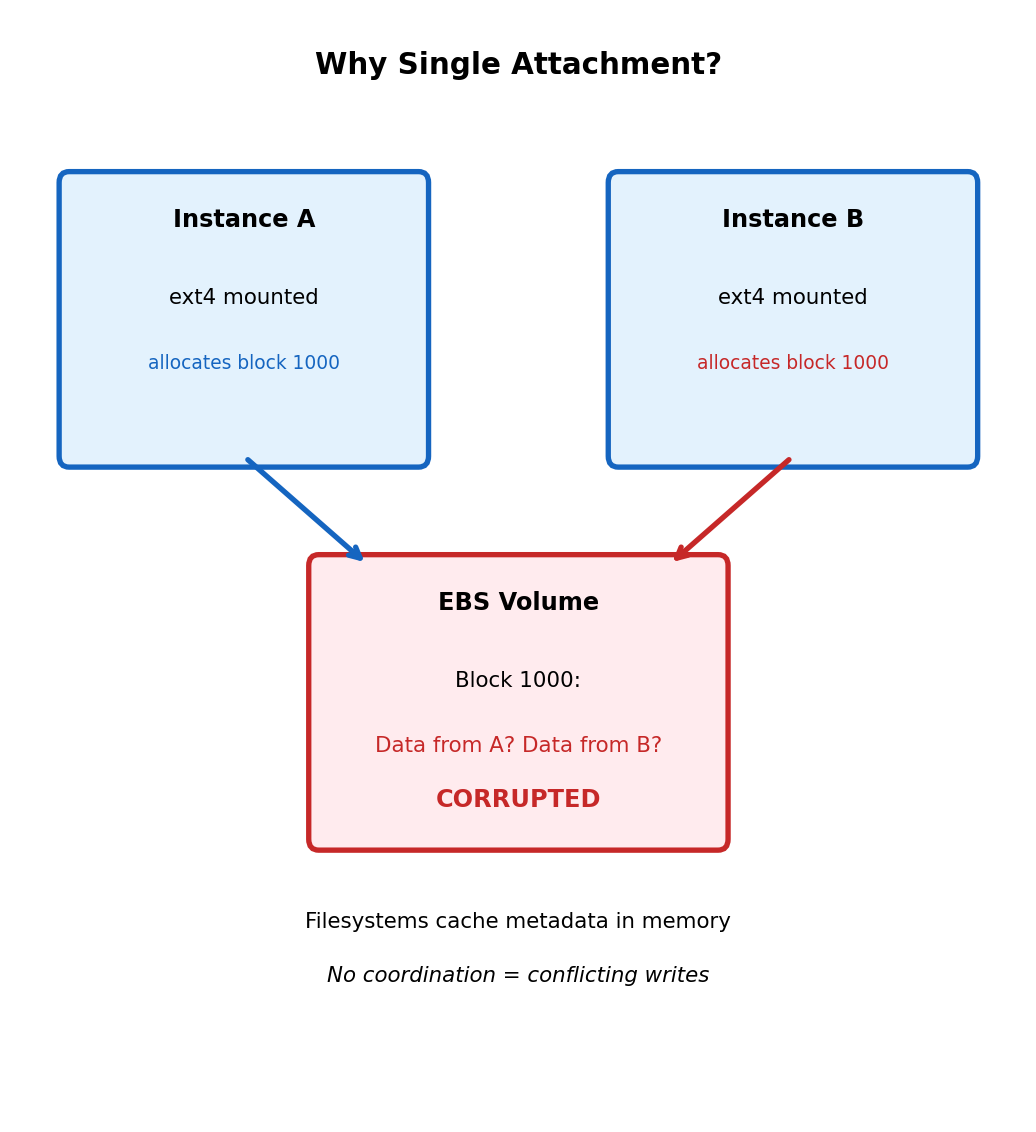
Filesystem design assumes exclusive access

Filesystems like ext4 maintain metadata structures:

  • Superblock: filesystem parameters
  • Inode tables: file metadata
  • Block allocation bitmaps: which blocks are free

These structures are cached in memory and written back to disk. Two instances mounting same volume:

  • Instance A allocates block 1000 for new file
  • Instance B (unaware) allocates block 1000 for different file
  • Both write different data to same location
  • Filesystem corruption guaranteed

EBS Multi-Attach (io1/io2 volumes only)

Multi-Attach allows attaching io1 or io2 volume to up to 16 instances. These are provisioned IOPS SSD volumes designed for high-performance workloads.

Requires cluster-aware filesystem (not ext4):

  • Shared-disk filesystems: GFS2, OCFS2
  • Application-level coordination: Clustered databases

Not general-purpose shared storage - specialized use case requiring explicit coordination.

Standard filesystems cannot coordinate across multiple hosts - they assume single writer.

File Storage Shares Filesystem Across Network

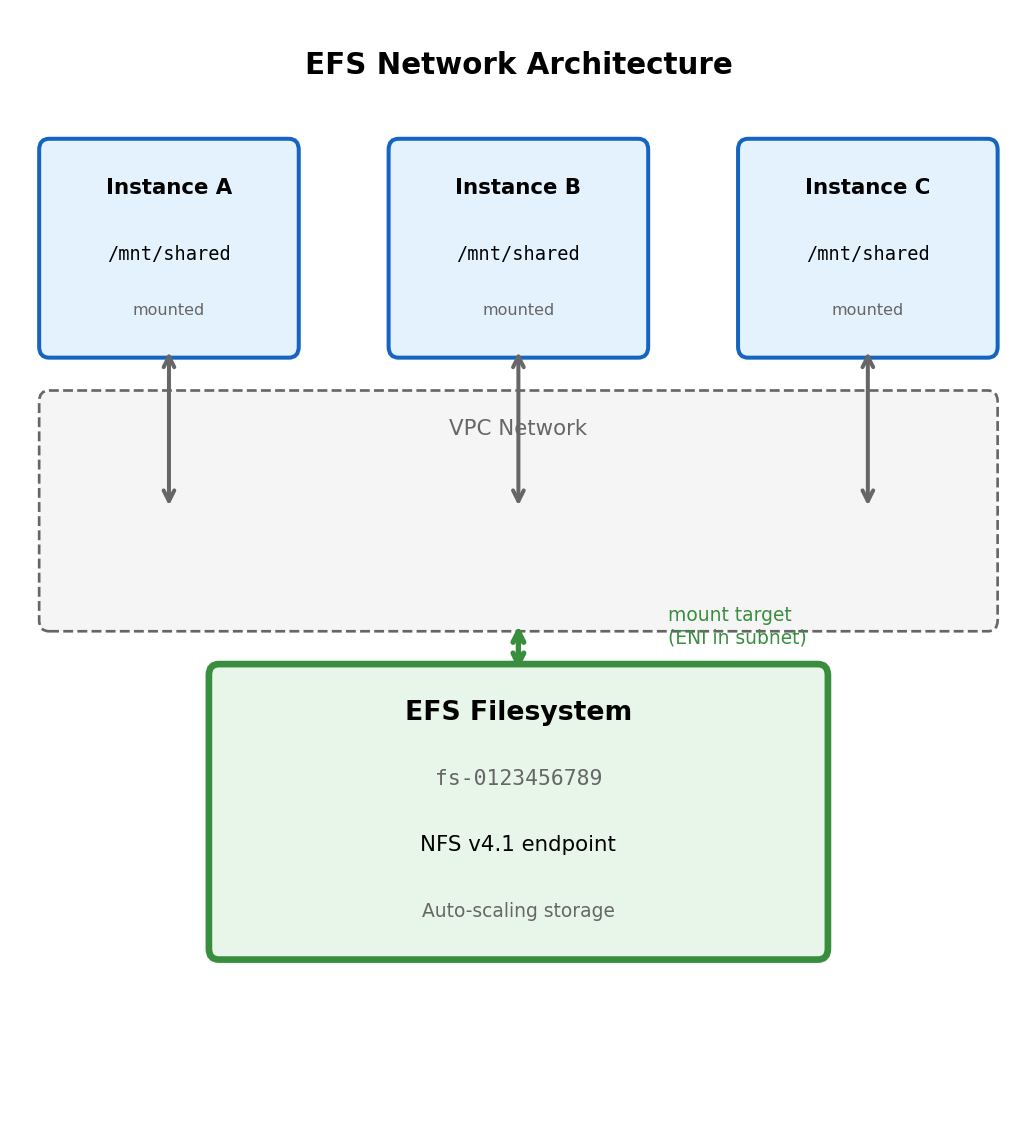
Network filesystem architecture

EFS (Elastic File System): Managed NFS service. Multiple instances connect to shared network endpoint (not attached like block storage).

# Mount EFS filesystem (NFS protocol)
$ sudo mount -t nfs4 \
    -o nfsvers=4.1,rsize=1048576,wsize=1048576 \
    fs-0123456789.efs.us-east-1.amazonaws.com:/ \
    /mnt/shared

Mount target fs-0123456789.efs.us-east-1.amazonaws.com: DNS name resolving to EFS infrastructure within VPC.

File operations traverse network

# Write on Instance A
with open('/mnt/shared/config.json', 'w') as f:
    json.dump(config, f)

# Read on Instance B (same filesystem)
with open('/mnt/shared/config.json', 'r') as f:
    config = json.load(f)  # Sees Instance A's write

Every read and write is a network operation to EFS service. The filesystem appears local but data travels over network.

NFS protocol handles coordination:

  • File locking across clients
  • Cache coherency
  • Concurrent access semantics

All instances connect to same EFS endpoint. Filesystem state is centralized in EFS service.

Network Filesystem Performance Characteristics

Latency comparison with local storage

Storage Type Read Latency Write Latency
Instance store (NVMe) ~0.1 ms ~0.1 ms
EBS gp3 ~1-2 ms ~1-2 ms
EFS General Purpose ~5-10 ms ~5-10 ms
EFS Max I/O ~10-25 ms ~10-25 ms

Every EFS operation crosses network, adds latency overhead compared to locally-attached storage.

Throughput scales with data size

EFS throughput depends on data stored:

  • Bursting mode: Baseline throughput + burst credits
  • Provisioned mode: Fixed throughput regardless of size
Data stored: 100 GB
Baseline: 5 MB/s (bursting mode)
Burst: Up to 100 MB/s (while credits available)

Data stored: 1 TB
Baseline: 50 MB/s

Small file operations

NFS protocol overhead per operation. Many small files = many round trips.

# Slow: 1000 small file reads
for i in range(1000):
    with open(f'/mnt/efs/file_{i}.txt') as f:
        data = f.read()  # Network round trip each

# Faster: Single large file
with open('/mnt/efs/large_file.bin') as f:
    data = f.read()  # One operation, streams data

EFS appropriate for: Shared configuration, content management, home directories.

Not appropriate for: Databases, high-throughput processing, latency-sensitive applications.

Object Storage Uses HTTP API Instead of Filesystem

S3 operations are HTTP requests

import boto3
s3 = boto3.client('s3')

# PUT object (HTTP PUT request)
s3.put_object(
    Bucket='my-bucket',
    Key='models/classifier.pkl',
    Body=open('model.pkl', 'rb')
)

# GET object (HTTP GET request)
response = s3.get_object(
    Bucket='my-bucket',
    Key='models/classifier.pkl'
)
data = response['Body'].read()

# DELETE object (HTTP DELETE request)
s3.delete_object(
    Bucket='my-bucket',
    Key='models/classifier.pkl'
)

No filesystem - HTTP semantics:

  • Address by bucket + key (like URL path)
  • No mount, no file handles
  • No directories (keys can contain / but it’s just a character)
  • No append (rewrite entire object)
  • No rename (copy to new key, delete old)
  • No locking (last write wins)

Accessible from anywhere with network:

EC2 instance, Lambda function, laptop, any HTTP client. No attachment, no VPC requirement (with public endpoint).

S3 Keys Are Flat Namespace With Path-Like Convention

Console displays folder hierarchy - API stores flat keys

AWS Console shows:

my-bucket/
├── models/
│   ├── v1/
│   │   └── classifier.pkl
│   └── v2/
│       └── classifier.pkl
└── uploads/
    └── user123/
        └── document.pdf

Actual S3 contents (three objects, flat):

Key: models/v1/classifier.pkl
Key: models/v2/classifier.pkl
Key: uploads/user123/document.pdf

No “models” folder exists. The / characters are part of the key string, not directory separators.

Listing with prefix filter:

# "List directory contents" = list objects with prefix
response = s3.list_objects_v2(
    Bucket='my-bucket',
    Prefix='models/'
)

for obj in response['Contents']:
    print(obj['Key'])
# models/v1/classifier.pkl
# models/v2/classifier.pkl

Delimiter simulates directory listing:

response = s3.list_objects_v2(
    Bucket='my-bucket',
    Prefix='models/',
    Delimiter='/'
)
# CommonPrefixes: ['models/v1/', 'models/v2/']
# Returns "subdirectory" prefixes without listing all objects

S3 Key Design Affects Query Efficiency

Key prefix determines what queries are efficient

# Key structure: {type}/{user_id}/{timestamp}_{filename}
# Example: uploads/user123/2025-01-15_document.pdf

# Efficient: All uploads for specific user
s3.list_objects_v2(
    Bucket='app-data',
    Prefix='uploads/user123/'
)
# S3 filters at storage layer, returns only matching objects

# Inefficient: All uploads from specific date
# No prefix helps - must scan all objects, filter client-side
response = s3.list_objects_v2(Bucket='app-data', Prefix='uploads/')
for obj in response['Contents']:
    if '2025-01-15' in obj['Key']:
        # Found one

Alternative key structure for date queries:

# Key structure: {type}/{date}/{user_id}_{filename}
# Example: uploads/2025-01-15/user123_document.pdf

# Now efficient: All uploads from specific date
s3.list_objects_v2(
    Bucket='app-data',
    Prefix='uploads/2025-01-15/'
)

# Now inefficient: All uploads for specific user
# Must scan all dates

Choose key structure based on primary access pattern. Cannot efficiently query by both user and date with single key structure.

Secondary access patterns may require maintaining separate key hierarchies (duplication) or external index (database).

S3 Provides Strong Read-After-Write Consistency

Write then read returns current data

# Process A: Write object
s3.put_object(
    Bucket='data',
    Key='results/job-123.json',
    Body=json.dumps({'status': 'complete', 'score': 0.94})
)

# Process B: Read immediately after
response = s3.get_object(
    Bucket='data',
    Key='results/job-123.json'
)
result = json.loads(response['Body'].read())
# Guaranteed to see Process A's write

Consistency guarantees:

Operation Sequence Guarantee
PUT → GET (same key) Strong: sees new data
DELETE → GET Strong: returns 404
PUT → LIST Eventual: may not appear immediately
Overwrite → GET Strong: sees new version

LIST operations may lag briefly

# Upload new object
s3.put_object(Bucket='data', Key='new-file.json', Body='{}')

# Immediate LIST might not include it
response = s3.list_objects_v2(Bucket='data', Prefix='')
# new-file.json may not appear in Contents yet

# But direct GET works immediately
s3.get_object(Bucket='data', Key='new-file.json')  # Succeeds

For coordination between processes, use direct GET with known key rather than LIST to discover objects.

Uploading Large Files: Multipart Upload

Single PUT has limits and reliability issues

  • Maximum single PUT: 5 GB
  • Large uploads over unreliable networks: Failure requires restart from beginning
  • No parallelization: Single stream to S3

Multipart upload splits file into parts

# boto3 handles multipart automatically for large files
s3.upload_file(
    Filename='large_model.tar.gz',  # 8 GB file
    Bucket='ml-artifacts',
    Key='models/large_model.tar.gz'
)
# Automatically uses multipart for files > 8 MB (configurable)

Multipart mechanics:

  1. Initiate multipart upload → receive UploadId
  2. Upload parts (5 MB - 5 GB each) with part numbers
  3. Parts can upload in parallel, retry individually
  4. Complete upload → S3 assembles parts into single object
# Explicit multipart control
from boto3.s3.transfer import TransferConfig

config = TransferConfig(
    multipart_threshold=100 * 1024 * 1024,  # Use multipart > 100 MB
    multipart_chunksize=50 * 1024 * 1024,   # 50 MB parts
    max_concurrency=10                       # 10 parallel uploads
)

s3.upload_file('huge_file.bin', 'bucket', 'key', Config=config)

Failed part retries only that part, not entire file. Parallel uploads improve throughput on high-bandwidth connections.

Presigned URLs Enable Direct Client-to-S3 Transfer

Without presigned URLs: All data flows through your server

# Client uploads to your API
@app.route('/upload', methods=['POST'])
def upload():
    file = request.files['document']
    # File bytes received by your server
    # Then uploaded to S3
    s3.upload_fileobj(file, 'bucket', f'uploads/{file.filename}')
    return {'status': 'uploaded'}

500 MB file: Consumes your server’s bandwidth, memory, CPU, and time.

With presigned URLs: Client uploads directly to S3

# Your API generates presigned URL (< 1 ms)
@app.route('/get-upload-url', methods=['POST'])
def get_upload_url():
    key = f"uploads/{uuid.uuid4()}/{request.json['filename']}"

    url = s3.generate_presigned_url(
        'put_object',
        Params={'Bucket': 'uploads-bucket', 'Key': key},
        ExpiresIn=3600  # URL valid for 1 hour
    )
    return {'upload_url': url, 'key': key}

# Client uploads directly to S3 using presigned URL
# Your server never handles the file bytes

Presigned URL contains embedded authorization:

https://uploads-bucket.s3.amazonaws.com/uploads/abc123/doc.pdf
  ?X-Amz-Algorithm=AWS4-HMAC-SHA256
  &X-Amz-Credential=AKIA.../us-east-1/s3/aws4_request
  &X-Amz-Date=20250115T100000Z
  &X-Amz-Expires=3600
  &X-Amz-Signature=a1b2c3d4...

Signature validates: Bucket, key, expiration time. Cannot be modified - S3 verifies signature.

IAM Roles Provide Automatic Credential Management

Credentials embedded in code or environment: Security risk

# Dangerous: Credentials in code
s3 = boto3.client('s3',
    aws_access_key_id='AKIAIOSFODNN7EXAMPLE',
    aws_secret_access_key='wJalrXUtnFEMI/K7MDENG/bPxRfiCYEXAMPLEKEY'
)
# Credentials visible in: git history, logs, error traces, process listing

IAM role attached to compute resource

# EC2 instance or Lambda with IAM role
import boto3

s3 = boto3.client('s3')  # No credentials specified
s3.upload_file('model.pkl', 'bucket', 'key')  # Works

boto3 automatically retrieves credentials from instance metadata service. Credentials rotate automatically (typically hourly). No secrets in code, environment variables, or configuration files.

IAM policy controls access:

{
  "Version": "2012-10-17",
  "Statement": [{
    "Effect": "Allow",
    "Action": ["s3:GetObject", "s3:PutObject"],
    "Resource": "arn:aws:s3:::ml-artifacts/models/*"
  }]
}

This policy: Allows read/write to models/ prefix in ml-artifacts bucket. Denies access to other prefixes, other buckets, delete operations.

Attach policy to IAM role, attach role to EC2 instance or Lambda function.

No secrets to manage, rotate, or leak. AWS handles credential lifecycle.

S3 Event Notifications Signal Object Changes

S3 can emit events when objects are created, deleted, or restored

Event configuration on bucket:

  • Event types: s3:ObjectCreated:*, s3:ObjectRemoved:*, s3:ObjectRestore:*
  • Filter by prefix: Only events for keys starting with uploads/
  • Filter by suffix: Only events for keys ending with .jpg

Event payload includes:

  • Bucket name
  • Object key
  • Object size
  • Event type and timestamp

This enables event-driven architectures: Object uploaded → trigger processing automatically. Integration with Lambda, SQS, and SNS covered in subsequent sections.

S3 Static Website Hosting

Serve static files directly from S3 bucket

Configure bucket for website hosting:

aws s3 website s3://my-site-bucket \
    --index-document index.html \
    --error-document error.html

Bucket contents:

my-site-bucket/
├── index.html
├── about.html
├── css/styles.css
├── js/app.js
└── images/logo.png

Access via website endpoint:

http://my-site-bucket.s3-website-us-east-1.amazonaws.com/

Browser requests index.html → S3 returns file contents.

Requires public access policy:

{
  "Version": "2012-10-17",
  "Statement": [{
    "Effect": "Allow",
    "Principal": "*",
    "Action": "s3:GetObject",
    "Resource": "arn:aws:s3:::my-site-bucket/*"
  }]
}

Anyone can read objects. Appropriate for public static content.

Direct S3 hosting: Development, internal tools. Production typically adds CloudFront for HTTPS, caching, custom domains - covered in integration section.

Choosing Storage Model

Block when application requires filesystem: Database storage, applications using file paths and standard I/O.

File when multiple instances need shared filesystem: Shared configuration, content management, legacy applications.

Object when HTTP API is acceptable: ML models, user uploads, static assets, backups, any blob storage.

Selection follows from access requirements, not preference.

Serverless Compute

Server Management in Traditional Deployment

EC2 deployment requires operational decisions:

  • Instance type selection (compute/memory balance)
  • Operating system installation and updates
  • Application runtime setup (Python, Node.js, etc.)
  • Security patches and maintenance windows
  • Scaling policy configuration
  • Health monitoring and alerting
  • Load balancer configuration

Your application runs on infrastructure you provision and maintain. The application is always resident - process starts at boot, listens for requests, handles them as they arrive.

Cost model: Pay for instance hours

Instance runs continuously whether handling 1000 requests/second or 0 requests.

# Check if your Flask app is running
$ ps aux | grep gunicorn
user  12345  0.1  1.2 gunicorn: master [app:app]
user  12346  0.0  0.8 gunicorn: worker [app:app]
user  12347  0.0  0.8 gunicorn: worker [app:app]

# It's running. Waiting for requests. Costing money.

The t3.medium running your API costs ~$30/month whether it handles traffic or sits idle.

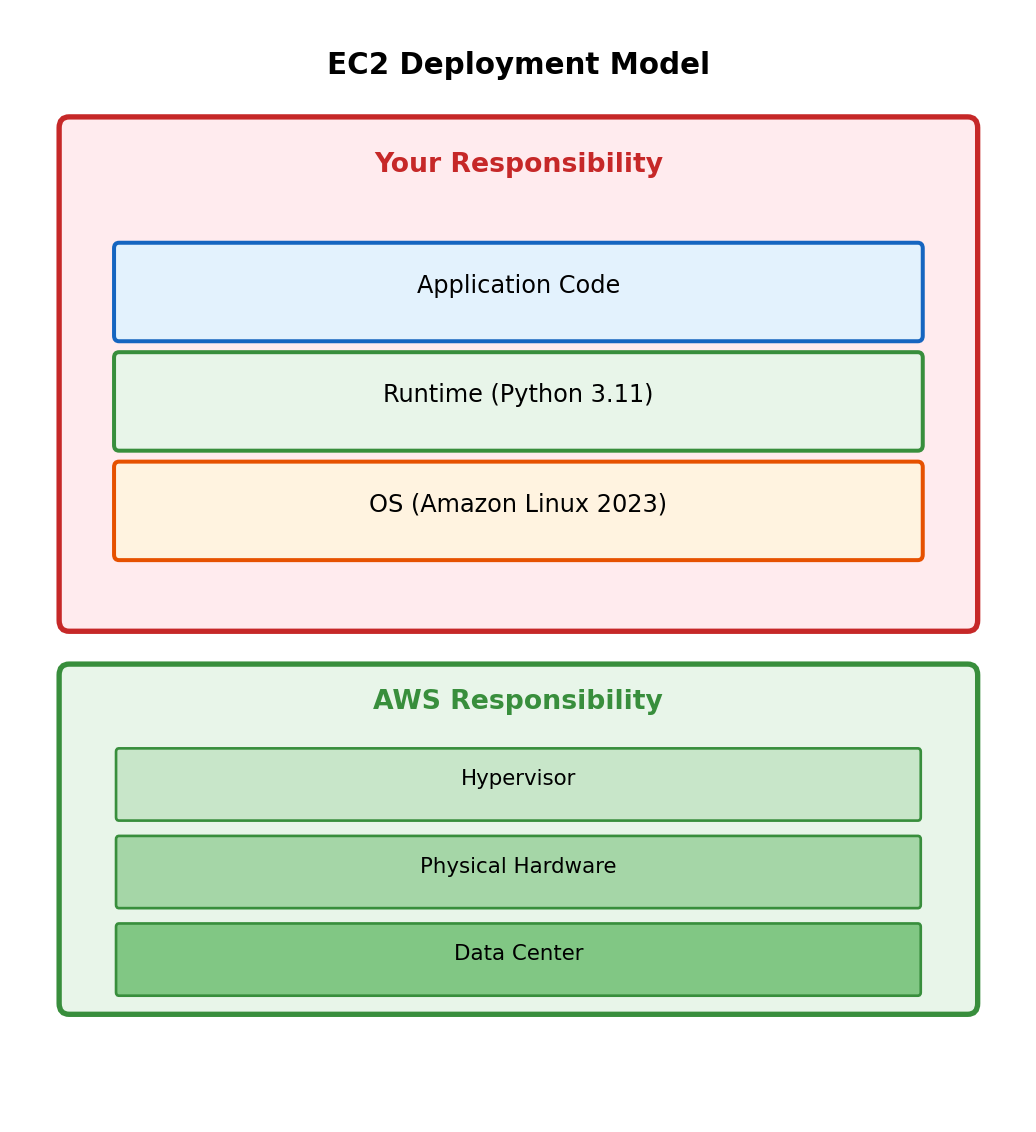
Shifting the Responsibility Boundary

What if AWS managed more of the stack?

Instead of provisioning an EC2 instance where your code runs continuously, you provide only the code. AWS handles:

  • Execution environment provisioning
  • Runtime installation and patching
  • Scaling (including to zero)
  • Server allocation and management

The trade-off:

You give up control over the execution environment in exchange for not managing it. No SSH access, no persistent processes, no direct filesystem.

Lambda function: Code as the deployment unit

# handler.py - This IS your entire deployment
def handler(event, context):
    """AWS invokes this function when triggered"""
    name = event.get('name', 'World')
    return {
        'statusCode': 200,
        'body': f'Hello, {name}!'
    }

No Flask, no gunicorn, no server configuration. You deploy this function. AWS runs it when something triggers it.

“Serverless” doesn’t mean no servers - it means servers aren’t your concern.

AWS manages runtime, patching, scaling, and infrastructure. You manage code.

Function Invocation vs. Process Lifecycle

EC2: Long-running process

# Flask app - process starts once, handles many requests
app = Flask(__name__)

@app.route('/greet')
def greet():
    return f'Hello, {request.args.get("name", "World")}!'

if __name__ == '__main__':
    app.run(host='0.0.0.0', port=5000)
    # Process runs until terminated
    # Maintains state between requests
    # Keeps connections open

The process initializes once. Each request uses the already-running process.

Lambda: Function invoked per trigger

# Lambda handler - invoked fresh for each trigger
def handler(event, context):
    # No persistent process
    # No listening socket
    # Function runs, returns, done
    return {
        'statusCode': 200,
        'body': f'Hello, {event.get("name", "World")}!'
    }

Your function is invoked when something triggers it. There’s no “main” loop, no server listening. Lambda is not running your code right now - it will run your code when triggered.

The event parameter contains trigger data:

  • HTTP request details (if triggered by API Gateway)
  • S3 object information (if triggered by S3 event)
  • Message body (if triggered by SQS message)
  • Custom JSON (if triggered directly)

What is an Execution Environment?

Lambda functions don’t run directly on bare hardware. AWS creates an execution environment - an isolated container-like sandbox for your code.

Execution environment provides:

  • Runtime (Python 3.11, Node.js 20, etc.)
  • Your deployed code (handler + dependencies)
  • Allocated memory (128 MB - 10 GB, you configure)
  • Temporary filesystem (/tmp, 512 MB - 10 GB)
  • Environment variables you configure
  • AWS SDK for your runtime

Execution environment isolation:

  • Each environment isolated from others
  • Cannot see or affect other functions
  • Cannot see concurrent invocations of same function
# Your handler runs inside the execution environment
def handler(event, context):
    # context provides environment information
    print(f"Request ID: {context.aws_request_id}")
    print(f"Memory limit: {context.memory_limit_in_mb} MB")
    print(f"Time remaining: {context.get_remaining_time_in_millis()} ms")

    # Do work
    return {'statusCode': 200, 'body': 'Done'}

context object provides invocation and environment information.

The execution environment is the sandbox where your function runs. You configure its resources; AWS manages its lifecycle.

Cold Start: Creating a New Execution Environment

First invocation creates the environment

No suitable execution environment exists → Lambda must create one. This is a cold start.

Cold start phases:

  1. Environment creation - AWS allocates resources, creates the sandbox
  2. Code download - Your deployment package downloaded from S3
  3. Runtime initialization - Python interpreter starts, loads modules
  4. Handler initialization - Code outside handler function runs
# handler.py
import json
import boto3
import heavy_ml_library  # Imported during cold start

# This runs ONCE during cold start, not per invocation
s3_client = boto3.client('s3')
model = heavy_ml_library.load_model('model.pkl')

def handler(event, context):
    # This runs on EVERY invocation
    result = model.predict(event['data'])
    return {'statusCode': 200, 'body': json.dumps(result)}

Imports and module-level code execute during initialization. handler function executes on each invocation.

Cold start duration depends on:

  • Deployment package size
  • Number and size of dependencies
  • Initialization code complexity
  • Runtime choice (Python, Java, Node.js differ)
  • Memory allocation (more memory = faster CPU = faster init)

Warm Invocation: Reusing Execution Environments

AWS keeps execution environments alive

After function completes, environment isn’t immediately destroyed. Kept available for subsequent invocations → can be reused.

Warm invocation skips initialization:

Cold:  [Create Env][Download][Init Runtime][Init Code][Handler]
Warm:  [Handler]

Warm invocations go directly to handler - no environment creation, downloads, or initialization.

Environment reuse implications:

# Module-level state persists between invocations
request_count = 0
db_connection = None

def handler(event, context):
    global request_count, db_connection

    request_count += 1  # Accumulates across warm invocations!
    print(f"This environment has handled {request_count} requests")

    # Connection reuse - don't recreate on every call
    if db_connection is None:
        db_connection = create_connection()  # Only on cold start

    return {'statusCode': 200}

Not guaranteed - AWS may terminate environment at any time. In practice, warm environments handle many invocations before termination.

Environment reuse is why:

  • Database connection pooling works
  • Cached data persists between calls
  • Global state accumulates (sometimes unexpectedly)

Patterns for Initialization Code

Move expensive operations outside handler

# GOOD: Initialize once, reuse across invocations
import boto3
import pickle

# These run once per cold start
s3 = boto3.client('s3')
dynamodb = boto3.resource('dynamodb')
table = dynamodb.Table('users')

# Load model once
response = s3.get_object(Bucket='models', Key='model.pkl')
model = pickle.loads(response['Body'].read())

def handler(event, context):
    # Fast: uses pre-initialized resources
    prediction = model.predict(event['features'])
    table.put_item(Item={'id': event['id'], 'result': prediction})
    return {'statusCode': 200}

Lazy initialization for conditional use

# Resources only initialized if needed
_heavy_client = None

def get_heavy_client():
    global _heavy_client
    if _heavy_client is None:
        _heavy_client = create_expensive_client()
    return _heavy_client

def handler(event, context):
    if event.get('needs_heavy_processing'):
        client = get_heavy_client()  # Only init if needed
        # ...

Understand what initializes when

import json
import boto3  # Import runs during init

# Module level - runs once per cold start
print("Cold start - initializing")
config = load_config()
client = boto3.client('s3')

def helper_function(x):
    # Defined at module level
    # Body runs when called
    return x * 2

def handler(event, context):
    # This runs on every invocation
    print("Handler executing")

    # Function call happens during invocation
    result = helper_function(event['value'])

    # But client was already created
    client.put_object(...)  # Uses existing client

Cold start output:

Cold start - initializing
Handler executing

Subsequent warm invocations:

Handler executing

The initialization message only appears on cold starts.

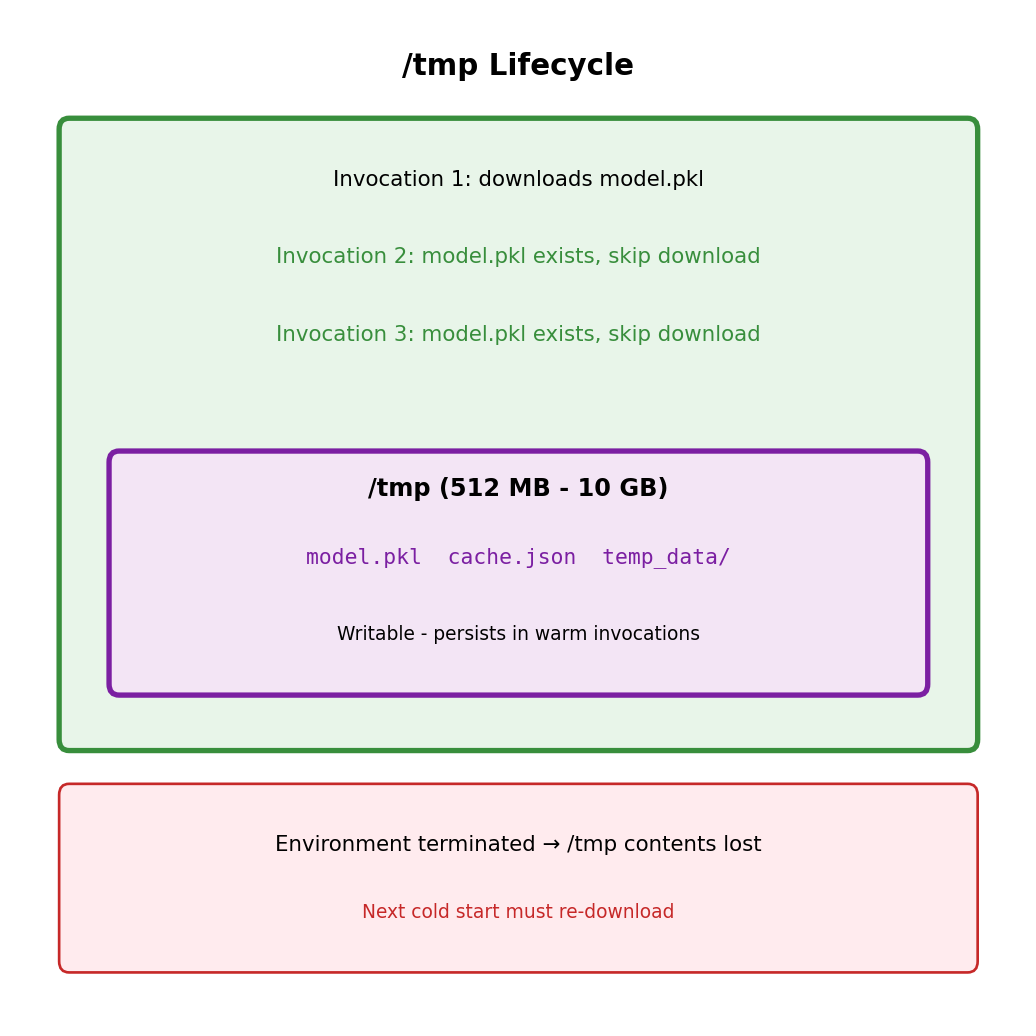
/tmp Storage: Ephemeral but Persistent Within Environment

Writable filesystem in the execution environment

/tmp directory: 512 MB to 10 GB (configurable). Only writable location - code package is read-only.

import os
import tempfile

def handler(event, context):
    # Can write to /tmp
    with open('/tmp/cache.json', 'w') as f:
        json.dump(event, f)

    # Can read it back
    with open('/tmp/cache.json', 'r') as f:
        data = json.load(f)

    # Check space
    statvfs = os.statvfs('/tmp')
    available_mb = (statvfs.f_frsize * statvfs.f_bavail) / (1024 * 1024)
    print(f"Available /tmp space: {available_mb:.1f} MB")

    return {'statusCode': 200}

Persistence characteristics:

  • Persists across warm invocations (same environment)
  • Lost when environment terminates
  • Not shared between concurrent invocations (separate environments)
# Pattern: Check if cached before downloading
model_path = '/tmp/model.pkl'

if not os.path.exists(model_path):
    # Cold start or model not cached
    s3.download_file('bucket', 'model.pkl', model_path)

# Now use model_path - either downloaded or from cache
model = load_model(model_path)

Use for: cached downloads, intermediate processing, temporary data. Don’t rely on for persistence - environment termination not in your control.

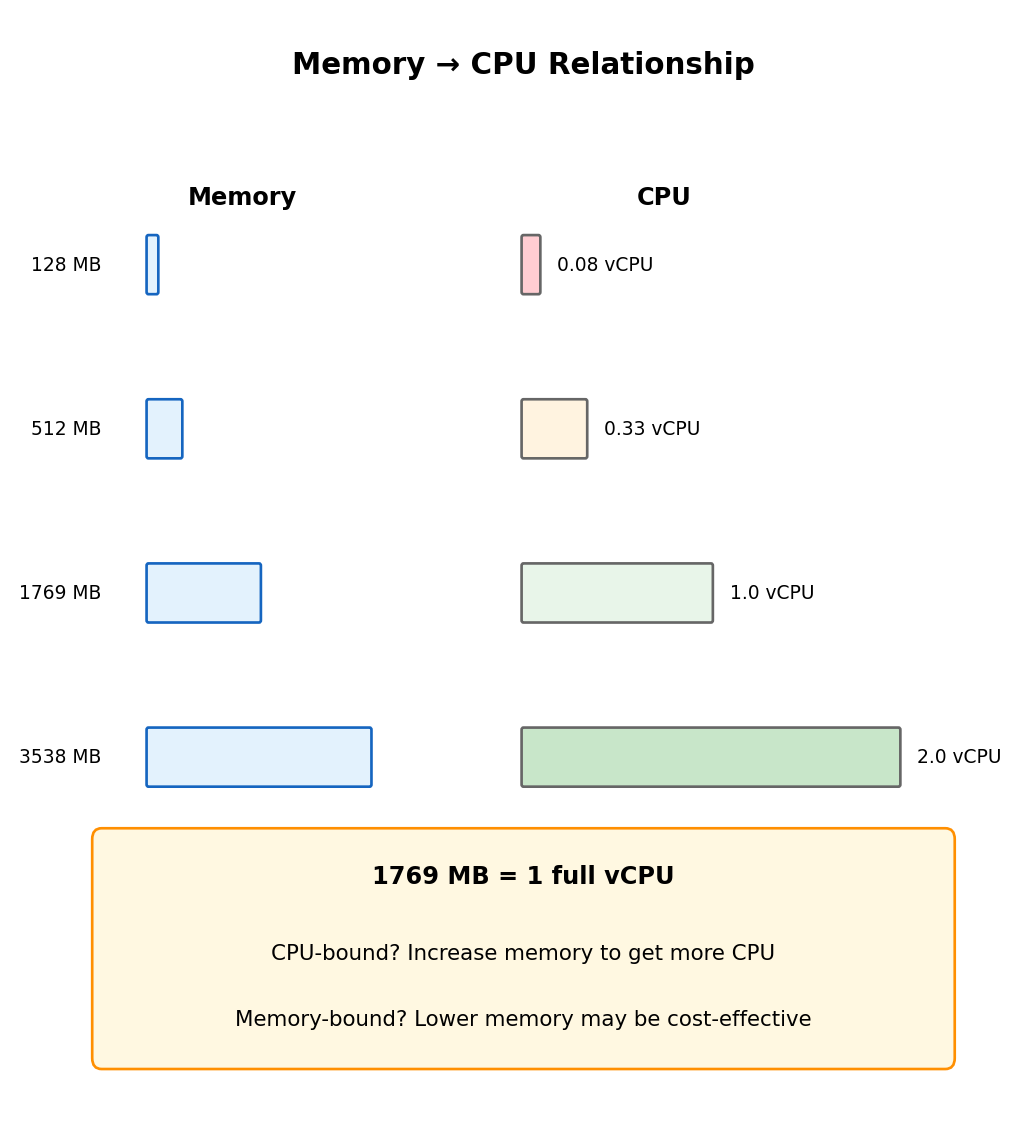
Memory Configuration Determines CPU Allocation

Memory and CPU are proportionally coupled

Configure memory (128 MB to 10 GB). Lambda allocates CPU proportionally - no direct CPU selection.

Memory vCPU Equivalent
128 MB ~0.08 vCPU
512 MB ~0.33 vCPU
1769 MB 1 vCPU
3538 MB 2 vCPU
10240 MB 6 vCPU

Implication: CPU-bound work (ML inference, image processing) needs more memory to get more CPU - even if the work doesn’t need the memory.

# If this is slow at 512 MB
def handler(event, context):
    # CPU-intensive work
    result = expensive_computation(event['data'])
    return result

# Increasing to 2048 MB makes it ~4x faster
# Not because we need memory, but because we get more CPU

Memory also affects cold start speed:

Higher memory = more CPU = faster initialization. Heavy imports may have faster cold starts at higher memory - potentially reducing total cost despite higher per-ms price.

Timeout: Hard Limit on Execution Duration

Functions have a maximum execution time

Configurable: 1 second to 15 minutes. Function doesn’t complete in time → Lambda terminates it.

def handler(event, context):
    # Check remaining time
    remaining_ms = context.get_remaining_time_in_millis()
    print(f"Time remaining: {remaining_ms} ms")

    # Long-running work
    for item in event['items']:
        if context.get_remaining_time_in_millis() < 5000:
            # Less than 5 seconds left - stop gracefully
            return {
                'statusCode': 200,
                'body': 'Partial completion - timeout approaching'
            }
        process_item(item)

    return {'statusCode': 200, 'body': 'Complete'}

Timeout termination:

  • Function stops immediately (mid-execution)
  • No cleanup code runs
  • Invocation marked as error
  • Any partial work may be lost

Setting appropriate timeouts:

  • Too short: unnecessary failures
  • Too long: hung functions consume resources, cost money
  • Rule of thumb: expected duration + buffer for variability

Typical values: API handlers 10-30s, batch processing up to 15 min. Need longer? Use Step Functions or break into smaller pieces.

Environment Variables and Configuration

Configuration without code changes

Environment variables: different configurations per deployment stage, no code changes.

import os

# Read configuration from environment
TABLE_NAME = os.environ['DYNAMODB_TABLE']
LOG_LEVEL = os.environ.get('LOG_LEVEL', 'INFO')
API_ENDPOINT = os.environ['EXTERNAL_API_URL']

def handler(event, context):
    # Use configuration
    dynamodb.Table(TABLE_NAME).put_item(...)

Set via console, CLI, or infrastructure code:

aws lambda update-function-configuration \
    --function-name my-function \
    --environment "Variables={DYNAMODB_TABLE=prod-users,LOG_LEVEL=WARNING}"

Environment per stage:

Variable Development Production
DYNAMODB_TABLE dev-users prod-users
LOG_LEVEL DEBUG WARNING
API_ENDPOINT https://sandbox.api.com https://api.com

Same code, different configuration per deployment.

Secrets handling

Environment variables visible in console and logs. For sensitive values → AWS Secrets Manager or Parameter Store.

import boto3
import os

# NOT this - secret visible in Lambda console
API_KEY = os.environ['API_KEY']  # Visible!

# Better - retrieve at runtime
secrets = boto3.client('secretsmanager')

def get_api_key():
    response = secrets.get_secret_value(
        SecretId='my-api-key'
    )
    return response['SecretString']

# Can cache in module scope for reuse
_api_key = None

def handler(event, context):
    global _api_key
    if _api_key is None:
        _api_key = get_api_key()

    # Use _api_key securely

Environment variables: Non-sensitive configuration (table names, endpoints, feature flags).

Secrets Manager: Credentials, API keys, connection strings.

Layers: Shared Code Across Functions

Deployment package structure

Lambda code lives in a deployment package - handler plus dependencies:

function.zip
├── handler.py
├── numpy/
├── pandas/
└── sklearn/

Multiple functions with same dependencies → each includes them separately.

Layers separate shared dependencies

Layer: ZIP archive with libraries, custom runtimes, or other dependencies. Functions reference layers instead of bundling everything.

function.zip
└── handler.py
ml-dependencies-layer.zip
├── numpy/
├── pandas/
└── sklearn/
# Function just imports - layer provides the packages
import numpy as np
import pandas as pd
from sklearn import ensemble

def handler(event, context):
    # Libraries from layer are available
    df = pd.DataFrame(event['data'])
    ...

Layer benefits:

  • Smaller function packages (faster deploys)
  • Share dependencies across functions
  • Update dependencies separately from code
  • AWS provides managed layers (e.g., pandas, numpy)

Functions can use up to 5 layers. Total unzipped size (function + layers) limited to 250 MB.

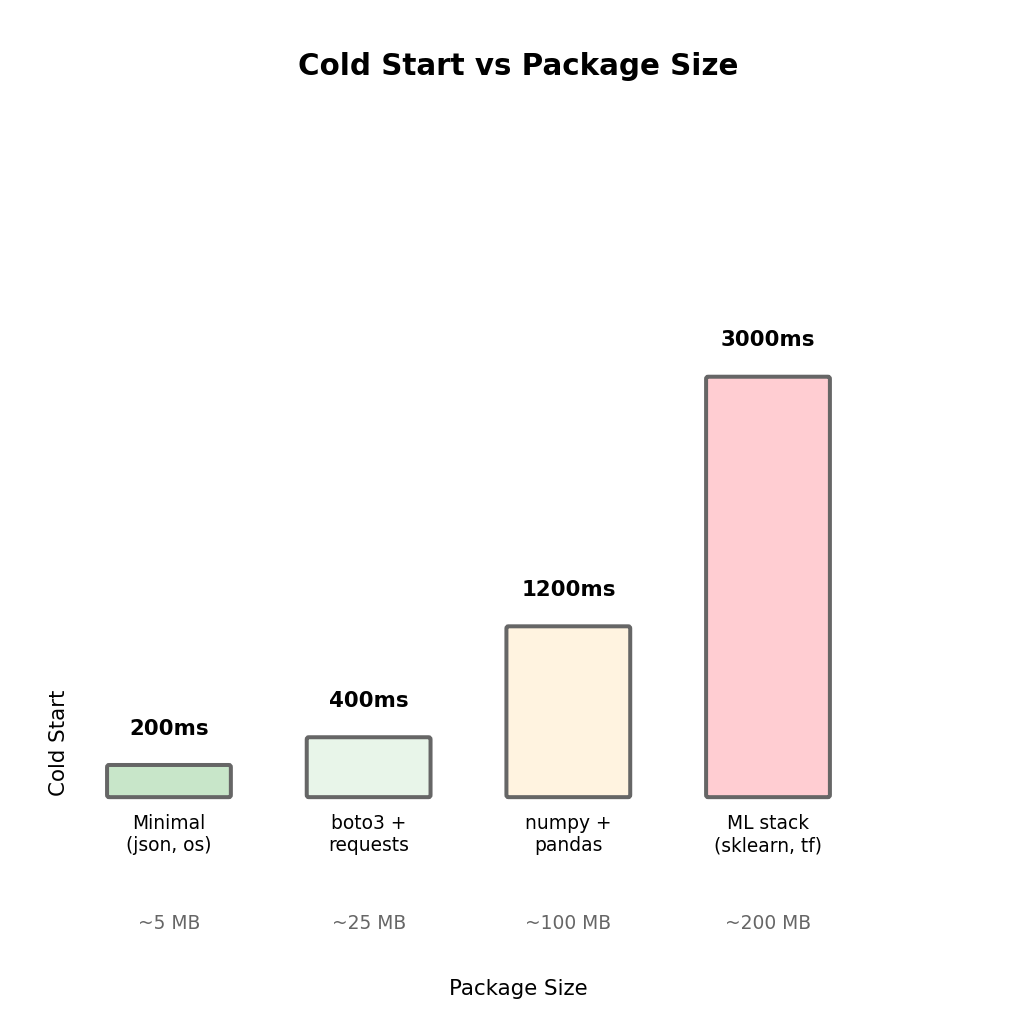
Dependency Size Affects Cold Start

Cold start must download and load your code. More dependencies means:

  • Larger download
  • More imports to process
  • More memory to load modules

Larger packages = longer cold starts

# Minimal dependencies - fast cold start (~200ms)
import json

def handler(event, context):
    return {'statusCode': 200, 'body': json.dumps(event)}
# Heavy dependencies - slow cold start (~2000ms)
import numpy as np
import pandas as pd
from sklearn.ensemble import RandomForestClassifier
import tensorflow as tf

def handler(event, context):
    # ...

Import granularity matters:

# Imports entire sklearn package
from sklearn import *

# Only loads ensemble module
from sklearn.ensemble import RandomForestClassifier

Lazy imports defer cost to when needed:

def handler(event, context):
    if event.get('type') == 'heavy':
        import heavy_library  # Only import when needed
        return heavy_library.process(event)
    return simple_response(event)

The relationship isn’t linear - some libraries are particularly slow to import (pandas, tensorflow) due to their own initialization logic.

Concurrency: Parallel Execution Environments

When Lambda receives concurrent triggers, it creates additional execution environments. Each concurrent invocation runs in its own isolated environment.

Multiple triggers can arrive simultaneously

Time 0:    Trigger 1 arrives    → Environment A handles it
Time 10ms: Trigger 2 arrives    → Environment B handles it (A still busy)
Time 20ms: Trigger 3 arrives    → Environment C handles it
Time 50ms: Trigger 1 completes  → Environment A becomes free
Time 60ms: Trigger 4 arrives    → Environment A handles it (reused)

Concurrency scaling:

  • Lambda automatically creates environments as needed
  • Scales from 0 to thousands concurrently
  • Each new environment incurs cold start
  • Default account limit: 1000 concurrent executions

Account-level limit:

All Lambda functions in your AWS account share a concurrency pool. If you have 10 functions and 1000 limit, they collectively can’t exceed 1000 concurrent executions.

# If this function uses 500 concurrency at peak...
def high_traffic_handler(event, context):
    ...

# ...other functions share the remaining 500
def other_handler(event, context):
    ...

Reserved and Provisioned Concurrency

These features exist but add cost and complexity. Most Lambda workloads don’t need them - understand when they’re actually warranted.

Reserved concurrency: Guarantee + Limit

Reserve a portion of account concurrency for specific function. Other functions cannot consume this allocation.

Account limit: 1000
Function A reserved: 200
Function B reserved: 100
Unreserved pool: 700

Function A can use up to 200 (guaranteed)
Function A cannot exceed 200 (limited)
Other functions share remaining 700

Use reserved concurrency when:

  • Function could overwhelm downstream systems without limit
  • Function is critical and must have guaranteed capacity
  • You need to prevent one function from starving others

Not needed when: Default scaling behavior is acceptable and downstream systems can handle the load.

Provisioned concurrency: Eliminate cold starts

Keep N execution environments initialized and ready. All invocations up to N are warm.

Provisioned: 10 environments

Invocations 1-10:  Instant (pre-warmed)
Invocation 11+:    May cold start (scales beyond provisioned)

The cost trade-off:

  • You pay for provisioned environments even with zero invocations
  • Essentially converts Lambda back toward EC2’s cost model
  • Negates much of Lambda’s cost advantage for variable traffic

Use provisioned concurrency only when:

  • User-facing API where cold start latency is truly unacceptable
  • Traffic pattern is predictable enough to provision correctly
  • Cost of provisioning is justified by latency requirements

Not needed for: Background processing, async workloads, internal tools, or any function where occasional cold start latency is acceptable.

Lambda Pricing Model

Two pricing components:

  1. Request charge: Per invocation
    • $0.20 per 1 million requests
    • Each trigger = one request
  2. Duration charge: Per GB-second
    • $0.0000166667 per GB-second
    • GB-second = (memory allocated in GB) × (execution time in seconds)

Example calculation:

Function configuration:
- Memory: 512 MB (0.5 GB)
- Average execution time: 200 ms (0.2 seconds)
- Invocations per month: 1,000,000

Request charges:
  1,000,000 requests × $0.20/million = $0.20

Duration charges:
  GB-seconds = 0.5 GB × 0.2 sec × 1,000,000 = 100,000 GB-s
  100,000 × $0.0000166667 = $1.67

Total monthly cost: $0.20 + $1.67 = $1.87

Free tier (per month):

  • 1 million requests
  • 400,000 GB-seconds

Many low-traffic applications fit entirely in free tier.

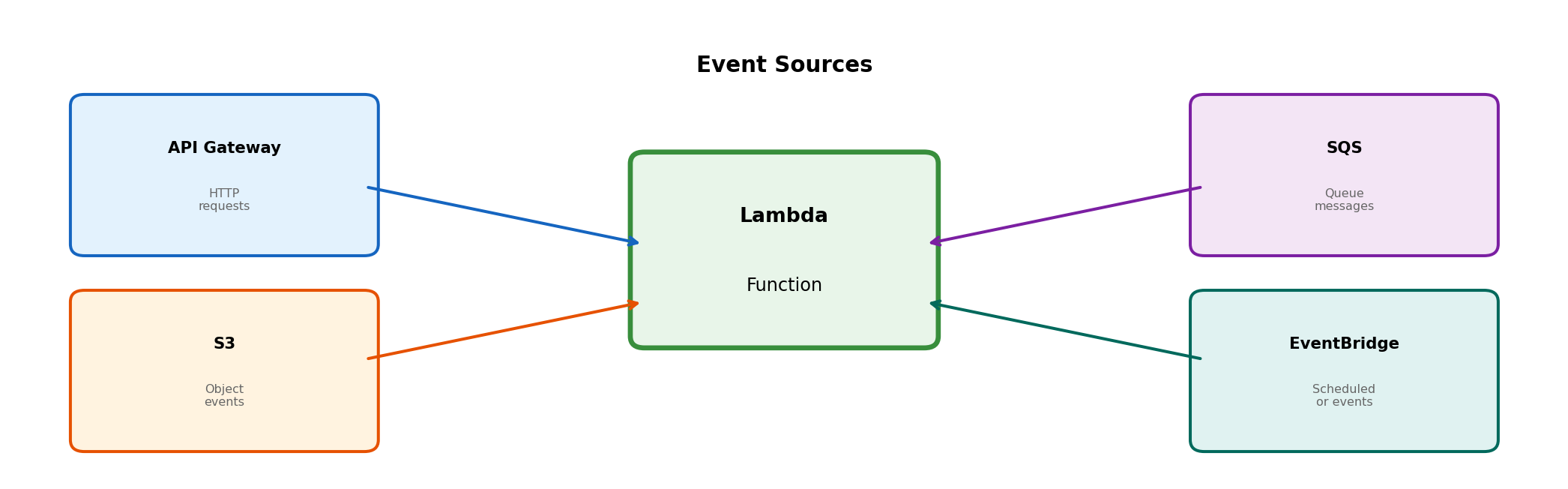
Event Sources That Can Trigger Lambda

Lambda functions execute in response to events. These events come from various sources, each delivering data in a specific format to your handler.

Each source has different characteristics:

Source Invocation Type Use Case
API Gateway Synchronous - waits for response HTTP APIs, webhooks
S3 Asynchronous - fire and forget File processing, uploads
SQS Poll-based - Lambda pulls messages Work queues, decoupling
EventBridge Asynchronous Scheduled tasks, event routing

The invocation type affects how errors are handled and how your function should respond.

HTTP Requests via API Gateway

API Gateway: HTTP endpoint in front of Lambda

AWS service that accepts HTTP requests, routes to backend services including Lambda. Without it, Lambda has no HTTP endpoint - function exists but no URL to call it.

Integration flow:

  1. Client sends HTTP request to API Gateway URL
  2. API Gateway transforms request into Lambda event
  3. API Gateway invokes Lambda function (synchronous)
  4. Lambda returns response
  5. API Gateway transforms response to HTTP response
  6. Client receives HTTP response
Client → API Gateway → Lambda → Response → Client
        (HTTP)        (invoke) (return)   (HTTP)

API Gateway handles:

  • HTTPS termination (SSL/TLS)
  • Request validation
  • Authentication/authorization (optional)
  • Rate limiting (optional)
  • CORS headers

Lambda handles:

  • Business logic
  • Response generation

API Gateway Event Structure

When API Gateway invokes your Lambda function, it sends an event object containing request details:

def handler(event, context):
    # event contains the HTTP request details

    # HTTP method and path
    http_method = event['httpMethod']  # 'GET', 'POST', etc.
    path = event['path']               # '/users/123'

    # Query string parameters
    params = event.get('queryStringParameters') or {}
    page = params.get('page', '1')

    # Request headers
    headers = event.get('headers') or {}
    auth_token = headers.get('Authorization')
    content_type = headers.get('Content-Type')

    # Request body (for POST/PUT)
    body = event.get('body')  # String - parse JSON if needed
    if body and content_type == 'application/json':
        import json
        data = json.loads(body)

    # Path parameters (from URL like /users/{id})
    path_params = event.get('pathParameters') or {}
    user_id = path_params.get('id')

    # Return HTTP response
    return {
        'statusCode': 200,
        'headers': {
            'Content-Type': 'application/json'
        },
        'body': json.dumps({'user_id': user_id, 'page': page})
    }

The response must include statusCode and body. Headers are optional but commonly needed for Content-Type and CORS.

S3 Events: Object-Triggered Invocation

S3 can trigger Lambda on object changes

Configure bucket to emit events on object create/delete/modify. Lambda subscribes to these events.

Common trigger patterns:

  • s3:ObjectCreated:* - Any object creation (PUT, POST, Copy)
  • s3:ObjectRemoved:* - Any object deletion
  • s3:ObjectCreated:Put - Specifically PUT operations

Event configuration can filter by prefix/suffix:

Trigger: s3:ObjectCreated:*
Prefix: uploads/
Suffix: .jpg

Only triggers for: uploads/*.jpg
Does not trigger for: uploads/doc.pdf or images/photo.jpg

Invocation is asynchronous:

S3 emits event and continues - doesn’t wait for Lambda. If Lambda fails, S3 doesn’t know or retry. Lambda service handles retries (twice by default).

Use cases:

  • Image uploaded → generate thumbnails
  • CSV uploaded → process and load to database
  • Log file uploaded → parse and index
  • Backup file uploaded → validate and catalog

S3 Event Structure

When S3 triggers your Lambda, the event contains information about what changed:

def handler(event, context):
    # event['Records'] is a list - can batch multiple events
    for record in event['Records']:
        # Event type
        event_name = record['eventName']  # 'ObjectCreated:Put'

        # Bucket information
        bucket = record['s3']['bucket']['name']  # 'my-uploads-bucket'

        # Object information
        key = record['s3']['object']['key']      # 'uploads/photo.jpg'
        size = record['s3']['object']['size']    # 1234567 (bytes)

        # Key is URL-encoded - decode it
        from urllib.parse import unquote_plus
        decoded_key = unquote_plus(key)  # Handles spaces, special chars

        # Now process the object
        if event_name.startswith('ObjectCreated'):
            process_new_object(bucket, decoded_key, size)
        elif event_name.startswith('ObjectRemoved'):
            cleanup_removed_object(bucket, decoded_key)

def process_new_object(bucket, key, size):
    import boto3
    s3 = boto3.client('s3')

    # Download the object that triggered this event
    response = s3.get_object(Bucket=bucket, Key=key)
    content = response['Body'].read()

    # Process content...

The event tells you what changed. Your handler retrieves the actual content from S3 if needed.

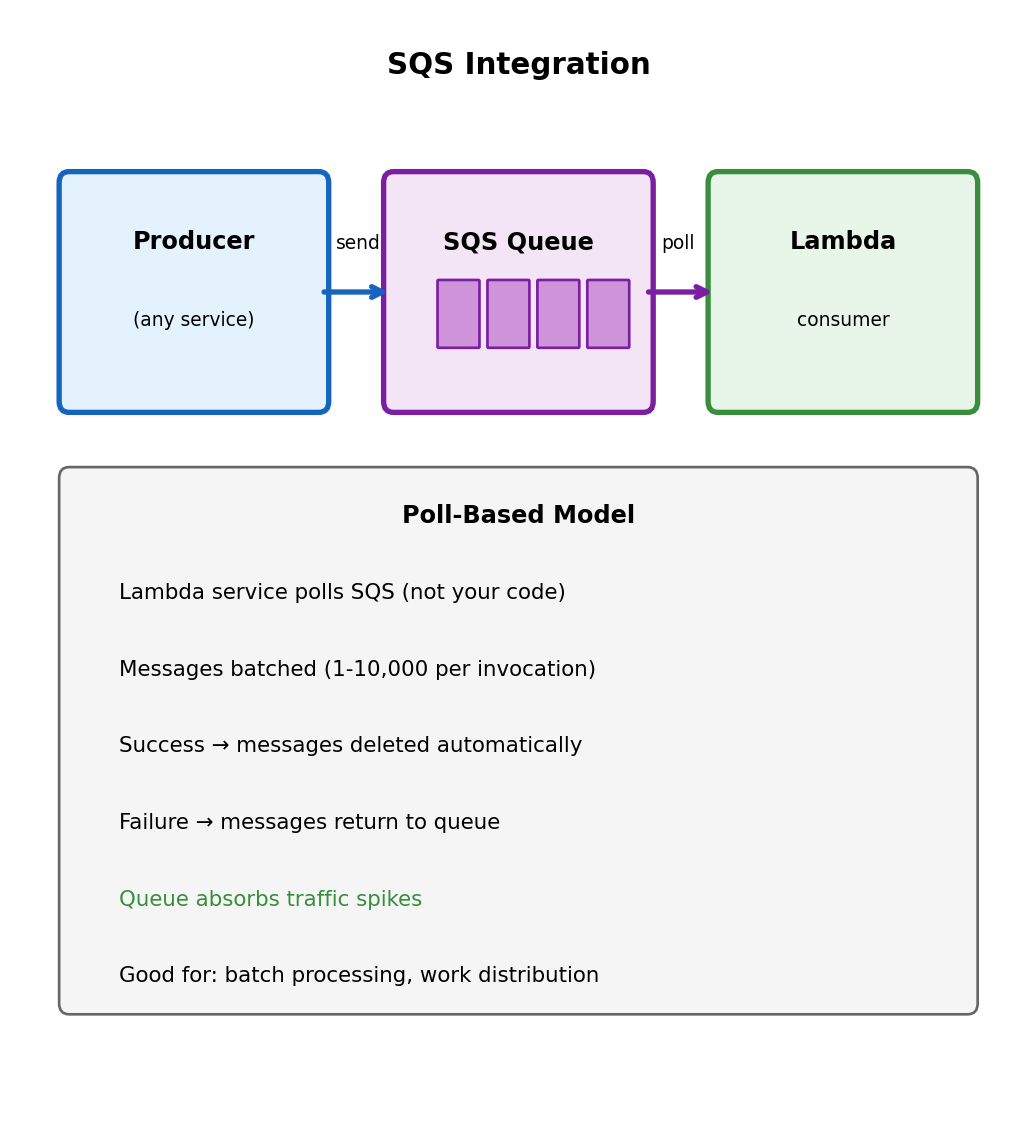
SQS: Poll-Based Invocation

SQS (Simple Queue Service) decouples producers and consumers

Messages placed in queue. Lambda polls and processes. Different from API Gateway (synchronous push) and S3 (asynchronous push).

Why queue-based processing?

  • Decoupling: Producer doesn’t need to know about consumer
  • Buffering: Queue absorbs traffic spikes
  • Retry: Failed messages return to queue
  • Rate control: Control how fast Lambda processes

Lambda polls SQS (you don’t):

Lambda service manages polling. Messages available → invokes your function with a batch.

def handler(event, context):
    # event['Records'] contains batch of messages
    for record in event['Records']:
        body = record['body']  # Message content

        # Process message
        data = json.loads(body)
        process_item(data)

    # Successful return = messages deleted from queue
    # Exception = messages return to queue for retry

Batch processing:

Multiple messages per invocation (configurable 1-10,000). Efficient for high-volume queues - one cold start handles many messages.

When Lambda Fits

Lambda is not universally better or worse than EC2 - it has characteristics that fit certain patterns well.

Lambda fits well:

Event-driven processing

  • File uploaded → process it
  • HTTP request → respond
  • Message received → handle it
  • Schedule → run task

Variable/unpredictable traffic

  • Sporadic API calls
  • Batch jobs that run occasionally
  • Development/testing environments
  • New products with unknown demand

Short-duration tasks

  • API handlers (seconds)
  • Data transformation
  • Notification sending
  • Webhook processing

Operations you don’t want to manage

  • No patching
  • No capacity planning
  • No scaling configuration
  • No server monitoring

Lambda fits poorly:

Long-running processes

  • 15 minute maximum
  • No persistent connections
  • No background threads that survive invocation

Consistent high throughput

  • EC2 may be more cost-effective
  • Reserved capacity costs add up
  • Cold starts under load

Specific runtime requirements

  • Custom OS configuration
  • Specific library versions
  • Hardware requirements (GPU)

Stateful applications

  • No persistent local state
  • No filesystem persistence
  • Connection pooling is limited

Latency-critical without provisioning

  • Cold starts add latency
  • Provisioned concurrency adds cost

The decision isn’t “Lambda vs EC2” but rather “which pattern fits this workload’s characteristics?”

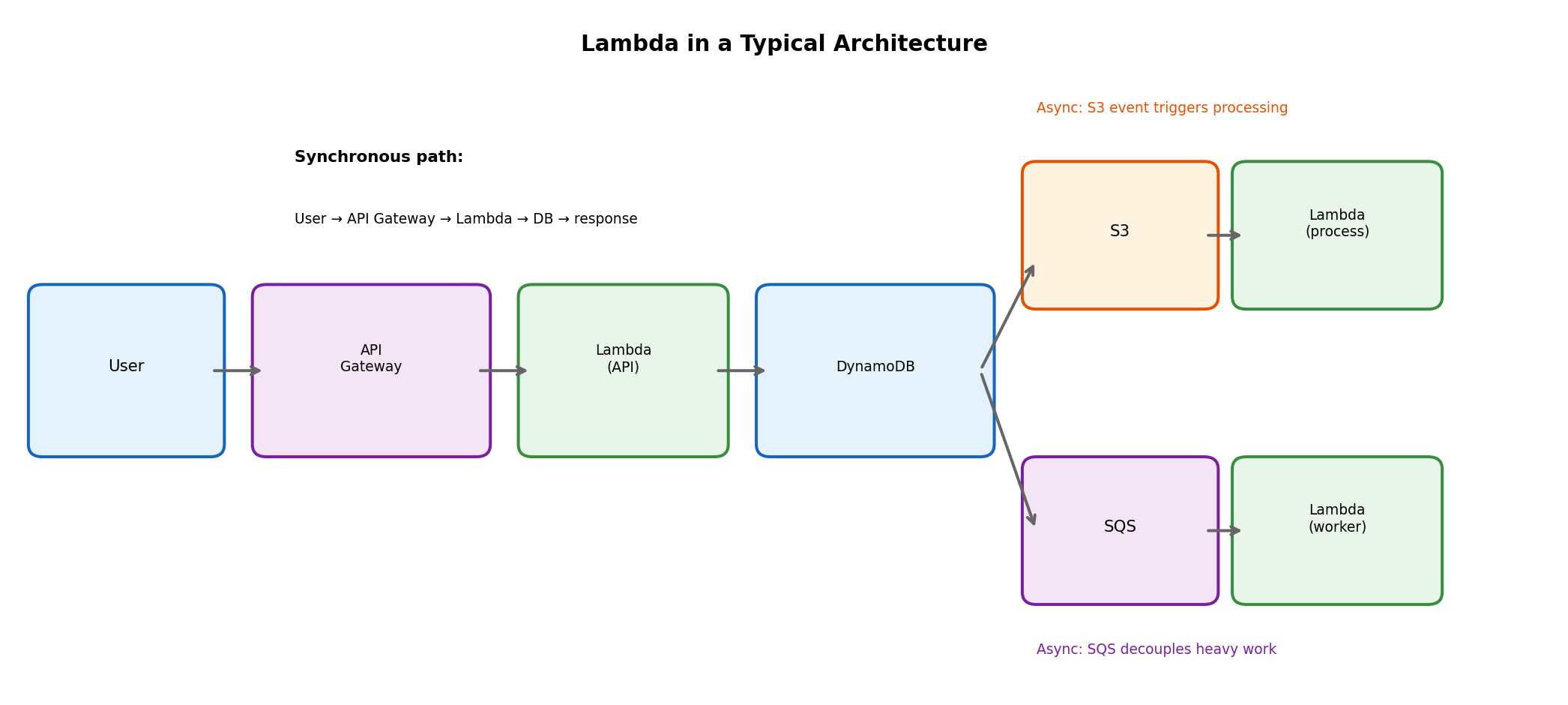
Lambda in System Architecture

Lambda functions rarely exist in isolation - they connect to other services to form complete systems.

Common integration patterns:

  • API Gateway → Lambda → DynamoDB: Synchronous API handling
  • S3 → Lambda: Trigger processing when files arrive
  • SQS → Lambda: Queue-based work processing
  • EventBridge → Lambda: Scheduled tasks, event routing
  • Lambda → SQS/SNS: Decouple downstream processing

Each function small and focused. Complex workflows: multiple functions with services between them.

Asynchronous Processing

Synchronous Communication: Tight Coupling

Direct call model

def handle_request(request):
    order = parse_order(request)
    result = process_order(order)  # 30 seconds
    return result

HTTP connection held entire 30 seconds.

Coupling consequences:

  • Client blocks until completion
  • Server crash mid-processing → work lost
  • Traffic spike beyond capacity → requests rejected
  • Both parties must be available simultaneously

When synchronous makes sense:

  • User actively waiting (login, search)
  • Result needed to proceed
  • Processing is fast (sub-second)

The Key Question: Does the Caller Need to Wait?

Must wait for result

  • Login form → need auth result to proceed
  • Account balance query → user looking at screen
  • Search → user waiting for results

Synchronous appropriate here. Coupling inherent to use case.

Can proceed without waiting

  • Place order → confirmation enough, fulfillment later
  • Upload video → don’t wait for transcoding
  • Generate report → check back later

Can decouple request from processing.

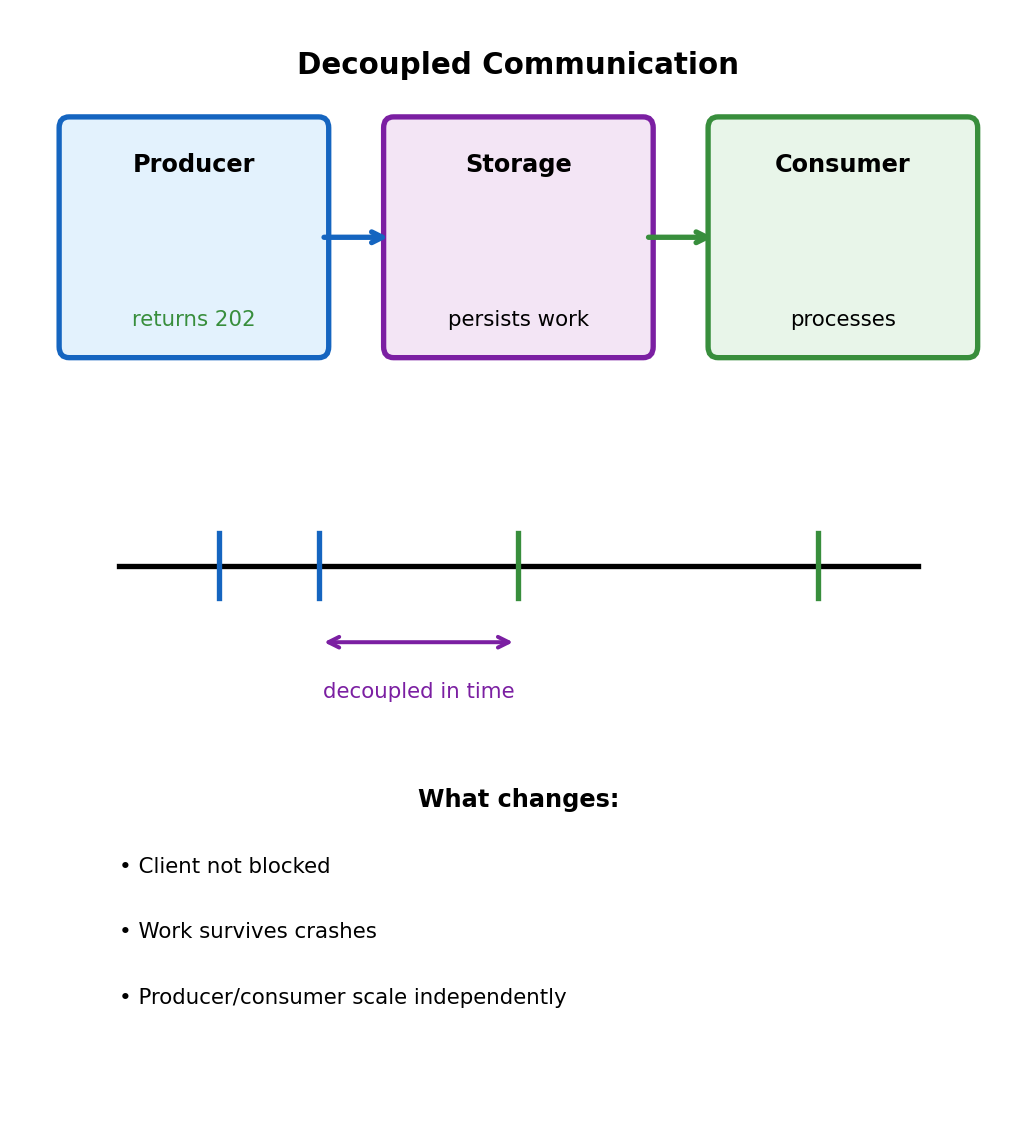
Decoupling in time = separating “request accepted” from “request completed”

Opens architectural options:

  • Failure isolation
  • Load buffering
  • Independent scaling
  • Different availability requirements

Decoupling via Intermediate Storage

Instead of A → B directly: A → Storage → B

# Producer: accept and acknowledge
def handle_request(request):
    job_id = str(uuid.uuid4())
    store_job(job_id, request.data)
    return {'job_id': job_id, 'status': 'accepted'}, 202

# Consumer: process from storage (separate process)
def process_pending_jobs():
    while True:
        job = get_next_job()
        if job:
            result = do_processing(job)
            save_result(job.id, result)
            mark_complete(job.id)

HTTP 202 (Accepted) vs 200 (OK):

  • 202 = “accepted your request”
  • 200 = “completed your request”

Client checks back later or receives callback.

What Properties Does the Storage Need?

Not just any database - specific requirements for reliable async processing:

Durability

  • Once accepted, work must not be lost
  • Survives producer crash after write
  • Survives consumer crash mid-processing

Ordering (sometimes)

  • Some workloads: process in order received
  • Other workloads: order doesn’t matter
  • Trade-off: strict ordering limits throughput

Delivery semantics

What if consumer crashes after receiving?

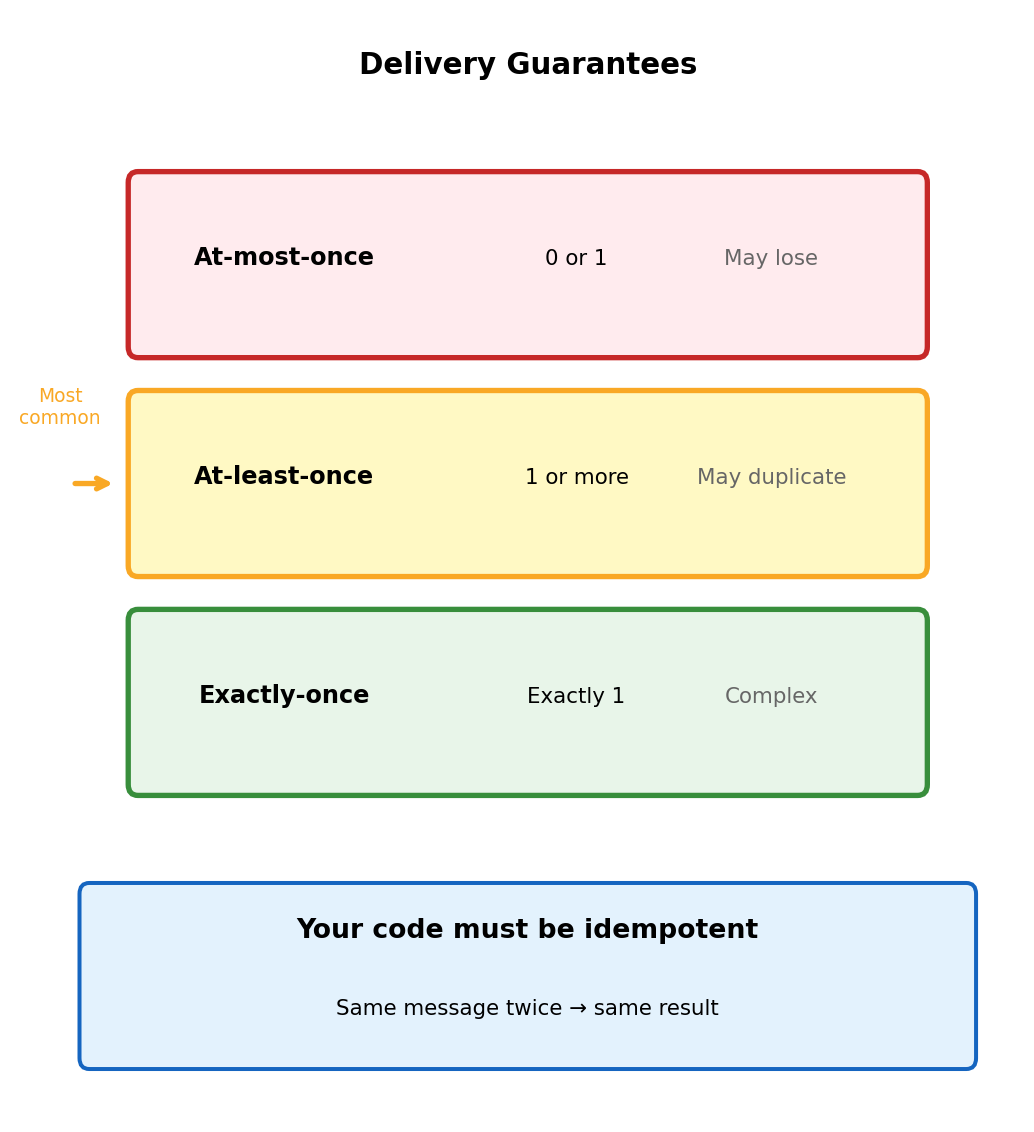
  • At-most-once: Job lost (fast, but loses work)
  • At-least-once: Job re-delivered (common choice)
  • Exactly-once: Complex, expensive

Visibility control

  • Consumer A takes job → B shouldn’t also take it
  • But if A crashes → job should become available again
  • Need temporary “hide while processing” mechanism

These requirements common enough → dedicated abstraction: message queue

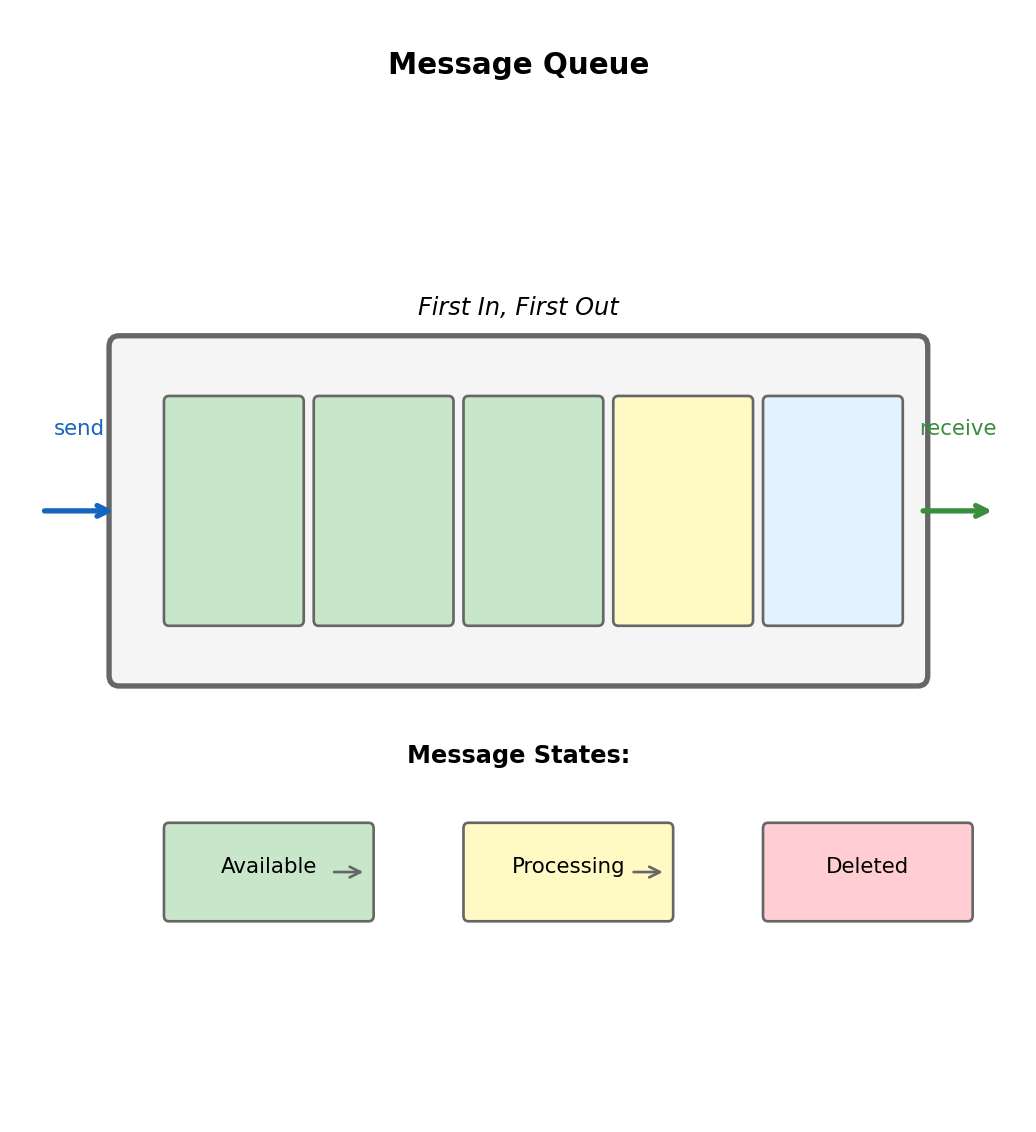
The Message Queue Abstraction

Three fundamental operations

Producer                Queue                  Consumer
   |                      |                       |
   |--- send(msg) ------->|                       |
   |                      |                       |
   |                      |<---- receive() -------|
   |                      |                       |
   |                      |    [processing...]    |
   |                      |                       |
   |                      |<---- delete() --------|

Send: Add message, returns when durably stored

Receive: Get next message, becomes temporarily invisible

Delete: Confirm complete, permanently removed

Key insight: Message not removed on receive - removed on explicit delete. Enables recovery if consumer fails mid-processing.

Visibility Timeout

What if consumer receives message then crashes before delete?

Mechanism

On receive → message invisible for configurable period

t=0    Consumer A receives
       Message invisible (30s timeout starts)

t=15   Consumer A still processing
       Message still invisible

t=35   Timeout expired, no delete
       Message visible again

t=36   Consumer B receives
       Retry begins

Timeout too short: Message reappears while still being processed → duplicate work

Timeout too long: Failed processing waits unnecessarily before retry

Extending Visibility for Long Processing

Don’t know how long processing takes? Extend timeout during processing:

def process_message(message, queue_client):
    receipt_handle = message['ReceiptHandle']

    for chunk in large_dataset:
        process_chunk(chunk)

        # Heartbeat: extend visibility every 20 seconds
        queue_client.change_message_visibility(
            QueueUrl=QUEUE_URL,
            ReceiptHandle=receipt_handle,
            VisibilityTimeout=30  # Another 30 seconds
        )

    # Done - delete
    queue_client.delete_message(QueueUrl=QUEUE_URL, ReceiptHandle=receipt_handle)

Pattern: Consumer “heartbeats” queue = “still working on this”

  • Heartbeats stop (crash) → message eventually visible again
  • Allows short default timeout (fast recovery) + arbitrarily long processing

At-Least-Once Delivery

Most queues guarantee: message will be delivered, but might be delivered more than once.

How duplicates occur

1. Consumer receives message
2. Processes successfully (30 sec)
3. Sends delete request
4. Network hiccup - delete lost
5. Queue never receives delete
6. Visibility timeout expires
7. Message visible again
8. Another consumer receives
9. Processed twice

Consumer did everything right. Network unreliability caused duplicate.

Not a bug - fundamental trade-off

Exactly-once requires distributed transactions. Complex, expensive. At-least-once is practical choice.

Implication: Your code must handle duplicates.

Idempotent Processing

Idempotent = processing same message twice produces same result as once

Naturally idempotent

# Set absolute value
user.status = 'active'

# Write to specific key
s3.put_object(Bucket='b', Key='k', Body=data)

# Upsert
db.upsert(key=order_id, data=order_data)

“Set X to Y” - running twice just sets X to Y twice.

NOT idempotent

# Increment
user.balance += 100  # Twice = +200

# Insert
db.insert(record)  # Twice = two records

# Send notification
send_email(user, "shipped")  # Twice = two emails

Making operations idempotent

Track what you’ve processed:

def process_payment(message):
    message_id = message['MessageId']

    # Already processed?
    if db.get(f'processed:{message_id}'):
        return  # Skip duplicate

    # Process
    charge_customer(message['amount'])

    # Record completion
    db.put(f'processed:{message_id}', {
        'processed_at': now()
    })

Use atomic check-and-set (DynamoDB conditional write) to handle race conditions.

Idempotency Keys for External Services

When calling external services, pass idempotency key:

def process_order_payment(message):
    order = json.loads(message['Body'])

    # Deterministic key from message content
    idempotency_key = f"order-{order['order_id']}-payment"

    # Stripe deduplicates based on key
    stripe.PaymentIntent.create(
        amount=order['amount'],
        currency='usd',
        idempotency_key=idempotency_key  # Same key = same response
    )

Many payment APIs support this precisely because at-least-once is common.

Best practices:

  • Derive from logical identity, not queue-assigned ID
  • Include all parameters affecting operation
  • Consistent generation (same inputs → same key)

Dead Letter Queues

Some messages can never succeed. Invalid data, deleted resources, bugs.

Poison message problem

Message with malformed JSON arrives
Consumer 1: parse fails, crash
Message returns to queue
Consumer 2: parse fails, crash
Message returns to queue
Consumer 3: parse fails, crash
...forever...

Queue keeps delivering, consumers keep failing.

Solution: Dead letter queue (DLQ)

After N failed attempts → move to separate queue

  • Isolates problem messages
  • Healthy messages continue processing
  • DLQ = holding area for investigation

DLQ Configuration and Replay

Max receive count

Each failed processing increments count. After N receives without delete → move to DLQ.

# Check in handler
def handler(event, context):
    for record in event['Records']:
        count = int(record['attributes']
                    ['ApproximateReceiveCount'])
        if count > 3:
            log.error(f"Repeated failure: {record}")

Typical settings:

  • Max receive: 3-5
  • Visibility timeout: Match processing time
  • DLQ retention: Days to weeks

DLQ depth signals:

  • Spike: New bug, bad data batch
  • Gradual growth: Intermittent issue
  • Constant: Known issue unaddressed

Replay after fixing

def replay_dlq():
    """Move DLQ messages back to main"""
    while True:
        response = sqs.receive_message(
            QueueUrl=DLQ_URL,
            MaxNumberOfMessages=10,
            WaitTimeSeconds=1
        )

        messages = response.get('Messages', [])
        if not messages:
            break

        for msg in messages:
            sqs.send_message(
                QueueUrl=MAIN_QUEUE_URL,
                MessageBody=msg['Body']
            )
            sqs.delete_message(
                QueueUrl=DLQ_URL,
                ReceiptHandle=msg['ReceiptHandle']
            )

Only replay after fixing issue, else messages cycle back to DLQ.

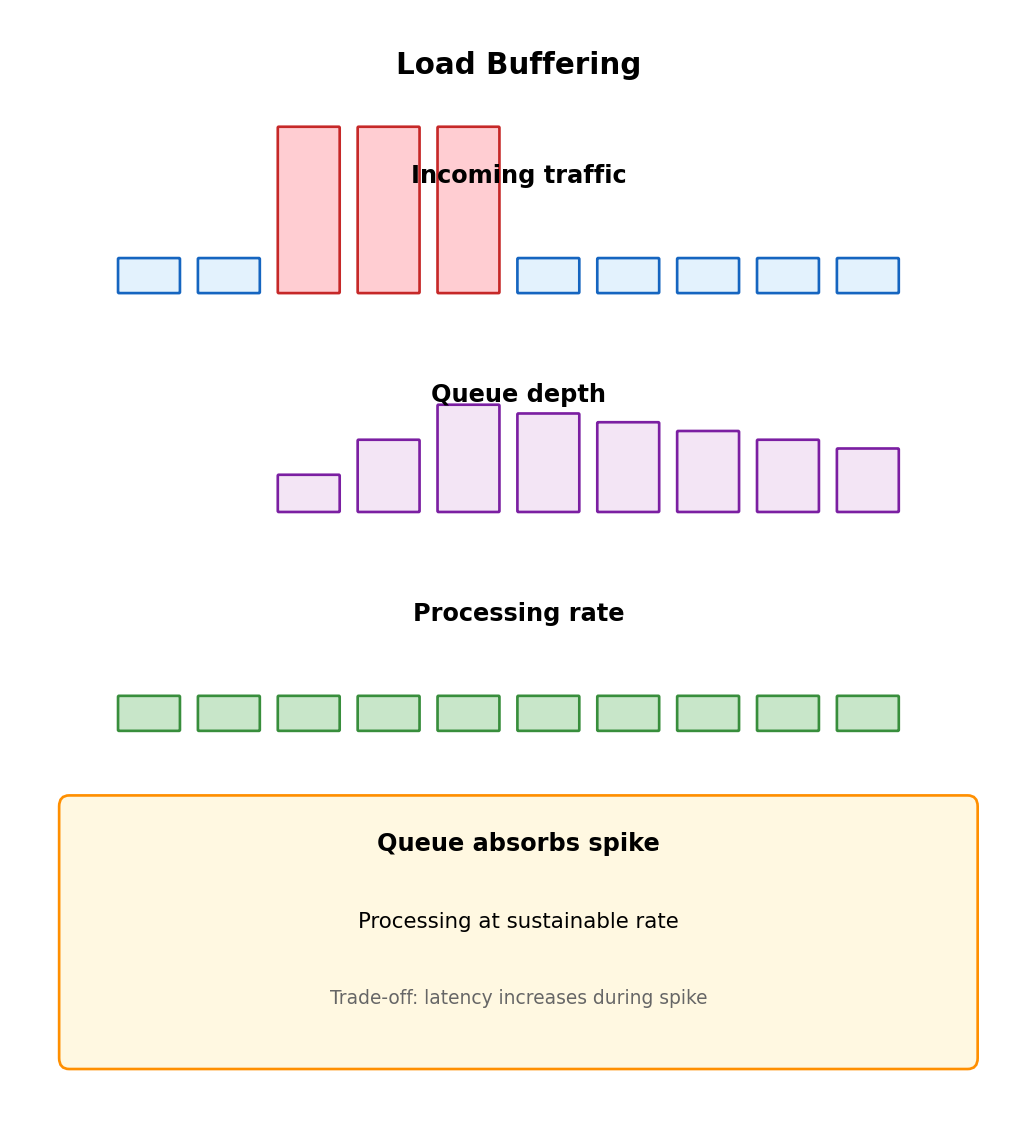
Load Buffering

Queues absorb traffic spikes that exceed processing capacity.

Synchronous under spike

Requests arrive faster than processing capacity:

  • Excess requests timeout or rejected
  • HTTP 503 Service Unavailable
  • Cascading failures as servers overload

Asynchronous under spike

Time     Arrivals    Queue    Processing
00:00    100/sec     0        100/sec
00:01    500/sec     400      100/sec  ← spike
00:02    500/sec     800      100/sec
00:03    100/sec     700      100/sec  ← spike ends
00:04    100/sec     600      100/sec
  ...
00:10    100/sec     0        100/sec  ← drained
  • All requests accepted
  • Processing rate constant
  • Spike absorbed into queue depth
  • Gradually drains after spike

Throughput vs Latency Trade-off

Synchronous under load

  • Latency constant until capacity hit
  • At capacity: reject excess
  • Throughput capped
  • No backlog after spike

Asynchronous under load

  • All requests accepted
  • Latency grows with queue depth
  • Backlog must drain after spike
  • Recovery time depends on spike duration

Neither universally better

  • User-facing, latency-sensitive → sync with backpressure
  • Background processing, eventual completion OK → async

Hybrid: Accept and queue, but set max depth. Exceed threshold → reject. Buffering for normal spikes, bounded latency.

Independent Scaling

Synchronous: Scaling coupled

Same process receives and processes. Add capacity for processing → also add receiving capacity (maybe don’t need).

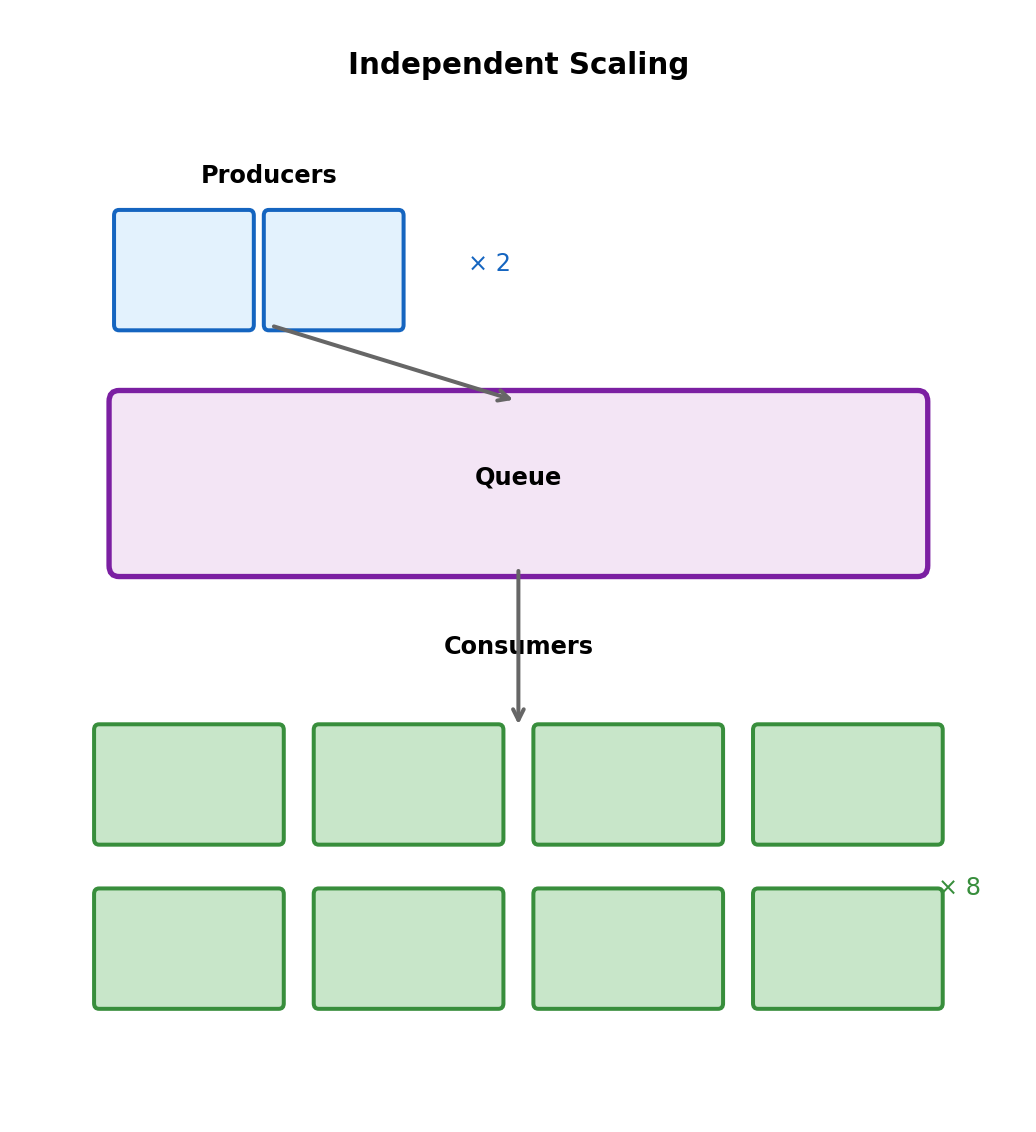
Queue-based: Scale each tier independently

Producers:   2 instances (receiving is fast)

             ┌───────────┐
             │   Queue   │
             └───────────┘

Consumers:   8 instances (processing is slow)
  • Add producers for request volume
  • Add consumers for processing throughput
  • Remove consumers when queue empty (cost savings)

Lambda auto-scales on queue depth:

  • Depth grows → more concurrent executions
  • Queue empties → scale to zero
  • Pay only for actual processing

Fan-Out: One Event, Multiple Consumers

Order placed → need to:

  1. Update inventory
  2. Send confirmation email
  3. Record analytics
  4. Notify shipping

Point-to-point queue

Each message → one consumer. Multiple services need event?

  • Producer sends to multiple queues, or
  • One consumer forwards to others

Couples producer to knowledge of all consumers.

Publish-subscribe

Producer publishes to topic. All subscribers get copy.

Producer → Topic
            ↓  ↓  ↓  ↓
          Inv Email Analytics Ship
  • Publish once
  • Add consumer → no producer change
  • Producer doesn’t know (or care) who subscribes

Fan-Out + Durability: Topic → Queue → Consumer

Topics alone: no durability. Subscriber unavailable → misses event.

Combined pattern

Each subscriber has own queue subscribed to topic:

Order Service


┌────────────┐
│ SNS Topic  │  (fan-out)
└────────────┘
  │    │    │
  ▼    ▼    ▼
┌───┐┌───┐┌───┐
│SQS││SQS││SQS│  (durability)
└───┘└───┘└───┘
  │    │    │
  ▼    ▼    ▼
Inv  Email Ship  (consumers)

Benefits:

  • Fan-out from topic
  • Durability from queues
  • Each consumer: own pace, failure isolated
  • Add subscriber: create queue, subscribe to topic
# Producer: publish to topic
sns.publish(
    TopicArn=ORDER_TOPIC_ARN,
    Message=json.dumps({
        'order_id': order_id,
        'event': 'placed'
    })
)

# Consumer: read from own queue
def inventory_handler(event, context):
    for record in event['Records']:
        # SNS wraps in extra JSON layer
        sns_msg = json.loads(record['body'])
        order = json.loads(sns_msg['Message'])
        update_inventory(order)

# Email service: separate Lambda, separate queue
def email_handler(event, context):
    for record in event['Records']:
        sns_msg = json.loads(record['body'])
        order = json.loads(sns_msg['Message'])
        send_confirmation(order)

AWS SQS: Standard vs FIFO

Standard Queue

  • At-least-once delivery
  • Best-effort ordering (usually FIFO, not guaranteed)
  • Unlimited throughput
  • Cheaper
sqs.send_message(
    QueueUrl=QUEUE_URL,
    MessageBody=json.dumps(data)
)

response = sqs.receive_message(
    QueueUrl=QUEUE_URL,
    MaxNumberOfMessages=10,
    WaitTimeSeconds=20  # Long poll
)

sqs.delete_message(
    QueueUrl=QUEUE_URL,
    ReceiptHandle=msg['ReceiptHandle']
)

FIFO Queue

  • Exactly-once processing
  • Strict ordering guaranteed
  • 300-3000 msg/sec limit
  • Queue name ends .fifo
sqs.send_message(
    QueueUrl=FIFO_QUEUE_URL,
    MessageBody=json.dumps(data),
    MessageGroupId='user-123',
    MessageDeduplicationId=str(uuid.uuid4())
)

Use FIFO when:

  • Financial transactions
  • User action sequences
  • Event sourcing

Default choice: Standard + idempotent processing

AWS SNS: Publish-Subscribe

Topic characteristics

  • Push delivery to subscribers
  • Subscriber types: SQS, Lambda, HTTP, email, SMS
  • All subscribers receive every message
  • Message filtering by attributes
  • No retention (deliver immediately or lost)
# Create topic
response = sns.create_topic(Name='order-events')
topic_arn = response['TopicArn']

# Publish
sns.publish(
    TopicArn=topic_arn,
    Message=json.dumps({'order_id': 'ORD-123'}),
    MessageAttributes={
        'event_type': {
            'DataType': 'String',
            'StringValue': 'order_placed'
        }
    }
)

Subscribing

# Subscribe SQS queue
sns.subscribe(
    TopicArn=topic_arn,
    Protocol='sqs',
    Endpoint=queue_arn
)

# Subscribe Lambda
sns.subscribe(
    TopicArn=topic_arn,
    Protocol='lambda',
    Endpoint=function_arn
)

# Subscribe with filter
sns.subscribe(
    TopicArn=topic_arn,
    Protocol='sqs',
    Endpoint=high_value_queue_arn,
    Attributes={
        'FilterPolicy': json.dumps({
            'order_value': [{'numeric': ['>=', 1000]}]
        })
    }
)

Filter: Only orders $1000+ to this queue.

Lambda + SQS Integration

Lambda polls SQS automatically via event source mapping.

No polling code needed

def handler(event, context):
    for record in event['Records']:
        body = json.loads(record['body'])
        process_order(body)

    # Success = messages deleted
    # Exception = messages return to queue

Lambda service handles:

  • Long polling
  • Batching (1-10,000 messages)
  • Scaling based on queue depth
  • Visibility timeout
  • Retry on failure

Batch size trade-off:

  • Larger: Efficient (amortize cold start), harder failure handling
  • Smaller: Simpler errors, more overhead

Partial Batch Failure Handling

Default: Exception fails entire batch. All messages retry, including already-processed ones.

Report which messages failed

def handler(event, context):
    failed = []

    for record in event['Records']:
        try:
            process(json.loads(record['body']))
        except Exception as e:
            failed.append(record['messageId'])
            log.error(f"Failed {record['messageId']}: {e}")

    return {
        'batchItemFailures': [
            {'itemIdentifier': mid}
            for mid in failed
        ]
    }

Lambda deletes successful, returns failed to queue.

Requires: Enable ReportBatchItemFailures in event source mapping.

Example: 5 message batch

Processing:
  msg 1: ✓
  msg 2: ✓
  msg 3: ✗ exception
  msg 4: ✓
  msg 5: ✓

Without partial failure:
  All 5 retry → 4 duplicates

With partial failure:
  Return: {batchItemFailures: [3]}
  1,2,4,5 deleted
  Only 3 retries

Recommendation: Enable for most SQS-triggered functions.

Long Polling

Short polling (default)

  • Returns immediately, even if empty
  • Many empty responses when queue idle
  • Wasted API calls

Long polling

  • Waits up to 20 seconds for messages
  • Returns immediately when messages arrive
  • Fewer calls, lower cost
# Short poll
response = sqs.receive_message(
    QueueUrl=QUEUE_URL,
    MaxNumberOfMessages=10
)

# Long poll
response = sqs.receive_message(
    QueueUrl=QUEUE_URL,
    MaxNumberOfMessages=10,
    WaitTimeSeconds=20
)

Lambda uses long polling automatically.

Message Delays

Delay processing for retry backoff, scheduled tasks, debouncing.

Queue-level delay

All messages delayed N seconds:

sqs.create_queue(
    QueueName='delayed-queue',
    Attributes={'DelaySeconds': '300'}
)

Per-message delay

sqs.send_message(
    QueueUrl=QUEUE_URL,
    MessageBody=json.dumps(data),
    DelaySeconds=120  # This message only
)

Max delay: 15 minutes

Longer delays: EventBridge Scheduler, database + polling, Step Functions.

Use cases

Retry backoff:

def requeue_with_backoff(msg, attempt):
    delay = min(30 * (2 ** attempt), 900)
    sqs.send_message(
        QueueUrl=QUEUE_URL,
        MessageBody=msg['Body'],
        DelaySeconds=delay
    )

Debouncing:

# On file change, delay processing
sqs.send_message(
    QueueUrl=QUEUE_URL,
    MessageBody=json.dumps({'path': path}),
    DelaySeconds=30  # Wait for more changes
)

Scheduled task:

# Reminder in 10 minutes
sqs.send_message(
    QueueUrl=QUEUE_URL,
    MessageBody=json.dumps({'type': 'reminder'}),
    DelaySeconds=600
)

Batch Operations

SQS charges per API call, not per message.

Send batch (up to 10)

entries = [
    {'Id': str(i), 'MessageBody': json.dumps(item)}
    for i, item in enumerate(items[:10])
]

response = sqs.send_message_batch(
    QueueUrl=QUEUE_URL,
    Entries=entries
)

if response.get('Failed'):
    for f in response['Failed']:
        log.error(f"Failed: {f['Id']}")

Delete batch (up to 10)

sqs.delete_message_batch(
    QueueUrl=QUEUE_URL,
    Entries=[
        {'Id': str(i), 'ReceiptHandle': m['ReceiptHandle']}
        for i, m in enumerate(messages)
    ]
)

Cost impact

100 individual sends: 100 API calls
100 batched (10/call):  10 API calls

Cost reduction: 90%

Throughput impact

  • Individual: Limited by round-trip latency
  • Batched: Amortize latency across 10 messages

Lambda batching

Lambda auto-batches receive/delete. Configure batch size 1-10,000.

Larger batches:

  • More efficient
  • Higher throughput
  • Partial failure affects more
  • Longer processing time

Large Messages: S3 Reference Pattern

SQS limit: 256 KB per message

Store in S3, send reference

def send_large_message(data, bucket):
    payload = json.dumps(data)

    if len(payload.encode()) > 200_000:
        key = f"messages/{uuid.uuid4()}.json"
        s3.put_object(Bucket=bucket, Key=key, Body=payload)

        sqs.send_message(
            QueueUrl=QUEUE_URL,
            MessageBody=json.dumps({
                '__s3_ref__': True,
                'bucket': bucket,
                'key': key
            })
        )
    else:
        sqs.send_message(
            QueueUrl=QUEUE_URL,
            MessageBody=payload
        )

Consumer retrieves from S3

def handler(event, context):
    for record in event['Records']:
        body = json.loads(record['body'])

        if body.get('__s3_ref__'):
            response = s3.get_object(
                Bucket=body['bucket'],
                Key=body['key']
            )
            payload = json.loads(response['Body'].read())
            # Cleanup
            s3.delete_object(
                Bucket=body['bucket'],
                Key=body['key']
            )
        else:
            payload = body

        process(payload)

AWS Extended Client Library automates this.

Monitoring Queue Health

Key metrics

Metric Indicates
ApproximateNumberOfMessagesVisible Backlog
ApproximateNumberOfMessagesNotVisible In-flight
ApproximateAgeOfOldestMessage How backed up
NumberOfMessagesSent Producer throughput
NumberOfMessagesDeleted Consumer throughput

Healthy queue:

  • Depth stable or near zero
  • Age below threshold
  • DLQ empty

Problems:

  • Depth growing → consumers can’t keep up
  • Age increasing → processing stalled
  • DLQ filling → repeated failures

Alarms

# Queue depth
cloudwatch.put_metric_alarm(
    AlarmName='high-queue-depth',
    MetricName='ApproximateNumberOfMessagesVisible',
    Namespace='AWS/SQS',
    Dimensions=[{'Name': 'QueueName', 'Value': NAME}],
    Threshold=10000,
    ComparisonOperator='GreaterThanThreshold',
    EvaluationPeriods=3,
    Period=60
)

# Message age
cloudwatch.put_metric_alarm(
    AlarmName='old-messages',
    MetricName='ApproximateAgeOfOldestMessage',
    Namespace='AWS/SQS',
    Dimensions=[{'Name': 'QueueName', 'Value': NAME}],
    Threshold=3600,
    ComparisonOperator='GreaterThanThreshold',
    EvaluationPeriods=2,
    Period=60
)

Decision Framework

Use synchronous

  • User actively waiting
  • Result needed to proceed
  • Fast processing (sub-second)
  • Simple request-response

Examples:

  • Authentication
  • Real-time queries
  • Form validation

Characteristics:

  • Tight coupling acceptable
  • Failures visible to caller
  • Scaling coupled

Use asynchronous

  • User can continue without result
  • Work can complete later
  • Slow or variable processing
  • Need failure isolation
  • Need load buffering
  • Different scaling needs

Examples:

  • Order fulfillment
  • Notifications
  • Report generation
  • Video transcoding

Characteristics:

  • Decoupled in time
  • Failures isolated
  • Independent scaling
  • Requires idempotency

Hybrid Pattern: Accept Sync, Process Async

@app.route('/orders', methods=['POST'])
def create_order():
    # Sync: validate immediately
    order = validate_order(request.json)
    if not order.valid:
        return {'error': order.errors}, 400

    # Sync: save to database
    order_id = save_order(order)

    # Async: queue fulfillment
    sqs.send_message(
        QueueUrl=FULFILLMENT_QUEUE,
        MessageBody=json.dumps({
            'order_id': order_id,
            'action': 'fulfill'
        })
    )

    # Return immediately
    return {'order_id': order_id, 'status': 'processing'}, 202

User gets immediate confirmation. Fulfillment happens reliably in background.

Status checking

@app.route('/orders/<order_id>/status')
def order_status(order_id):
    order = get_order(order_id)
    return {
        'order_id': order_id,
        'status': order.status
    }

Or callbacks

def fulfillment_handler(event, context):
    for record in event['Records']:
        order = json.loads(record['body'])
        fulfill(order)

        if order.get('callback_url'):
            requests.post(
                order['callback_url'],
                json={'order_id': order['order_id'],
                      'status': 'fulfilled'}
            )

Service Integration

Lambda Runs Inside AWS, Not on the Internet

Lambda functions and HTTP requests live in different worlds

Lambda functions execute within AWS infrastructure. They can be invoked by AWS services (S3 events, SQS messages), but don’t listen on HTTP ports and don’t have public URLs.

# Your Lambda function
def handler(event, context):
    return {'statusCode': 200, 'body': 'Hello'}

How does a user’s HTTP request reach this function?

Direct Lambda invocation requires AWS credentials:

import boto3
lambda_client = boto3.client('lambda')
response = lambda_client.invoke(
    FunctionName='my-function',
    Payload=json.dumps({'name': 'test'})
)

This works for service-to-service communication within AWS. But a browser making GET https://myapi.com/users cannot invoke Lambda directly - it doesn’t have AWS credentials, and Lambda isn’t listening on an HTTP port.

Connecting HTTP clients to Lambda requires something that accepts HTTP requests from the public internet and translates them into Lambda invocations.

API Gateway Bridges HTTP and Lambda

API Gateway is a managed reverse proxy

It accepts HTTP requests at a public URL and routes them to backend services. For Lambda, it translates HTTP requests into Lambda invocations and Lambda responses back into HTTP responses.

https://abc123.execute-api.us-east-1.amazonaws.com/prod/users
        └── API Gateway endpoint ──┘           └── path ──┘

What happens on each request:

  1. Client sends HTTP request to API Gateway URL
  2. API Gateway validates request (optional)
  3. API Gateway invokes Lambda with event containing HTTP details
  4. Lambda executes, returns response object
  5. API Gateway translates response to HTTP
  6. Client receives HTTP response

The Lambda function never opens a port, never manages connections, never deals with TLS. API Gateway handles the HTTP protocol; Lambda handles the business logic.

You deploy the function, API Gateway provides the URL.

The Lambda Event From API Gateway

When API Gateway invokes your Lambda function, it passes the HTTP request as a structured event:

# Incoming HTTP request:
# POST /users?role=admin HTTP/1.1
# Host: abc123.execute-api...
# Content-Type: application/json
# Authorization: Bearer xxx
#
# {"name": "Alice"}

API Gateway transforms this into:

event = {
    'httpMethod': 'POST',
    'path': '/users',
    'queryStringParameters': {'role': 'admin'},
    'headers': {
        'content-type': 'application/json',
        'authorization': 'Bearer xxx'
    },
    'body': '{"name": "Alice"}',
    'isBase64Encoded': False
}

Your handler processes and returns:

def handler(event, context):
    method = event['httpMethod']
    body = json.loads(event['body'] or '{}')

    if method == 'POST':
        user = create_user(body)
        return {
            'statusCode': 201,
            'headers': {
                'Content-Type': 'application/json'
            },
            'body': json.dumps(user)
        }

    return {
        'statusCode': 405,
        'body': 'Method not allowed'
    }

API Gateway takes your return dict and constructs the HTTP response. Status code becomes HTTP status, headers become HTTP headers, body becomes response body.

API Gateway Does More Than Route Requests

A reverse proxy handles cross-cutting concerns

Things every API needs, but you don’t want to implement in every function:

Authentication - Verify identity before code runs

  • API keys (simple, but not secure alone)
  • IAM authentication (for AWS-to-AWS)
  • JWT tokens from Cognito or custom authorizer
  • Request rejected at gateway if auth fails → Lambda never invoked

Rate limiting - Protect backend from overload

  • Requests per second limits
  • Burst allowances
  • Per-client quotas via API keys

Request validation - Reject malformed requests early

  • Required parameters
  • Schema validation
  • Fail at gateway, not in your function

Each of these protects your Lambda function. Invalid or excessive requests are rejected before they consume Lambda execution time (and cost).

Rate Limiting Protects Your Backend

Without rate limiting

Your Lambda function is invoked for every request. Malicious or misconfigured client sends 10,000 requests/second:

  • 10,000 Lambda invocations/second
  • Each invocation costs money
  • Downstream resources (database) overwhelmed
  • Legitimate users affected

With rate limiting at the gateway

Account default: 10,000 req/sec
This API: 1,000 req/sec
/expensive-endpoint: 100 req/sec

Excess requests receive HTTP 429 (Too Many Requests) immediately. They never reach Lambda, never hit your database, never cost you Lambda execution fees.

HTTP/1.1 429 Too Many Requests
Retry-After: 1

{"message": "Rate limit exceeded"}

Client receives clear signal to back off. Gateway absorbed the attack; backend unaffected.

Static Content Latency: Geography Matters

S3 bucket location affects user experience

Images, CSS, JavaScript bundles, user-uploaded documents. S3 bucket is in us-east-1 (Virginia).

User in Tokyo requests an image:

  • Request travels ~11,000 km to Virginia
  • S3 retrieves object
  • Response travels ~11,000 km back
  • Round trip: 150-200ms minimum (speed of light)

For a web page loading 50 assets, that’s 50 × 200ms of latency-bound requests. Even with parallel loading, the page feels slow.

Latency here is physics, not performance.

Light travels at ~200,000 km/s through fiber. Tokyo to Virginia is 11,000 km. That’s 55ms one way, minimum. No optimization can beat the speed of light.

Reducing this latency requires putting content closer to users.

Edge Caching: Content Closer to Users

Content Delivery Network (CDN) concept

Instead of one origin in one region, cache copies at edge locations around the world. When a user requests content:

  1. Request goes to nearest edge location (low latency)
  2. If edge has cached copy → return immediately
  3. If not → fetch from origin, cache for next request

CloudFront: AWS’s CDN

  • 400+ edge locations globally
  • Integrates with S3, API Gateway, custom origins
  • Provides custom domain + managed TLS certificate

First request (cache miss): User in Tokyo → Tokyo edge → S3 origin → Tokyo edge → User

Total: ~200ms (fetch from origin)

Subsequent requests (cache hit): User in Tokyo → Tokyo edge → User

Total: ~20ms (served from edge)

The edge location is physically close. Most requests hit cache. Latency drops dramatically.

Cache Hit vs Cache Miss

Cache hit: Edge has the content

User → Edge: GET /images/logo.png
Edge: "I have this cached"
Edge → User: 200 OK (from cache)

Latency: ~20ms

Edge returns cached copy immediately. Origin not contacted. This is the fast path - and for popular content, most requests are cache hits.

Cache miss: Edge must fetch from origin

User → Edge: GET /images/new-upload.png
Edge: "Not in my cache"
Edge → Origin: GET /images/new-upload.png
Origin → Edge: 200 OK + content
Edge: Cache it for next time
Edge → User: 200 OK

Latency: ~200ms (first request)
Latency: ~20ms (subsequent requests)

First user pays the origin fetch latency. All users after benefit from the cached copy.

Cache effectiveness depends on:

  • How often the same content is requested
  • How long content stays in cache (TTL)
  • How many requests hit each edge location

Cache Configuration Decisions

TTL (Time To Live): How long to cache?

Short TTL (seconds to minutes):

  • Content updates quickly reflected
  • More origin fetches
  • Good for: Frequently changing content

Long TTL (hours to days):

  • Better cache hit ratio
  • Updates take time to propagate
  • Good for: Static assets that rarely change

Versioned filenames solve the TTL dilemma:

/static/app.js        → TTL: 5 minutes (changes often?)
/static/app.v2.3.js   → TTL: 1 year (version in name)

With versioned filenames, you deploy new code with a new filename. Old cached versions don’t matter - new requests use the new filename. Set very long TTL, get both cacheability and instant updates.

Cache key: What makes a request “same”?

By default: URL path. Same path = same cached response.

Can include: Query strings, headers. But more in cache key = fewer cache hits.

CloudFront + S3 for Static Assets

Typical setup for web applications:

S3 bucket holds static files (build output, images, uploads). CloudFront distribution sits in front of the bucket. Users access files through CloudFront URL or custom domain.

Your domain: cdn.myapp.com

         CloudFront

         S3 bucket (private)

Origin Access Control (OAC):

S3 bucket remains private - no public access. Only CloudFront can read from it. This prevents users from bypassing CDN and hitting S3 directly.

Benefits for your project:

  • Fast asset loading globally
  • Custom domain with HTTPS (managed certificate)
  • S3 costs reduced (fewer direct requests)
  • DDoS protection at edge

When not worth the complexity:

  • Development/internal tools (single location users)
  • Low traffic, infrequent access
  • Content so personalized caching doesn’t help

Network Calls Have Different Failure Modes Than Local Calls

Service A calls Service B over the network

Network calls introduce failure modes that don’t exist in local function calls:

  • Network timeout (no response)
  • Connection refused (service down)
  • Connection reset (service crashed mid-response)
  • HTTP 500 (service had internal error)
  • HTTP 503 (service overloaded)
  • Slow response (not failed, but 30 seconds)

In a local function call, you either get a result or an exception, quickly. Network calls add failure modes and latency variability.

In a service chain, failures compound:

A → B → C → D

Each hop: 99.9% success rate
Chain: 99.9% × 99.9% × 99.9% × 99.9% = 99.6%

Three nines at each step gives you less than three nines end-to-end. More services = more failure points.

Failures are not exceptional - they’re expected. Design for them.

Retry: The Obvious First Response

Request failed? Try again.

def call_service():
    for attempt in range(3):
        try:
            response = requests.get(url, timeout=5)
            return response
        except RequestException:
            if attempt == 2:
                raise
            continue

Some failures are transient - they go away if you retry:

  • Network blip
  • Service restarting
  • Momentary overload

Other failures are permanent - retry won’t help:

  • HTTP 400 (bad request - your fault)
  • HTTP 404 (resource doesn’t exist)
  • HTTP 401 (not authorized)

Retry transient failures. Don’t retry permanent ones.

if response.status_code >= 500:
    # Server error - might be transient
    retry()
elif response.status_code >= 400:
    # Client error - our request is wrong
    raise ClientError(response)

Immediate Retry Creates Thundering Herd

Service B is overloaded, returning 503s

Client 1: Request fails → immediate retry Client 2: Request fails → immediate retry Client 3: Request fails → immediate retry … Client 1000: Request fails → immediate retry

All 1000 clients retry at the same moment. Service B, already struggling, now receives another 1000 requests instantly. It fails again. All 1000 retry again.

The retry storm keeps the service down.

# This makes things worse
for attempt in range(3):
    try:
        return requests.get(url)
    except:
        continue  # Retry immediately

Even if the service could recover in 1 second, the continuous retry storm prevents recovery. Clients are “helping” by retrying, but collectively they’re causing a denial of service.

Exponential Backoff Spreads Load

Wait longer between each retry

import time
import random

def call_with_backoff(func, max_attempts=5):
    for attempt in range(max_attempts):
        try:
            return func()
        except TransientError:
            if attempt == max_attempts - 1:
                raise

            # Wait: 1s, 2s, 4s, 8s...
            delay = 2 ** attempt
            time.sleep(delay)

First retry after 1 second. Second retry after 2 more seconds. Third after 4 more. Exponential growth creates spacing.

But all clients still retry at the same intervals.

Client 1: Retry at t=1, t=3, t=7 Client 2: Retry at t=1, t=3, t=7 Client 3: Retry at t=1, t=3, t=7

Still clustered, just at different times. Need to break the synchronization.

Jitter Breaks Synchronization

Add randomness to break clustering

import random

def call_with_backoff_jitter(func, max_attempts=5):
    for attempt in range(max_attempts):
        try:
            return func()
        except TransientError:
            if attempt == max_attempts - 1:
                raise

            # Full jitter: random between 0 and max
            max_delay = 2 ** attempt
            delay = random.uniform(0, max_delay)
            time.sleep(delay)

Full jitter: Random delay between 0 and 2^attempt

Client 1: Retry at t=0.7 Client 2: Retry at t=0.2 Client 3: Retry at t=0.9

Retries spread across the window instead of clustering at one point. Service receives steady trickle instead of burst.

AWS SDK uses this by default. Most well-designed clients implement exponential backoff with jitter. If you’re building retry logic, include jitter.

Timeouts Prevent Indefinite Blocking

Every network call needs a timeout

Without timeout, a slow or unresponsive service blocks your code indefinitely. Connection stays open, thread stays blocked, resources stay consumed.

# Dangerous: No timeout
response = requests.get(url)  # May never return

# Safe: Explicit timeout
response = requests.get(url, timeout=5)  # Fail after 5s

# Better: Separate connect and read timeouts
response = requests.get(url, timeout=(3, 10))
#                              connect=3s, read=10s

Connect timeout: How long to wait for connection establishment. Service down? Fail fast.

Read timeout: How long to wait for response data. Service slow? Don’t wait forever.

Timeout values depend on what you’re calling:

  • Health check: 1-2 seconds
  • Database query: 5-30 seconds
  • Long-running API: Set based on expected duration + buffer

Timeout Ordering in Service Chains

A calls B calls C

Each service has a timeout for its downstream call:

  • C’s operation takes up to 5s
  • B’s timeout calling C: 7s (5s + buffer)
  • A’s timeout calling B: 10s (7s + buffer)

If A’s timeout < B’s timeout:

A gives up at 8s. B is still waiting for C (up to its 7s timeout). When C finally responds to B, B responds to… nothing. A already gave up. Work wasted.

Rule: Caller timeout > callee timeout

A timeout (10s) > B timeout (7s) > C operation (5s)

This ensures:

  • If C is slow, B times out first
  • If B is slow, A times out after B would have
  • Work isn’t wasted on requests that caller abandoned

Circuit Breaker: Stop Calling Failing Services

Retries have a limit

Even with backoff and jitter, you’re still calling a service that’s failing. If the service is down for 5 minutes, you’ll spend 5 minutes making failing calls (with exponential waits).

Meanwhile:

  • Your resources are consumed waiting
  • Your latency suffers
  • You’re adding load to a struggling service

Circuit breaker: Fail fast when service is unhealthy

Track success/failure rate. If failure rate exceeds threshold, stop calling - return error immediately without making the request.

# CLOSED: Normal operation
# Requests flow through, track failures

# OPEN: Service is failing
# Reject requests immediately, don't call service

# HALF-OPEN: Test recovery
# Allow one request through to test
# Success → close circuit
# Failure → stay open

Circuit Breaker in Action

Timeline of circuit breaker behavior:

t=0     Requests succeeding (CLOSED)
t=10    Service starts failing
t=10-15 Failures accumulate, threshold hit
t=15    Circuit OPENS
t=15-45 Requests fail immediately (no network call)
        Service has time to recover
t=45    Timeout expires, circuit HALF-OPEN
t=45    One test request sent
t=45    Success! Circuit CLOSES
t=45+   Normal operation resumes

Key benefit: From t=15 to t=45, your code fails fast instead of waiting for timeouts. Service B isn’t receiving requests, giving it time to recover.

Configuration parameters:

  • Failure threshold: How many failures open the circuit
  • Timeout: How long to stay open before testing
  • Success threshold: How many successes to close from half-open
class CircuitBreaker:
    def __init__(self,
                 failure_threshold=5,
                 recovery_timeout=30):
        self.state = 'CLOSED'
        self.failures = 0
        self.threshold = failure_threshold
        self.timeout = recovery_timeout
        self.opened_at = None

    def call(self, func):
        if self.state == 'OPEN':
            if self._timeout_expired():
                self.state = 'HALF_OPEN'
            else:
                raise CircuitOpenError()

        try:
            result = func()
            self._on_success()
            return result
        except Exception:
            self._on_failure()
            raise

    def _on_failure(self):
        self.failures += 1
        if self.failures >= self.threshold:
            self.state = 'OPEN'
            self.opened_at = time.time()

    def _on_success(self):
        self.failures = 0
        self.state = 'CLOSED'

Combining Resilience Patterns

These patterns work together:

@circuit_breaker(threshold=5, timeout=30)
def call_service_b():
    for attempt in range(3):
        try:
            response = requests.get(
                url,
                timeout=(3, 10)  # Connect, read
            )
            response.raise_for_status()
            return response.json()

        except Timeout:
            delay = random.uniform(0, 2 ** attempt)
            time.sleep(delay)
            continue

        except HTTPError as e:
            if e.response.status_code >= 500:
                delay = random.uniform(0, 2 ** attempt)
                time.sleep(delay)
                continue
            raise  # 4xx = don't retry

    raise ServiceUnavailable()

Order of defense:

  1. Timeout prevents waiting forever
  2. Retry (with backoff + jitter) handles transient failures
  3. Circuit breaker stops calling if failures persist

Each layer catches different failures:

  • Timeout: Individual slow calls
  • Retry: Occasional failures
  • Circuit breaker: Sustained outages

Step Functions: Workflow Orchestration

What it is

AWS service for coordinating multi-step workflows. Define states and transitions visually or in JSON. AWS executes the workflow, handling retries and state persistence.

When it helps:

  • Complex workflows with branching logic
  • Long-running processes (hours, days)
  • Need to pause for human approval
  • Parallel execution with aggregation
  • Visual debugging of workflow state

When it’s overkill:

Simple async doesn’t need it:

API → SQS → Lambda

vs

API → Step Functions → Lambda

The SQS pattern is simpler, cheaper, and sufficient for most cases. Step Functions adds value when the coordination logic itself is complex - not just “process this later.”

Use for: Order processing with approvals, multi-stage data pipelines, anything with complex branching.

Skip for: Simple “do this later” tasks.

EventBridge: Event Routing

What it is

Serverless event bus with content-based routing. Events from many sources, rules determine where they go.

How it differs from SNS:

  • SNS: Publish to topic, all subscribers get message
  • EventBridge: Publish event, rules filter and route
// EventBridge rule: Route high-value orders
{
  "source": ["orders"],
  "detail-type": ["order.placed"],
  "detail": {
    "amount": [{"numeric": [">=", 1000]}]
  }
}

Only orders with amount >= 1000 trigger this rule. Other orders go elsewhere (or nowhere).

Built-in event sources:

AWS services emit events to EventBridge automatically. EC2 instance state changes, S3 events, CodePipeline status - all available without configuration.

When SNS is enough: All subscribers need all messages. No filtering. Simple fan-out. Use SNS + SQS.

Also useful for: Scheduled triggers (cron replacement). rate(5 minutes) or cron(0 12 * * ? *).

Kinesis: Real-Time Streaming

What it is

Ingest and process continuous data streams in real-time. Unlike SQS (message queue), Kinesis is a log - data is retained and can be replayed.

Kinesis behaves differently than SQS

SQS is a work queue: process a message, delete it, it’s gone. Consumers compete - each message goes to one consumer. Order isn’t guaranteed (Standard) or is strict but low throughput (FIFO).

Kinesis is a stream: data stays for 24 hours (configurable to 365 days). Consumers read independently at their own position - same data can be processed by analytics, archival, and alerting systems simultaneously. Order is guaranteed within a shard.

When Kinesis characteristics matter:

  • Real-time analytics (multiple consumers, same data)
  • Log aggregation (retain for replay/audit)
  • Event sourcing (rebuild state by replaying events)
  • Ordered processing at high throughput

When SQS characteristics are sufficient:

Process once, delete, move on. Single consumer per message. No replay needed. Most async processing fits this model - use SQS by default.

Mental model: Kinesis = distributed log (retain, replay, multiple readers). SQS = work queue (process, delete, compete).

Choosing Integration Patterns

Default patterns for most projects:

  1. Lambda behind API Gateway for APIs
  2. S3 for file storage (+ CloudFront if users are distributed)
  3. SQS for async processing
  4. SNS → SQS for fan-out

EventBridge, Step Functions, Kinesis solve specific problems. Reach for them when you have those problems - not by default.

Putting Services Together

A Content Moderation Pipeline

User uploads an image. Application must:

  1. Store the original image
  2. Analyze content for policy violations (AWS Rekognition)
  3. Run custom classification model (application-specific categories)
  4. Combine results and update database
  5. Notify user of outcome

Two analysis paths run in parallel:

  • Rekognition: Managed service, ~200-500ms typical
  • Custom model: Your Lambda + model, ~2-30 seconds depending on complexity

Neither path knows about the other. Both produce results that must be combined before the user sees an outcome.

This is a coordination problem.

The upload is synchronous (user waits for acknowledgment). The analysis is asynchronous (user doesn’t wait). The notification is eventually synchronous (user sees result).

How do you decompose this into services? Where do boundaries fall? What coordinates the parallel work?

Decomposition: Identifying Service Boundaries

Start with actions, then ask: who performs each?

Action Characteristics Service Candidate
Receive upload HTTP, needs response API Gateway + Lambda
Store original Durable, any size S3
Queue for processing Decouple, buffer SQS
Call Rekognition AWS SDK, fast Lambda
Run custom model CPU/memory intensive Lambda (or container)
Store results Structured query DynamoDB
Combine results Wait for both ???
Notify user Async delivery SNS or direct

The interesting question: “Combine results”

Two async processes complete at different times. Something must:

  • Know that both are expected
  • Detect when each completes
  • Trigger combination logic only when both are ready

This is the coordination problem that shapes the architecture.

The Upload Path: Synchronous Acknowledgment

User uploads image, receives job ID, can check status later

# Upload Lambda handler
def handle_upload(event, context):
    # Parse multipart upload from API Gateway
    body = parse_multipart(event)
    image_data = body['file']
    user_id = event['requestContext']['authorizer']['user_id']

    # Generate job ID for tracking
    job_id = str(uuid.uuid4())

    # Store original in S3
    s3.put_object(
        Bucket=UPLOAD_BUCKET,
        Key=f'uploads/{job_id}/original.jpg',
        Body=image_data,
        Metadata={'user_id': user_id}
    )

    # Create job record (pending state)
    dynamodb.put_item(
        TableName=JOBS_TABLE,
        Item={
            'job_id': {'S': job_id},
            'user_id': {'S': user_id},
            'status': {'S': 'pending'},
            'created_at': {'S': datetime.utcnow().isoformat()}
        }
    )

    # Queue for processing (triggers async work)
    sqs.send_message(
        QueueUrl=PROCESSING_QUEUE,
        MessageBody=json.dumps({'job_id': job_id})
    )

    # Return immediately - processing happens async
    return {
        'statusCode': 202,
        'body': json.dumps({
            'job_id': job_id,
            'status': 'processing',
            'status_url': f'/jobs/{job_id}'
        })
    }

HTTP 202 Accepted: Request received, processing started, result not yet available. Client has job ID to poll status.

User waits ~100-200ms for acknowledgment.

Actual analysis hasn’t started yet - only queued.

The Split: Fan-Out to Parallel Processing

SQS message triggers dispatcher Lambda

The processing queue doesn’t directly invoke both analysis paths. A dispatcher Lambda reads the message and initiates both branches.

# Dispatcher Lambda - triggered by SQS
def dispatch_handler(event, context):
    for record in event['Records']:
        message = json.loads(record['body'])
        job_id = message['job_id']

        # Get image location
        image_key = f'uploads/{job_id}/original.jpg'

        # Invoke Rekognition analysis (async)
        lambda_client.invoke(
            FunctionName='rekognition-analyzer',
            InvocationType='Event',  # Async - don't wait
            Payload=json.dumps({
                'job_id': job_id,
                'image_key': image_key
            })
        )

        # Invoke custom model analysis (async)
        lambda_client.invoke(
            FunctionName='custom-model-analyzer',
            InvocationType='Event',  # Async - don't wait
            Payload=json.dumps({
                'job_id': job_id,
                'image_key': image_key
            })
        )

        # Update job status
        dynamodb.update_item(
            TableName=JOBS_TABLE,
            Key={'job_id': {'S': job_id}},
            UpdateExpression='SET #s = :s',
            ExpressionAttributeNames={'#s': 'status'},
            ExpressionAttributeValues={':s': {'S': 'analyzing'}}
        )

InvocationType=‘Event’: Lambda invokes target asynchronously and returns immediately. Dispatcher doesn’t wait for either analysis to complete.

Two Lambdas now running in parallel, neither aware of the other.

Neither analysis Lambda blocks the other.

Dispatcher completes in milliseconds.

Branch A: Calling AWS Rekognition

Rekognition is a managed service - you send image, receive labels

# Rekognition analyzer Lambda
def rekognition_handler(event, context):
    job_id = event['job_id']
    image_key = event['image_key']

    # Call Rekognition (synchronous within this Lambda)
    response = rekognition.detect_moderation_labels(
        Image={
            'S3Object': {
                'Bucket': UPLOAD_BUCKET,
                'Name': image_key
            }
        },
        MinConfidence=70
    )

    # Extract results
    labels = [
        {
            'name': label['Name'],
            'confidence': label['Confidence'],
            'parent': label.get('ParentName', '')
        }
        for label in response['ModerationLabels']
    ]

    # Store results in DynamoDB
    dynamodb.update_item(
        TableName=JOBS_TABLE,
        Key={'job_id': {'S': job_id}},
        UpdateExpression='SET rekognition_result = :r, rekognition_at = :t',
        ExpressionAttributeValues={
            ':r': {'S': json.dumps(labels)},
            ':t': {'S': datetime.utcnow().isoformat()}
        }
    )

    # Check if other branch is complete
    check_and_finalize(job_id)

Rekognition returns structured data:

  • Moderation labels (violence, explicit content, etc.)
  • Confidence scores
  • Label hierarchy (parent categories)

This Lambda writes its results and then checks if the job can be finalized.

Rekognition reads directly from S3 - image bytes don’t flow through Lambda.

Branch B: Custom Model Analysis

Your own classification logic - runs longer, under your control

# Custom model analyzer Lambda
def custom_model_handler(event, context):
    job_id = event['job_id']
    image_key = event['image_key']

    # Download image from S3
    response = s3.get_object(Bucket=UPLOAD_BUCKET, Key=image_key)
    image_bytes = response['Body'].read()

    # Load model (cached in execution environment)
    model = get_cached_model()

    # Preprocess image
    tensor = preprocess_image(image_bytes)

    # Run inference
    predictions = model.predict(tensor)

    # Post-process results
    categories = [
        {
            'category': CATEGORY_NAMES[i],
            'score': float(predictions[i])
        }
        for i in range(len(predictions))
        if predictions[i] > 0.5
    ]

    # Store results
    dynamodb.update_item(
        TableName=JOBS_TABLE,
        Key={'job_id': {'S': job_id}},
        UpdateExpression='SET custom_result = :r, custom_at = :t',
        ExpressionAttributeValues={
            ':r': {'S': json.dumps(categories)},
            ':t': {'S': datetime.utcnow().isoformat()}
        }
    )

    # Check if other branch is complete
    check_and_finalize(job_id)

Time breakdown:

  • S3 download: ~50-200ms
  • Model loading (cold): ~2-10s
  • Model loading (warm): ~0ms (cached)
  • Inference: ~500ms-5s (depends on model)

Cold start dominates. Warm invocations much faster.

All compute happens inside Lambda.

Memory setting affects inference speed (more memory = more CPU).

The Coordination Problem: When Are Both Done?

Both branches write results to DynamoDB. How do we know when both are complete?

Option 1: Polling

Status check Lambda queries DynamoDB periodically. When both results present, trigger finalization.

  • Simple but wasteful
  • Latency depends on poll interval
  • Works but not elegant

Option 2: Each branch checks and finalizes

After writing its result, each branch checks if the other result exists. First to see both results triggers finalization.

  • Event-driven, no polling
  • Exactly one branch triggers finalization (with proper locking)
  • Race condition must be handled

Option 3: DynamoDB Streams

DynamoDB stream triggers Lambda on every update. Lambda checks if both results present.

  • Fully event-driven
  • Additional complexity (stream processing)
  • Natural fit for DynamoDB-centric architecture

Option 4: Step Functions

State machine waits for both branches, then proceeds.

  • Cleanest coordination model
  • Additional service and cost
  • Explicit workflow representation

We’ll implement Option 2 - simple, no additional services.

For this example: Check-and-finalize.

Production systems often use Step Functions for complex workflows.

Implementing Check-and-Finalize

Each branch calls this after writing its result:

def check_and_finalize(job_id):
    # Atomic read of current state
    response = dynamodb.get_item(
        TableName=JOBS_TABLE,
        Key={'job_id': {'S': job_id}},
        ConsistentRead=True  # Strong consistency required
    )

    item = response.get('Item', {})

    # Check if both results present
    has_rekognition = 'rekognition_result' in item
    has_custom = 'custom_result' in item

    if not (has_rekognition and has_custom):
        # Other branch not done yet - nothing to do
        return

    # Both done - try to claim finalization
    # Conditional update prevents double-finalization
    try:
        dynamodb.update_item(
            TableName=JOBS_TABLE,
            Key={'job_id': {'S': job_id}},
            UpdateExpression='SET #s = :s, finalized_at = :t',
            ConditionExpression='#s <> :done',
            ExpressionAttributeNames={'#s': 'status'},
            ExpressionAttributeValues={
                ':s': {'S': 'finalizing'},
                ':done': {'S': 'complete'}
            }
        )
    except dynamodb.exceptions.ConditionalCheckFailedException:
        # Other branch already claimed finalization
        return

    # We claimed it - do the finalization
    finalize_job(job_id, item)

ConditionExpression ensures only one branch finalizes, even if both check simultaneously.

DynamoDB conditional update is atomic.

Only one branch wins the race.

Finalization: Combining Results

The branch that claims finalization combines results and determines outcome:

def finalize_job(job_id, item):
    # Parse both results
    rekognition = json.loads(item['rekognition_result']['S'])
    custom = json.loads(item['custom_result']['S'])

    # Business logic: combine analysis
    decision = make_moderation_decision(rekognition, custom)

    # Update final status
    dynamodb.update_item(
        TableName=JOBS_TABLE,
        Key={'job_id': {'S': job_id}},
        UpdateExpression='''
            SET #s = :status,
                decision = :decision,
                completed_at = :time
        ''',
        ExpressionAttributeNames={'#s': 'status'},
        ExpressionAttributeValues={
            ':status': {'S': 'complete'},
            ':decision': {'S': json.dumps(decision)},
            ':time': {'S': datetime.utcnow().isoformat()}
        }
    )

    # Notify user (async)
    sns.publish(
        TopicArn=NOTIFICATION_TOPIC,
        Message=json.dumps({
            'job_id': job_id,
            'user_id': item['user_id']['S'],
            'decision': decision
        })
    )

Decision logic is application-specific:

  • Rekognition flags explicit content → reject
  • Custom model flags off-topic → warn
  • Neither flags issues → approve
  • Conflicting signals → manual review queue

Business logic concentrated in one place.

Easy to modify decision rules without changing pipeline structure.

Complete Data Flow

Seven services, one pipeline:

  1. API Gateway → receives HTTP, routes to Lambda
  2. Upload Lambda → validates, stores, queues (sync response)
  3. S3 → holds image bytes durably
  4. SQS → decouples upload from processing
  5. Dispatcher Lambda → fans out to both analysis paths
  6. Analysis Lambdas → Rekognition + Custom model (parallel)
  7. DynamoDB → holds state, coordinates completion
  8. SNS → delivers notification

Failure Modes and Recovery

Each service boundary is a potential failure point

Failure Impact Recovery
Upload Lambda timeout User sees error Retry upload
S3 put fails No image stored Lambda retries, fails to user
SQS send fails Job stuck pending Lambda retries, DLQ if persistent
Dispatcher fails Job stuck analyzing SQS retry, DLQ
Rekognition fails Partial results DLQ, manual intervention
Custom model fails Partial results DLQ, manual intervention
DynamoDB fails State lost Retry, eventual consistency

Dead Letter Queues capture persistent failures:

# SQS queue configuration
{
    "RedrivePolicy": {
        "deadLetterTargetArn": "arn:aws:sqs:...:processing-dlq",
        "maxReceiveCount": 3
    }
}

Message fails 3 times → moves to DLQ. Operations team investigates.

Partial completion is the hard case:

Rekognition succeeds, custom model fails. Job has one result but not both. Options:

  • Timeout and notify failure after N minutes
  • DynamoDB TTL cleans up orphaned jobs
  • Monitoring alerts on jobs stuck in “analyzing” state

Messages that consistently fail don’t block the queue.

DLQ preserves evidence for debugging.

Observability: Understanding the Pipeline

Each Lambda writes structured logs:

import json
import logging

logger = logging.getLogger()
logger.setLevel(logging.INFO)

def log_event(event_type, job_id, **kwargs):
    logger.info(json.dumps({
        'event': event_type,
        'job_id': job_id,
        'timestamp': datetime.utcnow().isoformat(),
        **kwargs
    }))

# Usage in handlers
log_event('upload_received', job_id, size_bytes=len(image_data))
log_event('rekognition_complete', job_id, label_count=len(labels))
log_event('finalization_claimed', job_id, claimed_by='rekognition')

job_id is the correlation key:

All logs for one upload share the same job_id. Query CloudWatch Logs:

fields @timestamp, event, @message
| filter job_id = "abc-123-def"
| sort @timestamp asc

Key metrics to track:

  • Queue depth (SQS): Are we keeping up?
  • Lambda duration: Cold starts? Slow inference?
  • Error rate by stage: Where do failures concentrate?
  • End-to-end latency: Upload to notification time

One job_id links all events.

Async gap visible in timestamps.

Architectural Decisions Summary

Why these choices?

API Gateway + Lambda for upload:

  • Managed scaling
  • Pay per request
  • No servers to maintain

S3 for image storage:

  • Durable (eleven 9s)
  • Direct integration with Rekognition
  • Presigned URLs possible for direct upload

SQS for decoupling:

  • Upload completes fast (user doesn’t wait)
  • Buffering during traffic spikes
  • Retry semantics built-in

Lambda for analysis:

  • Scale to zero when idle
  • Scale up automatically under load
  • Memory/CPU configurable per function

DynamoDB for coordination:

  • Conditional updates for atomic claim
  • Low latency reads/writes
  • Streams available if needed later

SNS for notification:

  • Decouple notification delivery
  • Multiple subscribers possible (email, SMS, webhook)
  • Fire-and-forget from Lambda’s perspective

What’s NOT in this architecture:

  • EC2 (no persistent servers)
  • RDS (no relational database)
  • ECS/EKS (no containers)
  • Step Functions (coordination in code instead)

Each excluded service could be appropriate for different requirements. This architecture optimizes for:

  • Minimal operational burden
  • Cost scales to zero at idle
  • Individual component scaling

Extending the Pattern

Same structure, different domains:

Document processing pipeline:

  • Upload: PDF document
  • Branch A: Textract (AWS OCR)
  • Branch B: Custom NLP model
  • Combine: Extracted text + entity classification

Video analysis pipeline:

  • Upload: Video file
  • Branch A: Rekognition Video (scene detection)
  • Branch B: Transcribe (audio to text)
  • Branch C: Custom model (brand detection)
  • Combine: Multi-modal analysis result

The pattern generalizes:

  1. Receive input (sync acknowledgment)
  2. Fan-out to parallel processors
  3. Each processor writes partial result
  4. Coordination point combines results
  5. Deliver final output

Coordination complexity scales with branches:

  • 2 branches: Check-and-finalize works
  • 3+ branches: Consider Step Functions
  • Dynamic branches: Definitely Step Functions

Pattern scales horizontally.

Coordination strategy must match branch count.